Udock MT4

  • ユーティリティ
  • ERIANUX, LLC
    ERIANUX, LLC
    Dedicated Full-Stack Developer blending a strong foundational education with practical expertise in modern software engineering. Proficient across the entire development lifecycle—from crafting intuitive, user-centric interfaces with React and Vue to architecting robust backend systems using Python
  • バージョン: 1.2
  • アップデート済み: 23 10月 2026
  • アクティベーション: 20

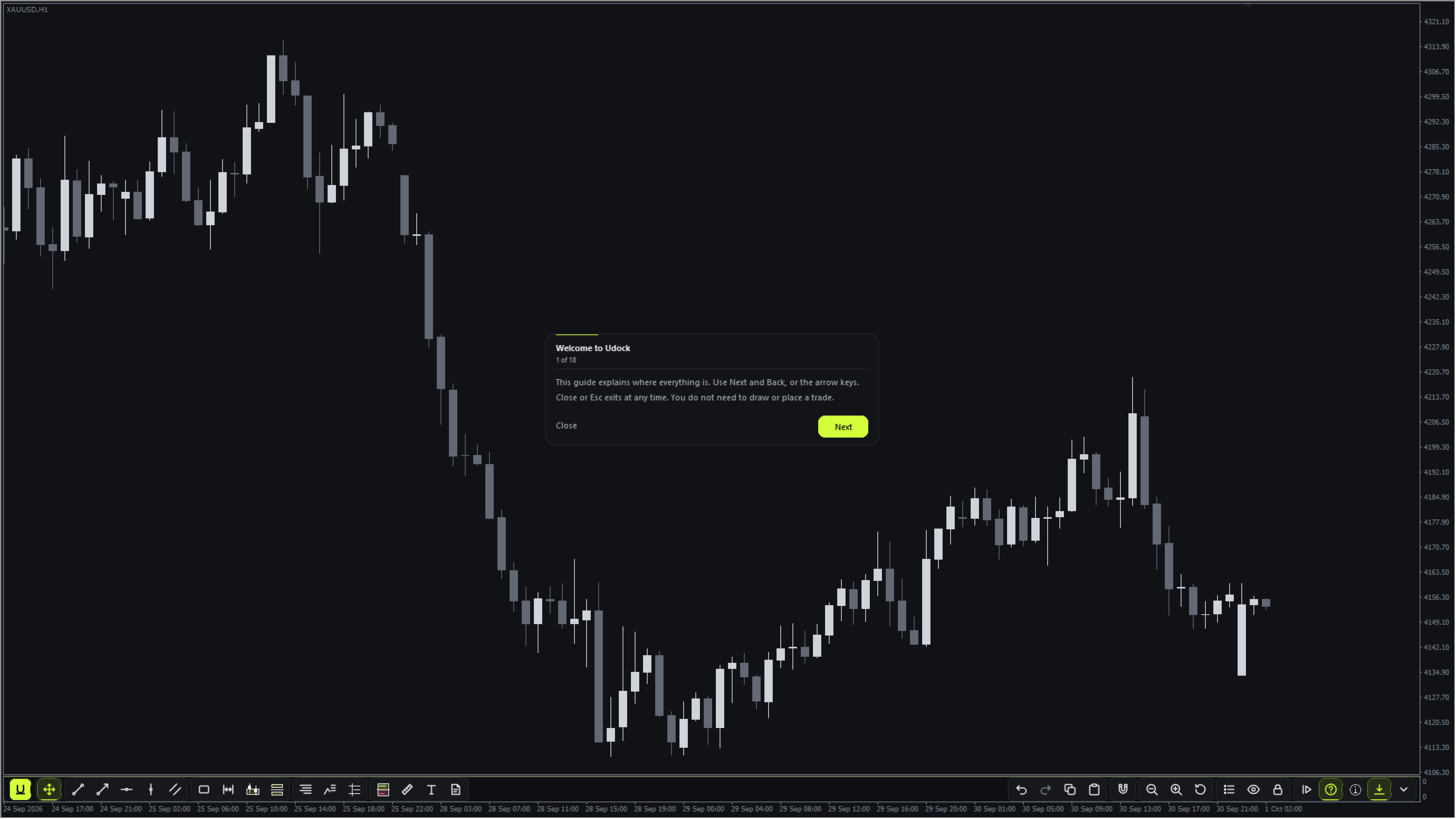
Udock は、普段お使いの MetaTrader 4 のチャートにスリムなツールバーを追加します。何も置き換えません。MT4 本来のローソク足、インジケーター、サブウィンドウ、オブジェクトはすべて元の位置のままです。

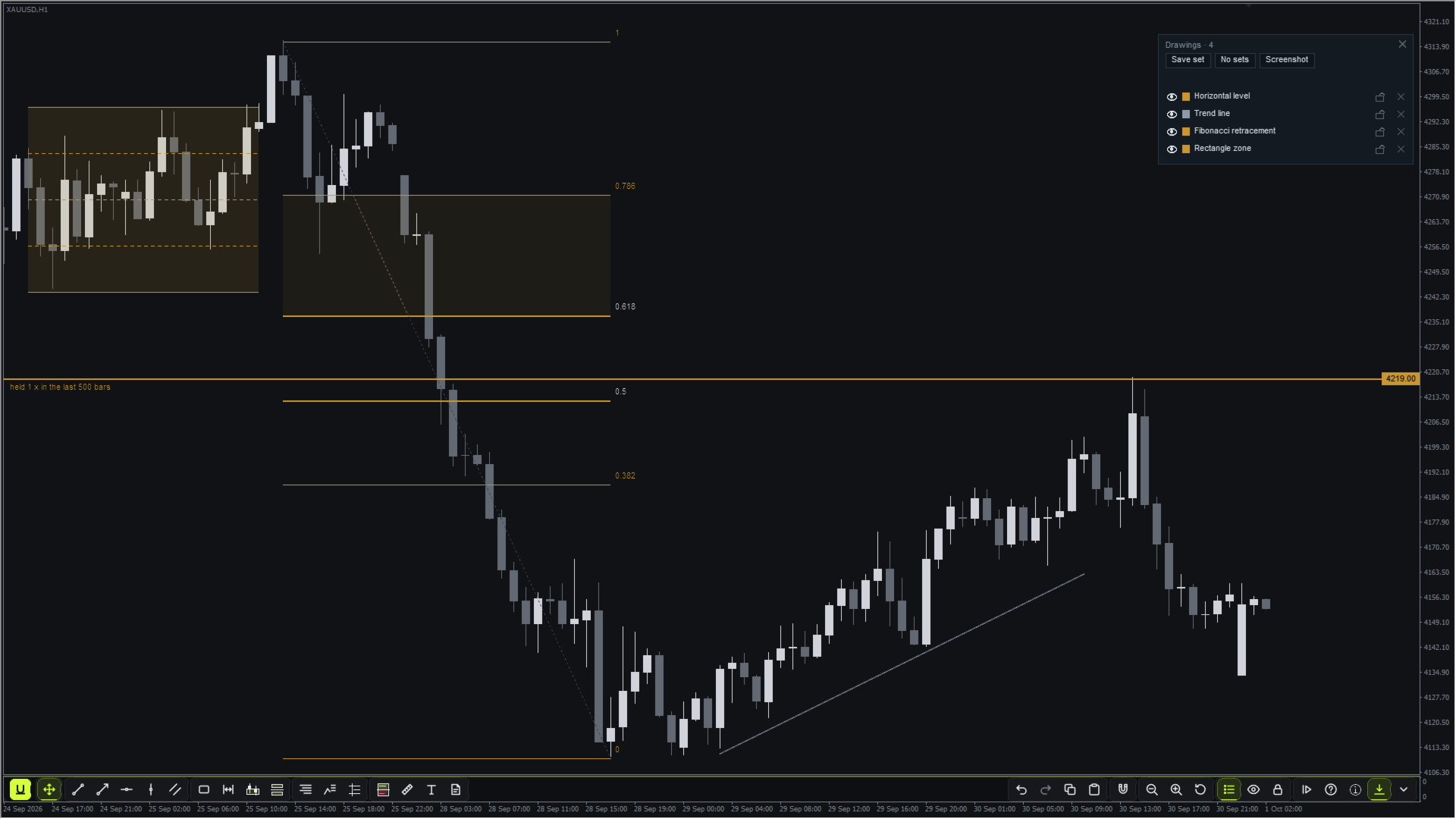
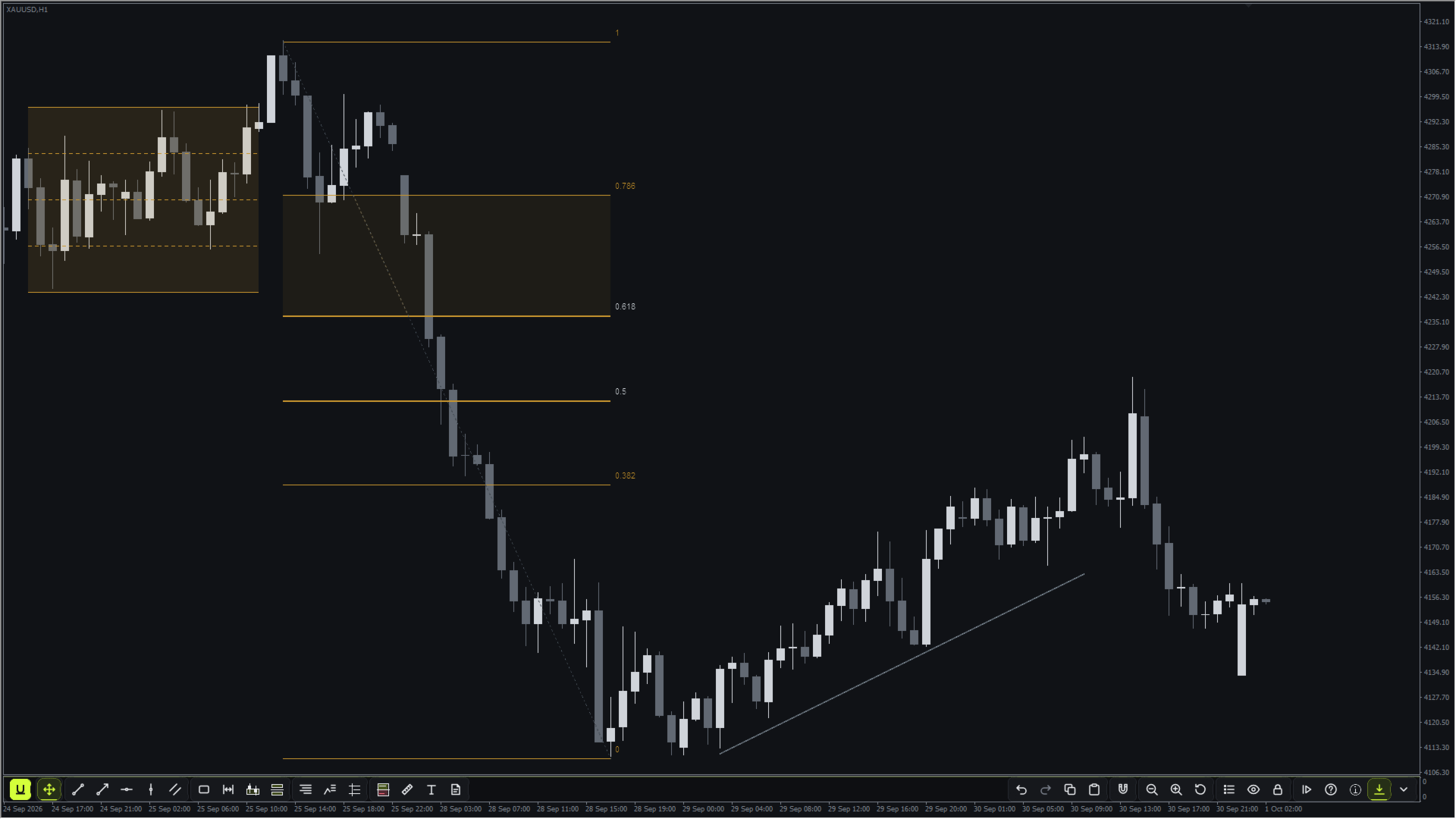
16 種類の描画ツール

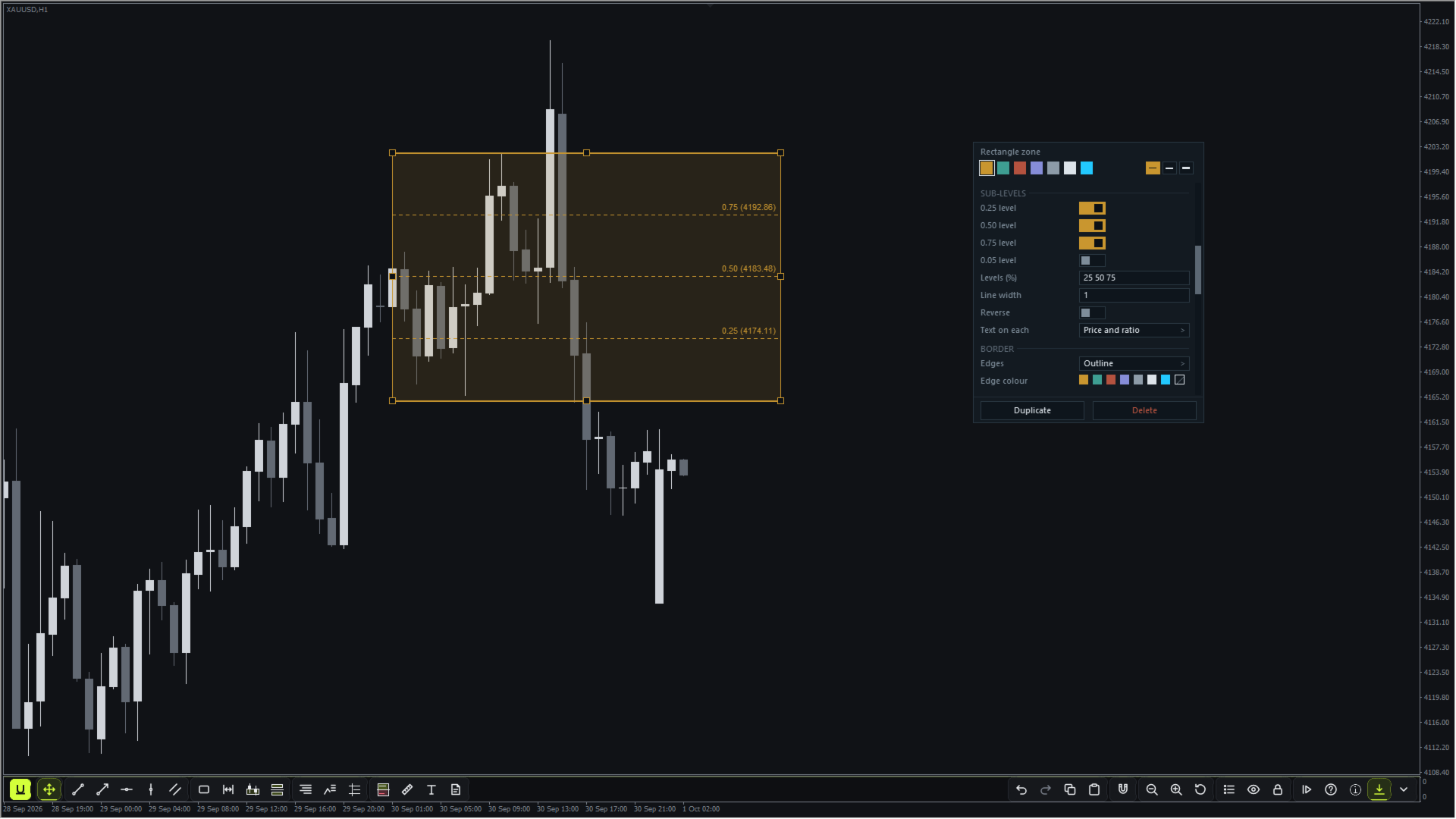
トレンドライン、レイ、水平ライン、時間マーカー、平行チャネル、矩形ゾーン、セッション / キルゾーン、オーダーブロック、フェアバリューギャップ、フィボナッチ・リトレースメント、スイング・フィボナッチ、前日 / 前週の水準、リスク / リワード、価格・時間の計測、テキストとメモ。

  • 各ツールに専用のキーがあります。キーを押してからチャートをクリックすると、描画を配置できます。
  • ダブルクリックで描画のエディターが開き、色、線幅、時間足ごとの表示、レイヤー、テンプレート、アラートを設定できます。長いエディターや描画リストは、スクロールバー、または矢印キー、Page Up / Page Down、Home / End キーでスクロールできます。
  • 元に戻す・やり直し(U / Y)、ポインター位置へのコピー・貼り付け(C / V)、複数選択、Ctrl-drag による複製、OHLC マグネット(S)。
  • 描画はシンボルごとに保存され、そのシンボルのすべての Udock ウィンドウに表示されます。クロスヘアもウィンドウ間で共有されます。

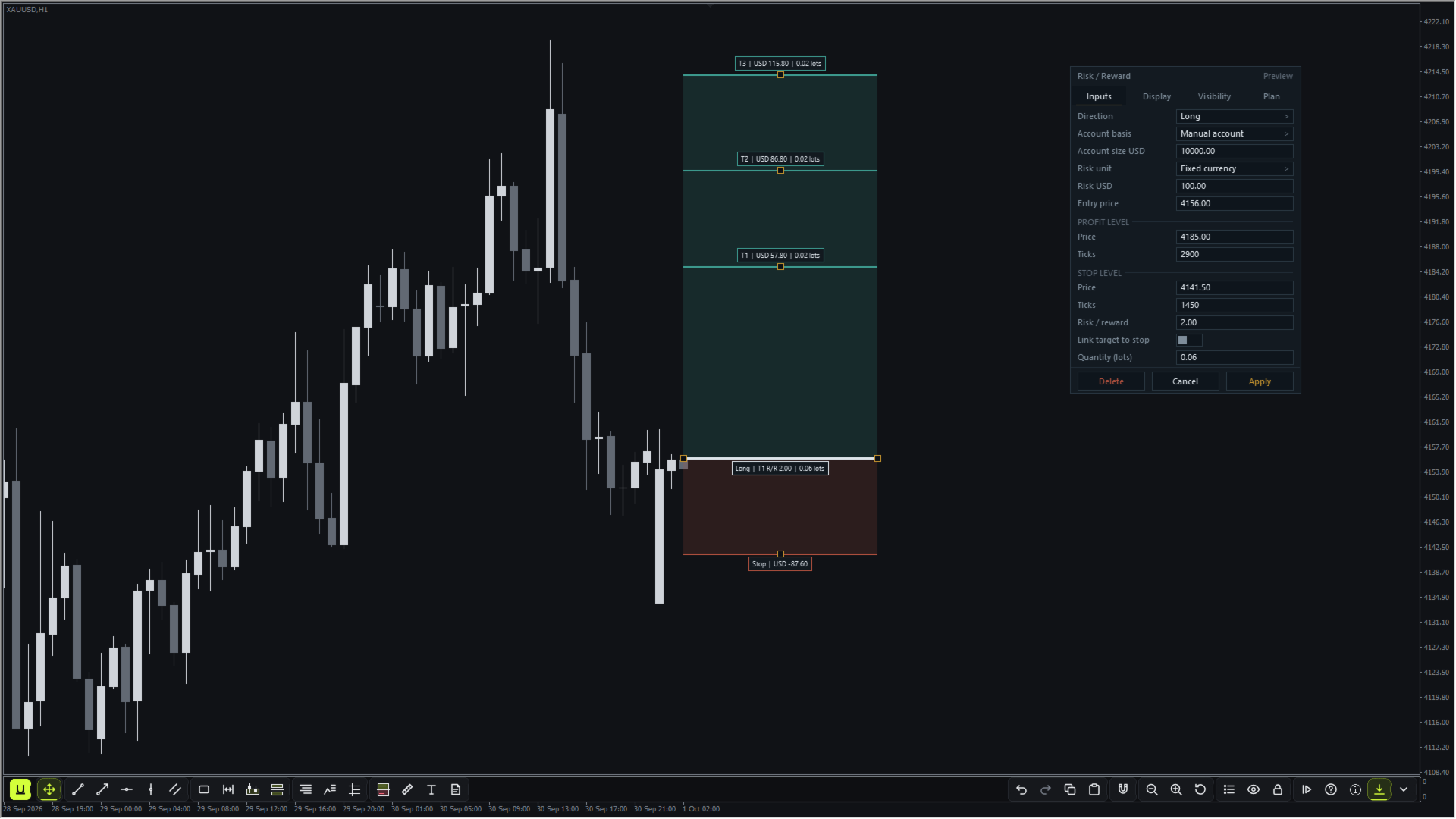
リスク / リワード・プランナー

  • ロット数は固定金額、口座に対する割合、または固定ロットで算出でき、基準には手動入力の口座サイズ、リアルタイムの残高、またはリアルタイムの有効証拠金を使えます。
  • 最大 3 つのターゲットにそれぞれの決済比率を設定可能。連動ターゲットはストップを動かしても比率を維持し、手数料とスリッページは 1 ロットあたりで入力します。
  • Plan タブには、リスク予算、ロット丸め後の実際のストップリスク、コスト控除後のリワード、純リワード / リスクが表示されます。
  • ロット数はブローカーのロットステップと最小ロットに従い、設定したリスクを超えて切り上げられることはありません。
  • トレードの計画を立てるだけです。注文を出すことは決してありません。

チャート操作

  • パンでは時間と価格を同時に、どの方向にもドラッグでき、ローソク足は手の動きに合わせて動きます。
  • ズームは、ツールバーの Zoom と表示されたスライダー、- ボタンと + ボタン、または MT4 本来のマイナスキーとプラスキーで操作します。いずれも MT4 の 6 段階のズームレベルを 1 段階ずつ切り替えます。MetaTrader 4 はマウスホイールの操作をプログラムに渡さないため、Udock には MT4 でのホイールズームはありません。
  • Udock をチャートに表示していても、MT4 本来のキーボード操作(Page Up / Page Down、Home / End、矢印キー、マイナス / プラス)はそのまま使えます。ただし、Udock のエディター、描画リスト、ツアーのいずれかが開いている間は例外で、これらのキーは開いているエディターやリストのスクロールに使われます。
  • Reset で最新のバーと自動の価格スケールに戻ります。
  • ツールバーはチャートの下部または上部に配置され、キー 1 つ(Shift+H)で非表示にできます。

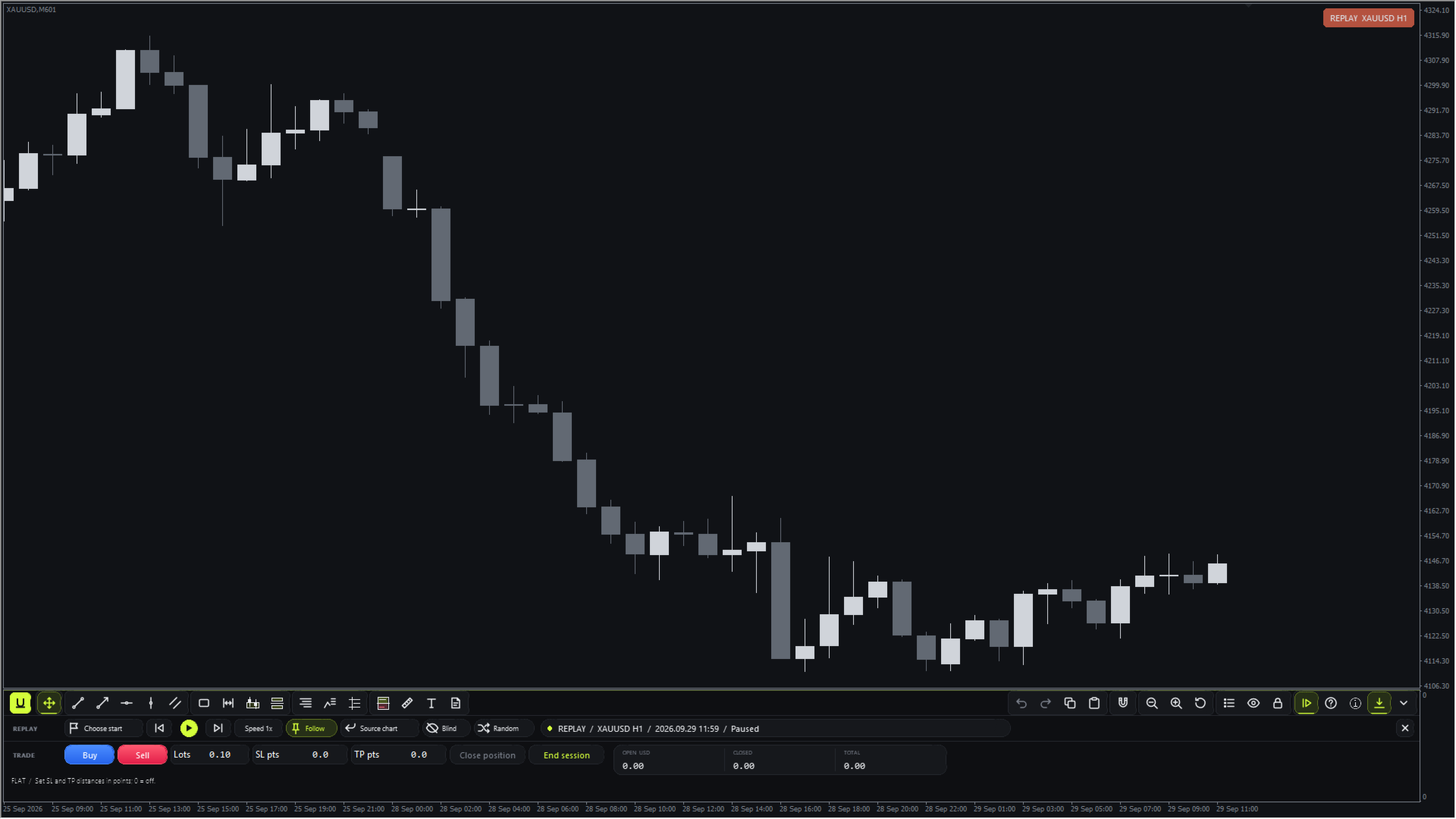
ペーパー・バーリプレイ

  • 開始するローソク足をクリックで選ぶか、日付を入力するか、Random に選ばせます。その後、同じシンボルの別のオフライン練習用チャート上で履歴が先へ再生され、実際のチャートには手を加えません。
  • MT4 では練習用チャートにコード化した時間足が必要なため、そのタイトルにはコード化した時間足が表示されます(例:EURUSD M5 をリプレイする場合は EURUSD,M51)。チャート隅の「REPLAY EURUSD M5」チップとリプレイストリップには、実際のシンボルと時間足が表示されます。
  • リプレイは M1、M5、M15、M30、H1、H4、D1 のチャートから実行でき、練習セッションごとに 1 つの時間足を使用します。
  • 再生、一時停止、ステップ送り、速度のコントロール。
  • ロット数と、ポイント単位のストップロス・テイクプロフィットを指定して買い・売り・決済ができます。ストップとターゲットのラインはチャート上でドラッグできます。
  • セッション終了時にはサマリーが表示され、TXT と CSV のレポートがターミナルのデータフォルダー内の MQL4 / Files / Udock / Replay / Reports に保存されます。
  • ブラインドモードでは日付が隠され、表示するたびにその操作が記録されます。
  • リプレイはペーパーシミュレーションです。順次表示されるバーはブローカーの M1 バーから生成され、口座に注文を送信することは一切ありません。

アラート

あらゆる描画にタッチアラートとクローズ越えアラートを設定できます。アラートはターミナル内に表示され、ターミナルの通知設定を入力すれば、MT4 のプッシュ通知やメールでも送信できます。

診断

ツールバーの診断ボタンでは、製品とターミナルのバージョン、チャートの状態、リプレイとペーパートレードの状態、処理時間、最近の問題を確認できます。「Write report」はサポート用のプレーンテキストレポートを MQL4 / Files / Udock / Diagnostics に保存します。MQL5 のサポート経由で送る前に、レポートの内容をご確認ください。

ガイド

初回使用時に内蔵のツアーがすべてのツール、メニュー、ショートカットを説明します。ツアーはツールバーから再度開けます。

知っておきたいこと

  • リプレイには、選択した日付のブローカーの M1 履歴が必要です。遡れる範囲は、ターミナルの最大バー数の設定とブローカーの履歴によって制限されます。
  • リプレイの約定は M1 バーからシミュレーションされます。スプレッド、手数料、スリッページ、スワップはリプレイでは再現されません。結果は銘柄の損益通貨で表示され、口座通貨への換算は行いません。ペーパートレードは Forex タイプと CFD タイプのシンボルに対応しています。先物タイプのシンボルは、メッセージを表示して対象外とします。
  • リプレイでは、シンボルごとに小さな練習用ファイルを1つターミナルの履歴フォルダーに保持し、次のセッションで再利用します。
  • 練習セッションは 1 シンボルにつき、M1 で最大 8 つ、その他の対応時間足ではそれぞれ最大 9 つまでです。
  • リスク / リワードの金額はブローカーのティック値を使用します。
  • Udock はライブチャートとオフラインチャート用です。ストラテジーテスターでは待機状態のままです。
  • 1 チャートにつき Udock は 1 つです。

サポートとアップデート

ご質問は MQL5 のメッセージでお受けしています。購入者からのご要望が Udock に合うものであれば、アップデートに反映します。
おすすめのプロダクト
The main idea of this indicator is rates analysis and prediction by Fourier transform. The indicator decomposes exchange rates into main harmonics and calculates their product in future. The indicator shows 2 price marks in history, depicting price range in the past, and 2 price marks in future with price movement forecast. Buy or sell decision and take profit size are displayed in a text label in the indicator window. The indicator uses another indicator as an engine for calculations - FreqoMet
"The trend is your friend" is one of the best known sayings in investing, because capturing large trendy price movements can be extremely profitable. However, trading with the trend is often easier said than done, because many indicators are based on price reversals not trends. These aren't very effective at identifying trendy periods, or predicting whether trends will continue. We developed the Trendiness Index to help address this problem by indicating the strength and direction of price trend
Program Overview: This program is a trading tool designed to monitor and analyze the 7 major currency pairs. It is a variant of a similar program used for tracking stock indices, but this version focuses on the seven major currency pairs. The program helps in identifying and calculating significant price movements (gaps) between the high and low prices of these currency pairs over a specified time frame. It then provides insights through comments and alerts based on the calculated gaps. Major Cu
H4 GBPUSD Trend Scalper is a trend signal scalper The EA trades according to the trend strategy using original built-in indicator for opening and closing orders. The external inputs for limiting trading on Fridays and Mondays are available. The purpose of the strategy is to use the current trend with the most benefit. According to the results of testing and working on demo and real accounts, the best results achieved by using the Н4 timeframe on the GBP/USD pair Works on MetaTrader 4 Build 971+
Taurus All4 Taurus All4 is a high-performance indicator, it will tell you the strength of the trend, and you will be able to observe the strength of the candle. Our indicator has more than 4 trend confirmations. It is very simple and easy to use. Confirmation Modes Candle Trend Confirmations: When the candle switches to light green the trend is high. When the candle switches to light red the trend is reverting down. When the candle changes to dark red the trend is low. Trendline Trend Confirm
「Auto FIBO Pro」Crypto_Forex インジケーターは、取引の補助ツールとして最適です。 - インジケーターは、フィボナッチ レベルとローカル トレンド ライン (赤色) を自動的に計算してチャート上に配置します。 - フィボナッチ レベルは、価格が反転する可能性のある重要な領域を示します。 - 最も重要なレベルは、23.6%、38.2%、50%、61.8% です。 - リバーサル スキャルピングやゾーン グリッド取引に使用できます。 - Auto FIBO Pro インジケーターを使用して、現在のシステムを改善する機会も多数あります。 - Info Spread Swap Display があり、接続されている外国為替ペアの現在のスプレッドとスワップを表示します。 - ディスプレイには、アカウントの残高、エクイティ、マージンも表示されます。 - Info Spread Swap Display は、チャートのどのコーナーにも配置できます。 高品質のトレーディングロボットとインジケーターをご覧になるにはここをクリックしてください! これは、この MQL5 ウェブサイ




インディケータは現在のクオートを作成し、これを過去のものと比較して、これに基づいて価格変動予測を行います。インジケータには、目的の日付にすばやく移動するためのテキスト フィールドがあります。 オプション: シンボル - インジケーターが表示するシンボルの選択; SymbolPeriod - 指標がデータを取る期間の選択; IndicatorColor - インジケータの色; HorisontalShift - 指定されたバー数だけインディケータによって描画されたクオートのシフト; Inverse - true は引用符を逆にします。false - 元のビュー。 ChartVerticalShiftStep - チャートを垂直方向にシフトします (キーボードの上下矢印)。 次は日付を入力できるテキストフィールドの設定で、「Enter」を押すとすぐにジャンプできます。
Harvest GOLD USES THE TREND WAVE INDICATOR AND IT CAN IDENTIFY THE BEGINNING AND THE END OF A NEW WAVE TREND MOVEMENT. AS AN OSCILLATOR, THE INDICATOR IDENTIFIES THE OVERBOUGHT AND OVERSOLD ZONES. IT WORKS GREAT TO CATCH THE SHORT TERM PRICE REVERSALS AND USES A MARTINGALE STRATEGY TO CLOSE ALL TRADES IN PROFIT. USE DEFAULT SETTINGS ON H1 OR HIGHER TIME FRAME ON ANY PAIR FOR MORE ACCURATE TRADES WHY THIS EA : Smart entries calculated by 3 great strategies The EA can be run on even a $30000
リアル口座での実際の運用成績はこちら: https://www.mql5.com/en/signals/2346679 この口座は 2025年12月2日に開設しました 。 ここからどのように成長していくのか、ぜひ楽しみに見守ってください。 商品説明文 本EAは 過剰なバックテストのフィッティングを行っていません。 長期的に安定して動くこと、そして「現実的な運用」を最優先に設計しています。 また、 預金をただ眠らせたままにしておくのはもったいない という考えから開発を始めました。 ロットを無理に上げる必要はありません。 むしろ ロットを上げすぎないことが最も大切 です。 このEAを導入してから、 毎日MT4を見てドキドキしながら過ごす時間がなくなりました。 必要以上にチャートに張り付かず、 淡々とした運用ができるようになったことを実感しています。   Gold Impulse Split — 製品説明 トレーダーの皆さま、こんにちは。私は Gold Impulse Split です。 リリース特別キャンペーン — 1か月お試しレンタル:$30 期間限定で、 Gold
VR Cub
Vladimir Pastushak
VR Cub は、質の高いエントリーポイントを獲得するためのインジケーターです。このインジケーターは、数学的計算を容易にし、ポジションへのエントリーポイントの検索を簡素化するために開発されました。このインジケーターが作成されたトレーディング戦略は、長年にわたってその有効性が証明されてきました。取引戦略のシンプルさはその大きな利点であり、初心者のトレーダーでもうまく取引することができます。 VR Cub はポジション開始ポイントとテイクプロフィットとストップロスのターゲットレベルを計算し、効率と使いやすさを大幅に向上させます。取引の簡単なルールを理解するには、以下の戦略を使用した取引のスクリーンショットを見てください。 設定、設定ファイル、デモ版、説明書、問題解決方法は、以下から入手できます。 [ブログ] レビューを読んだり書いたりすることができます。 [リンク] のバージョン [MetaTrader 5] エントリーポイントの計算ルール ポジションをオープンする エントリーポイントを計算するには、VR Cub ツールを最後の高値から最後の安値までストレッチする必要があります。 最初
M5 タイムフレームのロボット スカルパー。 GBPUSD 通貨ペアでの取引。このロボットは、英ポンドの取引のためにプロのトレーダーの会社によって特別に開発されました。ロボットは、毎日約 5 ~ 15 の取引を開始します。 GBPUSD のスプレッドが最大 10 ピップスまでの低いブローカーと取引するのが最善です。開始するための推奨最低入金額は $500 以上です。 利点: マーチンゲールは使いません。 ネットではありません。 すべての取引にはストップロスがあります。 GBPUSDペア専用のプロボット。 ロボットスキャルパー、M5 期間の日中取引。 このロボットはどのように取引しますか? 市場を分析するために、ロボットは 2 つの指標の価格モデルと戦略的な市場パターンを使用します: パラボリック ストップとリバース システムとボリンジャー バンド。ロボットは最初に、価格エントラポレーション統計を使用して価格の動きについて市場を分析します。次に、ロボットはこれらの指標を読み取り、現在と過去の動きの傾向を比較します。市場の反転またはロールバックを示すパターンが一致した場合、ロボットは取
Pirate
Anatoliy Lukanin
3.9 (20)
Deposit :   from 100 deposit units Trading pairs: I recommend currency pairs: EURAUD, CHFJPY, EURCHF, EURGBP, AUDCHF, CADCHF, USDCHF. Trading period :  Any Account: You should use ECN-ECN.Pro accounts with five-digit quotes with a moderate size (spread). Parameters: USING - Choice, trading risk or fixed lot RISK/LOT - Lot Risk Value RESTORING_THE_BALANCE - Restoring balance* HOW_THE_RESET_WINDOW - Reset the Global Variable TAKE_PROFIT - Set profit STOP_LOSS - Set loss COUNT_BUY - The number of s
Reversal Monster Mini
Abdulfattah Yahya Mohammed Alhazmi
The Most advanced and comprehensive EA to trade Trend Reversals/Pullbacks It is a very profitable EA, to trade trends breakout, and manage trades, takeprofit, stoploss, move to breakeven, and trailing stop. The   “Reversal Monster EA”   trades Reversal/Pullbacks when the current price of the pair pullback to a predefined horizontal level or trendline on the currency chart. The opening of the position can be immediate after pullback to the drawn trendline or after closing the candle below/above
FREE
The indicator shows the potential trend direction by cyclical-wave dependence. Thus, all the rays of the intersection will be optimal rays, in the direction of which the price is expected to move, taking into account the indicator period. Rays can be used as a direction for potential market movement. But we must not forget that the approach must be comprehensive, the indicator signals require additional information to enter the market.
The Night Scalper EA Lite is a fully automated Expert Advisor that trades at night and relies on price reversion. The EA trades using market orders and has the option to use time averaging to improve performance. This EA works best on EURUSD using the M5 timeframe, but will also work on AUDUSD, GBPUSD, NZDUSD, USDCAD, USDCHF and likely many more. A VPS is advisable when trading this system and a low spread and commission based broker is best. Check the comments for back test results and optimiz
FREE
Price reach indicator. It also serves as the perfect term for supports and resistance. I use it in two experts. The basic tool for professional trading. The indicator analyzes the last 500 bar and uses this to determine the levels ( but it doesn't predict the future ) . Personally, I use it on TF H1.  It is very simple. Four lines on chart and that's all. Only two input parameters.  Thousands of indicators. Why this? Is good ? No! Is very good. Please test the indicator prior to purchasing.
Traders Toolbox Premium  はオールインワンツールです   それらの戦略と計算を自動化するために、一般的な取引戦略に関する広範なトレーニングに基づいて作成されました。     (Jason Kisoglooによって設計およびプログラムされました)   特徴:   19個々の信号   -これらの信号の それぞれ は、ニューラルネットワークスタイルの構成でバイアスされ、最終的な/全体的な結果を構成します。 各信号には独自の設定が あり 、必要に応じてカスタマイズまたは最適化できます。     包括的なオン   - 画面 - ディスプレイ -包括的な情報とツールチップを備えた6つのスナップアウェイパネル。 (パネルの境界線をクリックして、折りたたんだり、離したりします...設定は機器ごとに自動的に保存されます):     信号パネル   -バイアス情報と信号の詳細を含む信号分析を表示します。     ニュースパネル   -アップ、さらにはニュース来 トン の に基づいて 予測 の イベントへのカウントダウンと現在の機器に影響を。 (内部M     T5 エコノミッ
The main idea of this indicator is rates analysis and prediction by Fourier transform. Indicator decomposes exchange rates into main harmonics and calculates their product in future. You may use the indicator as a standalone product, but for better prediction accuracy there is another related indicator - FreqoMaster - which uses FreqoMeterForecast as a backend engine and combines several instances of FreqoMeterForecast for different frequency bands. Parameters: iPeriod - number of bars in the ma
VANDORA FX USES THE TREND WAVE INDICATOR AND IT CAN IDENTIFY THE BEGINNING AND THE END OF A NEW WAVE TREND MOVEMENT. AS AN OSCILLATOR, THE INDICATOR IDENTIFIES THE OVERBOUGHT AND OVERSOLD ZONES. IT WORKS GREAT TO CATCH THE SHORT TERM PRICE REVERSALS AND USES A MARTINGALE STRATEGY TO CLOSE ALL TRADES IN PROFIT. USE DEFAULT SETTINGS ON H1 OR HIGHER TIME FRAME ON ANY PAIR FOR MORE ACCURATE TRADES WHY THIS EA : Smart entries calculated by 5 great strategies The EA can be run on even a $20000 a
DracoAI is a revolutionary automated forex trading robot based on neural network.  Loss coverage is our premium exclusive feature. DracoAI IS: THE BEST MONEY MAKING SERVICE & STABLE PASSIVE INCOME PROFIT, EVEN IF YOU DO NOT PARTICIPATE IN BIDDING FINANCIAL INDEPENDENCE AND STABILITY DracoAI IS SAFE, BECAUSE: WE GUARANTEE THE SAFETY OF YOUR FUNDS NEGATIVE RESULTS OF TRADING ARE COVERED BY OUR RESERVE FUND 100% CONFIDENTIALITY Monitoring  - most popular signal at MQL5 :  https://www.mql5.com/en/s
"Impulses and Corrections 4" is created to help traders navigate the market situation. The indicator shows multi-time frame upward and downward "Impulses" of price movements. These impulses are the basis for determining the "Base" , which is composed of zones of corrections of price movements, as well as "Potential" zones for possible scenarios of price movement. Up and down impulses are determined based on a modified formula of Bill Williams' "Fractals" indicator. The last impulse is always "U
Exp Swing
Vladislav Andruschenko
4.44 (64)
これは、Swinger(Pendulum、Cheburashka)と呼ばれる有名な戦略のモデルを使用しています。 戦略は、2つの反対の保留中の注文を出すことにあります。価格が特定の方向に移動すると、一方の保留中の注文がトリガーされ、もう一方の注文のロットサイズが増加します。 EAは3種類のオープン保留中の注文を提供します(TypeofTrade) 配置後の自動オープン(インスタントオープンAutoTrade) 手動開封後の開封と管理(手動開封ManualTrade) 高/低レベルで開く(過去のバーTFTradeの高低) OCO(One-Cancels-the-Other)注文は、2つの注文で構成される条件付き注文の一種です。2つ目の注文が約定すると、1つ目の注文は自動的にキャンセルされます。 スイング-完全な説明 MT5 version 購入する方法 インストールする方法     ログファイルの取得方法     テストと最適化の方法     Expforex のすべての製品 使い方? 開始時に、エキスパートアドバイザーは2つの注文を出します-現在の価格から StopOrderDe
FREE
Easy Backtest Backtesting your trading strategy is the most important thing which every successful trader knows very well. Easy Backtest is the perfect solution to test your new strategy in Strategy Tester in your MT4 , using all available historical data. You can place orders: BUY , SELL , pending orders with Stop Loss and Take Profit , and you can modify them at any time. You can close orders individually or all at once, and also  breakeven the same like you do it in live trading. The play b
FREE
Expert Mind Core: Statistical Probability Engine The   Expert Mind Core   algorithm is based on a high-order mathematical model designed to analyze structural market imbalances. Unlike standard indicators, this system utilizes a multidimensional approach to price action, evaluating the rate of change in volatility (Gamma-analysis) and its deviation from the equilibrium point. The core logic functions by identifying   exhaustion zones   where the probability of a corrective movement significantly
Mobile LotSize Trade on the go with confidence Have you ever spotted the perfect trade opportunity on your phone, only to enter with the wrong lot size and end up risking more than you intended? With Mobile LotSize , that’s no longer a problem. Leave this EA running on your trading platform, and it will automatically monitor your pending orders set at 0.01 lots. If you’ve placed a stop loss or take profit from your phone, Mobile LotSize will calculate and adjust the trade size to match your ris
Description: Please tick "Show object descriptions" in chart properties to enable hrays views That utility converts a trendline into a horizontal ray known as tool for drawing supply and demand zones. Simply create a trendline on a chart and once selected, it will get converted. Ray remains horizontal while dragging.  Quick ray plot: press "R" key to create horizontal ray. It will be snapped to the nearest OHLC value Further versions will be improved. For feature request please post new comm
The indicator shows which trading pairs, strategies, robots and signals that you use are profitable and which are not. The statistic of trades and balance graph are displayed in the account currency and pips - to switch simply click on the graph. button "$"(top left) - minimize/expand and move the indicator panel button ">"(bottom right) - stretching and resetting to the original size Statistic of trades 1 line - account balance, current profit and lot of open trades; 2 line - the number of all
Unlimited Binary Options Copier Remote is a powerful tool to copy binary options trades remotely between multiple accounts at different locations over internet. This is an ideal solution for signal provider, who want to share his binary options trades with the others globally on his own rules. One provider can copy trades to unlimited receivers and one receiver can get trade from unlimited providers as well. The provider can set the subscription expiry for each receiver, so that receiver will no
This is the complete REX package. It consists of the lite, pro and ULTRA version.  Perfect for beginners and intermediates. REX complete is 100% non repaint. The strategy is based on a mix of different strategies, statistics, including pivot points, oscillators and patterns.  As the trading idea consists of a variety of some classic indicators like Momentum, Williams Percent Range, CCI, Force Index, WPR, DeMarker, CCI, RSI and Stochastic, it is clear that the fundamental indicators have being u
Note: After installation, please go to Tools>Options>Expert Advisors and add https://porsaj.com to 'Allow WebRequest for listed URL'. Still Problem?! Please check Internet connection! An economic calendar in the context of forex refers to a tool or resource that provides information about upcoming economic events, indicators, and data releases that can potentially impact the financial markets, particularly the foreign exchange market. It helps traders stay informed about key economic announce
このプロダクトを購入した人は以下も購入しています
Unlimited Trade Copier Pro is a tool to copy trade remotely to multiple MT4, MT5 and cTrader accounts at different computers/locations over internet. This is an ideal solution for you if you are a signal provider and want to copy your trades to other receivers globally on your own rules. One provider can copy trades to multiple receivers and one receiver can get trade from multiple providers as well. The provider can even set the subscription expiry for each receiver, so that receiver will not b
The FFx Hidden Manager panel will help you to manage easily your orders directly on the chart. Below all features described: TP, SL and TrailingStop are hidden Each order has its own lines on chart Drag & Drop any line to change the TP/SL as per your need Option to move automatically the SL line at breakeven when TP #1 is reached Option to choose the TP/SL type (by pips or price) Option to choose the TrailingStop type (by pips, MA, Fractals, PSAR or ATR) Define which order(s) you want to manage
FFx Risk Calculator panel will help you to calculate very easily your trades size, SL or the risk directly on the chart. All features are described below: Option to select which parameter to calculate: Risk, Stop Loss or Lot Size The panel will show if the lot size is allowed according to the current account free margin Button to maximize/minimize the panel Drag and Drop the panel anywhere on the chart How to use it? Select the parameter you want to be calculated. It will be based on the 2 other
News Trader Pro is a unique robot that allows you to trade the news by your predefined strategy. It loads every piece of news from several popular Forex websites. You can choose any news and preset the strategy to trade it, and then News Trader Pro will trade that news by selected strategy automatically when the news comes. News release gives opportunity to have pips since the price usually has big move at that time. Now, with this tool, trading news becomes easier, more flexible and more exciti
The FFx Watcher PRO is a dashboard displaying on a single chart the current direction of up to 15 standard indicators and up to 9 timeframes. It has 2 different modes: 1. Watcher mode: Multi Indicators User is able to select up to 15 indicators to be displayed User is able to select up to 9 timeframes to be displayed 2. Watcher mode: Multi Pairs User is able to select any number of pairs/symbols User is able to select up to 9 timeframes to be displayed This mode uses one of the standard indicat
エリオット波動カウンターは、エリオット波動を迅速かつユーザーフレンドリーに手動でマークアップするためのパネルです。マークの色とレベルを選択できます。最後のマークアップとツールによって作成されたマークアップ全体を削除する機能もあります。マークアップはワンクリックで作成されます。 5 回クリック - 5 つの波があります。エリオット波動カウンターは、エリオット波動の初心者にもプロのアナリストにも最適なツールです。 エリオット波動カウンターのインストールと入力ガイド 取得したい場合     EA 追加 URL (  http://autofxhub.com   ) MT5 端末に関する 通知 (スクリーンショットを参照)。 MT4 バージョン https://www.mql5.com/en/market/product/14016 MT5 バージョン https://www.mql5.com/en/market/product/15081 一般的な入力: 波の種類ボタン: このボタンを使用すると、ユーザーはチャートで強調表示する波のパターンの種類を選択できます。使用可能なオプションには、イン
If you wish to draw Support and Resistance lines, view: daily market opening, classical pivot levels, Fibonacci pivot levels, trend lines, Fibonacci levels, the remaining time to candle closing, and current spread. If you seek to place your orders with the exact lot that meets your desired stop loss risk. If you wish to do all this and more with just one click, then this is the perfect tool to use. This tool will allow you to feel more relaxed when deciding to open orders, as well as predicting
This is an Expert Adviser use for manual trading as a background EA or combine with external EA to open orders. Loss Recovery Trading is one of your options to handle the lose positions instead of using stop loss by setting a zone recovery area and target to exit the turn rounds sequence. How It Work? If the market goes against your first positions direction at the specific of losing points, the EA will open an opposite direction position with calculated larger lot size and also keep the first
Telegram Publisher Agent は、 トレーダーが Telegram チャネルおよびグループにリアルタイムでシグナルを送信できるようにするアドオンです。このツールは、カスタマイズ可能なメッセージ、チャートのスクリーンショット、その他の機能を備えており、トレーダーが取引の洞察や戦略をフォロワーと共有するのに役立ちます。このツールは、明暗のテーマ切り替えを備えた美しいデザインも備えており、ユーザーに美的で機能的な取引体験を提供します。 Telegram Publisher Agent は、すべての取引をチャネルおよびグループ内のシグナルとして公開するように設計されています。あなたがしなければならないことは、取引を提供することだけです。その後、ボタンをクリックするだけで、Telegram Publisher Agent が取引シグナルを取引チャネルまたはグループに送信するためのすべての面倒な作業を実行します。 Telegram パブリッシャーエージェント   インストールと入力ガイド EA に関する通知を受け取りたい場合は、URL  ( http://autofxhub.c
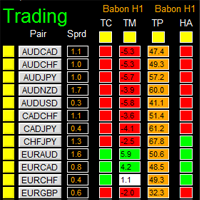
如果产品有任何问题或者您需要在此产品上添加功能,请联系我 Contact/message me if you encounter any issue using the product or need extra feature to add on the base version. There is Demo version of this panel Dashboard Babon Scalping System Demo in my product list, please try it out to get familiar with all functionalities for free, LINK . This system basically utilizes TDI, Heiken Ashi Trend, Price Trend on H1 time-frame and TMA on H1&H4 time-frame to generate the trend (big picture). Then the system will zoom in to genera
The Pairs Trade indicator is a utility for semi-automatic pair trading. It allows combining the charts of two arbitrary instruments, even if the schedules of their trading sessions are different. It displays a spread chart in the form of a histogram with an overlaying moving average. It calculates the swap that will be charged for the synthetic position (in the deposit currency). It is possible to set a level for automatic opening of a synthetic position on the spread chart (analogous to the 'se
The script displays info about the share's corporate reports and dividends. The data is downloaded from   investing.com : Report date Profit per share (EPS) Revenue Market capitalization Amount of dividends Date of payment of dividends Dividend income The product cannot be tested in the tester (since it is not possible to receive data from the Internet). Before launching:  Add 2   URL   https://ru.investing.com/earnings-calendar/Service/getCalendarFilteredData  and   https://ru.investing.com/di
This Stacker EA will: Automatically set Stop loss on a new order Automatically set Take profit on a new order Stack (or open up to 4 additional orders at the same time) when a new order is placed, the SL/TP can be preset individually for each order. Provides a transparent replacement for the standard 1-click trading buttons in MetaTrader 4 (1 click still works and SL/TP will automatically be set as well as Stacking). Automatically calculate lot order size according to preset risk management perc
Currencies Cleaner panel will give you an overview of all the most traded market's currencies in a single click. First of all the panel will refresh all your charts, opening them four times in all timeframes needed. 1 - CURRENCIES It uses a complex algorithm to study the movement of 17 different indicators. It means that the algorithm not only "reads" the actual value of an indicator, but also creates a probability of success using the position of this value on the indicator and the last moveme
Buy or rent it and request a copy of the Antimartingale EA for free  Trendline based utility, you design your trendlines or horizontal lines, the EA opens trades for you Possibility to trade on break and/or bounce events Indipendent break and bounce settings Configurable market, stop and limit orders T1T2 Logic to lock profits and minimize losses Trailing Stop Loss Max Spread check Notifies you when your trendlines are crossed No strange trendline name or syntax, you decide the color of tr
FXFledgling Exit Tool is a complete risk management tool that analyzes both the open trades and the direction of the pair of open trades. As long as the suggested entry and lotsizing management presented here is followed strictly, you will have a high chance (but no guarantee) of surviving the trade. What It Does It is used as an exit tool. It helps the trader to manage any manual trade that he transacted. It does the following: Trail Stop Dynamic Stop Loss - a calculated stop-loss that changes
This utility records the swap, which allows you to monitor and analyze the changes in the swap. The program writes a file with the swap data for every pair selected in the Market Watch. The data are recorded to a csv file at the specified time, the file is located in <terminal root directory>/MQL4/Files. File format: Date Day Time Currency pair Long-swap Short-swap 16.01.2018 Mon 23:30 EURNOK -34.81 27.14 16.01.2018 Mon 23:30 EURDKK -0.022 -0.032 16.01.2018 Mon 23:30 EURGBP -2.38 0.15 To start r
New opportunities for analyzing cryptocurrency in the usual MetaTrader 4. For example : We select the symbol of the cryptocurrency and attach any indicators, Expert Advisors or scripts. Startup Mode View cryptocurrency; Data collection. Capabilities Work as with a standard currency chart; Automatic update of open charts; Selection of individual cryptocurrency for updating; Selection of individual timeframes for updating; Work on the desired timeframes; Open charts do not affect the work of Cry
Notify Telegram is a utility that bridge your MetaTrader4 trading activities to your Telegram chat/channel. It will help you to monitor your MetaTrader4 actions such as placing trade, modifying order's TP/SL, closing trades etc and send a notification message to your dedicated Telegram chat/channel. It does not execute any trade on your MetaTrader4 account. It can be useful for monitoring EA performance or providing signal to your Telegram channel/group subscribed. Parameters Token ="" - enter
The  Easy Strategy Builder (ESB)  is a " Do It Yourself " solution that allows you to create a wide range of the automated trading strategies without any line of codes. This is the world’s easiest method to automate your strategies that can be used in STP, ECN and FIFO brokers. No drag and drop is needed. Just by set conditions of your trading strategy and change settings on desired values and let it work in your account. ESB has hundreds of modules to define unlimited possibilities of strategi
Telegram ChartSnap is an utility tool to bridge your MetaTrader 4 activities to your Telegram chat/group/channel. It will screen shot your MetaTrader 4 chart and send it to your dedicated Telegram chat/group/channel through a Telegram bot. The whole process will keep repeating based on a time cycle that predetermined by the user. It is a convenient tool for those who like to get access to their favorite system/dashboard that only available at MetaTrader Desktop. Beside that, trader can easily s
フィボナッチリトレースと拡張ラインツール DiNapoliポイント取引方法とゴールデンセクション取引を使用するトレーダーにとって理想的なMT4プラットフォームのフィボナッチリトレースと拡張ラインツール 主な特長: あなたはフィボナッチリトレースメントの複数のセットを直接描くことができ、重要なリターンポイント間の関係は一目瞭然です。 2.フィボナッチ拡張を描画することができます。 3.フィボナッチフォールドバックとラインの延長は、簡単な観察と数値表示のために左右に動かすことができます。 4.チャートは非常に爽やかな 5.数字キーでサイクルを切り替えることができます。 ファンクションキー: 1。 [戻るを押す、要求に応じて描画する、最大8つのグループにする 2。拡張]を描くには[押す] 3。 \を押すと、現在のサイクルの下にあるすべての拡張機能と折り畳みが削除されます 4。フォールドバックを移動して削除して展開する (1)最初のフォールドバックセットのF5行をクリックします。 一度クリックすると(黄色に変わります)、キーボードのDeleteキーを押すと、フォーカ
Советник риск-менеджер с огромным арсеналом возможностей защиты вашего депозита. Для инвесторов, которые решили передать капитал в доверительное управление. Когда у трейдера нет доступа к настройкам - нивелирует торговые риски. А также для трейдеров, которые осознали необходимость стороннего контроля за их торговлей для улучшения торговых результатов.  Для максимальных результатов - должен стоять на отдельном VPS сервере и у трейдера не должно быть возможности менять настройки в торговый период.
Grid Hero War Pad is a  GRAPHICAL MANUAL TRADER version of the original Grid Hero EA, designed and created for ADVANCED TRADERS who are experienced in plotting their own market entries. It is coded using ADVANCED GRAPHICAL INTERFACE programming, that combines the power of discretionary trading with Grid Hero algorithm in the form of a graphical console with button-click easy execution. It allows you to execute trades manually using Market Orders and Pending Orders, and then automatically uses th
The advantage of using this EA This EA directly updates takeprofit and stop losses that are still empty in a manual order Parameters Multiplier: Multiplier value of the previous transaction Distance: Distance hedging from the previous order Takeprofit: take profit taken from the last price + the value of this column We recommend that you do not add more than one manual transaction in the same pair martingale hedging | manual hedging | hedging manual | hedging lot | best robot | best ea
The new version of  MirrorSoftware 2021  has been completely rewriten and optimized.  This version requires to be loaded only on a single chart because  it can detect all actions on every symbol and not only the actions of symbol where it is loaded. Even the  graphics and the configuration mode  have been completely redesigned. The MirrorSoftware is composed of two components (all components are required to work):  MirrorController  (free indicator): This component must be loaded into the MASTER
Скрипт открывает графики по всем инструментам находящимся в окне "Обзор рынка" и по желанию может задать для всех графиков один шаблон. Так-же можно удалить все графике открытые в терминале Мт4. В скрипте имеются следующие настройки: "Таймфрейм" по умолчанию M30;             (Можно поставить свой: M1, M5, M15, M30, H1, H4, D1, W1, MN.) "Задержка" по умолчанию "0";                  (Задержка перед открытием следующего графика в миллисекундах.) "Шаблон" по умолчанию "True";                (True=пр
По факту вы выставляете виртуальные Buy Stop и Sell Stop которые срабатывают после закрытия свечи. Данный помощник позволяет заранее выставить уровень Stop Loss и Take Profit. Так-же имеется демо режим для предварительного расчёта параметра риск/прибыль. Помощник имеет следующие настройки "Лот" по умолчанию "0.01" "Проскальзывание" по умолчанию "60"        (Значение в пунктах) "Номер Ордера" по умолчанию "0"               (Магический номер ордера) "Цвет Комментариев" по умолчанию "Black"  "Шрифт
(8th Feb 2019 Launch Promo: $97/lifetime just for 1 day! Price goes to $180/lifetime in 24 hours!) The TFA Trade Manager helps you easily manage your trades with an intelligent vertical "bars" system. You easily now easily click + drag your entry, stop loss, take profit, breakeven, partial profit and trailing stop with a few simple mouse clicks. You can also easily calculate the risk you wish to allocate to each trade by telling the trade manager your desired risk %, lot size or $dollars to risk
This utility automatically draws the trend channel on the price chart. For the time interval from the specified date to the current bar, the drawn channel is almost optimal. Placing the beginning of the channel at a more distant historical price extremum, you get a visualization of a longer-term trend. Channel slope is not a continuous value, but takes one of discrete values (in AxB format, where A is the number of price points (points), and B is the number of timeframes). This program works ONL
作者のその他のプロダクト
Gaps は、上位の時間足が残した水準を、取引しているどのチャートにも描画します。マップはブローカーの日足から作られるため、1 分足でも 4 時間足でも同じ水準が同じ位置に表示されます。 4 種類の水準(月足・週足・日足) フェアバリューギャップ、ヒゲゾーン、インバランス、オーバーラップを、それぞれチャート上のゾーンとして描画します。 水準は確定したローソク足だけから作られます。過去にさかのぼって描き直されることはありません。 月足・週足・日足の水準は明確な階層で整理され、チャートが見やすく保たれます。 表示する最小のゾーンを設定できます。 ゾーンの振る舞い ゾーンは、価格がそれを明確に抜けるまでマップ上に残り、その後チャート上で変化し、やがてマップから外れます。同じ場所により強いゾーンが現れた場合、その位置を譲ることもあります。表示されている間、その価格が動くことはありません。 ゾーンが重なる場合は、より重要な方が表示されます。もう一方は失われず一時的に控えられ、スペースが空くと元の価格で再び表示されます。ただし、その間に価格によって終了した場合は除きます。 オープニングギャップ、流
Udock は MetaTrader 5 のチャートにスリムなツールバーを追加し、普段お使いのチャート上でそのまま動作します。置き換えるものは何もありません。MT5 本来のローソク足、インジケーター、サブウィンドウ、オブジェクトは元の位置のままです。 16 種類の描画ツール トレンドライン、レイ、水平ライン、時間マーカー、平行チャネル、矩形ゾーン、セッション / キルゾーン、オーダーブロック、フェアバリューギャップ、フィボナッチ・リトレースメント、スイング・フィボナッチ、前日 / 前週の水準、リスク / リワード、価格・時間の計測、テキストとメモ。 各ツールに専用のキーがあり、右クリック 1 回でエディターが開きます。色、線幅、時間足ごとの表示、レイヤー、テンプレート、アラートを設定できます。 矩形ゾーンには 4 分割と任意のサブレベルがあり、背景と枠線はそれぞれ個別にオン・オフできます。 元に戻す・やり直し、ポインター位置へのコピー・貼り付け、複数選択、Ctrl-drag による複製、OHLC マグネット。 描画はシンボルごとに保存され、そのシンボルのすべての Udock ウィンドウ
Gaps は、上位の時間足が残した水準を、取引しているどのチャートにも描画します。マップはブローカーの日足から作られるため、1 分足でも 4 時間足でも同じ水準が同じ位置に表示されます。 4 種類の水準(月足・週足・日足) フェアバリューギャップ、ヒゲゾーン、インバランス、オーバーラップを、それぞれチャート上のゾーンとして描画します。 水準は確定したローソク足だけから作られます。過去にさかのぼって描き直されることはありません。 月足・週足・日足の水準は明確な階層で整理され、チャートが見やすく保たれます。 表示する最小のゾーンを設定できます。 ゾーンの振る舞い ゾーンは、価格がそれを明確に抜けるまでマップ上に残り、その後チャート上で変化し、やがてマップから外れます。同じ場所により強いゾーンが現れた場合、その位置を譲ることもあります。表示されている間、その価格が動くことはありません。 ゾーンが重なる場合は、より重要な方が表示されます。もう一方は失われず一時的に控えられ、スペースが空くと元の価格で再び表示されます。ただし、その間に価格によって終了した場合は除きます。 オープニングギャップ、流
フィルタ:
レビューなし
レビューに返信