Udock MT4

  • Utilità
  • ERIANUX, LLC
    ERIANUX, LLC
    Dedicated Full-Stack Developer blending a strong foundational education with practical expertise in modern software engineering. Proficient across the entire development lifecycle—from crafting intuitive, user-centric interfaces with React and Vue to architecting robust backend systems using Python
  • Versione: 1.2
  • Aggiornato: 23 ottobre 2026
  • Attivazioni: 20

Udock aggiunge una barra degli strumenti compatta al grafico MetaTrader 4 che usi già. Non sostituisce nulla: candele, indicatori, sottofinestre e oggetti propri di MT4 restano tutti dove sono.

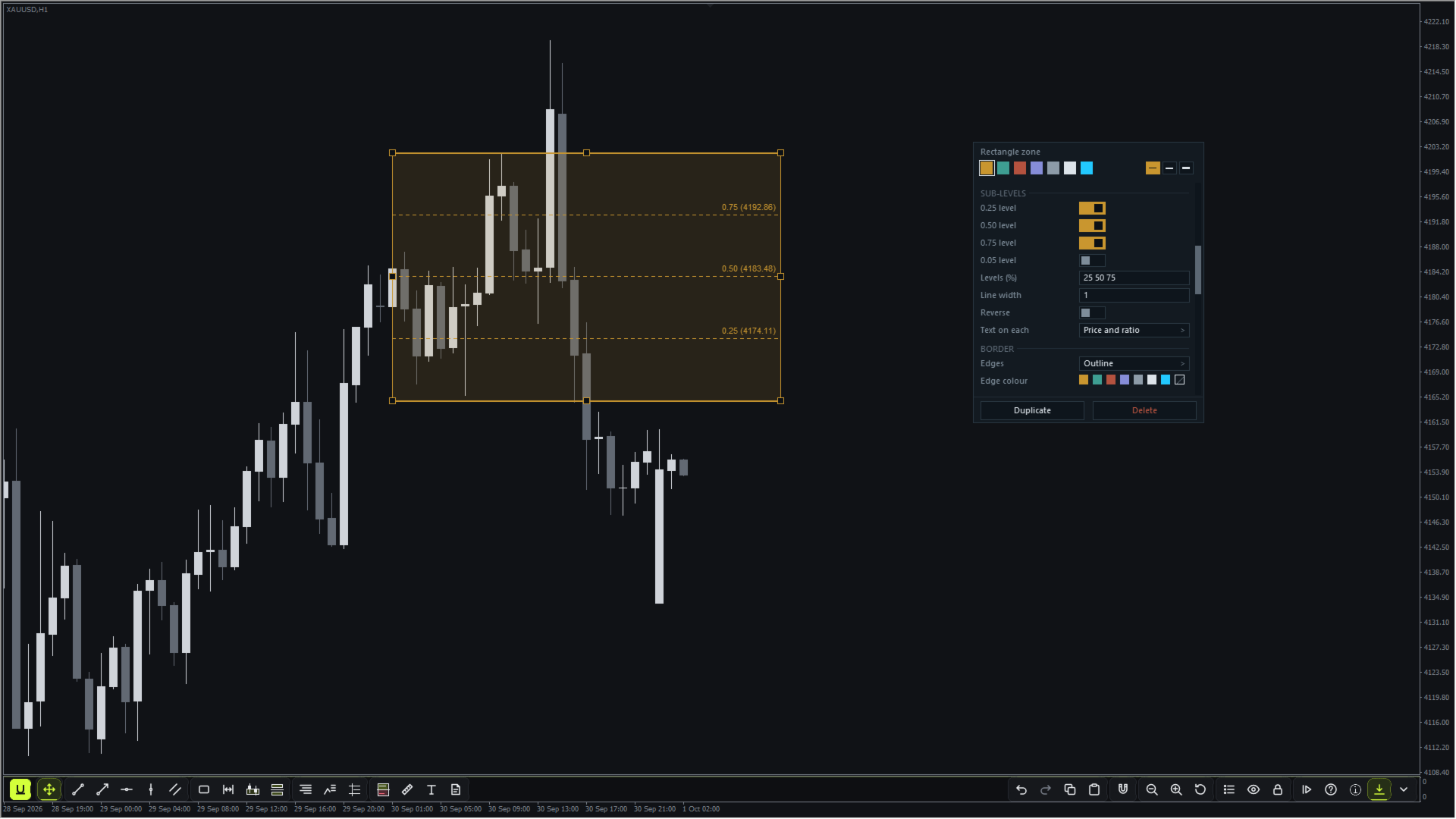
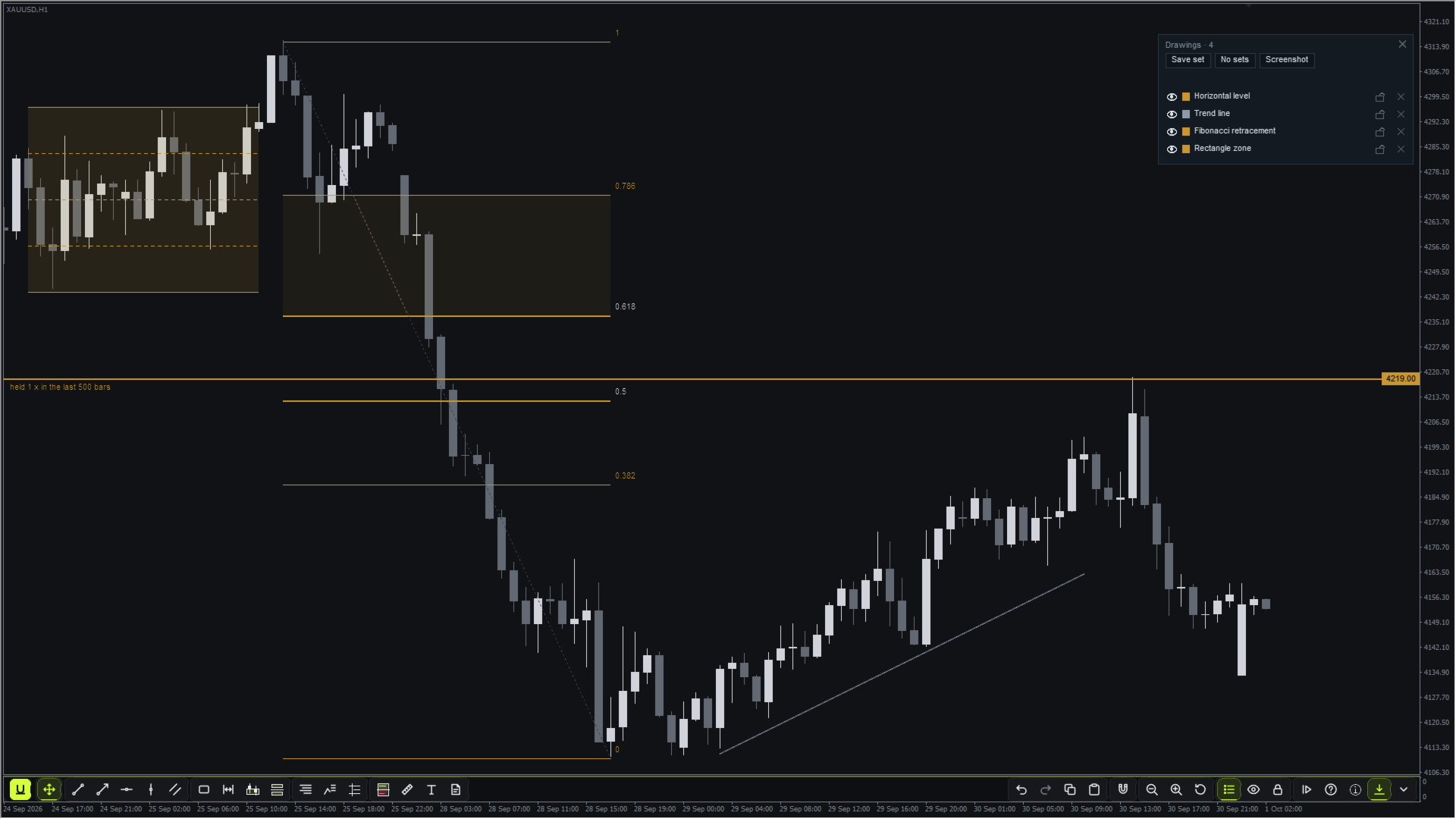
16 strumenti di disegno

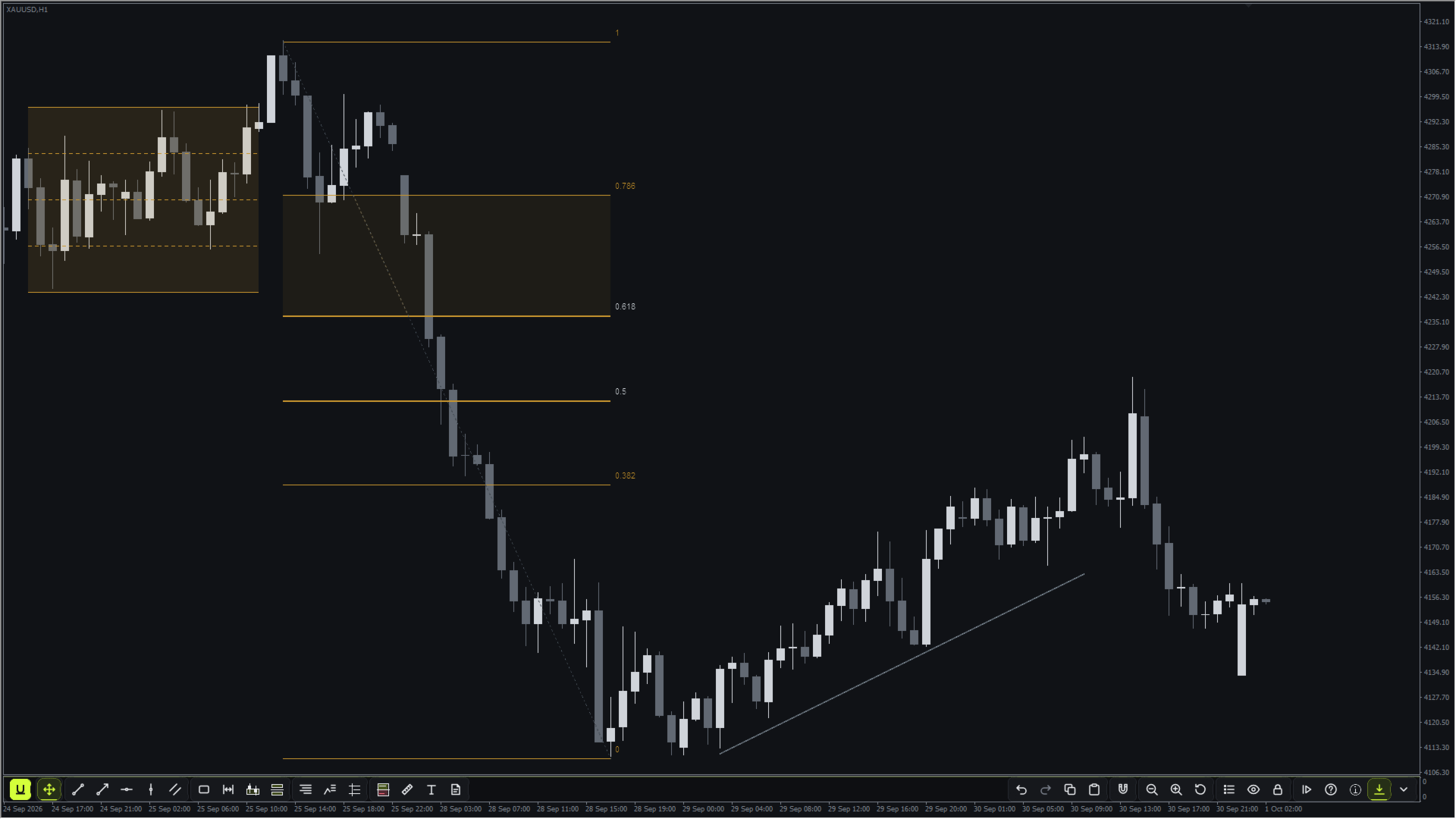
Linea di tendenza, semiretta, livello orizzontale, marcatore temporale, canale parallelo, zona rettangolare, sessione / killzone, order block, fair value gap, ritracciamento di Fibonacci, Fibonacci sullo swing, livelli del giorno / della settimana precedente, rischio / rendimento, misura di prezzo e tempo, testo e nota.

  • Ogni strumento ha il proprio tasto. Premilo, poi fai clic sul grafico per posizionare il disegno.
  • Un doppio clic apre l'editor del disegno: colori, spessori, visibilità per timeframe, layer, modelli e alert. Gli editor lunghi e l'elenco dei disegni scorrono con la barra di scorrimento o con i tasti freccia, Page Up / Page Down e Home / End.
  • Annulla e ripristina (U / Y), copia e incolla nella posizione del puntatore (C / V), selezione multipla, clonazione con Ctrl-drag e magnete OHLC (S).
  • I disegni vengono salvati per simbolo e compaiono in ogni finestra Udock di quel simbolo, con il mirino condiviso tra di esse.

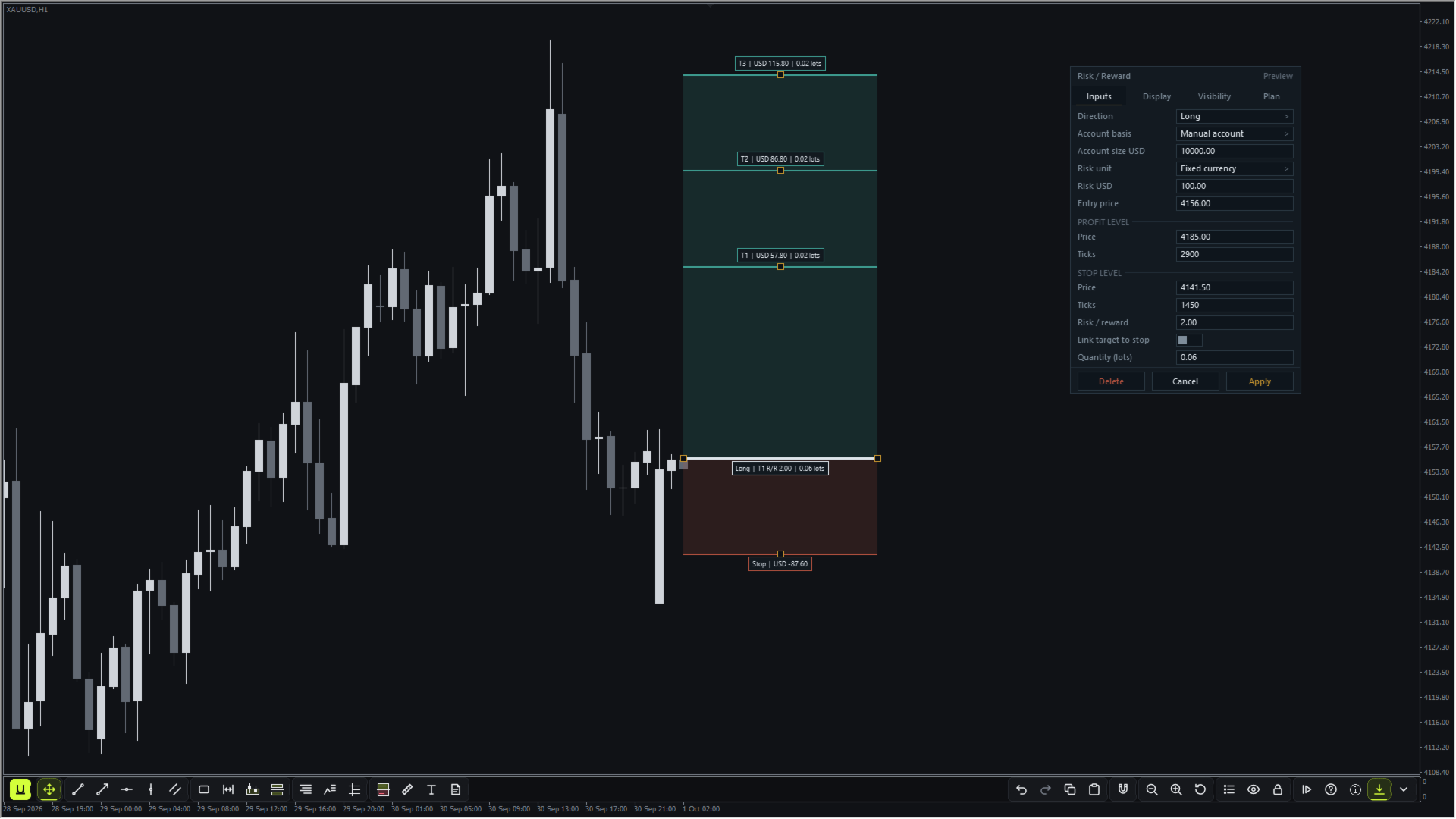
Pianificatore rischio / rendimento

  • Dimensionamento per importo fisso, percentuale del conto o lotti fissi, partendo da una dimensione del conto inserita manualmente, dal saldo in tempo reale o dall'equity in tempo reale.
  • Fino a tre target, ciascuno con la propria quota; target collegati che mantengono il loro rapporto quando sposti lo stop; e commissioni e slippage inseriti per lotto.
  • Una scheda Plan con il budget di rischio, il rischio effettivo allo stop dopo l'arrotondamento dei lotti, il rendimento al netto dei costi e il rapporto netto rendimento / rischio.
  • Le dimensioni dei lotti seguono lo step e il lotto minimo del broker e non vengono mai arrotondate per eccesso oltre il tuo rischio.
  • Si limita a pianificare il trade. Non inserisce mai ordini.

Controllo del grafico

  • Il trascinamento sposta insieme tempo e prezzo in qualsiasi direzione, e le candele seguono la tua mano.
  • Lo zoom si regola con il cursore con l'etichetta Zoom nella barra degli strumenti, con i pulsanti - e + o con i tasti meno e più propri di MT4. In entrambi i casi si passa un livello alla volta tra i sei livelli di zoom di MT4. MetaTrader 4 non passa la rotellina del mouse ai programmi, quindi Udock non ha lo zoom con la rotellina su MT4.
  • La navigazione da tastiera propria di MT4 (Page Up / Page Down, Home / End, frecce, meno / più) continua a funzionare con Udock sul grafico, tranne quando è aperto uno degli editor di Udock, l'elenco dei disegni o il tour. In quel caso questi tasti fanno scorrere l'editor o l'elenco aperto.
  • Reset riporta alle ultime barre e alla scala automatica dei prezzi.
  • La barra degli strumenti si trova in basso o in alto sul grafico e si nasconde con un tasto (Shift+H).

Replay simulato delle barre

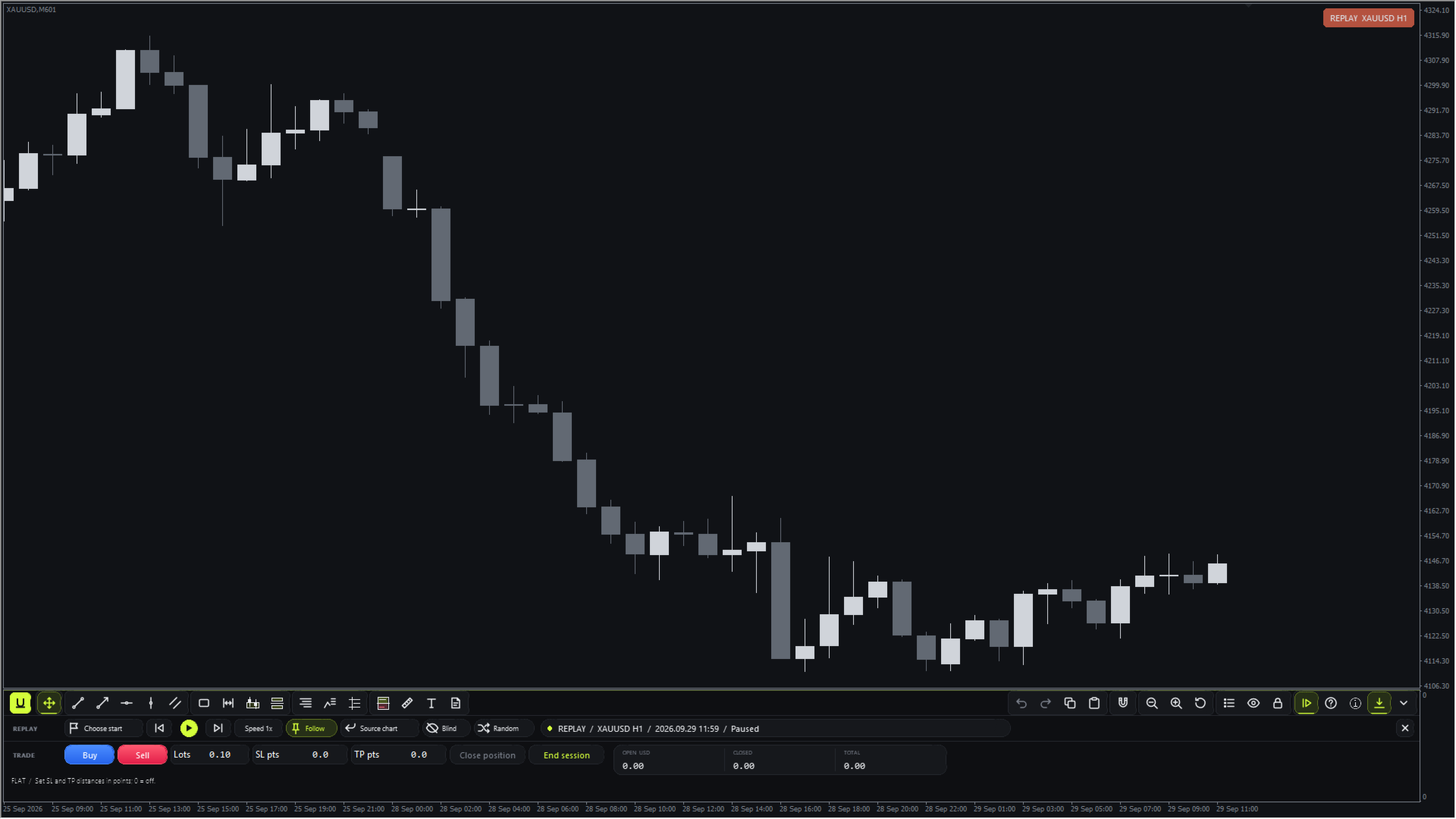
  • Scegli una candela di partenza facendo clic su di essa, digita una data o lascia che sia Random a sceglierne una. Lo storico scorre poi in avanti su un grafico di pratica offline separato dello stesso simbolo, e il tuo grafico reale resta intatto.
  • MT4 richiede un timeframe in codice per il grafico di pratica, quindi il suo titolo ne mostra uno (per esempio EURUSD,M51 quando fai il replay di EURUSD M5). Un'etichetta "REPLAY EURUSD M5" nell'angolo del grafico e la barra del replay mostrano il simbolo e il timeframe reali.
  • Il replay funziona dai grafici M1, M5, M15, M30, H1, H4 e D1, con un timeframe per sessione di pratica.
  • Comandi di riproduzione, pausa, avanzamento a passi e velocità.
  • Acquisto, vendita e chiusura con lotti, stop loss e take profit in punti. Le linee di stop e di target si possono trascinare sul grafico.
  • Al termine della sessione ricevi un riepilogo, e un report TXT e CSV viene salvato nella cartella dati del terminale, in MQL4 / Files / Udock / Replay / Reports.
  • La modalità alla cieca nasconde le date, e ogni rivelazione viene registrata.
  • Il replay è una simulazione su carta. Le barre rilasciate sono costruite dalle barre M1 del broker, e non invia mai ordini al tuo conto.

Alert

Alert di tocco e di chiusura oltre, su qualsiasi disegno. Compaiono nel terminale e possono essere inviati anche tramite notifica push di MT4 o e-mail, una volta compilate le impostazioni di notifica del terminale.

Diagnostica

Il pulsante di diagnostica della barra degli strumenti mostra le versioni del prodotto e del terminale, lo stato del grafico, lo stato del replay e del trading su carta, i tempi e i problemi recenti. "Write report" salva un report di supporto in testo semplice in MQL4 / Files / Udock / Diagnostics. Controlla il report prima di inviarlo tramite il supporto MQL5.

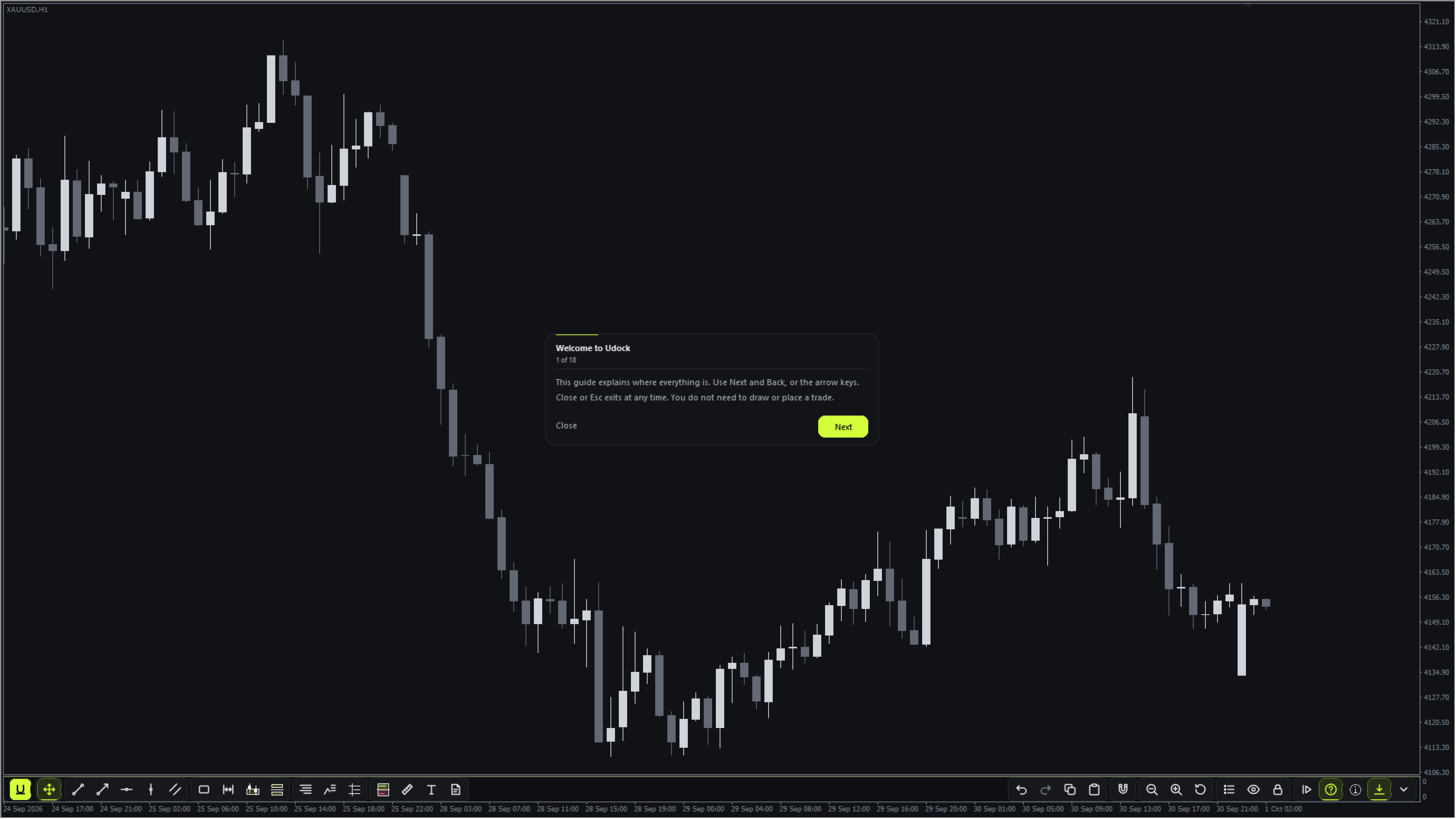
Guida

Un tour integrato spiega ogni strumento, menu e scorciatoia al primo utilizzo. Puoi riaprirlo dalla barra degli strumenti.

Buono a sapersi

  • Il replay richiede lo storico M1 del broker per le date scelte. L'impostazione del numero massimo di barre del terminale e lo storico del broker limitano quanto indietro puoi andare.
  • Le esecuzioni nel replay sono simulate a partire dalle barre M1. Spread, commissioni, slippage e swap non sono modellati nel replay. I risultati usano la valuta di profitto dello strumento, senza conversione nella valuta del conto. Il trading su carta copre i simboli di tipo Forex e CFD. I simboli di tipo futures vengono rifiutati con un messaggio.
  • Il replay conserva un piccolo file di pratica per simbolo nella cartella dello storico del terminale e lo riutilizza nella sessione successiva.
  • Fino a otto sessioni di pratica per M1, o nove per ciascun altro timeframe supportato, per simbolo.
  • Gli importi di rischio / rendimento usano i valori del tick del broker.
  • Udock è pensato per i grafici live e offline. Nel Tester Strategie resta inattivo.
  • Un Udock per grafico.

Supporto e aggiornamenti

Le domande passano attraverso i messaggi MQL5. Se gli acquirenti chiedono qualcosa che si adatta a Udock, entra in un aggiornamento.
Prodotti consigliati
FreqoMaster
Stanislav Korotky
The main idea of this indicator is rates analysis and prediction by Fourier transform. The indicator decomposes exchange rates into main harmonics and calculates their product in future. The indicator shows 2 price marks in history, depicting price range in the past, and 2 price marks in future with price movement forecast. Buy or sell decision and take profit size are displayed in a text label in the indicator window. The indicator uses another indicator as an engine for calculations - FreqoMet
Trendiness Index
Libertas LLC
5 (3)
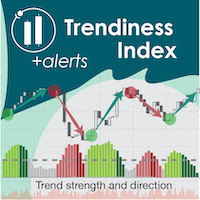
"The trend is your friend" is one of the best known sayings in investing, because capturing large trendy price movements can be extremely profitable. However, trading with the trend is often easier said than done, because many indicators are based on price reversals not trends. These aren't very effective at identifying trendy periods, or predicting whether trends will continue. We developed the Trendiness Index to help address this problem by indicating the strength and direction of price trend
Program Overview: This program is a trading tool designed to monitor and analyze the 7 major currency pairs. It is a variant of a similar program used for tracking stock indices, but this version focuses on the seven major currency pairs. The program helps in identifying and calculating significant price movements (gaps) between the high and low prices of these currency pairs over a specified time frame. It then provides insights through comments and alerts based on the calculated gaps. Major Cu
H4 GBPUSD Trend Scalper is a trend signal scalper The EA trades according to the trend strategy using original built-in indicator for opening and closing orders. The external inputs for limiting trading on Fridays and Mondays are available. The purpose of the strategy is to use the current trend with the most benefit. According to the results of testing and working on demo and real accounts, the best results achieved by using the Н4 timeframe on the GBP/USD pair Works on MetaTrader 4 Build 971+
Indicador Taurus All4
Fabio Oliveira Magalhaes
Taurus All4 Taurus All4 is a high-performance indicator, it will tell you the strength of the trend, and you will be able to observe the strength of the candle. Our indicator has more than 4 trend confirmations. It is very simple and easy to use. Confirmation Modes Candle Trend Confirmations: When the candle switches to light green the trend is high. When the candle switches to light red the trend is reverting down. When the candle changes to dark red the trend is low. Trendline Trend Confirm
Auto Fibo Pro m
DMITRII GRIDASOV
Indicatore "Auto FIBO Pro" Crypto_Forex: è un ottimo strumento ausiliario nel trading! - L'indicatore calcola e posiziona automaticamente sul grafico i livelli di Fibo e le linee di tendenza locali (colore rosso). - I livelli di Fibonacci indicano le aree chiave in cui il prezzo può invertirsi. - I livelli più importanti sono 23,6%, 38,2%, 50% e 61,8%. - Puoi usarlo per lo scalping di inversione o per il trading di zone grid. - Ci sono molte opportunità per migliorare il tuo sistema attuale usa
L'indicatore costruisce le quotazioni attuali, che possono essere confrontate con quelle storiche e su questa base fanno una previsione del movimento dei prezzi. L'indicatore ha un campo di testo per una rapida navigazione fino alla data desiderata. Opzioni: Simbolo - selezione del simbolo che visualizzerà l'indicatore; SymbolPeriod - selezione del periodo da cui l'indicatore prenderà i dati; IndicatorColor - colore dell'indicatore; HorisontalShift - spostamento delle virgolette disegnate d
Harvest GOLD
Sayan Vandenhout
Harvest GOLD USES THE TREND WAVE INDICATOR AND IT CAN IDENTIFY THE BEGINNING AND THE END OF A NEW WAVE TREND MOVEMENT. AS AN OSCILLATOR, THE INDICATOR IDENTIFIES THE OVERBOUGHT AND OVERSOLD ZONES. IT WORKS GREAT TO CATCH THE SHORT TERM PRICE REVERSALS AND USES A MARTINGALE STRATEGY TO CLOSE ALL TRADES IN PROFIT. USE DEFAULT SETTINGS ON H1 OR HIGHER TIME FRAME ON ANY PAIR FOR MORE ACCURATE TRADES WHY THIS EA : Smart entries calculated by 3 great strategies The EA can be run on even a $30000
You can also monitor the real account performance here: https://www.mql5.com/en/signals/2346679 I opened this account on December 2, 2025 . Please follow along and see how it grows from here — I’m excited to share its progress with you. Product Description  This EA is not over-fitted to backtests . It is designed with a strong focus on long-term stability and realistic, practical operation , rather than chasing perfect historical results. I created this EA because I felt that leaving money
VR Cub
Vladimir Pastushak
VR Cub è un indicatore per ottenere punti di ingresso di alta qualità. L'indicatore è stato sviluppato per facilitare i calcoli matematici e semplificare la ricerca dei punti di ingresso in una posizione. La strategia di trading per la quale è stato scritto l'indicatore ha dimostrato la sua efficacia per molti anni. La semplicità della strategia di trading è il suo grande vantaggio, che consente anche ai trader alle prime armi di commerciare con successo con essa. VR Cub calcola i punti di apert
Robot scalper per timeframe M5. Negozia sulla coppia di valute GBPUSD. Questo robot è stato sviluppato appositamente da un'azienda di trader professionisti per il trading con la sterlina. Il robot apre approssimativamente da 5 a 15 operazioni al giorno. È meglio fare trading con broker che hanno uno spread basso su GBPUSD fino a 10 pip. Il deposito minimo consigliato per iniziare è di $ 500 o più. vantaggi: non usa martingala. non una rete. ogni operazione ha uno stop loss. bot professionale s
Pirate
Anatoliy Lukanin
3.9 (20)
Deposit :   from 100 deposit units Trading pairs: I recommend currency pairs: EURAUD, CHFJPY, EURCHF, EURGBP, AUDCHF, CADCHF, USDCHF. Trading period :  Any Account: You should use ECN-ECN.Pro accounts with five-digit quotes with a moderate size (spread). Parameters: USING - Choice, trading risk or fixed lot RISK/LOT - Lot Risk Value RESTORING_THE_BALANCE - Restoring balance* HOW_THE_RESET_WINDOW - Reset the Global Variable TAKE_PROFIT - Set profit STOP_LOSS - Set loss COUNT_BUY - The number of s
Reversal Monster Mini
Abdulfattah Yahya Mohammed Alhazmi
The Most advanced and comprehensive EA to trade Trend Reversals/Pullbacks It is a very profitable EA, to trade trends breakout, and manage trades, takeprofit, stoploss, move to breakeven, and trailing stop. The   “Reversal Monster EA”   trades Reversal/Pullbacks when the current price of the pair pullback to a predefined horizontal level or trendline on the currency chart. The opening of the position can be immediate after pullback to the drawn trendline or after closing the candle below/above
FREE
Trend Ray
Andriy Sydoruk
The indicator shows the potential trend direction by cyclical-wave dependence. Thus, all the rays of the intersection will be optimal rays, in the direction of which the price is expected to move, taking into account the indicator period. Rays can be used as a direction for potential market movement. But we must not forget that the approach must be comprehensive, the indicator signals require additional information to enter the market.
Night Scalper EA Lite
Robots4Forex Ltd
2.25 (4)
The Night Scalper EA Lite is a fully automated Expert Advisor that trades at night and relies on price reversion. The EA trades using market orders and has the option to use time averaging to improve performance. This EA works best on EURUSD using the M5 timeframe, but will also work on AUDUSD, GBPUSD, NZDUSD, USDCAD, USDCHF and likely many more. A VPS is advisable when trading this system and a low spread and commission based broker is best. Check the comments for back test results and optimiz
FREE
Price reach indicator. It also serves as the perfect term for supports and resistance. I use it in two experts. The basic tool for professional trading. The indicator analyzes the last 500 bar and uses this to determine the levels ( but it doesn't predict the future ) . Personally, I use it on TF H1.  It is very simple. Four lines on chart and that's all. Only two input parameters.  Thousands of indicators. Why this? Is good ? No! Is very good. Please test the indicator prior to purchasing.
Traders Toolbox Premium è uno strumento all-in-one creato sulla base di un'ampia formazione sulle strategie di trading comuni al fine di automatizzare tali strategie e calcoli. Caratteristiche: 19 Segnali individuali - Ciascuno di questi segnali può essere polarizzato in una configurazione in stile rete neurale per costituire il risultato finale/complessivo. Ogni segnale ha le proprie impostazioni da personalizzare o ottimizzare se necessario. Visualizzazione su schermo completa -  sei panne
The main idea of this indicator is rates analysis and prediction by Fourier transform. Indicator decomposes exchange rates into main harmonics and calculates their product in future. You may use the indicator as a standalone product, but for better prediction accuracy there is another related indicator - FreqoMaster - which uses FreqoMeterForecast as a backend engine and combines several instances of FreqoMeterForecast for different frequency bands. Parameters: iPeriod - number of bars in the ma
VandoraFX Gold
Sayan Vandenhout
VANDORA FX USES THE TREND WAVE INDICATOR AND IT CAN IDENTIFY THE BEGINNING AND THE END OF A NEW WAVE TREND MOVEMENT. AS AN OSCILLATOR, THE INDICATOR IDENTIFIES THE OVERBOUGHT AND OVERSOLD ZONES. IT WORKS GREAT TO CATCH THE SHORT TERM PRICE REVERSALS AND USES A MARTINGALE STRATEGY TO CLOSE ALL TRADES IN PROFIT. USE DEFAULT SETTINGS ON H1 OR HIGHER TIME FRAME ON ANY PAIR FOR MORE ACCURATE TRADES WHY THIS EA : Smart entries calculated by 5 great strategies The EA can be run on even a $20000 a
DracoAI
Hua Manh Hung
DracoAI is a revolutionary automated forex trading robot based on neural network.  Loss coverage is our premium exclusive feature. DracoAI IS: THE BEST MONEY MAKING SERVICE & STABLE PASSIVE INCOME PROFIT, EVEN IF YOU DO NOT PARTICIPATE IN BIDDING FINANCIAL INDEPENDENCE AND STABILITY DracoAI IS SAFE, BECAUSE: WE GUARANTEE THE SAFETY OF YOUR FUNDS NEGATIVE RESULTS OF TRADING ARE COVERED BY OUR RESERVE FUND 100% CONFIDENTIALITY Monitoring  - most popular signal at MQL5 :  https://www.mql5.com/en/s
"Impulses and Corrections 4" is created to help traders navigate the market situation. The indicator shows multi-time frame upward and downward "Impulses" of price movements. These impulses are the basis for determining the "Base" , which is composed of zones of corrections of price movements, as well as "Potential" zones for possible scenarios of price movement. Up and down impulses are determined based on a modified formula of Bill Williams' "Fractals" indicator. The last impulse is always "U
Exp Swing
Vladislav Andruschenko
4.44 (64)
Utilizza il modello di una famosa strategia chiamata Swinger (Pendulum, Cheburashka) - posizionamento alternativo di ordini pendenti con aumento del lotto. La strategia consiste nel piazzare due ordini pendenti opposti. Quando il prezzo si muove in una determinata direzione, viene attivato un ordine pendente, mentre la dimensione del lotto dell'altro ordine viene aumentata. L'EA prevede tre tipologie di apertura degli ordini pendenti (TypeofTrade) Apertura automatica dopo il posizionamento (Ape
FREE
Easy Backtest
Jacek Pawel Bialek
Easy Backtest Backtesting your trading strategy is the most important thing which every successful trader knows very well. Easy Backtest is the perfect solution to test your new strategy in Strategy Tester in your MT4 , using all available historical data. You can place orders: BUY , SELL , pending orders with Stop Loss and Take Profit , and you can modify them at any time. You can close orders individually or all at once, and also  breakeven the same like you do it in live trading. The play b
FREE
Expert Mind Core: Statistical Probability Engine The   Expert Mind Core   algorithm is based on a high-order mathematical model designed to analyze structural market imbalances. Unlike standard indicators, this system utilizes a multidimensional approach to price action, evaluating the rate of change in volatility (Gamma-analysis) and its deviation from the equilibrium point. The core logic functions by identifying   exhaustion zones   where the probability of a corrective movement significantly
Mobile LotSize Trade on the go with confidence Have you ever spotted the perfect trade opportunity on your phone, only to enter with the wrong lot size and end up risking more than you intended? With Mobile LotSize , that’s no longer a problem. Leave this EA running on your trading platform, and it will automatically monitor your pending orders set at 0.01 lots. If you’ve placed a stop loss or take profit from your phone, Mobile LotSize will calculate and adjust the trade size to match your ris
Description: Please tick "Show object descriptions" in chart properties to enable hrays views That utility converts a trendline into a horizontal ray known as tool for drawing supply and demand zones. Simply create a trendline on a chart and once selected, it will get converted. Ray remains horizontal while dragging.  Quick ray plot: press "R" key to create horizontal ray. It will be snapped to the nearest OHLC value Further versions will be improved. For feature request please post new comm
Magic Balance
Daniil Evstratenko
The indicator shows which trading pairs, strategies, robots and signals that you use are profitable and which are not. The statistic of trades and balance graph are displayed in the account currency and pips - to switch simply click on the graph. button "$"(top left) - minimize/expand and move the indicator panel button ">"(bottom right) - stretching and resetting to the original size Statistic of trades 1 line - account balance, current profit and lot of open trades; 2 line - the number of all
Unlimited Binary Options Copier Remote is a powerful tool to copy binary options trades remotely between multiple accounts at different locations over internet. This is an ideal solution for signal provider, who want to share his binary options trades with the others globally on his own rules. One provider can copy trades to unlimited receivers and one receiver can get trade from unlimited providers as well. The provider can set the subscription expiry for each receiver, so that receiver will no
This is the complete REX package. It consists of the lite, pro and ULTRA version.  Perfect for beginners and intermediates. REX complete is 100% non repaint. The strategy is based on a mix of different strategies, statistics, including pivot points, oscillators and patterns.  As the trading idea consists of a variety of some classic indicators like Momentum, Williams Percent Range, CCI, Force Index, WPR, DeMarker, CCI, RSI and Stochastic, it is clear that the fundamental indicators have being u
Note: After installation, please go to Tools>Options>Expert Advisors and add https://porsaj.com to 'Allow WebRequest for listed URL'. Still Problem?! Please check Internet connection! An economic calendar in the context of forex refers to a tool or resource that provides information about upcoming economic events, indicators, and data releases that can potentially impact the financial markets, particularly the foreign exchange market. It helps traders stay informed about key economic announce
Gli utenti di questo prodotto hanno anche acquistato
Unlimited Trade Copier Pro
Vu Trung Kien
4.43 (7)
Unlimited Trade Copier Pro is a tool to copy trade remotely to multiple MT4, MT5 and cTrader accounts at different computers/locations over internet. This is an ideal solution for you if you are a signal provider and want to copy your trades to other receivers globally on your own rules. One provider can copy trades to multiple receivers and one receiver can get trade from multiple providers as well. The provider can even set the subscription expiry for each receiver, so that receiver will not b
The FFx Hidden Manager panel will help you to manage easily your orders directly on the chart. Below all features described: TP, SL and TrailingStop are hidden Each order has its own lines on chart Drag & Drop any line to change the TP/SL as per your need Option to move automatically the SL line at breakeven when TP #1 is reached Option to choose the TP/SL type (by pips or price) Option to choose the TrailingStop type (by pips, MA, Fractals, PSAR or ATR) Define which order(s) you want to manage
FFx Risk Calculator
Eric Venturi-Bloxs
FFx Risk Calculator panel will help you to calculate very easily your trades size, SL or the risk directly on the chart. All features are described below: Option to select which parameter to calculate: Risk, Stop Loss or Lot Size The panel will show if the lot size is allowed according to the current account free margin Button to maximize/minimize the panel Drag and Drop the panel anywhere on the chart How to use it? Select the parameter you want to be calculated. It will be based on the 2 other
News Trader Pro
Vu Trung Kien
4.38 (16)
News Trader Pro is a unique robot that allows you to trade the news by your predefined strategy. It loads every piece of news from several popular Forex websites. You can choose any news and preset the strategy to trade it, and then News Trader Pro will trade that news by selected strategy automatically when the news comes. News release gives opportunity to have pips since the price usually has big move at that time. Now, with this tool, trading news becomes easier, more flexible and more exciti
FFx Watcher PRO
Eric Venturi-Bloxs
The FFx Watcher PRO is a dashboard displaying on a single chart the current direction of up to 15 standard indicators and up to 9 timeframes. It has 2 different modes: 1. Watcher mode: Multi Indicators User is able to select up to 15 indicators to be displayed User is able to select up to 9 timeframes to be displayed 2. Watcher mode: Multi Pairs User is able to select any number of pairs/symbols User is able to select up to 9 timeframes to be displayed This mode uses one of the standard indicat
Elliott Wave Counter è un pannello per il markup manuale rapido e intuitivo delle onde di Elliott. Si può selezionare un colore e un livello di segni. Sono inoltre disponibili funzioni per la rimozione dell'ultimo markup e dell'intero markup effettuato dallo strumento. Il markup viene eseguito con un clic. Fai clic cinque volte: ottieni cinque onde! Elliott Wave Counter sarà un ottimo strumento sia per i principianti che per gli analisti professionisti delle onde di Elliott. Guida all'installazi

If you wish to draw Support and Resistance lines, view: daily market opening, classical pivot levels, Fibonacci pivot levels, trend lines, Fibonacci levels, the remaining time to candle closing, and current spread. If you seek to place your orders with the exact lot that meets your desired stop loss risk. If you wish to do all this and more with just one click, then this is the perfect tool to use. This tool will allow you to feel more relaxed when deciding to open orders, as well as predicting
This is an Expert Adviser use for manual trading as a background EA or combine with external EA to open orders. Loss Recovery Trading is one of your options to handle the lose positions instead of using stop loss by setting a zone recovery area and target to exit the turn rounds sequence. How It Work? If the market goes against your first positions direction at the specific of losing points, the EA will open an opposite direction position with calculated larger lot size and also keep the first
Telegram Publisher Agent   è un componente aggiuntivo che consente ai trader di inviare segnali ai propri canali e gruppi Telegram in tempo reale. Con messaggi personalizzabili, schermate di grafici e altre funzionalità, lo strumento aiuta i trader a condividere le loro intuizioni e strategie di trading con i loro follower. Lo strumento presenta anche un bellissimo design con interruttore a tema chiaro e scuro, offrendo agli utenti un'esperienza di trading estetica e funzionale. Telegram Publish
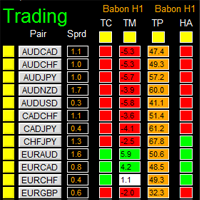
如果产品有任何问题或者您需要在此产品上添加功能,请联系我 Contact/message me if you encounter any issue using the product or need extra feature to add on the base version. There is Demo version of this panel Dashboard Babon Scalping System Demo in my product list, please try it out to get familiar with all functionalities for free, LINK . This system basically utilizes TDI, Heiken Ashi Trend, Price Trend on H1 time-frame and TMA on H1&H4 time-frame to generate the trend (big picture). Then the system will zoom in to genera
Pairs Trade
Oleg Pechenezhskiy
The Pairs Trade indicator is a utility for semi-automatic pair trading. It allows combining the charts of two arbitrary instruments, even if the schedules of their trading sessions are different. It displays a spread chart in the form of a histogram with an overlaying moving average. It calculates the swap that will be charged for the synthetic position (in the deposit currency). It is possible to set a level for automatic opening of a synthetic position on the spread chart (analogous to the 'se
Corporate Report
Pavel Verveyko
5 (1)
The script displays info about the share's corporate reports and dividends. The data is downloaded from   investing.com : Report date Profit per share (EPS) Revenue Market capitalization Amount of dividends Date of payment of dividends Dividend income The product cannot be tested in the tester (since it is not possible to receive data from the Internet). Before launching:  Add 2   URL   https://ru.investing.com/earnings-calendar/Service/getCalendarFilteredData  and   https://ru.investing.com/di
This Stacker EA will: Automatically set Stop loss on a new order Automatically set Take profit on a new order Stack (or open up to 4 additional orders at the same time) when a new order is placed, the SL/TP can be preset individually for each order. Provides a transparent replacement for the standard 1-click trading buttons in MetaTrader 4 (1 click still works and SL/TP will automatically be set as well as Stacking). Automatically calculate lot order size according to preset risk management perc
Currencies Cleaner panel will give you an overview of all the most traded market's currencies in a single click. First of all the panel will refresh all your charts, opening them four times in all timeframes needed. 1 - CURRENCIES It uses a complex algorithm to study the movement of 17 different indicators. It means that the algorithm not only "reads" the actual value of an indicator, but also creates a probability of success using the position of this value on the indicator and the last moveme
Buy or rent it and request a copy of the Antimartingale EA for free  Trendline based utility, you design your trendlines or horizontal lines, the EA opens trades for you Possibility to trade on break and/or bounce events Indipendent break and bounce settings Configurable market, stop and limit orders T1T2 Logic to lock profits and minimize losses Trailing Stop Loss Max Spread check Notifies you when your trendlines are crossed No strange trendline name or syntax, you decide the color of tr
FXFledgling Exit Tool is a complete risk management tool that analyzes both the open trades and the direction of the pair of open trades. As long as the suggested entry and lotsizing management presented here is followed strictly, you will have a high chance (but no guarantee) of surviving the trade. What It Does It is used as an exit tool. It helps the trader to manage any manual trade that he transacted. It does the following: Trail Stop Dynamic Stop Loss - a calculated stop-loss that changes
Writing SWAP
Denis Danilov
This utility records the swap, which allows you to monitor and analyze the changes in the swap. The program writes a file with the swap data for every pair selected in the Market Watch. The data are recorded to a csv file at the specified time, the file is located in <terminal root directory>/MQL4/Files. File format: Date Day Time Currency pair Long-swap Short-swap 16.01.2018 Mon 23:30 EURNOK -34.81 27.14 16.01.2018 Mon 23:30 EURDKK -0.022 -0.032 16.01.2018 Mon 23:30 EURGBP -2.38 0.15 To start r
Crypto Market Pro
Daniil Kurmyshev
5 (1)
New opportunities for analyzing cryptocurrency in the usual MetaTrader 4. For example : We select the symbol of the cryptocurrency and attach any indicators, Expert Advisors or scripts. Startup Mode View cryptocurrency; Data collection. Capabilities Work as with a standard currency chart; Automatic update of open charts; Selection of individual cryptocurrency for updating; Selection of individual timeframes for updating; Work on the desired timeframes; Open charts do not affect the work of Cry
Telegram Notify
Kin Hang Tan
1 (1)
Notify Telegram is a utility that bridge your MetaTrader4 trading activities to your Telegram chat/channel. It will help you to monitor your MetaTrader4 actions such as placing trade, modifying order's TP/SL, closing trades etc and send a notification message to your dedicated Telegram chat/channel. It does not execute any trade on your MetaTrader4 account. It can be useful for monitoring EA performance or providing signal to your Telegram channel/group subscribed. Parameters Token ="" - enter
Easy Strategy Builder
Gheis Mohammadi
5 (3)
The  Easy Strategy Builder (ESB)  is a " Do It Yourself " solution that allows you to create a wide range of the automated trading strategies without any line of codes. This is the world’s easiest method to automate your strategies that can be used in STP, ECN and FIFO brokers. No drag and drop is needed. Just by set conditions of your trading strategy and change settings on desired values and let it work in your account. ESB has hundreds of modules to define unlimited possibilities of strategi
Telegram ChartSnap is an utility tool to bridge your MetaTrader 4 activities to your Telegram chat/group/channel. It will screen shot your MetaTrader 4 chart and send it to your dedicated Telegram chat/group/channel through a Telegram bot. The whole process will keep repeating based on a time cycle that predetermined by the user. It is a convenient tool for those who like to get access to their favorite system/dashboard that only available at MetaTrader Desktop. Beside that, trader can easily s
Fibonacci Expansion and Retracement Analysis Fibonacci retracing and extended line tools for the MT4 platform, ideal for traders who use the DiNapoli point trading method and the Golden Section trading The main function: 1. You can draw multiple sets of Fibonacci retracements directly, and the relationship between important return points is clear at a glance. 2. Can draw Fibonacci extensions 3. The Fibonacci foldback and extension of the line can be moved left and right for easy observation
Risk manager x2
Andrii Malakhov
Советник риск-менеджер с огромным арсеналом возможностей защиты вашего депозита. Для инвесторов, которые решили передать капитал в доверительное управление. Когда у трейдера нет доступа к настройкам - нивелирует торговые риски. А также для трейдеров, которые осознали необходимость стороннего контроля за их торговлей для улучшения торговых результатов.  Для максимальных результатов - должен стоять на отдельном VPS сервере и у трейдера не должно быть возможности менять настройки в торговый период.
Grid Hero War Pad
Chock Hwee Ng
3.4 (5)
Grid Hero War Pad is a  GRAPHICAL MANUAL TRADER version of the original Grid Hero EA, designed and created for ADVANCED TRADERS who are experienced in plotting their own market entries. It is coded using ADVANCED GRAPHICAL INTERFACE programming, that combines the power of discretionary trading with Grid Hero algorithm in the form of a graphical console with button-click easy execution. It allows you to execute trades manually using Market Orders and Pending Orders, and then automatically uses th
The advantage of using this EA This EA directly updates takeprofit and stop losses that are still empty in a manual order Parameters Multiplier: Multiplier value of the previous transaction Distance: Distance hedging from the previous order Takeprofit: take profit taken from the last price + the value of this column We recommend that you do not add more than one manual transaction in the same pair martingale hedging | manual hedging | hedging manual | hedging lot | best robot | best ea
MirrorEA
Eugenio Bravetti
The new version of  MirrorSoftware 2021  has been completely rewriten and optimized.  This version requires to be loaded only on a single chart because  it can detect all actions on every symbol and not only the actions of symbol where it is loaded. Even the  graphics and the configuration mode  have been completely redesigned. The MirrorSoftware is composed of two components (all components are required to work):  MirrorController  (free indicator): This component must be loaded into the MASTER
Open charts
Maksim Slovakov
Скрипт открывает графики по всем инструментам находящимся в окне "Обзор рынка" и по желанию может задать для всех графиков один шаблон. Так-же можно удалить все графике открытые в терминале Мт4. В скрипте имеются следующие настройки: "Таймфрейм" по умолчанию M30;             (Можно поставить свой: M1, M5, M15, M30, H1, H4, D1, W1, MN.) "Задержка" по умолчанию "0";                  (Задержка перед открытием следующего графика в миллисекундах.) "Шаблон" по умолчанию "True";                (True=пр
По факту вы выставляете виртуальные Buy Stop и Sell Stop которые срабатывают после закрытия свечи. Данный помощник позволяет заранее выставить уровень Stop Loss и Take Profit. Так-же имеется демо режим для предварительного расчёта параметра риск/прибыль. Помощник имеет следующие настройки "Лот" по умолчанию "0.01" "Проскальзывание" по умолчанию "60"        (Значение в пунктах) "Номер Ордера" по умолчанию "0"               (Магический номер ордера) "Цвет Комментариев" по умолчанию "Black"  "Шрифт
TFA Trade Manager
TFA Global Pte. Ltd.
(8th Feb 2019 Launch Promo: $97/lifetime just for 1 day! Price goes to $180/lifetime in 24 hours!) The TFA Trade Manager helps you easily manage your trades with an intelligent vertical "bars" system. You easily now easily click + drag your entry, stop loss, take profit, breakeven, partial profit and trailing stop with a few simple mouse clicks. You can also easily calculate the risk you wish to allocate to each trade by telling the trade manager your desired risk %, lot size or $dollars to risk
Quantized Trend
Oleg Pechenezhskiy
This utility automatically draws the trend channel on the price chart. For the time interval from the specified date to the current bar, the drawn channel is almost optimal. Placing the beginning of the channel at a more distant historical price extremum, you get a visualization of a longer-term trend. Channel slope is not a continuous value, but takes one of discrete values (in AxB format, where A is the number of price points (points), and B is the number of timeframes). This program works ONL
Altri dall’autore
Gaps disegna i livelli che i timeframe superiori lasciano dietro di sé, su qualsiasi grafico da cui fai trading. La mappa nasce dalle candele giornaliere del broker, quindi un grafico a 1 minuto e uno a 4 ore mostrano gli stessi livelli negli stessi punti. Quattro famiglie di livelli, su candele mensili, settimanali e giornaliere Fair value gap, wick zone, imbalance e overlap, ciascuno disegnato come una zona sul tuo grafico. I livelli nascono solo da candele chiuse. Non vengono mai ridisegnati


Udock
ERIANUX, LLC
Udock aggiunge una barra degli strumenti compatta al tuo grafico MetaTrader 5 e lavora sul grafico che usi già. Nulla viene sostituito: candele, indicatori, sottofinestre e oggetti propri di MT5 restano esattamente dove sono. 16 strumenti di disegno Linea di tendenza, semiretta, livello orizzontale, marcatore temporale, canale parallelo, zona rettangolare, sessione / killzone, order block, fair value gap, ritracciamento di Fibonacci, Fibonacci sullo swing, livelli del giorno / della settimana pr
Gaps disegna i livelli che i timeframe superiori lasciano dietro di sé, su qualsiasi grafico da cui fai trading. La mappa nasce dalle candele giornaliere del broker, quindi un grafico a 1 minuto e uno a 4 ore mostrano gli stessi livelli negli stessi punti. Quattro famiglie di livelli, su candele mensili, settimanali e giornaliere Fair value gap, wick zone, imbalance e overlap, ciascuno disegnato come una zona sul tuo grafico. I livelli nascono solo da candele chiuse. Non vengono mai ridisegnati
Filtro:
Nessuna recensione
Rispondi alla recensione