Under Controls
- エキスパート
- バージョン: 1.2
- アップデート済み: 13 10月 2026
- アクティベーション: 5

Fair Value Gap, Liquidity Sweep & SuperTrend Expert Advisor for MetaTrader 5
OverviewUnder Control is a professional Expert Advisor for MetaTrader 5 built around the combination of Fair Value Gaps, liquidity sweeps, SuperTrend direction and multi-layer signal validation.
The strategy is designed to evaluate price structure rather than react to a single technical condition.
A potential setup passes through several independent filters, including:
Fair Value Gap → Liquidity Sweep → SuperTrend Direction → ATR Noise Filter → Spread Control → Trend Duration → ADX Confirmation → Signal Strength
Only after the configured conditions are satisfied can the Expert Advisor proceed with a trade.
The result is a structured framework that combines market-structure analysis with configurable execution, capital allocation and position protection.
Fair Value Gap & Liquidity LogicThe primary signal engine searches for Fair Value Gaps (FVGs) that meet the minimum size specified by:
SignalFVGMinSizePoints
A Fair Value Gap represents a price imbalance within the recent market structure.
The setup can additionally require a Liquidity Sweep before the FVG is considered valid.
Controlled by:
SignalLiquiditySweepRequired
This allows the trader to decide whether a liquidity event must precede signal validation.
The combination is intended to focus the analysis on situations where price has both interacted with a liquidity area and created a measurable imbalance.
Multi-Layer Signal ConfirmationUnder Control does not rely on the FVG condition alone.
The signal engine can combine several independent measurements.
SuperTrend Direction
SignalSuperTrendMultiplie
defines the SuperTrend multiplier used to establish the directional context of the setup.
ATR Noise Filter
SignaATRNoiseFilter
uses ATR-based filtering to reduce the influence of relatively small market fluctuations.
Spread Protection
SignaMaxSpreadAllowed
defines the maximum spread permitted for a trade.
If current spread conditions exceed the configured threshold, the setup can be rejected.
Trend Duration Control
SignaMaxBarsInTrend
limits how long the current trend may have continued before the setup is considered invalid.
ADX Confirmation
SignaADXOpenConfirmation
defines the ADX level required for opening confirmation.
Signal Strength
SignalThreshold
sets the minimum signal strength required before the Expert Advisor can proceed with an entry.
Together, these filters create a configurable validation framework rather than a single-condition entry model.
Capital Allocation & Exposure ControlUnder Control includes a dedicated money-management layer designed around capital exposure control.
Automatic position sizing can be enabled through:
AutoCapitalRegulationOn
The target exposure is controlled by:
CapitalExposureRatio
A base position size is provided through:
BaseContractSize
This structure allows the trader to define how the strategy should relate position sizing to available account capital.
Controlled Position ChainsUnder Control supports a configurable sequence of positions when the strategy conditions allow additional entries.
The maximum depth is controlled by:
PositionChainDepth
Allocation scaling is controlled by:
AllocationScalingExponent
This creates a predefined mathematical relationship between position size and chain depth.
The structure is therefore configurable and bounded rather than based on unlimited position accumulation.
The Expert Advisor does not use Martingale recovery logic, unlimited pyramiding, or an unrestricted grid-recovery mechanism.
Position ProtectionUnder Control includes a dedicated protection layer for managing open exposure.
Profit Protection
ProfitCeilingPoints
defines the configured profit distance in points.
Loss Protection
LossFloorPoints
defines the configured loss distance in points.
These parameters establish explicit boundaries for individual positions.
Trailing EngineAn optional trailing mechanism can be enabled through:
TrailingEngineActive
Trailing begins after the configured:
TrailEngagementDistance
and advances according to:
TrailStepPoints
This allows the trader to define when the position-protection mechanism should become active and how aggressively it should follow price.
Optional pending-order trailing can also be configured through:
-
TrailPendingActive
-
TrailPending
For prolonged position sequences, an optional correction mechanism is available.
CorrectionStrategy
can adjust protection levels as the position chain develops.
A value of:
0
disables the correction mechanism.
This provides an additional layer of control for configurations that use multiple sequential positions.
Independent Long & Short ControlLong and Short exposure can be configured independently:
-
LongExposureEnabled
-
ShortExposureEnabled
This allows the Expert Advisor to operate:
-
Long only;
-
Short only;
-
in both directions.
The directional configuration can therefore be adapted to the trader's market model or instrument characteristics.
Execution & EnvironmentUnder Control provides dedicated parameters for managing multiple instances and broker-specific execution requirements.
StrategyInstanceID
A unique identifier for the Expert Advisor instance, equivalent in purpose to a Magic Number.
This helps separate its trades from other strategies running on the same account.
ExecutionTag
A custom text identifier attached to trades for easier organization and monitoring.
FillExecutionPolicy
Defines the MQL5 order-filling policy used for execution.
InstitutionalExecutionMode
Provides an alternative execution mode for brokers requiring specific order-handling behavior.
Key Features-
Fair Value Gap analysis
-
Liquidity Sweep confirmation
-
SuperTrend directional filtering
-
ATR-based noise filtering
-
ADX entry confirmation
-
Configurable signal-strength threshold
-
Maximum spread protection
-
Trend-duration control
-
Automatic capital-based position sizing
-
Configurable capital exposure ratio
-
Bounded position-chain depth
-
Configurable allocation scaling
-
Fixed profit and loss protection
-
Optional trailing-stop engine
-
Optional pending-order trailing
-
Correction logic for prolonged position sequences
-
Independent Long / Short controls
-
Unique strategy identification
-
Configurable MQL5 filling policy
-
Institutional-style execution mode
Signal
SignalFVGMinSizePoints
Minimum Fair Value Gap size required for signal consideration.
SignalLiquiditySweepRequired
Requires a liquidity sweep before the FVG setup can be validated.
SignalSuperTrendMultiplie
SuperTrend multiplier used to determine directional context.
SignaATRNoiseFilter
ATR multiplier used for market-noise filtering.
SignaMaxSpreadAllowed
Maximum permitted spread in points.
SignaMaxBarsInTrend
Maximum number of bars allowed for the current trend before the setup is invalidated.
SignaADXOpenConfirmation
ADX level required for entry confirmation.
SignalThreshold
Minimum signal-strength value required for an entry.
SignalMeasure
Defines the measurement method applied to the signal corridor.
Money ManagementAutoCapitalRegulationOn
Enables automatic position sizing based on account capital.
CapitalExposureRatio
Defines the target capital-exposure ratio.
BaseContractSize
Base lot or contract size used as the starting value for position calculations.
PositionChainDepth
Maximum number of positions permitted within a position chain.
AllocationScalingExponent
Controls how position allocation changes as chain depth increases.
ProtectionProfitCeilingPoints
Configured profit distance in points.
LossFloorPoints
Configured loss distance in points.
TrailingEngineActive
Enables the trailing protection engine.
TrailEngagementDistance
Distance in points required before trailing becomes active.
TrailStepPoints
Trailing movement step in points.
LevelStart
Initial level used by the protection logic.
TrailPendingActive / TrailPending
Optional settings for pending-order trailing.
CorrectionStrategy
Controls the optional correction mechanism for prolonged position sequences.
0 = disabled.
EnvironmentLongExposureEnabled / ShortExposureEnabled
Enable or disable Long and Short trading independently.
StrategyInstanceID
Unique strategy identifier for separating this Expert Advisor's trades.
ExecutionTag
Custom text tag attached to trades.
FillExecutionPolicy
MQL5 order-filling policy.
InstitutionalExecutionMode
Enables an alternative execution mode for brokers with specific order-handling requirements.
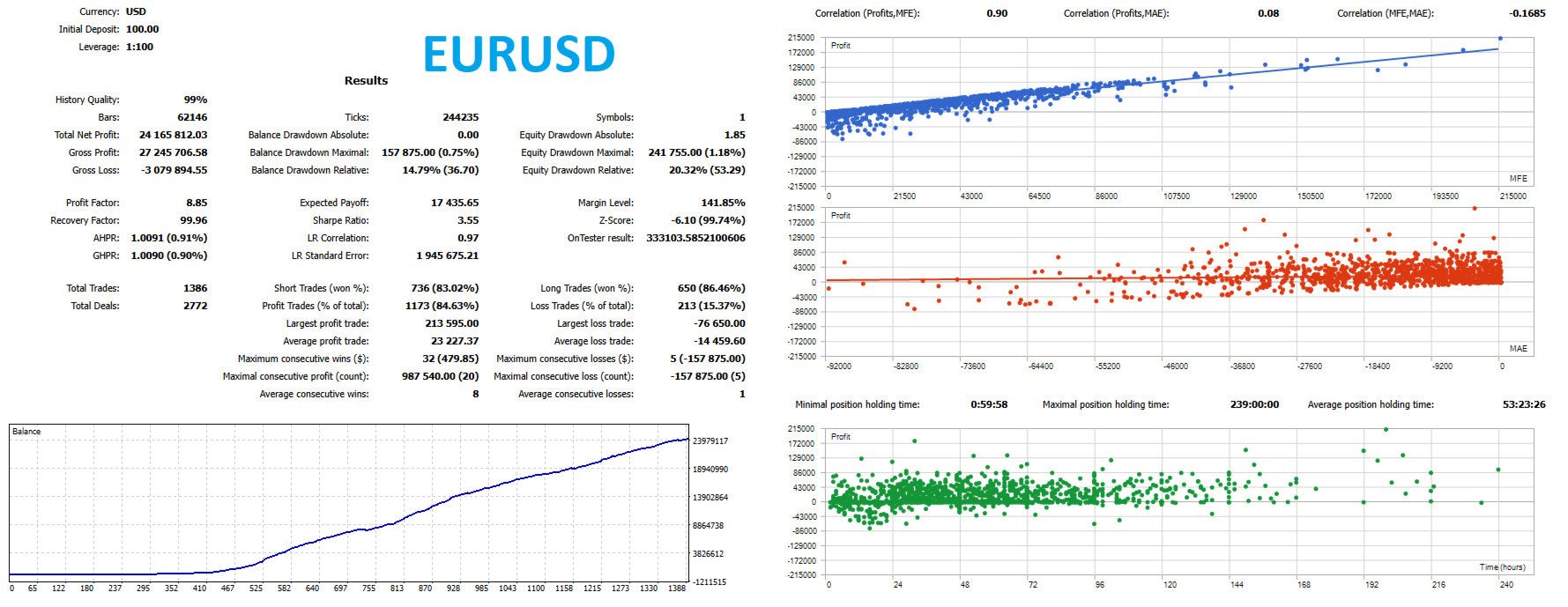
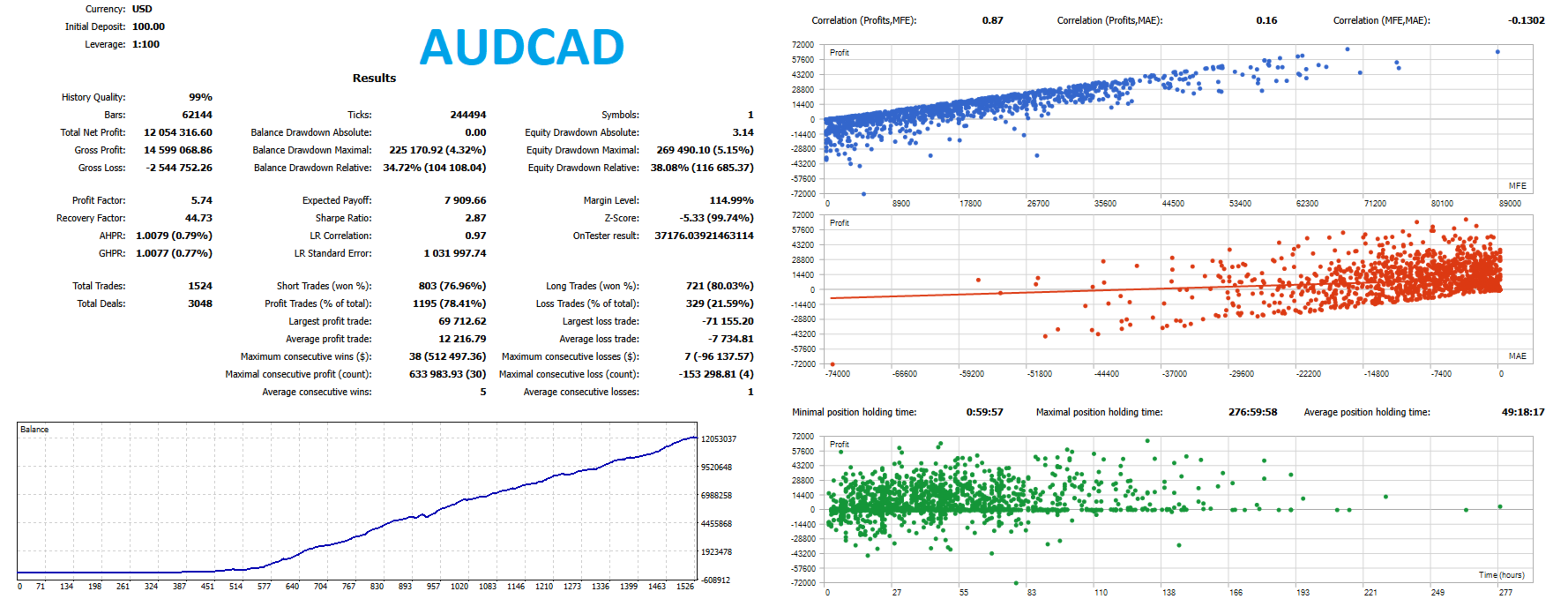
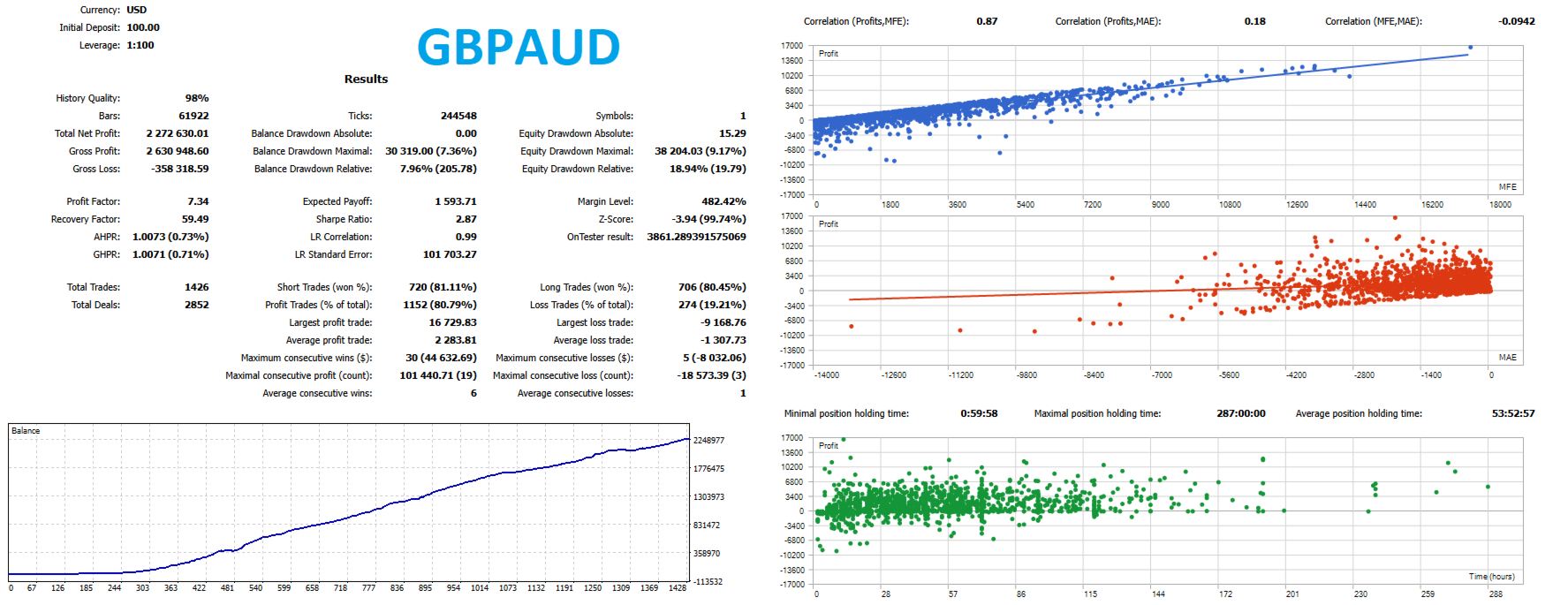
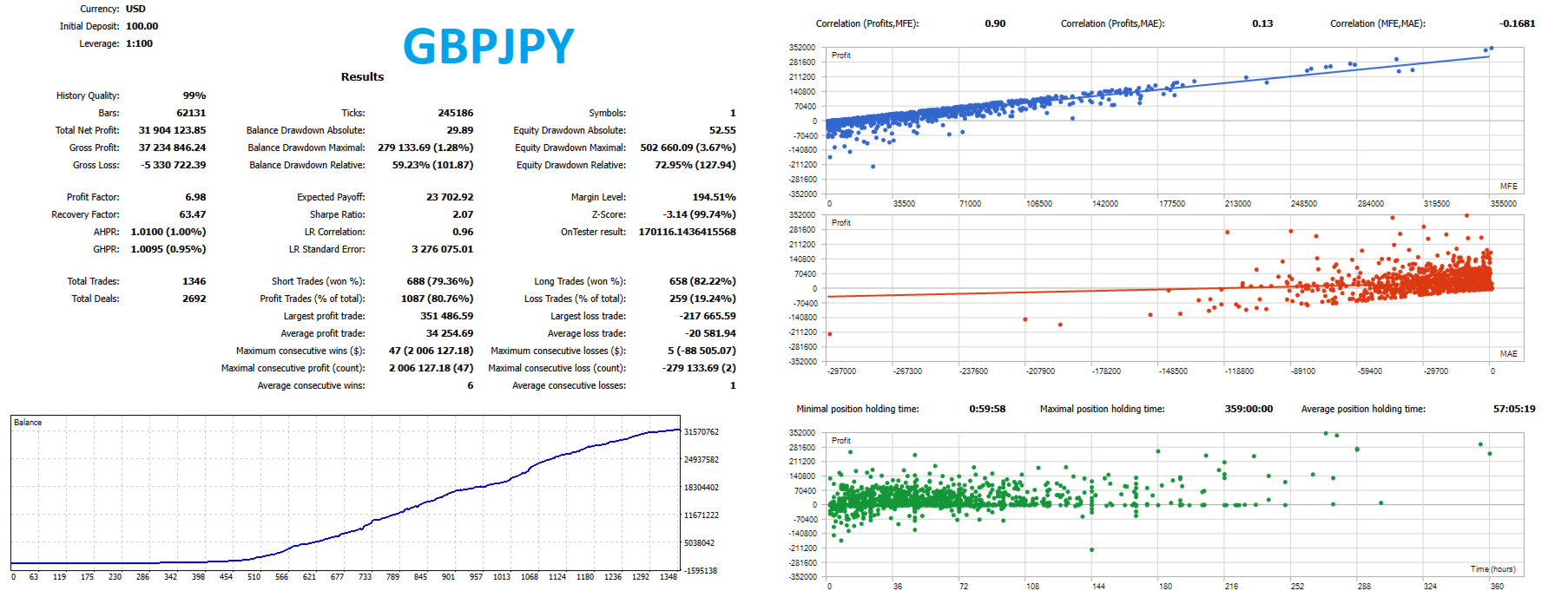
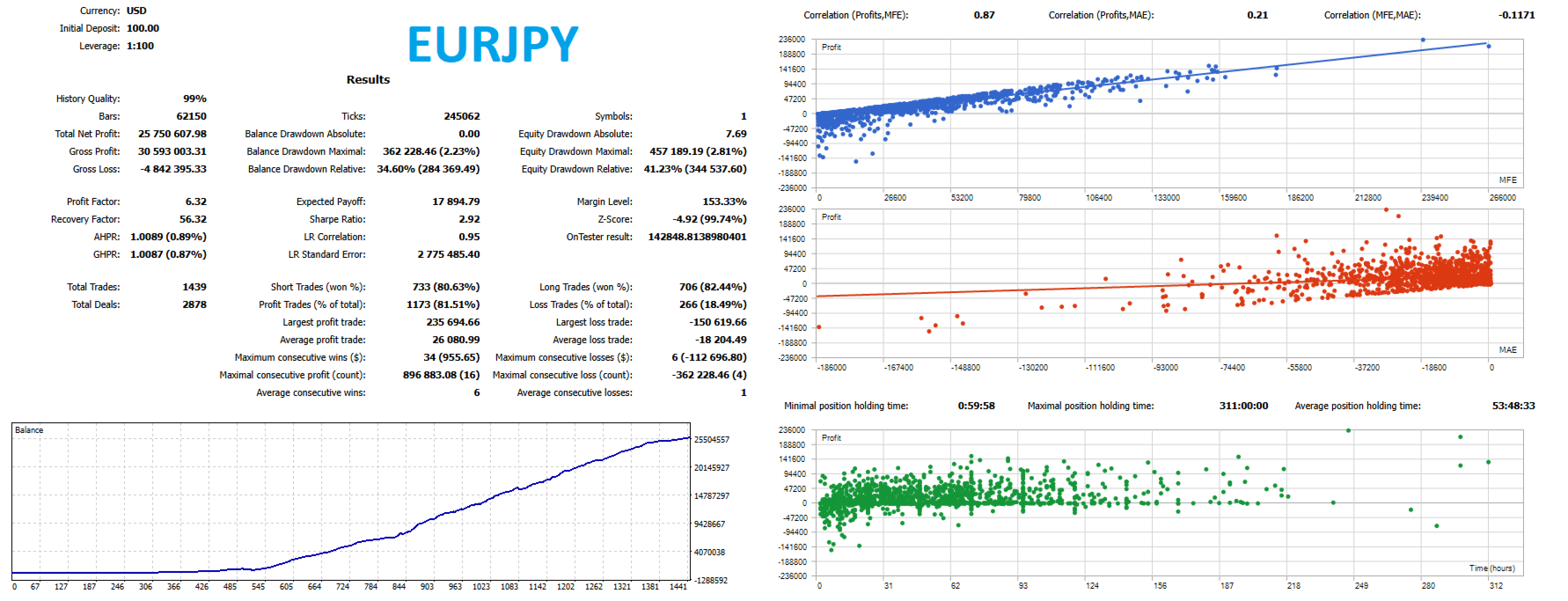
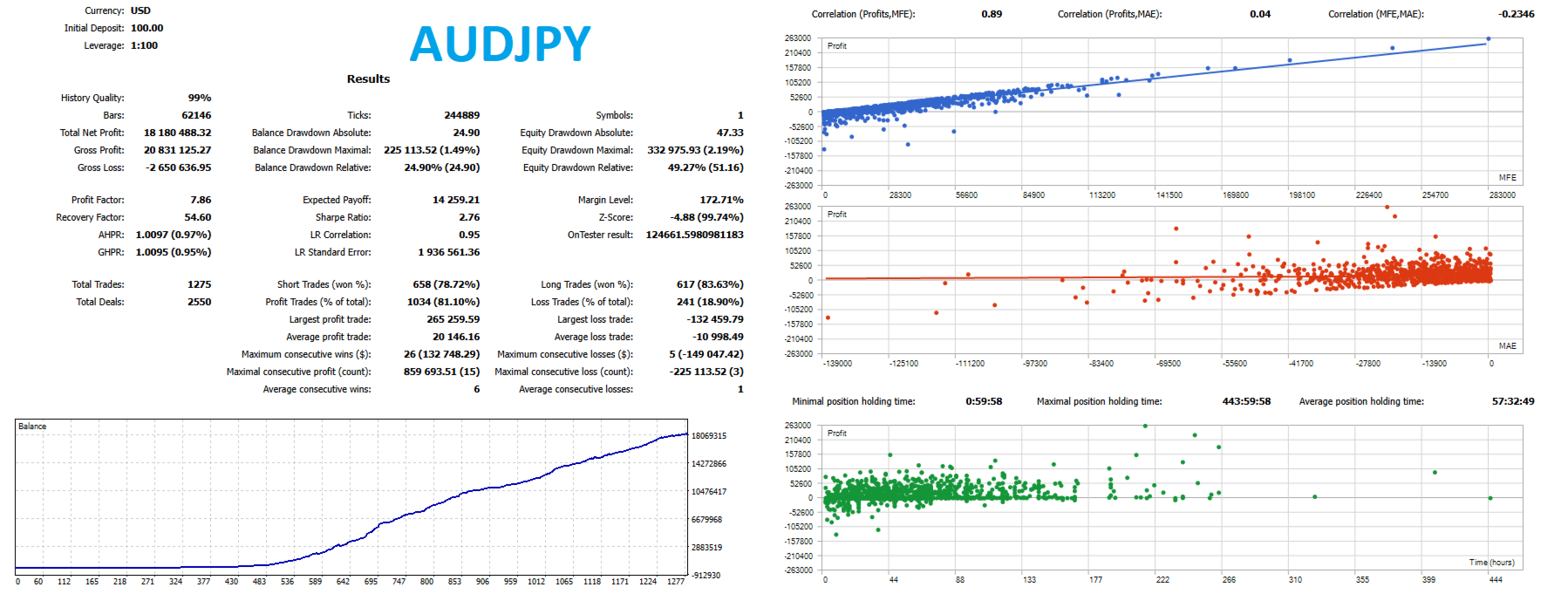
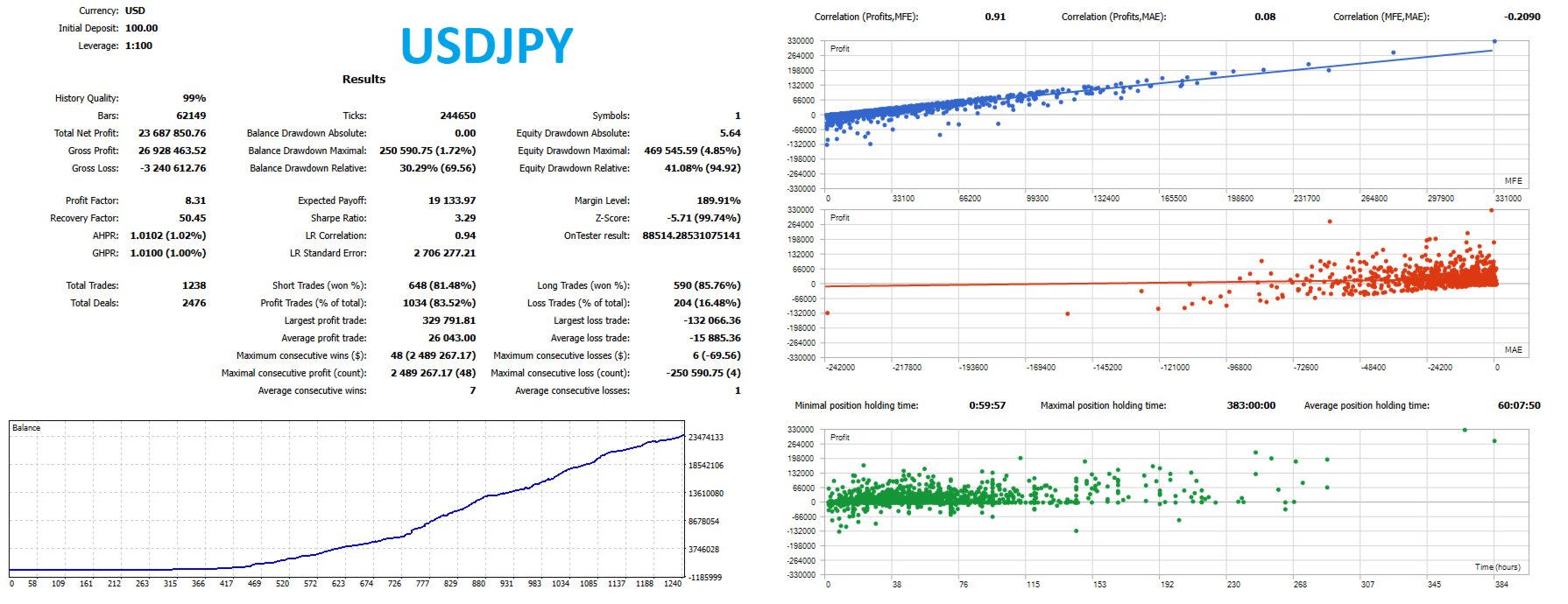
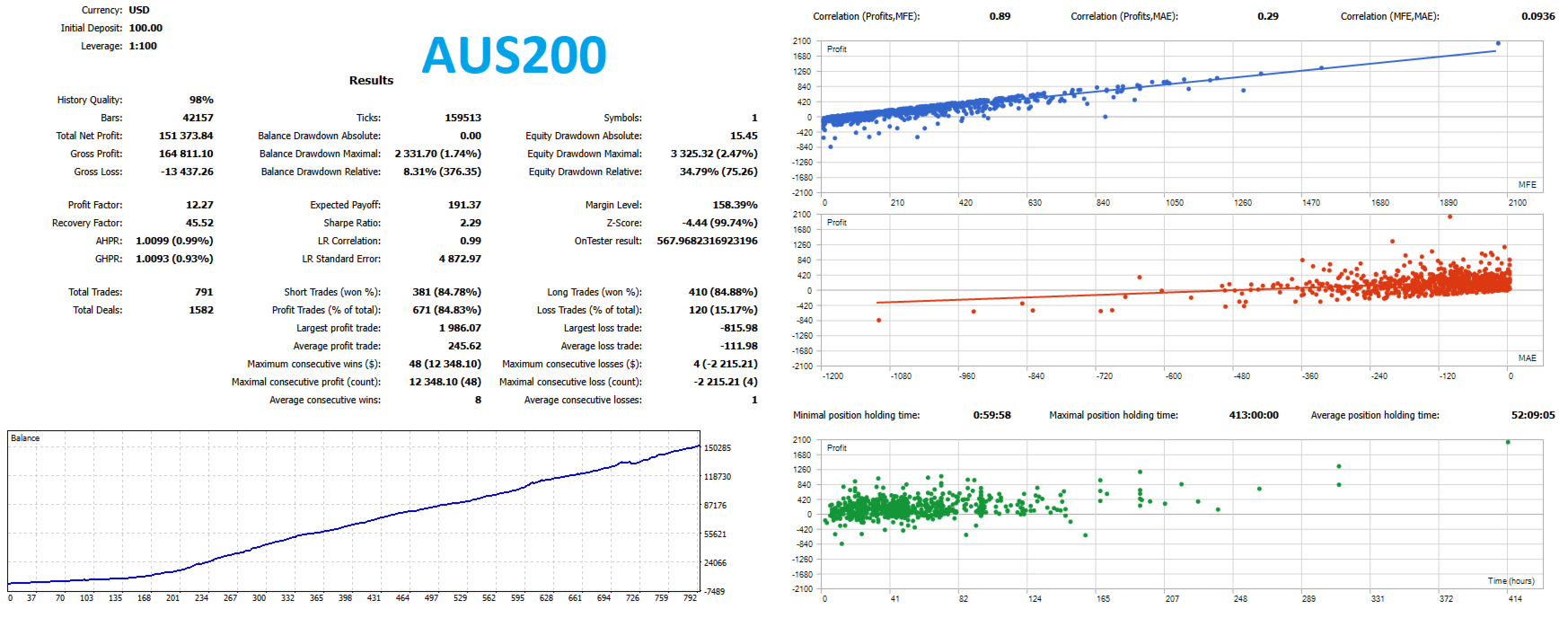
Recommended WorkflowFor best evaluation, test Under Control in the MetaTrader 5 Strategy Tester using the same symbols and timeframes intended for live deployment.
Begin with the default parameters as a reference configuration and then evaluate adjustments based on:
-
instrument volatility;
-
typical spread;
-
commission structure;
-
account size;
-
available liquidity;
-
execution conditions.
For a realistic evaluation, pay particular attention to trading costs and execution quality, since these factors can materially affect short-term and structure-based strategies.
After deploying the Expert Advisor on a demo account, monitor the initial trades and verify that position sizing, exposure, protection levels and execution behavior match your intended configuration.
Designed Around ControlThe philosophy behind Under Control is reflected in its architecture.
Control the setup.
Control the exposure.
Control the protection.
Control the execution.
The Expert Advisor combines market-structure concepts with explicit parameters for signal validation, capital allocation, position chains and trade protection.
It is designed for traders who want a configurable framework rather than a single-condition entry algorithm.
Important NoticeUnder Control is a trading software tool and does not guarantee profitable results.
Financial markets involve substantial risk, and no combination of technical conditions can guarantee the outcome of a trade.
Backtesting results are not a guarantee of future live performance. Actual results may differ due to spread, commission, slippage, liquidity, execution speed and other market conditions.
Thoroughly test the Expert Advisor on your selected instruments and timeframes before using it with real funds.
Always use position sizing and exposure levels appropriate to your own risk tolerance and trading plan.