SILVER PRECISION ENGINE MT5
Silver Precision Engine MT5 is a specialized automated Expert Advisor developed for trading Silver on MetaTrader 5.
The system is designed for XAGUSD on the H1 timeframe and focuses on selective, rule-based execution rather than continuous market exposure. It does not open trades simply because a new candle has formed. The EA waits until its internal market, signal, volatility, timing, and risk conditions are satisfied before allowing a new position.
The current strategy is buy-side only. It does not open short positions.
PRODUCT PROFILE
Platform: MetaTrader 5
Instrument: Silver / XAGUSD
Recommended timeframe: H1
Trading direction: Buy only
Execution: Fully automated
Current version: 9.7
Operating style: Selective swing and intraday execution
Recommended terminal operation: Continuous
One-month rental: USD 100
Six-month rental: USD 540
One-year rental: USD 1000
lifetime license: USD 4500
TRADING CONCEPT
Silver Precision Engine MT5 is built around a selective signal process.
The EA evaluates completed H1 candles and combines internal market information such as:
- Directional market structure
- Trend alignment
- Momentum conditions
- Volatility conditions
- Signal confidence
- Entry timing
- Protective distance requirements
- Available margin
- Current account exposure
- Maximum holding limits
A trade is opened only when the complete validation sequence is satisfied.
When the required conditions are not present, the EA remains inactive. This is normal behavior and is part of the strategy design.
The system is not intended to trade every candle, every hour, or every market movement. Its purpose is to reduce unnecessary entries and participate only when the internal filters identify a qualified setup.
SELECTIVE ORDER EXECUTION
Silver Precision Engine MT5 uses controlled order execution.
A validated trading setup may be divided into a small group of positions instead of opening an unlimited sequence of orders. This allows the EA to distribute the selected exposure while keeping the number of simultaneous positions controlled.
The execution model is designed to:
- Avoid constant position accumulation
- Limit the number of orders opened for one signal
- Prevent repeated entries from the same unconfirmed condition
- Separate one qualified setup into controlled order components
- Keep all positions under the same protection and exit logic
- Stop opening additional exposure when the internal conditions are no longer valid
The EA may therefore open more than one position for a confirmed setup, but it is not designed to continuously stack new positions without limits.
MAIN FEATURES
- Developed specifically for Silver/USD trading
-Designed for H1 timeframe
- Fully automated entry, management, and exit
- Use Machine learning, so it is continues learning system
- Buy-side strategy
- Selective trade-entry filters
- Controlled number of simultaneous positions
- Adaptive position-volume calculation
- Configurable capital-use percentage
- Configurable maximum-lot protection
- Stop Loss and Take Profit management
- Maximum holding-time controls
- Maximum holding-bar controls
- Internal risk-guard framework
- Margin and free-margin checks
- Broker volume and symbol validation
- Protective-distance validation
- Historical signal support for Strategy Tester operation
- Internal live decision logic for current market candles
- On-chart operating information and diagnostics
- Automated order comments for trade identification
- No manual trade entry is required after installation
EMBEDDED HISTORICAL SIGNAL CORE
Silver Precision Engine MT5 includes an embedded historical signal resource for supported historical periods.
This design allows the EA to operate in the MetaTrader 5 Strategy Tester without requiring the user to install a separate external CSV file.
For historical candles covered by the embedded data, the EA reads the corresponding internal historical signal.
For candles beyond the embedded historical range, the EA can use its internal live decision component to evaluate current market conditions.
This structure is intended to provide:
- Self-contained historical testing
- Easier installation
- No dependency on a separately supplied signal file
- Continuity between historical testing and current-market operation
- Clear diagnostic messages showing the active signal source
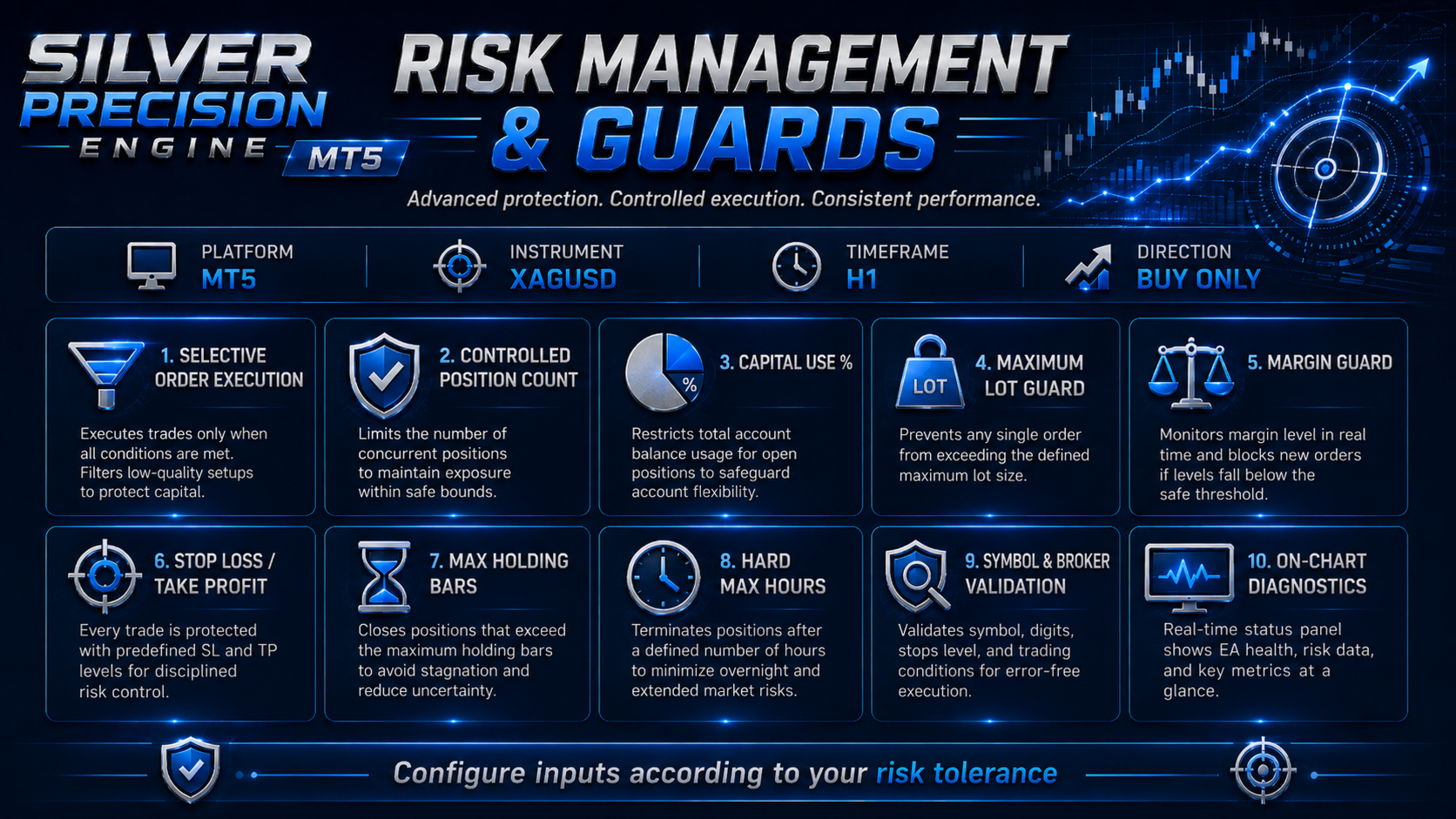
MULTI-LAYER RISK-GUARD FRAMEWORK
The EA includes several protective layers that operate before entry, during execution, and while positions are open.
These controls are intended to reduce uncontrolled exposure and prevent trades from remaining active outside the permitted operating conditions.
1. Pre-entry validation guard
Before opening a position, the EA checks whether the current setup satisfies its internal signal and market requirements.
The EA may reject an entry when:
- Signal confidence is insufficient
- Market conditions do not match the strategy
- Required protective levels are invalid
- The available margin is insufficient
- The calculated volume is outside broker limits
- The maximum-lot setting would be exceeded
- The current setup has already been processed
- The maximum permitted exposure has already been reached
2. Symbol and broker-specification guard
Silver contract specifications differ between brokers.
The EA checks relevant trading properties such as:
- Symbol availability
- Minimum volume
- Maximum volume
- Volume step
- Tick size
- Tick value
- Contract size
- Stop-distance requirements
- Margin requirements
This helps the EA adjust the requested volume to the broker's permitted trading conditions.
3. Capital-use guard
InpCapitalUsePercent controls the percentage of available account capital considered by the internal position-sizing system.
This setting does not guarantee a fixed risk percentage on every trade. It controls the amount of account capital available to the sizing calculation.
Reducing this value generally reduces exposure. Increasing it generally increases exposure and margin usage.
4. Maximum-lot guard
InpMaximumLot defines the maximum volume the EA is permitted to request.
The calculated lot size cannot intentionally exceed this user-defined limit.
This is an important protection when:
- The account balance grows
- Leverage is high
- Silver prices change
- The broker uses a different contract size
- The internal sizing calculation produces a large requested volume
5. Margin guard
Before execution, the EA checks whether sufficient margin and free margin are available.
A position may be rejected, reduced, or not opened when the account cannot safely meet the broker's margin requirement.
The EA also displays account and margin information on the chart to help the user monitor current exposure.
6. Stop Loss and Take Profit protection
Positions are opened with strategy-defined protective levels when valid broker conditions allow them.
The protective system includes:
- Stop Loss
- Take Profit
- Strategy exit conditions
- Protective validation before order placement
The exact distance can vary according to the market setup, volatility, and broker specification.
7. Maximum holding-bar guard
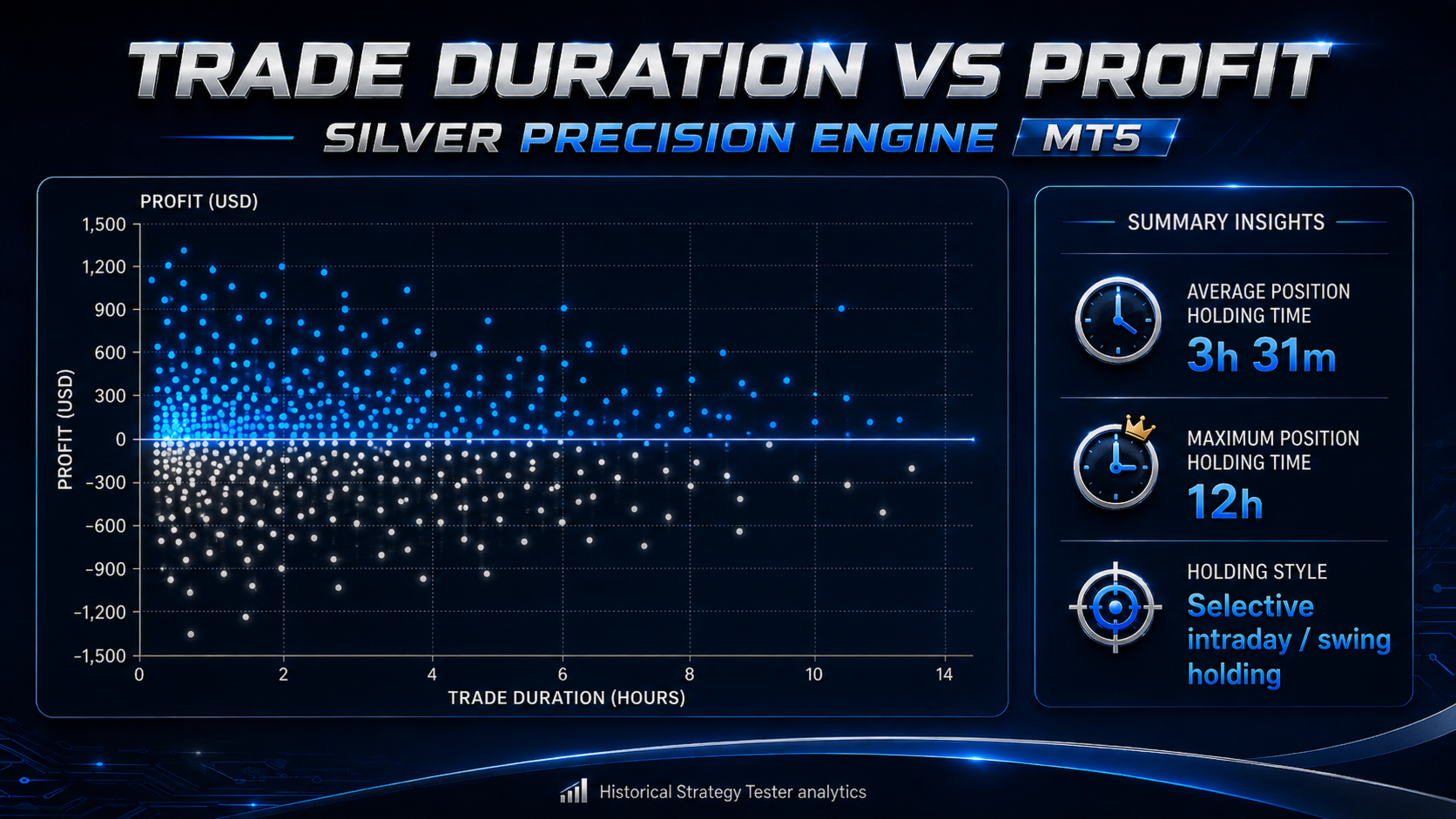
The EA limits how many H1 bars a position may remain active.
This prevents a trade from remaining open indefinitely when the expected market movement does not develop within the permitted number of bars.
8. Hard maximum holding-time guard
In addition to the bar-based limit, the EA includes a hard time limit measured in hours.
When the maximum holding period is reached, the EA can close the position even when neither the original Take Profit nor Stop Loss has been reached.
This creates a second time-based protection layer.
9. Active-position management guard
While positions are open, the EA continues monitoring:
- Current profit or loss
- Protective levels
- Holding duration
- Number of elapsed bars
- Current market conditions
- Exit triggers
- Account margin state
The EA can close positions when the normal strategy exit, protective exit, or maximum holding condition is triggered.
10. Duplicate-entry and exposure guard
The system tracks its own orders through internal trade identifiers and order comments.
This helps reduce repeated processing of the same signal and keeps the number of open positions associated with one setup controlled.
POSITION SIZING
The EA calculates volume dynamically using account and broker information.
The position-sizing process may consider:
- Current equity or available capital
- InpCapitalUsePercent
- Current Silver price
- Broker contract size
- Margin requirement
- Account leverage
- Minimum volume
- Maximum volume
- Volume step
- InpMaximumLot
Because brokers use different Silver contract specifications, the same account balance may produce a different lot size on different brokers.
Users should never assume that the backtested volume will be identical on another broker.
TRADING FREQUENCY
Silver Precision Engine MT5 is selective.
The EA can remain without a trade for extended periods when no valid setup is detected.
This behavior is intentional.
The system is designed to prefer:
- Fewer qualified setups
- Controlled exposure
- Clear protective levels
- Limited simultaneous orders
- Defined maximum holding periods
It is not designed to maintain permanent exposure or to open a new trade on every candle.
TRADE MANAGEMENT
After entry, the EA manages the complete trade process automatically.
Trade management can include:
- Monitoring Stop Loss and Take Profit
- Monitoring the maximum holding-bar limit
- Monitoring the hard maximum holding-time limit
- Closing positions when a strategy exit is triggered
- Preventing additional entries when exposure limits are reached
- Identifying positions using dedicated order comments
- Displaying current operating status on the chart
The user does not need to manually close normal EA positions unless an emergency or personal risk decision requires intervention.
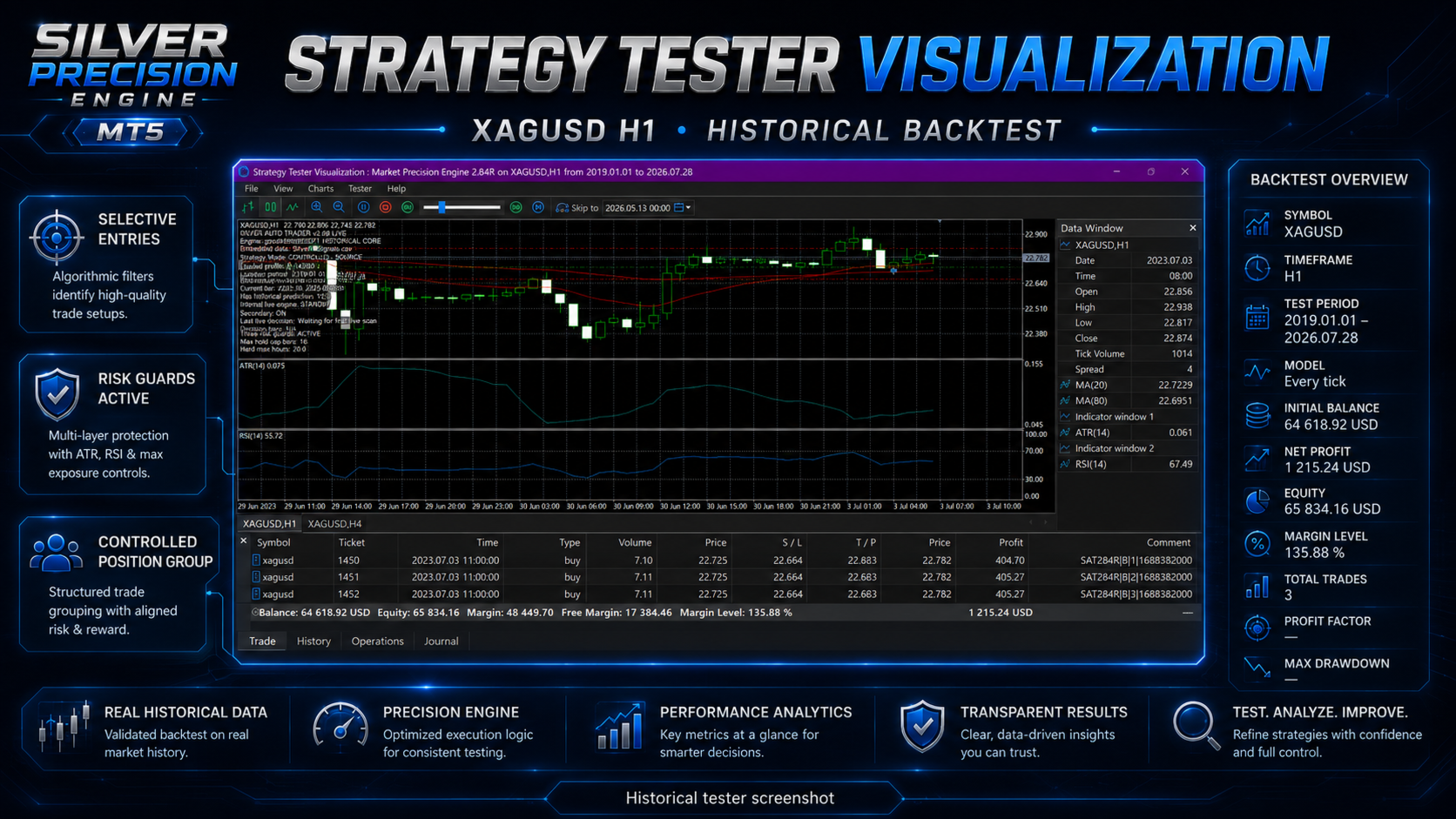
ON-CHART DIAGNOSTICS
The EA displays operating information directly on the chart.
Depending on the active operating mode, the panel can show information such as:
- Product and version
- Current engine mode
- Active signal source
- Current candle time
- Historical prediction availability
- Live decision status
- Current trading decision
- Risk-guard status
- Maximum holding-bar setting
- Hard maximum holding-time setting
- Account and margin information
These diagnostics help users understand whether the EA is waiting, processing historical signals, using current-market logic, managing open positions, or blocking an entry for protection reasons.
REFERENCE STRATEGY TESTER RESULT
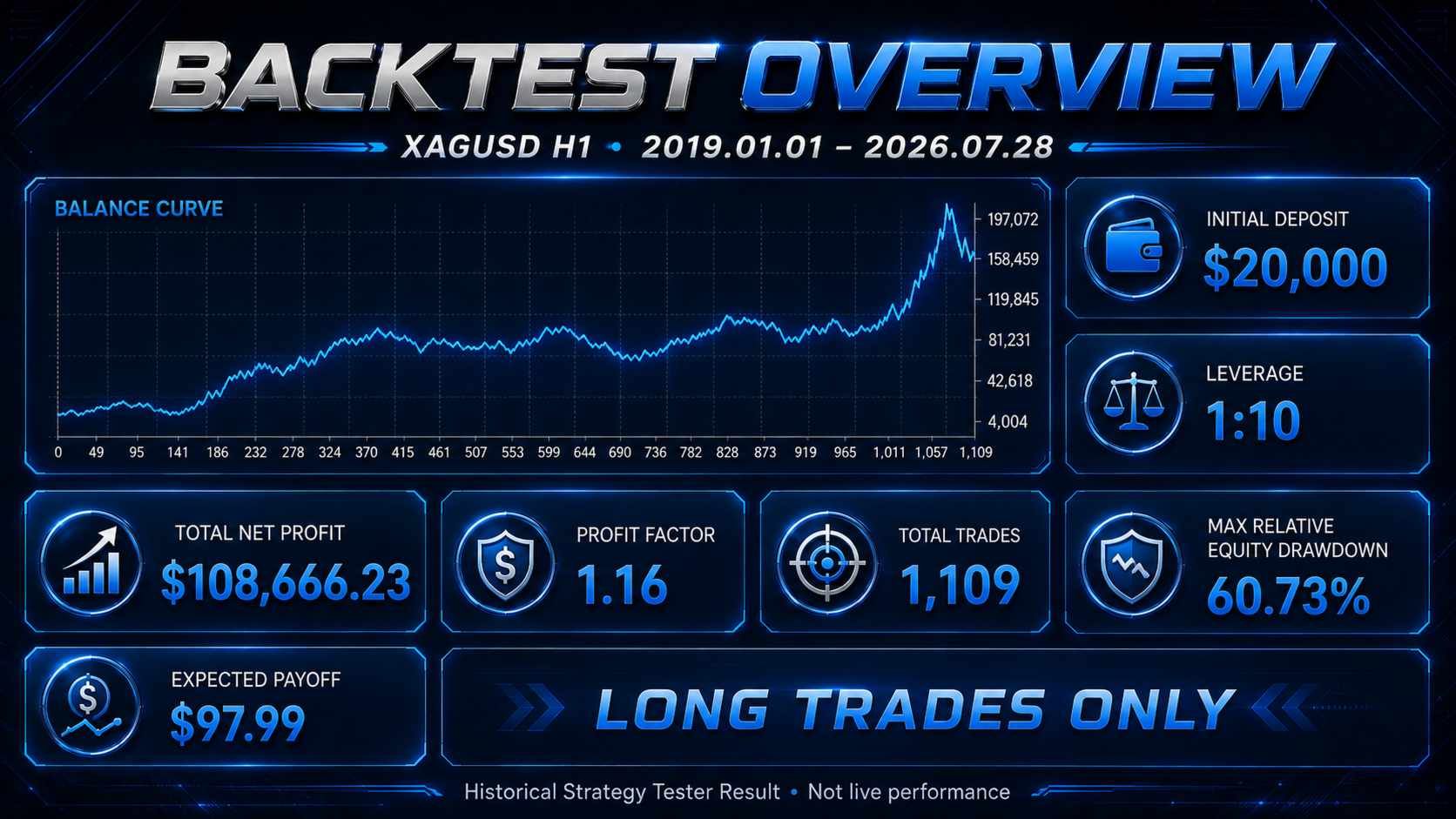
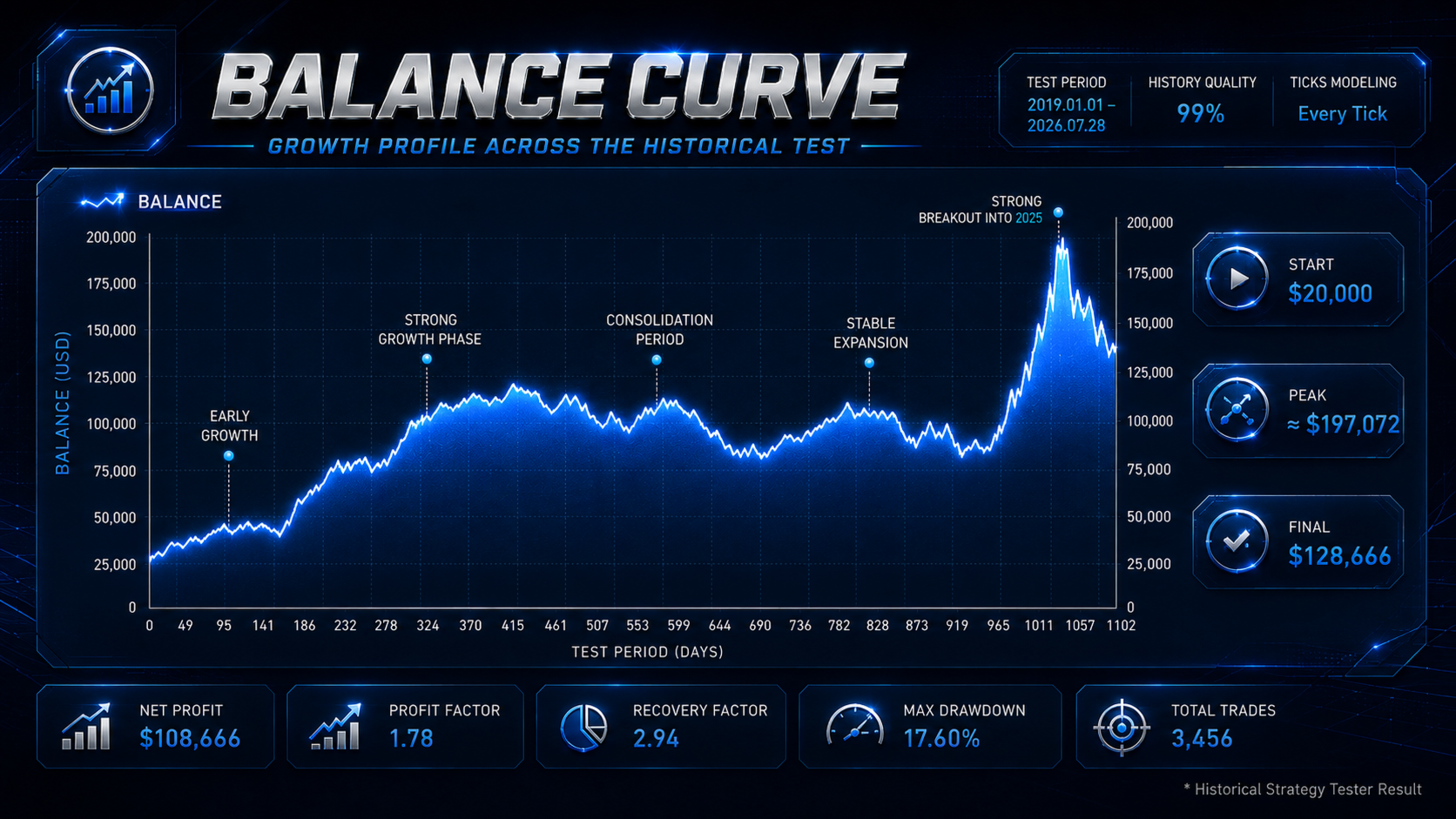
The following figures are historical MetaTrader 5 Strategy Tester results.
They are not live trading results and do not guarantee future performance.
Product version: 9.7
Platform: MetaTrader 5
Symbol: XAGUSD
Timeframe: H1
Test period: 1 January 2019 to 28 July 2026
History quality: 99%
Initial deposit: USD 20,000
Reference leverage: 1:10
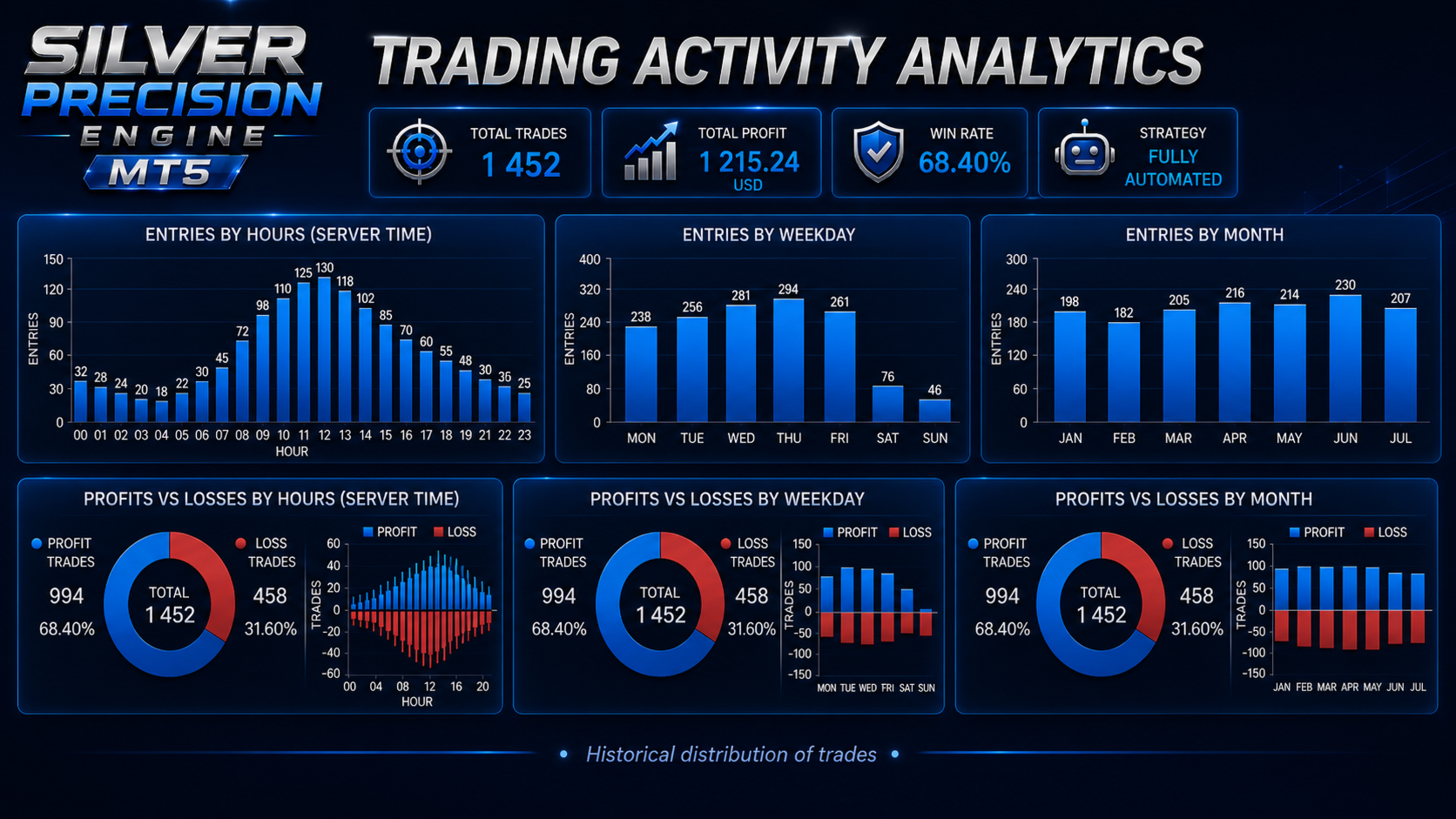
Total trades: 1,109
Total deals: 2,218
Long trades: 1,109
Short trades: 0
Profitable trades: 489
Profit trades: 44.09%
Loss trades: 620
Total net profit: USD 108,666.23
Profit factor: 1.16
Expected payoff: USD 97.99
Recovery factor: 1.27
Sharpe ratio: 3.24
Maximum relative balance drawdown: 58.70%
Maximum relative equity drawdown: 60.73%
Average position holding time: 3 hours 31 minutes
Maximum position holding time: 12 hours
Reference inputs:
InpMaximumLot = 10.0
InpCapitalUsePercent = 75.0
The reference configuration is aggressive and experienced substantial drawdown.
It should not automatically be considered suitable for every trader or account.
Users seeking lower exposure should test:
- A lower InpCapitalUsePercent
- A lower InpMaximumLot
- A larger account balance
- More conservative broker leverage
- Different spread and commission conditions
Changing the risk settings will also change trading volume, margin usage, profit, loss, and drawdown.
RECOMMENDED OPERATING ENVIRONMENT
Platform: MetaTrader 5
Instrument: Silver / XAGUSD
Recommended timeframe: H1
Trading direction: Buy only
Algorithmic trading: Enabled
Terminal operation: Continuous
Internet connection: Stable
VPS: Recommended
The EA should be attached to one supported Silver H1 chart.
A continuously operating MetaTrader 5 terminal is required for live trade management.
A VPS is recommended when the user's local computer cannot remain online continuously.
SUPPORTED SYMBOLS
The EA is intended only for Silver against the US Dollar.
Supported symbol naming can include common XAGUSD and SILVER variations, depending on the final Market build and broker format.
Examples may include:
- XAGUSD
- XAGUSD.a
- XAGUSDm
- XAGUSD.pro
- SILVER
- SILVER.a
The EA should not be attached to Gold, Forex pairs, indices, cryptocurrencies, or other instruments.
Users must verify symbol compatibility in the Strategy Tester before live use.
BROKER DIFFERENCES
Now the version 9.7 is compatible with the most of brokers trade silver.
Results can vary materially between brokers because Silver trading conditions are not standardized.
Important differences include:
- Contract size
- Tick value
- Tick size
- Minimum lot
- Maximum lot
- Volume step
- Margin requirement
- Account leverage
- Spread
- Commission
- Swap
- Stop-distance rules
- Historical price data
- Execution speed
- Slippage
- Trading-session availability
Before live use, the user should:
1. Confirm that the broker offers a supported Silver symbol.
2. Run a full Strategy Tester test using the broker's own data.
3. Check that the calculated lot size is accepted.
4. Review margin and free-margin requirements.
5. Compare spread and commission with the reference test.
6. Test the EA on a demo account.
7. Observe the on-chart diagnostics.
8. Confirm that orders, protective levels, and exits operate correctly.
INSTALLATION
1. Install Silver Precision Engine MT5 through the MetaTrader 5 Market.
2. Open the broker's supported Silver.
3. Select the H1 timeframe.
4. Attach the EA to the chart.
5. Enable algorithmic trading.
6. Review InpMaximumLot.
7. Review InpCapitalUsePercent.
8. Confirm that the on-chart diagnostic panel shows normal operation.
9. Keep MetaTrader 5 or the VPS running continuously.
Do not attach multiple copies of the EA to the same Silver account unless that exact configuration has been tested.
WHO THIS PRODUCT IS FOR
Version 9.7 be suitable for traders who:
- Want a dedicated Silver Expert Advisor
- Prefer selective trading instead of constant activity
- Understand that a system can experience losing periods
- Are willing to run broker-specific tests
- Can monitor margin and drawdown
- Prefer automated entry and exit management
- Can operate MetaTrader 5 continuously
- Accept that historical performance does not guarantee future results
This product is not suitable for users who:
- Expect guaranteed profits
- Expect daily trades
- Require a short-selling strategy
- Cannot tolerate drawdown
- Do not test on their own broker
- Use capital they cannot afford to lose
- Expect identical results across all brokers and accounts
RENTAL OPTIONS
One-month rental: USD 100
Suitable for users who want to evaluate the EA using their own broker, account conditions, VPS, Strategy Tester, and demo account.
Six-month rental: USD 540
Recommended for users who want a longer operating period and a lower effective monthly cost than repeated monthly rentals.
One-year rental: USD 1000
Provides the lowest effective monthly rental cost and is intended for users planning longer-term operation.
SUPPORT AND UPDATES
Product support is provided through the MQL5 messaging system and the product Comments section.
Support may include:
- Installation guidance
- Symbol-compatibility guidance
- Input-setting explanations
- Strategy Tester setup guidance
- Interpretation of on-chart diagnostic messages
- Assistance with common broker-specification issues
Updates may include:
- Broker-compatibility improvements
- Execution refinements
- Risk-control refinements
- Diagnostic-panel improvements
- Error corrections
- MetaTrader build compatibility
- Documentation improvements
Any material strategy change will be identified in the version notes.
IMPORTANT RISK NOTICE
Silver Precision Engine MT5 is an automated trading tool.
It is not a deposit, financial guarantee, investment promise, or guarantee of profit.
Historical Strategy Tester results cannot reproduce every live-market condition.
Live results may differ because of:
- Spread expansion
- Slippage
- Commission
- Swap
- Execution delays
- Price-feed differences
- Broker contract specifications
- Account leverage
- Available margin
- VPS latency
- Market gaps
- Trading interruptions
- Changes in Silver market behavior
The reference test experienced significant drawdown.
Use only capital you can afford to lose.
Evaluate the EA in the MetaTrader 5 Strategy Tester and on a demo account before live deployment.
Select the capital-use percentage and maximum lot carefully.
The user remains responsible for the final decision to operate the EA and for all resulting trading risk.