Supper Trend
- エキスパート
- バージョン: 2.0

A multi-strategy EA that automatically switches between trend-following via Supertrend and scalping during sideways markets, with an optional AI confirmation layer.
Overview
Most trend-following EAs (including the original Supertrend) share the same weakness: they perform great in a clear trending market but bleed losses repeatedly during sideways conditions, because reversal signals get whipsawed back and forth.
This EA addresses that with a two-layer architecture:
-
Trend Mode — enters on Supertrend (ATR-based) reversal signals, faithfully reproducing the original non-repainting TradingView indicator.
-
Sideway Mode — when the system detects a ranging market (via a 3-layer filter), the EA automatically switches to a scalping approach using RSI + Williams %R with ATR-based dynamic SL/TP, instead of standing idle or continuing to take losing trend trades.
On top of that, the EA can optionally integrate an AI layer (Grok) as a final confirmation step before entering a trade — the AI can analyze extra context (ADX, CHOP, RSI, W%R, account state) and decide EXECUTE/CANCEL, and can even split the position into multiple Market/Limit/Stop orders across different price zones.
How It Works
1. Market Regime Detection — 3-Layer Filter
| Layer | Tool | Condition that triggers Sideway |
| Layer 1a | ADX | ADX below threshold (default 22) → trend too weak |
| Layer 1b | Choppiness Index (CHOP) | CHOP above threshold (default 60) → market is "choppy", no clear direction |
| Layer 3 | Consecutive loss counter | Consecutive losing trades ≥ threshold → force the system into a safer mode |
If any one of these three conditions is true, the EA treats the market as Sideway.
2. Trend Mode
When conditions qualify as trending, the EA enters on the original Supertrend reversal signal (up/dn flip based on ATR), with options for:
-
Fixed lot size or lot sized by account risk % (based on Balance or Equity).
-
An optional Recovery system: increases lot size by a multiplier or a fixed addition after a losing trade, capped by a maximum risk % to limit damage, and automatically resets to the base lot once the account recovers.
3. Sideway Mode (Scalping)
When the market is ranging, the EA switches to a different logic entirely: it watches for overbought/oversold zones using RSI and Williams %R and takes short-term mean-reversion trades, with SL/TP calculated dynamically from ATR — adapting to the actual volatility at that moment instead of a fixed point value.
4. Optional AI Layer
If enabled, every signal (whether from Trend or Sideway mode) is sent along with technical context to the Grok API for confirmation before execution, or canceled if the AI assesses the risk as too high.
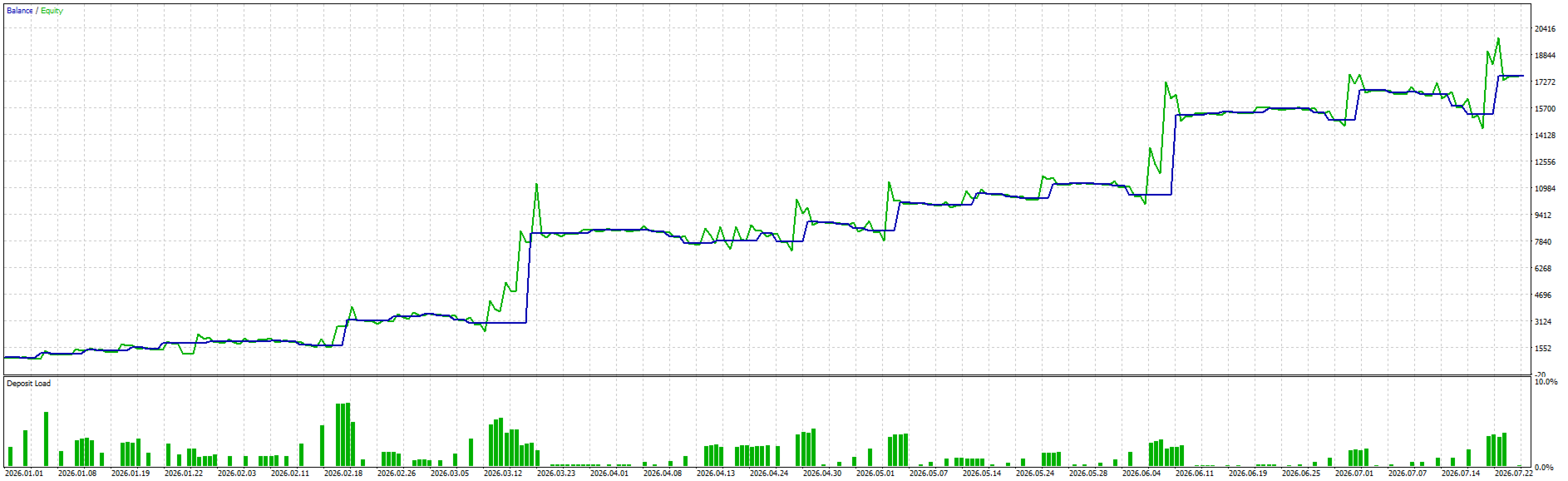
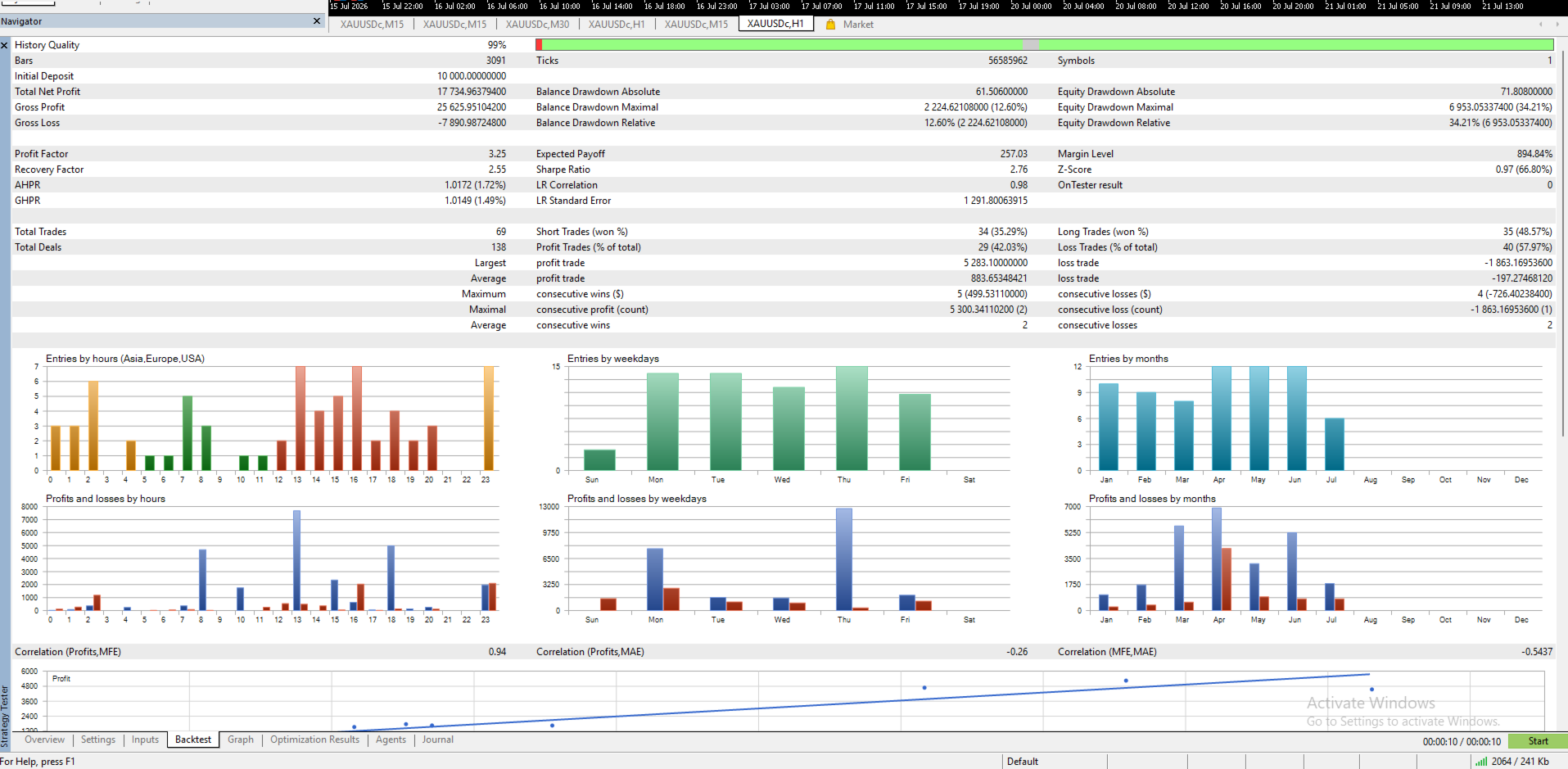
Illustrative Backtest Results
⚠️ Important note: These are backtest results on historical data (99% History Quality, 3,300 bars, starting deposit of 1,000), shown purely to illustrate how the system behaves, NOT a promise of future profit. You should re-run your own backtest on your symbol/timeframe/broker before considering live use.
| Metric | Value |
| Total Net Profit | +16,629.99 |
| Profit Factor | 3.65 |
| Recovery Factor | 4.14 |
| Sharpe Ratio | 3.87 |
| Total Trades | 70 (140 deals) |
| Win rate Long / Short | 45.71% / 40.00% |
| Winning / Losing trades (overall) | 42.86% / 57.14% |
| Average win / Average loss | +763.12 / −156.60 |
| Balance Drawdown Max | 1,448.62 (8.64%) |
| Equity Drawdown Max | 4,012.93 (35.44%) |
Worth noting: the win rate is only ~43%, yet the system is still profitable because the average winning trade is roughly 5x the average losing trade — a classic "let winners run, cut losses fast" trend-following profile. That said, relative Equity Drawdown (35.44%) is significantly higher than relative Balance Drawdown (16.13%), indicating there were periods of fairly deep floating drawdown before recovery. This is something to weigh carefully against your own risk tolerance before using larger lot sizes.
Parameter Guide
Supertrend Configuration
| Parameter | Default | Meaning |
| InpATRPeriod | 10 | ATR period used by Supertrend |
| InpMultiplier | 3.0 | ATR multiplier — increase to reduce noise, decrease for more sensitivity |
| InpUseBuiltinATR | true | true = standard (Wilder) ATR; false = self-calculated SMA(True Range) |
| InpTimeframe | PERIOD_CURRENT | Timeframe used to compute Supertrend |
Lot & Risk Management (Trend Mode)
| Parameter | Meaning |
| InpLotMode | FIXED (fixed lot) or RISK (sized by account %) |
| InpLotSize | Fixed lot size, used when FIXED is selected |
| InpRiskPercent | Risk % per trade, used when RISK is selected |
| InpRiskBase | Calculate risk % based on Balance or Equity |
Recovery System (optional, disabled by default)
| Parameter | Meaning |
| InpUseRecovery | Enable/disable lot recovery after a loss |
| InpRecoveryTrigger | Trigger only on SL hit, or on any losing trade |
| InpRecoveryMode | Increase lot by a multiplier, or by a fixed addition |
| InpRecoveryMultiplier / InpRecoveryAddLot | The step size for each increase |
| InpMaxRiskPercent | Maximum risk % cap — prevents lot size from growing indefinitely |
⚠️ Recovery is a Martingale-style mechanism — it always carries elevated risk even with a cap in place. Only enable it if you fully understand the mechanism and have tested it thoroughly.
3-Layer Sideway Filter
| Parameter | Meaning |
| InpUseADXFilter, InpADXPeriod, InpADXThreshold | Filter by ADX trend strength |
| InpUseChopFilter, InpChopPeriod, InpChopThreshold | Filter by Choppiness Index |
| InpUseLossCountFilter, InpMaxConsecutiveLosses | Force safe mode after a losing streak |
Sideway Trading (Scalping)
| Parameter | Meaning |
| InpEnableSidewayTrade | Fully enable/disable trading during Sideway regime |
| InpSidewayLotMode, InpSidewayCustomLot | Lot size used specifically for scalping trades (recommended smaller than Trend mode) |
| InpRSIPeriod, InpRSIOversold, InpRSIOverbought | Overbought/oversold zones based on RSI |
| InpWPRPeriod, InpWPROversold, InpWPROverbought | Overbought/oversold zones based on Williams %R |
ATR-Based Dynamic SL/TP
| Parameter | Meaning |
| InpUseDynamicSLTP | Enable SL/TP calculated from ATR instead of a fixed point value |
| InpDynamicSL_ATRMult, InpDynamicTP_ATRMult | ATR multiplier for SL and TP |
AI Grok Integration (optional)
| Parameter | Meaning |
| InpUseAI | Enable/disable the AI confirmation layer |
| InpAIApiKey, InpAIUrl, InpAIModel | API connection details |
| InpAITimeout | Maximum response wait time (ms) |
| InpAIFallbackOnFail | If the AI call fails/times out, still enter the trade based on the original signal |
Note: the AI layer uses a synchronous WebRequest call, so it does not work inside Strategy Tester — it only runs when the EA is attached to a live/demo chart. You must whitelist the API URL under Tools → Options → Expert Advisors → Allow WebRequest.
General Settings
| Parameter | Meaning |
| InpMagicNumber | Identifier for this EA's trades |
| InpSlippage | Maximum allowed slippage (points) |
| InpStopLossPts, InpTakeProfitPts | Fixed SL/TP (points), only used when Dynamic SL/TP is disabled |
| InpReverseOnSignal | Automatically close the opposite position on a reversal signal |
| InpOneTradePerBar | Only process a signal once per new bar (recommended: keep true) |
Quick Setup Guide
-
Backtest before going live — use Strategy Tester in "Every tick based on real ticks" mode to reflect realistic spread/slippage.
-
Start simple: disable InpUseRecovery and InpUseAI first, and run only the core Trend + Sideway logic to understand its behavior.
-
Lot configuration: beginners should use LOT_MODE_FIXED with a small lot; only switch to LOT_MODE_RISK once you understand the risk % that fits your own tolerance (0.5–1% per trade is a reasonable starting point).
-
Check SL/TP: if using a fixed InpStopLossPts, make sure the value is larger than your broker's minimum "Stops Level" requirement to avoid rejected orders.
-
If enabling AI: whitelist the correct API URL in your MT5 settings, and always keep InpAIFallbackOnFail = true so signals aren't missed if the API call fails.
-
Forward test on a Demo account for at least a few weeks before considering a live account, especially if using InpUseRecovery.
Strengths
-
Not just another plain trend-following EA — it switches between two distinct trading modes based on actual market conditions, addressing part of the classic "loses money in sideways markets" weakness of a pure Supertrend system.
-
The 3-layer filter (ADX + CHOP + consecutive-loss counter) helps reduce noisy signals without relying on complex secondary indicators.
-
SL/TP can be calculated dynamically from ATR — adapting to market volatility instead of using a fixed point value.
-
Flexible lot management (fixed or risk %), with the option to extend further using AI as an additional filtering layer.
-
Extensive parameters allow deep customization per symbol/timeframe.
Weaknesses / Things to Keep in Mind
-
Many parameters means more tuning time for each specific symbol/broker/timeframe; there is no single setting that works for every market.
-
The Recovery system is fundamentally Martingale-style — even with a maximum risk cap, it can still amplify losses if an unusually long losing streak occurs.
-
The AI layer cannot be backtested (a limitation of WebRequest in Strategy Tester) — it can only be evaluated through actual Demo/Live runs, and adds API cost plus processing latency.
-
The sample backtest above only covers 70 trades over a relatively short history — longer-term data and real forward testing are needed to properly assess long-term stability.
-
Relative Equity Drawdown in the backtest (35.44%) is notably higher than relative Balance Drawdown (16.13%) — be prepared, both mentally and in terms of capital, for periods of deep floating drawdown.
Risk Disclosure
Automated Forex/Gold trading carries the risk of capital loss. Past backtest results do not guarantee future performance. Please review the mechanics carefully, make sure you understand how the system works, and only trade with capital you can afford to lose.