Donchian Portifolio Pro
- エキスパート
- バージョン: 1.10
- アップデート済み: 18 7月 2026
- アクティベーション: 10

DONCHIAN PRO - PORTFOLIO EA FOR METATRADER 5
Donchian Pro is a multi-symbol trend-following Expert Advisor designed to monitor a focused Forex portfolio from a single MT5 chart.
The default setup combines long-term Donchian breakouts, an EMA 200 trend filter, ATR-based trade management and account-level risk protection. Signals are evaluated using completed H4 candles only.
The EA does not use martingale, grid recovery or position averaging. Every accepted trade is opened with an initial Stop Loss, while exposure is controlled at both symbol and portfolio levels.
DEFAULT STRATEGY
The standard configuration is the main reference setup and is intended for EURUSD and GBPUSD on H4.
- Donchian entry period: 140 completed bars
- Donchian exit period: 70 completed bars
- Trend filter: EMA 200
- ATR period: 14
- Initial Stop Loss: 1.50 ATR
- Initial Take Profit: 2.00 ATR
- Maximum holding period: 24 H4 bars
- Cooldown: 35 H4 bars per symbol
- Risk per trade: 0.25% of account balance
- Maximum portfolio positions: 2
- Maximum positions per symbol: 1
- Maximum daily equity loss: 2%
- Maximum drawdown from peak equity: 10%
Buy signals are accepted only above the EMA 200. Sell signals are accepted only below the EMA 200. Entries are evaluated after the signal candle closes, avoiding decisions based on an unfinished H4 bar.
The default setup deliberately favors selectivity over trading frequency. Long Donchian periods and the H4 timeframe can produce extended periods without entries. This is expected behavior and not an execution problem.
MULTI-SYMBOL OPERATION
One EA instance can monitor EURUSD and GBPUSD from a single chart.
Recommended installation:
- Platform: MetaTrader 5
- Suggested chart: EURUSD H4
- Default portfolio: EURUSD, GBPUSD
- EA instances: one
- Algo Trading: enabled
Make sure all configured symbols are available in Market Watch. If your broker uses symbol suffixes, enter the complete names in SymbolsList, for example:
EURUSD.a,GBPUSD.a
The timeframe of the chart does not change the internal signal timeframe, although H4 is recommended for clarity and consistent testing.
RISK AND EXECUTION PROTECTION
Donchian Pro includes:
- Percentage-risk or fixed-lot sizing
- Risk-based volume rounded down to the broker's volume step
- Protection against increasing volume only to reach the minimum lot
- Automatic volume reduction when margin is insufficient
- Minimum free-margin requirement
- Maximum margin-usage limit
- Daily equity-loss protection
- Peak-equity drawdown protection
- Spread filter
- Cooldown between trades
- Maximum exposure per symbol
- Maximum portfolio exposure
- Protection against conflicting positions opened by another strategy on the same symbol
If the calculated risk volume is below the broker's minimum lot, the EA skips the trade. This is intentional. The robot will not silently increase the selected percentage risk just to force an entry.
INFORMATION PANEL
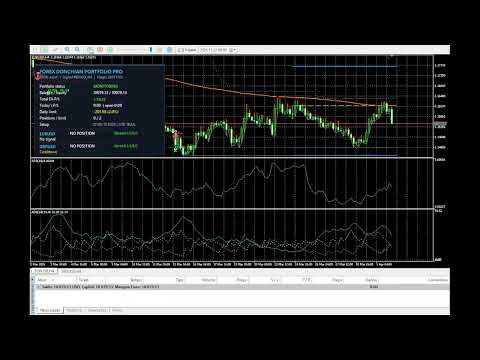
The professional on-chart panel displays:
- Account balance and equity
- Total EA profit or loss, including open positions
- Current daily result and daily limit
- Open portfolio positions
- Active strategy settings
- Current spread
- Status of each monitored symbol
- Current trading or protection state
Optional visual tools can display the Donchian structure, EMA reference and trade markers directly on the chart. These visual elements can be disabled when maximum tester performance is preferred.
SUGGESTED SMALL-BALANCE TEST SETTINGS
The values below are manual testing suggestions. They are not a separate built-in preset and do not guarantee that the broker's minimum lot will fit the selected risk.
For balances around USD 50 to USD 100, a cent account is strongly recommended. On many standard Forex accounts, the minimum volume of 0.01 lot can already represent excessive risk for a small balance.
Suggested conservative starting point:
- SymbolsList: EURUSD
- LotMode: LOT_RISK_PERCENT
- RiskPercent: 0.10 to 0.25
- MaxPortfolioPositions: 1
- MaxPositionsPerSymbol: 1
- MaxDailyLossPercent: 1.0
- MaxPeakDrawdownPercent: 5.0
- MaxMarginUsagePercent: 20.0
- AutoReduceLotForMargin: true
- BlockIfMarginCheckFails: true
- MinBalanceToTrade: reduce the default USD 100 threshold only after testing
For a USD 50 test account, MinBalanceToTrade can be tested at 40.0 to preserve an additional balance floor.
Keep the default Donchian, EMA, ATR, Stop Loss, Take Profit, exit and cooldown settings unchanged during the first small-balance comparison. This isolates the effect of money management from the strategy logic.
If the Strategy Tester reports no trades because the calculated volume is below the broker's minimum, use a cent account or a larger test deposit. Increasing RiskPercent or forcing a fixed lot only to create trades changes the risk profile and is not recommended without separate validation.
STRATEGY TESTER - STRONGLY RECOMMENDED
Before using the EA on any account, test it with your broker's symbols, contract specifications, spread, commission and historical data.
Recommended testing procedure:
1. Begin with the unchanged default configuration on EURUSD H4.
2. Add EURUSD and GBPUSD to Market Watch and download their H4 history.
3. Use Every tick based on real ticks whenever reliable tick data is available.
4. Test several market years instead of one short favorable period.
5. Separate development data from an out-of-sample period.
6. Use MT5 forward testing during optimization.
7. Include realistic spreads, commission, swaps and execution assumptions.
8. Run the EA on a demo account before considering live execution.
9. For small balances, compare the default setup with the suggested manual settings without changing the signal logic.
Backtests are research tools, not forecasts. Results can vary between brokers because of pricing, spread, commission, swaps, tick history, contract size and execution conditions.