Bullish Consecutive Signal
- インディケータ
- バージョン: 1.0

Bullish Consecutive Signal — Consecutive Bullish Candle Buy Signal with Alerts & P&L Simulation
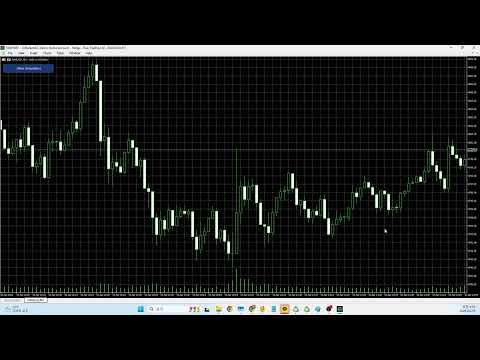
Bullish Consecutive Signal automatically detects consecutive bullish candle patterns and marks high-probability buy entries directly on the chart. Each signal comes with an ATR-calculated Stop Loss and Take Profit level, drawn as reference lines so you can assess risk at a glance. A built-in P&L back-simulation lets you evaluate strategy performance without leaving the chart.
If you apply this indicator to a different symbol or timeframe, results may vary significantly. Always backtest and adjust the filters, ATR multipliers, and MA periods before using the indicator in a live environment.
"Sim trigger (true = run immediately)" input to true to execute on next load.
Default settings are tuned for XAUUSD M1. Other symbols and timeframes require individual testing and parameter optimization.
Parameter Descriptions (All default values are calibrated for XAUUSD on the M1 chart.)
Parameter Description Default
── Signal Conditions ──
InpBullCount Number of consecutive bullish candles required to confirm a buy signal. A candle is bullish when Close > Open. Higher values produce fewer but potentially stronger signals. 3
── Moving Average Filter ──
InpShortMAPer Period of the short-term EMA used for MA alignment and open-position filtering. 7
InpLongMAPer Period of the long-term EMA used for MA alignment and open-position filtering. 30
InpMACond MA alignment requirement. Golden Cross: short EMA must be above long EMA. Dead Cross: short must be below long. Disabled: no alignment check is applied. Disabled
InpOpenFilter Requires the signal bar's open price to be below the selected EMA. Below Short MA filters pullback entries against the short EMA. Below Long MA uses the long EMA. Disabled: no position filter. Below Short MA
InpMADistMin Minimum price distance between the short and long EMAs. Set to 0 to disable. Useful for filtering flat, non-trending market conditions. 0.0
── Bollinger Bands ──
InpBBPeriod Period of the Bollinger Bands used for the lower-band touch filter. 20
InpBBDev Standard deviation multiplier for the Bollinger Bands. 2.0
InpBBTouch When true, at least one candle in the bullish sequence must have touched or crossed the lower Bollinger Band. Adds a mean-reversion condition to the entry. false
── ATR SL / TP Settings ──
InpATRPeriod Period used to calculate the Average True Range (ATR) for dynamic SL and TP placement. 14
InpATRMultSL ATR multiplier for the Stop Loss. SL = Entry − (ATR × this value). Increase to give the trade more room; decrease for a tighter stop. 1.5
InpATRMultTP ATR multiplier for the Take Profit. TP = Entry + (ATR × this value). The default setting produces a 2 : 1 reward-to-risk ratio (3.0 ÷ 1.5). 3.0
InpLineBars Number of bars that the SL / TP / Entry reference lines extend to the right of the signal bar. Cosmetic only; does not affect calculations. 8
── Filter ① — RSI Range ──
InpRsiEnable Enables the RSI range filter. When active, a signal is accepted only if the RSI value falls within [InpRsiMin, InpRsiMax]. false
InpRsiPeriod RSI calculation period. 14
InpRsiMin Lower boundary of the acceptable RSI range. Signals with RSI below this value are rejected. 35.0
InpRsiMax Upper boundary of the acceptable RSI range. Signals with RSI above this value are rejected. 60.0
── Filter ② — ADX Trend Strength ──
InpAdxEnable Enables the ADX strength filter. When active, signals are accepted only when ADX is above InpAdxMin, indicating a trending rather than ranging market. true
InpAdxPeriod ADX calculation period. 7
InpAdxMin Minimum ADX value required to pass the filter. A value of 20 is a widely used threshold for a trending market; lower values are more permissive. 19.0
── Filter ③ — Long-Term MA Direction ──
InpTrendMAEnable Enables the trend MA direction filter. When active, signals must align with the position of price relative to the slow EMA. false
InpTrendMAPer Period of the slow trend EMA (e.g. 200 for the classic 200 EMA). 200
InpTrendMAAbove When true, signals are accepted only when price (bar open) is above the trend EMA — bullish bias. When false, only signals below the EMA are accepted — bearish bias / counter-trend mode. true
── Filter ④ — Candle Body Size ──
InpBodyEnable Enables the candle body size filter. Rejects signals where the average candle body of the bullish sequence is too small relative to ATR. true
InpBodyMinRatio Minimum required body size expressed as a percentage of ATR. The average body across the bullish sequence must equal or exceed (ATR × InpBodyMinRatio / 100). Increase to require stronger bullish momentum. 7.0
── Filter ⑤ — Trading Session ──
InpTimeEnable Enables the session time filter. When active, signals outside the defined hour range are ignored. false
InpTimeStart Session start hour (server time, 0–23). Signals at or after this hour are allowed. 7
InpTimeEnd Session end hour (server time, 0–23). Signals before this hour are allowed. If InpTimeEnd < InpTimeStart the filter wraps around midnight (e.g. 22:00–06:00). 21
── Live Alerts ──
InpAlertPopup Enables an on-screen popup alert each time a new signal is detected on the latest completed bar. true
InpAlertEmail Sends an email alert on each new signal. Requires SMTP settings configured under MT5 Tools → Options → Email. false
InpAlertPush Sends a push notification to the MetaQuotes mobile app on each new signal. Requires a MetaQuotes ID registered under MT5 Tools → Options → Notifications. false
── Simulation ──
InpSimDays Number of calendar days to include in the P&L back-simulation, measured back from the current bar. Click the "[ Run Simulation ]" button on the chart to execute. 100
InpSimLots Lot size used to calculate the simulated dollar P&L for each trade. Does not affect signal detection. 0.1
InpSimTrigger Set to true to run the simulation automatically on indicator load, without clicking the button. Useful on live accounts where chart object click events may not fire correctly. false