Phantom Trail Pro MT4

Standard trailing stops cost you money. They trail too tight and stop you out before the move is done.

You enter a clean trend. The trade is working, price is moving in your direction. You activate the trailing stop. And then — a normal pullback, one candle against the trend, and you're out. Price continues without you. You were right. The trailing stop was wrong.

This is not a trailing stop problem. It is a fixed-distance trailing stop problem.

Markets don't move in straight lines. They breathe. They pull back before continuing. A fixed pip trailing stop ignores volatility, ignores the candle structure, and treats a 50-pip EURUSD move the same as a 500-pip XAUUSD move. That's why it stops you out.

PHANTOM Trail Pro replaces standard trailing with stepped ATR-based trailing — a system that adapts to actual market volatility and gives your trades the room they need to run.

---

### What PHANTOM Trail Pro Does

PHANTOM Trail Pro is a MetaTrader 5 trailing stop utility that attaches to your open positions and manages them through a 4-stage intelligent trailing process. It combines ATR-based stop distances, Break Even logic with a buffer zone, optional partial closes at profit targets, and a minimum SL distance to prevent premature stopouts.

It works on your trades whether you entered manually or via an EA. No signal generation — just pure mechanical trade management done right.

---

### Who This Is For

- Manual traders who want professional trailing stop management without coding it themselves
- EA users whose automated strategies have no trailing or use fixed-pip trailing
- Scalpers who need precise SL management on fast-moving instruments
- Swing traders who want to let winners run without manually monitoring every candle
- Prop firm traders who need to maximize winner size without exposing too much profit to reversal

---

### How It Works

Phase 1 — Minimum Profit Threshold
Trail Pro waits until the trade reaches a defined profit level before any trailing begins. No premature breakeven moves. The trade has room to establish direction.

Phase 2 — Break Even with Buffer
When profit threshold is hit, Trail Pro moves the SL to break even — but with a buffer. Not exact entry. A buffer below entry means price can pull back slightly without stopping you at zero. The buffer is fully configurable.

Phase 3 — Stepped ATR Trailing (4 Stages)
Once in profit beyond BE, Trail Pro begins stepped trailing. The trail moves in defined increments — not continuously. This is intentional. Continuous trailing follows every tick and gets stopped out on normal volatility. Stepped trailing only moves when the market earns it. Each step uses ATR as the distance multiplier, so the trail widens on volatile instruments and tightens on quiet ones.

All 4 steps are independently configurable: profit trigger, ATR multiplier, trail distance.

Phase 4 — Partial Closes
At defined profit targets (TP1, TP2), Trail Pro can close a percentage of the position. Bank profit, reduce exposure, let the runner continue with a tighter trail. All configurable per position type.

---

### Full Feature List

Trailing Engine
- 4-stage stepped ATR trailing (steps 1 through 4, each independently configurable)
- ATR period configurable (default 14, adjustable per symbol)
- Continuous trail mode available (off by default — stepped is recommended)
- Trail only activates after minimum profit threshold is reached

Break Even
- BE with configurable buffer (pips above entry, not at exact entry)
- BE trigger: configurable profit level before BE activates
- Prevents zero-loss stopouts on retracements

Partial Closes
- TP1 partial close: close X% at first profit target
- TP2 partial close: close Y% at second profit target
- Remaining runner continues with stepped trail
- Each close percentage configurable

Minimum SL Distance
- Prevents SL from being placed too close to current price
- Symbol-aware defaults (wider for XAUUSD, tighter for EURUSD)
- Protects against broker minimum stop requirements

Trade Filtering
- Magic number filter: apply Trail Pro to specific EAs or all trades
- Symbol filter: manage specific instruments only
- Direction filter: apply to long trades, short trades, or both

Cooldown
- Configurable cooldown period after each SL modification
- Prevents SL from updating too frequently on fast markets

Modes
- Easy Mode: select preset profile (Conservative / Balanced / Aggressive + symbol type), set BE buffer, go
- Advanced Mode: configure every parameter per step independently

Notifications
- Telegram alerts: BE move, step triggers, partial closes, final SL hit
- On-screen alerts in MT5
- MT5 push notifications

Compatibility
- Works with any Expert Advisor
- Works with manual trades
- No internet connection required
- No subscription, no API, no external server
- Any broker (hedging recommended for partial closes)

---

### What You Get

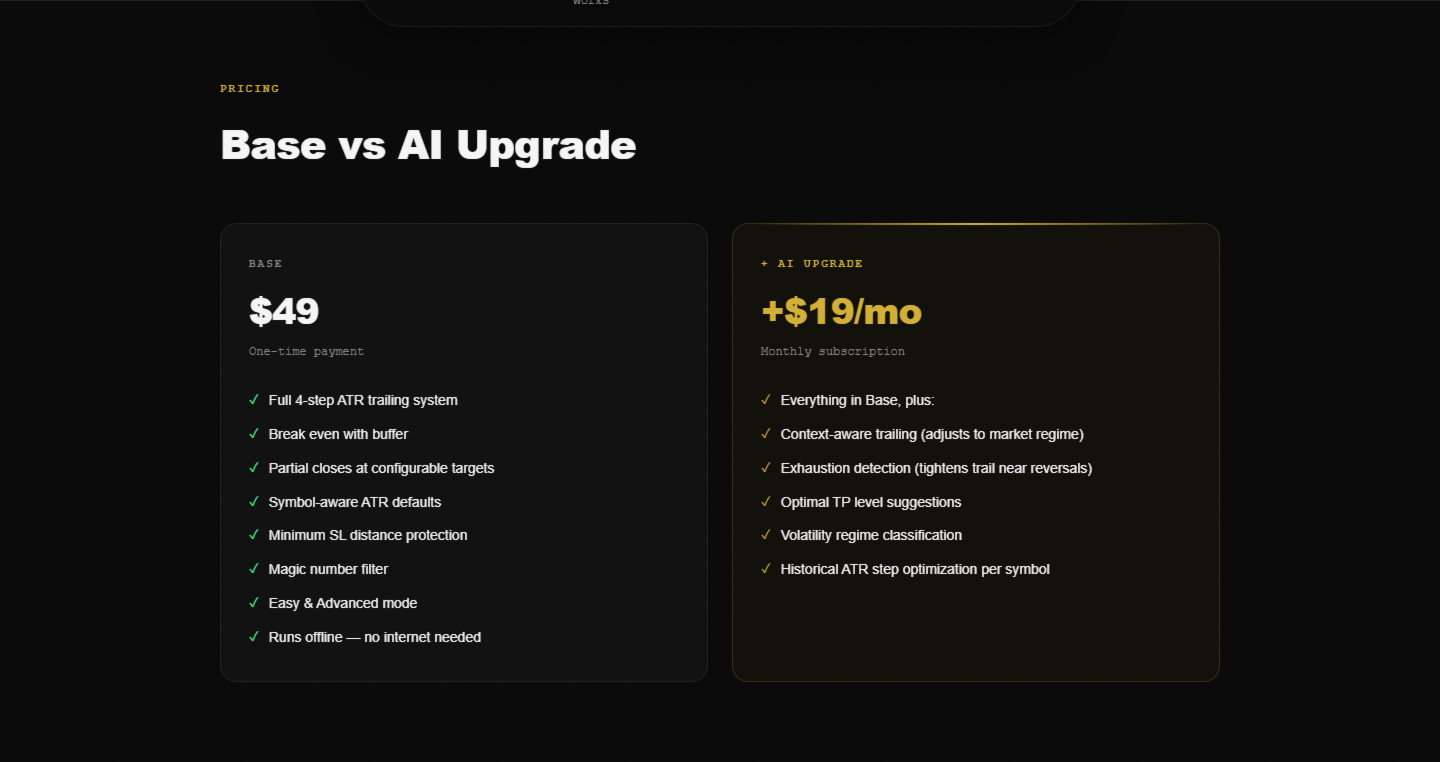
- Wider runners — stepped trailing gives trades room to develop fully
- Banked profits — partial closes lock in gains before the inevitable pullback
- Consistent execution — Trail Pro manages exits systematically, not emotionally
- Universal compatibility — works alongside any EA without modification
- Set and forget — drag it on, let it manage everything

---

### Good to Know

Stepped trailing is not continuous trailing. The SL moves in jumps, not tick by tick. This is a deliberate design choice — it reduces whipsaw stopouts significantly. If you expect continuous pixel-perfect trailing, this is not the right tool. If you want to stay in winning trades longer, it is.

Trail Pro works best in trending markets. In choppy, ranging conditions, ATR trailing distances widen and the tool becomes less precise. Consider combining with PHANTOM News Shield to avoid news-driven chop.

Partial close functionality requires a hedging account or a broker that supports partial position closure. Verify your broker supports this before enabling partial closes.

If a trade reverses sharply before reaching the profit threshold, Trail Pro does not interfere. Your original stop loss remains in place. Trail Pro only activates once the minimum profit threshold is reached.

---

### Setup in 3 Steps

1. Drag PHANTOM Trail Pro onto any chart (manages all open positions account-wide or per filter)
2. Choose mode: Easy (preset) or Advanced (manual config)
3. Done — Trail Pro monitors and manages all matching open trades from that moment forward

---

### System Requirements

- MetaTrader 5 (Build 4000+)
- Hedging account recommended (for partial closes)
- Any broker (ECN, STP, Market Maker all supported)
- No internet connection required
- Compatible with any Expert Advisor
- VPS optional but recommended for 24/7 operation

---

Part of the PHANTOM Trading Suite:
- Phantom News Shield — Automatic news protection
- Phantom Trail Pro — Smart trailing stop manager
- Phantom Guardian — Prop firm risk management
- Phantom Copier — Smart trade copier
- Phantom Airbag — AI trade filter for any EA
- Phantom Trader DSS — Autonomous AI trader

Try the full PHANTOM Suite free for 14 days at goldfoundry.de/sentinel
おすすめのプロダクト
Gann Box MT4
Frederic Jacques Collomb
5 (1)
Gann Box インジケーターは、トレーダーが市場の重要なレベルを特定し、活用するのを支援するために設計された強力で多機能なツールです。このインジケーターを使用すると、チャート上に長方形を描くことができ、それが自動的に 0, 0.25, 0.50, 0.75, 1 の戦略的レベルを持つ複数のゾーンに分割されます。価格がこれらのレベルのいずれかに達すると、アラートがトリガーされ、トレーディングの意思決定に貴重な支援を提供します。描いたゾーンに対する市場の動きを即座に把握できます。ゾーンをトレースするには、単純な長方形を描いて名前を GannBox に変更するだけです。 このインジケーターは、 サポートとレジスタンス の概念を使用するトレーダー、 サプライとデマンド 、 ICTテクニック 、または**公正価値ギャップ(FVG)**の専門家など、すべてのタイプのトレーダー向けに設計されています。 デイトレーダー、スイングトレーダー、またはポジショントレーダーであろうと、 Gann Box は市場の動きをより良く理解し予測する手助けをし、反応性とパフォーマンスを向上させます。 MT5バージョ
What is it? Think about it, you can send all the orders/positions info to your telegram channel or group to create your community or VIP signals on telegram. Position info means this EA forward all of your new positions open details (Open price, Open time, Position Type, position Symbol and volume), positions changes ( SL or TP modifying or pending price changes) and position close (Close price, profit or loss, position duration time) and also EA Send NEWS alert (Economic calendar event) on you
革新的な Trades Time Manager を使用して、取引ルーチンを簡単に管理できます。この強力なツールは、指定された時間に注文執行を自動化し、取引アプローチを変革します。 購入から注文の設定まで、すべて手動介入なしで、さまざまな取引アクションのためのパーソナライズされたタスク リストを作成します。 Trades Time Manager のインストールと入力ガイド EA に関する通知を受け取りたい場合は、MT4/MT5 ターミナルに URL を追加してください (スクリーンショットを参照)。 MT4のバージョン     https://www.mql5.com/en/market/product/103716 MT5のバージョン     https://www.mql5.com/en/market/product/103715 手動監視に別れを告げ、合理化された効率を採用します。直感的なインターフェイスにより、シンボル、約定時間、価格、ストップロス (SL)、テイクプロフィット (TP) ポイント、ロットサイズなどの正確なパラメーターを設定できます。 このツールの柔軟性は、市
Based on my original trading strategy, it appears that this EA is programmed to use technical analysis to identify an inside candle pattern in the current candle and wait for a breakout in either direction. If the price breaks out higher, the EA will place a buy order, and if it breaks out lower, the EA will place a sell order. The take profit and stop loss levels are set at 50 pips each. Additionally, using a martingale strategy, which involves increasing the lot size after a losing trade, ca
FREE
The initial price is 92.25 USD, the future price is 250 USD Universal advisor with the use of economic and fundamental news " Smart News Trade ". Trading tactics are based on tracking the dynamics of the market and accelerating the price movement. Not guessing, not forecasting, only calculations with clear guidelines for the direction of positions. The work is carried out with pending orders, a stop loss is used to protect funds. A VPS server is required for smooth operation. Ease of use: Ther
close all profitable orders The set contains scripts for different purposes, facilitating work in the MetaTrader 4 terminal. If necessary, a screen is provided for some scripts. Before working on a real account, check (on a demo account) whether the required script responds to your tasks (for example, there is a script for opening five orders at the same time, by default the lot is set to 10; so that you do not accidentally open five positions with a total volume of 50 lots - be attentive))) Use
Heaven Assistant: Simplify Your MT4 Management Simplify the management of the MetaTrader 4 (MT4) platform with the Heaven Assistant . This Expert Advisor (EA) is a robust tool that allows you to control and customize your trading environment in an efficient and user-friendly manner. Key Features: Multiple Pairs Opening: Quick access to most currency pairs, both major and minor, plus exotic pairs. The ability to open indices, metals, and cryptocurrencies with a single click. Template Change: Easi
Discord to Telegram Pro とは? Discord to Telegram Pro は、選択した Discord チャンネルのメッセージを自動的に読み取り、Telegram のチャンネル、グループ、または個人チャットへ直接転送する MetaTrader 4 用のプロフェッショナルなブリッジです。 この EA は、シグナル配信者、プライベートコミュニティ、Discord のトレーディンググループ、そして Discord のメッセージを手動でコピーせず Telegram に自動転送したいユーザー向けに設計されています。 このシステムは MetaTrader 4 内でブリッジとして動作します: Discord Bot Token と Channel ID を使って Discord に接続します 数秒ごとに新しいメッセージを確認します シグナルや管理メッセージを検出します BUY、SELL、CLOSE、BREAKEVEN、PARTIAL CLOSE、エントリー範囲、stop loss、take profits、TP OPEN などの情報を抽出します Telegram Bot
Notify To Telegram MT4 Expert Advisor will send notifications via Telegram when orders are opened/modified/closed on your MetaTrader 4 account.  Send message to person, channel or group chat.  Easy to customize message.  Support custom message for all languages. Support full Emoji.  Parameters: Telegram Bot Token - create bot on Telegram and get token. Telegram Chat ID  - input your Telegram user ID, group / channel ID Magic number filter - default all, or input magic number to notify with com

Account Profit & Loss Killer Full Account-Level Intelligent Risk Management EA (MT4) ⸻ Product Introduction Account Profit & Loss Killer is a true "overall account control and risk management tool". It does not participate in any trading strategy; it focuses on only one thing: When the total floating profit or total floating loss of all positions in the account reaches your set amount, it immediately and within milliseconds forcibly closes all orders in the account. This is a true "
FREE
Market Monitor
Rodrigo Rethka Goncalves
Market Monitor – Smart Asset Performance Dashboard for MT4 Turn your MetaTrader 4 into a professional trading intelligence center! Market Monitor is a powerful monitoring tool that displays, in real time, the most relevant performance metrics of each symbol being traded — helping you make faster, smarter, and more strategic decisions. What Does This Indicator Do? Market Monitor scans all open and historical orders, consolidates the data by symbol, and displays everything in visual pa
Just $30 for six months!!!. This will draw Order Blocks just by clicking on a candle with different colors for different timeframes. It will use the body or the wicks. It can also draw the mean threshold of the candle open/close or high/low. As a drawing tool, it is not active all the time after adding it to the chart. Activate by pressing 'b' twice on the keyboard within a second. If activated but then decided not to draw, deactivate by pressing 'b' once.  Box color depends if candle is abov
EAsy ClickTrade is the easiest way in the Forex market to: Execute trades instantly as a function of selected Equity Risk and your desired StopLoss Level for ANY CURRENCY PAIR . Calculate the risk exposure to the market in terms of equity at risk per currency and direction. Calculate how attractive a potential trade is in terms of Risk and Spread Cost (excellent for scalpers and short-term traders). Inputs Select Risk for Lots Calculation [% Equity]. By default 1%. This is the initial value for
Plug & Play portfolio - series of high-quality EURUSD H1 strategies for maximized success. The 4th out of 8 strategies  portfolio set.  Each EA works well as a standalone, works even better as portfolio. Triple tested  - backtest,   robustness tests , portfolio correlation. Uses a well-known   CCI indicator   combined with an   ADX indicator. Why to buy Fully automatic EA with really easy set-up. Only risk amount to be set and you are good to go. Developed using genetic algorithms on 'in sampl
This EA is based on the relationship between the three currencies, interaction, and thus hedging, I now find the most ideal pair of currencies is the default parameter of the three pairs of currencies, On the parameters Parameter setting is very simple, "Huoli" is profitable n USD. Users can determine the number of orders according to the funds of the account.
Closing Orders At Specified Time is a utility which helps you to close opened orders and delete pending orders at a specified time - especially when you cannot be online and do it by yourself at that time. You can schedule a specific time for closing orders, and additionally you can choose what type of orders should be closed (all, only opened or only pending), what symbols (all or you can enter names of three symbols) and with what Magic Number. You can also select to close only profitable or o
This positions risk visualization indicators, indicators allow you to clearly know how much price go back will be generated account Stop Out.    This is a very useful indicator for Controlling Risk when account is open positions, attach this indicator to the chart of the open positions, the indicator will draw a Line Of Stop Out Price on the chart, and output Stop Out Point Value in the upper left corner.    Stop Out Price can give you clearly know what price is Account Stop Out, can give y
A bot for trading in binary options for mql4. He can do send message in mobile of phone. He can do work in several long time-frame. He can modify main analize. He do displey panel of the bot and modify her you can. He have do display of tick grafic in 15 min and more(time of timeframe). He can modify a small main analize. He can modify a dimension of smal main analize. He can modify the advanced  analize. He can modify a small advanced analize. He can modify a dimension of smal advanc
手動取引を改善: Trade Manager Assistant による正確で高速な自動リスク管理 提供されている無料のデモ バージョンを使用して、完全なセットアップ手順を入手し、Trade Manager Assistant の機能を調べてください。より詳しい情報は https://www.mql5.com/blogs/post/758625 をご覧ください。       。 手動取引では、慎重な分析と迅速な意思決定が必要ですが、実行エラー、矛盾、取引パラメータの混乱のリスクにより、利益が損なわれ、不必要なストレスがかかる可能性があります。 Trading Manager Assistant のご紹介: 手動取引プロセスを効率化するように設計された必須アシスタントで、チャートに精度、制御、自動化された効率をもたらします。 実行の遅さや計算ミスによる取引損失とはお別れです。アシスタント ビジネス マネージャーは、プロフェッショナルのスピードと正確さで業務を遂行できるようサポートし、重要な管理タスクを処理している間、ビジネス チャンスの発見に集中できるようにします。これは単なるウィザー
: PropFolio Command Manager Pro | The Ultimate Multi-Symbol Arrow Execution Terminal Overview: Stop staring at the charts waiting for your custom indicator arrows to appear. PropFolio Command Manager Pro is an institutional-grade, multi-symbol execution terminal that instantly automates your favorite custom indicator. Simply type the name of your arrow indicator into the settings, and the Command Manager will scan up to 30 currency pairs, indices, or metals simultaneously. When your arrow fires,
What Is Currency StrengtT Indicator? A currency strengthT indicator is a graphical tool that shows the strength of a currency. Common indicators usually show the strength of a currency in relation to another currency, however, with some calculations it is possible to find the absolute strength of each individual currency. Therefore, a currency strength matrix indicator (or meter) is a tool that tries to express the absolute strength of a currency, so that you can compare this strength with the
Size Calculator allow you to calculate the size you need for your position giving two parametres: the number of pips risked and the money risked, for example if you want to risk 20 USD on 200 pips, then you will need to input 200 in the case reserved for pips and 20 in the case reserved for risk, the size will appear in left top carner of the chart in your metatrader 4 platform,  Size Calculator  support the following symbols : EURUSD GBPUSD AUDUSD NZDUSD  GOLD WTI  EURJPY GBPJPY USDJPY AUDJPY C
ProfRoboTrading Dashboard MultiSymbol   is   Expert Advisor  a lightweight on-chart control panel that provides a clear overview of your trading account and open positions across multiple symbols. The dashboard displays key account metrics, summarizes open BUY/SELL orders and lots per symbol, calculates profit for Day/Week/Month, and offers quick manual close actions directly from the table. Key features Multi-symbol table   (symbols list configurable). Account metrics panel:   Balance, Equity,
CANADIAN TAIGAは、ボラティリティーブレイクアウトとサポート/レジスタンスレベルのブレイクアウトの原則に基づいたトレンドフォロー型の取引システムを使用したプロフェッショナルポートフォリオEAです。すべてのカナダドルのペアで動作します。カナディアン・タイガの中核となる原理は、洗練されたヘッジモジュールを使用して、すべてのCADペアで取引機会を捉えることです。 CANADIAN TAIGAをダウンロードして、推奨されているようにすべてのカナダドルペアでテストしてみて、説明されているように意図されていることができない場合は、購入しないでください。主に最低時間枠(M5)で動作するため、モデリングの質の高さはあまり気にしないでください。 自動売買ボタンを無効にした状態でEAをチャート上で起動し、初期化後に自動売買を再度有効にするか、市場の時間外、できれば週末にチャート上で自動売買を有効にすることが非常に重要であり、強く推奨されます。なぜならば、EAは高速実行品質テストを行うために、初期化時に1回の迅速な単一取引(即時のオープンおよびクローズポジション)を実行する可能性があり、おそ
Telegram Broadcast
Volodymyr Hrybachov
4.67 (3)
TELEGRAM BROADCASTユーティリティは、取引をTelegramチャネルに即座に公開するのに役立ちます。あなたが長い間FOREX信号であなた自身のテレグラムチャンネルを作りたいと思っていたなら、これはあなたが必要とするものです。 TELEGRAM BROADCASTはメッセージを送信できます: 取引の開始と終了。 保留中の注文の配置と削除。 ストップロスとテイクプロビジョニングの変更(ラストオーダー); 損失を止め、provをトリガーします。 保留中の注文のアクティブ化と削除: 取引レポートの送信; 入金と出金のメッセージを送信する。 ドローダウンまたは利益がN値に達したときにメッセージを送信します。 アカウントの監視-N分ごとに統計を送信します。 独自のテキストを追加して、各メッセージに分単位で遅延を投稿できます。すべてのメッセージは柔軟です。ユーティリティは1つのチャートにのみインストールされますが、すべてのシンボルからメッセージを送信します。設定で任意の記号を非表示にできます。 ユーティリティ構成: [サービス]-> [設定]-> [エキスパートアドバイザ
Does your trading consist of Multiple EA's, Multiple time frames an no clear indication of how each individual strategy or time frame is performing, then this indicator will help. Assign the EA Magic number to this indicator and track it's performance on the chart by selecting on chart the period, today, week, month year or all history to view. Easy visual colour changing header to display the performance of the EA for the respective periods.    Minimize the panel to reduce chart clutter. Add yo
Telegram Ultimate Manager MT4 Use Cases: Manager Order (open, close, modify order) Publish open and close order to Telegram Channel Open trade based on Forex Factory News Requirement: Telegram Chat ID Telegram Bot API Token Telegram Channel ID Please read the guide This tools can not be backtested Free n8n workflow template to : 1. Import Forex Factory news to Google Calendar 2. Send chat to Telegram bot about news release. Is it good or bad for the currency Inputs: Telegram Bot Token : your T
Telebot4 to Telegram
Chukwuemeka Kingsley Anyanwu
###   TeleBot4 - Trade Copier from MT4 to Telegram [MANUAL] TeleBot4 is an innovative MQL4 program designed to seamlessly bridge your MetaTrader 4 trading experience with Telegram. This powerful tool allows traders to send real-time trade notifications directly to their Telegram channels and groups, ensuring they never miss an important market move. **Key Features:** - **Real-Time Trade Alerts:** Instantly receive notifications for every trade executed on your MT4 account, including order op
Edward Teach Fx Это советник для краткосрочной торговли с использованием серии ордеров с их усреднением  и последующим увеличением. Советник торгует в обе стороны, выбирая более подходящую сторону в процессе торговли. Используется скрытые профиты и виртуальный скользящий стоп в виде трала.Так же советник имеет возможность останавливать торговлю (не открывать новые ордера) перед важными новостями, как   при ручной установке, так и получая информацию от индикатора "News provider" . Имеется несколь
RSI Dashboard is a great tool for quickest possible analysis of multiple currency pairs  at the same time in terms of Oversold or Overbought . All displayed and used by indicator symbols are freely to choose and are specified using a space separated list in parameters you're able to analyze not only predetermined ones, but everything that your broker offers, also commodities, equities, indices, ones with prefixes, suffixes etc. There are 3 types of alerts: alert notifications in the MT4 termin
このプロダクトを購入した人は以下も購入しています
Local Trade Copier EA MT4
Juvenille Emperor Limited
4.96 (109)
Local Trade Copier EA MT4 による、驚くほど高速な取引コピーを体験してください。1分で簡単にセットアップできるこの取引コピー機は、同じWindowsコンピュータまたはWindows VPS上の複数のMetaTrader端末間で取引をコピーすることができ、0.5秒未満の高速コピースピードを実現します。 初心者であろうとプロのトレーダーであろうと、 Local Trade Copier EA MT4 には、あなたの特定のニーズに合わせてカスタマイズするための幅広いオプションが用意されています。これは、利益の可能性を高めたい人にとって究極のソリューションです。 今すぐ試してみて、これが市場で最も速くて簡単なトレードコピー機である理由を理解してください。 ヒント: デモアカウントで Local Trade Copier EA MT4 デモバージョンをダウンロードして試すことができます: ここ ダウンロードした無料のデモ ファイルを MT4 >> ファイル >> データ フォルダを開く >> MQL4 >> Experts フォルダに貼り付けて、ターミナルを再起動しま
Trade Manager EAへようこそ。これは、取引をより直感的、正確、そして効率的にするために設計された究極の リスク管理ツール です。これは単なるオーダー実行ツールではなく、包括的な取引計画、ポジション管理、リスク管理のためのソリューションです。初心者から上級者、迅速な実行を必要とするスキャルパーまで、Trade Manager EAはあらゆるニーズに対応し、為替、指数、商品、暗号通貨などさまざまな市場で柔軟に対応します。 Trade Manager EAを使用すると、複雑な計算が過去のものになります。市場を分析し、エントリーポイント、ストップロス、テイクプロフィットのレベルをチャート上のラインでマークし、リスクを設定するだけで、Trade Managerが最適なポジションサイズを即座に計算し、SLとTPをピップ、ポイント、口座通貨でリアルタイムに表示します。すべての取引が簡単かつ効果的に管理されます。 主な機能: ポジションサイズ計算機 :定義されたリスクに基づいて取引サイズを瞬時に決定します。 簡単な取引計画 :エントリー、ストップロス、テイクプロフィットを設定するためのド
Copy Cat More Trade Copier MT4 (コピー猫MT4) は単なるローカル取引コピーツールではなく、現代の取引課題に対応するために設計された完全なリスク管理と実行フレームワークです。Propファームのチャレンジから個人の資産管理まで、強力な実行力、資金保護、柔軟な設定、高度な取引処理を組み合わせ、あらゆる状況に適応します。 このコピーツールは Master(送信側) と Slave(受信側) の両モードで動作し、成行注文や指値注文のリアルタイム同期、取引修正、部分決済、Close By 操作をサポートします。デモ口座・リアル口座の両方に対応し、取引用パスワードまたは投資家パスワードでも利用可能です。Persistent Trade Memory 技術により、EA・ターミナル・VPS が再起動しても復元可能です。複数の Master と Slave を同時に管理でき、ブローカー間の違いはプレフィックス/サフィックスの自動調整やシンボルマッピングで処理されます。 マニュアル/設定: Copy Cat Trading Copier マニュアル Copy Cat Mo
Trade Assistant MT4
Evgeniy Kravchenko
4.43 (195)
取引 ごとのリスクの 計算、新規注文 の 簡単 な 設置、部分的 な 決済機能 を 持 つ 注文管理、 7 種類 のトレーリングストップなど 、便利 な 機能 を 備 えています 。 追加の資料と説明書 インストール手順 - アプリケーションの手順 - デモアカウント用アプリケーションの試用版 ライン機能 チャート上にオープニングライン、ストップロス、テイクプロフィットを表示します。この機能により、新規注文を簡単に設定することができ、注文を出す前にその特徴を確認することができます。   リスク計算 リスク計算機能は、設定されたリスクとストップロス注文のサイズを考慮して、新規注文のボリュームを計算します。ストップロスの大きさを自由に設定できると同時に、設定したリスクを守ることができます。 Lot calc ボタン - リスク 計算 を 有効 / 無効 にします 。 Risk フィールドでは 、必要 なリスクの 値 を 0 から 100 までのパーセンテージまたは 預金通貨 で 設定 します 。 設定」 タブで 、 リスク 計算 の 種類 を 選択 します :「 $ 通貨」、「 % 残
Exp COPYLOT CLIENT for MT4
Vladislav Andruschenko
4.65 (66)
MetaTrader 4向け 高機能トレードコピーソフト MetaTrader 4 用の、高速・安定・高機能なトレードコピーソフトです。 COPYLOT は、 MetaTrader 4 と MetaTrader 5 間でFX取引をコピーでき、さまざまな口座タイプや運用スタイルに合わせて柔軟に同期できます。 COPYLOT MT4版の対応コピー方式: MetaTrader 4 → MetaTrader 4 MetaTrader 5 Hedge → MetaTrader 4 MetaTrader 5 Netting → MetaTrader 4   MT5版 詳細説明 + DEMO + PDF 購入方法 インストール方法 ログファイルの取得方法 テストと最適化の方法 Expforexの全製品 MetaTrader 5版 を使えば、 MetaTrader 5 → MetaTrader 5 および MetaTrader 4 → MetaTrader 5 のコピーにも対応します: COPYLOT CLIENT for MT5 COPYLOT は、2台、3台、さらには10台規模のターミナル環境でも
The product will copy all telegram signal to MT4   ( which you are member  ) , also it can work as remote copier.  Easy to set up, copy order instant, can work with almost signal formats, image signal, s upport to translate other language to English Work with all type of channel or group, even channel have "Restrict Saving Content", work with  multi channel, multi MT5 Work as remote copier: with signal have ticket number, it will copy exactly via ticket number. Support to backtest signal. How to
VirtualTradePad mt4 Extra
Vladislav Andruschenko
4.85 (61)
ワンクリックで取引できるトレーディングパネル。ポジションと注文の操作!チャートまたはキーボードから取引。 手動取引用の取引パネル。チャート(チャートウィンドウ)またはキーボードから取引できます。開閉、リバース、ロックポジションと注文を処理する МetaТrader4のメインオーダーのトレーディングコントロールパネル:売買、売却、売却、売却、売却、閉じる、削除、修正、トレーリングストップ、ストップロス、takeproft MT5のバージョン 完全な説明   +DEMO +PDF 購入する方法 インストールする方法     ログファイルの取得方法     テストと最適化の方法     Expforex のすべての製品 シンボルウィンドウからの取引とキーボードからの取引! あなたはMetaTrader 4ターミナル - バーチャルコントロールパネルVirtualTradePadのためのユニークなプラグインを持っています。 Description on English 注意!  ストラテジーテスターの 取引方法を学びたい場合は、無料の TesterPad ユーティリティをチェックしてくだ
TelegramからMT4へ: 究極のシグナルコピーソリューション Telegram to MT4 は、DLLを必要とせず、TelegramのチャンネルやチャットからMetaTrader 4プラットフォームに取引シグナルを直接コピーできる最先端のユーティリティです。この堅牢なソリューションは、比類のない精度とカスタマイズオプションにより、シグナルのシームレスな実行を保証し、時間を節約し、効率性を向上させます。 [ Instructions and DEMO ] 主な特徴 直接的なTelegram API統合 電話番号とセキュアコードで認証します。 ユーザーフレンドリーな EXE ブリッジを使用して、チャット ID を簡単に取得および管理します。 複数のチャネル/チャットを追加、削除、更新して、同時に信号をコピーします。 高度なフィルターによる信号解析 カスタム例外語 (例: 「レポート」、「概要」) を含む不要な信号をスキップします。 柔軟な SL および TP 形式 (価格、ピップ、ポイント) をサポートします。 シグナルが価格ではなくポイントを指定する場合、エントリ ポイントを自動
この製品は、ニュースタイム中にすべてのエキスパートアドバイザーと手動チャートをフィルタリングするため、急激な価格変動によるマニュアルトレードのセットアップの破壊や他のエキスパートアドバイザーによって入力された取引について心配する必要はありません。この製品には、ニュースのリリース前にオープンポジションとペンディングオーダーを処理できる完全な注文管理システムも付属しています。 The News Filter  を購入すると、将来のエキスパートアドバイザーのためにビルトインのニュースフィルターに頼る必要はなく、今後はすべてのエキスパートアドバイザーをここからフィルタリングできます。 ニュース選択 ニュースソースは、Forex Factoryの経済カレンダーから取得されます。 USD、EUR、GBP、JPY、AUD、CAD、CHF、NZD、CNYなど、任意の通貨数に基づいて選択できます。 Non-Farm(NFP)、FOMC、CPIなどのキーワード識別に基づいて選択することもできます。 影響レベルによってフィルタリングするニュースを選択することができ、低、中、高の影響範囲から選択できます。
Trading History - A program for trading and money management on the history of quotes in stratagy tester. It can work with pending and immediate orders, and is equipped with trailing stop, breakeven and take profit functions. Very good for training and testing different strategies. Manual (Be sure to read before purchasing) Advantages 1. Allows you to test any trading strategy in the shortest possible time 2. An excellent simulator for trading training. You can gain months of trading experience
Coppy Master MT4
Sergey Batudayev
3.5 (2)
コピーマスター MT4       MetaTrader 4およびMetaTrader 5ターミナル用のトレードコピーツールです。双方向のコピーをサポートしています。 MT4 から MT5、MT5 から MT4、同じタイプのアカウント間での MT4 から MT4 への移行も可能です。 正しく動作するには、すべての端末が同じ PC または VPS 上で実行されている必要があります。 [ Instruction  and Demo ]  MetaTrader 4にコピーする場合は、別のバージョンが必要です。       コピーマスター MT5       - が必要です。 主な特徴: コピーモード マスターとレシーバーの両方の役割をサポートします。取引の送受信を柔軟に設定できます。 注文管理 成行注文と未決済注文をコピーします。同期決済、部分決済、取引反転、SL/TP変更をサポートします。 シンボル処理 プレフィックスとサフィックスをサポートします。特定のシンボルを除外または含めたり、アセットにカスタム名を割り当てたりできます。 リスク管理と制限 1 日の取引制限、最大損失制限、お
TradePanel MT4
Alfiya Fazylova
4.84 (94)
Trade Panelは多機能なトレーディングアシスタントです。アプリには手動取引用の50以上のトレーディング機能が搭載されており、ほとんどの取引作業を自動化することができます。 ご注意ください!割引は期間限定で、毎週火曜日に価格が5ドルずつ上昇します(上限90ドルまで)。 購入前に、デモアカウントでアプリのデモ版をテストすることができます。デモアカウント用のアプリの試用版をダウンロードするには、次のリンクをご利用ください: https://www.mql5.com/en/blogs/post/750865 。 完全な手順 こちら 。 取引。 ワンクリックで取引操作を行うことができます: リスクを自動計算して指値注文やポジションを開く。 複数の注文やポジションをワンクリックで開く。 注文のグリッドを開く。 保留中の注文やポジションをグループごとに閉じる。 ポジションの方向を反転(Buyを閉じてSellを開く、またはSellを閉じてBuyを開く)。 ポジションをブロックする(不足している量のポジションを開くことでBuyとSellのポジション量を等しくする)。 すべてのポジションを部分的に
RSI Divergence Scanner is a multi-timeframe and multi-symbol dashboard and alert that checks all timeframes and symbols to find divergences between price chart and RSI indicator. This divergence scanner is integrated with support and resistance zones so you can check the RSI divergences in the most important areas of the chart to find trend reversals in the price chart. Download demo version   (works on M 1,M5,M30,W1 timeframes) Full description of scanner parameters ->   click here . How to get
Local Trade Copier EA は、MAMまたはPAMMアカウントを必要とせずに、外部ソースからのトレードシグナルを実行する必要がある、または同時に複数のアカウントを管理する必要がある個々のトレーダーまたはアカウントマネージャー向けのソリューションです。最大8つのマスターアカウントから無制限のスレーブアカウントにコピーします [ インストールガイド | アップデートガイド | トラブルシューティング | FAQ | すべての製品 ] 100%セルフホスト インストールと使用が簡単 インストーラー、構成ファイル、サーバー、メモリパイプ、DLLは使用されていません EAを永久に使用するための1000回のアクティベーション ローカル実行、ネットワーク遅延なし それはあなたがこれまでに必要とするすべての機能を実装します: 最大8つのマスターアカウントと無制限のスレーブアカウント すべてのブローカーおよびDD / NDD / ECN / STP実行で動作します 異なる口座通貨の口座で動作します ライブアカウントとデモアカウントの間で区別なく機能します マスターアカウントとスレーブア
Trade Copier Global: The name speaks for itself. This copier allows you to copy orders between MT4 terminals even if they are not installed on the same computer. Features Copying trades between MT4 terminals around the world with a short delay. Automatically recognizes symbol prefixes. Can connect many Slaves to the same Master. Supports pending and market orders. Supports partial order close (with limitations, see below) Can send messages and notifications to the Slaves from the Master Several
Close Assistant (CA)  is a full featured utility for monitoring and closing a set of positions placed by trader or EA. It closes filtered orders in specified time or level or candle patterns or when a certain profit or loss of the total positions is reached. CA uses Zero Profit Lock function to save deposit when total profit falls to zero. Profit and loss levels can be set in fixed amount of account currency or percentage of balance or equity or margin. CA only monitors and works on filtered po
EchoTrade Telegram to MT5 Copier Seamless, Instant, and Reliable Signal Copying - Direct from Telegram to MetaTrader 4! The product does not run in the strategy tester but you can get free trial version   here  for testing before purchase. Tired of manually executing trades from Telegram signals? EchoTrade automates the process, instantly copying trades from any Telegram channel or group directly into your MT5 account—accurately, efficiently, and without delay. Key Features: Universal Compatib
Tired of complex order placement and manual calculations? Trade Dashboard is your solution. With its user-friendly interface, placing orders becomes effortless, by a single click, you can open trades, set stop loss and take profit levels, manage trade lot size, and calculate risk to reward ratios, allowing you to only focus on your strategy. Say goodbye to manual calculations and streamline your trading experience with Trade Dashboard. Download  Demo Version  right now. You can find  Details of
Elevate Your Trading Signals with Our Advanced Telegram Bridge EA It’s time to captivate your audience with real-time trading updates that are both professional and visually appealing. Contact me to receive a trial and see the demo channel! We have significantly invested in user friendly features that create a unique experience for customers and providers.  SIGNAL BRIDGE is able to deliver 100% COPIER FRIENDLY SIGNALS for all business cases, even bypassing Metatrader logics where other EAs stru
MT4 to Telegram Signal Provider は使いやすく、完全にカスタマイズ可能なツールで、Telegramに信号を送信し、あなたのアカウントを信号提供者に変えることができます。 メッセージのフォーマットは 完全にカスタマイズ可能です! しかし、簡単な使用のために、あらかじめ定義されたテンプレートを選択し、メッセージの特定の部分を有効または無効にすることもできます。 [ デモ ]   [ マニュアル ] [ MT5バージョン ] [ Discordバージョン ] [ Telegramチャンネル ]  New: [ Telegram To MT5 ] セットアップ ステップバイステップの ユーザーガイド が利用可能です。 Telegram APIの知識は必要ありません。開発者が必要なものをすべて提供します。 主要機能 購読者に送信される注文の詳細をカスタマイズする機能 例えばブロンズ、シルバー、ゴールドなど、階層型のサブスクリプションモデルを作成できます。ゴールドサブスクリプションでは、すべての信号が得られますなど。 ID、シンボル、またはコメントによる注文のフ
MT4のエキスパートアドバイザーリスクマネージャーは非常に重要であり、私の意見ではすべてのトレーダーにとって必要なプログラムです。 このエキスパートアドバイザーを使用すると、取引口座のリスクを管理することができます。リスクと利益の管理は、金銭的およびパーセンテージの両方で実行できます。 エキスパートアドバイザーが機能するには、それを通貨ペアチャートに添付し、許容可能なリスク値を預金通貨または現在の残高の%で設定するだけです。 アドバイザ機能 このリスクマネージャーは、リスクの管理を支援します。 -取引のために -1日あたり - 1週間 - ひと月ほど 制御することもできます 1)取引時の最大許容ロット 2)1日あたりの最大注文数 3)1日あたりの最大利益 4)エクイティを引き受ける利益を設定する それだけではありません。設定で自動設定を指定した場合、アドバイザーはデフォルトのSLとTPを設定することもできます。 アドバイザーは各イベントにアラートを添えて、注文を削除する理由を説明します。たとえば、あなたが開封し、6番目の注文を開封し、1日あたり5つの注文のみを開封す
Seconds Chart - MetaTrader 4で秒足チャートを作成するユニークなツールです。 Seconds Chart を使用すると、秒単位のタイムフレームでチャートを構築でき、標準的な分足や時間足チャートでは得られない柔軟性と分析精度を実現します。例えば、 S15 は15秒足を表します。あらゆるインジケーター、エキスパートアドバイザー、スクリプトを利用可能で、標準的なチャートと同様に便利に操作できます。 標準的なツールとは異なり、 Seconds Chart は超短期のタイムフレームでも高い精度と遅延なく作業できるように設計されています。 Seconds Chartの利点 1秒から900秒 までのタイムフレームをサポート。 瞬時の読み込み MT5ターミナルからのティックデータベースのインポートにより、過去データを即時利用可能。 MT5ターミナルで「 Tick Database 」ユーティリティを最初に起動する必要があります。 リアルタイムでデータが更新され、 遅延やラグなし 。 複数の秒足チャートを同時に作成可能。 Seconds Chartが最適な用途 スキャルピング
MT4 to Discord Signal Provider は、Discord へ直接トレーディングシグナルを送信するために設計された、使いやすく完全にカスタマイズ可能なユーティリティです。このツールは、あなたのトレーディングアカウントを効率的なシグナルプロバイダーに変えます。 スタイルに合わせてメッセージフォーマットをカスタマイズ!利便性を考え、事前にデザインされたテンプレートから選択し、メッセージのどの要素を含めるか除外するかを選択できます。 [ デモ ] [ マニュアル ] [ MT5 バージョン ] [ Telegram バージョン ]  New: [ Telegram To MT5 ] セットアップ 簡単なセットアップのために、私たちの詳細な ユーザーガイド に従ってください。 Discord API の事前知識は必要ありません。必要なツールはすべて提供されます。 主な特徴 購読者の更新のための注文詳細をカスタマイズ。 ブロンズ、シルバー、ゴールドなど、各レベルで異なるシグナルアクセスを提供する階層的サブスクリプションモデルを実装。 注文が実行されたチャートのスクリーン
Trade Manager は、リスクを自動的に計算しながら、取引を迅速に開始および終了するのに役立ちます。 過剰取引、復讐取引、感情的な取引を防止する機能が含まれています。 取引は自動的に管理され、アカウントのパフォーマンス指標はグラフで視覚化できます。 これらの機能により、このパネルはすべてのマニュアル トレーダーにとって理想的なものとなり、MetaTrader 4 プラットフォームの強化に役立ちます。多言語サポート。 MT5バージョン  |  ユーザーガイド + デモ Trade Manager はストラテジー テスターでは機能しません。 デモについてはユーザーガイドをご覧ください。 危機管理 % または $ に基づくリスクの自動調整 固定ロットサイズを使用するか、ボリュームとピップに基づいた自動ロットサイズ計算を使用するオプション RR、Pips、または価格を使用した損益分岐点ストップロス設定 トレーリングストップロス設定 目標に達したときにすべての取引を自動的に終了するための 1 日あたりの最大損失 (%)。 過度のドローダウンからアカウントを保護し、オーバートレードを防ぎま
THIS EA IS A SEMI-AUTO EA, IT NEEDS USER INPUT. Manual & Test Version Please TEST this product before   BUYING  and watch my video about it. Contact me for user support or bug reports, or if you want the MT5 version! MT5 Version I do not guarantee any profits or financial success using this EA. With this Expert Advisor, you can: Implement your own   Zone Recovery   strategy to capitalize on trending markets. Create   Grid   trading strategies, to profit from ranging markets. Place orders easil
TradeMirrorはMT4/MT5プラットフォーム用のトレードコピーEAです。 なぜTradeMirrorなのか 私たちは、金融ソフトウェアのセキュリティ、安定性、プライバシーの重要性を理解しています: 操作しやすいグラフィカル・インターフェースを提供 プライバシーとセキュリティに重点を置き、注文の分配にプライバシー要件がある様々な金融シナリオに適している。 注文の正確な複製、ミリ秒単位の配信 フルプラットフォーム、MT4またはMT5をサポート; システムの状態をインテリジェントに認識し、電子メールによる通知でトランザクションのセキュリティを保護します。 コア機能リスト フォローアップ・ソフトウェアは、機能が多ければ多いほど良いというものではないので、厳密な需要分析の結果、プログラムを合理化し、最終的に以下のコア機能を維持した: 複数のコネクション メール通知 ロットスケーリング 信号フィルタリング 以下、逆順 テイクプロフィット/ストップロスのリセット 無料デモ Trademirrorを購入する前に、いつでも無料デモをお試しいただけます: このページの 無料デモ  ボタンをクリッ
News Filter EA: Advanced Algo Trading Assistant News Filter EA is an advanced algo trading assistant designed to enhance your trading experience. By using the   News Filter EA , you can integrate a Forex economic news filter into your existing expert advisor, even if you do not have access to its source code. In addition to the news filter, you can also specify   trading days   and   hours   for your expert. The News Filter EA also includes   risk management   and   equity protection   features
Dashboard.mq4 - シンプルなトレーディングマネージャー 手動取引を好み、取引の管理を簡素化するツールを求めているトレーダー向けに設計された、この強力なMQL4ユーティリティは、取引の効率を高め、リアルタイムのダッシュボードを提供して取引を管理します。MetaTraderにシームレスに統合され、ロットサイズの計算やリスク指標の追跡を簡単に行えます。 主な機能: リスク&マージン表示 : リアルタイムでロットサイズ、必要マージン、勝率を計算し、正確な取引判断をサポートします。 取引管理ボタン : 1クリックで購入/売却の注文を出し、すべての取引(利益のあるもの、損失のあるもの)を閉じ、テイクプロフィットやストップロスのキャンセルなど、注文の修正が可能です。 カスタマイズ可能な勝率追跡 : 現在の月、最後の取引、または全履歴など、さまざまな期間で取引のパフォーマンスを分析できます。 インタラクティブで直感的なUI : 素早い操作が可能なカスタマイズ可能なボタンを備えた、明確で使いやすいダッシュボード。 正確な計算 : 口座残高とリスク率に基づいたロットサイズ計算機が内蔵されてい
Measures the length of the selected movement in points, shows the duration of the movement, as well as the speed of movement.   Outputs the average value of each dimension. It is designed to calculate the expected target based on typical market movements. The intended goal will provide information about the ratio of the stop size to the possible profit and will allow you not to open positions with a small expected profit. It will also help you determine the point at which it is more logical to c
Grid Manual MT4
Alfiya Fazylova
4.71 (17)
「Grid Manual」は、注文のグリッドを操作するための取引パネルです。 ユーティリティはユニバーサルで、柔軟な設定と直感的なインターフェイスを備えています。 それは、損失を平均化する方向だけでなく、利益を増やす方向でも注文のグリッドで機能します。 トレーダーは注文のグリッドを作成して維持する必要はありません。 すべてが「Grid Manual」によって行われます。 注文を開くだけで十分であり、「Grid Manual」は注文のグリッドを自動的に作成し、非常に閉じるまでそれに付随します。 完全な説明とデモバージョン ここ。 ユーティリティの主な機能と機能 ユーティリティは、モバイル端末から開かれた注文を含め、あらゆる方法で開かれた注文を処理します。 「制限」と「停止」の2種類のグリッドで機能します。 グリッド間隔の計算には、固定と動的(ATRインジケーターに基づく)の2つの方法で機能します。 オープンオーダーグリッドの設定を変更できます。 チャート上の各注文グリッドの損益分岐点を表示します。 各注文グリッドの利益率を表示します。 ワンクリックでグリッドから収益性の高い注文を閉じるこ
フィルタ:
レビューなし
レビューに返信