
XAI Sentinel Pro Grok 4
- エキスパート
- バージョン: 30.8
- アップデート済み: 28 7月 2026
- アクティベーション: 5

XAI Sentinel Pro Grok 4 — XAUUSD Spike-Detection System for MT5
Golden Nightwatch is a fully automated trading system built specifically for XAUUSD (Gold). It watches for genuine volatility spikes — not every candle — and manages every trade with broker-verified risk control from entry to exit, so you're not watching the chart every time gold moves.
After purchase, please contact me via MQL5 private message for the setup guide and personalized settings for your broker.
Two Ready-to-Test Settings Included
Rather than guessing at inputs, you get two pre-built configurations, each suited to a different way of running the EA. Load either one directly into the Strategy Tester and see the difference for yourself.
| Setting | Conservative | Growth ($1K) |
|---|---|---|
| Core Settings | ||
| Lot size (base) | 0.01 | 0.01 |
| Min bar range (pips) to trigger spike | 360 | 360 |
| Cooldown after a trade (seconds) | 180 | 180 |
| Max one position at a time | On | Off |
| SL / TP | ||
| Hard SL (pips) | 700 | 700 |
| Take Profit (pips) | 1000 | 1000 |
| Profit before trailing starts (pips) | 550 | 550 |
| Trailing distance (pips) | 5 | 5 |
| Martingale Lot Recovery | ||
| Lot multiplier per loss | 3.0 | 3.0 |
| Max consecutive steps | 3 | 3 |
| Absolute max lot size | 4.0 | 4.0 |
| Trend Filter (H1 MA) | ||
| Enabled | On | On |
| MA period | 3 | 3 |
| MA method | EMA | EMA |
| Spike Quality Filter | ||
| Body/range ratio filter | On | On |
| Min body/range ratio | 0.7 | 0.7 |
| Session Filter | ||
| Trading hours (server time) | 8 – 20 | 8 – 20 |
| News Blackout Filter | ||
| Enabled | Off | Off |
| Same-Direction Cooldown | ||
| Hours blocked after a loss | 4 | 4 |
| Intraday Loss Protection | ||
| Stops after N losses/day | On — max 2 | Off |
| H4 ATR Range Filter | ||
| Enabled | Off | On |
| ATR period | 14 | 100 |
| Ranging threshold (× 20-bar avg) | 0.8 | 0.9 |
| HTF Trend Confirmation | ||
| Timeframe | D1 | D1 |
| MA period | 20 | 20 |
| MA method | LWMA | Smoothed |
How to Backtest Golden Nightwatch (Step by Step)
- Download both .set files provided with this product.
- Open MetaTrader 5 → Strategy Tester (View → Strategy Tester, or Ctrl+R).
- Expert — select Golden Nightwatch EA.ex5 .
- Symbol / Timeframe — XAUUSD, M1.
- Date — choose a Custom period; a longer range gives a more reliable picture across different gold volatility regimes.
- Modelling — set to "Every tick based on real ticks." This is the single most important setting on this screen — see why below.
- Deposit / Leverage — for Setting 2, start with a $1,000 deposit to match what it was tuned against
- Go to the Inputs tab, click Load, and select one of the two .set files. apply those setting in the backtest input
- Click Start and let it run to completion.
Run both settings back-to-back on the same date range — that's the clearest way to see how the risk/exposure trade-off between them plays out in practice.
Why "Every tick based on real ticks" matters
This mode replays your broker's actual historical bid/ask ticks — real order flow, real spread, real gaps. Plain "Every tick" (without the real-ticks flag) is used when true tick history isn't available, and instead synthesizes an approximate price path by interpolating each bar's Open/High/Low/Close — a reasonable estimate, but not what actually happened. For a spike-detection strategy where entries depend on the exact shape of a bar and management depends on live spread, that difference can noticeably shift your results. Check the "Modelling quality" percentage after each run — close to 99% on real ticks means a faithful replay of actual historical conditions.
Core Features
- Spike Detection Engine — enters only on genuine momentum spikes, not every candle
- Hard Stop Loss & Take Profit — every position protected the moment it opens
- Broker-Compliant Trailing Stop — checks your broker's live minimum stop distance and spread before every adjustment
- Dual Trend Confirmation — H1 filter plus an independent higher-timeframe (H4/D1) check
- Optional H4 ATR Range Filter — skips compressed/ranging conditions (active in Setting 2)
- News Blackout & Session Filters — pause around high-impact events or outside your chosen trading hours
- Loss-Aware Management — same-direction cooldown after a loss, optional intraday loss cap (active in Setting 1)
- Optional Martingale Lot Recovery (hard-capped) — bounded by both a max step count and an absolute max lot size. Increases risk — fully optional, disable by setting the multiplier to 1.0.
Technical Information
- Pair: XAUUSD
- Timeframe: M1
- Platform: MetaTrader 5
- Account types: Netting or Hedging
- Minimum deposit: $1,000 recommended for Setting 2 (as tested); Setting 1's lighter exposure can run on less — see the minimum-deposit note below
Important Notes (Please Read Before Using)
- This EA includes an optional, hard-capped martingale-style lot recovery feature. Bounded by a max step count and absolute max lot size, but any recovery-style sizing increases risk versus fixed lots. Fully disable-able (multiplier = 1.0).
- Setting 2 allows multiple concurrent positions — real exposure at any moment can be higher than Setting 1 even with the same lot inputs, since more than one trade can be open simultaneously. Size your deposit accordingly.
- All SL/TP/trailing/filter values are configurable inputs — the two settings provided are starting points, not the only way to run this.
FAQ
Why two settings instead of one? They represent two different risk postures — one trade at a time with a hard daily stop (Setting 1), versus multiple concurrent positions with no daily cap but an added volatility filter (Setting 2). Test both and pick the one that matches how much simultaneous exposure you're comfortable with.
Does it use Martingale? An optional, hard-capped lot-recovery feature in both settings — bounded by a max step count and absolute max lot size, fully disable-able. Disclosed upfront since it increases risk.
Can I use it with any broker? Yes — it reads your broker's real symbol specification at runtime (volume steps, stop levels, spread, margin) rather than assuming fixed values.
Will I receive updates? Yes
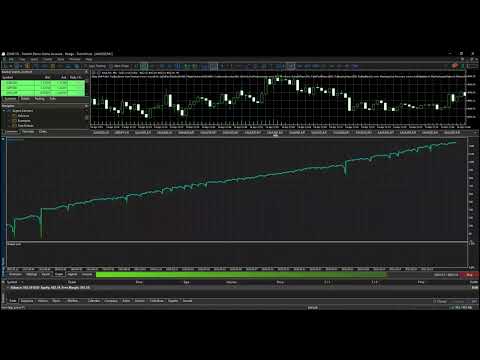































I've been following the EA's development process for a long time, and when it was released, I immediately bought it. The application of AI and real-time analysis has yielded very positive trading results. Consistent entry signals and the ability to trade on multiple currency pairs significantly increase profits, which is one of the advantages of this EA. I will wait longer to further evaluate the EA's actual performance.