 MetaTrader 5
 エキスパート
 インディケータ
 ライブラリ
 ユーティリティ
 ウィジェット
 ルール
YouTubeにあるマーケットチュートリアルビデオをご覧ください
ロボットや指標を購入する
仮想ホスティングで
EAを実行
EAを実行
ロボットや指標を購入前にテストする
マーケットで収入を得る
販売のためにプロダクトをプレゼンテーションする方法
MetaTrader 5のためのエキスパートアドバイザーとインディケータ - 47
 自動売買ロボットとインジケータを使用して、外国為替取引の収益性を高めます。 自動売買ロボットを使用すると、取引の開始と終了を自動化でき、インジケータは市場の行動をより正確に予測するのに役立ちます。
このページには、MetaTrader5アプリケーションのカタログが掲載されています。

MATTRIX Position Monitor An 8x8 currency matrix dashboard that gives you a live overview of all your open positions across the 28 Forex majors in one compact panel. Designed for traders who manage multiple currency exposures and want to see direction, hedging, profit, and risk at a glance.
WHAT YOU SEE: The 8x8 matrix is organized by the Big8 currency hierarchy: EUR, GBP, AUD, NZD, USD, CAD, CHF, JPY.
- Lower triangle (28 cells): one cell per Forex major pair Cell color = direction:
FREE

APEXSYNC TRADE COPIER PRO - THE INSTITUTIONAL-GRADE COPYING REVOLUTION ULTRA-LOW LATENCY | SMART RISK INTELLIGENCE | PROP-FIRM SAFE Tired of slow, basic copiers that risk your capital? Meet ApexSync Pro - the next-generation trade copier engineered to DOMINATE the MT4/MT5 ecosystem with institutional-grade performance, AI-driven risk management, and prop-firm certified safety protocols. WHY APEXSYNC PRO BEATS EVERYTHING ELSE Feature Old Copiers APEXSYNC PRO Speed 500ms+ (slow) <200ms (blazing
FREE

Wikirobo | Smart Entry Zone Indicator for All Timeframes Wikirobo is a powerful indicator that automatically highlights potential entry zones as Buy Limit and Sell Limit orders across all timeframes. Highlights Suggested entry zones for every timeframe ️ Clear, timeframe-specific Stop Loss levels shown on the chart for better risk management and position sizing Suitable for scalpers, day traders, and swing traders —flexible for any trading style How to Use Instea
FREE

Overview
RealCost Spread Guard is a spread monitoring utility for MetaTrader 5. It does not trade, modify orders, or send data to external servers. It samples the current chart spread, displays live and historical spread statistics, optionally alerts when spread exceeds a configured threshold, and can write a local CSV file for later review.
This utility is useful before running manual entries, scalpers, grid systems, signal copiers, or any EA that is sensitive to spread spikes.
Typical Use
FREE
XFlow shows an expanding price channel that helps determine the trend and the moments of its reversal. It is also used when accompanying transactions to set take profit/stop loss and averages. It has practically no parameters and is very easy to use - just specify an important moment in the history for you and the indicator will calculate the price channel. This is a demo version limited to CHF currency pairs. Designed to familiarize you with the interactive use of XFlow DISPLAYED LINES ROTATE
FREE

MNFM Performance Monitor MT5
A read-only dashboard for comparing trading activity by magic number and symbol. It does not open, modify or close orders and does not generate trading signals.
Features - Booked trading net including entry and exit commission, swap and deal fees. - Current floating profit plus position swap. - Views by magic number, by symbol and by open position exposure. - Rolling 7-day and 30-day periods or all available trading history. - Exit-deal win rate, profit factor and
FREE

Your account, protected. Whatever is trading on it.
Phoenix Palladium Guard does not trade. It watches your whole account and steps in when a limit you set is reached: it closes all positions, deletes pending orders and keeps new trades out until the limit resets. It works for every EA on the account, EAs from any developer, and your own manual trades.
**Why an account guard?** Every EA calculates its risk as if it had the whole account to itself. Run four at once with similar settings and yo
FREE

RiskCompass Panel MT5 1. The Problem and the Approach You have a position idea, and the first real question is always the same: how much of this account am I about to put at risk, and can the account carry it. The information that answers that question is scattered across half a dozen windows. Balance is on one tab. Margin level is somewhere else. The spread you just paid is visible only if you look at the instrument row. The server day, which decides whether your daily loss limit has already be
FREE

Shows what each closed trade earned after commission, swap and fees, by symbol, session, hour, weekday or month. FEATURES Rebuilds each trade from its deals, costs apart from gross. Net result, R, summary, breakdowns, cost alarm, CSV export. HOW TO USE IT 1. Attach it to a chart. 2. Choose the window and table. 3. Read the panel or export the CSV. PARAMETERS InpRange, InpFilterMagic, InpRiskPercent, InpFixedStopPips, InpBreakdown. LIMITATIONS Trades opened before the window are counted, not reco
FREE

This Expert Advisor monitors all open positions across all symbols in MetaTrader 5. Whenever a Stop Loss (SL) or Take Profit (TP) is manually set or adjusted on any position, the EA automatically applies that value to all other open positions , regardless of symbol or order type (Buy/Sell). This ensures consistent and synchronized SL and TP levels across your account.
Perfect for mobile trading via tablet or smartphone!
FREE

The Manual Adjust SL/TP EA streamlines your risk management by enabling you to manually specify new SL and TP price levels for your open positions. The Levels is Price value and is NOT a pips or points distance from the Entry Levels. The EA automatically validates your inputs against the broker’s stop-level requirements (minimum distance) to prevent order adjustment rejections. It offers filtering options so you can choose to apply adjustments only to Buy orders, Sell orders, or both. Key Featur
FREE

CopyStar – File-based Trade Copier (MT5 Master/Slave, MT4-compatible) Short description
CopyStar mirrors changes to your open net positions from the master to any slaves – quickly, robustly, and without network configuration. Communication runs via common files (shared file folder), enabling CopyStar to support MT5↔MT5, MT5→MT4, MT4→MT4, and MT4→MT5. Supports symbol mapping, lot multiplication, optional SL/TP copying, magic/comment filters, and a clear chart status display including heartbeat.
FREE

Trading Panel Pro Trading Panel Pro is a professional MetaTrader 5 trading panel designed to help traders open and manage positions faster with precision and ease . Execute Buy/Sell orders , place pending orders , and manage trades directly from the chart using a clean, modern, and minimal interface — reducing unnecessary clicks and improving execution speed during fast-moving markets. Built for traders who value speed, simplicity, and efficient trade execution . Features:
Fast trade executio
FREE

Role in MT5 Spread Trading 1. Spread Compensation Trading Spread Calculation: The indicator automatically calculates the current spread and adds it to the price. Actual Cost Consideration: Helps traders account for the actual transaction cost (spread). Precise Entry: Ensures stop loss and take profit settings already incorporate spread factors.
FREE

Key Features Smart Profit/Loss Management Set your target profit in your deposit currency (USD, EUR, etc.) Define maximum acceptable loss to protect your capital Automatic calculation includes floating profit, swap, and commission Flexible Position Filtering Symbol Filter: Close only trades on the current chart symbol or all symbols Magic Number Filter: 0 = Close only manual trades (no magic number) -1 = Close all trades regardless of magic number Custom number = Close only trades with speci
FREE

HorizonProbe measures how the size of a price move compares with the cost of trading it, across several holding times, on your broker's own history and your broker's own spread.
It is a single script. It places no orders, reads no positions, and has no external dependency. Copy the one file into a terminal and run it on a chart.
THE QUESTION IT ANSWERS
The cost of a trade is paid once, whatever happens next. The move you are paid for is not fixed: over a longer holding time, the average move
FREE

Contrarian traders who've found a strategy that works better inverted — buys become sells, and vice versa Getting up and running (5 steps, no headaches) 1. Drop the EA into MT5 Copy SimpleTradeCopier.ex5 into <your MT5 terminal>\MQL5\Experts\. Then in MT5, open the Navigator (Ctrl+N) and drag SimpleTradeCopier onto any chart — it doesn't matter which one. 2. Set up your MASTER account This is the account whose trades you want to copy from. In the EA's inputs: InpMode = STC_MASTER ← this account
FREE
如果产品有任何问题或者您需要在此产品上添加功能,请联系我 Contact/message me if you encounter any issue using the product or need extra feature to add on the base version.
Session TakeProfit StopLoss is basically helping to set the take profit and stop loss in dollar for the total open orders (session). Once the total profit is greater than session_tp or less than session_sl, the EA will help to close all open orders acting similarly to a take profit/stop loss for a single order.
Inputs session_tp: session take profit ses
FREE

"Terminator Trades " EA robot, built on the powerful MQ5 code, is designed to simplify the process of closing your positions and pending orders. You can adjust if you want close all the trades or by specific symbols. With just a single click on a button, you can efficiently manage your current positions, ensuring that you never miss an opportunity to terminate a trade. Close Trades , Delete Pending Orders with Terminator Trades.
FREE

Trend Falcon Signals is a professional-grade, lightweight signal indicator utility developed for MetaTrader 5. It is specifically designed to identify high-probability, trend-following entry points using a multiple-timeframe moving average crossover system. Please note: This utility is purely an analytical tool. It does NOT open, manage, or close trades automatically. It strictly provides visual arrows on the chart and sends mobile notifications to assist manual traders. Core Trading Logic & St
FREE

**DER AUTOR ÜBERNIMMT KEINE HAFTUNG FÜR VERLUSTE, DIE DURCH DIE NUTZUNG DIESER SOFTWARE ENTSTEHEN, INSBESONDERE NICHT FÜR VERLUSTE DURCH DAS AUTOMATISCHE SCHLIESSEN VON POSITIONEN (TRADES). BITTE TESTEN SIE DIE SOFTWARE AUSFÜHRLICH AUF EINEM DEMO-KONTO!** --- # Equity Drawdown Monitor - Ihr Wächter für Risikomanagement **Schützen Sie Ihr Kapital mit professionellem Multi-EA-Monitoring und automatischem Notfall-Stopp.** Der **Equity Drawdown Monitor** ist ein unverzichtbares Werkzeug für Trader,
FREE

Order Book, known also as Market Book, market depth, Level 2, - is a dynamically updated table with current volumes of orders to buy and to sell specific financial instument at price levels near Bid and Ask. MetaTrader 5 provides the means for receiving market book from your broker in real time. The expert OrderBook Recorder records market book changes and stores them in local files for further usage in indicators and expert adviser, including testing in the tester. The expert stores market book
FREE
If you want something as below: Sell FOREX trading signal. Manage multiple accounts. Follow the trading from somebody. "TradeCopier_follow" and "TradeCopier_source" can help you! Features: Copying from one source (master) account to multiple follower (slave) accounts. Allow investor (read only) password for the source (master) account. There are no complicated settings and input parameters, everything is easy. Works with different Brokers. Works with different symbols (EURUSD_FX, eurusd_m, e
FREE

PropCorrelation shows whether your open positions are really different trades. Three index shorts feel like three trades; most days they are one bet, sized three times. The panel puts the number on your chart: the correlation between every pair of open positions, signed by direction, next to the money each of them risks to its stop. Free. Setup takes a minute: attach it to one chart, and the matrix appears for whatever is open on the account. No inputs are required to start. Try it first
It is
FREE

izi hedge is a tool that helps you manage risk, manage hedge orders and rebalance losing orders.
How it works It will place an order opposite to the order you placed with that currency pair. If the order you place is correct, the reverse order will be automatically deleted If the market unfortunately goes against your order and touches the hedge order, it will begin to calculate the hedging volume to limit the risk of the market going in reverse.
FREE

MT5 Trade Alerts to Telegram Send your MetaTrader 5 trade activity to Telegram automatically. MT5 Trade Alerts to Telegram is an account-wide monitoring and notification utility for MetaTrader 5. It detects trade events on the trading account and publishes clear, customizable Telegram alerts without opening, modifying or managing trades. Use it for manual trading, Expert Advisors, signal channels, account monitoring or simply to keep a real-time record of trade activity on your phone. Main Featu
FREE

Unlock the full power of MT5 with NGA Next Gen Assistant — the most advanced trading assistant designed to give you full control over your trades… even from your phone! .
-Risk calculation, dollars stop loss based:
by using NGA you can set the exact amount you willing to lose each time, without having to deal with manual pips calculation, just drag the visual Stop loss line to your SL place and execute the trade, the NGA will automatically figure out the right lot size it needs to
FREE

Please visit = https://www.mql5.com/en/market/product/181686 for slave EA
MT4 Version = https://www.mql5.com/en/market/product/183101 Free Demo Version = https://c.mql5.com/6/1033/COPYTRADE_DEMO7D.zip User Manual : download here
Professional Copy Trade EA for MT5, NO HASSLE, PLUG and PLAY and CROSS PLATFORM MT4 <---> MT5. A powerful and reliable Copy Trade Expert Advisor designed for traders, signal providers, fund managers, and prop firm users. Easily copy trades between multiple accounts
FREE

Solarize – Professional Trading Panel for MetaTrader 5 Solarize is a premium trading panel designed for traders who demand speed, precision, and efficiency in every execution. Built with a luxurious Black & Gold interface, Solarize combines an elegant design with practical trading tools, allowing traders to manage positions, pending orders, risk, and account statistics from a single control panel. Whether you're a scalper, intraday trader, or swing trader, Solarize helps simplify your workflow
FREE
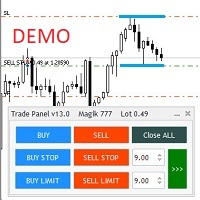
Бесплатная версия советника Trade Panel PRO
Данная торговая панель предназначена для быстрой и удобной торговли в один клик. Создавался продукт для частичной автоматизации своей личной ручной торговли https://www.mql5.com/ru/signals/1040299?source=Site+Profile+Seller Советник имеет ряд возможностей, а именно: Открытие BUY или SELL ордеров. SL выставляется ниже (выше) минимальной (максимальной) цены, задаваемых в параметрах количества свечей. Размер TP рассчитывается в соотношении от размера S
FREE

The one minute chart has a bug, but the one-day chart can still be used after deleting the bug and reloading the indicators, This indicator can be used to determine how far the indicator goes up to place an order to buy, how far it goes down to place an order to sell, and not placing an order until it reaches this distance, which is considered oscillation, open an account gift index
FREE

# LBU Trading Console
LBU Trading Console is a unified MetaTrader 5 utility for visual trade planning, position management, equity protection and multi-symbol RSI monitoring. Its tabbed interface keeps four practical workflows in one chart and one EX5 file.
## Main modules
### Trade
- Draw and drag Entry, Stop Loss and Take Profit levels directly on the chart. - Calculate volume from the selected account risk percentage. - Support market, limit and stop orders. - Validate volume, margin and
FREE

Position Story MT5 answers a practical history question: what happened inside this position?
Select a position from the account history and the panel rebuilds its story from the recorded deals. You can see the opening deal, partial exits, reversals or close-by events, their order, and the values MT5 recorded for each one.
What it shows
• Position summary with symbol, position ID, deal count, recorded entry/exit volume when that split is knowable, and coverage state. • Ordered deal sequence wi
FREE

DS Risk Calculator works out your lot size from the stop you actually intend to use, and shows how much room is left before your daily loss limit, your overall drawdown limit and your consistency rule are reached. It is built for funded account rules, and it works just as well on an ordinary account with rules you set yourself.
It does not place, modify or close orders. There are no trading functions in it. It reads your account and shows you arithmetic.
WHAT IT SHOWS
- Lot size for the sto
FREE

A simple utility that tells you to leave the computer and go for a walk and have a coffee every 60 minutes, or however long you configure.
The function is to remind us to get off the computer and go for a walk so as not to make the mistake of opening up an emotional order, taking every day to the end and a simple walk would solve the problem.
--- NEW VERSION FULL https://www.mql5.com/en/market/product/192677
Check out my FOMO blocker as well https://www.mql5.com/en/market/product/188473
Ch
FREE

The MetaTrader 5 script to set TP and SL for all positions during volatile market conditions in the current chart It is able to modify or close Key Features Absolute prices only
Leave as 0.0 if you don't want to change a particular value
No confirmation. The script executes immediately
Current symbol only. The script only affects positions in the chart the script is dragged to Use Cases Emergency exit
Risk management by changing SL and TP of all orders
FREE

ENGLISH DESCRIPTION CampTrader Tools is a trade management utility designed for MetaTrader 5. The tool helps traders manage existing positions by applying configurable trade management features such as stop loss, take profit, trailing stop, and position averaging. It is intended to assist with trade management and does not provide trading signals or guarantee trading results. FEATURES — AUTOMATIC SL & TP —
The tool can automatically apply stop loss and take profit levels to positions that do no
FREE

Symbol Carousel EA provides a clear and structured way to monitor all your active trades. The Expert Advisor automatically cycles through all open orders, positions, both or all symbols in the Market Watch and switches the chart symbol accordingly. Each symbol is displayed for a defined amount of time before moving on to the next one, creating a clean and intuitive carousel-style view of your trading activity. This EA is designed purely for visual trade monitoring and does not open, modify, or c
FREE

“One-Click Flatten — Fast, Clean, Reliable” Close all orders and positions in your account with a single click — no hassle, no fumbling through tabs.
Time-saving tool for traders needing instant exit from the market—especially during volatile moves or news events.
Emotion-free execution reduces human errors and hesitation—just click and it's done.
Easy to use: load the EA in MT5 and let it handle the rest. Perfect for both beginners and seasoned traders.
Fu
FREE

Titan Dual Mode Utility is a high-performance trading assistant designed for traders who require speed, precision, and flexibility in the MetaTrader 5 terminal. This utility was developed to solve the delay of manual order entry, providing a professional interface for modern scalpers and intraday traders. The main innovation of this tool is the Dual Mode System , which allows the user to switch between two different execution strategies instantly: Protected Mode: This mode is designed for conser
FREE

Chopar MT5 — Transaction Notification Utility This tool is designed exclusively for broadcasting trading account events to Telegram ( @ChoparTradeBot) . It does not perform market analysis or provide financial advice; instead, it functions as an informational bridge between your MT5 terminal and the messenger. What This Monitor Tracks: Opening and Closing Trades: Captures the moment a deal is added to the history ( DEAL_ADD ). For closed positions, it immediately calculates and displays the fin
FREE

http://www.tradepositive.lat
ALGO Smart Flow Risk Manager (Keyboard Edition)
Have you ever spotted the perfect entry but hesitated so long calculating the lot size that the price ran away without you? Or has a bad streak ever wiped out 20% of your account because you didn't know when to stop? The ALGO Smart Flow Risk Manager is not an automated trading bot. It is a professional Execution Tool designed strictly for Manual Traders who demand speed, structure, and discipline. We turn your keyboar
FREE

Горячие клавиши плюс клик левой кнопки мыши на графике.
Советник открывает сделки, выставляет лимитные и стоповые ордера, удаляет ордера и закрывает позиции, также делает реверс открытых позиций, выставляет прописанные в настройках стоп лосс и тейк профит.
(реверс только на неттинговых счетах)
При запуске советника можно посмотреть подсказку как действует советник при нажатии клавиши + клик на графике.
Правее последнего бара, ниже цены Ctrl+ЛКМ - OpenSell
Правее последнего бара, выше
FREE
Note: Demo version only works on NZDJPY and USDRUB
What does it do? It assists you in your trading and has some important jobs to perform: It sets virtual pending orders, stop loss and take profit. It can set real stop loss and take profit if desired. It makes trading independent of bid-ask line concept, thus useful for very short term traders and price action traders. Orders can be opened, managed and closed with 1 click providing fastest management. It can automatically set your position sizi
FREE

TrendFollowing is an multi-currency scanner that just indicates where to buy/sell: Abilities: Opens up the chart automatically with and arrow indicating where to take action. Send the signal to a telegram channel, see @fx_signal_com channel to get the idea. Configuration: No need to configure "Market Watch". Open a chart and attach the scanner to it. Trading Rules: Use only buystop/sellstop orders above/below arrow on the chart. Delete the pending order if price retraces below/above the moving
FREE

You only need to load this EA into a single chart. Key Features Session Lockdown Blocks ALL trades outside London/NY sessions Instant position closing at session end NEW: Pre-close alerts (configurable minutes before session end) Smart Daily Limits Profit Target: Set $ or % goals to lock in gains Loss Limit: Hard-stop protection against bad days NEW: Choose between Balance (closed P&L) or Equity (including floating P&L) Dual-Layer Protection Prevention: Stops orders before execution Elimination
FREE

AlphaLogic PropProtector: The Ultimate Equity Shield Protect your Prop Firm account with institutional-grade precision. Are you tired of losing Prop Firm challenges due to emotional over-trading or a few dollars' calculation error? Most traders fail because they lose track of their Daily Drawdown or Absolute Equity Floor . AlphaLogic PropProtector is a professional-grade utility designed for traders who take risk management seriously. Whether you are trading a $50,000 challenge or managing a fun
FREE

Panel Tool – Button Click Trading (Replaces Default Trade Panel)
Features
1. Open or close Long positions with a button click.
2. Open or close Short positions with a button click.
3. Set lot sizes.
4. Set Stop-Loss (SL) or Take-Profit (TP) points (0 = not used).
5. Set order comments.
6. Display the Break-Even price .
7. Show total Long and Short lot sizes.
8. Display Profit or Loss in USD.
9. Show daily Profit or Loss in USD.
10. Set ID = 0 to manage manual orders together .
FREE

Script for deleting pending orders If you need to delete all pending orders you placed, this script will do it for you! It doesn't have any input parameters. Allow AutoTrading before running the script. Usage:
Run the script on a chart. If you need a possibility to adjust parameters of the script, use the version with input parameters https://www.mql5.com/en/market/product/627 You can download MetaTrader 4 version here: https://www.mql5.com/en/market/product/2782
FREE

TradeCopier is an application for automated copying of trades for different accounts in MetaTrader 5 terminal with flexible rules of filtering and modification. With TradeCopier, copying, filtering and transformation of trades are realized and processed via the server . It means that copying trades is possible within one or several computers. How can you boost your trading results with TradeCopier? Your convenience and speed Average speed of copying: 100 ms Working with MetaTrader 5 Working with
FREE
TradeCopy MT5 Demo is an efficient MT4, MT5 single system only used on MT5 demo account. Features: 1, can achieve cross-MT4 and MT5 each other. 2. The transmitting end and the receiving end are in the same file, which is convenient to use. 3, can achieve cross-platform follow-up. 4, more ways to follow the order, you can follow the balance, net worth, lot ratio or fixed lot. 5, can enlarge or reduce the amount of the single. 6, the currency has a different name, you can convert. Use the wizard:
FREE

Know the broker symbol before you evaluate the EA. D7 Symbol Inspector is a free, read-only MetaTrader 5 chart utility. It brings the symbol fields that often decide whether an EA can size, place or protect an order into one panel — without sending or modifying a trade. Who it is for Use it before testing an Expert Advisor on a broker symbol, especially when the symbol has a suffix, unusual contract size, nonstandard volume steps or a spread that changes through the session. What it reads Last a
FREE
"Moving Ratio Candle" is used to check the distance of a candle to a theoretical pressure point. Furthermore, we have two points of interest, the first for the mean and the second for the median. This indicator uses the shape of bars and the line that crosses the bar from left to right is based on the calculation of the closing price for both sides. The rest follows a more standard calculation. The same could be done as a line, but I want to know the behavior of this indicator in relation to the
FREE

Record your MetaTrader 5 trading to your SureInsight journal automatically, including the stop loss you actually set.
SureInsight Journal Sync is the official MetaTrader 5 companion for SureInsight. It watches your account and sends each closed trade to your journal, so your record is built from platform data rather than from memory.
Important
This is not a trading robot, signal provider, copy-trading service or automated strategy.
It does not open, close, modify or manage trades.
Its onl
FREE
Most current tick data does not accurately reflect the actual spread levels. To achieve more precise backtest results, we need to adjust it to a higher value to account for slippage that may occur when Expert Advisors (EAs) execute orders in real trading.
This tool is used to change the Spread value in custom symbols created from tick data for backtesting purposes. Simply select the desired Spread value and wait for the tool to adjust it accordingly.
FREE

Easy to use Trade Panel that I personally use for my personal trading and trade copying. For Trade copy: This is the Slave Script, you need the extra Master Panel. Search for "Trading Panel and Copier"
Functions of the Master Panel: Automatic Lotsize calculation via given risk in % Buy and Sell Mode Manage Core and Addon Positions Limit Order Function Stop Loss and Limit Lines Hotkeys Close last Trade Close all Trades Manual SL price Manual TP price Manual Limit price Trade Copy via slave scri
FREE

OrderBook Utilities is a script, which performs several service operations on order book hob-files, created by OrderBook Recorder . The script processes a file for work symbol of the current chart. The file date is selected by means of the input parameter CustomDate (if it's filled in) or by the point where the script is dropped on the chart. Depending from the operation, useful information is written into the log, and optionally new file is created. The operation is selected by the input parame
FREE

Advanced Expert Advisor Monitor: Shows whether your Expert Advisor is still running, right on the chart. Keeps reporting its trades even after the Expert Advisor has stopped or was removed. Closed profit, win rate and floating profit for Today, 3 Days, Week or Month. A 365-day view: profit factor, drawdown, expectancy, streaks and more. Draws only your Expert Advisor's trades on the chart, by magic number. Popup and phone alerts when the Expert Advisor unexpectedly crashes.
Does this sound fa
FREE
This Expert Advisor captures and sends information about all open positions to a REST API server in real-time using HTTP POST requests. It is ideal for building synchronization tools, external monitoring systems, or custom trade copier solutions. What does this EA do? Iterates through all active orders in the account. Compares current positions with the previously sent ones. If any change is detected (SL, TP, price, symbol, volume, type, etc.), it sends updated information to the defined endpoi
FREE

opnMAX Ponos: Utility Overview opnMAX Ponos is a highly interactive, institutional-grade risk management and trade execution utility designed for MetaTrader 5. It acts as an on-chart graphical dashboard that allows for precise, mathematically validated position sizing and one-click order execution. Instead of manually calculating risk thresholds before taking a trade, Ponos uses a reactive, omni-directional calculation matrix to handle the math in real-time. Key Functional Features Omni-Directio
FREE

Script Name: Close All Positions Language: MQL5 Type: Utility Script Primary Function: Instantly close all open positions on the current trading account Purpose The “Close All Positions” script is a lightweight and efficient tool designed for traders using MetaTrader 5. Its main purpose is to help users quickly exit all active trades with a single click, especially during volatile market conditions or when risk management requires immediate action. Instead of manually closing each position on
FREE

Easy Trade Copier (Master / Sender) The lightning-fast, lightweight engine that broadcasts your trades safely. Description:
Welcome to the Easy Trade Copier (Master) . This is the "sender" EA. You attach this to your main trading account, and it instantly broadcasts every trade you take to your client accounts. Standard copiers often cause errors or freeze your trading platform when trying to send data to multiple accounts at once. The Easy Master uses smart, glitch-free saving technology so
FREE

Product Description: GODFX EXECUTIONER v1.00 Take Control of Your Trading with Institutional-Grade Precision. The GODFX Executioner is not just a trade manager; it is a professional-grade command center for MetaTrader 5. Designed for scalpers and day traders who demand speed, it combines advanced risk management with intuitive visual tools to ensure you never have to calculate a lot size or fumble with orders again. Key Features: Dynamic Visual Planning: Drag-and-drop SL and TP lines on y
FREE

Discover our all-in-one monitoring and notifications EA for MetaTrader. Designed to ensure traders’ security and peace of mind, this unique EA offers a full range of advanced features that will allow you to stay informed and control your account activity, anytime and anywhere. Key Features : Continuous server monitoring: real-time notification on server availability and performance (Cpu, Ram, disk), connectivity, latency and more Advanced account management: live tracking of margin calls, dro
FREE

Demo copier of deals from MetaTrader 5 to MetaTrader 5 ( MetaTrader 4<->MetaTrader 4 version is available ; with both versions, you can copy MetaTrader 5<->MetaTrader 4, MetaTrader 4<->MetaTrader 5, MetaTrader 5<->MetaTrader 5, MetaTrader 4<->MetaTrader 4). Works only in the mode of hedging. Spread filter. Select the best price (start copying positions with a profit or loss). Configure the lot size, fixed or ratio-based (provider signals can be copied with an increased lot). Configure order copy
FREE

Trade Assistant – Position & History Overview Streamline your trading workflow with a powerful all-in-one panel for MetaTrader 5. Trade Assistant is a professional EA panel that gives you full control over your trades — from order execution to real-time position monitoring — all within a clean, intuitive on-chart interface. Key Features One-Click Order Execution Instant Market Orders (Buy / Sell) with configurable Lot, SL and TP Full Pending Order support: Buy/Sell Limit & Buy/Se
FREE

https://youtu.be/E5AqInoWcFc Visual Risk Panel Pro is a premium, lightweight utility designed specifically for manual traders who value speed, precision, and strict risk management. Instead of typing numbers into a clunky panel or calculating position sizes on a separate app mid-trade, this utility brings interactive math directly onto your charts. Simply draw your structural zone, drag your entry or exit lines, and let the panel manage the rest flawlessly. Key Advantages Zero Math Anxiety: Th
FREE

Equity Ratchet FX Stealth Profit Manager & Smart Scalping Assistant "Lock your profits in stealth mode. The ultimate safety net for manual scalpers and grid strategies." What Is Equity Ratchet FX? Equity Ratchet FX is a professional trade management utility built for: Manual Scalpers who want fast execution with structured risk management Grid & Martingale Traders who need a smart, silent profit-locking system This is NOT another traditional trailing stop. Instead, it uses a Virtual Stop
FREE

Forex Inspector Broker X-Ray See exactly what your broker charges, and how it compares, in one clean panel on your chart. ForexInspector Broker X-Ray reads your live account conditions and shows them in a professional tabbed panel: real spread, true cost per lot (spread plus commission), swaps in money, leverage, margin, execution type, stop-out, ping and a 0 to 10 broker score. It also shows how your broker ranks against the community on forexinspector.com. 100% FREE • It never trades • It
FREE

EquityShield is a lightweight and dependable Expert Advisor (EA) for MetaTrader 5, crafted to protect your trading account from excessive losses with minimal resource usage. It monitors your account's equity drawdown and automatically closes all open positions and pending orders if the drawdown exceeds your specified threshold, either in percentage (%) or a fixed amount ($). Designed as a robust safety barrier, EquityShield ensures your capital remains secure during unexpected market volatility
FREE
MetaTraderマーケットはトレーダーのための自動売買ロボットやテクニカル指標を備えており、 ターミナルから直接利用することができます。
MQL5.community支払いシステムはMetaTraderサービス上のトランザクションのためにMQL5.comサイトに登録したすべてのユーザーに利用可能です。WebMoney、PayPal または銀行カードを使っての入金や出金が可能です。

取引の機会を逃しています。
- 無料取引アプリ
- 8千を超えるシグナルをコピー
- 金融ニュースで金融マーケットを探索