仕事が完了した

実行時間13 日
依頼者からのフィードバック
The developer was exceptionally intelligent, professional, knowledgeable and skilled in creating an ea to trade my strategy effectively and accurately. Will continue to work with him in the future.

指定

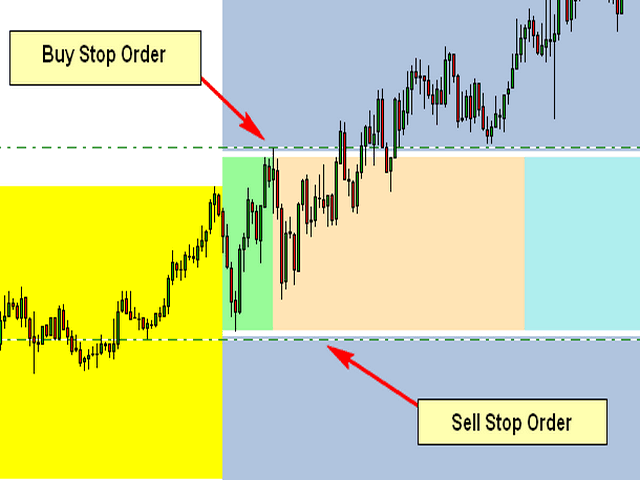
The Attached Picture show the breakout zone (in green, but also extends to the coral and turquoise colors) with a buy stop at the high and a sell stop at the low. Notice that both orders are also offset by the spread which is the gap (white) between the order and the breakout zone. I also need to the EA to consider the spread when placing the pending orders.

Initial Trade Direction:  

  • Buy and Sell: EA places a Buy Order at the high of the Breakout range and a sell order at the low of the range.   

  • Buy Only: EA Only places Buy Orders at both the high and low of the breakout range.   

  • Sell Only:  EA Only places Sell Orders at both the high and low of the breakout range. 

Breakout Zone Minimum Range (Pips): The smallest gap/range the EA is permitted to trade. 

Breakout Zone Maximum Range (Pips): The Widest gap/range the EA is permitted to trade. 

Reverse Mode: EA will reverse all signals when auto trading.           

Example - If Buy and Sell is selected, EA would place a pending Buy order at the high of the range and a pending Sell order at the low. However, if Reverse Mode is enabled then EA will place Sell order at the High and a Buy order at the low of range. 

Delete All Pending Order When Initial Trade Active: If enabled, then when any pending order is active, EA will delete all the other pending orders and manage the order that was activated to completion. 

Number of Loop Trade: When enabled, the EA will open new orders each time an active order hits TP. So, once the current order reaches TP then the EA should open a new order in the same direction where the TP was hit. Example – If the initial trade is a buy and the Number of Loop Trade = 3. EA will open BUY trade first. If the trade hits TP, then the cycle is complete and the EA will immediately open a new Buy trade starting a new loop until the max number of loops are reached. Similarly, in the event price goes the opposite direction then the recovery mechanism (Hedge and/or Grid) should begin. If the recovery mechanism was successful (closing the trade in TP) then the loop is now complete, therefore the EA should immediately open a new trade in the direction the loop was closed. If the Recovery Mechanism was unable to save the trade and actually closed with a loss, then no additional orders or loops should be opened. 

Key Functions to Include:   

Initial Trade Type:  

Auto Trading: EA opens the initial trade by itself. Placing pending orders at the high and low of the NTZ range.    

Manual Trading: EA take control of manual pending order, once the order is activated.  


Trailing-Stop: Trailing-Enable/Disable (Points movement for the Trailing Stop to be based on the pip value/count of range.) 


Multi-Zone Mode: The ability to trade Multiple Breakout Zones throughout the day (when enabled, the EA will trade additional breakout zones once there's no existing order)  

Example: 

Breakout Zone 1: Enable/Disable, Start Time Input, End Time Input 

Breakout Zone 2: Enable/Disable, Start Time Input, End Time Input 

Breakout Zone 3: Enable/Disable, Start Time Input, End Time Input 

Breakout Zone 4: Enable/Disable, Start Time Input, End Time Input 


Day of Week Filter: The option to select specific days of week that EA should trade. 


Built-in Money Management:  

  • Money Management – if enabled, the initial lot will be calculated automatically based on the (NTZ Range Size + Spread, PIP Value, Max Loss, # of Hedge Orders and the # of Grid Orders) If disabled, Fixed Lot is traded 

  • Fixed Lot – Fixed Lot size (used if Money Management = disabled). 

  • Max Daily Loss – Set Maximum daily loss permitted. 

  • Max Weekly Loss – Set Maximum weekly loss permitted. 

  • Max Monthly Loss  Set Maximum monthly loss permitted.  

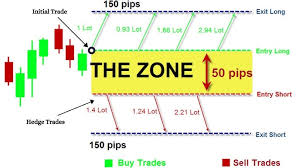
 Zone Recovery - Hedge Mode: Enable/Disable   

Hedge Calculation Mechanism: The EA should identify the pip value/count of the specified breakout zone and calculate the lotsize for the initial order based on the account leverage, the max loss permitted, spread identified, pip value, lotsize multiplier and the number of hedges inputted.  

NB: Once the maximum number of hedges permitted is reached, the EA should place a Stop Loss Order at the opposite side of the breakout range, which would close the loop with a loss once hit. 


Chart Display:  

Once added to the chart, the EA should display the breakout slot being traded (the highlighting the high and low point of the time slot/breakout range being traded), as well as the pip count of the breakout range, the day of week and a candle timer (counting down to time for the next candle to appear.  

The EA should also display a trading panel that provide stats and performance about the account and strategy.  


More indepth details will be provided after the selection process


ファイル:

JPG
Hedge.jpg
11.9 Kb

応答済み

1
開発者 1
評価
(2285)
プロジェクト
2879
63%
仲裁
121
45% / 26%
期限切れ
428
15%
仕事中
2
開発者 2
評価
(1)
プロジェクト
1
0%
仲裁
1
0% / 100%
期限切れ
0
3
開発者 3
評価
(57)
プロジェクト
82
24%
仲裁
24
13% / 58%
期限切れ
7
9%
取り込み中
4
開発者 4
評価
(14)
プロジェクト
17
6%
仲裁
8
38% / 38%
期限切れ
2
12%
取り込み中
5
開発者 5
評価
(5)
プロジェクト
5
0%
仲裁
0
期限切れ
0
6
開発者 6
評価
(15)
プロジェクト
34
24%
仲裁
4
0% / 50%
期限切れ
2
6%
仕事中
7
開発者 7
評価
(151)
プロジェクト
188
57%
仲裁
10
80% / 0%
期限切れ
0
仕事中
パブリッシュした人: 1 code
8
開発者 8
評価
(327)
プロジェクト
392
52%
仲裁
20
55% / 15%
期限切れ
28
7%
多忙
9
開発者 9
評価
(12)
プロジェクト
12
17%
仲裁
2
0% / 50%
期限切れ
1
8%
10
開発者 10
評価
プロジェクト
1
0%
仲裁
2
0% / 100%
期限切れ
0
11
開発者 11
評価
(159)
プロジェクト
284
35%
仲裁
18
22% / 56%
期限切れ
42
15%
取り込み中
12
開発者 12
評価
(1)
プロジェクト
1
0%
仲裁
0
期限切れ
0
13
開発者 13
評価
(2625)
プロジェクト
3334
67%
仲裁
77
48% / 14%
期限切れ
342
10%
パブリッシュした人: 1 code
14
開発者 14
評価
プロジェクト
1
0%
仲裁
1
0% / 100%
期限切れ
0
15
開発者 15
評価
(270)
プロジェクト
552
49%
仲裁
58
40% / 36%
期限切れ
228
41%
仕事中
16
開発者 16
評価
プロジェクト
0
0%
仲裁
0
期限切れ
0
17
開発者 17
評価
(45)
プロジェクト
91
13%
仲裁
34
26% / 59%
期限切れ
37
41%
類似した注文
I am looking of an Expert Advisor (EA) that has undergone independent validation and demonstrates a capability to successfully navigate prop firm challenges, as well as efficiently manage funded accounts. It is imperative that you provide a comprehensive explanation of the strategy utilized by your EA, along with a demo version that has a 30-day expiration. This will facilitate extensive back testing and forward
Hellow,l hope you are well,l am writing to place an order for a professional trading robot.l am looking for a reliable,well optimized robot that can trade efficiently,manage risk properly and deliver consistent performance in the market,I am particularly interested in a trading robot that uses a proven and transparent strategy,has strong risk management features,works well on common trading platforms,is suitable for
I am looking for an experienced MQL5 developer to build a professional MT5 software (indicator or semi-automated EA) for metals and major forex pairs. 📌 PLATFORM & MARKETS Platform: MetaTrader 5 Instruments: XAUUSD (Gold vs USD) XAGUSD (Silver vs USD) EURUSD GBPUSD USDJPY Trading styles: Scalping Intraday / short-term swing 🎯 MAIN OBJECTIVE I do NOT want an aggressive fully automated robot. I want a
The robot will take buy trades when the 2 ema cross over the 10 ema and price has closed above the 50 ema. The take profit and stop loss can be set as an optional level by the user. The robot will take sell trades when the 2 ema cross under the 10 ema and price has closed under the 50 ema. The take profit and stop loss can be set as an optional level by the user. The entry timeframe will be 15 minutes, but it could
I want to check if this indicator is repainting or not Whick mean the results of back testing is legit or not if anyone can help me to review it kindly to well to contact me i will be happy to work and go on long term work with anyone thanks
Specifications – Development of an MQL5 Expert Advisor (Reverse Engineering) Project context: I have access to a real trading history consisting of more than 500 trades executed over a period of approximately 3 years. These trades have been exported into a CSV file containing all available information, including date, time, symbol, order type, entry price, and exit price. Important: I do not have access to the
1.Sinyal Perdagangan : Sinyal beli: garis MACD utama memotong garis sinyal ke atas (macd_current>signal_current && macd_previous<signal_previous). Sinyal jual: garis MACD utama memotong garis sinyal ke bawah (macd_current<signal_current && macd_previous>signal_previous). Gambar di bawah menunjukkan kasus beli dan jual. 2. Posisi ditutup pada sinyal yang berlawanan: Posisi beli ditutup pada sinyal jual, dan posisi
Trading Bot Executes Trades on Specific Days via TradingView Alerts **As a** trader, **I want** to develop a trading bot that integrates with TradeLocker and MTS, **So that** when a TradingView alert (based on a 2,4,5,10,15,30 minute break and retest strategy whichever one) is triggered first. the bot will execute trades on both platforms, but only on specific days of the week. --- ## Acceptance Criteria 1
Project Description I am looking to collaborate with an experienced MQL5 / algorithmic trading developer who also has hands-on experience with Large Language Models (LLMs) and AI-driven systems. This is a long-term partnership opportunity , not a one-off paid freelance job. I bring 9 years of practical Elliott Wave trading experience , applied in live market conditions. The objective is to translate Elliott Wave
Hello, I’m looking for an experienced MT4 (MQL4) developer to convert the Lucky Reversal indicator from indicatorspot.com into a fully functional Expert Advisor (EA). Project Scope Code an MT4 EA that replicates the exact logic and signals of the Lucky Reversal indicator Trades should open and close automatically based on the indicator’s rules Must match indicator behavior 1:1 (no approximations) EA Requirements MT4

プロジェクト情報

予算
100+ USD
締め切り
最高 5 日