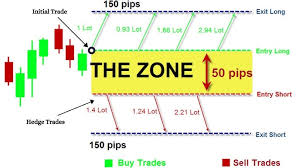
Create an Hedge trading EA using the concept of a specific breakout Indicator

Job finished

Execution time 13 days
Feedback from customer
The developer was exceptionally intelligent, professional, knowledgeable and skilled in creating an ea to trade my strategy effectively and accurately. Will continue to work with him in the future.

Specification

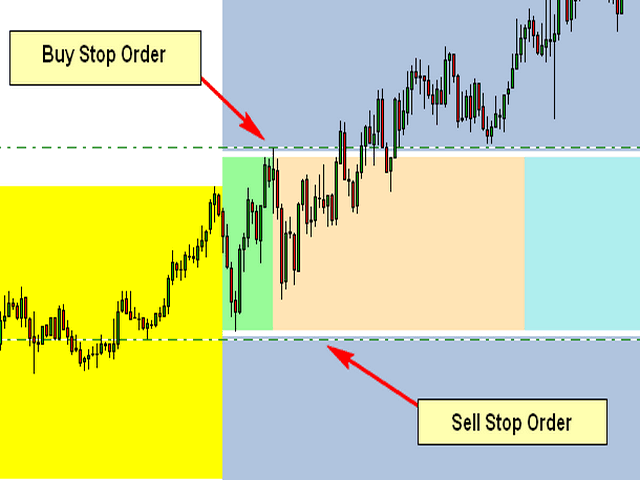
The Attached Picture show the breakout zone (in green, but also extends to the coral and turquoise colors) with a buy stop at the high and a sell stop at the low. Notice that both orders are also offset by the spread which is the gap (white) between the order and the breakout zone. I also need to the EA to consider the spread when placing the pending orders.

Initial Trade Direction:  

  • Buy and Sell: EA places a Buy Order at the high of the Breakout range and a sell order at the low of the range.   

  • Buy Only: EA Only places Buy Orders at both the high and low of the breakout range.   

  • Sell Only:  EA Only places Sell Orders at both the high and low of the breakout range. 

Breakout Zone Minimum Range (Pips): The smallest gap/range the EA is permitted to trade. 

Breakout Zone Maximum Range (Pips): The Widest gap/range the EA is permitted to trade. 

Reverse Mode: EA will reverse all signals when auto trading.           

Example - If Buy and Sell is selected, EA would place a pending Buy order at the high of the range and a pending Sell order at the low. However, if Reverse Mode is enabled then EA will place Sell order at the High and a Buy order at the low of range. 

Delete All Pending Order When Initial Trade Active: If enabled, then when any pending order is active, EA will delete all the other pending orders and manage the order that was activated to completion. 

Number of Loop Trade: When enabled, the EA will open new orders each time an active order hits TP. So, once the current order reaches TP then the EA should open a new order in the same direction where the TP was hit. Example – If the initial trade is a buy and the Number of Loop Trade = 3. EA will open BUY trade first. If the trade hits TP, then the cycle is complete and the EA will immediately open a new Buy trade starting a new loop until the max number of loops are reached. Similarly, in the event price goes the opposite direction then the recovery mechanism (Hedge and/or Grid) should begin. If the recovery mechanism was successful (closing the trade in TP) then the loop is now complete, therefore the EA should immediately open a new trade in the direction the loop was closed. If the Recovery Mechanism was unable to save the trade and actually closed with a loss, then no additional orders or loops should be opened. 

Key Functions to Include:   

Initial Trade Type:  

Auto Trading: EA opens the initial trade by itself. Placing pending orders at the high and low of the NTZ range.    

Manual Trading: EA take control of manual pending order, once the order is activated.  


Trailing-Stop: Trailing-Enable/Disable (Points movement for the Trailing Stop to be based on the pip value/count of range.) 


Multi-Zone Mode: The ability to trade Multiple Breakout Zones throughout the day (when enabled, the EA will trade additional breakout zones once there's no existing order)  

Example: 

Breakout Zone 1: Enable/Disable, Start Time Input, End Time Input 

Breakout Zone 2: Enable/Disable, Start Time Input, End Time Input 

Breakout Zone 3: Enable/Disable, Start Time Input, End Time Input 

Breakout Zone 4: Enable/Disable, Start Time Input, End Time Input 


Day of Week Filter: The option to select specific days of week that EA should trade. 


Built-in Money Management:  

  • Money Management – if enabled, the initial lot will be calculated automatically based on the (NTZ Range Size + Spread, PIP Value, Max Loss, # of Hedge Orders and the # of Grid Orders) If disabled, Fixed Lot is traded 

  • Fixed Lot – Fixed Lot size (used if Money Management = disabled). 

  • Max Daily Loss – Set Maximum daily loss permitted. 

  • Max Weekly Loss – Set Maximum weekly loss permitted. 

  • Max Monthly Loss  Set Maximum monthly loss permitted.  

 Zone Recovery - Hedge Mode: Enable/Disable   

Hedge Calculation Mechanism: The EA should identify the pip value/count of the specified breakout zone and calculate the lotsize for the initial order based on the account leverage, the max loss permitted, spread identified, pip value, lotsize multiplier and the number of hedges inputted.  

NB: Once the maximum number of hedges permitted is reached, the EA should place a Stop Loss Order at the opposite side of the breakout range, which would close the loop with a loss once hit. 


Chart Display:  

Once added to the chart, the EA should display the breakout slot being traded (the highlighting the high and low point of the time slot/breakout range being traded), as well as the pip count of the breakout range, the day of week and a candle timer (counting down to time for the next candle to appear.  

The EA should also display a trading panel that provide stats and performance about the account and strategy.  


More indepth details will be provided after the selection process


Files:

JPG
Hedge.jpg
11.9 Kb

Responded

1
Developer 1
Rating
(2285)
Projects
2879
63%
Arbitration
121
45% / 26%
Overdue
428
15%
Working
2
Developer 2
Rating
(1)
Projects
1
0%
Arbitration
1
0% / 100%
Overdue
0
Free
3
Developer 3
Rating
(57)
Projects
82
24%
Arbitration
24
13% / 58%
Overdue
7
9%
Loaded
4
Developer 4
Rating
(14)
Projects
17
6%
Arbitration
8
38% / 38%
Overdue
2
12%
Loaded
5
Developer 5
Rating
(5)
Projects
5
0%
Arbitration
0
Overdue
0
Free
6
Developer 6
Rating
(15)
Projects
34
24%
Arbitration
4
0% / 50%
Overdue
2
6%
Working
7
Developer 7
Rating
(151)
Projects
188
57%
Arbitration
10
80% / 0%
Overdue
0
Working
Published: 1 code
8
Developer 8
Rating
(327)
Projects
392
52%
Arbitration
20
55% / 15%
Overdue
28
7%
Busy
9
Developer 9
Rating
(12)
Projects
12
17%
Arbitration
2
0% / 50%
Overdue
1
8%
Free
10
Developer 10
Rating
Projects
1
0%
Arbitration
2
0% / 100%
Overdue
0
Free
11
Developer 11
Rating
(159)
Projects
284
35%
Arbitration
18
22% / 56%
Overdue
42
15%
Loaded
12
Developer 12
Rating
(1)
Projects
1
0%
Arbitration
0
Overdue
0
Free
13
Developer 13
Rating
(2625)
Projects
3334
67%
Arbitration
77
48% / 14%
Overdue
342
10%
Free
Published: 1 code
14
Developer 14
Rating
Projects
1
0%
Arbitration
1
0% / 100%
Overdue
0
Free
15
Developer 15
Rating
(270)
Projects
552
49%
Arbitration
58
40% / 36%
Overdue
228
41%
Working
16
Developer 16
Rating
Projects
0
0%
Arbitration
0
Overdue
0
Free
17
Developer 17
Rating
(45)
Projects
91
13%
Arbitration
34
26% / 59%
Overdue
37
41%
Free
Similar orders
I am looking of an Expert Advisor (EA) that has undergone independent validation and demonstrates a capability to successfully navigate prop firm challenges, as well as efficiently manage funded accounts. It is imperative that you provide a comprehensive explanation of the strategy utilized by your EA, along with a demo version that has a 30-day expiration. This will facilitate extensive back testing and forward
I am seeking a highly skilled developer to build a fully functional automated Expert Advisor for MetaTrader 5 (MQL5)- XAUUSD fast in and out EA scalper that opens multiple trades following trend, uses dynamic lot sizing, and has to be – 24/5 unlimited. require the development of a high-speed, continuous fully automated trading Expert Advisor (EA) for MetaTrader 5, optimized for live trading on ICmarkets. The EA must
Hellow,l hope you are well,l am writing to place an order for a professional trading robot.l am looking for a reliable,well optimized robot that can trade efficiently,manage risk properly and deliver consistent performance in the market,I am particularly interested in a trading robot that uses a proven and transparent strategy,has strong risk management features,works well on common trading platforms,is suitable for
I am looking for an experienced MQL5 developer to build a professional MT5 software (indicator or semi-automated EA) for metals and major forex pairs. 📌 PLATFORM & MARKETS Platform: MetaTrader 5 Instruments: XAUUSD (Gold vs USD) XAGUSD (Silver vs USD) EURUSD GBPUSD USDJPY Trading styles: Scalping Intraday / short-term swing 🎯 MAIN OBJECTIVE I do NOT want an aggressive fully automated robot. I want a
I am seeking an experienced freelance marketing and algorithmic trading specialist to develop a user-friendly automated trading bot for the Pocket Option platform. The system should feature a simple and secure interface that allows direct login using my existing credentials. The bot will be designed to operate exclusively on multiple OTC currency pairs (a minimum of 10, such as EUR/USD OTC, GBP/JPY OTC, and similar
The robot will take buy trades when the 2 ema cross over the 10 ema and price has closed above the 50 ema. The take profit and stop loss can be set as an optional level by the user. The robot will take sell trades when the 2 ema cross under the 10 ema and price has closed under the 50 ema. The take profit and stop loss can be set as an optional level by the user. The entry timeframe will be 15 minutes, but it could
GoldTrade EA 30 - 60 USD
Hi, I am looking for someone who has already developed a high-performance Gold EA that can outperform the one shown in my screenshot. If you have such an EA, please apply for this job. Please describe how the EA works (for example, whether it uses a grid system) and provide backtest results along with the set files. If the EA meets my expectations, you can make the necessary adjustments and I will use it as my own
I am looking for someone who has or who can modify the Margin Trader EA by MaryJane preferably the MT5 version by making it pyramid using a fixed lot size addition(preferably 1st trade lot size) instead of using all the margin available to define the lotsize
Create simple EA 30 - 60 USD
Start BUY:- when i click start BUY button new panel should open which should contain bellow points:- Trigger Price Time frame Cross/Close RR ration Trailing Stop ratio Maximum Trade count Risk (percentage or cash) (Option to Increase risk when SL hit) Remove Trigger (True/False ) I will explain above point one by one here bellow •Trigger price :- here we enter price at which when market cross or
I want to check if this indicator is repainting or not Whick mean the results of back testing is legit or not if anyone can help me to review it kindly to well to contact me i will be happy to work and go on long term work with anyone thanks

Project information

Budget
100+ USD
Deadline
to 5 day(s)