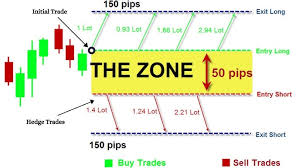
Create an Hedge trading EA using the concept of a specific breakout Indicator

Trabalho concluído

Tempo de execução 13 dias
Comentário do cliente
The developer was exceptionally intelligent, professional, knowledgeable and skilled in creating an ea to trade my strategy effectively and accurately. Will continue to work with him in the future.

Termos de Referência

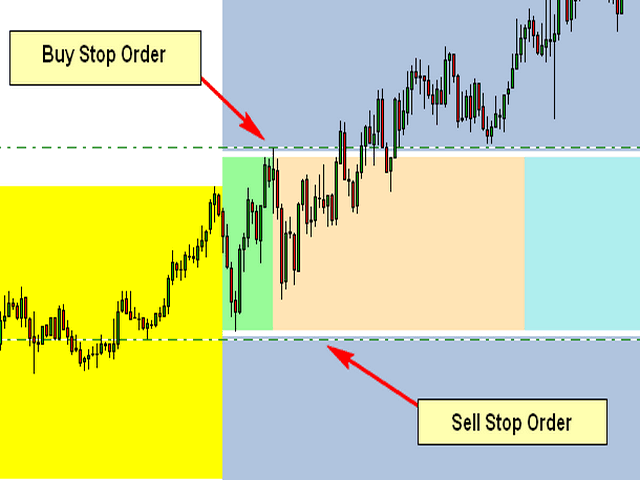
The Attached Picture show the breakout zone (in green, but also extends to the coral and turquoise colors) with a buy stop at the high and a sell stop at the low. Notice that both orders are also offset by the spread which is the gap (white) between the order and the breakout zone. I also need to the EA to consider the spread when placing the pending orders.

Initial Trade Direction:  

  • Buy and Sell: EA places a Buy Order at the high of the Breakout range and a sell order at the low of the range.   

  • Buy Only: EA Only places Buy Orders at both the high and low of the breakout range.   

  • Sell Only:  EA Only places Sell Orders at both the high and low of the breakout range. 

Breakout Zone Minimum Range (Pips): The smallest gap/range the EA is permitted to trade. 

Breakout Zone Maximum Range (Pips): The Widest gap/range the EA is permitted to trade. 

Reverse Mode: EA will reverse all signals when auto trading.           

Example - If Buy and Sell is selected, EA would place a pending Buy order at the high of the range and a pending Sell order at the low. However, if Reverse Mode is enabled then EA will place Sell order at the High and a Buy order at the low of range. 

Delete All Pending Order When Initial Trade Active: If enabled, then when any pending order is active, EA will delete all the other pending orders and manage the order that was activated to completion. 

Number of Loop Trade: When enabled, the EA will open new orders each time an active order hits TP. So, once the current order reaches TP then the EA should open a new order in the same direction where the TP was hit. Example – If the initial trade is a buy and the Number of Loop Trade = 3. EA will open BUY trade first. If the trade hits TP, then the cycle is complete and the EA will immediately open a new Buy trade starting a new loop until the max number of loops are reached. Similarly, in the event price goes the opposite direction then the recovery mechanism (Hedge and/or Grid) should begin. If the recovery mechanism was successful (closing the trade in TP) then the loop is now complete, therefore the EA should immediately open a new trade in the direction the loop was closed. If the Recovery Mechanism was unable to save the trade and actually closed with a loss, then no additional orders or loops should be opened. 

Key Functions to Include:   

Initial Trade Type:  

Auto Trading: EA opens the initial trade by itself. Placing pending orders at the high and low of the NTZ range.    

Manual Trading: EA take control of manual pending order, once the order is activated.  


Trailing-Stop: Trailing-Enable/Disable (Points movement for the Trailing Stop to be based on the pip value/count of range.) 


Multi-Zone Mode: The ability to trade Multiple Breakout Zones throughout the day (when enabled, the EA will trade additional breakout zones once there's no existing order)  

Example: 

Breakout Zone 1: Enable/Disable, Start Time Input, End Time Input 

Breakout Zone 2: Enable/Disable, Start Time Input, End Time Input 

Breakout Zone 3: Enable/Disable, Start Time Input, End Time Input 

Breakout Zone 4: Enable/Disable, Start Time Input, End Time Input 


Day of Week Filter: The option to select specific days of week that EA should trade. 


Built-in Money Management:  

  • Money Management – if enabled, the initial lot will be calculated automatically based on the (NTZ Range Size + Spread, PIP Value, Max Loss, # of Hedge Orders and the # of Grid Orders) If disabled, Fixed Lot is traded 

  • Fixed Lot – Fixed Lot size (used if Money Management = disabled). 

  • Max Daily Loss – Set Maximum daily loss permitted. 

  • Max Weekly Loss – Set Maximum weekly loss permitted. 

  • Max Monthly Loss  Set Maximum monthly loss permitted.  

 Zone Recovery - Hedge Mode: Enable/Disable   

Hedge Calculation Mechanism: The EA should identify the pip value/count of the specified breakout zone and calculate the lotsize for the initial order based on the account leverage, the max loss permitted, spread identified, pip value, lotsize multiplier and the number of hedges inputted.  

NB: Once the maximum number of hedges permitted is reached, the EA should place a Stop Loss Order at the opposite side of the breakout range, which would close the loop with a loss once hit. 


Chart Display:  

Once added to the chart, the EA should display the breakout slot being traded (the highlighting the high and low point of the time slot/breakout range being traded), as well as the pip count of the breakout range, the day of week and a candle timer (counting down to time for the next candle to appear.  

The EA should also display a trading panel that provide stats and performance about the account and strategy.  


More indepth details will be provided after the selection process


Arquivos anexados:

JPG
Hedge.jpg
11.9 Kb

Respondido

1
Desenvolvedor 1
Classificação
(2334)
Projetos
2937
63%
Arbitragem
124
44% / 26%
Expirado
429
15%
Livre
2
Desenvolvedor 2
Classificação
(1)
Projetos
1
0%
Arbitragem
1
0% / 100%
Expirado
0
Livre
3
Desenvolvedor 3
Classificação
(62)
Projetos
90
29%
Arbitragem
24
13% / 58%
Expirado
7
8%
Trabalhando
4
Desenvolvedor 4
Classificação
(17)
Projetos
21
14%
Arbitragem
8
38% / 38%
Expirado
3
14%
Carregado
5
Desenvolvedor 5
Classificação
(5)
Projetos
5
0%
Arbitragem
0
Expirado
0
Livre
6
Desenvolvedor 6
Classificação
(16)
Projetos
35
23%
Arbitragem
4
0% / 50%
Expirado
2
6%
Trabalhando
7
Desenvolvedor 7
Classificação
(160)
Projetos
204
60%
Arbitragem
10
80% / 0%
Expirado
0
Trabalhando
Publicou: 1 código
8
Desenvolvedor 8
Classificação
(365)
Projetos
441
55%
Arbitragem
22
50% / 14%
Expirado
30
7%
Carregado
9
Desenvolvedor 9
Classificação
(12)
Projetos
12
17%
Arbitragem
2
0% / 50%
Expirado
1
8%
Livre
10
Desenvolvedor 10
Classificação
Projetos
1
0%
Arbitragem
2
0% / 100%
Expirado
0
Livre
11
Desenvolvedor 11
Classificação
(162)
Projetos
289
35%
Arbitragem
18
22% / 61%
Expirado
43
15%
Livre
12
Desenvolvedor 12
Classificação
(1)
Projetos
1
0%
Arbitragem
0
Expirado
0
Livre
13
Desenvolvedor 13
Classificação
(2672)
Projetos
3407
68%
Arbitragem
77
48% / 14%
Expirado
342
10%
Livre
Publicou: 1 código
14
Desenvolvedor 14
Classificação
Projetos
1
0%
Arbitragem
1
0% / 100%
Expirado
0
Livre
15
Desenvolvedor 15
Classificação
(271)
Projetos
553
50%
Arbitragem
57
40% / 37%
Expirado
227
41%
Trabalhando
16
Desenvolvedor 16
Classificação
Projetos
0
0%
Arbitragem
0
Expirado
0
Livre
17
Desenvolvedor 17
Classificação
(45)
Projetos
91
13%
Arbitragem
34
26% / 59%
Expirado
37
41%
Livre
Pedidos semelhantes
8 cap prop firm passing 30 - 3000 USD
I am looking for an experienced MQL4/MQL5 HFT developer to build or optimize a High-Frequency Trading (HFT) Expert Advisor that can successfully pass proprietary trading firm challenges and perform consistently under live trading conditions with brokers such as 8cap or BlackBull Markets . The developer should have proven experience with HFT execution, ultra-low-latency trading, broker execution, slippage, spreads
I have a High-Frequency Trading (HFT) Expert Advisor for both MT4 and MT5 designed primarily for US30 (Dow Jones Index) . The EA performs consistently and profitably on demo accounts, but when I run it on an IC Markets Raw or Standard live account, it starts generating losses under what appear to be the same trading conditions. At this time, I cannot provide the source code (.mq4/.mq5). I can only provide the
Version document : 1.0 Plateforme : TradingView Langage : Pine Script v6 Type : Indicateur d'analyse et d'aide à la décision (non-exécutant) 1. Présentation du projet Nom du produit ONYX SR V2 — Intelligent Support & Resistance Scalping System Objectif Créer un indicateur TradingView capable d'identifier automatiquement des opportunités de scalping basées sur : supports et résistances dynamiques ; action du prix ;
EA Crafter 500+ USD
Act as a professional Quantitative Developer and Risk Manager. I want to build a systematic trading strategy rulebook that prioritizes capital preservation and statistical edge over raw performance. Please generate a structured trading strategy using the following framework: 1. ASSET CLASS & TIMEFRAME: - Asset: [e.g., Apple (AAPL), Bitcoin (BTC), or EUR/USD] - Timeframe: [e.g., 5-minute, 1-hour, Daily] 2. CORE
Part 1: Project setup Input settings (risk, stop loss, take profit, EMA periods) Indicator initialization Trade management framework Part 2: Trading logic EMA crossover detection Buy/Sell entry rules One-trade-per-symbol check Part 3: Risk management Automatic lot size calculation Stop-loss and take-profit placement Trade execution and error handling Part 4: Final touches On-screen information Optimization
# H4 Zone Retest EA (MQL5) An automated trading Expert Advisor (EA) for MetaTrader 5, developed in MQL5. The EA trades gold (XAUUSD) using a multi-timeframe breakout and retest strategy: it defines the first H4 candle of each day as a trading zone, detects breakouts on the M5 chart, waits for a retest, and executes trades with risk management, trailing stops, and optional news filtering. --- ## Features - H4 → M5
I require a custom EA and an accompanying custom indicator built in MQL5 for Meta Trader 4/5. The EA must be fully automated (Algo Trading); Telegram-Signal-Linked and named 'AMK Fx'

Informações sobre o projeto

Orçamento
100+ USD
Prazo
para 5 dias