Create an Hedge trading EA using the concept of a specific breakout Indicator

Auftrag beendet

Ausführungszeit 13 Tage
Bewertung des Kunden
The developer was exceptionally intelligent, professional, knowledgeable and skilled in creating an ea to trade my strategy effectively and accurately. Will continue to work with him in the future.

Spezifikation

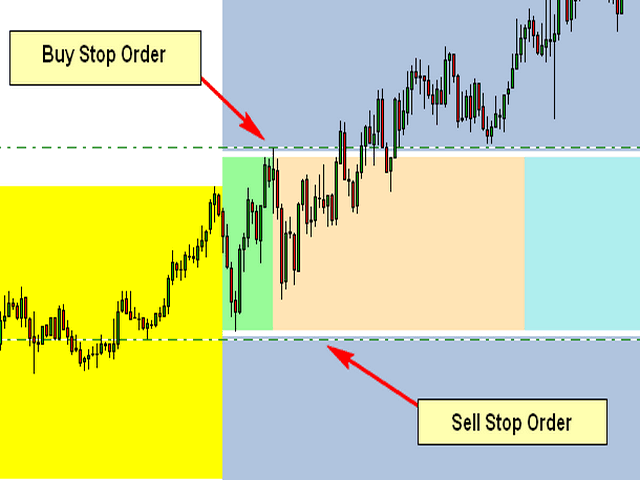
The Attached Picture show the breakout zone (in green, but also extends to the coral and turquoise colors) with a buy stop at the high and a sell stop at the low. Notice that both orders are also offset by the spread which is the gap (white) between the order and the breakout zone. I also need to the EA to consider the spread when placing the pending orders.

Initial Trade Direction:  

  • Buy and Sell: EA places a Buy Order at the high of the Breakout range and a sell order at the low of the range.   

  • Buy Only: EA Only places Buy Orders at both the high and low of the breakout range.   

  • Sell Only:  EA Only places Sell Orders at both the high and low of the breakout range. 

Breakout Zone Minimum Range (Pips): The smallest gap/range the EA is permitted to trade. 

Breakout Zone Maximum Range (Pips): The Widest gap/range the EA is permitted to trade. 

Reverse Mode: EA will reverse all signals when auto trading.           

Example - If Buy and Sell is selected, EA would place a pending Buy order at the high of the range and a pending Sell order at the low. However, if Reverse Mode is enabled then EA will place Sell order at the High and a Buy order at the low of range. 

Delete All Pending Order When Initial Trade Active: If enabled, then when any pending order is active, EA will delete all the other pending orders and manage the order that was activated to completion. 

Number of Loop Trade: When enabled, the EA will open new orders each time an active order hits TP. So, once the current order reaches TP then the EA should open a new order in the same direction where the TP was hit. Example – If the initial trade is a buy and the Number of Loop Trade = 3. EA will open BUY trade first. If the trade hits TP, then the cycle is complete and the EA will immediately open a new Buy trade starting a new loop until the max number of loops are reached. Similarly, in the event price goes the opposite direction then the recovery mechanism (Hedge and/or Grid) should begin. If the recovery mechanism was successful (closing the trade in TP) then the loop is now complete, therefore the EA should immediately open a new trade in the direction the loop was closed. If the Recovery Mechanism was unable to save the trade and actually closed with a loss, then no additional orders or loops should be opened. 

Key Functions to Include:   

Initial Trade Type:  

Auto Trading: EA opens the initial trade by itself. Placing pending orders at the high and low of the NTZ range.    

Manual Trading: EA take control of manual pending order, once the order is activated.  


Trailing-Stop: Trailing-Enable/Disable (Points movement for the Trailing Stop to be based on the pip value/count of range.) 


Multi-Zone Mode: The ability to trade Multiple Breakout Zones throughout the day (when enabled, the EA will trade additional breakout zones once there's no existing order)  

Example: 

Breakout Zone 1: Enable/Disable, Start Time Input, End Time Input 

Breakout Zone 2: Enable/Disable, Start Time Input, End Time Input 

Breakout Zone 3: Enable/Disable, Start Time Input, End Time Input 

Breakout Zone 4: Enable/Disable, Start Time Input, End Time Input 


Day of Week Filter: The option to select specific days of week that EA should trade. 


Built-in Money Management:  

  • Money Management – if enabled, the initial lot will be calculated automatically based on the (NTZ Range Size + Spread, PIP Value, Max Loss, # of Hedge Orders and the # of Grid Orders) If disabled, Fixed Lot is traded 

  • Fixed Lot – Fixed Lot size (used if Money Management = disabled). 

  • Max Daily Loss – Set Maximum daily loss permitted. 

  • Max Weekly Loss – Set Maximum weekly loss permitted. 

  • Max Monthly Loss  Set Maximum monthly loss permitted.  

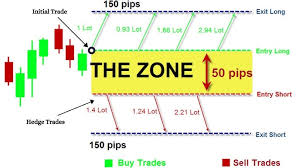
 Zone Recovery - Hedge Mode: Enable/Disable   

Hedge Calculation Mechanism: The EA should identify the pip value/count of the specified breakout zone and calculate the lotsize for the initial order based on the account leverage, the max loss permitted, spread identified, pip value, lotsize multiplier and the number of hedges inputted.  

NB: Once the maximum number of hedges permitted is reached, the EA should place a Stop Loss Order at the opposite side of the breakout range, which would close the loop with a loss once hit. 


Chart Display:  

Once added to the chart, the EA should display the breakout slot being traded (the highlighting the high and low point of the time slot/breakout range being traded), as well as the pip count of the breakout range, the day of week and a candle timer (counting down to time for the next candle to appear.  

The EA should also display a trading panel that provide stats and performance about the account and strategy.  


More indepth details will be provided after the selection process


Dateien:

JPG
Hedge.jpg
11.9 Kb

Bewerbungen

1
Entwickler 1
Bewertung
(2285)
Projekte
2879
63%
Schlichtung
121
45% / 26%
Frist nicht eingehalten
428
15%
Arbeitet
2
Entwickler 2
Bewertung
(1)
Projekte
1
0%
Schlichtung
1
0% / 100%
Frist nicht eingehalten
0
Frei
3
Entwickler 3
Bewertung
(57)
Projekte
82
24%
Schlichtung
24
13% / 58%
Frist nicht eingehalten
7
9%
Beschäftigt
4
Entwickler 4
Bewertung
(14)
Projekte
17
6%
Schlichtung
8
38% / 38%
Frist nicht eingehalten
2
12%
Beschäftigt
5
Entwickler 5
Bewertung
(5)
Projekte
5
0%
Schlichtung
0
Frist nicht eingehalten
0
Frei
6
Entwickler 6
Bewertung
(15)
Projekte
34
24%
Schlichtung
4
0% / 50%
Frist nicht eingehalten
2
6%
Arbeitet
7
Entwickler 7
Bewertung
(151)
Projekte
188
57%
Schlichtung
10
80% / 0%
Frist nicht eingehalten
0
Arbeitet
Veröffentlicht: 1 Beispiel
8
Entwickler 8
Bewertung
(327)
Projekte
392
52%
Schlichtung
20
55% / 15%
Frist nicht eingehalten
28
7%
Überlastet
9
Entwickler 9
Bewertung
(12)
Projekte
12
17%
Schlichtung
2
0% / 50%
Frist nicht eingehalten
1
8%
Frei
10
Entwickler 10
Bewertung
Projekte
1
0%
Schlichtung
2
0% / 100%
Frist nicht eingehalten
0
Frei
11
Entwickler 11
Bewertung
(159)
Projekte
284
35%
Schlichtung
18
22% / 56%
Frist nicht eingehalten
42
15%
Beschäftigt
12
Entwickler 12
Bewertung
(1)
Projekte
1
0%
Schlichtung
0
Frist nicht eingehalten
0
Frei
13
Entwickler 13
Bewertung
(2625)
Projekte
3334
67%
Schlichtung
77
48% / 14%
Frist nicht eingehalten
342
10%
Frei
Veröffentlicht: 1 Beispiel
14
Entwickler 14
Bewertung
Projekte
1
0%
Schlichtung
1
0% / 100%
Frist nicht eingehalten
0
Frei
15
Entwickler 15
Bewertung
(270)
Projekte
552
49%
Schlichtung
58
40% / 36%
Frist nicht eingehalten
228
41%
Arbeitet
16
Entwickler 16
Bewertung
Projekte
0
0%
Schlichtung
0
Frist nicht eingehalten
0
Frei
17
Entwickler 17
Bewertung
(45)
Projekte
91
13%
Schlichtung
34
26% / 59%
Frist nicht eingehalten
37
41%
Frei
Ähnliche Aufträge
1.Sinyal Perdagangan : Sinyal beli: garis MACD utama memotong garis sinyal ke atas (macd_current>signal_current && macd_previous<signal_previous). Sinyal jual: garis MACD utama memotong garis sinyal ke bawah (macd_current<signal_current && macd_previous>signal_previous). Gambar di bawah menunjukkan kasus beli dan jual. 2. Posisi ditutup pada sinyal yang berlawanan: Posisi beli ditutup pada sinyal jual, dan posisi
Trading Bot Executes Trades on Specific Days via TradingView Alerts **As a** trader, **I want** to develop a trading bot that integrates with TradeLocker and MTS, **So that** when a TradingView alert (based on a 2,4,5,10,15,30 minute break and retest strategy whichever one) is triggered first. the bot will execute trades on both platforms, but only on specific days of the week. --- ## Acceptance Criteria 1
specification High-Frequency Candle Momentum Scalper 1. Strategy Overview Core Logic: The EA identifies the current color of the active candle (Bullish or Bearish). Entry Trigger: It opens positions only after a specific duration of the candle has passed (e.g., after 30 seconds on a 1-minute candle) to confirm the direction. 2. Entry Logic (The "Half-Candle" Rule) Timeframe: M1 (Default, but adjustable). Time Filter
Me encuentro en busca de un desarrollador MT4 para crear un EA totalmente basado en reglas enfocadas en Propfirms (Específicamente en The5ers) para operar el activo EURUSD. Cuento con un documento detallado con reglas de contexto, eventos, ejecución y gestión operativa. Necesito código limpio, sin margintale, sin grid; con control de reducción orientado a abrir y cerrar posiciones durante el horario de la sesión de
Olá, preciso de um programador para montar um indicador com base na sobrevenda do estocastico, volume macd, para uma estrategia de reversão e falso rompimento com regioes de OB validos minimas e maximas de H1, H4, D1 e canais para confluencias, quero que seja didatico visualmente e com cores, sons de alertas e algum sinal de call ou put como setas indicando reversões e falsos rompimentos e continuidade
I have an issue with my ninja script and i would like you to help me straighten things I wanted to create an indicator and i have the source code already but i am getting compiling errors on my NinjaTrader And i tried fixing the error it still same I sent 3 images here for you to understand the errors and i would like to ask if you can help me fix it so i can go ahead and compile my source code. Thanks
I have a perfectly working EA that always gets altered, I need special security features implemented, and I already have a great idea of what I need. Super easy, codes already work, just need tweaking here and there. Cybersecurity proficiency would be a positive
Pazuzu 30+ USD
generate or create me a python coded file that has mql5 language requirements for a trading bot under the following instructions. the bot must execute trades if necessary the bot must trade 24/7 the bot must trade gold and currency the bot must make unlimited profit hourly the bot must enter market with caution after market analysis of 98 percent of clear trade

Projektdetails

Budget
100+ USD
Ausführungsfristen
bis 5 Tag(e)