Работа завершена

Время выполнения 13 дней
Отзыв от заказчика
The developer was exceptionally intelligent, professional, knowledgeable and skilled in creating an ea to trade my strategy effectively and accurately. Will continue to work with him in the future.

Техническое задание

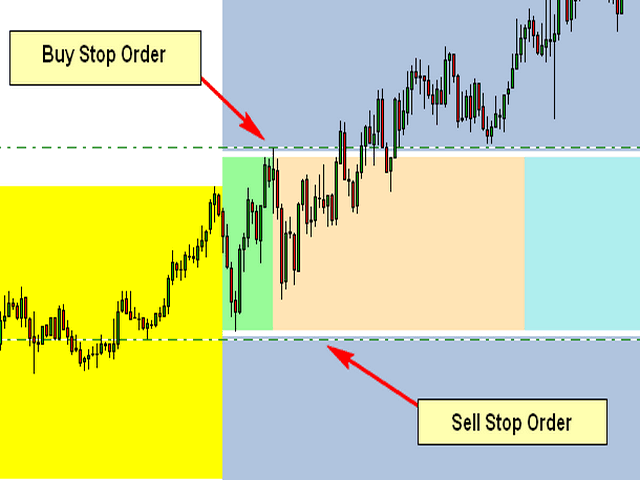
The Attached Picture show the breakout zone (in green, but also extends to the coral and turquoise colors) with a buy stop at the high and a sell stop at the low. Notice that both orders are also offset by the spread which is the gap (white) between the order and the breakout zone. I also need to the EA to consider the spread when placing the pending orders.

Initial Trade Direction:  

  • Buy and Sell: EA places a Buy Order at the high of the Breakout range and a sell order at the low of the range.   

  • Buy Only: EA Only places Buy Orders at both the high and low of the breakout range.   

  • Sell Only:  EA Only places Sell Orders at both the high and low of the breakout range. 

Breakout Zone Minimum Range (Pips): The smallest gap/range the EA is permitted to trade. 

Breakout Zone Maximum Range (Pips): The Widest gap/range the EA is permitted to trade. 

Reverse Mode: EA will reverse all signals when auto trading.           

Example - If Buy and Sell is selected, EA would place a pending Buy order at the high of the range and a pending Sell order at the low. However, if Reverse Mode is enabled then EA will place Sell order at the High and a Buy order at the low of range. 

Delete All Pending Order When Initial Trade Active: If enabled, then when any pending order is active, EA will delete all the other pending orders and manage the order that was activated to completion. 

Number of Loop Trade: When enabled, the EA will open new orders each time an active order hits TP. So, once the current order reaches TP then the EA should open a new order in the same direction where the TP was hit. Example – If the initial trade is a buy and the Number of Loop Trade = 3. EA will open BUY trade first. If the trade hits TP, then the cycle is complete and the EA will immediately open a new Buy trade starting a new loop until the max number of loops are reached. Similarly, in the event price goes the opposite direction then the recovery mechanism (Hedge and/or Grid) should begin. If the recovery mechanism was successful (closing the trade in TP) then the loop is now complete, therefore the EA should immediately open a new trade in the direction the loop was closed. If the Recovery Mechanism was unable to save the trade and actually closed with a loss, then no additional orders or loops should be opened. 

Key Functions to Include:   

Initial Trade Type:  

Auto Trading: EA opens the initial trade by itself. Placing pending orders at the high and low of the NTZ range.    

Manual Trading: EA take control of manual pending order, once the order is activated.  


Trailing-Stop: Trailing-Enable/Disable (Points movement for the Trailing Stop to be based on the pip value/count of range.) 


Multi-Zone Mode: The ability to trade Multiple Breakout Zones throughout the day (when enabled, the EA will trade additional breakout zones once there's no existing order)  

Example: 

Breakout Zone 1: Enable/Disable, Start Time Input, End Time Input 

Breakout Zone 2: Enable/Disable, Start Time Input, End Time Input 

Breakout Zone 3: Enable/Disable, Start Time Input, End Time Input 

Breakout Zone 4: Enable/Disable, Start Time Input, End Time Input 


Day of Week Filter: The option to select specific days of week that EA should trade. 


Built-in Money Management:  

  • Money Management – if enabled, the initial lot will be calculated automatically based on the (NTZ Range Size + Spread, PIP Value, Max Loss, # of Hedge Orders and the # of Grid Orders) If disabled, Fixed Lot is traded 

  • Fixed Lot – Fixed Lot size (used if Money Management = disabled). 

  • Max Daily Loss – Set Maximum daily loss permitted. 

  • Max Weekly Loss – Set Maximum weekly loss permitted. 

  • Max Monthly Loss  Set Maximum monthly loss permitted.  

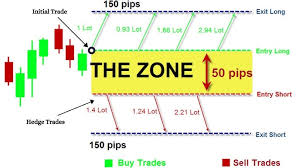
 Zone Recovery - Hedge Mode: Enable/Disable   

Hedge Calculation Mechanism: The EA should identify the pip value/count of the specified breakout zone and calculate the lotsize for the initial order based on the account leverage, the max loss permitted, spread identified, pip value, lotsize multiplier and the number of hedges inputted.  

NB: Once the maximum number of hedges permitted is reached, the EA should place a Stop Loss Order at the opposite side of the breakout range, which would close the loop with a loss once hit. 


Chart Display:  

Once added to the chart, the EA should display the breakout slot being traded (the highlighting the high and low point of the time slot/breakout range being traded), as well as the pip count of the breakout range, the day of week and a candle timer (counting down to time for the next candle to appear.  

The EA should also display a trading panel that provide stats and performance about the account and strategy.  


More indepth details will be provided after the selection process


Файлы:

JPG
Hedge.jpg
11.9 Kb

Откликнулись

1
Разработчик 1
Оценка
(2309)
Проекты
2905
63%
Арбитраж
122
44% / 25%
Просрочено
429
15%
Работает
2
Разработчик 2
Оценка
(1)
Проекты
1
0%
Арбитраж
1
0% / 100%
Просрочено
0
Свободен
3
Разработчик 3
Оценка
(60)
Проекты
87
29%
Арбитраж
24
13% / 58%
Просрочено
7
8%
Работает
4
Разработчик 4
Оценка
(16)
Проекты
19
11%
Арбитраж
8
38% / 38%
Просрочено
2
11%
Загружен
5
Разработчик 5
Оценка
(5)
Проекты
5
0%
Арбитраж
0
Просрочено
0
Свободен
6
Разработчик 6
Оценка
(16)
Проекты
35
23%
Арбитраж
4
0% / 50%
Просрочено
2
6%
Работает
7
Разработчик 7
Оценка
(154)
Проекты
192
58%
Арбитраж
10
80% / 0%
Просрочено
0
Работает
Опубликовал: 1 пример
8
Разработчик 8
Оценка
(350)
Проекты
421
54%
Арбитраж
20
55% / 15%
Просрочено
29
7%
Работает
9
Разработчик 9
Оценка
(12)
Проекты
12
17%
Арбитраж
2
0% / 50%
Просрочено
1
8%
Свободен
10
Разработчик 10
Оценка
Проекты
1
0%
Арбитраж
2
0% / 100%
Просрочено
0
Свободен
11
Разработчик 11
Оценка
(160)
Проекты
285
35%
Арбитраж
18
22% / 61%
Просрочено
42
15%
Загружен
12
Разработчик 12
Оценка
(1)
Проекты
1
0%
Арбитраж
0
Просрочено
0
Свободен
13
Разработчик 13
Оценка
(2642)
Проекты
3357
68%
Арбитраж
77
48% / 14%
Просрочено
342
10%
Свободен
Опубликовал: 1 пример
14
Разработчик 14
Оценка
Проекты
1
0%
Арбитраж
1
0% / 100%
Просрочено
0
Свободен
15
Разработчик 15
Оценка
(270)
Проекты
552
49%
Арбитраж
57
40% / 37%
Просрочено
227
41%
Работает
16
Разработчик 16
Оценка
Проекты
0
0%
Арбитраж
0
Просрочено
0
Свободен
17
Разработчик 17
Оценка
(45)
Проекты
91
13%
Арбитраж
34
26% / 59%
Просрочено
37
41%
Свободен
Похожие заказы
I am looking for a professional MQL5 developer to build a MetaTrader 5 Expert Advisor from scratch. The EA will be called LadyKiller EA. It must trade only the following instruments: • XAUUSD (Gold) • US30 / Dow Jones Index Requirements: • Strong and reliable buy and sell entry logic • Stop Loss and Take Profit system • Risk management (lot size control) • Maximum trades protection • Drawdown protection • Trend
I need an mql5 EA which can be used with 100$ capital very low drawdown The EA should be high frequency trading special for XAUUSD and btcusd or binary options but also the EA should be testable via strategy tester and demo test for five days is needed NO SELECTION CAN BE DONE WITHOUT TESTING when applying make sure you send the backtester results with demo EA testable via strategy tester
Do you need a profitable and well-structured trading strategy converted into a fully automated Expert Advisor on the MT5 platform? I specialize in developing advanced, high-performance EAs with: ✅ Smart entry & exit logic ✅ Risk-based lot size calculation ✅ Break-even & trailing stop system ✅ Spread & session filters ✅ Daily drawdown protection ✅ Prop firm (FTMO-style) risk compliance ✅ Fully automated trade
Hello, I'm looking to find out the cost of creating a mobile trading robot. I've tried to describe it as thoroughly as possible in the following document. I look forward to your response. I'd like to know the costs, delivery time, and how you plan to implement it before making a decision
I have an existing MT5 Expert Advisor (“E-Core”). I need an experienced MQL5 developer to integrate a structured risk management upgrade and a higher timeframe trend filter into the current code. Two files will be provided: 1️⃣ E-Core Source Code (Current Version) 2️⃣ Update Instructions File (contains exact inputs, functions, and logic to integrate) The developer must: Integrate the update logic
I have a working MT5 Expert Advisor. I am NOT looking to change the strategy logic. I only need professional optimization and performance improvement. Requirements: • Parameter optimization • Risk adjustment • Max drawdown reduction • Forward testing report • Optimization for Gold (XAUUSD) Please provide previous optimization reports
DO NOT RESPOND TO WORK WITH ANY AI. ( I CAN ALSO DO THAT ) NEED REAL DEVELOPING SKILL Hedge Add-On Rules for Existing EA Core Idea SL becomes hypothetical (virtual) for the initial basket and for the hedge basket . When price hits the virtual SL level , EA does not close the losing trades. Instead, EA opens one hedge basket in the opposite direction. Original basket direction Hedge basket direction (opposite) Inputs
Hello, I am a user of the "BUY STOP SELL STOP V6" trading bot, which is an advanced Grid System bot. The bot is primarily designed for Gold (XAUUSD), but I want it to work on all currency pairs. "The bot contains a privacy/protection code that prevents it from running on other accounts or being modified on any platform, as it has a client account number lock mechanism" --- Bot Description & Current Settings Bot Type
Hello, I have a breakout EA with reversal logic. I own the full source code for both MT4 and MT5 versions. I need the modifications implemented for both MT4 and MT5 versions. I need several modifications: – Multiple reversals with configurable parameters – Breakeven functionality – Entry only after candle close beyond range + offset – Time-based activation – Alternative offset calculation logic – Automatic close at
Hi I have a simple task (hopefully) I have a custom strategy that I built with the help of Claude Anthropic - everything is finished and I zipped it with power shell but when importing it NT8 gives me the error message that the file was made from an older, incompatible version or not a NinjaScript. My folder structure is correct as far I can see so I don't know what the issues is and it's costing me too much to go

Информация о проекте

Бюджет
100+ USD
Сроки выполнения
до 5 дн.