모든 주문
모든 주문
 규칙
규칙
작업 종료됨

명시
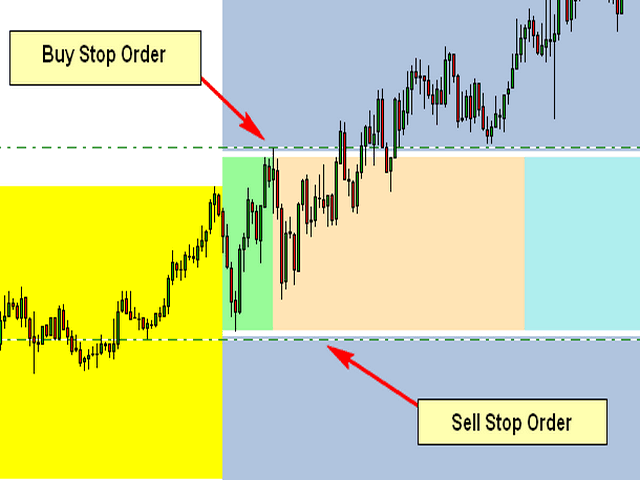
The Attached Picture show the breakout zone (in green, but also extends to the coral and turquoise colors) with a buy stop at the high and a sell stop at the low. Notice that both orders are also offset by the spread which is the gap (white) between the order and the breakout zone. I also need to the EA to consider the spread when placing the pending orders.
Initial Trade Direction:
-
Buy and Sell: EA places a Buy Order at the high of the Breakout range and a sell order at the low of the range.
-
Buy Only: EA Only places Buy Orders at both the high and low of the breakout range.
-
Sell Only: EA Only places Sell Orders at both the high and low of the breakout range.
Breakout Zone Minimum Range (Pips): The smallest gap/range the EA is permitted to trade.
Breakout Zone Maximum Range (Pips): The Widest gap/range the EA is permitted to trade.
Reverse Mode: EA will reverse all signals when auto trading.
Example - If Buy and Sell is selected, EA would place a pending Buy order at the high of the range and a pending Sell order at the low. However, if Reverse Mode is enabled then EA will place Sell order at the High and a Buy order at the low of range.
Delete All Pending Order When Initial Trade Active: If enabled, then when any pending order is active, EA will delete all the other pending orders and manage the order that was activated to completion.
Number of Loop Trade: When enabled, the EA will open new orders each time an active order hits TP. So, once the current order reaches TP then the EA should open a new order in the same direction where the TP was hit. Example – If the initial trade is a buy and the Number of Loop Trade = 3. EA will open BUY trade first. If the trade hits TP, then the cycle is complete and the EA will immediately open a new Buy trade starting a new loop until the max number of loops are reached. Similarly, in the event price goes the opposite direction then the recovery mechanism (Hedge and/or Grid) should begin. If the recovery mechanism was successful (closing the trade in TP) then the loop is now complete, therefore the EA should immediately open a new trade in the direction the loop was closed. If the Recovery Mechanism was unable to save the trade and actually closed with a loss, then no additional orders or loops should be opened.
Key Functions to Include:
Initial Trade Type:
Auto Trading: EA opens the initial trade by itself. Placing pending orders at the high and low of the NTZ range.
Manual Trading: EA take control of manual pending order, once the order is activated.
Trailing-Stop: Trailing-Enable/Disable (Points movement for the Trailing Stop to be based on the pip value/count of range.)
Multi-Zone Mode: The ability to trade Multiple Breakout Zones throughout the day (when enabled, the EA will trade additional breakout zones once there's no existing order)
Example:
Breakout Zone 1: Enable/Disable, Start Time Input, End Time Input
Breakout Zone 2: Enable/Disable, Start Time Input, End Time Input
Breakout Zone 3: Enable/Disable, Start Time Input, End Time Input
Breakout Zone 4: Enable/Disable, Start Time Input, End Time Input
Day of Week Filter: The option to select specific days of week that EA should trade.
Built-in Money Management:
-
Money Management – if enabled, the initial lot will be calculated automatically based on the (NTZ Range Size + Spread, PIP Value, Max Loss, # of Hedge Orders and the # of Grid Orders) If disabled, Fixed Lot is traded
-
Fixed Lot – Fixed Lot size (used if Money Management = disabled).
-
Max Daily Loss – Set Maximum daily loss permitted.
-
Max Weekly Loss – Set Maximum weekly loss permitted.
-
Max Monthly Loss – Set Maximum monthly loss permitted.
Zone Recovery - Hedge Mode: Enable/Disable
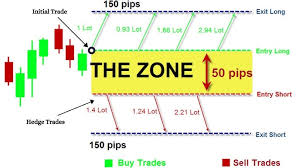
NB: Once the maximum number of hedges permitted is reached, the EA should place a Stop Loss Order at the opposite side of the breakout range, which would close the loop with a loss once hit.
Chart Display:
Once added to the chart, the EA should display the breakout slot being traded (the highlighting the high and low point of the time slot/breakout range being traded), as well as the pip count of the breakout range, the day of week and a candle timer (counting down to time for the next candle to appear.
The EA should also display a trading panel that provide stats and performance about the account and strategy.
More indepth details will be provided after the selection process