Apex Basket Signals
- Indicatori
- Versione: 8.0

FALCON APEX BASKET SIGNALS
Multi-asset basket signal dashboard for MetaTrader 5
----------------------------------------------------------------------------------------------------------------------------------------------
[ SPECIAL OFFER – Thirty Indicators AI Trend Commander FREE!
Worth $49 – Absolutely FREE!
🔗 Product Link:
https://www.mql5.com/en/market/product/167293
How to Claim:
-
Share your honest, positive feedback and give a ⭐⭐⭐⭐⭐ rating if deserved.
-
Send me a DM after submitting your review.
Get your Thirty Indicators AI Trend Commander Premium at no additional cost! Don't miss this special offer! ]
---------------------------------------------------------------------------------------------------------------------------------------------
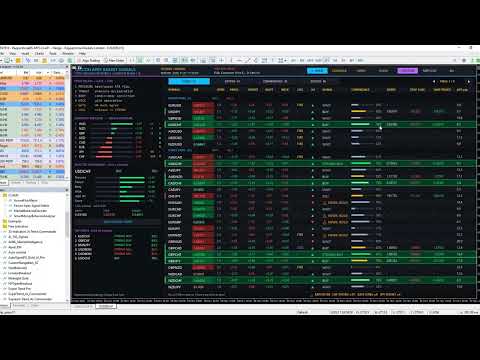
Most indicators look at one chart at a time. Falcon Apex Basket Signals looks at the whole market at once. Every forex pair, crypto, commodity and index available in your terminal is scanned live, and each one is graded by an original model called Tetra-Pressure Convergence (TPC). A BUY or SELL appears only when four independent pressure readings agree.
No moving averages. No RSI. No MACD. A different way to read the market.
HOW IT WORKS - THE TPC ENGINE
TPC measures buying and selling pressure from four separate angles:
1. PRESSURE (basket flow)
Every currency is treated as a basket. Each pair's move is normalised by its ATR, then credited to its base currency and debited from its quote currency across every pair. A pair's pressure = strength of its base basket minus strength of its quote basket. For crypto, commodities and indices, pressure compares each instrument's own flow with its peers in the same class.
2. THRUST
Is the pressure accelerating? TPC compares current pressure with pressure a few bars ago, so it reacts to fresh flow rather than old moves.
3. BODY
Candle conviction: total candle bodies divided by total candle ranges. Strong positive values mean bars keep closing near their highs.
4. WICK
Absorption: lower wicks versus upper wicks. Positive values mean dips are being bought.
+ GATE: the same basket pressure on H4 must not point against the trade.
+ COIL: when volatility squeezes and then releases, the signal is upgraded to STRONG.
The result is a score from -100 to +100 and a confidence percentage:
STRONG BUY - BUY - WAIT - SELL - STRONG SELL
MAIN FEATURES
- Full-screen, responsive dashboard that adapts to any chart size
- Automatic instrument detection: FOREX, CRYPTO, COMMODITIES and INDICES tabs are filled from your broker's own symbols (prefixes and suffixes handled automatically)
- Signal matrix showing Pressure, Thrust, Body, Wick, Coil, H4 gate, Signal and Confidence for every instrument
- Ready-made Entry, Stop Loss and Take Profit for each signal (stop beyond the recent swing, 1-2.5 ATR; target 2x risk by default)
- Whole-row highlight when confidence reaches 65% or more (adjustable)
- Live bid prices that flash green or red on every tick
- Currency pressure ladder ranking the 8 major currencies from strongest to weakest
- Selected-instrument panel with every pillar shown as a bar, plus one-click chart opening
- Top opportunities list for the active tab
- Sort by confidence and "signals only" filter
- Non-repainting mode (calculates on closed bars)
TRADE WITH CONTEXT
- Built-in economic calendar (today, tomorrow, this week; filter by impact)
- Market news view: released data with actual vs forecast, surprise and effect on the currency
- Click any event for full details, including the release history
- Countdown to the next high-impact event in the header
- News filter: signals on a currency can be held, downgraded or flagged around high-impact releases
- Exposure warning: alerts you when several signals stack on the same currency
ALERTS
- Popup, push notification and e-mail
- Only for signals at or above your confidence threshold
- Once per bar, never on load
- Optional warning before high-impact news
- Background tracking of each signal's result (take profit, stop loss, expiry), saved to a CSV file you can open in Excel
HOW TO USE
1. Attach the indicator to any chart (H1 recommended).
2. Choose a tab: Forex, Crypto, Commodities or Indices.
3. Press SORT: CONF so the best signals rise to the top.
4. Focus on highlighted rows (confidence 65%+), preferably STRONG signals with a coil release.
5. For forex, prefer pairs that combine a strong basket with a weak one, and check the exposure column.
6. Check the next high-impact event, then use the Entry / Stop / Target shown.
A full built-in GUIDE explains every column, colour and setting.
SETTINGS (main inputs)
- Signal timeframe and H4 gate timeframe
- Pressure, thrust, body/wick and coil periods
- Minimum score and STRONG score
- Confidence threshold for highlight, alerts and tracking
- Stop loss / take profit model (ATR multiples, reward:risk)
- News filter mode and time window
- Exposure warning level
- Calendar currencies and impact filter
- Display options (strategy column, sorting, refresh rate)
REQUIREMENTS AND NOTES
- MetaTrader 5, any broker. Works on any chart and timeframe.
- The economic calendar requires a live broker connection. It is not available in the Strategy Tester.
- The indicator adds the instruments it scans to Market Watch so MT5 can supply prices.
- The indicator does not place trades. It is an analysis and signal tool.
Trading involves significant risk. Signals are not a guarantee of future results. Always test on a demo account first and use proper risk management.