SpreadClock
- Indicatori
- Versione: 1.15

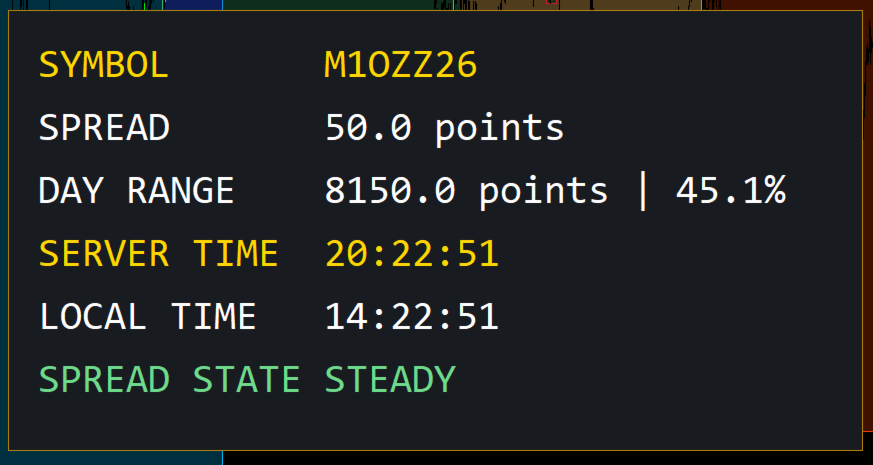
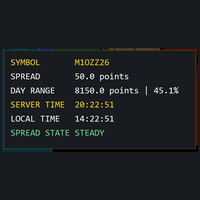
A small heads-up display for one corner of your chart:
- the symbol name
- the **current spread** in points, updated live
- today's **high–low range** in points, and where the current price sits inside that range as a percentage
- **server time and your local time**, side by side, both ticking every second
Its bottom line is the **Spread State**: the indicator keeps a rolling 60-second baseline of the spread and judges the live spread against it — **STEADY, WIDE, or BLOWOUT** — so a spread blowing out into a news release is visible as a state change, not something you notice after the fill. The first seconds after attaching read WARMING UP while the baseline builds; that is the instrument being honest about what it knows.
Corner, font size and position are configurable. For suite use, a built-in guard checks the position once per second: if the Five-Stack Panel covers SpreadClock's default slot, SpreadClock shifts below it — and below CageCalc if CageCalc was shifted onto the same ground. Removing the Panel restores the selected Y position.
Any symbol, any timeframe. No DLLs, no external connections, no account access — it reads the tick and draws text. That is all it does.
SpreadClock displays market data. It does not generate signals, does not predict prices, and does not place or manage trades.
Runs on XAUUSD and other CFDs, and on futures contracts as well — including 1-ounce gold futures — any symbol your broker offers in MetaTrader 5.