Renkin Trainer Pro
- Utilità
-
Yukitomo Takasugi
 Sviluppatore di strumenti di trading per MetaTrader 5 – YU Systems.
- Versione: 1.17
- Attivazioni: 5
Renkin Trainer Pro – Manual Trading Practice Panel for the MT5 Strategy Tester
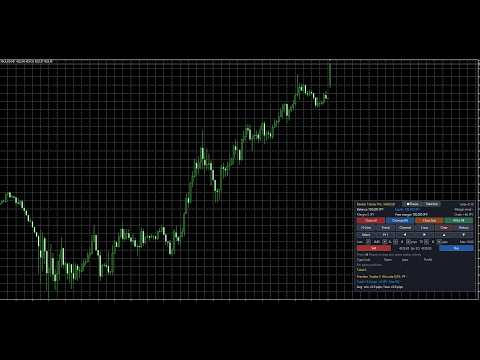
Practice manual trading on historical charts as if the market were live.
Run Renkin Trainer Pro in the Strategy Tester (visual mode), pause the chart at any moment, place and manage trades with one click, move forward bar by bar, and review your results. No automated trading – every decision is yours.
Launch price: 80 USD for the first 100 copies, then 100 USD.
=== WHY RENKIN TRAINER PRO ===
- Train your discretionary trading without risking real money
- Replay months of price action in minutes
- Stop the chart, think, trade – then step forward one bar at a time
- See your real statistics: win rate, profit factor, maximum drawdown
- Works with your own indicators and templates
=== MAIN FEATURES ===
Trading
- One-click Buy / Sell market orders
- Lot, Stop Loss and Take Profit set in pips (0 = none), with +/- buttons
- Required margin shown before you place an order
- Position list: type, lots, open price, pips and profit for each position
- Close a single position, Close all, Close profit only, Close loss only
- Break-even: Auto BE, All to BE, or BE button for each position
- Double-order protection
Practice control (Strategy Tester visual mode)
- Pause / Resume: the chart stops while all buttons keep working
- Next bar: advance exactly one bar and stop again
- Trade, close and draw lines while the chart is paused
Drawing tools
- Horizontal line, Trend line, Channel, Crosshair, Clear all
- Lines are moved with buttons (Select, Point, Left / Right / Up / Down) – no dragging needed in the tester
- Channel: move the lower line, the upper line, or the whole channel
- Extend lines to the left and right
Statistics
- Live practice statistics: trades, win rate, total pips, profit, profit factor, maximum drawdown, average win / loss in pips
- All closed trades are saved to a CSV file when the test ends (common Files folder)
- History button: show or hide the trade arrows of the tester
Account information
- Balance, Equity, Margin, Free margin, Margin level
Languages
- 11 languages: English, Russian, Chinese, Spanish, Portuguese, Japanese, Korean, German, French, Italian, Turkish
- The language is selected automatically from your MT5 terminal language (can also be set in the inputs)
- A suitable font is selected for each language
=== HOW TO USE ===
1. Open the Strategy Tester (Ctrl+R).
2. Select "Renkin Trainer Pro" as the Expert.
3. Choose the symbol, timeframe and date range.
4. Enable "Visual mode" and start the test.
5. Use the panel on the chart: set lots, SL and TP, press Buy or Sell, pause, step forward with Next bar, and manage your positions.
6. When the test ends, check the statistics on the panel and the CSV file.
Tip: To show your favourite indicators in the tester, save your chart template as "tester.tpl". It is loaded automatically when the visual test starts.
The panel can also be used on a live or demo chart as a simple one-click trading panel.
=== MAIN INPUTS ===
- Language (Auto / 11 languages)
- Default lots, SL and TP in pips
- Auto break-even trigger (pips)
- Slippage, order comment, magic number
- Panel position, font, font size and colors
- Drawing line colors
=== NOTES ===
- This product does not trade automatically. All orders are placed by you.
- Pause and Next bar work in the Strategy Tester visual mode.
- Results in the Strategy Tester do not guarantee future results in live trading.