Tiltproof Risk Manager

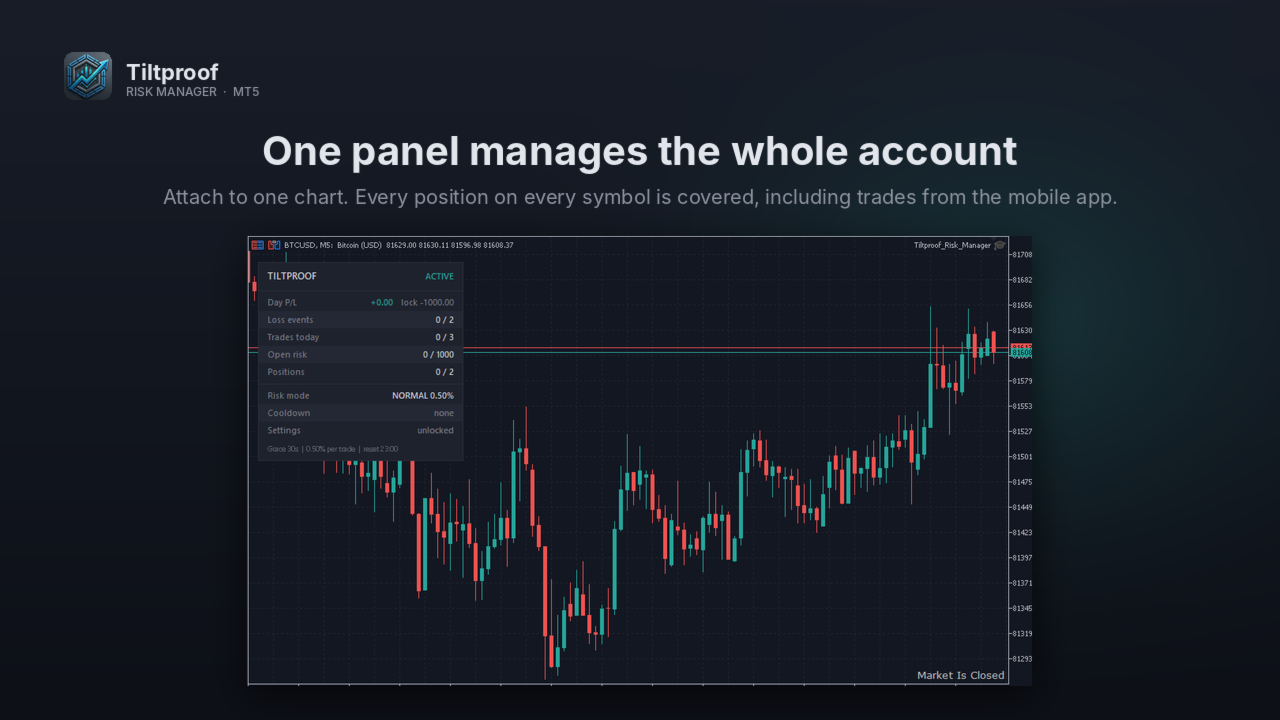
Tiltproof Risk Manager impone disciplina sullo stop loss e regole anti-tilt su ogni posizione del tuo conto. Non apre operazioni. Sorveglia tutte le posizioni, aperte manualmente, da un altro EA o dall'app mobile, e interviene quando le tue regole vengono infrante.

È pensato per i trader che conoscono le proprie regole ma le infrangono sotto pressione: operare senza stop loss, allontanare uno stop che sta per scattare o rientrare più grandi subito dopo una perdita.

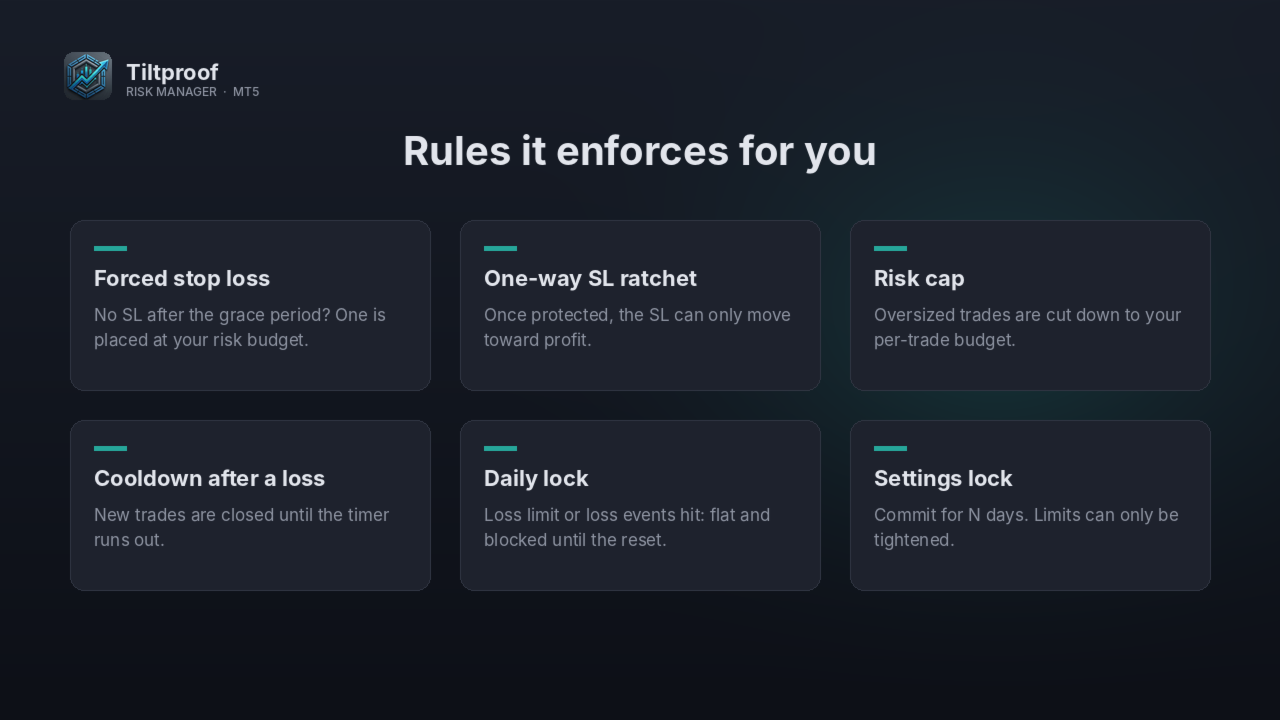
Controllo dello stop loss
- Periodo di tolleranza: dopo l'apertura hai un numero di secondi stabilito per piazzare il tuo SL.
- SL di emergenza: se dopo il periodo di tolleranza non c'è ancora uno SL, ne viene piazzato uno in base al tuo budget di rischio. Se non può essere piazzato, la posizione viene chiusa.
- Cricchetto unidirezionale: una volta protetta la posizione, lo SL può muoversi solo verso il profitto. Uno SL allargato o rimosso viene ripristinato.
- Limite di rischio: se il tuo SL rischia più del budget per operazione, il volume viene ridotto. Se scenderebbe sotto il lotto minimo, viene invece stretto lo SL.
- Interruttore: la posizione viene chiusa se la perdita flottante supera il limite per operazione moltiplicato per un fattore.

Regole anti-tilt
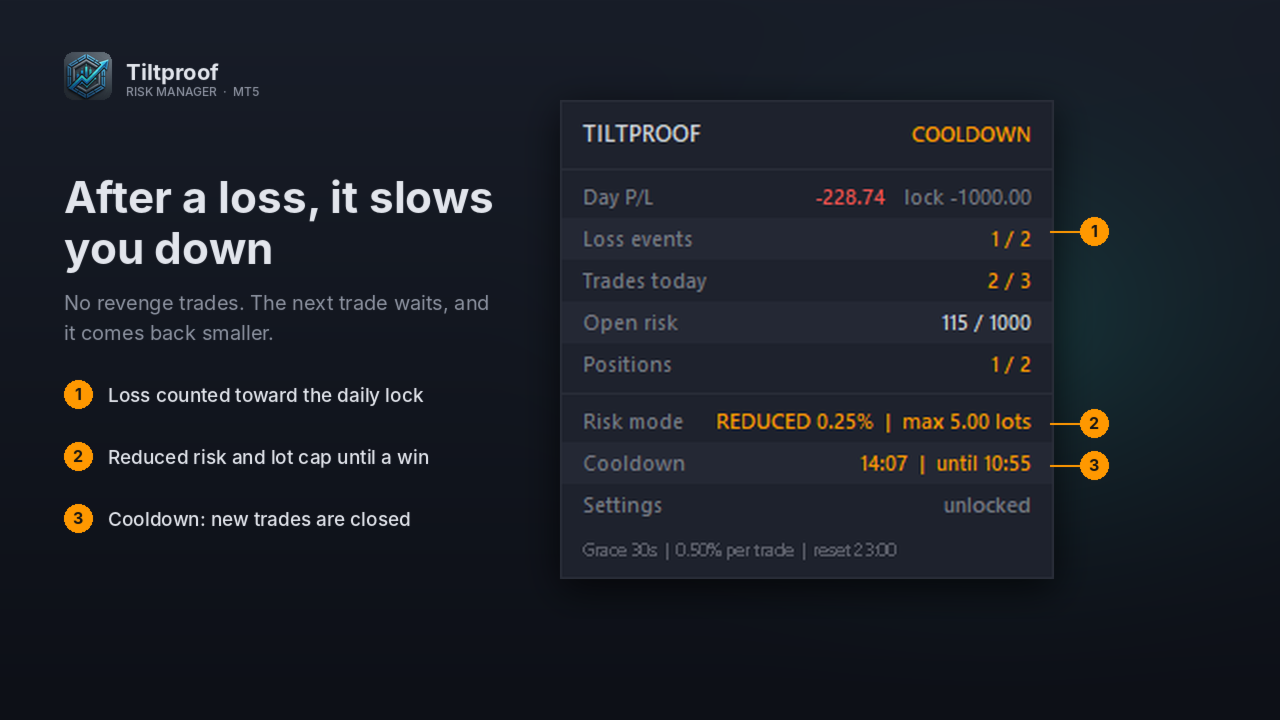
- Pausa dopo una chiusura in perdita o a pareggio. Le posizioni aperte durante la pausa vengono chiuse e ogni tentativo la prolunga.
- Dopo una perdita, le operazioni successive sono limitate a una % di rischio ridotta e al lotto dell'operazione in perdita, fino a un guadagno o al reset giornaliero.
- Numero massimo di operazioni al giorno. I tentativi bloccati non contano.

Limiti giornalieri
- Blocco giornaliero dopo un numero stabilito di eventi di perdita o quando il P/L del giorno (realizzato più flottante) raggiunge il tuo limite di perdita. Tutte le posizioni vengono chiuse e le nuove bloccate fino al reset giornaliero.
- Reset giornaliero alla mezzanotte del server del broker, alla mezzanotte CE(S)T o alle 17:00 di New York, in base alla tua prop firm o al tuo broker.
- Finestra opzionale senza posizioni prima del cambio giorno delle 17:00 di New York.
- Numero massimo di posizioni contemporanee e rischio aperto totale massimo.

Blocco delle impostazioni (opzionale)
Blocca le impostazioni per un numero di giorni stabilito. Durante il blocco i limiti possono solo essere inaspriti: parametri più permissivi e la modalità dry run vengono ignorati e ricevi un avviso. Usalo come impegno durante una challenge o una settimana storta.

Inoltre
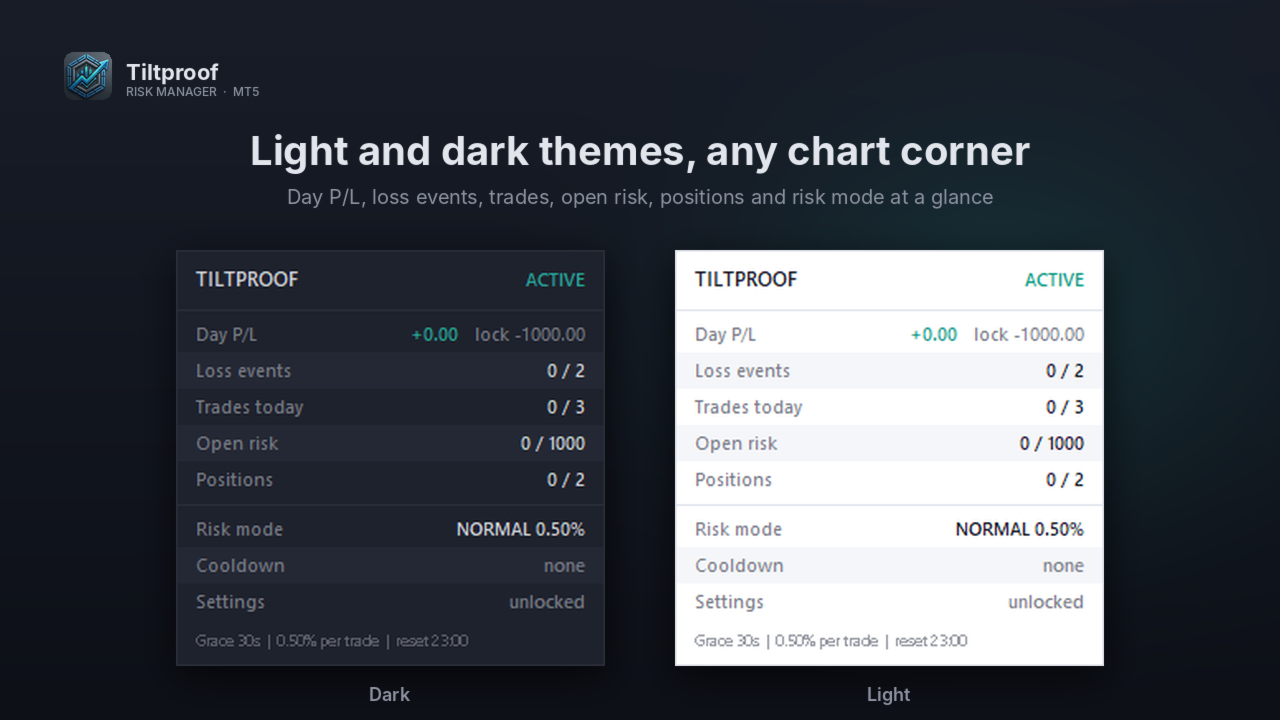
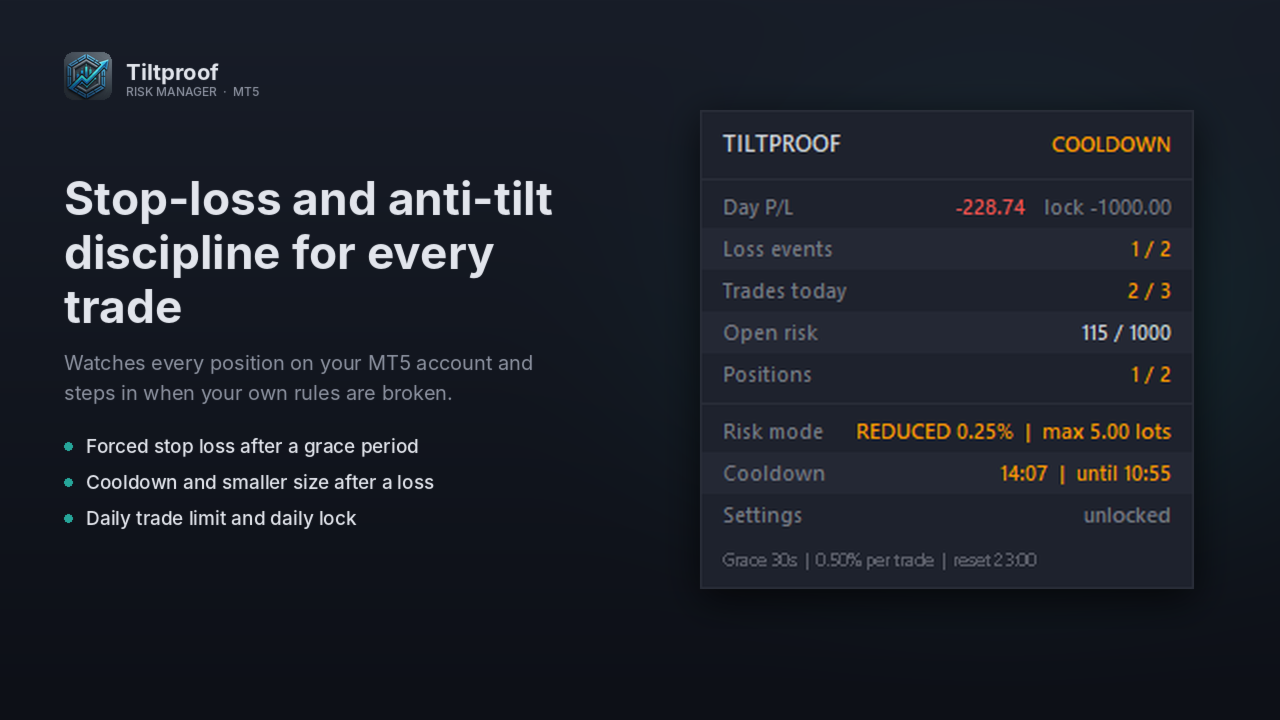
- Pannello con tema chiaro e scuro, posizionabile in qualsiasi angolo del grafico: P/L del giorno, eventi di perdita, operazioni di oggi, rischio aperto, posizioni, modalità di rischio, timer della pausa e stato del blocco impostazioni.
- Ogni intervento viene registrato in un log CSV nella cartella Common\Files del terminale, con notifiche push opzionali sul telefono.
- Modalità dry run per vedere cosa farebbe senza toccare alcuna posizione.
- Tutti i contatori vengono ricostruiti dallo storico delle operazioni, quindi riavviare il terminale non azzera i limiti.

Come si usa
Applicalo a UN solo grafico. Gestisce tutte le posizioni del conto, su qualsiasi simbolo. Attiva il trading algoritmico. Inizia con una sessione in dry run, poi passa alla modalità reale.

Importante
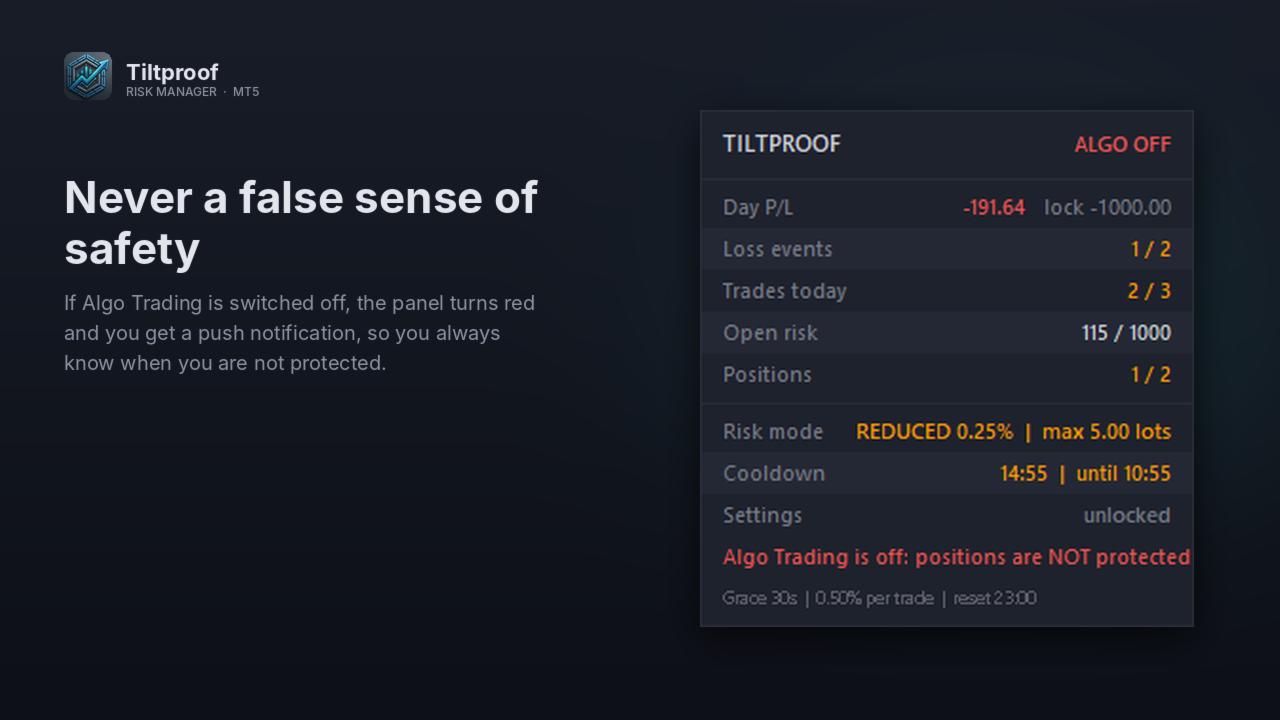
- La protezione funziona solo finché il terminale è avviato e connesso. Le operazioni dal telefono vengono gestite appena il terminale le vede, ma non a terminale spento. Usa un VPS per una copertura 24/5.
- Non usare due gestori del rischio sullo stesso conto.
- I budget sono una % del saldo al reset giornaliero.
- La demo gratuita mostra la logica di protezione nel tester di strategia, dove apre piccole operazioni dimostrative senza SL per farti vedere le regole all'opera. Non apre mai operazioni su un conto reale o demo.

Parametri (predefinito tra parentesi)
Rischio
- Rischio max. per posizione, % del saldo a inizio giornata (0.5)
- Rischio aperto totale max., % (1.0)
- Posizioni contemporanee max. (2)
- Secondi per piazzare il tuo SL (30)
- Interruttore: chiudi se la perdita flottante > limite per operazione x questo valore (1.25)
- SL di emergenza mai più lontano di questa % del prezzo (0.5)
Anti-tilt
- Pausa dopo una perdita o un pareggio, minuti, 0 = disattivata (15)
- Minuti aggiunti per ogni tentativo bloccato (15)
- Limite di rischio dopo una perdita fino a un guadagno, % (0.25)
- Guadagno = risultato netto superiore a questo valore x R (0.1)
- Operazioni max. al giorno (3)
Limiti giornalieri
- Eventi di perdita prima del blocco giornaliero (2)
- Perdita = risultato netto inferiore a meno questo valore x R (0.1)
- Perdite sullo stesso simbolo entro questi secondi contano come un solo evento (60)
- Blocco quando il P/L del giorno raggiunge meno questa % (1.0)
- Orario del reset: mezzanotte server / mezzanotte CE(S)T / 17:00 New York (mezzanotte server)
Chiusura giornaliera
- Chiudi tutto prima delle 17:00 di New York e blocca nuove operazioni fino alle 18:00 (disattivato)
- Minuti prima delle 17:00 di New York (5)
Blocco impostazioni
- Blocca impostazioni (disattivato)
- Durata del blocco, giorni (30)
Pannello
- Mostra pannello (attivo)
- Tema: chiaro / scuro (scuro)
- Angolo: in alto a sinistra / in alto a destra / in basso a sinistra / in basso a destra (in alto a sinistra)
- Distanza orizzontale e verticale dall'angolo, px (12 / 32)
Varie
- Dry run (disattivato)
- Notifiche push (attive)
- Nome del log in Common\Files (Tiltproof_log.csv)
- Deviazione max. in chiusura, punti (50)
Prodotti consigliati
GAM Risk Manager Professional Risk Management & Multi-Entry Trade Planning for MetaTrader 5 GAM Risk Manager is a professional MetaTrader 5 utility designed to help traders plan, calculate, structure, and execute risk-managed trades from one interactive environment. Instead of manually calculating position sizes, distributed entry levels, average entry price, total risk exposure, Stop Loss, and multiple Take Profit targets, GAM Risk Manager brings the complete structure together directly on the
Virtual Basket TP SL Manager
Moh Nugraha Kusuma
5 (1)
"Manage multiple positions as a single unit with hidden targets." The Virtual Basket TP SL Manager is a professional MetaTrader 5 utility designed to automate the closing of positions based on the total profit or loss of a group of orders (a "basket"). By utilizing Virtual Levels , all Take Profit (TP) and Stop Loss (SL) targets are stored locally within the EA's memory and are not sent to the broker's server, keeping your strategy safe from stop-hunting and price manipulation. Key Features Virt
FREE
Blade Position Manager Pro – MT5 Trade Management Utility Take Control of Your Trades with One Professional Dashboard Blade Position Manager Pro is a MetaTrader 5 trade management utility designed to help traders manage open positions, control risk, protect floating profits, and simplify everyday trading operations. Whether you trade Gold (XAUUSD), Forex, indices, or other supported instruments, Blade Position Manager Pro provides practical tools for managing your trades from a compact, easy-to-
Account and Market Dashboard
Ezekiel Bronal Nyangweso
Advanced Account Dashboard & Risk Monitor (MT5) This script provides a real-time on-chart dashboard for monitoring account performance, risk exposure, and execution conditions in MetaTrader 5. It is designed for traders who want clear visibility of account health and risk awareness during live trading or VPS operation. The script does not open trades and does not interfere with any strategy logic . Key Features Account Metrics Live equity, balance, and floating profit/loss Open position count an
FREE
AI QUANT SYSTEM EA — Institutional Neural Engine (v52.0) Fully Automatic Trading EA Please Note:- First that this is an EXPERT ADVISOR, not a Utility. However, due to certain restrictions, I have to publish this  EXPERT ADVISOR  under the Utilities category.  We are  Provided  including a FREE OpenAI API key with this product, so you do not need to purchase AI API KEYS one separately, With Lifetime FREE Upgardes in Future. The AI Quant System EA is a next-generation, high-frequency quantitative
this tool draws horizontal lines starting from a price you specify in the Inputs. you can draw Horizontal lines above or below or (both sides) the starting price. Based on (The Quarters Theory by Ilian Yotov), this tool displays colored lines at fixed intervals which you can change from the inputs. you can use many sets of Horizontal lines each set of Horizontal lines has its own color and style.
FREE
Xiao Dan Kuai Pao is a fast and clean one-click order panel for MetaTrader 5. Open and manage your trades instantly, with Stop Loss and Take Profit placed automatically — no more typing TP distances by hand. Key features: - One-click buttons: BUY, SELL, CLOSE, BREAK EVEN - Custom Stop Loss and Take Profit (in points) — set any distance you want - Flexible risk/reward — combine SL and TP freely to build any ratio, such as 1:1, 1:2, 1:3, 1:4 or 1:5 - Real-time price display (Bid) - Bar countdown t
momentumFX99 – Profesionálny manuálny mriežkový a exekučný panel momentumFX99 je vysokorýchlostný panel pre manuálne obchodovanie s jedným kliknutím určený pre obchodníkov, ktorí chcú okamžite vykonávať presné mriežky čakajúcich objednávok. Namiesto manuálneho výpočtu a zadávania viacerých objednávok počas rýchlych pohybov na trhu vám tento nástroj umožňuje nasadiť plne chránenú 5-úrovňovú trendovú mriežku jediným kliknutím. Dáva vám plnú kontrolu nad vašou realizáciou, čo vám umožňuje zachytiť
Telegram Control Center (TCC) è un Expert Advisor utilitario per MetaTrader 5 che collega il tuo conto di trading a Telegram. Non apre né gestisce operazioni. Monitora il tuo conto, invia alert in tempo reale e ti consente di controllare le posizioni da remoto tramite comandi Telegram. Funzionalita principali - Monitoraggio in tempo reale di saldo, equity, margine e tutte le posizioni aperte - Alert istantanei su Telegram all'apertura, chiusura o modifica di posizioni - Alert di drawdown dell'
FREE
Position Sizer MT5
Impact Ventures OÜ
4.5 (2)
Position Sizer MT5 is a clean, lightweight utility for MetaTrader 5 that calculates the correct lot size for any trade in real time, based on your account balance and defined risk percentage. Designed for traders who want precise risk management without manual calculations. Works on any symbol. Indices, forex, gold, commodities, crypto CFDs, you name it. Two modes: ATR Mode - automatically calculates your stop loss distance using the ATR indicator on any timeframe you choose (M1 to MN). Ideal fo
FREE
Smart Basket Manager
Tamer Mohamed Montaser Mohamed Tawfik Moussa
Smart Basket Manager Overview Smart Basket Manager is a trade management utility for MetaTrader 5. It is designed for traders who open several positions on a symbol and want to manage them together as one basket. It does not open trades and does not generate entry signals. It manages positions that already exist, according to the rules below. What it does Basket profit protection. When the combined profit of the managed positions reaches a start level, the utility locks a percentage of the highe
Session panel
Timo Mario Hoffmann
Session Panel for MT5 Session Panel is a free MT5 indicator that gives you a fast and convenient live overview of the major trading sessions directly from the chart. Monitor Tokyo, London, and New York session times, see which session is currently active, track countdowns to the next session, and view session overlap information in one compact dashboard. Built for traders who want better market timing, clearer session awareness, and a cleaner chart workflow in live market conditions. Session Pan
FREE
This tool will assist all those who trade the forex market manually. It will help them in a sense that it will calculate the required margin in order to initiate a trade. This calculator is so simple to use that a  that the user only inputs only 2 pieces of information. which are   Price   and   Lot size   the trader wishes to take. All other information needed to calculate the calculator will work it out by itself. It will run or calculate  on the current opened chart. As the name suggest it's
Risk Management Buttons
Kriengsak Peitaisong
This is a common, simple and easy to use but effective tool to manage trading risks for all traders. It also help trader places stop loss and take profit levels at the same time the order is filled. How to set the expert advisor's parameters to support your trading style? Lots size. Fixed lots size - For traders who prefered to trade with fixed lots size, they can input the lots size in 'User lots' menu in the expert advisor's properties. The input value should be from the 'Minimum Volume' to th
Smart Risk Manager
Abderrahmane Benali
5 (1)
Smart Risk Manager – Master Your Trades with Precision and Confidence Take complete control of your manual trading with Smart Risk Manager , a professional all-in-one trade and risk management Expert Advisor for MetaTrader 5 . Designed for traders who value speed, precision, and capital protection, it simplifies every step of trade execution while ensuring your risk remains under control. Whether you trade Forex, Gold, Indices, or Cryptocurrencies , Smart Risk Manager helps you execute trades w
Ti aiuta a restare entro i limiti del tuo conto finanziato o della tua challenge. Prop Firm Risk Guardian è un pannello di disciplina che mostra, in tempo reale, esattamente quanto sei vicino a violare le regole — e il lotto più grande che le tue stesse regole consentono adesso. Tiene d'occhio i tre numeri che chiudono le challenge: la perdita giornaliera rispetto al limite (con il margine residuo e un conto alla rovescia fino al reset), il drawdown massimo su base high-water mark mobile o stat
FREE
Breakeven Trailing SL Manager
Hafiz Muhammad Usama Sadique
Breakeven Trailing SL Manager; This utility Manager is a simple utility that protects your manual trades automatically. Attach it to any chart and it watches all manual positions on your account, on every symbol. It does not open trades and it ignores trades opened by other Expert Advisors. How it works When a trade moves in profit by the Breakeven Price, the Stop Loss is moved to the exact entry price. When the price moves the same distance again, the Stop Loss is moved to entry plus that dist
RMT Visual Trade Planner
Denis David Garcia Camejo
RMT Visual Trade Planner is a position size calculator and order planner for MetaTrader 5: you plan a trade with three lines on the chart. Drag the stop loss and take profit, and it shows the lot size for your risk, the money at risk, the reward and the margin. The order is sent only after you press SEND and then CONFIRM. The problem it solves Working out the lot size for a given stop and a given risk takes a calculator, and a mistake there costs more than a bad entry. The order window of MetaTr
Utility professionale per la gestione del rischio. Calcolo automatico del lotto e pannello rischio live. Funziona accanto a qualsiasi EA. - Calcolo lotto automatico da % rischio + distanza SL + saldo - Pannello: Saldo | Equity | Drawdown % | Lotto suggerito | R:R - Alert drawdown giornaliero + chiusura automatica opzionale ️ Se Auto_Close è attivo, chiude tutte le posizioni al raggiungimento del drawdown massimo. Sabino Gervasio — sabbonzo.gumroad.com
ChartChaos
Dustin Ricardo Pierenz
A MetaTrader 5 script that automatically closes all charts except for a specified number to keep open. Simply enter numbers like   1,2,5,10   to keep those corresponding charts open, or a single number (e.g.,   3 ) to keep the first 3 charts open. All other charts are closed in one action, helping you manage multiple open positions with ease. Perfect for decluttering your workspace and focusing on the charts that matter most. Source Code here:  https://github.com/pwn-forex/ChartChaos Youtube T
FREE
Basket Risk Planner MT5 is a chart-based utility for monitoring and planning existing MetaTrader 5 position baskets. It does not generate trading signals and it does not open or add trades. Attach it to the chart of the symbol whose positions you want to review. The panel updates with current market quotes and presents the basket in account currency. What the utility shows Basket Risk Planner MT5 displays the current position count, floating profit/loss and estimated net basket result. Open p
Order Flow Footprint Workspace is a read-only order-flow and market microstructure workspace for MetaTrader 5. It transforms the tick data provided by your broker into an interactive session-based footprint view with price-level activity, profiles, historical navigation and diagnostics. The workspace automatically adapts to the information actually available in the broker feed and does not invent trade direction when the source data cannot support it. MAIN FEATURES • Footprint candles with S
Trade Assistant AI MT5 Trade Assistant AI MT5 is a professional manual trading assistant for MetaTrader 5, created for traders who want a cleaner, faster, and more structured way to manage their trading workflow from one chart panel. This tool helps you plan trades, calculate risk, place manual orders, manage open positions, and stay more organized during live market conditions. It is built for traders who want better control, not unnecessary complexity. Important: Trade Assistant AI MT5 is not
Elevate your trading with this Metatrader 5 expert – the Position Volume Calculator. This tool takes the guesswork out of risk management and profit optimization. Simply input your desired stop-loss points with dragging the stop-loss line, and let the expert advisor compute the optimal position volume for your trade. Plus, with customizable reward ratios, it's easier than ever to set your take-profit points for maximum gains. Trade with confidence and precision. Try the Position Volume Calculat
FREE
Powerful and beautiful trading panel helps you in scheduling or placing multiple trades based on your presets in a single click. It is designed to execute orders immediately or schedule trades in advance to be executed at certain time using multiple filters to avoid non favorable market conditions (wide spread, reduced leverage etc.). Additional functionality developed to sycnhronize two instances of the expert over the internet (Master - Slave Mode), which means trader can open the panel in loc
RiskRewardPanel – Strumento di calcolo Rischio/Rendimento per MetaTrader 5 RiskRewardPanel è un pannello utilitario progettato per assistere i trader nel calcolo del rischio e del potenziale rendimento prima di aprire una posizione. Basandosi sui parametri impostati dall’utente (saldo del conto, percentuale di rischio e rapporto rischio/rendimento), lo strumento calcola automaticamente la dimensione del lotto, il livello di stop loss e il take profit, mostrando le linee direttamente sul grafico
FREE
Partial
Pablo Filipe Soares De Almeida
Partial Close Manager – Strumento di Regolazione del Volume di Trading Questo strumento consente di chiudere parzialmente le operazioni aperte in MetaTrader 5. Funzionalità Chiusura Parziale: Chiudi parte delle operazioni aperte con un solo clic. Calcolo del Volume: Calcola automaticamente il volume da chiudere, evitando inserimenti manuali. Supporto Multi-Ordine: Applica la chiusura parziale a tutti gli ordini aperti dello stesso simbolo. Tabella Trascinabile: Clicca e tieni premuto l’intestazi
Smart Risk Trade Panel is a trading panel for MetaTrader 5 built around one idea: you decide how much you are willing to lose, and the panel calculates the correct lot size for you . No calculator, no spreadsheet, no guessing. Press BUY or SELL and three lines appear on the chart: entry, stop loss and take profit. Drag the stop or the target wherever the chart tells you, and the lot size, the loss at stop, the gain at target and the reward:risk ratio are recalculated instantly. When everything l
Trade Manager Assistant Mt5 ZeroLogics
David Salomon Beltran Mauricio
ZeroLogics . Basic tool for trade management, risk management, and planning, featuring visual levels, TPs, RR, lot sizing, profit/loss tracking, and draggable SL and TP, along with basic automatic per-trade options such as trailing stop, auto breakeven, and auto partials. It is a tool designed to simplify your trades  — it is not a professional tool nor does it claim to be, and it includes 2 interface languages: ENGLISH and SPANISH. Trade Manager Assistant  Comprehensive User Guide and Technica
TradingX Hotkeys
Johannes Stephanus Lombard
Inputs Available Lotsizes Partial Close % You can change lotsizes as you require On an open chart click once to select chart to be able to use hotkeys on specific chart. All Pairs can be used with this expert We created this expert to be able to still trade C300 with a 0.06 Lotsize If you enter a 0.6 lot and close 0.90% you can trade with 0.06 Lot Keys to be used: B -Buy S -Sell C -Close Profitable D -Breakeven (Note if stoploss is set it won't break even) P -Partial close X -Close all
Gli utenti di questo prodotto hanno anche acquistato
Trade Assistant MT5
Evgeniy Kravchenko
4.43 (216)
It helps to calculate the risk per trade, the easy installation of a new order, order management with partial closing functions, trailing stop of 7 types and other useful functions. Additional materials and instructions Installation instructions - Application instructions - Trial version of the application for a demo account Line function -   shows on the chart the Opening line, Stop Loss, Take Profit. With this function it is easy to set a new order and see its additional characteristics bef
Forex Trade Manager MT5
InvestSoft
4.98 (687)
Benvenuto a Trade Manager EA, lo strumento definitivo per la gestione del rischio , progettato per rendere il trading più intuitivo, preciso ed efficiente. Non è solo uno strumento per l'esecuzione degli ordini, ma una soluzione completa per la pianificazione delle operazioni, la gestione delle posizioni e il controllo del rischio. Che tu sia un principiante, un trader avanzato o uno scalper che necessita di esecuzioni rapide, Trade Manager EA si adatta alle tue esigenze, offrendo flessibilità s
================================================================================ POC BREAKOUT - V20.72. Full Professional Grade Toolkit ================================================================================ POC Breakout is a full MetaTrader 5 trading dashboard for discretionary traders who want breakout signals, Point of Control (POC) context, volume profiles, order flow, market structure, news, alerts, and advanced trade planning in one professional workspace. Attached directly to you
Telegram to MT5 MultiChannel Copier
Sergio Marquez Uroz
4.65 (20)
Telegram to MT5 Multi-Channel Copier   copia automaticamente i segnali di trading dai tuoi canali Telegram e Discord direttamente su MetaTrader 5. Niente bot, niente estensioni del browser, niente copia manuale. Il segnale arriva su Telegram o Discord e l'EA apre l'operazione nel tuo terminale in pochi secondi. E prima di copiare un canale, il backtester integrato ti mostra cosa avrebbe fatto quel canale sul tuo conto. Il prodotto include due componenti: un'applicazione Windows che ascolta i tuo
TradePanel MT5
Alfiya Fazylova
4.88 (170)
Trade Panel è un assistente commerciale multifunzionale. L'applicazione contiene più di 50 funzioni di trading per il trading manuale e permette di automatizzare la maggior parte delle attività commerciali. Istruzioni per l'applicazione: https://www.mql5.com/it/blogs/post/762331 Versione di prova dell'applicazione per un conto demo: https://www.mql5.com/it/blogs/post/762419 Come installare l'applicazione: https://www.mql5.com/it/blogs/post/762362 Come testare l'applicazione in modalità visuale:
Copia i segnali Telegram con le tue regole di trading Telegram to MT5 Signal Trader copia automaticamente i segnali di trading testuali dai canali e gruppi Telegram pubblici e privati in MetaTrader 5. Gestisci più fornitori e conti MT5 da un'unica applicazione desktop, con impostazioni di rischio e di trading specifiche per ogni fornitore . Per copiare i segnali non servono bot Telegram né configurazioni API. Accedi semplicemente con il tuo account Telegram tramite numero di telefono o codice QR
FarmedHedge Pair Trading Dashboard
Tanapisit Tepawarapruek
5 (6)
Farmed Hedge Yield Farming | All Markets (Manual - Hybrid - Semi/Automated EA) VERIFIED TRADING RESULTS - Farmed Hedge Yield Axi Copy:  https://www.mql5.com/en/signals/2356376 - Farmed Hedge Yield Exn Copy:   https://www.mql5.com/en/signals/2356404 - Farmed Hedge Yield V Copy:  https://www.mql5.com/en/signals/2357156 IMPORTANT NOTICE: FarmedHedge is a MANUAL-FOCUSED TRADING UTILITY ,not a fully automated EA. Results shown on this Signal include manual trades and overall strategic management.
The product will copy all telegram signal to MT5 ( which you are member) , also it can work as remote copier.  Easy to set up, copy order instant, can work with almost signal formats, image signal,  s upport to translate other language to English Work with all type of channel or group, even channel have "Restrict Saving Content", work with  multi channel, multi MT5 Work as remote copier: with signal have ticket number, it will copy exactly via ticket number. Support to backtest signal. How to s
Power Candles Strategy Scanner - Strumento di ricerca configurazioni multi-simbolo con ottimizzazione automatica Power Candles Strategy Scanner utilizza lo stesso motore di auto-ottimizzazione che alimenta l'indicatore Power Candles, applicandolo a tutti i simboli presenti nel tuo Market Watch, uno accanto all'altro. Un unico pannello ti indica quali simboli sono statisticamente negoziabili in questo momento, quale strategia è vincente su ciascuno di essi, la coppia ottimale di Stop Loss / Take
Entry In The Zone with SMC Multi Timeframe is a real-time market analysis tool based on Smart Money Concepts (SMC), designed to analyze market structure, price direction, and key trading zones. It supports both Single-Timeframe and Multi-Timeframe Analysis, providing a clearer view of overall market structure across multiple timeframes, with real-time BUY / SELL signals designed with a strict focus on No-Repaint principles.   The signals are designed to help filter unclear setups and evaluate tr
Quant AI Agents
Ho Tuan Thang
5 (1)
Quant AI Agents are independent trading Expert Advisors. Instead of trading using a fixed strategy like other conventional EAs, Quant AI Agents   is a   multi-agent AI trading framework   that turns natural-language strategy prompts into live.  WANT THE SAME RESULTS AS MY LIVE SIGNAL?   Use the exact same brokers I do:   IC MARKETS , IC TRADING   .  Unlike the centralized stock market, Forex has no single, unified price feed.  Every broker sources liquidity from different providers, creating un
Grid Manual MT5
Alfiya Fazylova
4.73 (22)
Grid Manual è un pannello di trading per lavorare con una griglia di ordini. L'utilità è universale, ha impostazioni flessibili e un'interfaccia intuitiva. Funziona con una griglia di ordini non solo nella direzione delle perdite, ma anche nella direzione dell'aumento dei profitti. Il trader non ha bisogno di creare e mantenere una griglia di ordini, lo farà l'utilità. È sufficiente aprire un ordine e il manuale di Grid creerà automaticamente una griglia di ordini per esso e lo accompagnerà fino
Trade Indicator Assistant   is a powerful MT5 utility designed to turn indicators into automated trading systems. Its main feature is the ability to automatically detect an indicator’s   BUY and SELL signal buffers , without requiring you to know the buffer numbers, search through indicator settings, or modify the indicator source code. Bonus Indicator:   After purchasing Trade Indicator Assistant, contact me to receive   Trade Signal Pro   completely free as a bonus indicator. [Download Demo V
Footprint Chart Pro — Professional OrderFlow EA for MetaTrader 5 Version 6.34 | Professional tool for real traders | Institutional-Grade Visualization DEMO USERS - PLEASE SELECT EVERY TICK / REAL TICK WHEN TESTING AND YOU HAVE DOWNLOADED HISTORICAL DATA. IF YOU SEE A WAITING SCREEN AND IT IS NOT DOWNLOADING, IT MEANS YOU HAVE LOW HISTORICAL DATA. TRY 1 MIN AND 5 MIN FIRST ON 1 DAY DATA. ONE DAY DATA SHOULD BE THE NEWEST AND MOST CURRENT DATE. PLEASE WAIT UNTIL THE MARKET HAS ROLLED OVER PERIOD.
The Patch
Mian Rameez Ali
The Patch It never opens a trade. It walks behind the ones that did. Every open position, every pending order — checked twice a second for the one thing that's easy to forget: a stop, a target. Found bare, it doesn't ask. It writes the missing number in, measured in points from wherever the position began, and moves on to the next. No strategy, no opinion on direction. Just the quiet assumption that nothing should ever sit on the market unprotected — not because someone decided it shouldn't,
FUTURES ORDERFLOW FOOTPRINT CHART Professional OrderFlow EA for MetaTrader 5 Version 1.01| Professional tool for real traders | Institutional-Grade Visualization STRATEGY TESTER USERS - PLEASE SELECT EVERY REAL TICK WHEN TESTING AND YOU HAVE DOWNLOADED HISTORICAL DATA. IF YOU SEE A WAITING SCREEN AND IT IS NOT DOWNLOADING, IT MEANS YOU HAVE LOW HISTORICAL DATA. TRY 1 MIN AND 5 MIN FIRST ON 1 DAY DATA. ONE DAY DATA SHOULD BE THE NEWEST AND MOST CURRENT DATE. PLEASE WAIT UNTIL THE MARKET HAS ROL
Anchor Trade Manager
Kalinskie Gilliam
5 (9)
Your EAs cannot see each other, but Anchor can. Anchor gives you one place to coordinate your EAs, manage risk, and decide when trading is allowed. It works alongside the trading bots you already use without any changes to them. The Problem One EA opens a trade. Then another starts trading. The next thing you know, you wake up to multiple grids built across your account. Each EA may be doing exactly what it was designed to do, but together they can place far more risk on your account than you in
Floor Watch
Syed Tauqeer Hussain Shah
Floor Watch One number, watched every thirty seconds: how far equity has fallen since the day began — or since its highest point, if it's told to trail the peak instead of the open. Cross the line and it doesn't argue. Every open position closes, every pending order vanishes, and anything that slips through afterward gets shut the moment it appears. Not asked. Removed. The floor holds until the clock turns 5 AM Pakistan time — then, and only then, does the day start over. One rule. No except
Ultimate Extractor
Clifton Creath
5 (7)
Ultimate Extractor - Professional Trading Analytics for MT5 *****this is the local HTML version of Ultimate Extractor. !!!!!it is not compatible with Cloud!!!! For the online version please reach out to me directly****** Ultimate EA manager also now available when you use cloud pro and above for free!! Ultimate Extractor transforms your MetaTrader 5 trading history into actionable insights with comprehensive analytics, interactive charts, and real-time performance tracking. What It Does Automa
Advanced Daily Trading Limiter PRO
AL MOOSAWI ABDULLAH JAFFER BAQER
Advanced Daily Trading Limiter PRO Professional Risk Management. Uncompromising Trading Discipline. One undisciplined trading session can erase weeks of consistent profits. Whether it's overtrading, revenge trading, or exceeding a prop firm's daily risk limits, emotional decisions often become a trader's biggest obstacle—not the market itself. Advanced Daily Trading Limiter PRO is a comprehensive risk management and discipline enforcement utility for MetaTrader 5, designed to help traders stay
Un solo acquisto. Tutti i miei indicatori MT4 e MT5, disponibili oggi e pubblicati in futuro, senza costi aggiuntivi. Dopo l’acquisto, contattami per sapere come riceverli. È previsto un aumento di 50$ ogni 10 acquisti, fino a 999$. Si applica il prezzo del Market al momento del pagamento. Mantieni l’indicatore di cui ti fidi. Automatizza il lavoro che lo circonda. Il tuo segnale. Le tue regole. La tua esecuzione. Hai già un indicatore MT5 su cui fai affidamento, ma devi ancora sorvegliare il g
AI Trading Assistant | Discord/Telegram → MetaTrader 5 Automation An advanced automation framework that enables natural language trade instructions sent from Discord or Telegram to be executed automatically on MetaTrader 5 using n8n workflows and a custom Expert Advisor. This solution integrates modern workflow automation with MetaTrader 5, allowing users to send trade instructions such as: “buy EURUSD 1% risk 30 pip SL 3R TP” “sell GBPUSD now 2% 20 SL 60 TP” “buy limit EURUSD at 1.0850 with 1%
YuClusters
Yury Kulikov
4.93 (43)
Attention: You can view the program operation in the free version  YuClusters DEMO .  YuClusters is a professional market analysis system. The trader has unique opportunities to analyze the flow of orders, trade volumes, price movements using various charts, profiles, indicators, and graphical objects. YuClusters operates on data based on Time&Sales or ticks information, depending on what is available in the quotes of a financial instrument. YuClusters allows you to build graphs by combining da
Premium Trade Manager - Il pannello di trading con un coach integrato Premium Trade Manager porta un coach di trading direttamente nel tuo grafico, con un motore di esecuzione completo al di sotto. Imposta il trade come fai sempre, poi lascia che Max, il tuo coach di trading IA, legga esattamente quel setup rispetto al tuo conto live e ti dia un verdetto chiaro prima che tu confermi: lo stop rispetta un approccio disciplinato, il rischio è ragionevole, c'è un evento ad alto impatto tra pochi min
Exp5 VirtualTradePad PRO SE for MT5
Vladislav Andruschenko
5 (1)
VirtualTradePad PRO SE MT5 — centro di controllo professionale per il trading su MetaTrader 5 VirtualTradePad PRO SE è un pannello di trading premium basato sul grafico e un ambiente di gestione delle operazioni per MetaTrader 5 . È progettato per i trader che desiderano esecuzione più rapida, controllo più chiaro delle posizioni, gestione strutturata delle operazioni, pianificazione visiva dei livelli e un workflow professionale direttamente dal grafico. Non è soltanto un semplice pannello BUY
Daily Trading Limiter
AL MOOSAWI ABDULLAH JAFFER BAQER
5 (8)
• Please test the product in the Strategy Tester before purchasing to understand how it works. • If you face any issues, contact me via private message—I’m always available to help. • After purchase, send me a screenshot of your order to receive a FREE EA as a gift. Daily Trading Limiter — the rule you cannot break Every trader knows the number. Three trades. Two percent. One bad day and stop. And every trader has watched themselves take the fourth trade anyway. The problem was never knowing th
MT5 Trading Deck
Manuel Michiels
5 (2)
One button. One trade. MT5 Trading Deck is a hotkey trading panel for MetaTrader 5 that turns the platform into a keyboard-driven execution cockpit. Stop loss, take profit and lot size are pre-calculated for every key; the moment you press, a market order is live on the broker. A complete technical user manual is attached in the product Comments section. It documents every input parameter, the full hotkey map, the recommended Stream Deck XL layout, and the advanced workflows for Pre-Limit orders
EA Slipstream
Stephen J Martret
5 (1)
Your backtest filled every order at the price it asked for. Your account does not. EA Slipstream measures what execution costs your EA, using your own fills, slippages and spreads to show you the true performance of your EA. A backtest prices every trade at the level the EA named. In live trading a pending order fills at whatever price is available when it triggers, a stop closes wherever the market is when it is hit, and the spread at that moment is whatever the account was quoting. The differ
EA Overfitter
Stephen J Martret
5 (1)
That backtest looks great. But will it still be making money tomorrow, next week, next month? EA Overfitter re-runs your EA on 100 price histories it has never seen. One score tells you if the edge is real. A backtest tells you what an EA did on one price history — the one that happened to occur. What you cannot tell from it is how much of that result was the strategy and how much was the particular path. EA Overfitter answers that. It builds up to 100 synthetic price histories your EA has n
Trading Chaos Expert
Hennadii Stanilevych
5 (11)
This software has no equals in the world and represents a universal trade "console" covering trading signals, automated market entry, setting of Stop Loss and Take Profit, as well as Trailing Profit for multiple trades at the same time in a single open window. Intuitive control of the Expert Advisor in "three clicks" ensures a comprehensive use of all its functions on different computers, including tablets PCs. Interacting with additional signal indicators that mark the chart to give a real mark
Filtro:
Nessuna recensione
Rispondi alla recensione