Overseer EA Guard
- Utilità
- Versione: 1.0
- Attivazioni: 10

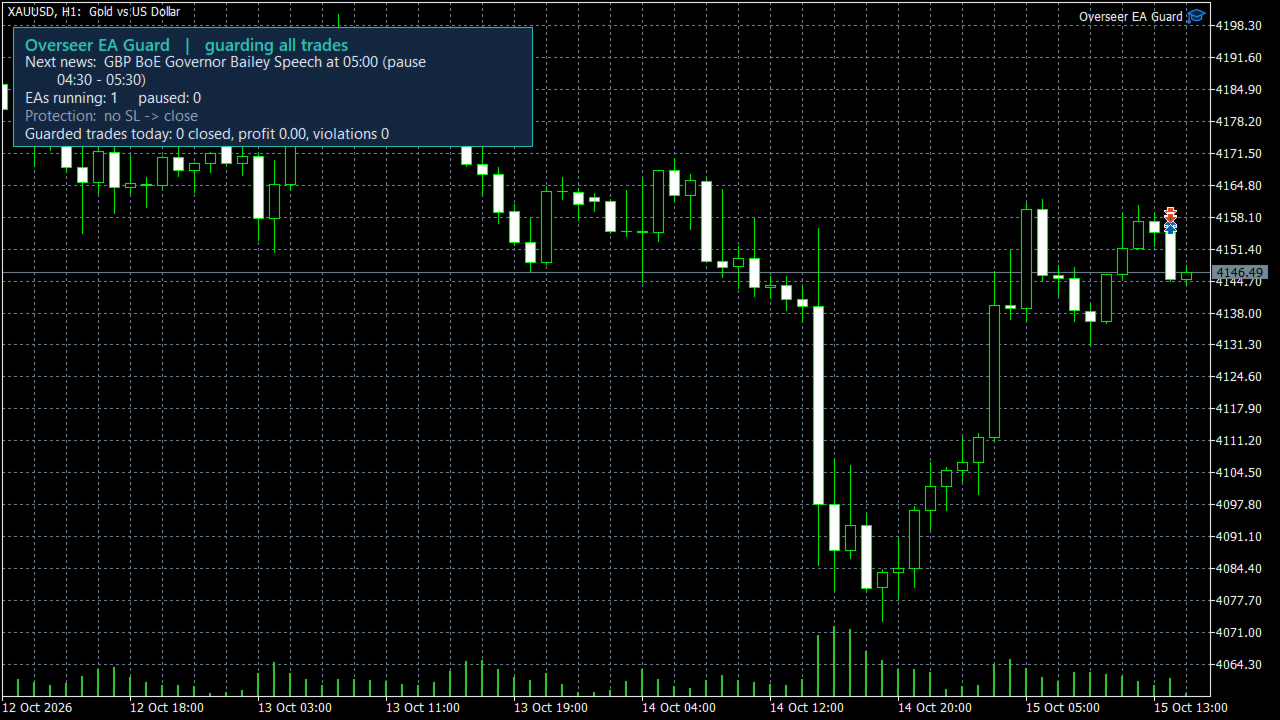
Overseer EA Guard pauses your Expert Advisors before important news and puts them back afterwards. It works with any EA - bought, free or your own - without changing a single line of its code.
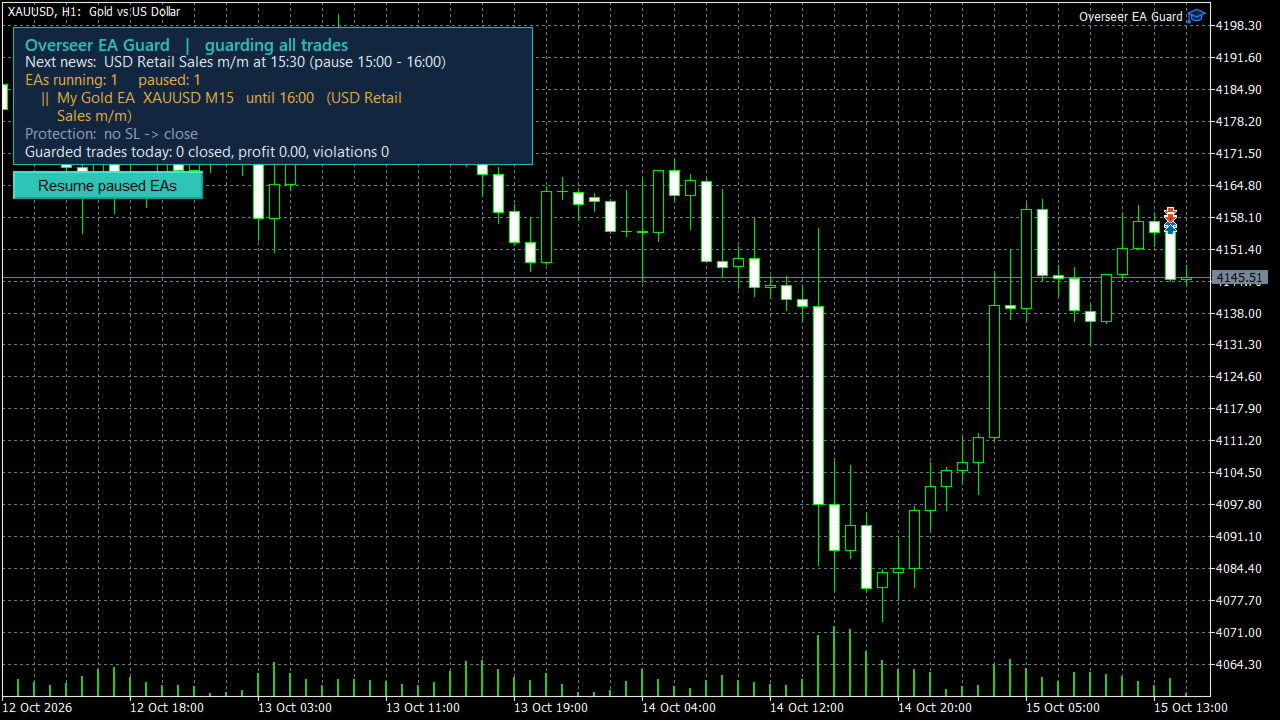
Most news filters can only "ask" an EA to stop trading (the EA must be programmed to listen), or they close the trades the EA opens during the news, which costs you the spread every time. Overseer EA Guard does neither. Before the news it takes the EA off its chart, exactly as you would by hand, and after the news it puts the EA back on the same symbol and timeframe, with exactly the same input settings. While the EA is paused it cannot open anything.
Overseer EA Guard never opens trades itself.
News pause
- Uses the economic calendar built into MetaTrader 5. No DLL, no web requests, nothing to install.
- Finds the right currencies by itself: XAUUSD - USD news, EURUSD - EUR and USD news, GER40 - EUR news. Only the EAs whose symbol is affected are paused; the others keep working.
- Choose which news: major only (NFP, CPI, rate decisions) or major + medium (also PMI, retail sales...).
- Pause before and resume after the news: 15 minutes, 30 minutes, 1 hour or 2 hours.
- Open positions when the pause starts: leave them, close them, or move the stop loss to breakeven (profitable positions only).
- Pause all EAs, or only the ones you list by name.
- If MetaTrader or the computer restarts during a pause, the paused EAs are put back when the pause ends.
Protection
- Position without a stop loss: close it, or set a stop loss of your choice (in pips). The EA gets a few seconds to set its own stop loss first.
- Maximum lot per position: larger positions are closed.
- Maximum number of open positions: the newest extra positions are closed.
- Daily loss limit (% of balance): closes the guarded positions and pauses the EAs until the next trading day. Deposits and withdrawals are not counted as loss.
- After a violation the EAs can be paused until you press the "Resume paused EAs" button on the chart.
- Choose which trades are guarded: all, manual trades only, or EAs by magic number (single numbers or ranges, e.g. 12345, 20001-20005).
Notifications (off by default)
- Email and push notifications to your phone, each can be switched on separately.
- Alerts for: paused and resumed EAs, violations, rejected orders, Algo Trading switched off, lost connection, an EA that stopped running.
- Optional notification for every opened and closed trade.
- Daily report: account, trades of the day, violations, pauses and the news of the next 24 hours.
How to use
- Attach Overseer EA Guard to one chart of any symbol (a chart without another EA). One copy per terminal is enough.
- Allow Algo Trading.
- Keep your EAs on their own charts as usual.
For email and push notifications, set them up in Tools > Options > Email / Notifications and switch them on in the inputs.
Input parameters
Which trades to guard
- Magic numbers - * = all trades, 0 = manual trades, or a list such as 12345, 20001-20005.
Protection
- Position without stop loss - Off / Close the position / Set a stop loss. Default: Close.
- Stop loss for "Set a stop loss", pips - 1 pip = 10 points on 2, 3 and 5 digit symbols (EURUSD 0.0001, USDJPY 0.01, XAUUSD 0.10). Default: 50.
- Seconds the EA gets to set its own stop loss - Default: 10.
- Max lot per position - 0 = off.
- Max open positions - 0 = off.
- Pause EAs after a violation - EAs stay paused until you press "Resume paused EAs". Default: on.
- Daily loss limit, % of balance - 0 = off.
News
- Pause EAs around news - Default: on.
- Which news - Major news only (NFP, CPI, rate decisions) / Major + medium news.
- Pause before the news - 15 min, 30 min, 1 hour, 2 hours. Default: 30 min.
- Resume after the news - 15 min, 30 min, 1 hour, 2 hours. Default: 30 min.
- Open positions when the pause starts - Leave them / Close them / Move stop loss to breakeven.
- EAs to pause - EA names separated by commas; empty = all EAs.
Notifications
- Email, Push to phone - Default: off.
- Notify every opened / closed trade - Default: off.
- Daily report, hour, minute (server time), on weekends - Default: on, 23:30, no weekends.
- Alert if disconnected longer than, minutes - Default: 10.
Good to know
- Only EAs on charts of the same MetaTrader 5 terminal can be paused.
- While an EA is paused, its open positions stay on the server with their stop loss and take profit, but the EA does not manage them (for example trailing stops do not move). Use "Open positions when the pause starts" if you prefer to close them or move them to breakeven.
- An EA that keeps its state only in memory starts fresh after a pause, exactly as after a restart of MetaTrader. Most EAs handle this without any problem.
- The economic calendar is not available in the Strategy Tester, so the news pause can only be seen on a live chart.
- Overseer EA Guard does not predict the market and does not make any EA profitable. It protects your account from avoidable risks.