EconomicStopper Economic Calendar Countdown MT5

  • Indicatori
  • Naoto Shimoda
    Naoto Shimoda
    • MetaTrader 4/5 Indicator & EA Developer al  FX.Hamrat
    • Giappone
    • 466
    FX.Hamrat - MetaTrader 4/5 indicator and Expert Advisor developer based in Japan.
    Over 10 years of trading experience (discretionary and systematic), and 90+ MT4/MT5 programs built so far - including 30+ custom-made projects for individual traders.
  • Versione: 2.32
  • Attivazioni: 10

Know exactly how long until the next release, and what came out.

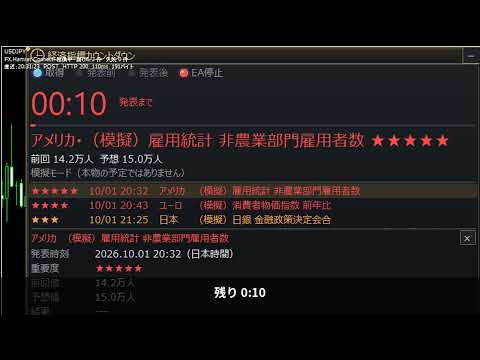
EconomicStopper shows the time to each economic release as a countdown, lists the upcoming events with their importance, and shows the actual value and the surprise against the forecast after the release. Everything is in one panel on the chart. It reads the economic calendar built into MetaTrader 5, so it needs no DLL and no web requests.

How it behaves over time

  1. More than 5 minutes before: the timer counts down every second and the bar shortens.
  2. 5 minutes before: the timer turns to the caution color. You can get an alert, e-mail or push notification here.
  3. 1 minute before: the timer turns red and the panel frame and the lamp blink together.
  4. At the release: the panel switches to "After" and counts the time since the release. The value line shows "Waiting for the actual".
  5. When the actual arrives: the actual and the surprise appear, for example "vs forecast +31K above". Above is green, below is red, as forecast is white.
  6. After the release: it keeps counting for 180 seconds (adjustable), then moves to the next event.

Features

  1. Release time to the second: the timer uses the PC clock in 0.1-second steps and does not wait for ticks.
  2. Choose the events: by importance, country and (optionally) part of the event name. Major events are set by default.
  3. Countdown with color stages: caution at 5 minutes, red and a blinking frame at 1 minute.
  4. Actual and surprise after the release (above, below, as forecast). If the forecast is missing, it compares with the previous value.
  5. Stop your EA around releases: it sets a global variable FXH_ECO_STOP (1 = inside the stop window) and an indicator buffer (iCustom, buffer 0). Add this to your EA and call it at the top of OnTick, and it will not open new orders from N minutes before to N minutes after a release:
    bool NewsStop()
    {
       if(!GlobalVariableCheck("FXH_ECO_STOP")) return false;
       if(TimeLocal() - (datetime)GlobalVariableGet("FXH_ECO_ALIVE") > 60) return false;   // indicator not running
       return GlobalVariableGet("FXH_ECO_STOP") > 0.5;
    }
    // OnTick: if(NewsStop()) return;
  6. List of upcoming events up to 7 days ahead.
  7. Alerts, e-mail and push notifications: before the release, at the release and when the actual arrives.
  8. Resizable panel: drag the corner to resize; double-click the title for a full-chart event board. Five panel styles.
  9. Simulation mode: test the countdown, alerts and the EA stop signal without waiting for a real release.

Details

  • Times are shown in your PC's local time.
  • Event names follow the language of your MetaTrader 5 terminal.
  • Importance comes from the MetaTrader 5 calendar (high, medium, low).
  • In the Strategy Tester the calendar cannot be read, so the indicator runs in simulation mode there. The EA stop signal stays 0 in the tester, so it does not affect your EA's backtests.
  • No DLL, no web requests.

Inputs (main)

  • Countdown start (default 15 minutes before) and count after the release (default 180 seconds)
  • Panel style, position, width and rows shown
  • Days ahead (default 2), minimum importance, filter by country and importance or by event name
  • Alerts: importance, and how to alert before the release (default 5 minutes), at the release and for the actual
  • EA stop signal: from N minutes before to N minutes after (default 30 / 30), signal name
  • Simulation mode

This indicator shows the economic calendar and the time to each release. It does not trade, does not give investment advice and does not promise any results. Event times and values depend on the MetaTrader 5 economic calendar and may change.
Altri dall’autore
See the Dow Theory direction of six timeframes in one panel. DowgatorPro2 judges the current trend direction (up or down) automatically by Dow Theory, using closed bars only. It carries over the features of the earlier e-DowgatorPro and puts first that even a beginner can read the direction without confusion. The direction of six timeframes (M1 to D1) is shown on the panel in color. Features Check direction mismatch: see on the panel whether your chart's timeframe agrees with the higher timefram
The levels of higher timeframes, on the chart you are watching. LineTraderPro2 finds swing highs and lows with Dow Theory rules and draws horizontal lines at the levels the market watches, for any of 20 timeframes from M1 to W1. Each line is labeled with its timeframe (H1, D1 and so on) and the date of the swing, so you can see at a glance which timeframe a level belongs to without switching charts. What you see on the chart Horizontal lines: the swing highs above the price and the swing lows be
See the market's fear level on the chart you trade. VixChecker shows the VIX (the volatility index often called the fear index) in a sub-window as one bar per day, colored by level: normal (blue), caution (yellow, 20 or above by default) and fear (red, 30 or above). The current value, the change from the previous close and the time of the value are shown in a small panel, and the value can also be shown on the main chart. Where the VIX values come from (please read before buying) The indicator d
Round numbers on your chart, and a notice when the price gets close. RoundNumberAlert draws horizontal lines at round numbers (150.000, 150.500 ...) and watches them for you. When the price enters the touch range, only that line blinks and you get one notification. Major round numbers stand out in gold, and a small panel shows how many pips are left to the next round number above and below. Features Round-number lines: the step starts at 10 pips (for example 50 pips: 150.000, 150.500 ...). Major
See the Dow Theory direction of six timeframes in one panel. DowgatorPro2 judges the current trend direction (up or down) automatically by Dow Theory, using closed bars only. It carries over the features of the earlier e-DowgatorPro and puts first that even a beginner can read the direction without confusion. The direction of six timeframes (M1 to D1) is shown on the panel in color. Features Check direction mismatch: see on the panel whether your chart's timeframe agrees with the higher timefram
The levels of higher timeframes, on the chart you are watching. LineTraderPro2 finds swing highs and lows with Dow Theory rules and draws horizontal lines at the levels the market watches, for any of 20 timeframes from M1 to W1. Each line is labeled with its timeframe (H1, D1 and so on) and the date of the swing, so you can see at a glance which timeframe a level belongs to without switching charts. What you see on the chart Horizontal lines: the swing highs above the price and the swing lows be
See the market's fear level on the chart you trade. VixChecker shows the VIX (the volatility index often called the fear index) in a sub-window as one bar per day, colored by level: normal (blue), caution (yellow, 20 or above by default) and fear (red, 30 or above). The current value, the change from the previous close and the time of the value are shown in a small panel, and the value can also be shown on the main chart. Where the VIX values come from (please read before buying) The indicator d
Round numbers on your chart, and a notice when the price gets close. RoundNumberAlert draws horizontal lines at round numbers (150.000, 150.500 ...) and watches them for you. When the price enters the touch range, only that line blinks and you get one notification. Major round numbers stand out in gold, and a small panel shows how many pips are left to the next round number above and below. Features Round-number lines: the step starts at 10 pips (for example 50 pips: 150.000, 150.500 ...). Major
Filtro:
Nessuna recensione
Rispondi alla recensione