AlphaDesk Multi Symbol WR Pullback Scanner
- Experts
- Versione: 1.12
- Attivazioni: 5

AlphaDesk Multi Symbol WR Pullback Scanner
Version 1.10
Semi-automatic multi-timeframe Williams %R pullback scanner with built-in risk
management for MetaTrader 5.
Scans an entire symbol category at once, prints confirmed entry signals, and keeps a
live signal table on your chart. You review each signal and click Approve — the EA then
sizes the position from your risk percentage, places the stop loss and take profit
automatically, and sends the order. Nothing is traded without your click.
WHAT IT DOES
============
The scanner combines two timeframes for every symbol in the selected category:
1. Higher timeframe (HTF) establishes the directional bias using the Williams %R EMA.
2. Lower timeframe (LTF) triggers the actual entry on the pullback.
A signal is only printed when the LTF condition fires AND the HTF bias agrees, so
counter-trend noise is filtered out before you ever see it.
The 4 signal types
------------------
%R BUY Signal LTF %R crosses back above the -90 oversold level,
with HTF %R EMA above -80
%R SELL Signal LTF %R crosses back below the -10 overbought level,
with HTF %R EMA below -20
%REMA BUY Zone LTF %R EMA crosses up through -80 (deep pullback zone)
%REMA SELL Zone LTF %R EMA crosses down through -20 (deep pullback zone)
Every signal fires on a closed bar (shifts 1 and 2 are compared), so there are no
repainting intrabar signals.
SYMBOL CATEGORIES
=================
Pick one category and the scanner loops through every symbol in it automatically.
You can edit any list to add or remove symbols, or paste your own comma-separated
list.
Major Pairs 7 pairs (EURUSD, GBPUSD, AUDUSD, NZDUSD, USDJPY, USDCHF, USDCAD)
Minor Pairs 20 cross pairs
Metals XAUUSD, XAGUSD, XPTUSD, XPDUSD
Indices US30, US100, SPX500
Commodities Brent and WTI futures
Cryptos BTCUSD, ETHUSD, ADAUSD, SOLUSD, XRPUSD, LNKUSD, POLUSD,
AVXUSD, BNBUSD, DOGUSD
Symbols that are not available on your broker are skipped automatically, so the
default lists work across most MT5 brokers without editing.
TWO EXECUTION MODES
===================
APPROVE_MANUAL (default) Nothing is traded until you click Approve on a signal
row. One click sizes and places the trade.
AUTO_ON_SIGNAL A signal places its own trade immediately, with no click needed.
Use this only if you accept fully unattended execution.
The execution mode is shown on the panel at all times, next to the active risk
settings, so you always know which mode is running.
HOW A TRADE IS SIZED (risk based, not fixed lot)
==================================================
The EA does not guess a lot size. It works backwards from the stop loss:
risk money = account balance (or equity) x RiskPercent
loss per lot = stop distance / tick size x tick value
lot size = risk money / loss per lot
The lot is then floored to the broker volume step, so the real risk is never higher
than the percentage you set. Worked example — 10,000 USD account, RiskPercent 0.5,
EURUSD with an 8 pip ATR and a 1.5 stop multiplier gives a 12 pip stop, which is
about 80 USD of loss per lot. 50 USD of risk divided by 80 gives 0.625, floored to
the 0.01 step to 0.62 lots, for a real risk of 49.60 USD or 0.496 percent.
If the calculated lot comes out below the broker minimum, the EA skips the trade by
default rather than quietly over-risking the account. Set UseMinLot to true to trade
the minimum lot instead, and read the warning in the log first.
STOP LOSS AND TAKE PROFIT ARE DECIDED AUTOMATICALLY
===================================================
Stop distance = ATR(ATRPeriod) x SL_ATR_Multiplier, taken from the closed bar
Take profit = stop distance x TP_RR_Ratio
Defaults are a 14 period ATR, a 1.5 multiplier and a 2.0 ratio, so a 12 pip stop
would target 24 pips. The distance is always widened to clear the broker minimum
stop level, and a trade is never sent without a stop loss — if the ATR is not
available the EA uses a fallback distance and prints a message instead.
RISK GUARDS - every one of these can block an entry
===================================================
MaxOpenTrades hard cap on simultaneous positions
one position per symbol a symbol already held is never re-entered
MaxSpreadATRPercent skips the entry when the spread is too wide for the current
volatility, measured against ATR on the entry timeframe
MaxSpreadPoints optional extra absolute spread cap in points
MinFreeMarginPercent skips the entry when free margin is too low
MaxDailyLossPercent blocks new entries for the rest of the server day
UseMinLot what to do when the risk lot is under the broker minimum
UseAutoSLTP master switch for automatic stop and target
EnableTrading master switch for all order sending
The spread guard is measured against ATR rather than a fixed point count, so the same
setting behaves sensibly on a EURUSD pip and on a wide crypto spread. A 25 percent
limit means the spread may not exceed a quarter of the entry timeframe's ATR.
Every rejection is explained in one line on the panel and in the Experts log, so you
always know why a trade did not happen.
ON-CHART SIGNAL TABLE
======================
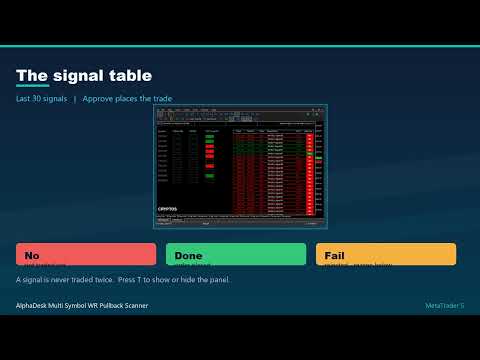
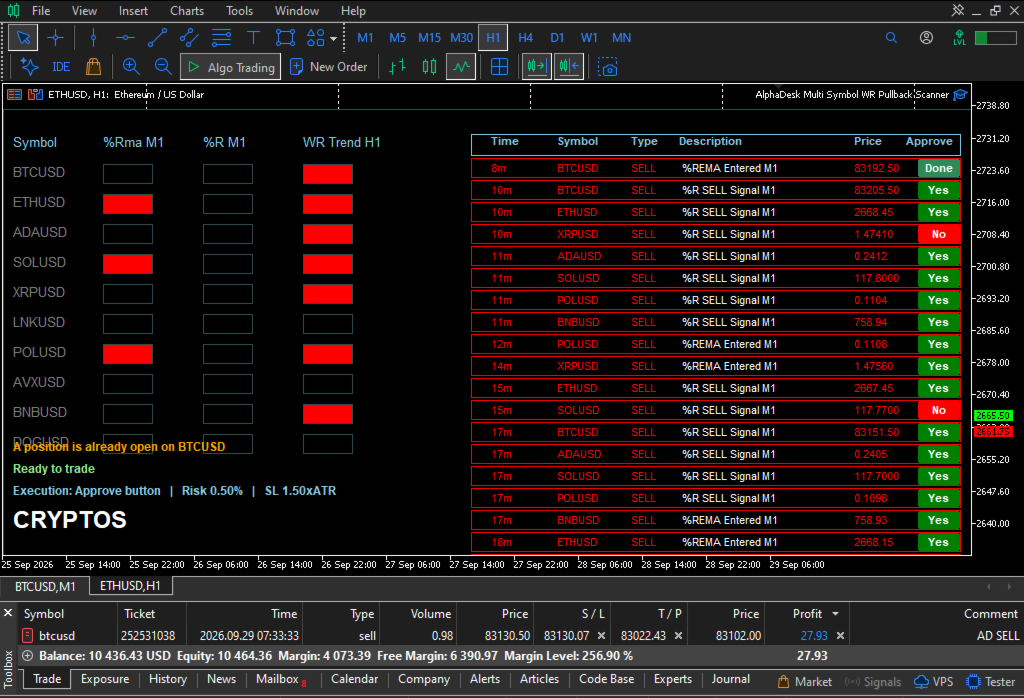
The dashboard keeps the 30 most recent signals for the active category, newest first:
Time, Symbol, Signal type, Price and signal age
Colour coded — green for BUY, red for SELL
An Approve button per row:
No not traded yet
Done approved and the order was placed
Fail approved but the order was rejected, reason shown below the table
Approve and executed state is stored in a local SQLite database per category, so it
survives restarts, and a signal is never traded twice. The panel also shows a live
status line with the current execution mode, risk percentage, stop multiplier and
target ratio. Press t to show or hide it.
INPUT SETTINGS
==============
Signal execution
ExecutionMode APPROVE_MANUAL or AUTO_ON_SIGNAL (APPROVE_MANUAL)
EnableTrading master switch for order sending (true)
MagicNumber identifies this EA's own positions (20260928)
MaxOpenTrades max simultaneous positions (3)
DeviationPoints max price deviation in points (20)
Risk and lot sizing
RiskPercent risk per trade, percent (0.5)
RiskBase measure the risk on Balance or Equity (Balance)
UseMinLot use the broker minimum when the risk lot is too small (false)
MaxLot hard lot cap, 0 for no cap (0)
MinFreeMarginPercent required free margin, 0 to disable (100)
MaxSpreadATRPercent skip spreads wider than this share of ATR (25)
MaxSpreadPoints extra absolute point cap, 0 to disable (0)
MaxDailyLossPercent daily circuit breaker, 0 to disable (0)
Auto stop loss and take profit
UseAutoSLTP calculate the stop and target (true)
ATRPeriod ATR period for the stop (14)
SL_ATR_Multiplier stop = ATR x this (1.5)
TP_RR_Ratio target = stop x this (2.0)
Trade management
UseBreakeven move the stop to breakeven (true)
BreakevenAtR breakeven after this multiple of R (1.0)
UseAtrTrail ATR trailing stop (true)
TrailATRMultiplier trail distance = ATR x this (1.0)
Symbol scanning
SelectedCategory which list to scan (Major Pairs)
symbol lists fully editable, comma separated (see above)
HTF bias timeframe (H1)
HTF %R period / %R-EMA period (100 / 44)
LTF entry timeframe (M5)
LTF %R period / %R-EMA period (100 / 44)
Any timeframe combination works. The defaults (H1 bias over M5 entry) are a solid
starting point, and H4 over M15 is a good slower alternative.
Trade management only ever touches positions carrying this EA's magic number, and the
stop is only ever moved in the profitable direction, never behind the current one.
HOW TO USE
==========
1. Attach AlphaDesk Multi Symbol WR Pullback Scanner to any chart. The chart symbol
is irrelevant — the scanner reads its own symbol lists.
2. Choose your Selected Category in the inputs and press OK.
3. Allow Algo Trading for the EA in Tools > Options > Expert Advisors, otherwise the
background scan cannot run and no order can be sent.
4. Press t to show or hide the signal panel.
5. Review a signal, then click Approve on its row. The EA sizes the position from
RiskPercent, attaches the automatic stop and target, and sends the order.
6. Read the status line under the table. It tells you what happened, or precisely
which guard blocked the entry.
Signals are also raised as standard terminal alerts and written to the Experts log
and the MQL5 Journal.
STRATEGY TESTER
===============
ValidationSelfTest places one 0.01 lot round trip the first time the EA runs
inside the Strategy Tester, then closes it. This is a
connectivity check so you can confirm the EA can trade on your
broker before going live.
This self test only runs when the tester is active. It never places a trade on a live
or demo chart, so you can leave it enabled.
IMPORTANT NOTES
===============
- This is a semi-automatic tool. In the default mode nothing is traded without your
click on Approve. In AUTO_ON_SIGNAL mode it trades without asking, so only use that
mode if you accept unattended execution.
- It is not financial advice and no signal is a recommendation to trade. Past
behaviour and indicator logic do not guarantee future results.
- Position sizing is only as good as the risk percentage you set. Start lower than
you think you need, and test on a demo account first.
- It reads market data and sends orders on the account it is attached to, so it works
on standard and swap-free account types. Use charts and symbols from the same
broker you intend to trade.
- Requires Algo Trading permission and a correctly configured terminal.
INSTALLATION
============
- Download the file from the Market tab in MetaTrader 5.
- In MetaEditor open File > Open Data Folder and copy the .ex5 file into MQL5\Experts\.
- Restart MetaTrader 5, or right-click Navigator > Expert Advisors and choose Refresh.
- Drag the tool from Navigator > Expert Advisors onto any chart.
FEEDBACK
========
If you find a setup where the scanner can be improved, please send a private message
with the symbol, timeframe and screenshot so it can be reviewed for a future update.