Multi Indicator Dashboard Pro
- Indicatori
- Versione: 1.39
- Attivazioni: 5

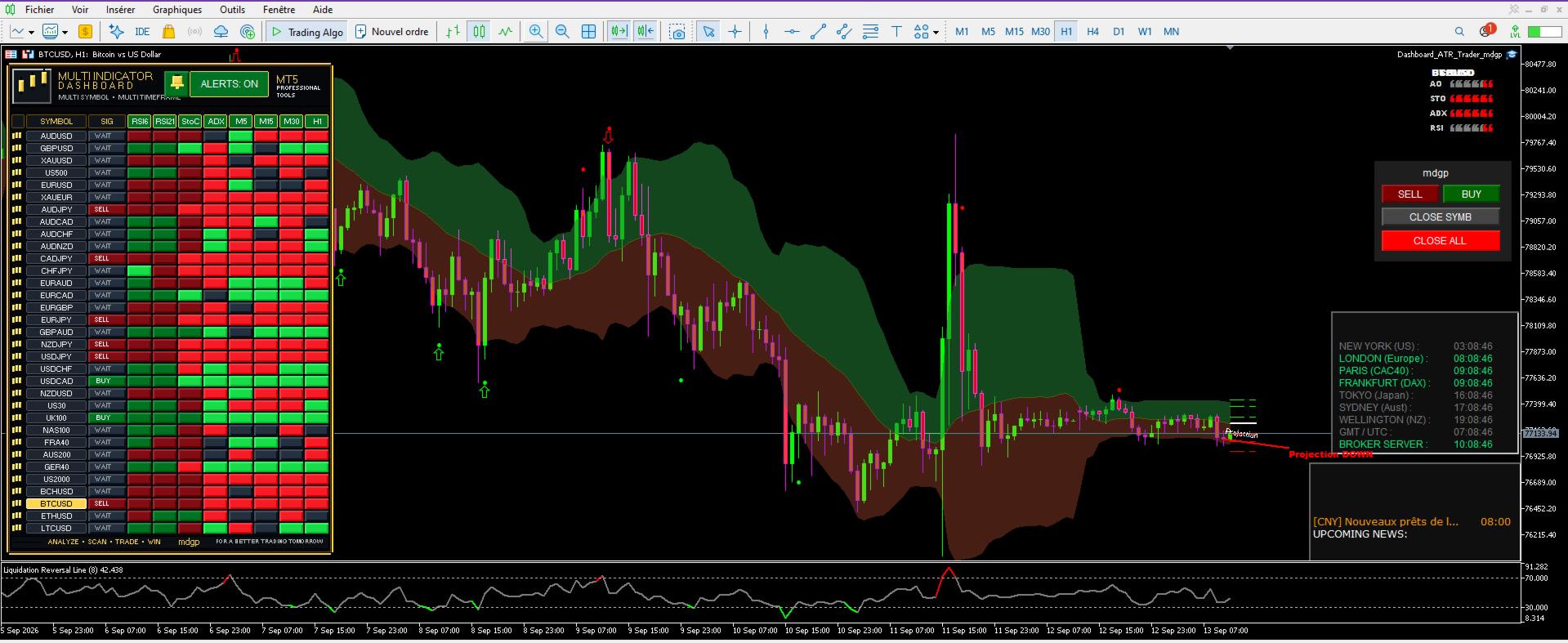
Multi Indicator Dashboard MTF PRO is a professional multi-symbol and multi-timeframe analysis dashboard for MetaTrader 5.
It combines several technical indicators, multi-timeframe confirmation and the integrated Projection Future mdgp system into one compact visual interface.
The objective is simple: instead of checking several indicators and timeframes manually, the dashboard analyzes the symbols available in Market Watch and presents their directional conditions in a single panel.
Main Features
Multi-Symbol Analysis
The dashboard automatically analyzes symbols available in the MetaTrader 5 Market Watch, allowing Forex pairs, metals, indices and other broker-supported instruments to be monitored from the same chart.
Technical Indicator Confirmation
The analysis combines:
- RSI Fast (RSI6)
- RSI Slow (RSI21)
- Stochastic Cross
- ADX / Directional Movement
- Projection Future mdgp
Each component has its own visual column, making it easy to see whether the indicators are pointing in the same direction.
Projection Future mdgp
The integrated Projection Future module uses linear regression over recent closed candles to estimate the current directional slope and extend it into future bars.
A projection is displayed directly on the active chart:
Green Projection UP — bullish directional projection.
Red Projection DOWN — bearish directional projection.
Projection Future is not only a visual tool. Its direction is also incorporated into the dashboard's signal-confirmation logic.
The projection period, future projection distance, colors and line width can be configured from the indicator inputs.
Multi-Timeframe Confirmation
The dashboard includes four dedicated timeframe columns:
M5 – M15 – M30 – H1
Each timeframe analyzes the enabled technical indicators and displays its directional condition.
The timeframe filters can be individually switched ON or OFF directly from the dashboard.
When enabled, the MTF filters participate in final signal confirmation. A BUY or SELL signal therefore requires agreement between the active main analysis components and the enabled multi-timeframe confirmations.
This helps filter situations where the main timeframe points in one direction while other monitored timeframes disagree.
BUY / SELL / WAIT Signals
The main signal column provides three clear states:
BUY — enabled confirmation conditions are aligned bullish.
SELL — enabled confirmation conditions are aligned bearish.
WAIT — the required conditions are not fully aligned.
The system is designed as a confirmation dashboard rather than a prediction guarantee. Signals should be evaluated together with the trader's own strategy and risk-management rules.
Interactive Dashboard
The interface is fully interactive.
Click directly on a symbol name to change the current MetaTrader 5 chart to that instrument.
The currently selected symbol is highlighted in gold, making it immediately identifiable inside the multi-symbol list.
The analysis modules can also be individually enabled or disabled directly from their dashboard headers:
RSI6 | RSI21 | StoC | ADX | PROJ
This allows traders to customize the confirmation structure without removing the indicator from the chart.
Integrated Alerts
The dashboard includes an interactive ALERTS ON/OFF control.
Depending on the selected inputs, notifications can use:
Popup alerts, sound alerts, push notifications and email notifications.
Alerts are generated when the configured alignment conditions produce a confirmed directional signal.
Professional Visual Interface
Multi Indicator Dashboard MTF PRO uses a compact dark interface designed for continuous monitoring.
The dashboard includes:
Multi-symbol scanning • Color-coded analysis cells • Interactive indicator controls • Interactive timeframe controls • Selected-symbol highlighting • Integrated Projection Future line • BUY/SELL/WAIT visualization • Premium MT5 dashboard layout
The interface is designed to provide a large amount of information while keeping the chart readable.
Main Inputs
Users can configure:
Main analysis timeframe
RSI Fast and Slow periods
RSI overbought and oversold levels
Stochastic parameters
ADX period and minimum level
Projection Future analysis period
Number of future projection bars
Bullish and bearish projection colors
Projection line width
Popup alerts
Sound alerts
Push notifications
Email notifications
Dashboard position
How to Use
Attach Multi Indicator Dashboard MTF PRO to an MT5 chart and make sure the instruments you want to monitor are available in Market Watch.
The dashboard will analyze the symbols and display the current state of each enabled component.
Look for directional agreement across the indicator columns, Projection Future and the enabled MTF columns. The final signal column summarizes the resulting confirmation as BUY, SELL or WAIT.
Click any symbol directly from the dashboard to open it on the current chart and inspect its Projection Future visually.
Important
Multi Indicator Dashboard MTF PRO is a technical analysis and decision-support indicator. It does not guarantee future market movements or trading results.
The Projection Future line is a mathematical extrapolation based on recent price data. It should not be interpreted as a guaranteed future price path.
Past performance and historical market behavior do not guarantee future results. Always apply appropriate risk management.
Multi Indicator Dashboard MTF PRO
ANALYZE • SCAN • CONFIRM • TRADE
For a better trading tomorrow.
Copyright 2026 – Marianne Dit Gerard Patrick JF – mdgp