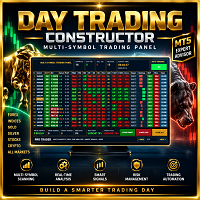
Multi Symbol Trading Dashboard
- Experts
- Versione: 1.0
- Attivazioni: 5

Overview
Multi Symbol Trading Dashboard is an Expert Advisor designed to monitor and manage trading opportunities across multiple symbols from a single integrated dashboard.
The Expert Advisor combines automated trading functions with manual trading controls, allowing the user to monitor multiple instruments and manage trading operations from one chart.
The dashboard displays market information, trading signals, current prices, profit information and multi-timeframe conditions for the enabled symbols. Your EA also includes ATR-based trade management, automatic lot calculation, pending orders, trailing stop functionality and position management.
Optimized for H4 Timeframe (4-Hour) The H4 timeframe provides the ideal balance between signal precision and noise reduction.
Main Features
- Multi symbol monitoring from one integrated dashboard
- Automatic and manual trading modes
- Buy Stop and Sell Stop order controls
- Multi-timeframe market analysis
- Trend signal monitoring
- ATR-based Stop Loss and Take Profit calculation
- Automatic lot calculation based on risk percentage
- Fixed lot size option
- Trailing Stop management
- Dynamic loss management
- Pending order expiration
- Maximum trade control per symbol
- Trading time filter
- Linear regression and market slope analysis
- Pivot level calculation
- Order Block filtering
- Previous candle close validation
- Individual symbol position management
- Close All function
The Expert Advisor calculates position size using the selected risk percentage and the Stop Loss distance, while respecting the symbol's minimum, maximum and volume step requirements.
Multi Symbol Trading Dashboard
The integrated dashboard is designed to provide a clear overview of the enabled trading instruments.
For each symbol, the dashboard can display:
- Symbol name
- Trading status
- Current profit
- Trading signal
- Buy and Sell controls
- Close position control
- Bid price
- Ask price
- Pivot level
- Signal ratio
- Multi-timeframe signal information
The dashboard also displays general account information, including Total Profit, Equity, Balance, Leverage and Margin.
Automatic Trading Mode
When Automatic Mode is enabled, the Expert Advisor evaluates the configured trading conditions for the enabled symbols.
Trading decisions can be filtered using the configured market analysis tools, including multi-timeframe signals, linear regression, slope validation, Order Block filtering, previous candle close validation and trading time restrictions.
The available symbols are evaluated individually, allowing the Expert Advisor to manage multiple instruments from a single chart.
Manual Trading Mode
The integrated dashboard also provides manual trading controls.
The user can place pending Buy Stop or Sell Stop orders directly from the dashboard. The order price, Stop Loss and Take Profit can be calculated using the configured ATR-based parameters.
The dashboard also allows the user to close positions and delete pending orders associated with the Expert Advisor's Magic Number.
Risk Management
The Expert Advisor includes several configurable money and trade management options.
Automatic Lot Calculation
When automatic lot calculation is enabled, the trading volume is calculated according to:
- Account balance
- Selected risk percentage
- Stop Loss distance
- Symbol tick value
- Symbol tick size
- Minimum and maximum allowed trading volume
- Volume step
A fixed lot size can also be used when automatic lot calculation is disabled.
ATR-Based Protection
Stop Loss and Take Profit distances can be calculated using the Average True Range indicator.
This allows the trading distance to adapt to the volatility of each symbol.
Trailing Stop
The Expert Advisor includes a configurable trailing stop system designed to manage open positions as market prices move.
Trailing parameters can be adjusted according to the user's trading preferences and market conditions.
Pending Order Management
The Expert Advisor supports pending Buy Stop and Sell Stop orders.
Pending order management includes:
- ATR-based pending distance
- Fixed point distance option
- Automatic Stop Loss calculation
- Automatic Take Profit calculation
- Pending order expiration
- Maximum trading operations per symbol
Expired pending orders can be automatically removed according to the configured expiration period.
Trading Schedule
A configurable trading time filter allows the user to define the hours during which new trading operations are permitted.
The filter can also be disabled if continuous trading operation is preferred.
Important Information
This Expert Advisor is a trading tool designed to automate and assist trading operations.
Trading involves financial risk. Market conditions, symbol specifications, spreads, execution conditions and parameter settings can affect trading results.
Past performance does not guarantee future results.
It is recommended to test the Expert Advisor in the MetaTrader 5 Strategy Tester and on a demo account before using it in live trading.
Recommended Usage
Before using the Expert Advisor, users should:
- Add the desired trading symbols to Market Watch.
- Attach the Expert Advisor to a chart.
- Configure the risk and lot size settings.
- Configure the ATR-based Stop Loss and Take Profit parameters.
- Select the desired trading hours if the time filter is enabled.
- Review the maximum number of allowed trading operations.
- Test the selected settings in the Strategy Tester before live use.