Auscadia MT5
- Experts
-
Marcus Glink
 25 years trading forex, 10 years building EAs — privately until now. Since 2026 I publish here on MQL5.
Development is my free time, not my job: no pressure to ship something every month, and room to talk to the people using my work.
Questions are welcome by private message. - Versione: 1.1
- Aggiornato: 7 settembre 2026
- Attivazioni: 10
What is Auscadia EA
Auscadia does one thing: it trades AUDCAD. Not 28 pairs, not "works on any symbol, just optimise it".
AUDCAD tends to drift away from its own average and then come back. Auscadia waits for that stretch, enters against it, and manages the resulting trades as a single basket with one shared target.
Most of the time this EA does nothing at all. It checks the market every five minutes and stays out until the setup is there. That is the design, not a fault.
How it holds trades — please read this
This is a recovery system. When the market keeps running against an open basket, Auscadia does not cut the position and take the loss. It adds at increasing distances and works the basket back to a shared target.
Trades can stay open for several days, sometimes weeks, showing a floating loss the whole time. That is normal and part of the system, not a sign that something is broken.
Meanwhile: position size stays capped, deep baskets are trimmed by the recovery logic, real take-profit orders sit at the broker, and a daily drawdown limit you set yourself can stop the EA for the day.
If you need every trade closed by the end of the session, this EA is not for you. Better you know that now than after you buy it.
Why AUDCAD
Australia and Canada both live on commodity exports — and there is neither the US dollar nor the euro in this pair. The headlines that shake EURUSD or GBPUSD every day hit AUDCAD far more softly.
What is left is a pair that moves more calmly and returns to its average more often than the majors.
Not always. There have been stretches where AUDCAD trended stubbornly for weeks. Those stretches are exactly why the protective layers exist.
Who it's for
BEGINNERS — change nothing. Open an AUDCAD chart, attach the EA, done. Every default is the value the EA was tested with, so there is nothing to optimise before you start. The EA checks symbol and account type itself and refuses to start if something is wrong.
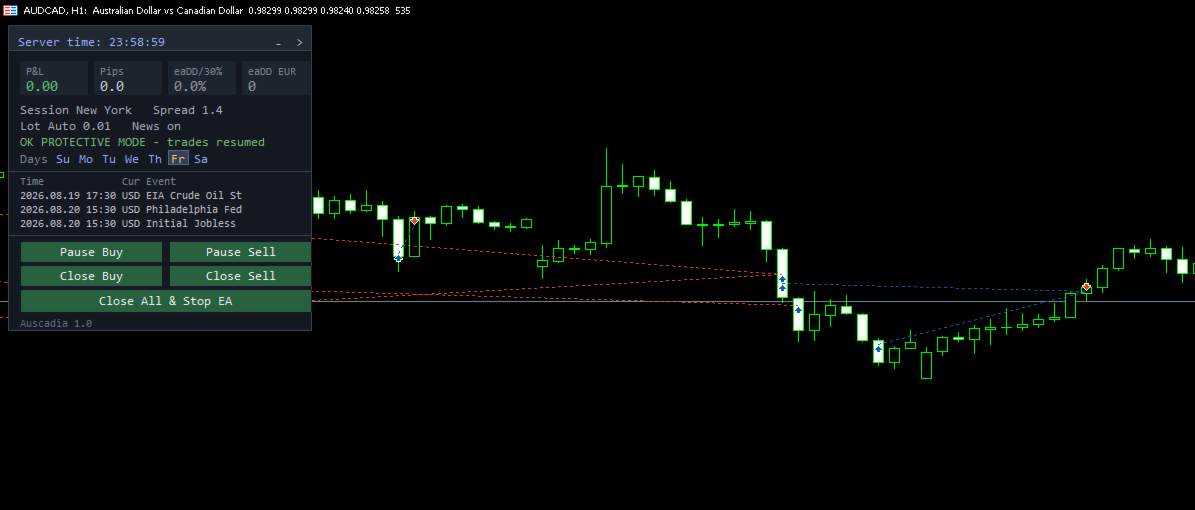
EXPERTS — full control when you want it. Risk, targets, protection, news handling and trading days are all adjustable, so you can size Auscadia against everything else on your account and set the limits where your own risk management wants them.The dashboard keeps you in the picture: today's result, the EA's own drawdown, spread, lot size, and a status line telling you when the protective layers have paused trading and when they have resumed. One click pauses a direction, closes one side, or stops the EA entirely — no input dialogs, and never a reason to pull the EA off a chart with an open basket.
Live signal since July 26, 2026
https://www.mql5.com/de/signals/2383806
Roadmap
August 2026 — Release. One strategy, live signal running.Next — refining risk behaviour in slow trending markets, based on live data.
Later — a second selectable strategy for AUDCAD.
No fixed dates. Each step ships when it holds up in testing, not before.
When a new strategy is added, the price goes up for new buyers. Everyone who bought before that keeps the price they paid and receives the addition as a normal update, free of charge. Bug fixes and performance improvements never affect the price.
Requirements
- MetaTrader 5, hedging account
- AUDCAD, any broker suffix
- Chart timeframe is free — M5 recommended for the display
- Broker with tight spreads (1:100 or above), VPS recommended
- Recommended $3,000 per 0.01 lot (the EA also runs at higher risk levels on smaller accounts)
Settings
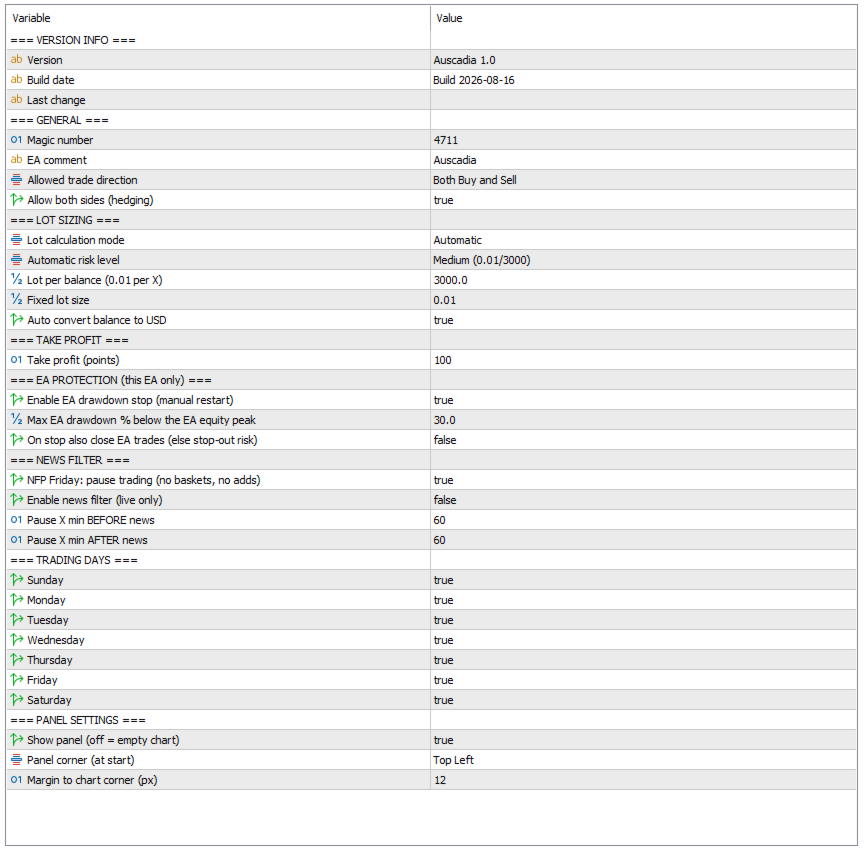
Defaults are the tested values. You can run the EA without changing a single one.
Any modification is made at your own risk and will lead to different results!
---SETTINGS OVERVIEW VERSION 1.0---

SETTING                            DEFAULT             	WHAT IT DOES
---------------------------------- ------------------- 	-----------------------------
GENERAL
Magic number                       4711                	identifies this EA's trades
EA comment                         Auscadia            	tag on every order, cosmetic
Allowed trade direction            Both Buy and Sell   	or one side only
Allow both sides (hedging)         true                	false = one basket at a time

LOT SIZING
Lot calculation mode               Automatic           	auto / own ratio / fixed
Automatic risk level               Medium (0.01/3000)  	balance behind each 0.01 lot
Lot per balance (0.01 per X)       3000                	used in ratio mode
Fixed lot size                     0.01                	ignores balance
Auto convert balance to USD        true             	same risk in any currency

TAKE PROFIT
Take profit (points)               100			target above basket average

EA PROTECTION (this EA only)
Enable EA drawdown stop            false		circuit breaker, manual restart
Max EA drawdown % below peak       30.0                	measured on this EA alone
On stop also close EA trades       false               	true = realise open baskets

NEWS FILTER
NFP Friday: block new baskets      true                	first Friday, date-based
Enable news filter (live only)     true			not available in the tester
Pause X min BEFORE news            60                  	window before an event
Pause X min AFTER news             60                  	window after an event

TRADING DAYS
Sunday ... Saturday                all true            	off = no new entries that day

PANEL SETTINGS
Show panel                         false		true = show chart
Panel corner (at start)            Top Left		draggable at runtime
Margin to chart corner (px)        12			distance from chart edge

DIAGNOSICS
Estended loging			   false		is only required for debugging

FIXED, NOT ADJUSTABLE
Max spread                         30 points
Max slippage                       100 points
P&L is always net, so swap is included before a basket closes
Auscadia — Documentation
Auscadia — an AUDCAD Expert Advisor, coming to the MQL5 Market - Trading Systems - 30 July 2026 - Traders' BlogsBacktest
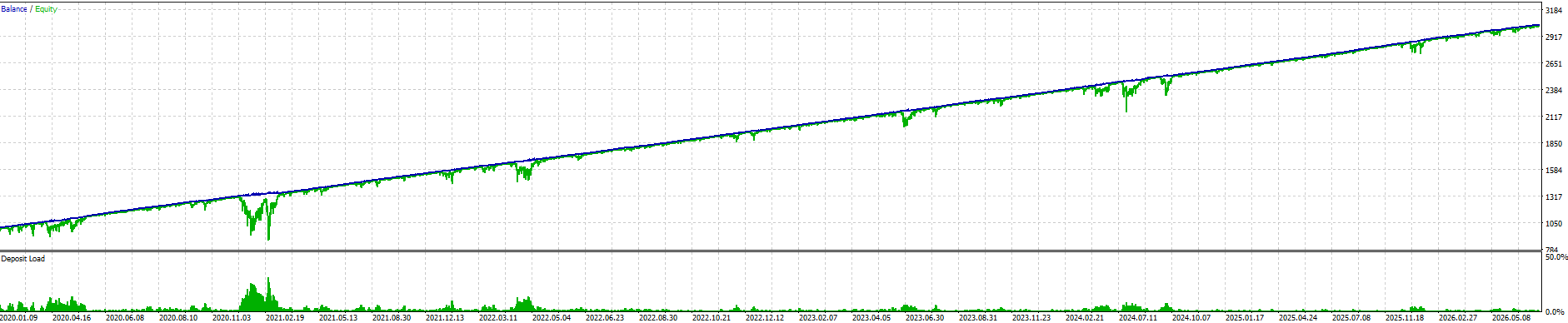
Use M5, "Every tick" or "Real ticks". Open-prices-only leaves out the moves inside the bar and produces meaningless results.
For reproducible classic tests: Lot calculation mode = Fixed lot , Fixed lot size = 0.01.
Swap, spread and slippage are fixed values in this EA — so the tester and live trading behave identically on exactly those points.
About me
I have been trading forex for 25 years and building Expert Advisors for the last ten — all of it for myself, on my own accounts. Since 2026 I am here on MQL5, publishing commercially for the first time.
Development is not my job, it is what I do with my free time because I enjoy it. That has one real advantage for you: I am not under pressure to push out a product every month. I can take the time to get something right, and I have room to actually talk to the people using my work.
So please do. If you have a question, send me a private message — I answer as quickly as I can. If something behaves in a way you did not expect, tell me. Feedback from real accounts is worth more than another week of backtesting, and it goes straight back into the product.
What I promise: fair prices and no overpriced gambling machines. What I cannot promise is that I never make mistakes — I do everything I can to avoid them, but I write software, and software has bugs. When one turns up, I would rather
hear about it from you than have you quietly uninstall it.
If you leave a review after using it, positive or not, I read every one. Give me the chance to build good tools with you, at prices that stay fair, that we all still enjoy using years from now.
A word of honesty first
An EA is not a miracle machine. It executes a strategy without emotion and with discipline — that is all, and that is already a lot.
Money management comes first. A small account with oversized lots dies from a perfectly normal losing streak. For this EA that line is $3,000 per 0.01 lot — which is the default setting.
Below that you are not trading, you are gambling. And anyone promising to turn $1,000 into a million is lying to you.
On backtests I promise this: no crash periods cut out, no dates blacklisted after the fact, no parameters tuned until a bad week disappears. Full period, worst drawdown included.
Past results are no guarantee of future performance. Only trade with capital you can afford to lose.
Before you buy any EA — my personal checklist
1 · Read the description for what it does not say.
Which pair, which timeframe, which account type? How does it manage a losing trade — stop loss, grid, martingale, or does it simply hold? If the description avoids that question, the answer is usually one you would not have liked.
2 · Look at the drawdown, not the profit.
Any curve can be made to look good. The number that tells you whether you can live with a system is the deepest drawdown, and how long it lasted. A 40% drawdown lasting four months is a different life than a 40% drawdown lasting four days.
3 · Be critical about the backtest.
Ask why an EA goes quiet during a crisis in the test, even though its indicators clearly gave a signal. Sometimes that is a genuine protective mechanism. Sometimes it is a date filter, quietly added after the fact so the equity curve stays clean. Check that the test covers the ugly years — 2020, 2022 — and does not conveniently begin after them. And keep in mind: crises don't kill EAs. Oversized lots and thin accounts do.
4 · Be suspicious of too many parameters.
Forty inputs mean forty ways to fit the past. If a seller tells you to optimise before you start, they are handing you the job of curve-fitting and the blame when it fails.
5 · A live signal beats any backtest.
Even a short one. Check that the signal actually matches the product: same settings, same broker type, realistic lot size for the balance shown.
6 · Run it on demo first — for weeks, not days.
Demo will not show you real slippage, but it will show you the EA's rhythm: how often it trades, how long positions stay open, how it behaves around news. That is what you need to know before real money is involved.
7 · Then go live small.
Minimum lot on a small real account. Real execution differs from demo, and you want to learn that difference cheaply.
8 · Match lot size to balance, always.
This is the one that kills accounts. Not a bad strategy — an oversized lot on a strategy that would otherwise have survived. Whatever the seller recommends per 0.01 lot, treat it as the minimum, not the target.
9 · Understand what updates you are entitled to.
Bug fixes should always be free. New features may raise the price for new buyers, which is normal — but you should know the policy before you pay, not after.
10 · Ask yourself the honest question.
Can you leave this running through a bad month without switching it off in the middle? An EA interrupted at the worst moment gives you the losses without the recovery. If the answer is no, that EA is not for you, no matter how good it looks.
Risk warning
Trading foreign exchange carries a substantial risk of loss and is not suitable for everyone. You can lose more than you expect, and leverage works against you just as reliably as it works for you.
This EA is a recovery system. It holds positions through drawdown by design. Under extreme market conditions — a gap, a liquidity hole, a broker outage at the wrong moment — a basket can move further against you than any backtest suggested. No protective layer can rule that out completely, and I won't claim otherwise.
Backtests are calculated on historical data. They show how the strategy behaved, not how it will behave. Nothing here is a guarantee, a promise of profit, or financial advice.
Test on a demo account first. Start small. Only ever trade money you can afford to lose entirely.