Harmonacci Pattern AI
- Experts
- Versione: 3.11
- Aggiornato: 5 luglio 2026

Harmonacci Pattern EA — Review & Parameter Guide
Overview
Harmonacci Pattern EA is a rule-based Expert Advisor for MetaTrader 5 that automates harmonic (XABCD) price pattern trading. It scans price swings using a faithful port of MetaQuotes’ own ZigZag indicator, matches the swing points against 19 harmonic pattern templates (Fibonacci ratio tables), constructs a Potential Reversal Zone (PRZ) for each candidate, and only opens a trade after price breaks out of that zone in the expected direction — not on the first touch.
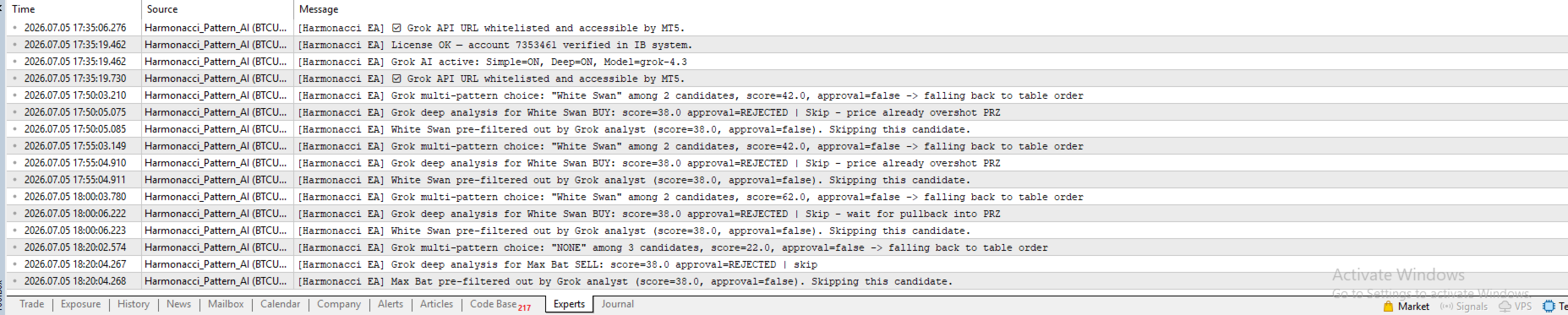
An optional AI confirmation layer (powered by Grok / xAI) can be enabled to let a large language model review recent candles before every entry. However, the EA is fully self-contained and works perfectly with this feature disabled.
This article explains what the EA does well, its real limitations, and provides a detailed guide to every input parameter so you can configure it correctly for your account and instruments.
Strengths
- No external indicator dependency: The ZigZag calculation is embedded directly in the EA (ported line-for-line from the official MetaQuotes ZigZag.mq5). No iCustom() calls, no missing indicator errors, and no extra files to install.
- Broad pattern coverage: Supports 19 harmonic templates (Gartley, Cypher, Barracuda, and 16 trademark-safe variants including Flying Fox, Lobster, Dragonfly, White/Black Swan, Max and A- extended families). Each pattern can be enabled or disabled independently.
- Confluence-based PRZ: The reversal zone for point D is built from two independent Fibonacci projections (BC→D extension and XA→D retracement) and is only accepted where they overlap. This significantly filters out low-quality matches.
- Breakout confirmation: The EA waits for a confirmed directional breakout after price enters the PRZ, avoiding entries at the first touch of a level that may not hold.
- Clear invalidation and timeout logic: A setup is cancelled the moment price closes beyond point X, or after a configurable number of bars without confirmation.
- Margin-aware position sizing: Lot size is calculated based on account risk percentage, then verified with real free margin using OrderCalcMargin. The EA automatically reduces size or skips the trade if margin is insufficient.
- Staged exits: Each signal can be split into three separate tickets with independent take-profit levels anchored to the pattern structure (point C, Fibonacci retracement of C–A, and point A).
- Optional AI second opinion: When enabled, the EA sends pattern structure and recent candles to an LLM and requires approval before entering. Disabled by default — no internet dependency for core operation.
- Excellent visual transparency: Real-time drawing of X-A-B-C labels, trend lines, PRZ rectangle, and ratio values on the chart.
Limitations & Honest Caveats
- Single active setup at a time: The EA tracks and manages only one candidate pattern simultaneously. It does not evaluate multiple overlapping patterns in parallel like a manual trader might.
- No trend or multi-timeframe filter: Purely price and ratio-based on a single timeframe. Counter-trend setups can and will be taken.
- Wide-tolerance patterns create noise: Templates with very broad ratios (especially White Swan and Sea Pony) generate frequent matches and invalidations. Disable them first if you see too many “Candidate invalidated” messages.
- ZigZag repaint behavior: Like any ZigZag system, the most recent swing can repaint. Patterns lock only after C is confirmed, but recent D projections can still shift slightly.
- No trailing stop or breakeven: SL/TP are fixed at entry. Trade management relies on the three staged take-profits.
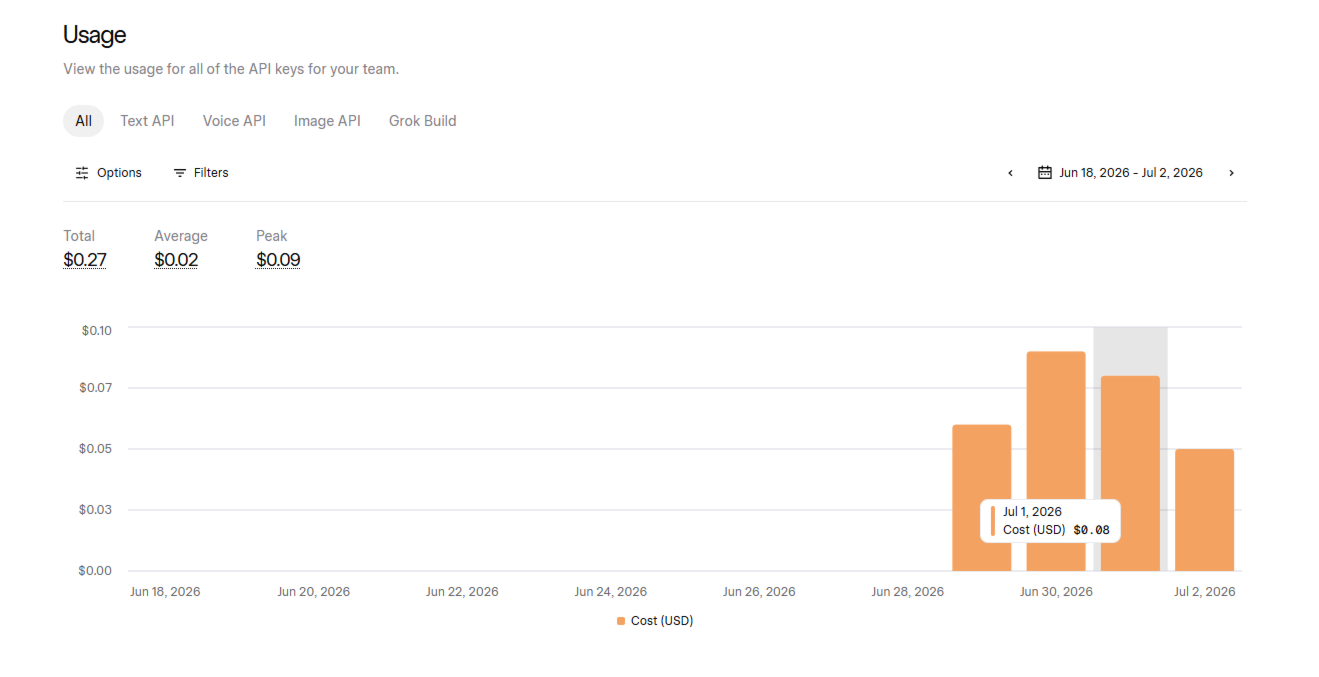
- AI confirmation adds latency and cost: Requires internet and API billing. Not recommended for long-term backtesting.
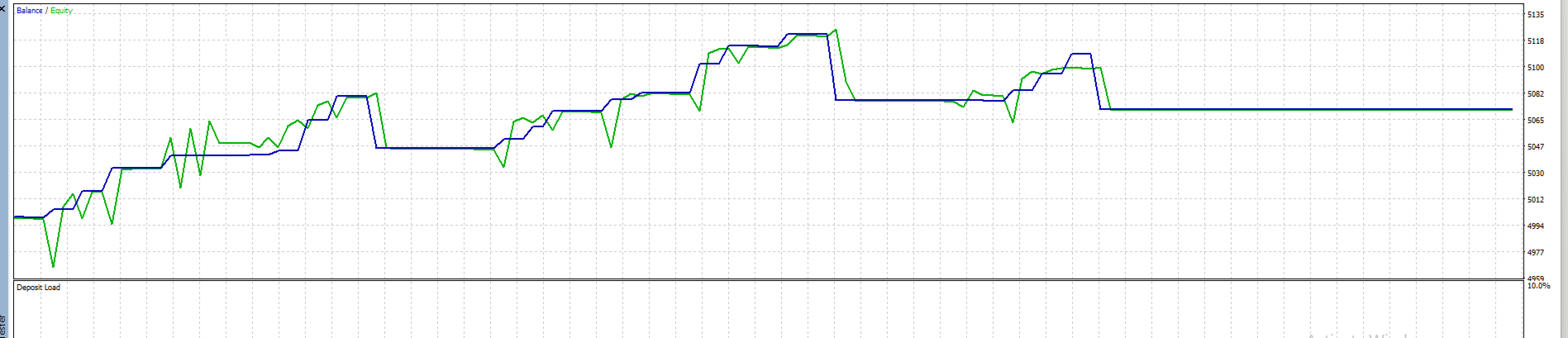
- Backtest quality depends on broker data: Results vary significantly between “Every tick based on real ticks” and lower-quality modeling.
- Not a guaranteed profit system: Harmonic patterns are probabilistic. Thorough backtesting on your specific symbol, timeframe, and broker is essential.
Complete Parameter Reference
1. ZigZag / Swing Detection
These parameters define how the EA detects swing highs and lows, forming the foundation of XABCD pattern recognition.
- InpZZDepth (Default: 12): Number of bars to look on each side for a swing high/low. Higher values detect major swings, lower values catch minor swings and wicks (increases signal frequency but adds noise).
- InpZZDeviation (Default: 50): Minimum price movement in points required to confirm a new swing in the opposite direction.
- InpZZBackstep (Default: 3): Minimum number of bars between two consecutive opposite swings to reduce clutter.
- InpMaxHistoryBars (Default: 3000): Maximum historical bars used to reconstruct the ZigZag indicator.
2. Pattern Matching
- InpRatioTolerance (Default: 0.04): Tolerance added to standard Fibonacci ratios (e.g., 0.618 becomes 0.578 – 0.658).
- InpMaxBarsInZone (Default: 40): Maximum bars the EA will wait for breakout confirmation after price enters the Potential Reversal Zone (PRZ).
- InpInvalidateBufferPt (Default: 150): Extra buffer in points beyond pattern invalidation level (protects against wicks and spread spikes).
3. Breakout Confirmation Entry
- InpBreakoutPeriod (Default: 8): Donchian Channel period for entry confirmation. The EA waits for a candle close beyond the highest high (Buy) or lowest low (Sell) of the last N bars.
4. Risk Management
- InpUseRiskPercent (Default: true): If true, lot size is calculated based on account balance percentage. If false, fixed lot is used.
- InpRiskPercent (Default: 1.0): Risk percentage per trade.
- InpFixedLot (Default: 0.10): Fixed lot size when risk percent is disabled.
- InpSL_BufferPoints (Default: 150): Additional Stop Loss buffer in points.
- InpTP2_CDRetrace (Default: 0.618): Fibonacci retracement level of CD leg for TP2.
- InpMaxSpreadPoints (Default: 350): Maximum allowed spread (in points) to open a trade.
- InpSlippagePoints (Default: 30): Maximum allowed slippage.
- InpMagicNumber (Default: 20260703): Unique identifier for the EA’s trades.
5. Pattern Activation Toggles
The EA includes 19 independently switchable harmonic patterns (all enabled by default):
FlyingFox, Gartley, Lobster, Dragonfly, Cypher, Barracuda, AltFlyingFox, DeepLobster, WhiteSwan, BlackSwan, MaxBat, MaxGartley, MaxDragonfly, AltBarracuda, ALobster, ADragonfly, AFlyingFox, AGartley, SeaPony
6. Chart Display
- InpDisplayPoints (Default: true): Show X-A-B-C-D labels and swing lines.
- InpDisplayRatios (Default: true): Display calculated Fibonacci ratios on chart.
- InpDisplayPRZ (Default: true): Draw Potential Reversal Zone as a shaded rectangle.
- InpDisplaySLTP (Default: true): Show SL and TP levels on chart.
- InpColorBullish / InpColorBearish / InpColorPRZ: Colors for bullish, bearish, and PRZ zones.
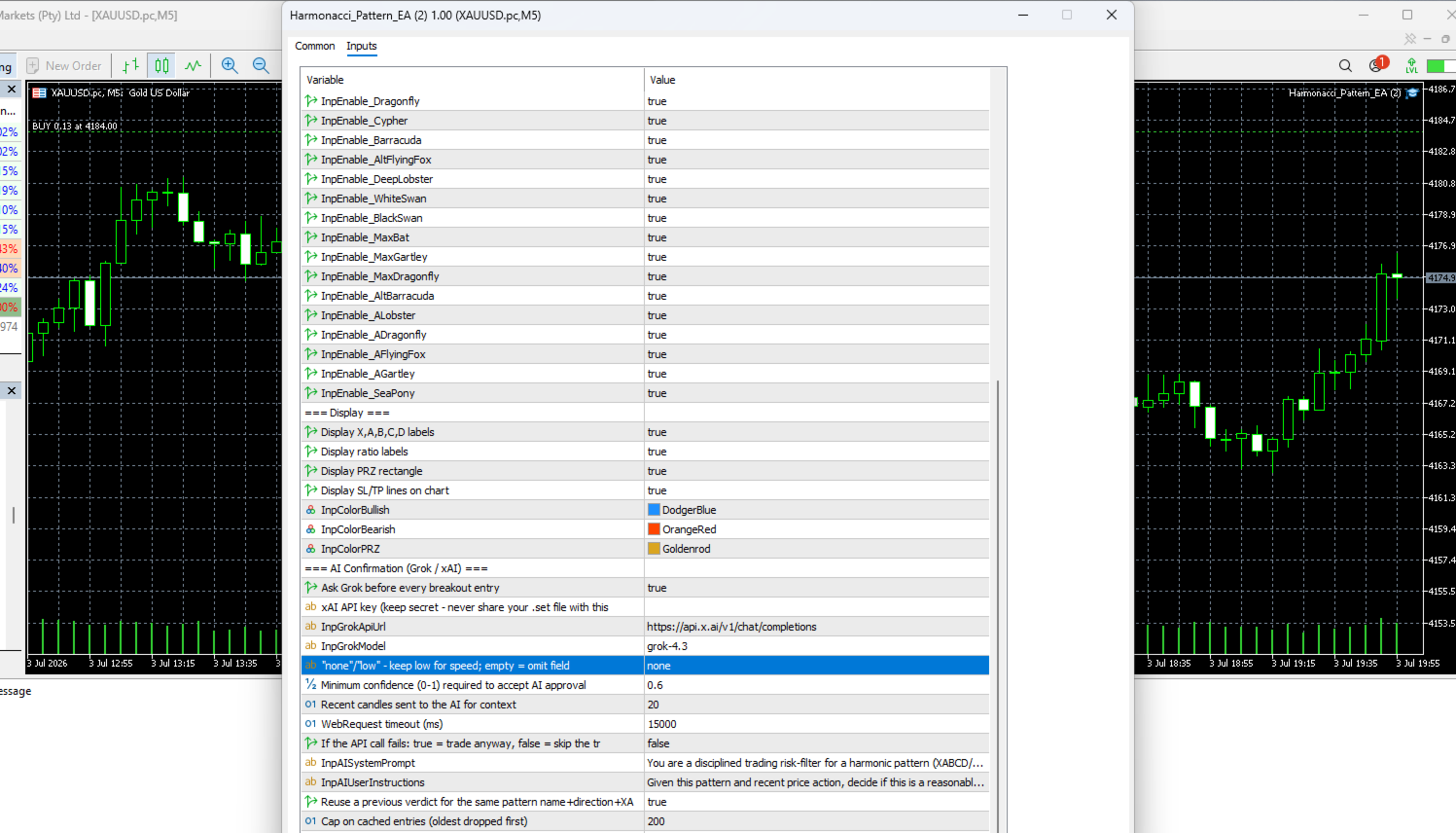
7. AI Confirmation (Grok / xAI) – Simple Mode
- InpUseAIConfirmation (Default: false): Master switch for basic AI confirmation.
- InpGrokApiKey (Default: ""): Your xAI API key (keep private).
- InpGrokApiUrl (Default: https://api.x.ai/v1/chat/completions)
- InpGrokModel (Default: grok-4.3)
- InpGrokReasoningEffort (Default: none): Thinking effort (none/low/high).
- InpAIMinConfidence (Default: 0.60): Minimum AI confidence score required.
- InpAICacheEnabled (Default: true): Enable caching to reduce API calls.
8. Deep AI Pattern Analysis (Grok Analyst Layer)
- InpUseDeepAIAnalysis (Default: false): Master switch for advanced multi-factor AI analysis.
- InpAIMinConvictionScore (Default: 75.0): Minimum conviction score (0-100) to allow a trade.
- InpDeepAICandleCount (Default: 60): Number of recent candles sent for analysis.
- InpAIIncludeChartDesc (Default: true): Automatically generate candle pattern descriptions for the AI.
- InpAIMultiPatternEval (Default: false): When multiple patterns form on the same swings, let Grok choose the best one.
- InpDisplayAIVerdict (Default: true): Display Grok’s conviction score and reasoning directly on the chart.
- InpAIApplySLAdjustment (Default: false): Allow AI to suggest Stop Loss adjustment.
Recommended Settings for Gold (XAUUSD)
Gold is highly volatile with frequent fakeouts and liquidity sweeps. The following settings are optimized for stable performance.
Recommended Environment:
- Timeframe: H1 or H4 (M15 and lower are too noisy)
- Broker: ECN/Raw Spread
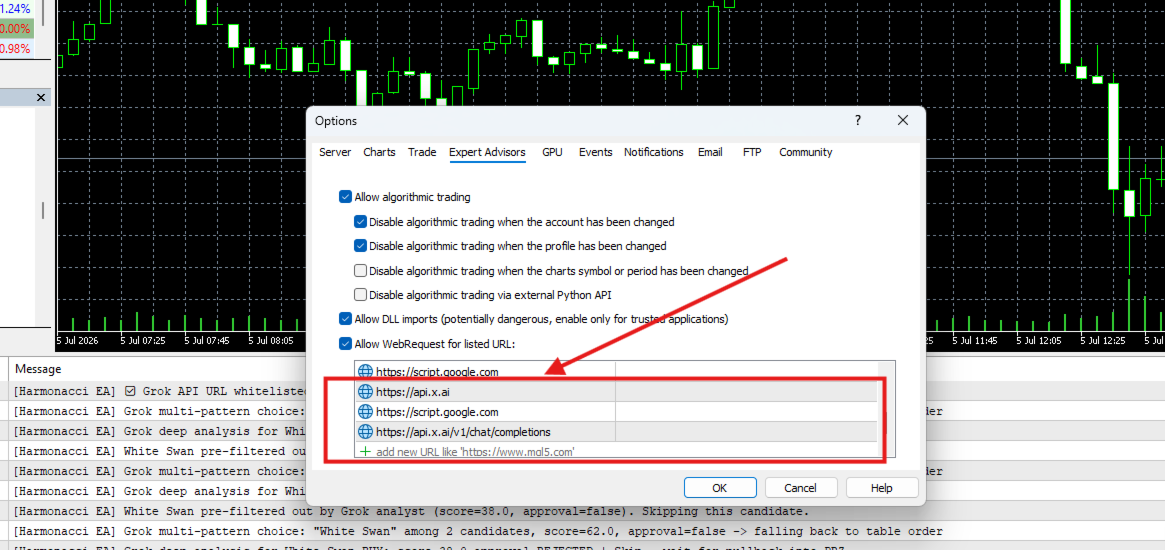
- WebRequest: Allow https://api.x.ai in MT5 (Tools → Options → Expert Advisors)
- In Tools → Options → Expert Advisors → Allow WebRequest for listed URL: Add URL: https://script.google.com
Suggested Parameters for XAUUSD:
| Parameter Group | Parameter | Recommended Value | Rationale |
|---|---|---|---|
| ZigZag Settings | InpZZDepth | 15 | Filters minor wicks |
| InpZZDeviation | 100 | $1.00 minimum move | |
| InpZZBackstep | 5 | Cleaner swing structure | |
| Pattern Matching | InpInvalidateBufferPt | 200 | Better protection against sweeps |
| Risk Management | InpSL_BufferPoints | 200 | $2.00 safety buffer |
| InpMaxSpreadPoints | 300 | Avoid high spread periods | |
| Deep AI Analyst | InpUseDeepAIAnalysis | true | Full AI power enabled |
| InpAIMinConvictionScore | 75.0 | High-quality setups only | |
| InpDeepAICandleCount | 60 | Rich market context | |
| InpAIMultiPatternEval | true | AI selects best pattern | |
| InpAIAnalyzeAtDetection | false | Analyze at breakout (recommended) |
Quick AI Setup Guide:
- Get your API Key from x.ai
- In MT5: Tools → Options → Expert Advisors → Check "Allow WebRequest for listed URL" → Add https://api.x.ai
- Attach EA to XAUUSD H1 or H4 chart
- Paste your API key into InpGrokApiKey
- Set InpUseDeepAIAnalysis = true
- Apply the recommended settings above
After loading, check the Experts tab for connection confirmation and license status. When a valid breakout occurs, Grok’s conviction score and detailed reasoning will appear on the chart.
Alerts
Popup, Push notification, Sound, and Email alerts.
Suggested Starting Points
- Conservative / Swing Trading (H1–H4, Gold, Majors): Keep defaults, disable White Swan & Sea Pony, set RiskPercent to 0.5–1.0.
- More Signals: Slightly increase InpRatioTolerance and reduce InpBreakoutPeriod.
- Small Accounts: Keep risk-based sizing at 1% or lower.
Disclaimer
Harmonacci Pattern EA is a rule-based tool for identifying and trading harmonic price patterns. It is not a guaranteed profit system. Past performance does not guarantee future results. Always test thoroughly on a demo account with your broker’s real conditions before using real capital. Never risk money you cannot afford to lose.
This is the clean, professional English version optimized for posting on MQL5. You can copy and paste it directly. Let me know if you want any adjustments, such as adding images placeholders, shortening sections, or changing the tone.