Account Protector EA JJP
- Utilità
- Versione: 2.0
- Attivazioni: 15

== Account Protector EA JJP ==
< Feature Summary >
🎯 Target Types
Feature Details
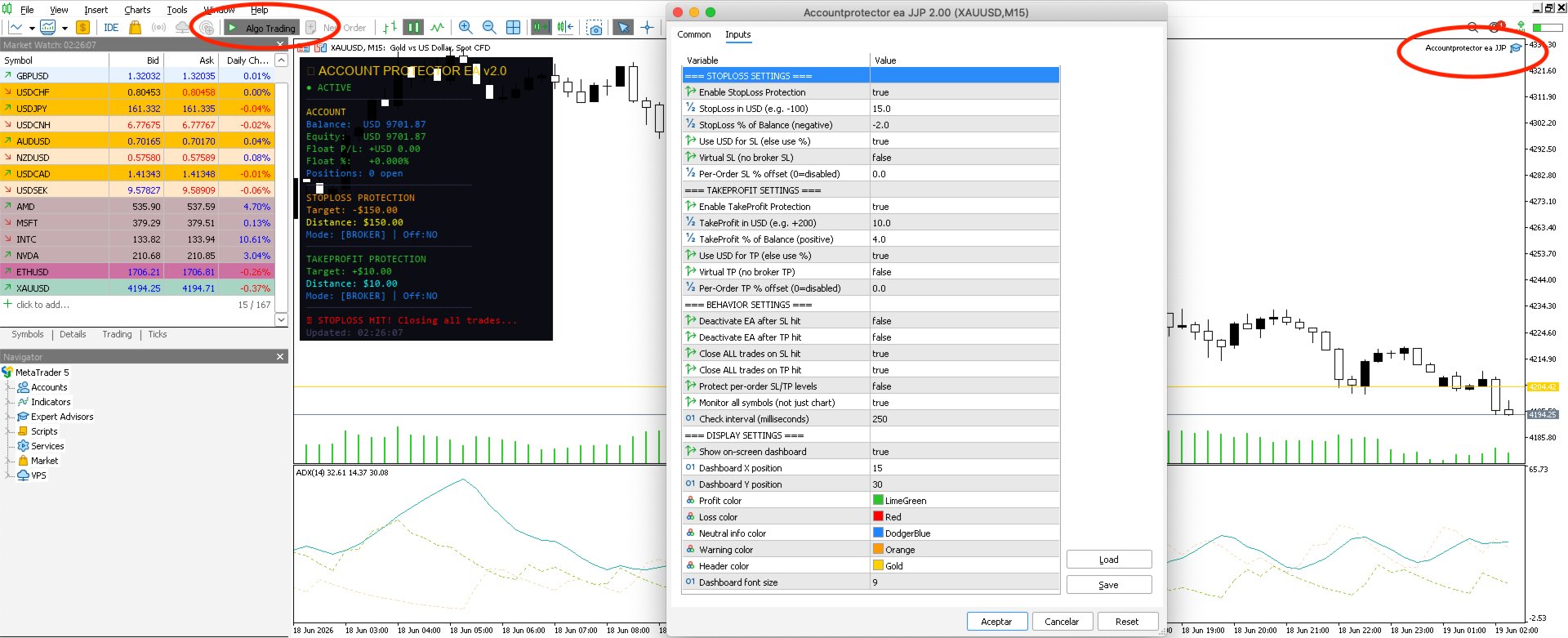
Stop Loss Set in USD (e.g., -$100) or as a % of balance (e.g., -2.0%) — switchable on entry
Take Profit Set in USD (e.g., +$200) or as a % of balance (e.g., +4.0%) — switchable on entry
Mode Selector. SL_UseUSD = true → uses the USD value; false → uses a percentage
🛡️ Protection Modes
Broker-backed: The EA modifies orders directly via trade.PositionModify() to set actual SL/TP levels with the broker.
Virtual mode: The EA internally monitors profits and losses and programmatically closes trades when certain thresholds are reached; this is useful when the broker rejects adjusted SL/TP levels.
🔄 Order Protection
When ProtectPerOrderSLTP = true, the EA calculates and applies individual Stop Loss/Take Profit levels to each open position, based on the SL_ProtectOrderPct/TP_ProtectOrderPct of the Entries. It only updates if the new level is more protective than the existing one.
📊 On-Screen Dashboard (Color-Coded)
>EA Status: Active/Deactivated (Green/Red)
>Real-time Account Balance, Net Worth, Floating Profit and Loss Statement (Green/Red depending on the symbol)
>Floating Profit and Loss as a percentage of the session's open balance
>SL Target + Remaining Distance (changes from orange to red as you approach)
>TP Target + Remaining Distance (changes from cyan to green as you approach)
>Mode Indicators: Virtual vs. Broker, Deactivate on Activation Yes/No
>Status message + timestamp of last update
⚙️ Trigger behavior
>CloseAllOnSL / CloseAllOnTP— Closes all open positions on all symbols with 3 retry attempts
>DeactivateOnSL / DeactivateOnTP— Disables additional EA checks after the trigger
>AllSymbols = true— Monitors all pairs (not just the chart symbol)
>Check frequency: Every CheckEveryMsmillisecond via EventSetMillisecondTimer