
WeekAnchor Eight
- Experts
- Versione: 2.10
- Aggiornato: 4 ottobre 2026
- Attivazioni: 10

WeekAnchor Eight
Live Monitoring
The live operation of this EA is published as our MQL5 signal. You can review its real, ongoing activity and trade history on the signal page below (also linked in the "Signal" section of this product page):
The signal is not a set file, and the set files are not the signal. Its account size, lot size and options are the developer's own operating choices for that account and are changed from time to time without notice; the supplied set files do not track them. Use the signal to see the strategy running on real money - the configurations this product recommends are the set files described below.
---
WeekAnchor Eight is a portfolio-style Expert Advisor for MetaTrader 5 that manages up to 8 FX pairs from a single chart. Each pair is handled independently, with its own magic number, lot settings, maximum-spread filter, and risk configuration. You attach the EA to one liquid FX chart (H1 recommended); the standard preset is easiest to read on a GBPJPY H1 chart, but internally the EA monitors every enabled pair independently.
This is not a martingale, grid, or arbitrage system. Its design combines a price anchor set at the weekly open, D1 ATR-based protective levels, and diversified management across multiple pairs. Entry timing is fixed internally — you do not need to configure day-of-week, time-of-day, or any fine-grained logic yourself.
Version 2.0 adds one optional sizing feature and changes what the supplied set files carry. The new option trades a week smaller when the eight pairs moved a long way apart on the last trading day before entry; it can only ever reduce your lot, never raise it, and it is off by default. The supplied set files no longer carry an equity stop: measured over 2015-2026, the 15% they used to carry sits inside this EA's own normal drawdown, so it ended the run rather than protecting it. Both changes are documented with their measured numbers below. Version 2.1 adds the Golden Week / Silver Week block and switches Crisis Guard on by default, both described below. Because both are ON by default, 2.1 is the first release that is NOT trade-for-trade identical to the one before it at default settings. Set InpJpHolidayBlockAll = false and InpUseCrisisGuard = false and it reproduces 2.0 - and 1.9 - trade for trade.
Version 1.9 adds one new entry filter and rebuilds the equity stop. The EA now skips its yen pairs when the week's entry day is a Japanese public holiday — those entries were measured to be worth nothing, so you get fewer trades for the same profit. The equity stop can now be pointed at this EA alone instead of your whole account, with the capital you assign to it stated explicitly, and its state (the reference peak, and a halt once triggered) survives a terminal restart. Both changes came from customers. One default changed: the holiday filter is on.
Earlier releases added the on-chart dashboard (1.5), the translucent panel, the one-click Risk Profile ladder and Prop Firm Mode (1.6), customer-requested usability fixes (1.7), and the panel/journal transparency work plus the Crisis Guard basket gate (1.8). At default settings each of those releases reproduced the previous one trade for trade.
Specifications
- Platform: MetaTrader 5
- Type: Expert Advisor
- Format: Portfolio EA covering up to 8 FX pairs
- Recommended evaluation environment: Strategy Tester and a demo account
- Attach chart: an H1 FX chart
- Standard example: GBPJPY H1
- Timeframe-independent: the trade-decision logic is designed to be effectively the same whether the EA runs on M5, H1, or H4 (it is timer-driven and does not depend on the chart's bar period; H1 is recommended for live use)
- Default sizing: FixedLot
- RiskPercent: selectable per pair (specified per pair; combined exposure grows when several pairs are held at once)
- Release line: 1.0 → 1.1 → 1.2 → 1.3 → 1.4 → 1.5 → 1.6 → 1.7 → 1.8 → 1.9 → 2.0
- Supported pairs: GBPJPY, USDJPY, AUDJPY, EURJPY, AUDCHF, GBPCHF, CHFJPY, GBPUSD
What's New in v2.1
Golden Week / Silver Week block (new, ON by default)
When the Monday entry day is a Japanese public holiday AND the next day is a holiday too, the EA now rests EVERY pair that week - not only the yen pairs, which the holiday filter already rested.
The reason is the exit, not the entry. This EA closes about 24 hours after it opens, so on those weeks it was entering the non-yen pairs into one shut Tokyo session and closing them in a second one. Measured over 2015-2026, the 8 weeks that fit this pattern lost on average - 4,433 per week against +6,530 for an ordinary week - and blocking them added about 1% to the 11.5-year net profit. Weeks where only the Tuesday is a holiday behaved completely normally and are not touched.
Being honest about the size of it: 8 weeks is a small sample and a permutation test puts it at p=0.167, so this is a judgement call rather than a proven edge. It is included because the trigger is a calendar date - decidable in advance with no uncertainty at all - and because it costs nothing in the weeks it does not fire. It comes round roughly twice in three years; the next ones are 2027-05-03 and 2031-05-05. Set InpJpHolidayBlockAll = false for 2.0 behaviour.
The Japanese holiday calendar was extended as well: the equinox dates are now computed correctly to 2150 instead of 2099, and the "sandwiched weekday" rule - a working day between two holidays becomes a holiday, which is exactly what Silver Week's Tuesday is - is now taken into account.
Crisis Guard now ON by default (was OFF)
Crisis Guard - the protection against a sharp, one-directional yen-strength shock - is now switched on by default and in all twelve supplied set files. Measured over 2019-2026 on the fixed-0.01 eight-pair setup, it cut this EA's worst equity drawdown from 34% to 21% for about 1% less profit; over the full 2015-2026 window at a fixed 0.10 lot it was 35% to 26% for about 3% less. The yen side has become riskier - a Bank of Japan that is raising rates, verbal warnings and actual intervention - and a carry-trade unwind like August 2024, which followed a BoJ rate hike, is the kind of move it is built for.
To be precise about what it does not do: it reacts to a sustained slide across several yen pairs, not to an intervention spike as such. In the five weeks that contained an actual intervention (2022 and 2024) it did not fire once. Set InpUseCrisisGuard = false for the old behaviour.
What's New in v2.0
Basket-activity de-risk (new, OFF by default)
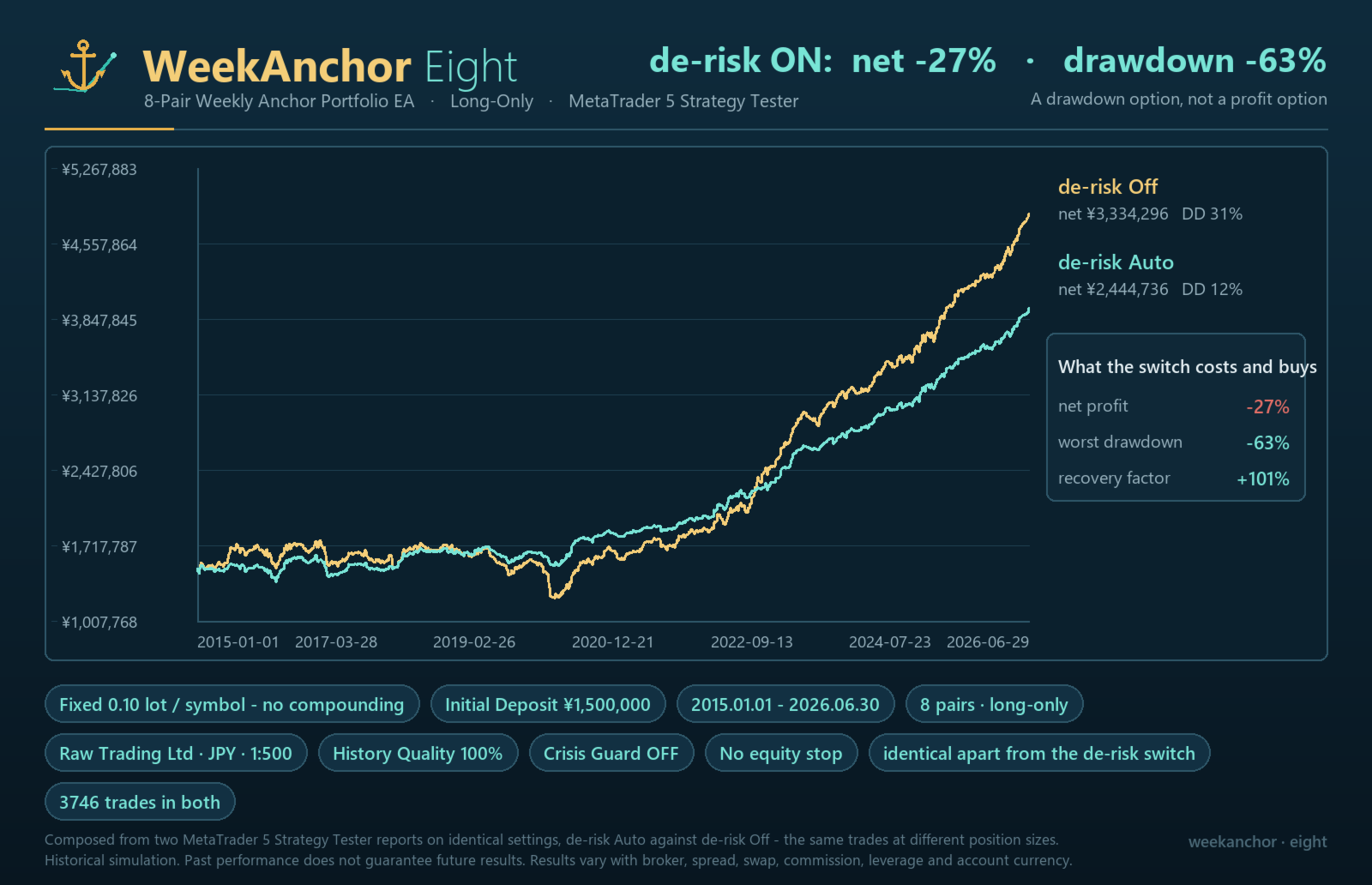
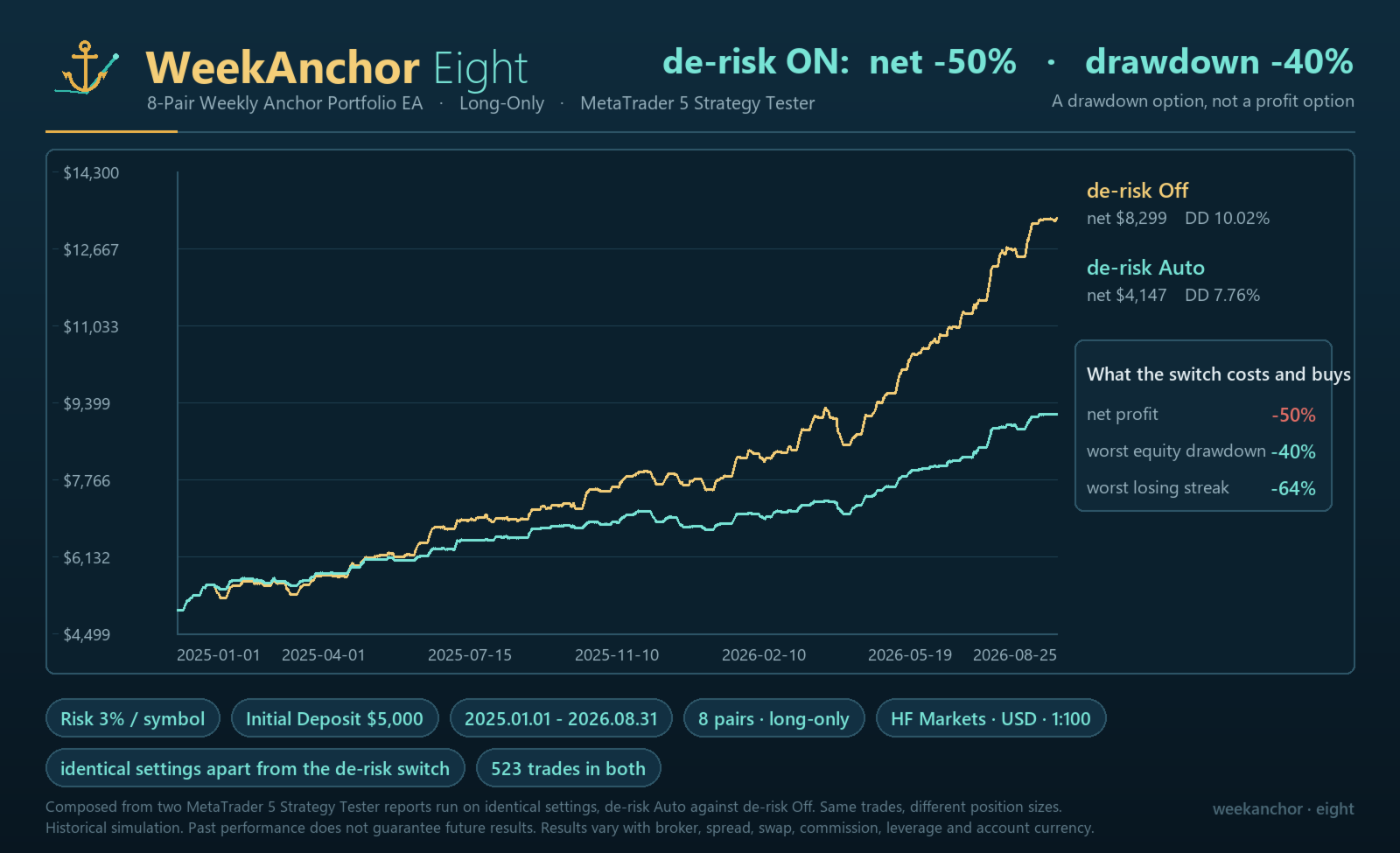
On the last completed trading day before Monday's entry - normally the Friday - the EA measures how far each of the eight pairs moved, in units of that pair's own daily range. Weeks following a scattered, high-activity Friday historically paid less and won less often, so this option trades them smaller. It never trades anything larger than your normal lot: every multiplier is capped at 1.00, and the EA refuses to start if you set one above it. Turning it on therefore cannot increase your risk compared with v1.9.
It is a drawdown option, not a profit option. Measured over 11.5 years at a 0.10 base lot: net profit falls about 27%, maximum balance drawdown falls from 31% to 12% of peak, and the recovery factor goes from 5.39 to 10.86. If you want more profit, this is the wrong switch.
Your lot size decides how much of it you get. At the 0.01 lot most supplied set files use it does nothing at all: each reduced size rounds back up to 0.01. Rather than pretend to work, the EA disables the option at startup, says so once per pair, and names the balance you would need. From 0.02 it does work, but with fewer steps than you typed - two of the five at 0.02, three at 0.03, four at 0.04. All five arrive at 0.05, and 0.05 (with its multiples, such as 0.10) is also the only place the sizes actually sent match the ratios you set; in between they are coarser. Full effect therefore needs 0.05 per pair, roughly 750,000 JPY / 5,000 USD for all eight. The EA prints the sizes it will really send at startup - believe that line, not the input boxes.
What is actually measured is how much the basket moved, not how similarly the pairs moved. We do not claim to detect "market agreement" or confidence, and it is not five graded levels - only the most active band separates cleanly from the rest. Everything except an 18-month real-tick check was chosen on the same 11.5 years, and the effect is smaller out of sample: at matched exposure, +17% net and -41% drawdown in sample against +8% and -7% out of sample.
The dashboard says what the option is doing
While the option is on, the panel adds two rows and changes one cell: the band and multiplier in force this week; what the NEXT Monday entry would use, shown as a real lot and not only a multiplier (mid-week, before a new reading exists, it says so rather than pretending to forecast); and the pair row's sizing cell shows both lots while that pair is being cut - 0.05>0.04 - where it used to show only the lot you configured. With the option Off the panel is row-for-row the v1.9 one. All of it is display only, and that was checked by measurement: a test build that ran this code on every tick, immediately before the trading logic, produced a bit-identical 11.5-year trade list.
The supplied set files no longer carry an equity stop
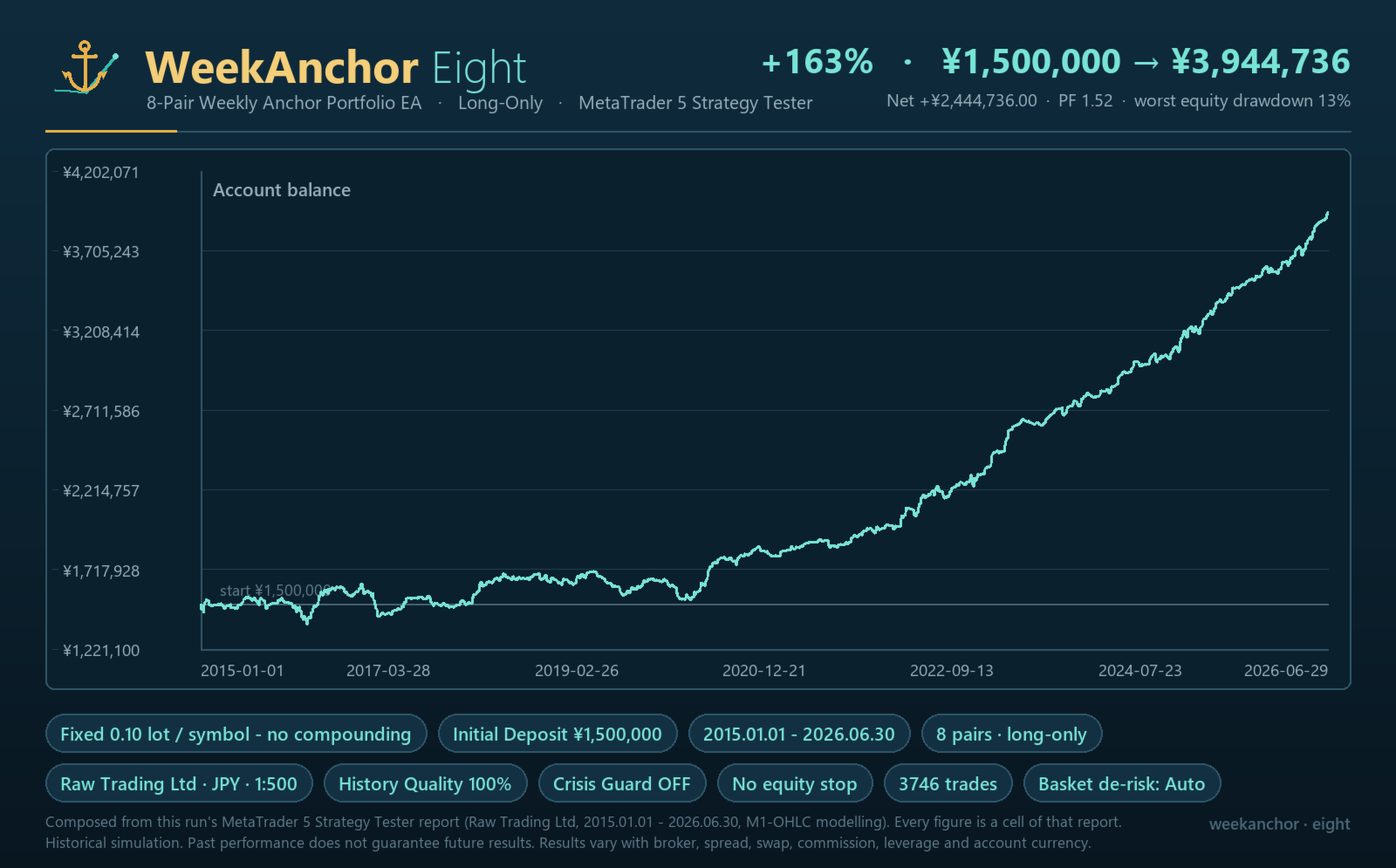
Every file used to ship InpEquityStopPct=15. All twelve now ship 0. Measured over 2015-2026, 15% sits inside this EA's own normal drawdown, so it did not act as a backstop - it ended the run: on the shipped fixed-0.01 eight-pair configuration a 15% stop halted the EA permanently about two years in, turning +220% into +1%. On the 2.5%-per-pair file it turned +1,377,781 JPY into -25,649 JPY. Only the 1.0%-per-pair files were unaffected.
What you give up: the stop is no longer there to halt an undersized account. It never prevented the loss - measured on a 300 USD account it simply ended the run after 68 trades - but its absence makes the minimum balances a hard requirement rather than a cushioned one. The drawdown in currency is the same at any balance, so a small account turns it into a percentage almost nobody sits through: on 300 USD the worst two-year window drew down 74% of the starting balance, with no stop-out and no margin call. The input is still there. If you enable it, set it above the drawdown figure for your configuration, not below.
A halt is now harder to clear by accident
Previously the equity stop's stored state was keyed to the account alone, so a second copy of the EA on the same account with the stop disabled would delete a halt that the first copy had latched, and changing the stop's scope or base did the same. A latched halt now survives all of those. To clear it deliberately, remove the EA from the chart and attach it again, as the manual has always said. Setting InpEquityStopPct to 0 no longer doubles as a reset.
Version 2.1 adds the Golden Week / Silver Week block and switches Crisis Guard on by default, both described below. Because both are ON by default, 2.1 is the first release that is NOT trade-for-trade identical to the one before it at default settings. Set InpJpHolidayBlockAll = false and InpUseCrisisGuard = false and it reproduces 2.0 - and 1.9 - trade for trade.
What's New in v1.9
Japanese holiday filter (new, ON by default)
When the week's entry day falls on a Japanese public holiday, the EA skips its yen pairs for that week (GBPJPY, USDJPY, AUDJPY, EURJPY, CHFJPY). Non-yen pairs are unaffected, and open positions are managed as usual. Those entries were measured to be worth nothing: over 2019-2026, 236 entries with a combined result of about +35 JPY, and a win rate well below the EA's own average by a margin far too large to be chance. Over the full 11.5-year window, 327 entries removed and total profit unchanged (+0.6%). The claim is exactly that: fewer trades, the same profit. The same runs also show a smaller drawdown, but that did not survive our test against chance (removing the same number of trades at random does as well about one time in six), so it is not claimed as a benefit. The calendar is derived from the rules rather than stored as a table, so nothing expires; it was reconciled against the Cabinet Office's official calendar, all 165 holidays from 2019 to 2027 matching exactly. Set InpJpHolidayFilter = false to trade every week regardless.
The equity stop can now protect this EA alone
A customer running WeekAnchor beside other strategies had his 15% stop halt the EA on whole-account equity, which is how every version until now measured it. InpEquityStopScope now offers "This EA only": a virtual equity built from the capital you assign plus this EA's own results. Other EAs, manual trades, and your own deposits and withdrawals cannot move it. InpEquityStopBase is the capital you assign, in your account's deposit currency: on a USD account, 1500 means this EA is running on 1,500 USD, so a 15% stop halts it after 225 USD of its own losses. Left at 0 on an account much larger than this EA's share, the percentage becomes effectively unreachable, so give it a base if you use the scoped mode. Type a base while the scope is still "Account" and the EA now says so explicitly instead of ignoring it in silence. The default remains "Account", identical to v1.8.
Before you choose a percentage, please read this
Measured over 2019-2026 on the shipped fixed-0.01 eight-pair configuration with the stop off, this EA's own worst equity drawdown was 34% of its capital with Crisis Guard off, and 21% with Crisis Guard on - about 510 USD and 315 USD respectively per 1,500 USD assigned. The shipped set files therefore leave the equity stop off (InpEquityStopPct = 0). At 15% the stop sits inside this EA's own normal drawdown, so it does not act as a backstop - it ends the run: measured over 2015-2026 on the shipped fixed-0.01 eight-pair configuration, a 15% stop halted the EA permanently about two years in and turned +220% into +1%. If you switch it on, set it above the drawdown figure for your own configuration and expect to reset it by hand. The manual has the full table.
The protection now remembers its state
The reference peak, and a halt once triggered, survive a timeframe change, a re-attach and a terminal restart, instead of quietly re-anchoring to whatever equity happens to be current. To reset the breaker deliberately, remove the EA from the chart and attach it again (switching accounts also clears it).
The news filter checks its own calendar
Its FOMC dates are a finite table, and the EA now warns in the log when that table is approaching its end.
At default settings other than the new holiday filter, the trading logic is unchanged from v1.8.
Earlier versions at a glance
- v1.8 - the panel names the peak the equity stop measures from and states in one line why nothing is happening; deposits and withdrawals stopped reading as drawdown; the widest spread of the Monday window is recorded; brokers that publish two symbol sets (GBPJPY / GBPJPYr) are detected and named; Crisis Guard sits the day out instead of opening trades it would close within the hour.
- v1.7 - order comment prefix became a setting; the dashboard's spread column states its unit and turns red while a spread is blocking an entry.
- v1.6 - translucent dashboard with an equity row; one-click Risk Profile ladder (Fixed 0.01 / 1% / 2% / 3%) with each profile's measured minimum balance; optional Prop Firm Mode (daily-loss limit and total-loss floor, with ALERT ONLY or CLOSE THIS EA on breach - measured on whole-account equity, but it only ever closes this EA's own positions).
- v1.5 - on-chart dashboard. v1.3 - Crisis Guard. v1.2 - Portfolio Safety controls and the Weekend-Gap Conditioner.
All of these optional trading features are off by default. Every release up to 2.0 reproduced the previous one trade for trade at default settings; 2.1 is the first exception, and only for the Golden/Silver Week block described above. The manual documents each of them in full.
Crisis Guard (added in v1.3; ON by default since v2.1)
This EA is a long-only portfolio in which 6 of the 8 supported pairs are JPY crosses. Its largest tail risk is therefore a sharp, one-directional yen-strength shock at intervention scale, or a carry-trade unwind, in which all JPY crosses fall together. Crisis Guard (input = InpUseCrisisGuard, default ON since v2.1) is an insurance-style protection for exactly that situation. It acts in stages: on the first signs of crisis it skips new entries and raises the stop-loss to break-even on positions already in profit; if the shock broadens across several JPY crosses it then closes all of this EA's positions at market in one batch. When the crisis clears it returns to normal automatically. The detection method is fixed internally and not disclosed; the only control exposed to you is ON/OFF.
An honest framing (please read). Crisis Guard is insurance, not a profit booster. Enabling it can reduce drawdown during tail (crash) events, but in exchange you give up part of your profit during normal conditions. It is a past / simulation reference only and does not promise any specific figures or future performance — an optional feature to choose according to your own risk tolerance.
Safety. Including the batch close, the only positions this feature touches are those opened by this EA itself, identified by magic number — never other EAs' or manual positions. Crisis Guard mitigates the tail risk; it does not eliminate it — during violent moves price can gap through the stop.
Set Files (.set)
Risk-level set files (for example, 1% / 2% / 3% risk) plus fixed-lot files (0.01 for small accounts, 0.05 for the basket-activity de-risk option) are posted in the Comments section of this product page. Download the one that fits your account size and risk tolerance, and validate it in the Strategy Tester and on a demo account.
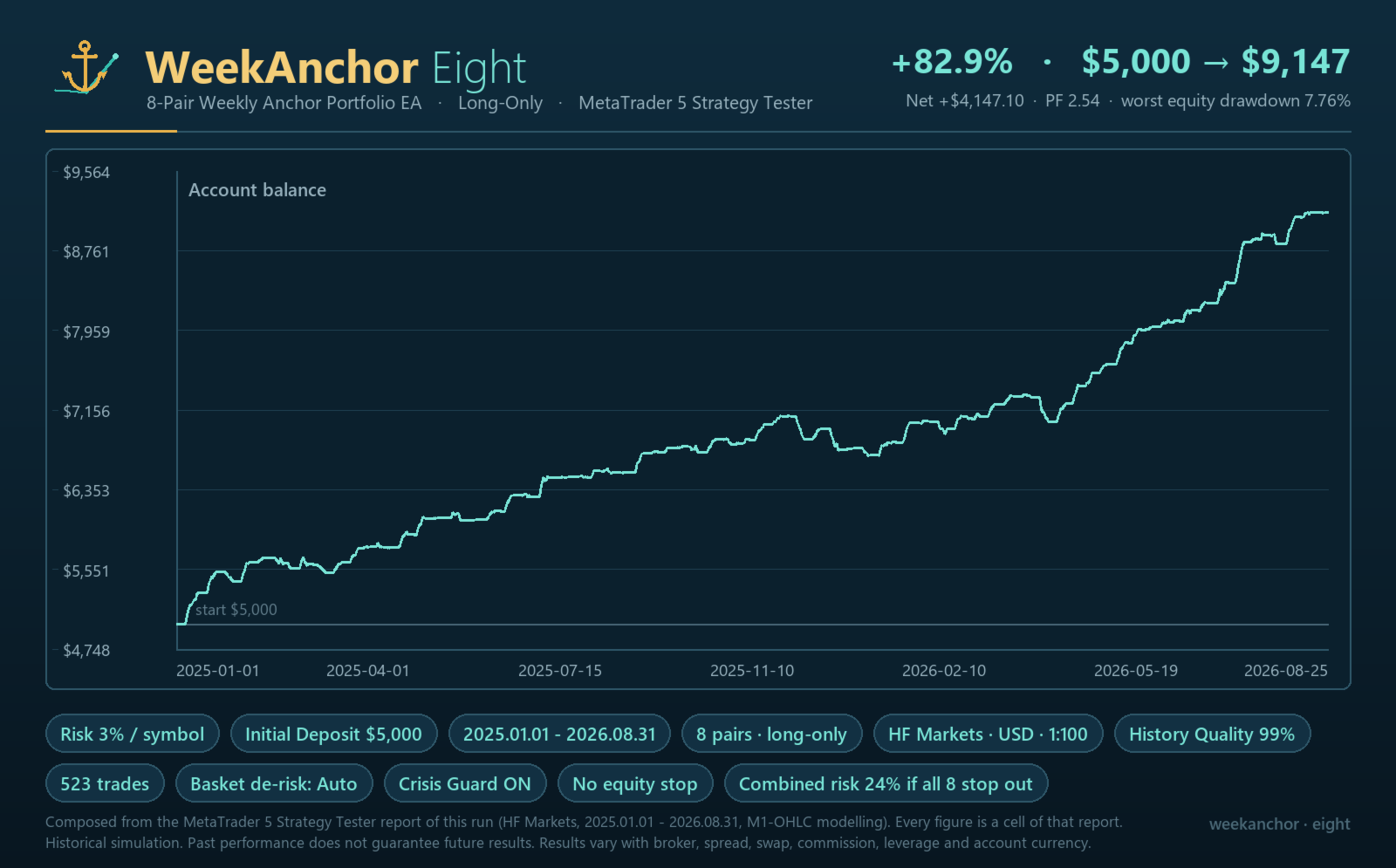
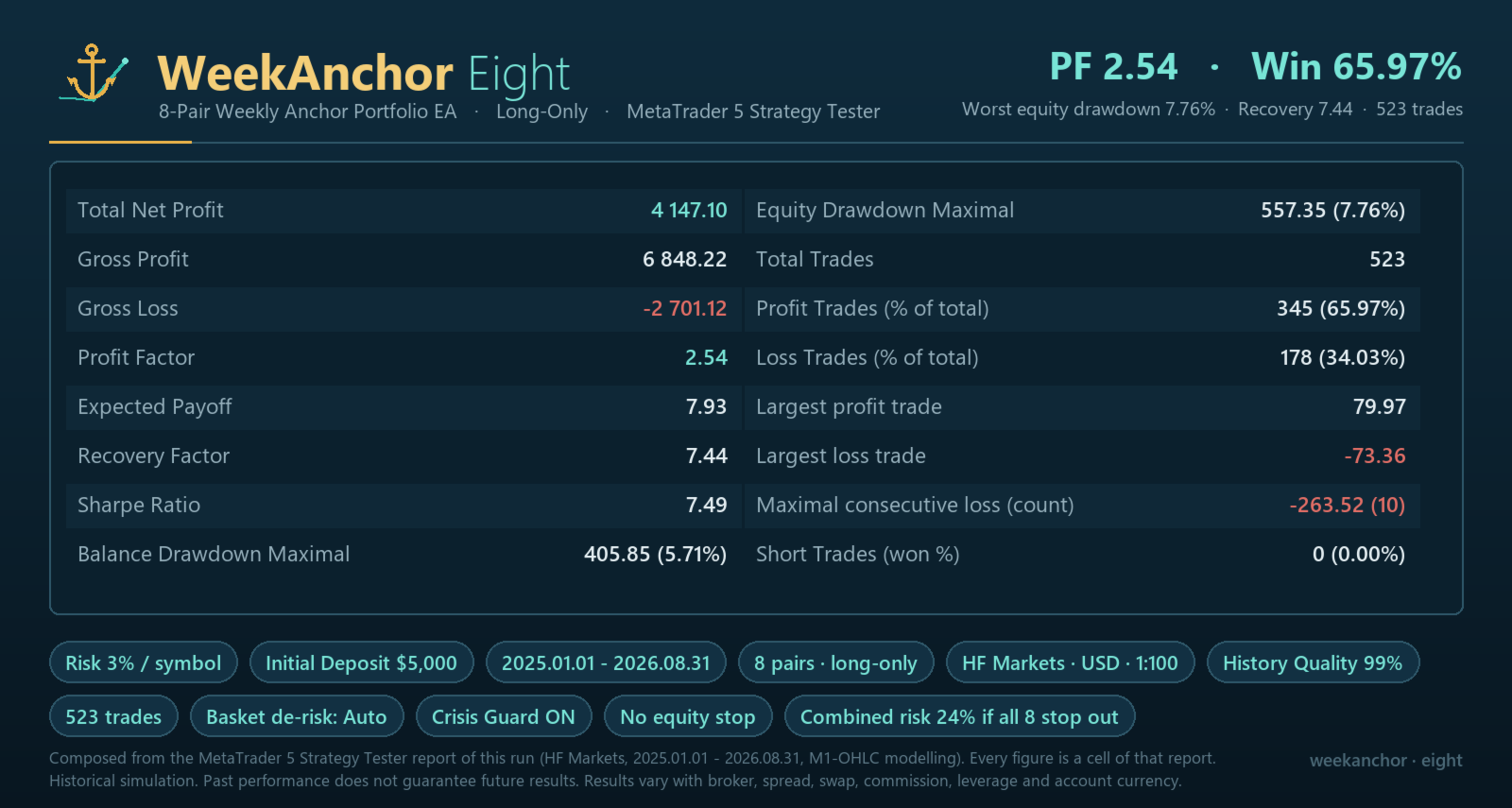
Please match the file to your balance — this matters more than it looks. The stop-loss is 3× the daily ATR (a deliberately wide stop), so on a small account the lot computed from a risk % can fall below the broker minimum (0.01), and the EA then skips the trade entirely rather than rounding up. It shows no error; you simply get fewer trades than you expected. Measured over a 3.5-year backtest, the balance each risk-% file needs before it takes every trade: 1% → about $10,000 (at $1,000 it took none at all), 2% → about $5,000 (at $1,000 it took only ~41% of its trades), 3% → about $1,500. On an account around $1,000 or smaller, use a fixed-lot file instead — 0.01 never changes, so it works at any balance. Note that RiskPercent is specified per pair, not across the whole portfolio, so combined risk grows when several pairs open at once. The manual has the full table and the drawdown figures for each.
Parameter Overview
- Broker/Execution: InpDeviationPoints, InpUseSpreadFilter, InpTimerSeconds, InpAutoResolveSymbols, InpSymbolPrefix, InpSymbolSuffix, InpCommentPrefix
- Important: leave InpUseSpreadFilter ON. It is not a cosmetic guard - it is part of how the strategy works. Measured over 11.5 years at v1.9 defaults with every optional guard off, the filter ON gives +220% and a profit factor of 1.42; switched OFF the same period gives -8%, profit factor 0.99 and a 78% equity drawdown. If your broker's spreads cause pairs to be skipped, raise the individual InpMaxSpread values or use a Raw/ECN account - do not switch the filter off.
- Risk/Exit: InpRiskProfile (one-click ladder, default Manual), InpEmergencySL_ATR, InpTakeProfit_ATR, InpRiskBelowMinLotPolicy
- Portfolio Safety (optional, off by default): InpMaxConcurrentPositions, InpEquityStopPct, InpEquityStopScope (Account / This EA only), InpEquityStopBase
- Japanese Holiday Filter (on by default): InpJpHolidayFilter
- Gap-Direction Conditioner (optional, off by default): InpGapFilterMode, InpGapMinPips, InpUpGapSizeFactor, InpGapMagX1, InpGapMagX2, InpGapMagX3
- Crisis Guard (on by default since v2.1): InpUseCrisisGuard only (the detection thresholds are fixed internally and not disclosed)
- News Filter (optional, off by default): InpUseNewsFilter, InpNewsFilterFomc, InpNewsFilterNfp, InpNewsFilterFix, InpServerGmtWinter, InpServerUsesUsDst — honest note: in a 3.5-year backtest this filter never actually blocked an entry (every entry is on a Monday; FOMC is a Wednesday and NFP a Friday, so the windows do not overlap). It ships for completeness and is not a reason to buy this EA.
- Dashboard (display only, on by default): InpShowDashboard, InpDashboardX, InpDashboardY, InpDashboardFontSize, InpDashboardTextColor, InpDashboardBgColor, InpDashboardBorderColor, InpDashboardOpacity
- Prop Firm Mode (optional, off by default): InpPropMode, InpPropDailyLossPct, InpPropTotalLossPct, InpPropInitialBalance, InpPropDayResetHourServer, InpPropBreachAction
- Pair Presets: InpUse..., InpSymbol..., InpSizing..., InpLot..., InpRiskPct..., InpMagic..., InpMaxSpread...
Before You Use It
Attach the EA once (not more than once) to a single H1 chart, and confirm that each supported symbol is available in Market Watch. Pairs that lack sufficient history are automatically excluded from that run after logging WAE8_PAIR_DISABLED, in which case the results will not include all 8 pairs.
Support & common questions
Most setup questions - "it is not trading", VPS, minimum balance, broker symbols, server time - are answered in the pinned "Setup & FAQ" comment below and in the manual. The most common one is "it is not trading": the EA enters only in a short window early on Monday and holds nothing the rest of the week, which is normal. To avoid missing that short window, run it on a VPS (or an always-on terminal) and match your set file to your balance (Fixed 0.01 works at any balance).
Risk Disclosure
This product is an automated trading tool. It is not investment advice. It does not guarantee profits, nor does it guarantee against losses. The descriptions, configuration examples, Strategy Tester results, screenshots, and manual on this page are all reference information and do not guarantee future profit, win rate, drawdown, or number of trades. The screenshots are historical Strategy Tester simulations (modeling quality 100%); each image states the settings it was run with.
FX and CFD trading carry various risks of loss, including market volatility, liquidity, spread widening, slippage, execution delays, system failures, communication failures, and differences between broker environments. JPY crosses in particular can experience sharp, one-directional moves driven by yen-buying intervention or a carry-trade unwind. Depending on your account conditions, losses may exceed your deposited capital. Whether negative-balance protection (zero-cut) applies depends on each broker's account conditions, so please check the specifications of the broker you intend to use. Before live operation, always run a Strategy Tester check in the broker environment you intend to use, then conduct forward testing on a demo account or with minimum lots. All use of this product is at your own responsibility and discretion.
More From This Developer
All of our published EAs and live signals are collected on our seller page:
Other Expert Advisors
- NightAnchor — 20 FX pairs — https://www.mql5.com/en/market/product/185922
Live Signals
- WeekAnchor Eight (this EA) — https://www.mql5.com/en/signals/2378669
- NightAnchor — https://www.mql5.com/en/signals/2380654
All linked products and signals are our own. Please evaluate each one on its own merits; past or live results are no guarantee of future performance.
---
Review the live signal linked above and consider your purchase.


































I started WeekAnchor Eight on a FusionMarkets Zero Demo account on 7/13/26 and by 8/15/26 it was up 6.9% with minimal DD on medium risk settings. It took 49 trades during that time (all longs), 53.1% win rate, holding time 21 hours, profit factor 3.81 I have now switched to a real account this week. Masahiro's support is excellent, he takes the time to explain everything in detail which is very much appreciated. Might this be a jewel that does not cost a fortune? Time will tell, but the signs are looking gooooood.