VWAP Edge Pro
- Indicatori
- Krzysztof Karleszko
- Versione: 3.5
- Aggiornato: 24 aprile 2026
1. What Is VWAP Edge Pro?
VWAP Edge Pro is a professional-grade trading indicator for MetaTrader 5 that tells you, in plain language, exactly where the smart money is trading — and whether the current price is cheap, expensive, or right at fair value.
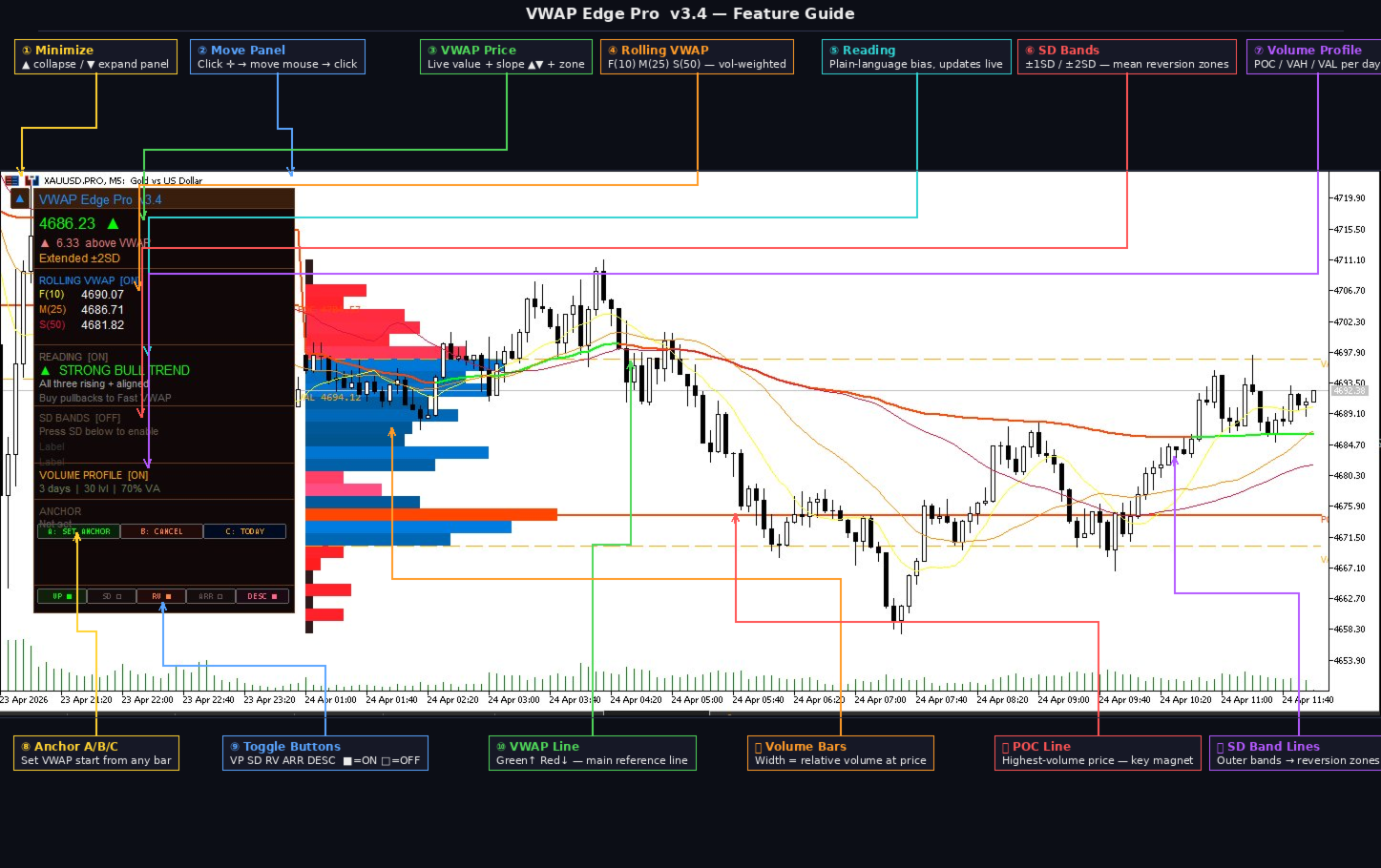
At its core, VWAP (Volume Weighted Average Price) is the most important price level watched by institutional traders, hedge funds, and prop firms every single day. It is not just an average — it is the true equilibrium price of the market, calculated using both price AND volume. When price is above VWAP, buyers are in control. When price is below VWAP, sellers are in control. When price returns to VWAP, the market is resetting.
Most free VWAP indicators get the math wrong, reset at the wrong time, or offer nothing beyond a single line. VWAP Edge Pro gives you the complete institutional toolkit — session VWAP, three rolling VWAPs, statistical bands, a multi-day volume profile, live signal descriptions, and a fully interactive control panel — all in one indicator.
No complex setup. No confusing parameters. Everything is controlled from the chart with simple ON/OFF buttons.
2. What Does It Show?
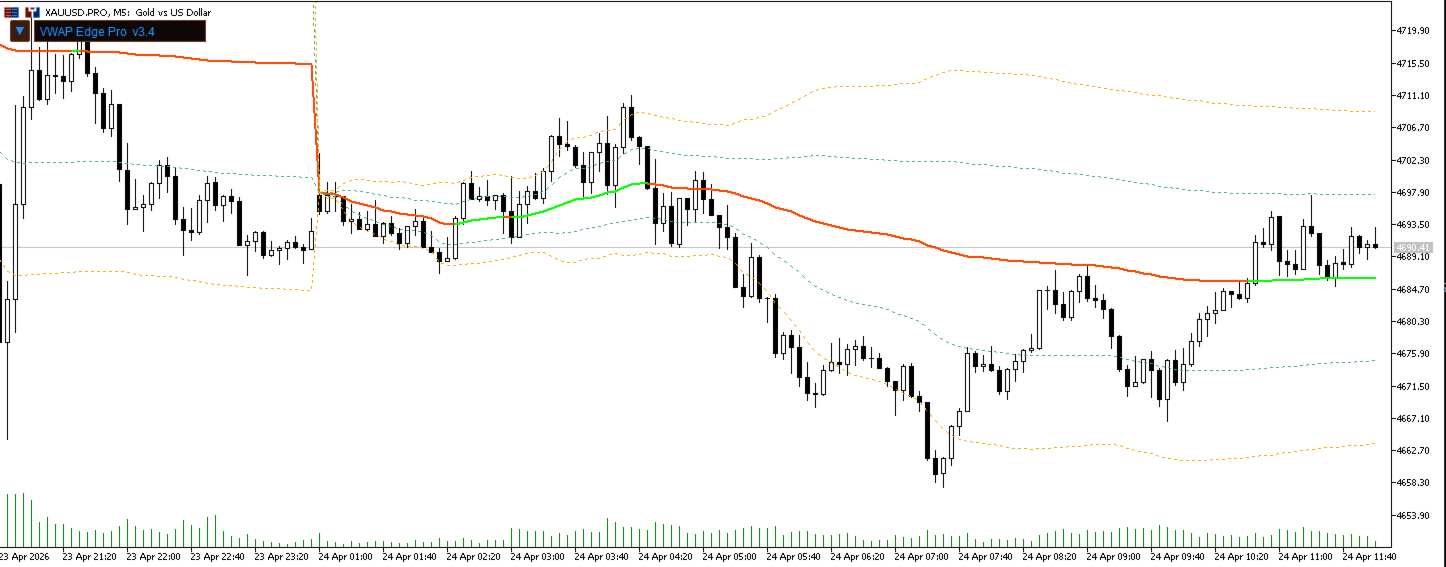
2.1 The Main VWAP Line
A clean, color-coded line that resets at the start of each trading day (or week, month, or any bar you choose).
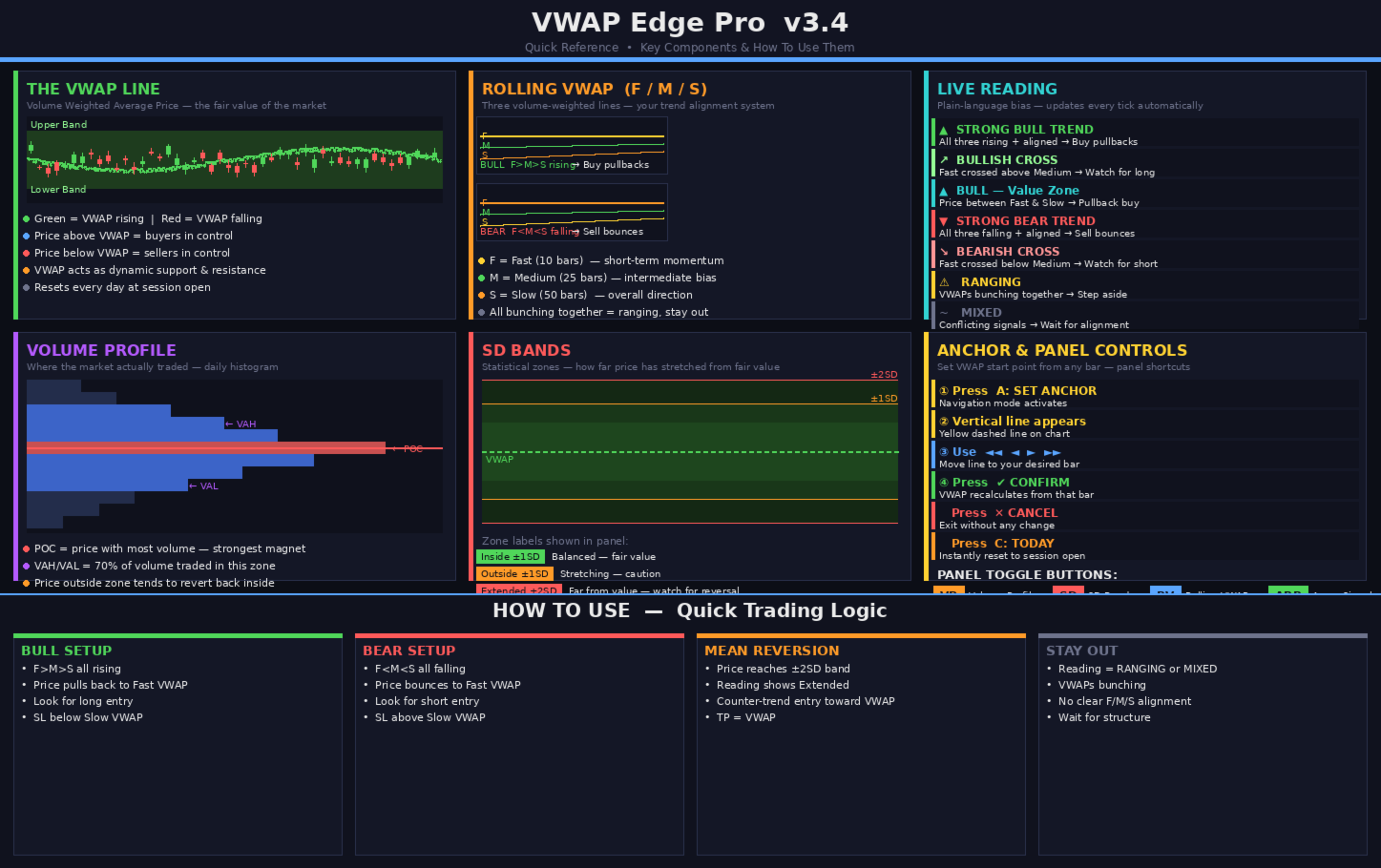
The line turns green when rising and red when falling — so you can see the direction at a glance without reading numbers.
Four reset options:
Daily — resets every morning. Best for intraday scalping and day trading.
Weekly — one VWAP across the entire week. Good for swing traders.
Monthly — macro-level bias. Good for longer-term context.
Anchored — you choose exactly which bar to start from. Perfect for analyzing moves from news events, session opens, or key reversal points.

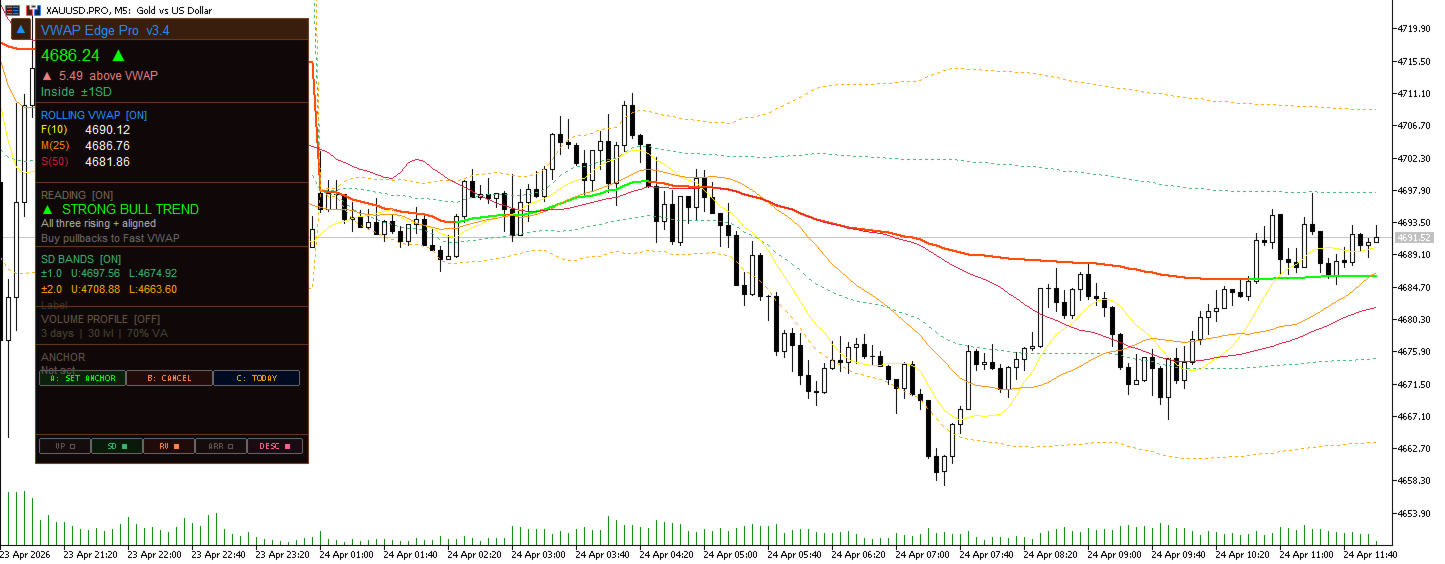
2.2 Standard Deviation Bands
Three pairs of bands that expand outward from the VWAP. Think of them as a rubber band around fair value.
When price reaches the outer bands, it has moved far from where most volume traded. Institutions often take profit at these levels, pushing price back toward the VWAP. This creates high-probability mean reversion setups.
The panel always tells you which zone you are in:
Inside ±1SD — price is near fair value, market is balanced
Outside ±1SD — price is starting to stretch
Extended ±2SD — price is far from fair value, watch for a pullback
EXTREME ±3SD — price is statistically very extended, high reversion risk
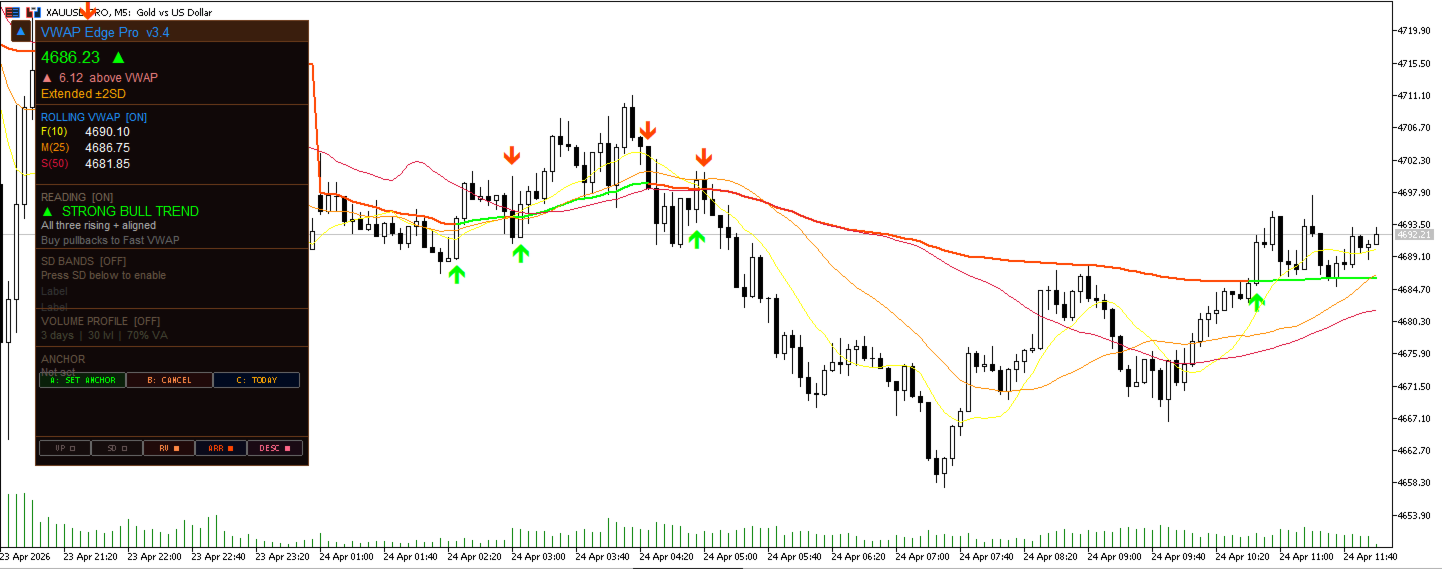
2.3 Triple Rolling VWAP
Three additional volume-weighted lines that work like a triple moving average system — but better, because they use volume in the calculation.
Fast (10 bars) — reacts quickly to recent price action
Medium (25 bars) — shows the intermediate bias
Slow (50 bars) — shows the overall intraday trend direction
How to read them at a glance:
Fast above Medium above Slow, all pointing up = strong uptrend, buy pullbacks
Fast below Medium below Slow, all pointing down = strong downtrend, sell bounces
All three bunching together = choppy market, stay out
Fast crossing above Medium = momentum turning bullish, watch for long
Fast crossing below Medium = momentum turning bearish, watch for short
2.4 Live Market Reading
This is the feature that makes VWAP Edge Pro unique. Instead of staring at lines and trying to work out what they mean, the panel tells you directly — updated every single tick.
Examples of what you will see:
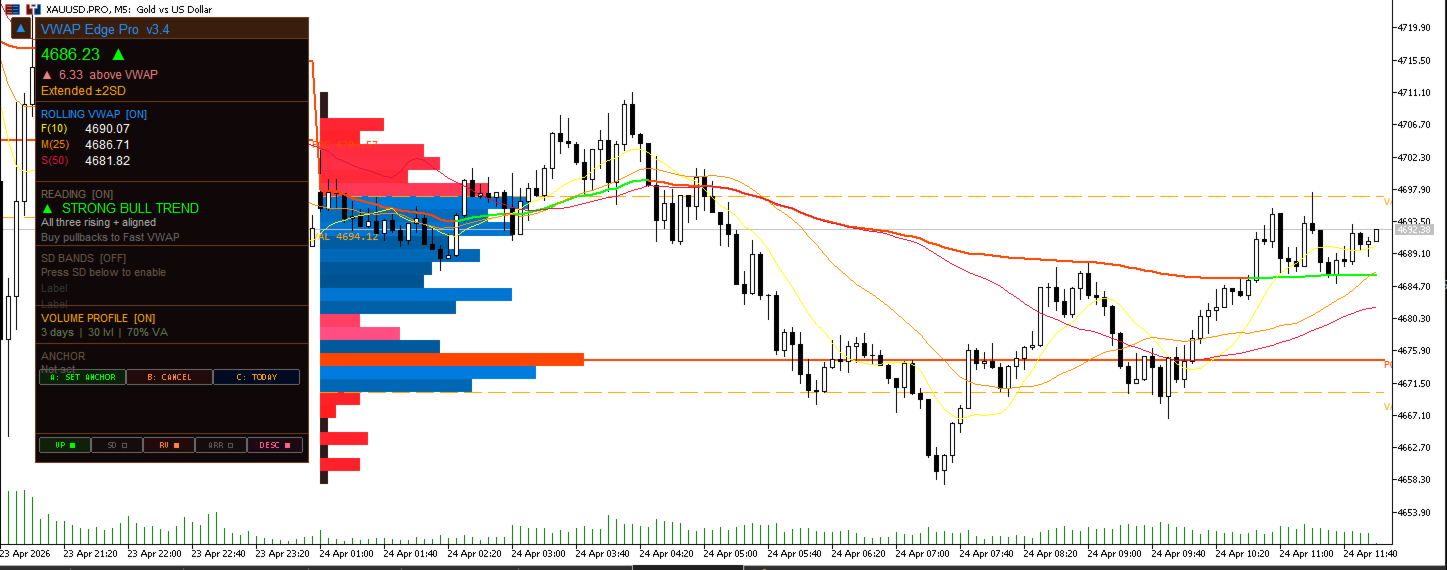
▲ STRONG BULL TREND — All three rising and aligned. Buy pullbacks to Fast VWAP.
▼ STRONG BEAR TREND — All three falling and aligned. Sell bounces to Fast VWAP.
↗ BULLISH CROSS — Fast crossed above Medium. Watch for long entry.
↘ BEARISH CROSS — Fast crossed below Medium. Watch for short or exit.
▲ BULL — Value Zone — Price is between Fast and Slow. Pullback buy opportunity.
▼ BEAR — VWAP Resistance — Price testing Medium VWAP from below. Watch for rejection.
⚠ RANGING — VWAPs bunching together. No clear trend. Step aside.
~ MIXED — Conflicting signals. Wait for alignment before trading.
The reading can be turned on or off with one click.
2.5 Daily Volume Profile
A horizontal bar chart drawn inside each trading day that shows exactly where most of the volume traded. Three key levels are always clearly marked:
POC (Point of Control) — the single price where the most volume changed hands. This is the strongest magnet on the chart. Price tends to gravitate back to it.
VAH (Value Area High) — the top of the zone where 70% of the day's volume traded.
VAL (Value Area Low) — the bottom of that same zone.
Prices outside the Value Area tend to get rejected back inside. Prices inside the Value Area tend to gravitate toward the POC.
By default the indicator shows the last 3 days of profiles, fully color-coded with an orange gradient — brighter orange means more volume was traded at that level.
2.6 Buy and Sell Signals
Clear solid arrow signals appear directly on the chart when price crosses the VWAP:
Green triangle below the bar — price crossed above VWAP, potential long
Red triangle above the bar — price crossed below VWAP, potential short
A spacing filter prevents the chart from being flooded with arrows during choppy sideways movement. You control how many bars must pass between signals.
2.7 Alert System
Get notified the moment something important happens — without watching the screen.
Alerts available for:
Price crossing the VWAP
Price touching Band 1
Price touching Band 2
Delivery options: pop-up alert, mobile push notification, email.
All alerts are disabled by default. You enable only the ones you want.
3. The Control Panel
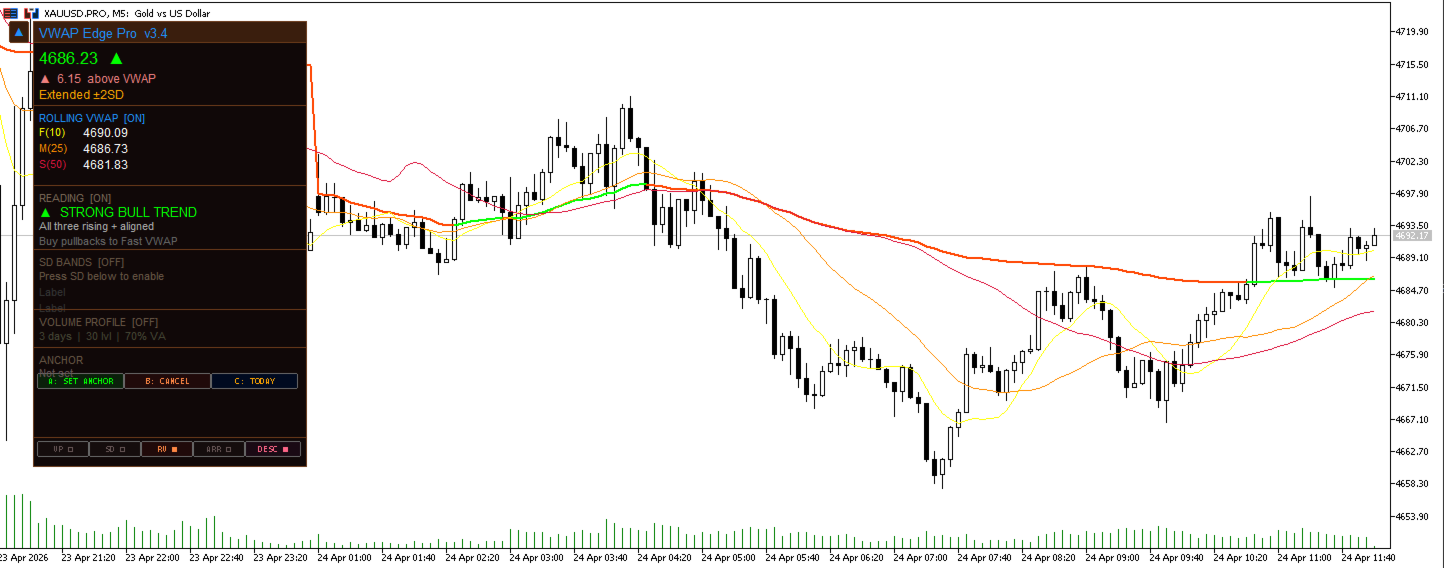
Everything is controlled from a clean on-screen panel — no need to open settings every time you want to change something.
The panel is organized into clearly labeled sections:
VWAP — current price level, distance from price, slope direction, zone
SD BANDS — live upper and lower levels for each active band
ROLLING VWAP — live Fast / Medium / Slow values
READING — plain language market interpretation
VOLUME PROFILE — active days, levels, and value area info
ANCHOR — current anchor position and navigation controls
At the bottom of the panel, three toggle buttons let you instantly show or hide the Volume Profile, Rolling VWAPs, and the Reading description — without opening the settings menu.
4. The Anchor Tool — Set VWAP From Any Bar
The Anchored VWAP is one of the most powerful features for experienced traders. It lets you start the VWAP from any exact bar you choose — a news release, a session open, a major high or low.
Setting it is simple:
Press A: SET ANCHOR on the panel
A yellow dashed line appears on the chart at the current bar
Use the ◄◄ and ►► arrow buttons to move it left or right through history, one or five bars at a time
When the line is on the bar you want, press CONFIRM
The VWAP instantly recalculates from that point forward
Press CANCEL at any time to exit without making any changes
Press C: TODAY to instantly reset to the start of today's session
5. Who Is This For?
VWAP Edge Pro is built for any trader who wants to trade with institutional reference levels rather than guessing where price might go.
It is particularly useful for:
Intraday traders and scalpers who need fast, clear bias signals
Prop firm challenge participants who need disciplined, rules-based entries
Day traders who want to know whether to buy dips or sell rallies
Swing traders who want macro VWAP context on higher timeframes
Traders learning price action who want plain-language explanations of what the chart is saying
Anyone tired of cluttered charts full of conflicting indicators
6. Works On Everything
VWAP Edge Pro works on any instrument in MetaTrader 5:
Forex — all pairs
Gold, Silver, Oil
Stock indices — US30, NAS100, SP500, DAX, FTSE
Cryptocurrencies
Stocks and Futures
Any timeframe from M1 to D1
Any broker — no restrictions, no special setup required
Compatible with both hedging and netting account types. Optimized for 24/7 VPS operation.
7. Quick Setup
Install the .ex5 file into your MT5 Indicators folder and attach it to any chart. The indicator works immediately on default settings with no configuration needed.
To customize: all settings are organized into clearly labeled groups in the Inputs tab — Session VWAP, SD Bands, Rolling VWAP, Volume Profile, Signals, Alerts, and Visual settings.
To use the Anchored VWAP: press A: SET ANCHOR on the panel, navigate to your desired bar with the arrow buttons, and press CONFIRM.
To toggle any feature on or off at any time, use the VP, RV, and DESC buttons at the bottom of the panel.
8. Settings Overview
Session VWAP
Reset period: Daily / Weekly / Monthly / Anchored
Price source: Typical Price (HLC/3), OHLC/4, or Close
Volume: Tick Volume (Forex) or Real Volume (Stocks and Futures)
SD Bands
Number of bands: 0 to 3
Multiplier per band: 0.5× to 3.0×
Color per band: fully customizable
Rolling VWAP
Fast / Medium / Slow periods: 5, 10, 15, 20, 25, 30, 50, or 100 bars
Color per line: fully customizable
Volume Profile
Days to show: 1, 2, 3, or 5
Price levels: 15, 20, 30, 40, or 50
Value Area percentage: default 70%
Bar width: as a percentage of the day's duration
Signals
Arrows on or off
Minimum bars between signals
Arrow size and color
Alerts
All alerts off by default — enable individually
Pop-up, push notification, or email delivery
Visual
VWAP line colors for rising, falling, and flat
Line width
Slope coloring on or off
Panel on or off
Risk Disclaimer
Trading foreign exchange, indices, commodities, or cryptocurrencies involves substantial risk and is not suitable for all investors. This indicator is an analytical tool only and does not provide trading advice or guarantee any outcome. No indicator eliminates risk or ensures profitable results. Past performance does not predict future results. You are solely responsible for your own trading decisions. The developer accepts no liability for financial losses arising from the use of this product.