SilverEdge Trade Console
- Utilità
- Versione: 4.4
- Aggiornato: 28 ottobre 2025
- Attivazioni: 5

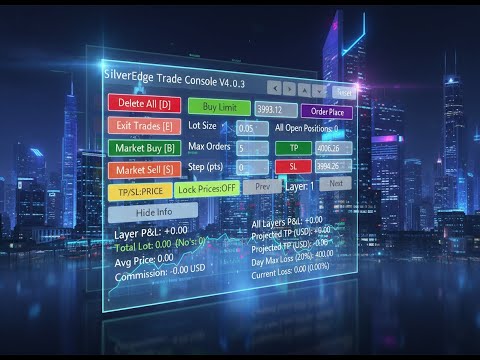
SilverEdge Trade Console is a fast, layer-based trading console for MT5 that lets you place, manage, and exit trades in a few keystrokes. It combines one-tap market orders, guided pending orders, per-layer TP/SL control, and a built-in break-even/trailing engine—wrapped in a clean dashboard that docks anywhere on your chart. Designed for scalpers and intraday traders who need speed, consistency, and clear logs.
Features-
Layer-Based Workflow (1–9): Assign and work within layers to separate strategies, timeframes, or trade ideas. Each layer carries its own magic and TP/SL rules.
-
Instant Market Actions: Dedicated Buy/Sell with hotkeys plus one-click “Exit Trades” for the active layer.
-
Guided Pending Orders: “Order Place” walks you through placing the correct pending type with preconfigured distances.
-
Per-Layer TP/SL Automation: Set base TP/SL and optional per-layer increments; apply instantly from the panel.
-
3 TP/SL Input Modes: Toggle between Price → Pips → Amount to enter targets in the way that makes sense for you.
-
Lock Prices Control: Freeze inputs to avoid accidental edits during fast markets; unlock to auto-recompute TP/SL.
-
Break-Even & Trailing Manager: Optional engine that moves stops to break-even, then trails in steps once price is in profit.
-
Apply-Scope Options: Act on the current layer only—or apply to all layers when needed.
-
Auto Pip Multiplier: Detects symbol precision (2/3/4/5 decimals, gold/indices) to keep pips/points correct across brokers.
-
Dashboard Docking: Snap the console to left/right/top/bottom or reset; show/hide the info panel on demand.
-
Trade Log Clarity: Clean, readable status lines and counters; optional include/exclude EA/non-EA items for actions and views.
-
Safety & Speed: Fast bulk close option and broker stop/freeze-level awareness baked into the manager.
-
Select Layer: Press 1–9 → sets the active Layer N (updates the panel).
-
Market Buy: Press B → places a Buy at market using current lot/layer settings.
-
Market Sell: Press S → places a Sell at market using current lot/layer settings.
-
Exit Trades (active layer): Press E → closes open positions for the selected layer.
-
Delete All [EA scope]: Press D → removes EA-controlled orders (and configured scope of positions) per the panel’s include settings.
-
Lock/Unlock Prices: Press L → toggles “Lock Prices” (prevents accidental TP/SL edits; auto-recomputes when unlocked).
-
(Buttons on panel)
-
Order Place: Guided placement of pending (Buy/Sell Limit/Stop) with preset distances.
-
TP / SL: Quick-apply target and stop for the active layer (honors current input mode).
-
TP/SL Mode: Cycles Price → Pips → Amount.
-
Previous / Next: Step through layers.
-
Dock Left/Right/Top/Bottom/Reset: Snap the console where you want it.
-
Show/Hide Info: Toggle on-screen guidance.
-
-
Scalpers & day traders needing instant entries/exits with consistent risk.
-
Layered strategy users running multiple ideas on the same symbol.
-
Gold/indices/FX traders switching between symbols with different pricing digits.
What it solves
-
Speed under pressure: Hotkeys and one-tap buttons reduce clicks and hesitation.
-
Consistency: Per-layer TP/SL rules and an optional BE/Trailing engine keep trade management disciplined.
-
Clarity: A tidy panel and readable logs keep you focused on price—not terminal clutter.
How you trade with it (typical flow)
-
Pick your Layer (1–9): Separate trades by idea or timeframe.
-
Set TP/SL: Choose Price, Pips, or Amount mode; lock if you want to prevent accidental edits.
-
Enter fast: Hit B or S for market orders—or use Order Place for precise pending's.
-
Manage automatically: Let the break-even/trailing engine protect gains once in profit.
-
Exit on cue: Use E to close the active layer quickly, or D to clear orders within your chosen scope.
Why traders like it
-
Muscle-memory trading: Layers on digits and core actions on single keys.
-
Fewer mistakes: Lock prices, clear labeling, and scoped actions.
-
Broker-agnostic pips: Auto-detects symbol precision so your pips/points stay correct.
-
Fits your workspace: Dock anywhere; keep the chart clean.
At-a-Glance Highlights
-
Layer-based execution (1–9)
-
Market & guided pending orders
-
3 input modes for TP/SL (Price, Pips, Amount)
-
Optional Break-Even + Trailing stop manager
-
Lock Prices safety
-
Dockable console, clean logs
-
Auto pip multiplier & symbol digit handling