Composite MA
- Indicatori
- Versione: 2.2
- Aggiornato: 8 novembre 2025
- Attivazioni: 20

Composite MA Indicator - Comprehensive Guide
Description:
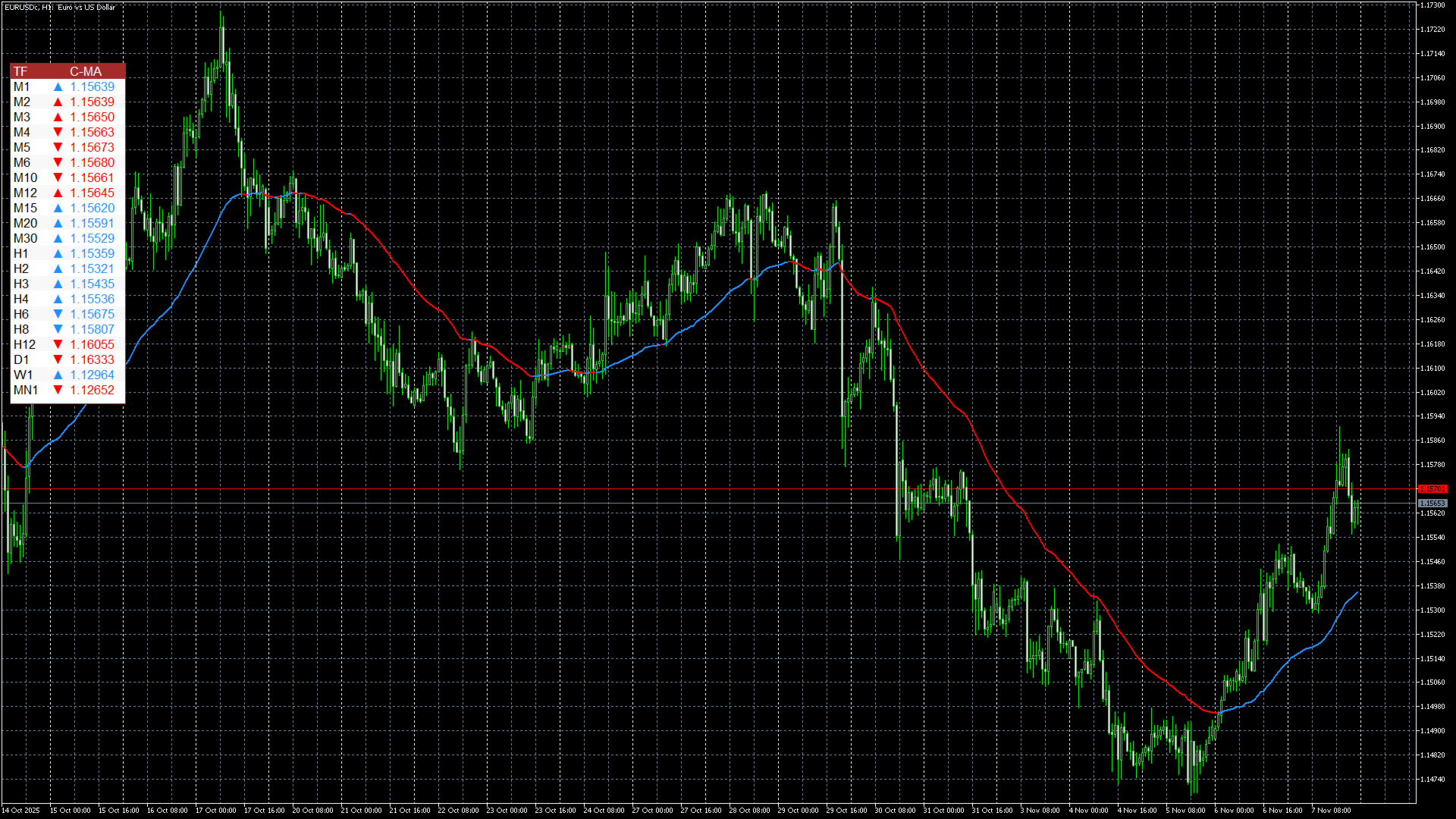
The Composite MA indicator is a sophisticated multi-timeframe trend analysis tool that calculates the average value of multiple moving averages across a user-defined period range. It provides comprehensive market trend visualization through both a color-coded composite moving average line on the chart and an Excel-style panel displaying trend direction across 21 different timeframes. The indicator uses canvas technology for smooth GUI rendering and offers real-time multi-timeframe trend analysis.
Usefulness:
This indicator is exceptionally valuable for traders seeking comprehensive market context across multiple timeframes. It helps identify trend direction, strength, and consistency across various trading horizons from minutes to monthly charts. The composite approach smooths out noise from individual MAs, providing more reliable trend signals. The visual panel allows quick assessment of market sentiment alignment, enabling better entry/exit timing and confirmation of trend reversals.
Logical Concept:
The core logic involves calculating multiple moving averages (from PeriodFrom to PeriodTo) and computing their average value to create a composite MA. This composite line changes color based on trend direction (blue for uptrend, red for downtrend). For multi-timeframe analysis, the indicator calculates separate composite MAs for each enabled timeframe and compares current vs previous values to determine trend direction. The unique arrow system shows both composite MA direction and price position relative to the composite MA.
Trend Detection Methodology:
-
Single Timeframe Trend: Compare current composite MA value with previous value. Rising values indicate uptrend (blue), falling values indicate downtrend (red)
-
Multi-Timeframe Alignment: Analyze trend consistency across timeframes. Strong trends show uniform direction across multiple timeframes
-
Trend Strength Assessment: Count how many timeframes align in direction. More aligned timeframes indicate stronger trend momentum
-
Reversal Detection: Watch for changes in arrow colors and directions across multiple timeframes simultaneously
Using the Indicator for Trend and Index Movements:
-
Primary Trend Identification: Use the main chart composite MA line for current timeframe trend direction
-
Multi-Timeframe Confirmation: Check the panel for alignment - optimal entries occur when multiple timeframes show same direction
-
Trend Strength Measurement: Count "Up" or "Down" statuses across timeframes - more consistent signals indicate stronger trends
-
Divergence Detection: Look for disagreement between timeframes (e.g., H1 up but M15 down) suggesting potential reversals
-
Support/Resistance Levels: Use composite MA values from higher timeframes as dynamic support/resistance
-
▲ and ▼ arrows indicate position of index price related to Composite MA price for corresponding timeframe
Basic MQL5 EA Integration Code:
//+------------------------------------------------------------------+
//|                      Composite MA EA Sample                      |
//+------------------------------------------------------------------+
#property copyright "2025"
#property version   "1.00"
#property description "EA using Composite MA Indicator"

//--- Input parameters
input group "=== Composite MA Settings ==="
input int                 MA_PeriodFrom = 1;           // MA Starting Period
input int                 MA_PeriodTo = 100;           // MA Ending Period
input int                 MA_Shift = 0;                // MA Shift
input ENUM_MA_METHOD      MA_Method = MODE_SMA;        // MA Method
input ENUM_APPLIED_PRICE  MA_Price = PRICE_CLOSE;      // MA Applied Price
input ENUM_TIMEFRAMES     MA_Timeframe = PERIOD_CURRENT; // MA Timeframe

input group "=== Trading Settings ==="
input double              LotSize = 0.1;               // Lot Size
input int                 MagicNumber = 12345;         // Magic Number
input int                 Slippage = 3;                // Slippage

//--- Global variables
int composite_ma_handle;  // Handle for the Composite MA indicator

//+------------------------------------------------------------------+
//| Expert initialization function                                   |
//+------------------------------------------------------------------+
int OnInit()
{
   //--- Create Composite MA indicator handle
   composite_ma_handle = iCustom(_Symbol, _Period, "Composite MA.ex5",
                                 true,      // Trendline_ON
                                 MA_PeriodFrom,
                                 MA_PeriodTo,
                                 MA_Shift,
                                 MA_Method,
                                 MA_Price,
                                 MA_Timeframe,
                                 200,       // DisplayBars
                                 false,     // Panel_ON - turn off panel in EA
                                 false, false, false, false, false, false, false, false, false, false, // All M timeframe panels off
                                 false, false, false, false, false, false, false, false, // All H timeframe panels off
                                 false, false, false, // D1, W1, MN1 panels off
                                 clrDodgerBlue, clrRed, clrGray, clrBrown // Colors
                                );

   if(composite_ma_handle == INVALID_HANDLE)
   {
      Print("Error creating Composite MA indicator handle: ", GetLastError());
      return INIT_FAILED;
   }

   Print("Composite MA indicator loaded successfully");
   return INIT_SUCCEEDED;
}

//+------------------------------------------------------------------+
//| Expert tick function                                             |
//+------------------------------------------------------------------+
void OnTick()
{
   //--- Check if we have enough bars
   if(Bars(_Symbol, _Period) < 100) return;

   //--- Get Composite MA values
   double ma_current = GetCompositeMAValue(0);   // Current bar
   double ma_previous = GetCompositeMAValue(1);  // Previous bar

   if(ma_current == 0 || ma_previous == 0) return;

   //--- Get current price
   double current_price = SymbolInfoDouble(_Symbol, SYMBOL_ASK);

   //--- Trading logic
   bool buy_signal = ma_current > ma_previous && current_price > ma_current;
   bool sell_signal = ma_current < ma_previous && current_price < ma_current;

   //--- Check for existing positions
   bool has_buy = PositionExists(POSITION_TYPE_BUY);
   bool has_sell = PositionExists(POSITION_TYPE_SELL);

   //--- Execute trading signals
   if(buy_signal && !has_buy)
   {
      if(has_sell) ClosePosition(POSITION_TYPE_SELL);
      OpenPosition(POSITION_TYPE_BUY);
   }
   else if(sell_signal && !has_sell)
   {
      if(has_buy) ClosePosition(POSITION_TYPE_BUY);
      OpenPosition(POSITION_TYPE_SELL);
   }
}

//+------------------------------------------------------------------+
//| Get Composite MA value from indicator buffer                    |
//+------------------------------------------------------------------+
double GetCompositeMAValue(int shift)
{
   double ma_value[1];
   ArraySetAsSeries(ma_value, true);

   if(CopyBuffer(composite_ma_handle, 0, shift, 1, ma_value) < 1)
   {
      Print("Error copying Composite MA buffer: ", GetLastError());
      return 0;
   }

   return ma_value[0];
}

//+------------------------------------------------------------------+
//| Check if position exists                                        |
//+------------------------------------------------------------------+
bool PositionExists(ENUM_POSITION_TYPE type)
{
   for(int i = 0; i < PositionsTotal(); i++)
   {
      if(PositionGetSymbol(i) == _Symbol && PositionGetInteger(POSITION_MAGIC) == MagicNumber)
      {
         if(PositionGetInteger(POSITION_TYPE) == type)
            return true;
      }
   }
   return false;
}

//+------------------------------------------------------------------+
//| Open position                                                   |
//+------------------------------------------------------------------+
void OpenPosition(ENUM_POSITION_TYPE type)
{
   MqlTradeRequest request = {0};
   MqlTradeResult result = {0};

   request.action = TRADE_ACTION_DEAL;
   request.symbol = _Symbol;
   request.volume = LotSize;
   request.magic = MagicNumber;
   request.slippage = Slippage;

   if(type == POSITION_TYPE_BUY)
   {
      request.type = ORDER_TYPE_BUY;
      request.price = SymbolInfoDouble(_Symbol, SYMBOL_ASK);
   }
   else
   {
      request.type = ORDER_TYPE_SELL;
      request.price = SymbolInfoDouble(_Symbol, SYMBOL_BID);
   }

   if(!OrderSend(request, result))
   {
      Print("Error opening position: ", GetLastError());
   }
}

//+------------------------------------------------------------------+
//| Close position                                                  |
//+------------------------------------------------------------------+
void ClosePosition(ENUM_POSITION_TYPE type)
{
   for(int i = 0; i < PositionsTotal(); i++)
   {
      if(PositionGetSymbol(i) == _Symbol && PositionGetInteger(POSITION_MAGIC) == MagicNumber)
      {
         if(PositionGetInteger(POSITION_TYPE) == type)
         {
            MqlTradeRequest request = {0};
            MqlTradeResult result = {0};

            request.action = TRADE_ACTION_DEAL;
            request.symbol = _Symbol;
            request.volume = PositionGetDouble(POSITION_VOLUME);
            request.magic = MagicNumber;

            if(type == POSITION_TYPE_BUY)
            {
               request.type = ORDER_TYPE_SELL;
               request.price = SymbolInfoDouble(_Symbol, SYMBOL_BID);
            }
            else
            {
               request.type = ORDER_TYPE_BUY;
               request.price = SymbolInfoDouble(_Symbol, SYMBOL_ASK);
            }

            if(!OrderSend(request, result))
            {
               Print("Error closing position: ", GetLastError());
            }
            break;
         }
      }
   }
}

//+------------------------------------------------------------------+
//| Expert deinitialization function                                |
//+------------------------------------------------------------------+
void OnDeinit(const int reason)
{
   if(composite_ma_handle != INVALID_HANDLE)
   {
      IndicatorRelease(composite_ma_handle);
      Print("Composite MA indicator handle released");
   }
}
//+------------------------------------------------------------------+
Important Notes for EA Developers:
-
Only visible timeframes have valid data - check the input parameters to see which timeframes are enabled
-
Status values interpretation:
-
1.0 = Up trend
-
-1.0 = Down trend
-
0.0 = Flat
-
-2.0 = Not available/not calculated
-
-
Price buffers contain the actual composite MA value for that specific timeframe
-
The indicator only calculates for the last DisplayBars bars, so copying historical data beyond that range may return zeros.
Key Buffer Mapping for EA Developers:
-
Buffer 0: CompositeMABuffer - Main composite MA values
-
Buffer 1: ColorBuffer - Color index (0=Blue/Up, 1=Red/Down)
-
Buffers 2-22: Timeframe status buffers (M1 to MN1) - Values: 1=Up, -1=Down, 0=Flat, -2=N/A
-
Buffers 23-43: Timeframe price buffers - Composite MA values for each timeframe
This indicator provides robust multi-timeframe trend analysis that EA developers can leverage for sophisticated trading decision systems.