
Go Long Master
- Experts
-
Cem Ummak
 I am a professional algorithmic trader and EA developer with **5+ years of experience** in building automated trading systems for real market conditions.
🌐 Community
📩 Personal Telegram: https://t.me/cemummak - Versione: 2.14
- Attivazioni: 20
Go Long MASTER EA – Simple. Flexible. Effective.
Go Long MASTER EA is built on a timeless principle: Buy with confidence, exit with control. This expert advisor opens a Buy position at a user-defined hour and closes it at a later time, every trading day — turning intraday opportunities into consistent potential gains.
Key Features:
-
Precise Timing – Opens and closes trades based on your preferred time.
-
Fully Editable Inputs – All parameters are transparent. No hidden settings.
-
MA Filter – Avoids entries when the trend is unclear.
-
RSI Filter – Skips overbought markets for smarter entries.
-
Break Even Option – Locks profits as trades move in your favor.
-
Trailing Stop Loss – Secures gains with dynamic protection.
-
Grid Trading Mode – Optional grid logic for advanced users.
-
Day Selector – Choose specific weekdays for trading.
-
Dual Mode – Can be used both as a long-term intraday tool or a scalper.
Default inputs are not recommendations. Please test the EA in the Strategy Tester before live use.
INPUTS:
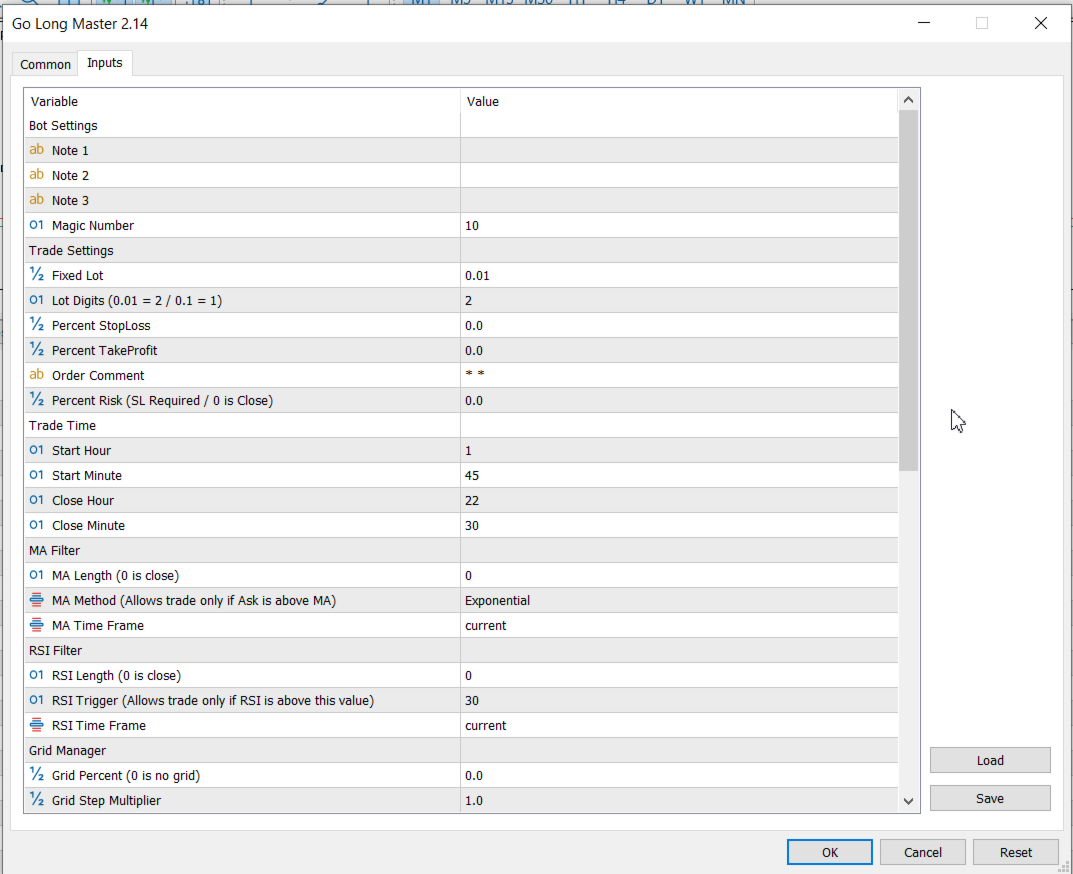
Bot Settings:
At the top of the input section, you'll find 3 Note Fields designed to help you document and track your settings easily.
These fields do not affect trade execution — they’re simply there to help you manage your custom strategies.
- Add comments while testing your settings
- Keep notes for different strategy variations
- Quickly recall your logic behind each configuration
Trade Settings:
Fixed Lot: Defines the fixed lot size for each trade. If you don’t want to use automatic risk calculation, enter a value here for manual control.
Lot Digits (0.01 = 2 / 0.1 = 1): Sets the lot precision. For example, use 2 for 0.01 or 1 for 0.1. Match this to your broker’s lot step size.
Percent StopLoss: Sets the stop loss as a percentage of the entry price. Enter 2 for a 2% stop loss. Set to 0 to disable.
Percent TakeProfit: Sets the take profit as a percentage of the entry price. Enter 3 for a 3% target. Set to 0 to disable.
Order Comment: Custom comment to label each trade. Helps you track and identify orders easily.
Percent Risk (SL Required / 0 is Close): Enables automatic lot sizing based on risk percentage. Requires a valid stop loss. Enter 2 to risk 2% of your balance. Set to 0 to disable.
Trade Time:
Start Hour: The hour when the trade will be opened.
Start Minute: The minute when the trade will be opened.
End Hour: The hour when the trade will be closed.
End Minute: The minute when the trade will be closed.
MA Filter:
MA Length: Period of the Moving Average. Set to 0 to disable the MA filter.
MA Method: Type of Moving Average used. A trade is allowed only if the Ask price is above the MA.
MA Time Frame: Timeframe used for the Moving Average calculation.
RSI Filter:
RSI Length: Period of the RSI. Set to 0 to disable the RSI filter.
RSI Trigger: Minimum RSI value required to allow a trade.
RSI Time Frame: Timeframe used for the RSI calculation.
Grid Manager:
Grid Percent (0 is no grid): Sets the percentage distance from the initial order where new grid orders will be placed. Set to 0 to disable the grid system.
Grid Step Multiplier: Multiplies the step size between grid orders, allowing for variable spacing as the grid expands.
Grid Type: Defines the type of grid strategy used (depends on enum implementation).
Max Order: Limits the total number of grid trades the robot can open.
Lot Multiplier (0 is close): Multiplies the lot size of each new grid order. Set to 0 to disable lot scaling.
Increase Lot After X Order: Starts increasing the lot size only after this number of grid orders has been opened.
Use Avagarage Stoploss (0 is close): Sets a single averaged stop loss for all grid positions. Set to 0 to disable.
Use Avagarage Take Porfit (0 is close): Sets a single averaged take profit for all grid positions. Set to 0 to disable.
Trailing Stoploss:
Active Trailing StopLoss: Enables or disables the trailing stoploss feature. When set to true, the robot will adjust stop levels dynamically as profit increases.
Percent Start After Puan (Profit Trailing): Defines the profit percentage at which the trailing stoploss will activate.
Percent Trailing Distance: Sets the distance (in percentage) the stoploss will trail behind the current price once activated.
Use Avarage Price (for multiple orders): When enabled, the trailing stop will be calculated based on the average entry price of all open positions, instead of the last one.
BreakEven:
Active: Enables or disables the break-even feature. When set to true, the robot will move the stoploss to a break-even level after certain profit is reached.
Base Price: Selects the reference price for break-even calculation.
Avarage Price: Uses the average entry price of all positions.
Single Pos: Uses the entry price of the specific position.
BE Active Percent: Specifies the profit percentage at which the break-even mechanism becomes active.
BE Gap Percent: Sets the buffer (in percent) between the entry price and the stoploss.
Trade Days:
Allows you to choose which days of the week the robot is permitted to open trades. You can enable or disable trading for each individual day, including the weekend if needed.












































Unfortunately, the EA does not work flawlessly. In live operation, it does not open all symbols correctly with one broker, and with another broker, it does not close open positions. After my polite inquiry and request for error correction, the seller apparently does not consider it necessary to respond after almost a week. I find this behavior unprofessional, and this is no way to enjoy the MQL5 market!