Super Scalper Tool
- Utilità
- Versione: 3.10
- Aggiornato: 31 luglio 2025
- Attivazioni: 6

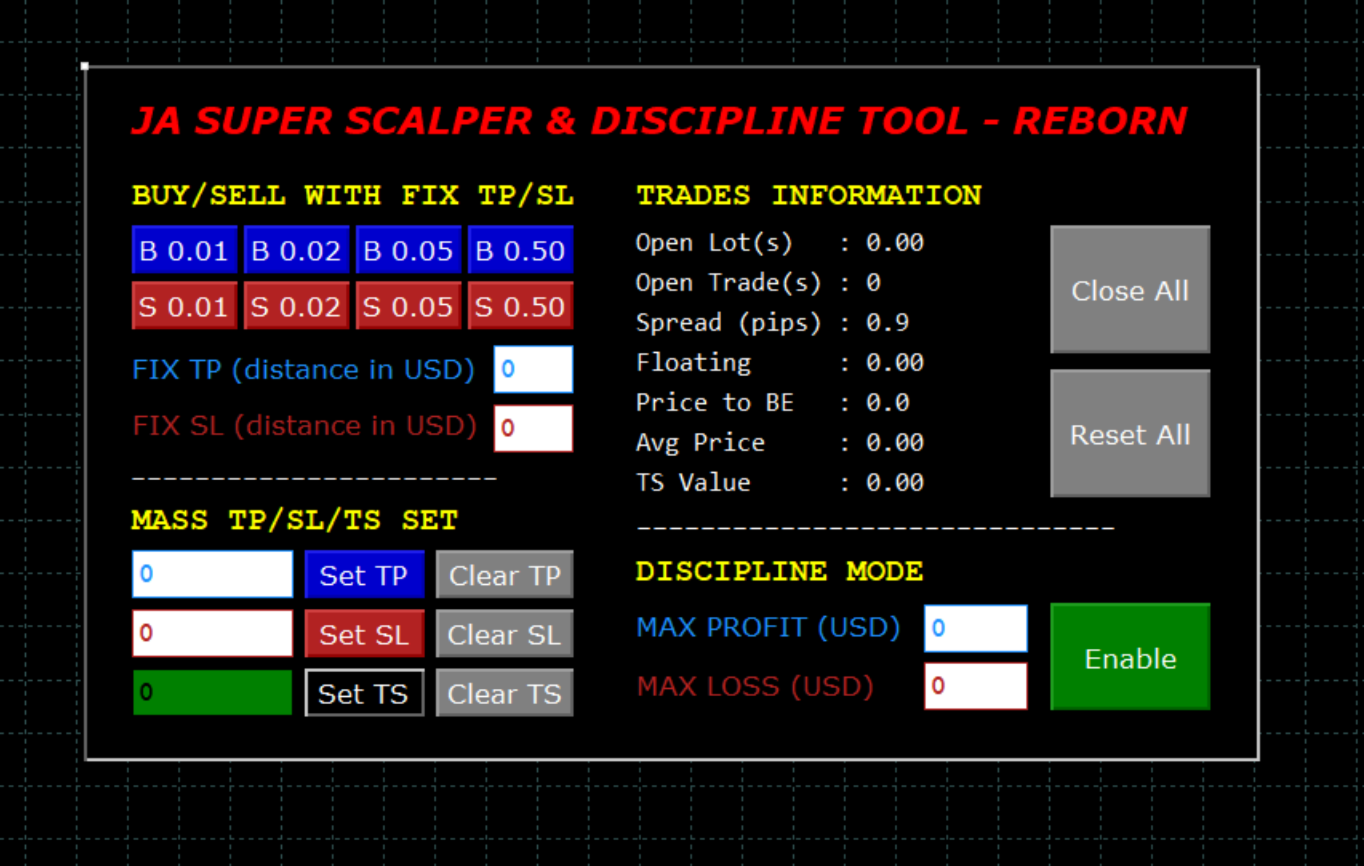
JA Super Scalper & Discipline Tool - REBORN (V3.0): Turbocharge Your Trading Efficiency with new Reborn (V3.0) version.
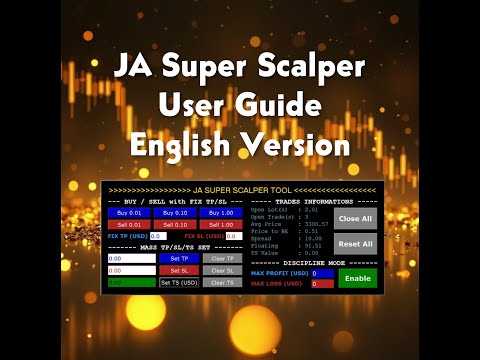
Introducing the Super Scalper & Discipline Tool - Reborn (V3.0). A simple tool designed for rapid entry and exit strategies. Reborn Version (V3.x) has better user interface. The interface on the video still the older V2.x version.
Maximize your trading potential with optimized performance, robust risk management, and seamless market execution tailored for high-frequency scalp trading.
New Discipline mode to limit your loss and profit target as well.
This EA will not open any position unless user presses the button. But this EA can help you to automatically close the trade(s) based on certain criteria set/enabled by the user.
Do not change timeframe when the program is active as it will deactivate all current active rules (TS & Discipline Mode) and might close all current open trades. This is current limitation so please take note.
YouTube: https://www.youtube.com/@JASuperScalper
Tiktok: https://www.tiktok.com/@ja_super_scalper?_t=ZS-8xKMMM24i6Z&_r=1
English user guide: https://youtu.be/XM_NROUinw8
Bahasa Indonesia panduan penggunaan: https://youtu.be/1lHNL_1LWp4
New Features in Reborn Version (V3.1): Trailing Stop logic improvement.
New Features in Reborn Version (V3.0):
- Drag & drop panel by clicking the dot on top left of the screen.
- Four custom BUY buttons and FOUR custom SELL buttons.
- Minor improvement on Trades Informations.
- KNOWN ISSUE: If you notice unusual font sizes or misaligned text, open the EA properties and adjust the font size as needed (usually by reducing it). This issue is caused by Windows display scaling.
Key New Features in V2.0:
- Discipline Mode to set max profit and loss in USD and Enable it. When the floating profit or loss meets this entered criteria, the EA will automatically close all positions and Disable Discipline mode.
- Three customizable buttons each for BUY and SELL with Auto TP/SL set.
- With single click, user can open position with up to 3 customizable lot size (editable in EA Setting).
- Fix TP and Fix SL (if entered) will automatically set TP and SL for each opened position with above customizable buttons
- Example:
- If TP is set at USD 2, then for any newly opened position with above button will automatically has TP +2 USD from its position. Same for SL (if value entered)
- User can choose to enter TP only (SL remains 0), SL only (TP remains 0), or both fill both TP and SL.
- Single button to Reset All setting (clear all edit box value to Zero, clear TP/SL/TS, disable Discipline Mode). Useful when user decided to cancel previous setting limit (like TP/SL/TS/Discipline Mode) and decide to go back to Manual mode.
- New information display:
- Floating: Current position (profit/loss). Easier to see when you have too many layers (don't need to scroll the bottom Toolbox window).
- TS Value: When Trailing Stop is enabled, this value will show the price where Trailing Stop will be started.
Key Features in V1.0:
- Quick SL/TP set for all current open trades - single click only.
- Clear SL/TP position for all open trades - single click only.
- Single button to Close All positions (one by one, slower vs MT5 internal Close All function).
- Information display on below items:
- Total lot size currently being opened.
- Total open trades quantity currently being opened.
- Average price for all current open trades.
- Price Different (Current Price vs Average Price from all open trades). Positive means overall trades are in profit and negative means overall trades are in lost. Please take note on potential accuracy gap due to spread.
- Current spread information from your broker.
What is Discipline Mode (new in V2.0)?
- Discipline Mode is a feature where user can limit how much profit/loss he/she would like to afford.
- Example when profit set to USD 100 and loss set to USD 50, then no matter how many positions being opened, if the floating price reaches that specified amount, all positions will be closed and then Discipline Mode will be Disabled (button color will change to Green). When Discipline Mode is Enabled, the button color will be red.
- What is the purpose of this mode? The idea came to my mind when I realized many new traders could not control his/her emotion. Most of them will open too many layers before eventually realizing that the floating loss is too big for them too handle. With this mode, user can set his/her limit, then can open whatever positions he/she wants.
- Be noted that in certain situation when the price is too volatile (usually news event), the closing of multiple positions (which will be done one by one) might have more delay or slower than actual price movement. So your total loss/profit might be different with the original intended/set value. Your server ping might also influence this.
Automatic Trailing Stop (Experimental Feature): This is new experimental feature, still under development (currently working, but needs further testing).
The idea is to set automatic trailing stop based on the value specified on the text box vs Average Price for all current open trades. Use at your own cautious! Example as below:
- User opened 10 BUY trades, with Average Price $ 3000.
- Current XAUUSD price at $ 3002 (means user at floating profit).
- User set TS at 5 (means $ 5 or 50 pips).
- So once Average Price hits $ 3005, TS will be automatically set at around $ 3000 (break even).
- TS will keep moving positively once the price moving to more profitable direction (like to $3010, then the TS will move to $ 3005 and so on).
- This to save time setting up TS manually for each open position, but directly considering all open trades profitable level (Average Price) and set TS based on that level.
- Be mindful that Average Price might have some accuracy gap due to spread. So set your TS accordingly.
Can We Set TS when We are in Floating Loss? Yes.
- User opened 10 BUY trades, with Average Price $ 3000.
- Current XAUUSD price at $ 2990 (big drop, means user at floating loss $ 10 or 100 pips).
- User set TS at 5 (means $ 5 or 50 pips) hoping the price will bounce back and TS will be automatically triggered.
- So once Average Price hits $ 3005, TS will be triggered and automatically set TS value at around $ 3000 (break even).
- TS will keep moving positively once the price moving to more profitable direction (like to $3010, then the TS will move to $ 3005 and so on).
- This to save time setting up TS manually for each open position, but directly considering all open trades profitable level (Average Price) and set TS based on that level.
- Be mindful that Average Price might have some accuracy gap due to spread. So set your TS accordingly.
Things to be Noted (Potential Future Improvements):
- The tool does not consider multiple pairs being opened.
- It will do all operation with assumption only single pair of currency or commodity being opened (like XAUUSD or BTCUSD and so on).
- If you are currently scalping multiple pairs, then using this SL/TP automation will be an issue as different currency or commodity might be hovering on very different price range.
- Common functions like Close All or BUY/SELL customized lot buttons will be working with no problem.
- The tool also does not support Hedging function. So if you are opening BUY and SELL positions at same time, then Price Diff calculation will not be accurate.
- Make sure you enable Algo Trading otherwise this Tool might not work (can not open/close trades). Follow below guides to enable Algo Trading:
- Click Tools - Options - Expert Advisors.
- Tick "Allow algorithmic trading".
- Untick the rest.
- If you have launched the Tools but not able to see the Tool on the chart, then please try below:
- Press "Alt-X".
- Select the "Jim Scalper Tools V1.0" and click Properties.
- Scroll to "Base_X_Distance" and "Base_Y_Distance" and adjust the value accordingly until you can see the Tool on the screen.
- Do not change timeframe when the program is active as it will deactivate all current working rules (TS, Discipline Mode) and might close all current open trades.
Final words:
- I'm not a professional coder. So no fancy cosmetic stuff on this tool. No guarantee this tool is free from any bugs or error as well. So use with your own cautious and always get yourself familiar with the tool in Demo account first!
- It's a simple yet functional Tool for me and my trades. I hope you will find this useful as well.
- Trading and especially Scalping is very dangerous. Please always be careful before opening any trade and do control your emotions.
- Drop me message for suggestion and happy trading! Wish you all the best of luck in your scalping trades!