 MetaTrader 5
 Sistemi Esperti
 Indicatori
 Script
 Librerie
 Archiviazione
Unisciti alla nostra fan page

Spread Heatmap - typical spread for every hour and weekday, in server time or New York time - indicatore per MetaTrader 5

I build and fix trading tools for MetaTrader 4 and MetaTrader 5:
• Expert Advisors (EAs) built from your strategy rules
• Custom indicators, alerts and on-chart panels
- Visualizzazioni:
- 162
- Valutazioni:
- Pubblicato:
-
 Ti stai perdendo delle opportunità di trading:
- App di trading gratuite
- Oltre 8.000 segnali per il copy trading
- Notizie economiche per esplorare i mercati finanziari
Registrazione AccediAccetti la politica del sito e le condizioni d’uso
Se non hai un account, registrati -
 Hai bisogno di un robot o indicatore basato su questo codice? Ordinalo su Freelance
Vai a Freelance
Hai bisogno di un robot o indicatore basato su questo codice? Ordinalo su Freelance
Vai a Freelance
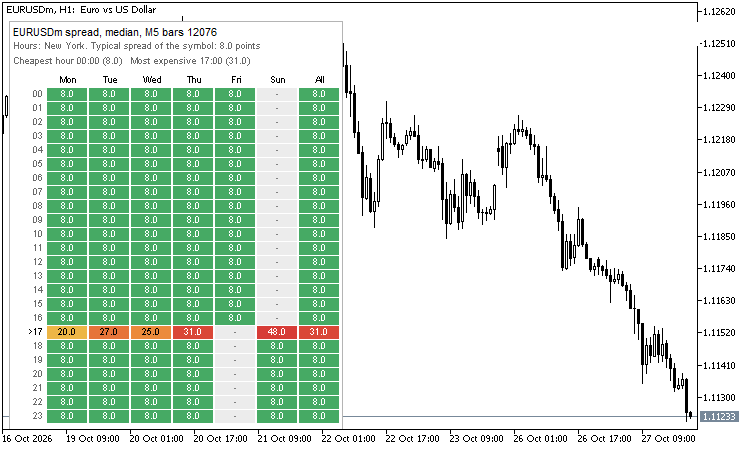
Spread is not the same all day. It is small in the London and New York session and it jumps when the market rolls over (around 17:00 New York) and in the first minutes after the weekend. This indicator shows it for the symbol of the chart as a table: 24 hours down, Monday to Friday and "All" across. Every cell is the typical spread of that hour on that weekday, coloured from green (cheap) through yellow and orange to red (expensive), with the number in points inside.
Files
- SpreadHeatmap.mq5 - the indicator.
- BrokerTime.mqh - the time zone class (the same file as in the code "Broker Time"). Put both files in the same folder and compile the indicator.
How it reads
- The spread is the value stored in the bars of the history (MqlRates.spread, in points). The bars of the timeframe you choose are used (M5 by default) for the last N days (60 by default).
- Statistic of each cell: median (default), average, 90th percentile (nine of ten bars are cheaper) or maximum.
- The colour scale is relative to the median spread of the whole symbol: green up to 1.3 times, yellow at 2 times, red from 4 times (all three are inputs).
- A cell with fewer than 3 bars shows "-". The marker ">" in front of an hour shows the current hour. The first lines show the symbol, the bars used, the cheapest and the most expensive hour.
- Hours can be shown in the broker server time, UTC, New York, London, Frankfurt, Sydney or Tokyo. For a city the class BrokerTime finds the clock of your broker from the Friday closes of the history and uses the summer time of the date of every bar, so "17:00 New York" is the same market moment all year. Saturday and Sunday columns appear only when the chosen zone puts bars there (for example Sunday evening in New York time).
- Optional: write the table (values and bar counts) to MQL5\Files\SpreadHeatmap_<symbol>.csv.
- Bars with spread 0 (not recorded) are ignored by default. If the bars of a symbol store one constant spread, the table is flat: that is what the history says.
- It draws on a chart only (nothing in the non-visual Strategy Tester) and never trades. The table is recalculated when a new bar of the chosen timeframe starts and every minute.
Inputs: timeframe, days, statistic, zone, skip zero, the three colour limits, position and font size of the table, CSV on/off.
How it was tested
- Compared with an independent calculation in Python (the IANA time zone database through zoneinfo): all 24 x 8 cells and bar counts for five setups (median in server time, average in New York, 90th percentile in London, maximum in UTC, median in Sydney) on EURUSD and XAUUSD of a live demo account: 0 differences (3,840 comparisons). A freshly started terminal needs a few seconds before the history is current: the check waits for it, and the indicator asks again after 5 seconds while a symbol has no bars yet.
- Validator-style runs in the Strategy Tester (EURUSD H1, GBPUSD M30, EURUSD M1): no errors, nothing drawn, 663,241 M1 bars calculated without a copy failure.
- The screenshot is a real chart of a demo account (EURUSD, hours in New York time): the rollover hour 17:00 is the red row.
 Awesome Oscillator Pullback EA for EURUSD, +209 Percent in a 2021-2026 Backtest
EURUSD EA that trades both directions: when the Awesome Oscillator turns against a weighted moving average filter, it places a stop order at the daily low or high of three days ago, with an ATR stop. Self-contained, no custom indicators. Backtest on EURUSD H1, October 2021 to October 2026: +209% on a 1,000 USD deposit with a fixed 20 USD risk per trade, 15.55% maximum equity drawdown.
 CanvasTabs: a lightweight tab bar for MQL5 based on CCanvas
A lightweight tab bar for chart panels, drawn with the standard CCanvas class. One include file, several independent instances per chart, click selection, resizing and safe cleanup. Includes a demo Expert Advisor.
 Trade Excursion Report - MAE and MFE of your closed trades (script)
For every closed position the script measures how far the price went against it (MAE) and in its favour (MFE), and shows what that says about your stops and exits. Table, summary on the chart and a CSV file. Read-only, it never trades.
MeanReversion: Ornstein-Uhlenbeck fit and optimal trading bands
Exact maximum likelihood of an Ornstein-Uhlenbeck spread and Bertram's optimal entry and exit levels for a given cost, with the expected length of a trade cycle.