 MetaTrader 5
 Sistemi Esperti
 Indicatori
 Script
 Librerie
 Archiviazione
Guarda come scaricare robot di trading gratuitamente
Ci trovi su Twitter!
Unisciti alla nostra fan page
Unisciti alla nostra fan page
Ti è piaciuto lo script? Provalo nel Terminale MetaTrader 5

MQL5 Program Packer - script per MetaTrader 5
Stanislav Korotky

Trading is just my hobby. I'm working in IT industry. So developement of experts, indicators, and script is not a problem at all to me. Wide range of technologies are used: MQL4, MQL5, system and applied programming, web-services, neural networks and more.
New:
New:
- Visualizzazioni:
- 11906
- Valutazioni:
- Pubblicato:
- Aggiornato:
-
 Ti stai perdendo delle opportunità di trading:
- App di trading gratuite
- Oltre 8.000 segnali per il copy trading
- Notizie economiche per esplorare i mercati finanziari
Registrazione AccediAccetti la politica del sito e le condizioni d’uso
Se non hai un account, registrati -
 Hai bisogno di un robot o indicatore basato su questo codice? Ordinalo su Freelance
Vai a Freelance
 This script allows you to assemble a zip-file of your MQL5-program with all dependencies automatically.
The dependencies are:
- included source files via #include directive (both modes of absolute (<>) and relative ("") references are supported);
- icons linked by #property icon directive;
- resources (images, sounds, and other types) embedded by #resource directive;
The script is based on a file scanner initially published in the article MQL Parsing by Means of MQL.
In order the script to work properly, user should make a simple yet important preparation step.
Create the file makelink.bat in the MQL5/Files folder with the following command and run it:
mklink /J MQL5 "..\..\MQL5\"
The file is provided (bound) with the script but bears txt-extension because bat-files are prohibited in MQL5 resources. You should copy makelink.txt to makelink.bat manually.
The command will create virtual pseudo-folder "MQL5" (so called file system junction point) inside real MQL5/Files folder. The pseudo-folder is actually a link/jump to the real MQL5 folder, accessible from the MQL5 sandbox. Do not mix up the real MQL5 folder and "MQL5" link (it's usually marked with a shortcut overlay on the icon).
The first occurence of "MQL5" in the abovementioned command is the pseudonym. You can choose another one at the expence of non-standard directory structure in the resulting ZIP-files (top-level folder in the ZIPs will have this name). The second occurence of "MQL5" in the command is the name of the real MQL5 folder - this part should be kept intact. Run the command in the MQL5/Files folder.
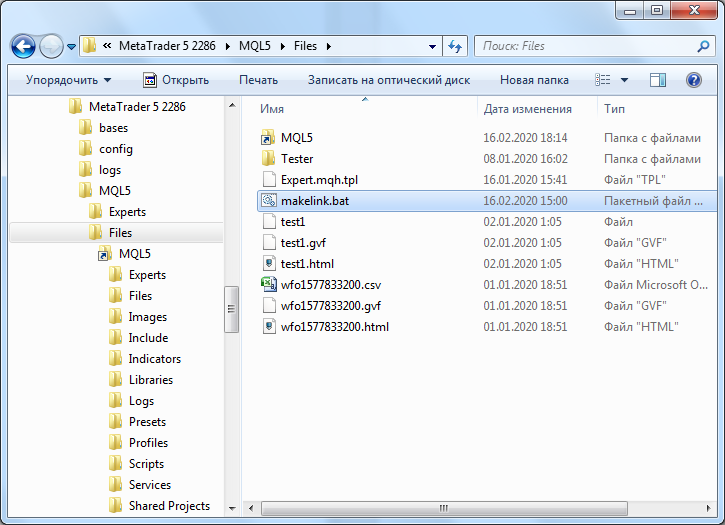
MQL5 sandbox access from MQL5/Files folder via junction point (symlink)
Important! Please note that the command creates the cyclic reference from subordinate folder MQL5/Files to upper level MQL5 folder. This may be danagerous if you use a software not smart enough to detect the recursion in the path. For example, loosely written backup programs, antiviruses or file managers can hang in an infinite loop and probably damage your operating system. Check your software for compatibility, include MQL5 into an exceptions list, or remove the link/jump just after you finished the packing task.
The pseudo-folder "MQL5" link is just a special file, you can remove it freely if you don't need it anymore, just make sure you're deleting the link inside MQL5/Files folder, not the real MQL5 folder in the terminal data path.
Input parameters
- string VirtualRootFolder - the name of the pseudo-folder link, "MQL5" by default; you can use another name, for example, "Sources", but then it becomes the top-level folder in the resulting archives, so you'll be unable to unzip sources inplace preserving standard MT hierarchy of folders with MQL5 top-level folder;
- string MainSourceFile - the pathname of MQL5 program you want to packup, by default it's "Scripts/mql5pack.mq5", which means that the script will pack itself; the pathname is from inside MQL5 folder, don't start it with MQL5 itself; for example, to pack MACD based EA example specify "Experts\Examples\MACD\MACD Sample.mq5"; back-slashes and forward-slashes are supported interchangeably;
- string PackedFile - the name of resulting archive, by default it's empty, which means that it will have the same name as the program but appended with zip-extension (for example, mql5pack.mq5.zip);
- string ExceptionListFilename - the name of a file with exception list of folders and files, which should be excluded from the archive regardless to dependencies, by default it contains "mql5pack.txt" with example of standard header folders/files installed along with MetaTrader.
The zip will contain full structure of subfolders and files in your MQL5, which are referenced from your MQL5 program.
The script utilizes the ZIP-library published in the article Handling ZIP Archives in Pure MQL5, but with minor fixes and improvements.
Here is an example of log:
Processing MQL5/Scripts/mql5pack.mq5
Scanning...
#property icon "mql5pack.png"
Including MQL5/Scripts/mql5pack.png
#resource "\\Files\\makelink.txt" as string __cmd1Folder
Including MQL5/Files/makelink.txt
#resource "\\Files\\mql5pack.txt" as string __exceptionListExample
Including MQL5/Files/mql5pack.txt
#include <mql5/FileReader.mqh>
Including MQL5/Include/mql5/FileReader.mqh
#include "RubbArray.mqh"
Including MQL5/Include/mql5/RubbArray.mqh
#include "HashMapTemplate.mqh"
Including MQL5/Include/mql5/HashMapTemplate.mqh
#include <Zip/Zip.mqh>
Including MQL5/Include/Zip/Zip.mqh
#include <Object.mqh>
Including MQL5/Include/Object.mqh
#include "StdLibErr.mqh"
Including MQL5/Include/StdLibErr.mqh
#include <Arrays\ArrayObj.mqh>
Including MQL5/Include/Arrays/ArrayObj.mqh
#include "Array.mqh"
Including MQL5/Include/Arrays/Array.mqh
#include <Object.mqh>
Including MQL5/Include/Object.mqh
#include <Dictionary.mqh>
Including MQL5/Include/Dictionary.mqh
#include <Object.mqh>
Including MQL5/Include/Object.mqh
#include <Arrays\List.mqh>
Including MQL5/Include/Arrays/List.mqh
#include <Object.mqh>
Including MQL5/Include/Object.mqh
#include "ZipDefines.mqh"
Including MQL5/Include/Zip/ZipDefines.mqh
#include "ZipHeader.mqh"
Including MQL5/Include/Zip/ZipHeader.mqh
#include "ZipDefines.mqh"
Including MQL5/Include/Zip/ZipDefines.mqh
#include "ZipDirectory.mqh"
Including MQL5/Include/Zip/ZipDirectory.mqh
#include "ZipDefines.mqh"
Including MQL5/Include/Zip/ZipDefines.mqh
#include "ZipContent.mqh"
Including MQL5/Include/Zip/ZipContent.mqh
#include <Object.mqh>
Including MQL5/Include/Object.mqh
#include "ZipDefines.mqh"
Including MQL5/Include/Zip/ZipDefines.mqh
#include "ZipHeader.mqh"
Including MQL5/Include/Zip/ZipHeader.mqh
#include "ZipFile.mqh"
Including MQL5/Include/Zip/ZipFile.mqh
#include "ZipDefines.mqh"
Including MQL5/Include/Zip/ZipDefines.mqh
#include "ZipContent.mqh"
Including MQL5/Include/Zip/ZipContent.mqh
Files processed: 19
Source length: 152757
Packing...
+ MQL5/Scripts/mql5pack.mq5
+ MQL5/Scripts/mql5pack.png
+ MQL5/Files/makelink.txt
+ MQL5/Files/mql5pack.txt
+ MQL5/Include/mql5/FileReader.mqh
+ MQL5/Include/mql5/RubbArray.mqh
+ MQL5/Include/mql5/HashMapTemplate.mqh
+ MQL5/Include/Zip/Zip.mqh
- MQL5/Include/Object.mqh
- MQL5/Include/StdLibErr.mqh
- MQL5/Include/Arrays/ArrayObj.mqh
- MQL5/Include/Arrays/Array.mqh
+ MQL5/Include/Dictionary.mqh
- MQL5/Include/Arrays/List.mqh
+ MQL5/Include/Zip/ZipDefines.mqh
+ MQL5/Include/Zip/ZipHeader.mqh
+ MQL5/Include/Zip/ZipDirectory.mqh
+ MQL5/Include/Zip/ZipContent.mqh
+ MQL5/Include/Zip/ZipFile.mqh
Packed file saved: MQL5/Scripts/mql5pack.mq5.zip
Files marked by '+' are added, marked by '-' are skipped as they are from the exceptions list.
 Rapid Doji EA
The Rapid Doji EA is a fully functional MetaTrader 5 Expert Advisor that uses pending orders (one BUY and one STOP) around each Doji candlestick on the Daily (PERIOD_D1) time frame. This is a great introduction to how to build a simple, profitable EA. You can watch, step-by-step, how this EA was built via YouTube videos. See the link in the code for details.
 Smart Lines
Converts trendlines into horizontal lines.
Forex Calculators
Margin Calculator, Point Value Calculator, Position Size Calculator, Profit Calculator and Swap Calculator.
Trade Statistics Report Real Time
This will display the Account Trading Report for real trade.