 MetaTrader 5
 Sistemi Esperti
 Indicatori
 Script
 Librerie
 Archiviazione
Unisciti alla nostra fan page
- Pubblicati da::
- Visualizzazioni:
- 176612
- Valutazioni:
- Pubblicato:
- Aggiornato:
-
 Ti stai perdendo delle opportunità di trading:
- App di trading gratuite
- Oltre 8.000 segnali per il copy trading
- Notizie economiche per esplorare i mercati finanziari
Registrazione AccediAccetti la politica del sito e le condizioni d’uso
Se non hai un account, registrati -
 Hai bisogno di un robot o indicatore basato su questo codice? Ordinalo su Freelance
Vai a Freelance
Hai bisogno di un robot o indicatore basato su questo codice? Ordinalo su Freelance
Vai a Freelance

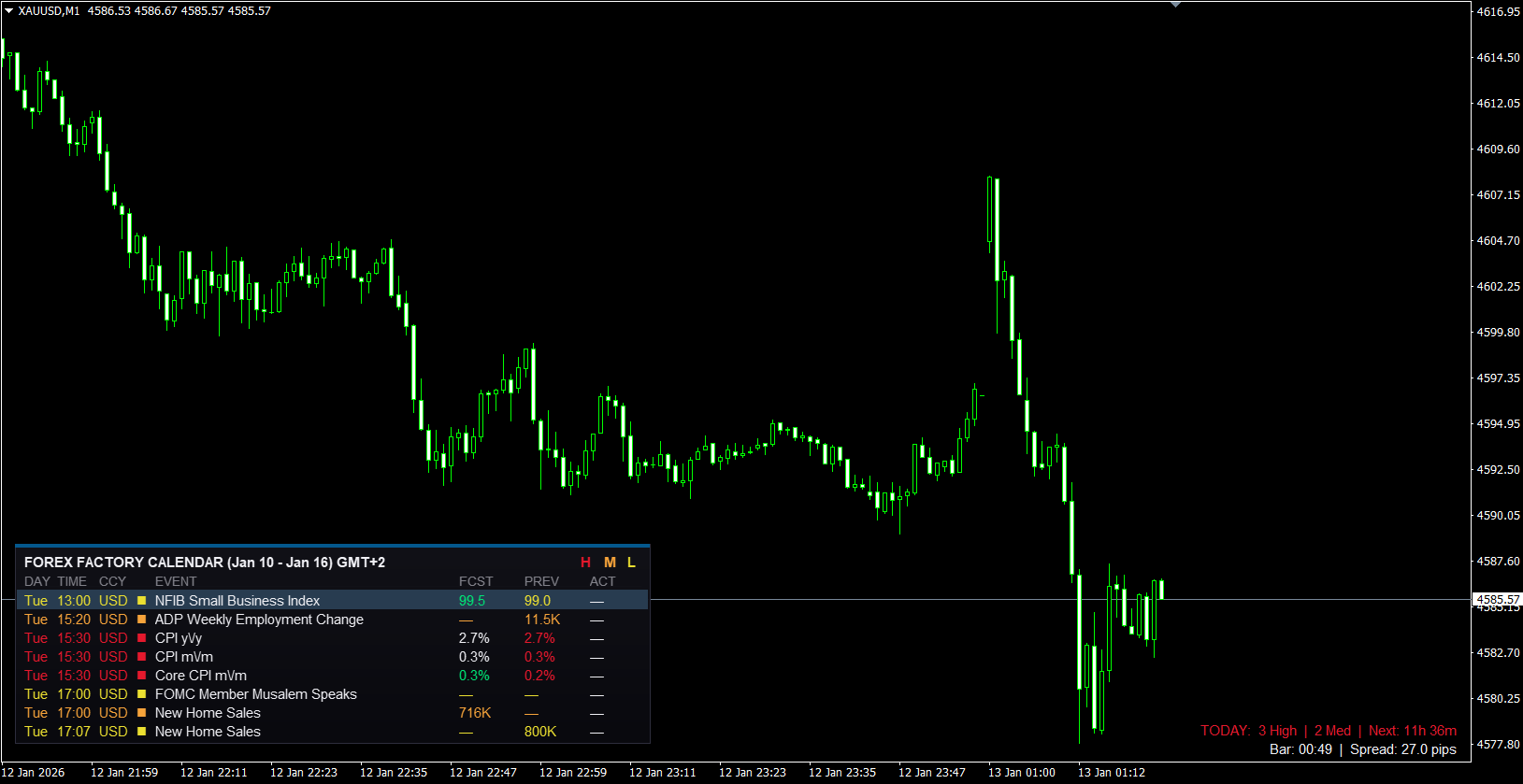
Safe. Fast. No DLLs Required.
The first MQL4 Calendar to use Native WebRequest via a smart Data Feeder.
🚀 The Solution (Native WebRequest)
Standard MQL4 indicators cannot download data from the web safely. Most calendars force you to enable dangerous "DLL Imports". We fixed this!
FFC 2.0 uses a 2-File Native Solution:
- File 1 (Expert): A silent background utility that fetches data using secure WebRequest.
- File 2 (Indicator): The beautiful Canvas panel you see on your chart.
⚠️ PART 1 MISSING? DOWNLOAD THE FEEDER EA
This Indicator requires the Data Feeder EA to work. It is published separately:
Download FFC Data Feeder (Required)📚 Installation Guide (Step-by-Step)
Step 1: Install the Files
Click File -> Open Data Folder in your terminal.
- Download the Feeder from the link above and copy to MQL4/Experts.
- Download the Indicator (below) and copy to MQL4/Indicators.
- Restart MetaTrader or Refresh the Navigator.
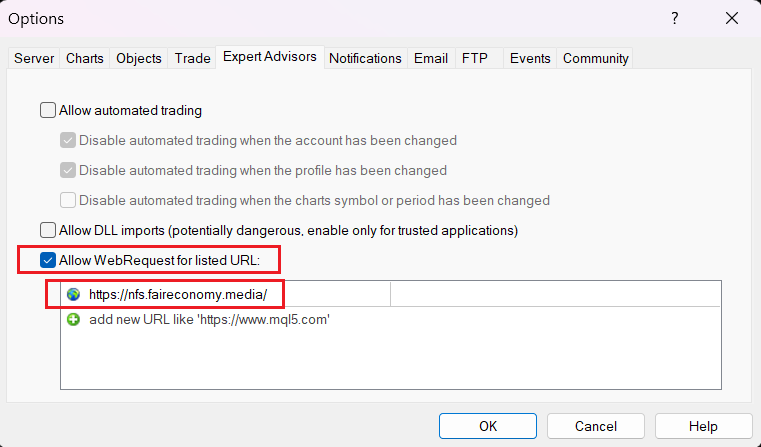
Step 2: Enable WebRequest (Crucial!)
Go to Tools -> Options -> Expert Advisors.
- Check "Allow WebRequest for listed URL".
- Add this exact URL: https://nfs.faireconomy.media/
- Note: You do NOT need to enable DLL imports!
Step 3: Run the Feeder

Open ONE empty chart (e.g., EURUSD M1) and drag the FFC_Data_Feeder Expert Advisor onto it.
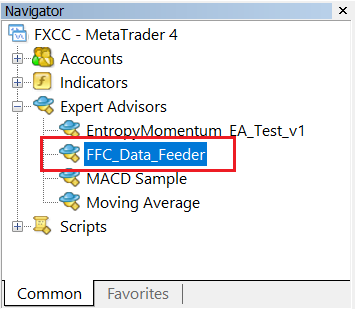
You must keep the chart running the Feeder EA open at all times. This EA acts as the "Server" that fetches news.
If you close this specific chart, news updates will stop. You can minimize the window, but do not close it.
Step 4: Add the Indicator
Now, drag the FFC_Calendar indicator onto any chart you want to trade on. Enjoy!
🛠️ Key Features
- Smooth UI: Modern Canvas rendering (No flickering, No lag).
- Interactive: Click "H", "M", "L" buttons to filter High/Medium/Low impact news instantly.
- Historical Markers: See past news events plotted on historical candles for backtesting.
- Symbol Info: Displays Spread, Bar Timer, and Daily Stats.
Free Open Source Tool. Data provided courtesy of Forex Factory.
 TickRecorder
Continuously records tick data in format "DateTime, Bid, Ask, Volume" even after restart.
 Lot Rebate Calculator
This script is used to calculate lot rebate.
LinesProfitLoss
Calculates profit (loss) of the current orders on the symbol.
PricePosition
PricePosition indicator provides the position of price in the point of angle when the price rises above (BUY) or falls below the angle section line (SELL).