Tester BO and Tester Signal Bar

Tester BO and Tester Signal Bar is a script that allows you to test your trading strategies.

The tester has two buffers with up / down signals.

An example of use can be seen in the screenshots below.

Using the indicator tester, you can achieve the maximum ratio of profitable trades for binary options. Improvement for forex is also planned. I wrote the idea at the very bottom in the “Planned work” group.

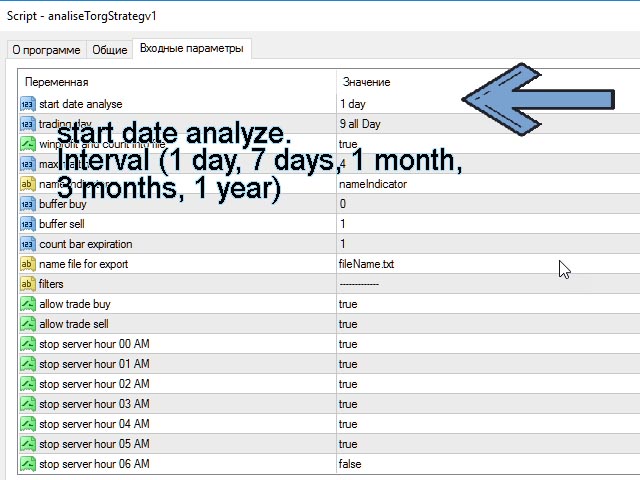
You can filter your signals by the following data:

1- start date analyze. Interval (1 day, 7 days, 1 month, 3 months, 1 year) The number of days is counted only weekdays (). But the analysis can be done on crypto assets on Saturday and Sunday. This is done on purpose in order to increase the analyzed interval. Superfluous information does not exist)

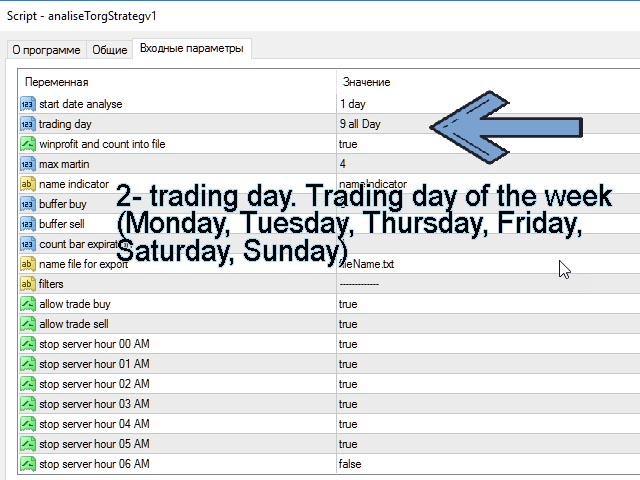
2- trading day. Trading day of the week (Monday, Tuesday, Thursday, Friday, Saturday, Sunday) You can analyze transactions only for the days you are interested in.

3- winprofit and count into file. Output the result of your strategy to a file

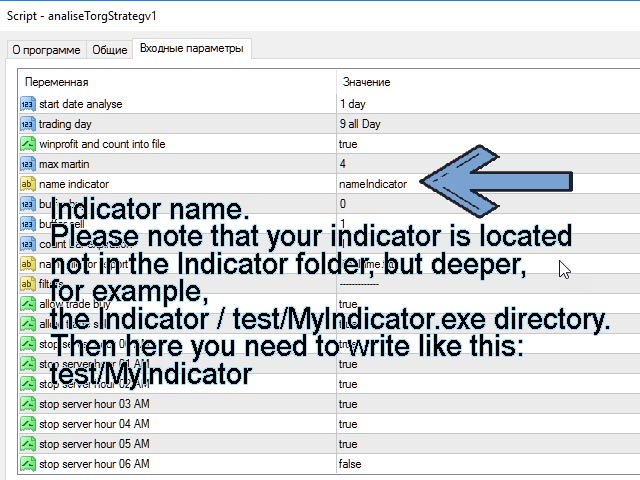
4- name indicator. Indicator name. Please note that your indicator is located not in the Indicator folder, but deeper, for example, the Indicator / test / MyIndicator.exe directory. Then here you need to write like this: test / MyIndicator

5- buffer buy. Default = 0. As a rule, the size is usually 0. If not, then you should set the one that is used in your indicator. As a rule, there can be up to 16 of them.

6- buffer sell. Default = 1. As a rule, the size is usually 1. If not, then you should set the one that is used in your indicator. As a rule, there can be up to 16 of them.

7- Expiration. Expiration time. How much time will be used in the analysis of a trading strategy. Measured by candles. Pay attention If you specified an expiration greater than 1 candle and a signal occurs on the previous candle, then the analysis will be based on the current candle. The candlestick closing price will be taken either the High or the low of the candle, depending on the type of candle. For the analysis to be more accurate, this signal does not need to be taken into analysis.

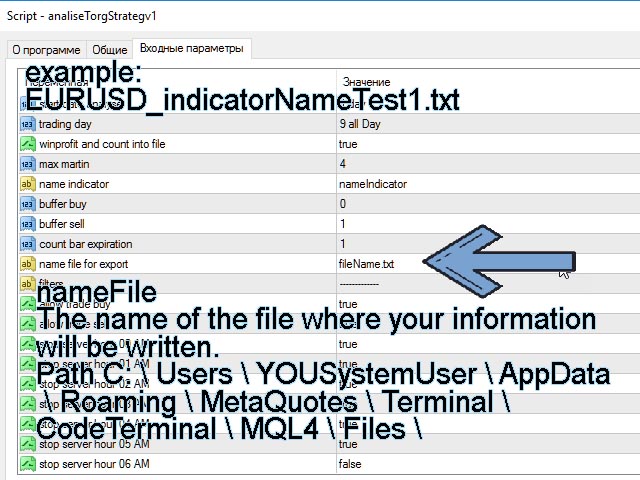
8- nameFile. The name of the file where your information will be written. Path C: \ Users \ YOUSystemUser \ AppData \ Roaming \ MetaQuotes \ Terminal \ CodeTerminal \ MQL4 \ Files \

9- allowBuy. Allow Buy only.

10- allowSell. Allow only Sell.

11- stopHour00- stopHour23. Limiting trade by the hour.

This tester will help reduce the time for analyzing your algorithm. in a short time, it will select from the millions of options for setting your indicator those that will give the maximum profitability result for binary options.

If you have questions, suggestions, write here.

Planned works:

I see the same patterns in the market that fast and long trends occur more often on candles in multiples of time: 15.30, 60 minutes.

Now I am studying the theory of probability and will make a product for Forex in one of the new versions of this product, in about 2-6 months.

While I am tormented by doubts, maybe it is not necessary to do this, because there is a strategy tester for forex in the metatrader itself. But in it, I don't know how to help people, how to automatically close deals for a specific time, without writing code. And here you don't have to write code. Closing will be in a specified time interval (number of candles).

I beg your pardon for my english.

Below the price is not given by the settings when publishing the application ...
Produits recommandés
Using hotkeys, you can create graphic objects of different drawing styles and different colors on the active chart. You can change the formatting styles for graphics. You can choose default drawing styles, or set them in the advisor properties selection window. Going to the graph, when creating graphic objects, the color, line type and line thickness are selected automatically. Drawing styles for graphical objects will depend on the current timeframe where drawing will be performed. Please watch
FREE
Naked chart MT4
Frederic Jacques Collomb
Un bouton. Un clic. Un graphique nu. MT5 version Vous avez tout dessiné. Lignes de tendance, Fibonacci, rectangles, zones, flèches... Votre graphique ressemble à une toile d'art moderne. Magnifique — mais vous ne voyez plus le prix. NAKED CHART règle ça en un clic. Un clic → tous les dessins disparaissent instantanément Re-clic → tout revient, exactement comme vous les avez laissés Les indicateurs ne sont pas touchés — seuls vos dessins sont masqués Bouton déplaçable — posez-le où vous voulez su
FREE
Using hotkeys, you can create graphic objects of different drawing styles and different colors on the active chart. You can change the formatting styles for graphics. You can choose default drawing styles, or set them in the advisor properties selection window. Going to the graph, when creating graphic objects, the color, line type and line thickness are selected automatically. Drawing styles for graphical objects will depend on the current timeframe where drawing will be performed. Please watch
FREE
SyncObjects est un outil qui vous permet de synchroniser en temps réel les objets dessinés sur plusieurs graphiques dans MetaTrader. Les objets tels que les lignes de tendance, les lignes horizontales et les étiquettes de texte peuvent être automatiquement reflétés sur d'autres graphiques. Cela permet une analyse fluide entre différents intervalles de temps et paires de devises, améliorant ainsi l'efficacité de votre environnement de trading. De plus, il fonctionne bien avec des outils de pratiq
FREE
Silver Bullet MT4
Saksham Solanki
5 (2)
Contact me for any queries or custom orders, if you want to use this in an EA. Key Features: Pattern Recognition : Identifies Fair Value Gaps (FVGs) Spots Break of Structure (BOS) points Detects Change of Character (CHoCH) patterns Versatile Application : Optimized for candlestick charts Compatible with any chart type and financial instrument Real-Time and Historical Analysis : Works seamlessly with both real-time and historical data Allows for backtesting strategies and live market analysis Vi
FREE
Hogvid Period Separator
David Richard Hinze
5 (1)
Simple and unobtrusive utility for displaying weeks, days and hours Options to control the display of separator lines and labels allow you to customize them to your own taste Display of the separator lines either only in the main chart, or across any indicator windows Automatically reduce intensity of less relevant separator lines and labels for the chart‘s current magnification
FREE
LT Watermark MT4
Thiago Duarte
5 (5)
This indicator draw a watermark on the chart, with the timeframe and symbol name. You can change everything, including add a aditional watermark. Functions: Symbol watermark: Size -  text size. Font -  text font. Color -  text color. Background text -  watermark at foreground or background mode. Horizontal correction -  x correction in pixels. Vertical correction -  y correction in pixels. Separator period X symbol -  what will separate the period from symbol. Aditional watermark: Enable custom
FREE
Deal multiplier Mt4
Mikhail Mitin
4.46 (13)
The utility opens copies of open trades. It is very convenient if you use the Signals service and want to increase the volume of transactions. Settings: Symbols: all symbols only current symbol Orders: Buy Sell Magic Any Magic Input Magic Lot size Original - lot size from original order; Fix Lot - fix lot size (input); Lot X Mult - lot size X koef; Stop Loss From sender - Stop Loss from original; Without - without Stop Loss; Plus Fix - Stop Loss from original order + fix points; Fix Point - fix
FREE
First 50 Downloads Free      AutoLineSaver for 448 Save and restore your chart workspace automatically.  |  User Manual 1. Overview AutoLineSaver automatically saves every line you draw on the chart and restores them the next time you open it. No more redrawing your analysis from scratch. Drop AutoLineSaver onto your chart once, and your workspace is always preserved. What it saves: • Horizontal lines • Trendlines • Rays (extended trendlines) • Vertical lines • Rectangles • Fibonacci retra
FREE
VR Watch list and Linker
Vladimir Pastushak
4.63 (8)
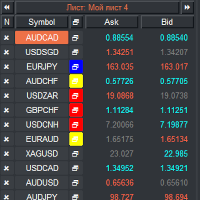
Liste de surveillance VR et Linker - application de filtrage pour le terminal MétaTrader . Facilite la recherche des instruments financiers les plus intéressants et techniques. Ce filtre est utilisé par les traders pour négocier sur des bourses telles que bybit, la Bourse de Moscou, l'American Exchange, le marché des changes et des crypto-monnaies, le marché des métaux, et est utilisé pour le trading dans des sociétés accessoires. La sélection des instruments financiers est effectuée manuellemen
FREE
The indicator shows support and resistance levels as horizontal lines. It shows the highs and lows of former days, weeks and month in every chart.  How to work with support and resistance levels show the EA  Limit Scalper and   the Universal Moving Average Expert Advisor (UniMA EA) .   When the tip of the coursor is on a line (mouseover) it shows the real value of the level and which high or low is shown, see explanation below. The indicator must be installed like an   expert advisor !  To se
FREE
GRATUIT — le canal de cassure Donchian et le stop suiveur basé sur l'ATR qui gère la position après la cassure, tracés sur un même graphique. 100% gratuit, sans limitation. S'il gagne sa place sur vos graphiques, un court avis est ce qui nous aide le plus — 30 secondes, et c'est ainsi que d'autres traders découvrent cet outil. La plupart des indicateurs de cassure montrent l'entrée et s'arrêtent là. Le plus difficile dans le suivi de tendance, c'est ce qui vient ensuite : où placer le stop, qu
FREE
Performance Tracker pour MT4 Performance Tracker est un outil d’analyse de trading et de suivi des performances de compte pour MetaTrader 4. Il aide les traders à consulter leurs performances historiques, analyser leur comportement face au risque et améliorer leurs prises de décision grâce à des rapports visuels et des statistiques détaillées. Ce produit est conçu pour les traders qui souhaitent comprendre leur activité de trading de manière claire et structurée. Fonctionnalités principales Tabl
FREE
Virtual Assistant MINI   VIRTUALL ASSISTANT = MAKE YOUR TP AND SL VIRTUAL!   Tool meant to control your stop loss and take profit by converting them to virtual SL/TP (with support for TRAILING) Convert all SL and TP to virtual so your exits on trades are hidden from your broker! Run this EA on any graph, choose 1MIN timeframe (VA is autosaving data only on new bar detected, so graph TF equals to VA autosave period) !!! When using virtual trade exits, stable connection is needed for order executi
FREE
Free automatic Fibonacci is an indicator that automatically plots a Fibonacci retracement based on the number of bars you select on the BarsToScan setting in the indicator. The Fibonacci is automatically updated in real time as new highest and lowest values appears amongst the selected bars. You can select which level values to be displayed in the indicator settings. You can also select the color of the levels thus enabling the trader to be able to attach the indicator several times with differe
FREE
Regua MT4
Edgar Lima Uggioni
Convenient tool for measuring the number of points between the prices directly on the chart. Displays in the measurement between points in percentage, points (financial) and time (bars ). Compatible with all graphical timeframes. When fixed on the chart is displayed in all timeframes. Press Ctrl, click the first point, move the mouse and will now display the measurement. Click again and fix. Very fast tool that does not occupy much space. Input Parameters Line Color Line Style Text Color Text S
FREE
ReplicatorDemo
Aleksej Shcherbak
This is a free demo version of the Replicator utility ( https://www.mql5.com/en/market/product/23028 ), which trades the minimum lot and only on EURUSD. The program is designed for copying your successful orders. The price is often fluctuates within a channel. But there is no time to place the next orders, especially if it happens at night. Place an order, when it closed with profit, the program repeats your order as a pending limit order. This will continue until the order closes with a loss, o
FREE
Swap Detector
Dustin Ricardo Pierenz
The Swap Detector is an essential MQL4 utility that displays the swap costs of any instrument when applied to a chart. It helps traders make informed decisions by visually indicating the swap value in customizable colors— green for positive (good) and red for negative (bad) by default. This tool ensures transparency in overnight holding costs, enabling better trade planning and risk management
FREE
Phone Trade Assistant
Krutik Piyushkumar Parekh
Smart Lot-Size Calculator And Trade Assistant for Mobile Trading Overview: This is the tool every trader in the market must have no matter if you are scalper, swing traders, day trader, or long term trader. This On-The-Go trading tool will help you stay disciplined and also stay free from daily trade management chores, Most traders face common problems like   1. Calculation of proper lot-size of a position to take controlled risk  2. Managing every trade and trailing stop-loss if trades goes in
FREE
OvertradeShield – EA utilitaire pour prévenir le surtrading en trading discrétionnaire Vous êtes-vous déjà retrouvé à regretter une « dernière » transaction en trading discrétionnaire ? OvertradeShield est un EA utilitaire qui limite et alerte automatiquement les entrées en fonction des profits et pertes réalisés, soutenant ainsi vos règles de trading et votre discipline mentale. Il est idéal pour ceux qui souhaitent suivre leurs résultats quotidiens, éviter le surtrading et appliquer strictemen
FREE
Auto Fibonacci Re
Teerathad Booranawisedkul
Overview Auto Fibonacci EA is a professional trading tool designed to automatically detect swing points and draw Fibonacci retracement levels on your charts. This indicator helps traders identify potential support and resistance zones based on the golden ratio principles. Key Features Automatic Swing Detection Intelligent algorithm identifies swing high and swing low points automatically Customizable swing detection sensitivity (SwingBars parameter) Works on all timeframes: M1, M5, M15, M30, H1
FREE
Auto Supply and Demand Oscillator is an indicator for MetaTrader 4 and MetaTrader 5 that detects supply and demand zones automatically and displays them as a single oscillator value at the bottom of the chart, instead of drawing rectangles directly on price. Concept Supply zones are price areas where strong selling created a sharp downward move away from a balance area. Demand zones are price areas where strong buying created a sharp upward move. Traditional implementations draw boxes on the
FREE
LT Clock MT4
Thiago Duarte
4.9 (10)
Simple indicator that draws the market hours on chart (broker, local and GMT). Functions: Horizontal distance -  from border. Vertical distance -  from border. Color -  text color. Font -  text font. Size -  text size. Corner -  which chart corner will be drawn. Show seconds -  show or hide seconds. Draw as background -  candles front or back. Label local -  text before local time. Label broker -  text before broker time. Label GMT -  text before GMT time. Object ID -  identification from object
FREE
You can check out comment #1 how does it work This is a very useful tool, enter the currency charts you need to open, use the symbol "/" to distinguish them, and select the periodicity /TF of the chart, press the button and they will open the charts for you in batches without you having to manually open them each! Because some EA use multiple currency pairs strategy, but do not support one chart to support all currency pairs, so I developed this tool, hope you like it, if you are satisfied with
FREE
Lorsque le marché est au-dessus de la MA 4H ou 1H, envisager l'achat, et lorsqu'il est en dessous, envisager la vente, réduit le risque de grosses pertes. Cela augmente le taux de réussite.  Il vous alerte au moment précis où la clôture de la bougie de 5 minutes croise la 20MA de 1 heure (H1) ou de 4 heures (H4). Cet utilitaire est conçu pour les traders qui privilégient la confirmation sur les unités de temps supérieures. Il surveille le marché en arrière-plan, vous permettant de vous concen
FREE
Larger Price Time Crosshair Data
John Louis Fernando Diamante
5 (6)
This utility indicator provides accessibility and readability, by displaying a larger price scale, time scale, crosshair, and symbol name/tf/ohlc information. All features are sizeable and can be styled separately, and are optional to show. All Features optional to use font, size and color options Price Scale option to hide the default MT4 price scale option to show horizontal lines at price levels prices drawn can be at round numbers (ie automatic rounding to multiples of 5/10/20/25 points),
FREE
Hogvid Chart Scale
David Richard Hinze
Do you want tidy and attractive charts? Let Hogvid Chart Scale help you! Chart Scale automatically scales the height of the chart to a configurable percentage of the total window height. This creates space at the top and bottom of the window for additional visual elements and increases clarity without having to manually adjust the vertical scaling which can be annoying, especially if you change the chart symbol frequently. The function can be activated and deactivated at any time with a simple
FREE
Pivot Point Fibo RSJ est un indicateur qui trace les lignes de support et de résistance de la journée en utilisant les taux de Fibonacci. Cet indicateur spectaculaire crée jusqu'à 7 niveaux de support et de résistance via Pivot Point en utilisant les taux de Fibonacci. C'est fantastique de voir comment les prix respectent chaque niveau de ce support et de cette résistance, où il est possible de percevoir les points d'entrée/sortie possibles d'une opération. Caractéristiques Jusqu'à 7 niveaux
FREE
Logique de travail L'utilitaire Stop Out est un indicateur simple mais très pratique indiquant combien de points il reste au niveau Stop Out / Son avantage réside dans le fait que de nombreux traders surestiment délibérément le risque dans le trading à la recherche de profit, utilisent la marge disponible au maximum, et dans ce cas, il est très important de savoir où le courtier peut fermer de force vos positions. Placez simplement l'indicateur sur le graphique et, en fonction de la position
FREE
Objects Show
Sergio D. Rocha
This is a script that is made to work in conjunction with the Objects Hide script Re-draw again the objects removed in the chart by the Objects Hide script Just drag and drop over the desired chart when you want to recall the objects deleted by Objects Hide Using this scripts system you can have the option to hide (remove) all graphical objects in the chart and recover them again later. Objects Hide is purchasable here in mql5.com find out more about this on this link. Please watch the demo tuto
FREE
Les acheteurs de ce produit ont également acheté
Bienvenue sur Trade Manager EA, l’outil ultime de gestion des risques conçu pour rendre le trading plus intuitif, précis et efficace. Ce n’est pas seulement un outil d’exécution d’ordres ; c’est une solution complète pour la planification des trades, la gestion des positions et le contrôle des risques. Que vous soyez débutant, trader expérimenté ou scalpeur ayant besoin d’une exécution rapide, Trade Manager EA s’adapte à vos besoins, offrant une flexibilité sur tous les marchés, des devises et i
Local Trade Copier EA MT4
Juvenille Emperor Limited
4.96 (110)
Découvrez une expérience exceptionnellement rapide de copie de trades avec le Local Trade Copier EA MT4 . Avec sa configuration facile en 1 minute, ce copieur de trades vous permet de copier des trades entre plusieurs terminaux MetaTrader sur le même ordinateur Windows ou Windows VPS avec des vitesses de copie ultra-rapides de moins de 0.5 seconde. Que vous soyez un trader débutant ou professionnel, le Local Trade Copier EA MT4 offre une large gamme d'options pour le personnaliser en fonction d
Unlimited Trade Copier Pro is a tool to copy trade remotely to multiple MT4, MT5 and cTrader accounts at different computers/locations over internet. This is an ideal solution for you if you are a signal provider and want to copy your trades to other receivers globally on your own rules. One provider can copy trades to multiple receivers and one receiver can get trade from multiple providers as well. The provider can even set the subscription expiry for each receiver, so that receiver will not b
Exp COPYLOT CLIENT for MT4
Vladislav Andruschenko
4.69 (65)
Copieur de trades professionnel pour MetaTrader 4 Un copieur de trades rapide, fiable et professionnel pour MetaTrader 4 . COPYLOT permet de copier des opérations Forex entre les terminaux MetaTrader 4 et MetaTrader 5 , avec une synchronisation flexible adaptée à différents types de comptes et styles de trading. La version COPYLOT MT4 prend en charge : MetaTrader 4 → MetaTrader 4 MetaTrader 5 Hedge → MetaTrader 4 MetaTrader 5 Netting → MetaTrader 4   Version MT5 Description complète + DEMO + PDF
Négociez automatiquement les zones de support et de résistance ou d'offre et de demande une fois que vous avez identifié les zones clés à partir desquelles vous souhaitez négocier. Cet EA vous permet de dessiner des zones d'achat et de vente en un seul clic, puis de les placer exactement là où vous vous attendez à ce que le prix change. L'EA surveille ensuite ces zones et effectuera automatiquement des transactions en fonction de l'action des prix que vous spécifiez pour les zones. Une fois la
Trade copier MT4
Alfiya Fazylova
4.58 (33)
Trade Copier est un utilitaire professionnel conçu pour copier et synchroniser les commandesentre les comptes de trading. Les commandes sont copiées du compte/terminal du fournisseur vers le compte/terminal du destinataire, qui sont installés sur le même ordinateur ou vps. PROMOTION - Si vous avez déjà acquis le "Trade copier MT4", vous pouvez obtenir le "Trade copier MT5" gratuitement (pour la copie MT4 > MT5 et MT4 < MT5). Pour obtenir des informations plus détaillées sur les conditions, veuil
Trade Assistant MT4
Evgeniy Kravchenko
4.43 (197)
It helps to calculate the risk per trade, the easy installation of a new order, order management with partial closing functions, trailing stop of 7 types and other useful functions. Additional materials and instructions Installation instructions   -   Application instructions   -   Trial version of the application for a demo account Line function -   shows on the chart the Opening line, Stop Loss, Take Profit. With this function it is easy to set a new order and see its additional characteris
Télécharger la version d'essai fonctionnelle Copy Cat More (Chat Copieur) — Copieur de Trades (Trade Copier) MT4 n'est pas un simple copieur de trades local ; c'est un cadre complet de gestion du risque et d'exécution (risk management and execution framework) conçu pour les défis du trading d'aujourd'hui. Des challenges de prop firm à la gestion de portefeuille personnel, il s'adapte à chaque situation grâce à sa combinaison d' exécution robuste, de protection du capital, de configuration fle
News Filter EA MT4
Rashed Samir
5 (10)
News Filter EA: Advanced Algo Trading Assistant News Filter EA is an advanced algo trading assistant designed to enhance your trading experience. By using the   News Filter EA , you can integrate a Forex economic news filter into your existing expert advisor, even if you do not have access to its source code. In addition to the news filter, you can also specify   trading days   and   hours   for your expert. The News Filter EA also includes   risk management   and   equity protection   features
Trade Copier Professional — Solution de Copie Locale   Trade Copier Professional est un système fiable de copie locale des transactions pour MetaTrader 4/5. Il permet aux traders de répliquer instantanément des positions sur plusieurs comptes d’un même ordinateur, avec des contrôles de sécurité intégrés et un tableau de bord professionnel.   Aperçu   L’EA fonctionne en modes Master et Slave à partir d’un seul fichier, avec bascule fluide. Les transactions peuvent être copiées entre terminaux MT
Equity Protect Pro : Votre expert en protection de compte complet pour un trading en toute sérénité Si vous recherchez des fonctionnalités telles que la protection de compte, la protection des capitaux propres, la protection de portefeuille, la protection multi-stratégies, la protection des bénéfices, la prise de bénéfices, la sécurité de trading, les programmes de contrôle des risques, le contrôle automatique des risques, la liquidation automatique, la liquidation conditionnelle, la liquidatio
Support and Resistance Dashboard for MT4 is a multi-timeframe and multi-symbol scanner and alert system that finds S/R zones and pivot points for all timeframes and symbols and alerts when price has interaction with them. If you are using support and resistance (or supply and demand) zones in your trading strategy, this dashboard and its alert and filtering system is a big time saver for you. Download demo version   (works on M 1,M5,M30,W1   timeframes) Full description of scanner parameters ->
Trade Reverse Copie4
Chukwuemeka Kingsley Anyanwu
Feel free to contact me for any extra features :) [SEE MT5 VERSION  https://www.mql5.com/en/market/product/128846 The Local Reverse Copier is an Expert Advisor designed to synchronize positions between a Master account and a Slave account with a twist: it reverses the trades. When a buy position is opened on the Master account, the EA opens a sell position on the Slave account, and vice versa. This allows for a unique form of trade copying where positions are mirrored in opposite directions bet
VirtualTradePad mt4 Extra
Vladislav Andruschenko
4.85 (61)
Panneau de trading pour trader en 1 clic.   Travailler avec des positions et des commandes!   Trading à partir du graphique ou du clavier. En utilisant notre panel de trading, vous pouvez trader en un clic à partir du graphique et effectuer des opérations de trading 30 fois plus rapidement que le contrôle MetaTrader standard. Des calculs automatiques de paramètres et de fonctions qui facilitent la vie d'un trader et aident un trader à mener ses activités de trading beaucoup plus rapidement et pl
CloseIfProfitorLoss with Trailing
Vladislav Andruschenko
4.87 (31)
Close If Profit or Loss with Trailing pour MetaTrader 4 — fermeture automatique par profit total ou perte totale Un utilitaire pratique pour MetaTrader 4 qui ferme automatiquement les positions lorsque le profit total ou la perte totale atteint le niveau que vous avez défini. L’Expert Advisor surveille les opérations ouvertes, calcule le résultat flottant, peut utiliser Trailing Profit et aide à gérer les positions plus rapidement qu’une réaction manuelle. MetaTrader 4 reste très utilisé par le
VirtualTradePad PRO SE MT4 — panneau de trading avancé et espace graphique pour MetaTrader 4 VirtualTradePad PRO SE est un panneau de trading professionnel et un espace de gestion des trades pour MetaTrader 4 . Il aide les traders à ouvrir, gérer, protéger, fermer et analyser leurs trades plus rapidement depuis une seule interface basée sur le graphique. Le produit a été créé pour les traders manuels actifs qui ont besoin de plus qu’un simple ensemble de boutons. PRO SE combine l’exécution en un
Exp Averager
Vladislav Andruschenko
4.82 (22)
Averager pour MetaTrader 4 — système professionnel de récupération de positions et de gestion de paniers d’ordres Un Expert Advisor conçu pour les traders qui veulent gérer intelligemment des positions en drawdown, améliorer leur prix moyen d’entrée et piloter toute une série d’ordres comme une seule structure cohérente. Averager ne se limite pas à ouvrir des ordres supplémentaires. Il aide à reconstruire un panier de positions avec une logique claire de récupération, de protection et de sortie
Niveaux GEX en temps réel à partir des données d'options CBOE. ES, NQ, RTY, Gold. Mise à jour toutes les 2 minutes. Full description: GammaOrderBook — EA tout-en-un qui télécharge et affiche les données GEX en direct sur le graphique. Aucun indicateur séparé nécessaire. Ce qui s'affiche • GEX Bars — Niveaux gamma Call/Put en barres horizontales, séparés par source ETF/Index • Zero Gamma Line — Niveau critique de changement de direction de couverture • Panorama V4 — Positionnement gamma multi
Strategy Builder offers an incredible amount of functionality. It combines a trade panel with configurable automation (covert indicators into an EA), real-time statistics (profit & draw down) plus automatic optimization of SL, TP/exit, trading hours, indicator inputs. Multiple indicators can be combined into an single alert/trade signal and can include custom indicators, even if just have ex4 file or purchased from Market. The system is easily configured via a CONFIG button and associated pop-up
Trendline EA
Carlos Oliveira
4.5 (10)
Trendline EA MT4 Trendline EA MT4 est un Expert Advisor semi-automatisé pour MetaTrader 4 conçu pour exécuter des actions de trading ou envoyer des alertes basées sur des lignes de tendance tracées par l’utilisateur. MetaTrader 4 ne fournit pas nativement de fonctionnalité permettant de placer ou gérer des transactions directement à partir des lignes de tendance. Cet Expert Advisor étend le comportement standard de la plateforme en surveillant les lignes de tendance définies par l’utilisateur et
Le Gestionnaire de ratio risque/rendement est un outil visuel de gestion des ordres et de calcul de la taille des positions, conçu pour favoriser un trading rigoureux et une gestion professionnelle des risques. Il permet aux traders de définir visuellement les niveaux d'entrée, de stop-loss et de take-profit directement sur le graphique, tout en calculant automatiquement la taille du lot et le ratio risque/rendement avant l'envoi d'un ordre. Cet outil permet de standardiser la préparation des tr
PZ Trade Pad Pro MT4
PZ TRADING SLU
3.67 (3)
Effortlessly calculate lot sizes and manage trades to save time and avoid costly errors The Trade Pad Pro EA is a tool for the Metatrader Platform that aims to help traders manage their trades more efficiently and effectively. It has a user-friendly visual interface that allows users to easily place and manage an unlimited number of trades, helping to avoid human errors and enhance their trading activity. [ Installation Guide | Update Guide | Troubleshooting | FAQ | All Products ] One of the k
Le MT4 to Telegram Signal Provider est un outil facile à utiliser et entièrement personnalisable qui permet d'envoyer des signaux à Telegram, transformant ainsi votre compte en fournisseur de signaux. Le format des messages est entièrement personnalisable ! Cependant, pour une utilisation simple, vous pouvez également opter pour un modèle prédéfini et activer ou désactiver des parties spécifiques du message. [ Démonstration ]   [ Manuel ] [ Version MT5 ] [ Version Discord ] [ Canal Telegram ]  N
The product will copy all telegram signal to MT4   ( which you are member  ) , also it can work as remote copier.  Easy to set up, copy order instant, can work with almost signal formats, image signal, s upport to translate other language to English Work with all type of channel or group, even channel have "Restrict Saving Content", work with  multi channel, multi MT5 Work as remote copier: with signal have ticket number, it will copy exactly via ticket number. Support to backtest signal. How to
Un panneau professionnel pour le trading manuel qui réunit tout le cycle d'une opération dans une seule fenêtre sur le graphique, de l'entrée précise à la protection du compte. Calibrez chaque position au plus près du risque que vous fixez, dessinez votre trade avec des lignes directement sur le graphique grâce au RR Tool, et passez des ordres au marché et en attente, des grilles et de l'OCO. Le panneau prend en charge le suivi de la position : clôture partielle jusqu'à cinq niveaux, six types d
MT4 MT5 Trade Bridge for MetaTrader 4 is the MetaTrader 4 component of the MT4 MT5 Trade Bridge system. It allows a MetaTrader 4 terminal to work either as a Master or as a Slave in a local bridge connection with MetaTrader 5. When configured as Master , the MT4 component reads trading activity from the MetaTrader 4 terminal and writes structured trade data into a local bridge file. The connected MT5 component can then read this data and mirror the trading activity according to its selected set
Telegram to MT4 Multi-Channel Copier copie automatiquement les signaux de trading de vos canaux Telegram directement vers MetaTrader 4. Pas de bots, pas d'extensions de navigateur, pas de copie manuelle. Vous recevez un signal sur Telegram et l'EA ouvre l'opération sur votre terminal en quelques secondes. Le produit comprend deux composants : une application Windows qui écoute vos canaux Telegram, et cet Expert Advisor qui exécute les signaux sur votre terminal MT4. Une version MT5 est également
Kali FX Trade Manager
Calvin Andile Mahlangu
Kalifx Trade Manager is a smart on-chart trading and risk-management panel for MetaTrader 4. It replaces manual order tickets and spreadsheet risk math with a compact, draggable panel that lets you place, size, and manage trades directly from the chart — including automatic breakeven, trailing stops, and a 3-level partial close (multi-TP) system with draggable on-chart lines. Built for discretionary traders who want the speed of a one-click panel with the discipline of automated risk rules runn
TradePanel MT4
Alfiya Fazylova
4.84 (95)
Trade Panel est un assistant commercial multifonction. L'application contient plus de 50 fonctions de trading pour le trading manuel et permet d'automatiser la plupart des tâches commerciales. Avant l'achat, vous pouvez tester la version de démonstration sur un compte de démonstration. Télécharger la version d'essai de l'application pour un compte de démonstration : https://www.mql5.com/fr/blogs/post/762644 . Instructions complètes ici . Commerce. Permet d'effectuer des opérations commerciales e
Verrouillage automatique des bénéfices lors de l'atteinte du bénéfice cible EquityTargetCloser   — est un conseiller expert utilitaire pour MetaTrader 5 qui ferme automatiquement toutes les positions de marché et supprime les ordres en attente dès que   les capitaux propres (Equity) dépassent le solde actuel du montant de bénéfice spécifié . Après la fermeture de toutes les positions, l'objectif est automatiquement relevé : le nouveau seuil = nouveau solde + bénéfice spécifié. L'EA n'ouvre pas d
Plus de l'auteur
Using hotkeys, you can create graphic objects of different drawing styles and different colors on the active chart. You can change the formatting styles for graphics. You can choose default drawing styles, or set them in the advisor properties selection window. Going to the graph, when creating graphic objects, the color, line type and line thickness are selected automatically. Drawing styles for graphical objects will depend on the current timeframe where drawing will be performed. Please watch
FREE
Using hotkeys, you can create graphic objects of different drawing styles and different colors on the active chart. You can change the formatting styles for graphics. You can choose default drawing styles, or set them in the advisor properties selection window. Going to the graph, when creating graphic objects, the color, line type and line thickness are selected automatically. Drawing styles for graphical objects will depend on the current timeframe where drawing will be performed. Please watch
FREE
Filtrer:
Aucun avis
Répondre à l'avis