Trailing by SAR

Tracking positions using trailing on the Parabolic SAR indicator.

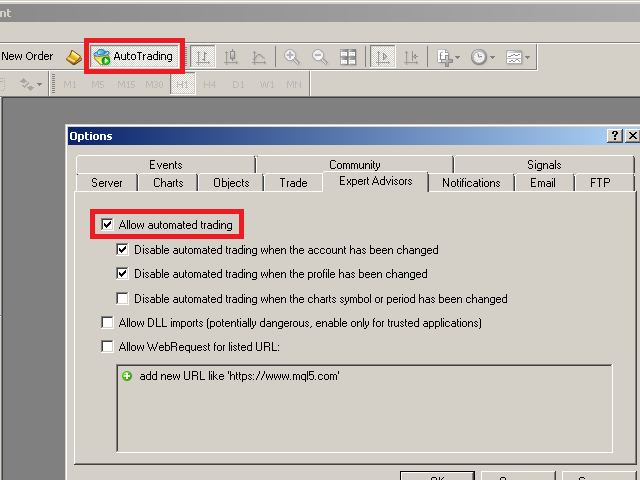
It is necessary to allow automated trading in the terminal settings.

In testing mode, the utility opens Buy or Sell positions on the first ticks, which allows you to visually observe the given logic, changing the utility parameters. In real mode, the utility does not open positions.

Discuss the complexities of Forex trading here: chat "Age of Expert Advisors".

Parameters

  • Select_Magic - selection of magic numbers. Positions with selected magic numbers will be accompanied by.
  • Select_Symbol - selection of symbols. Positions with selected symbols will be accompanied by.
  • TimeFrame_for_SAR - Timeframe for SAR indicator.
  • Step_SAR - price increment step (acceleration factor) for SAR indicator.
  • Maximum_SAR - maximum value of step for SAR indicator.
  • SAR_at_Profit - use trailing by SAR only in profitable zone.
  • open Buy for Tester - open the position of Buy in a Strategy Tester.
  • open Sell for Tester - open the position of Sell in a Strategy Tester.

Version for MT5: https://www.mql5.com/en/market/product/45398

Pay attention to the useful information in my profile: https://www.mql5.com/en/users/test-standart


Produits recommandés
Expert candle finder for forex in MetaTrader 4 Expert candle finder is one of the practical trader assistant experts that is used in the forex financial market, this expert accurately identifies the candlestick patterns on the price chart as a signal, all the found candles. informs you. This expert is run on your Meta trader platform and in a very precise way, it examines all the currency pairs that are in your watch list and every currency pair that had a professional and good candlestick patt
"Auto FIBO Pro" Crypto_Forex indicator - est un excellent outil auxiliaire dans le trading ! - L'indicateur calcule et place automatiquement sur le graphique les niveaux de Fibo et les lignes de tendance locales (couleur rouge). - Les niveaux de Fibonacci indiquent les zones clés où le prix peut s'inverser. - Les niveaux les plus importants sont 23,6 %, 38,2 %, 50 % et 61,8 %. - Vous pouvez l'utiliser pour le scalping inversé ou pour le trading en grille de zones. - Il existe également de nomb
C'est un panneau commun qui expose un réseau d'ordres d'achat et de vente. Ferme cet ordre de conseiller sur le bénéfice défini dans les paramètres. Ensuite, il y a un paramètre et appelé Ladder qui comprend que la distance entre les ordres commencent à augmenter par les points spécifiés par le paramètre ladder (ici, dans les paramètres de base est de 10 points) signifie le deuxième ordre de 10 points, le troisième ordre de 20 points, le quatrième ordre de 40 points, etc. Ensuite, ce qui est i
Auto Breakeven MT4
Volodymyr Hrybachov
A utility for automatically setting breakeven levels, transfers trades to breakeven   when passing a given distance   . Allows you to minimize risks. Created by a professional trader for traders.       Utility       works with any market orders opened manually by a trader or using advisors. Can filter trades by magic number. The utility can work with any number of orders simultaneously. MT5 version https://www.mql5.com/ru/market/product/57077 WHAT THE UTILITY CAN DO: install virtulnoe levels   b
По факту вы выставляете виртуальные Buy Stop и Sell Stop которые срабатывают после закрытия свечи. Данный помощник позволяет заранее выставить уровень Stop Loss и Take Profit. Так-же имеется демо режим для предварительного расчёта параметра риск/прибыль. Помощник имеет следующие настройки "Лот" по умолчанию "0.01" "Проскальзывание" по умолчанию "60"        (Значение в пунктах) "Номер Ордера" по умолчанию "0"               (Магический номер ордера) "Цвет Комментариев" по умолчанию "Black"  "Шрифт
Beta version of a semi-automatic utility for trading grid strategy. When using, please give feedback on the shortcomings / suggestions. Good luck to us! Parameters: Lot exponent - multiplication of the lot on the next order. Grid pips   - grid size. Take profit pip - distance of the take profit line. Magic number - the magic number of the adviser's work. Trading menu - presence/absence of a trading menu. Menu size - the size of the menu (choose the value for your resolution). Menu font size -
News Scalping Executor Pro is an utility which helps to trade high impact and huge volatility   news . This utility helps to create two opposite orders with risk management and profit protection. It moves automatically stop loss level to avoid losses as much as possible by using many different algorithms. It helps to avoid trading the news if spread suddenly becomes very huge. It can lock profit by moving stop loss or partially closing of orders. To be profitable with this type of trading you
The purpose   of this utility is to manage one or more subwindow in the same chart by opening and closing them through a button or the keyboard keys How it works: If you want to handle more than one subwindow you need to reinstall the indicator . In this case some setups has to be customized onlu in the last subwindow installed and others setups in the installed subwindow during the first time installation. They are denoted in the input rispectively as ' LW ' and ' IW '. First of all install
Three 3TP Easy Trade Pad Expert for MT4 – Download The 3TP Easy Trade Pad Expert is an advanced tool designed for capital management, risk control, and streamlined trading within the MetaTrader 4 (MT4) platform. With its functional and specialized interface, this expert advisor allows traders to effortlessly set and manage Stop Loss (SL) and Take Profit (TP) levels. In addition to simplifying trade execution, the tool provides features for defining acceptable risk, expected profit (R/R), and adv
P Y R A M I D   E X P E R T    This Forex utility is a complex exit strategy and order management tool that executes four trading methods; scalping, pyramid style, hedging, and scaling method to close trades with a profit.           V E R Y  I M P O R T A N T     This is not a stand alone expert advisor. Use it with your own volatility-based strategy. Once you found the currency pair to trade, you can just attach this tool to the chart of the chosen pair and it will do the
Program for automatic placement of stop loss and take profit orders. Values are calculated as points distance from open price. BreakEven option is also included. all options could be applied to BUY, SELL separately or together. Enter values ​​in points in the fields on the right side of the menu and press dedicated button to aplly your settings. If in doubt, The instruction is displayed in the tooltip.
FREE
Автопостроение трендовых линий. Отрисовка множества линий, потенциальных границ роста\падения цен (серый цвет линий) Выявление и отрисовка канала цен (зеленый цвет линий) Выявление потенциальных треугольников ТА (красный и синий цвет линий) Рекомендуется использовать белый фон графика, период графика - М30. Настройки Interval=200 - максимальное количество баров, используемых в анализе для построения линий. The_greatest_distance=5 000 - регулирует максимальное удаление от текущего бара уровня цен
HotKeys MT4
Alexey Valeev
3 (1)
This utility provides the ability to use hot keys in manual trading instantly responding to the current market situation. You can assign hot keys to open/close positions by their type, close all positions on the current chart and remove all orders on the current chart. You can also assign hot keys for five predefined trade volumes and switch between them if necessary with no need to change the volume manually from time to time. It is also possible to set the auto calculation of a trade volume in
Trade Assistant Pro 36 in 1
Makarii Gubaydullin
4.76 (21)
Outil Multifonction : Calculatrice de Lots, Ordres Grid, Ratio R/R, Gestionnaire de Trades, Zones d'Offre et de Demande, Price Action et bien plus Version Démo   |   Manuel d'utilisation L'Assistant de Trading ne fonctionne pas dans le testeur de stratégies : vous pouvez télécharger la Version Démo ICI pour tester l' utilitaire . Contactez-moi pour toute question / idées d'amélioration / en cas de bug trouvé Si vous avez besoin d'une version MT5, elle est disponible ici Simplifiez, accélérez et
The Profit Loss Control Panel is a tool designed to control loss and profit in trading. It allows to close deals if profit and/or loss of positions opened on the account reaches a certain limit. Limit types Percentage of balance Number of points Deposit currency Thus covering the most popular list of reasons to close the deal. The panel allows to combine limits of various types, for example, limit loss as a percentage of the deposit and limit profit in deposit currency. Limits as a percentage o
EA Hedger
Sergej Chukhista
4 (4)
EA Hedger   est un utilitaire de trading professionnel avec de nombreux paramètres qui vous permet de gérer les risques en utilisant la couverture. La couverture est une technique de trading qui consiste à ouvrir des positions opposées à celles déjà ouvertes. A l'aide d'une couverture, la position peut être totalement ou partiellement bloquée (verrouillée). Pourquoi est-il rentable d'acheter ce produit : Fiabilité   - le conseiller est soigneusement vérifié et testé Utilité   - l'Expert Advisor
Trendline EA
Carlos Oliveira
4.5 (10)
The FXTT Trendline EA for MT4 is a trading robot designed to automate trades based on trendlines drawn on your charts. This EA improves MetaTrader's standard capabilities by allowing you to set pending orders directly from your trendlines, enhancing your trading strategy with precision and automation. Key Features: Automated Trading: Automates trades based on trendlines you draw, enhancing precision and reducing manual effort. Customizable Actions and Alerts: Assign specific Buy/Sell actions to
一键平仓小工具,可以针对买单、卖单和挂单进行批量操作,可以操作当前图表订单和所有订单,简单高效。 第一行第一个按钮是关闭当前图表 品种 所有买单,第二个按钮是关闭当前图表品种的所有卖单,第三个按钮是关闭当前图表 品种 的所有订单; 第二行 第一个按钮是删除当前图表 品种 所有买单挂单,第二个按钮是 删除 当前图表品种的所有卖单 挂单 ,第三个按钮是 删除 当前图表 品种 的所有 挂单 ; 第三行第一个按钮是关闭所有 品种的全部买单,第二个按钮是关闭所有 品种的全 卖单,第三个按钮是关闭所有 品种的全部订单; 第四行第一个按钮是删除所有 品种全部买单挂单 ,第二个按钮是 删除 全部品种 的全部卖单挂单 ,第三个按钮是删除 全部品种 的全部挂单 。 希望此程序能对您有用
FREE
Risk Commander
Adisorn Soodkanueng
Product Name: Risk Commander: Trade Assistant & Strategy Simulator Risk Commander is more than just a trade panel—it is a complete Manual Trading Ecosystem . It serves two powerful purposes: Live Assistant: Helps you execute trades with speed, precision, and perfect risk management in real-time markets. Training Simulator: Fully compatible with the Strategy Tester (Visual Mode) , allowing you to practice manual trading on historical data without risking a cent. NEW! Built-in Simulator Mode S
One Click Trader is a tool designed for MetaTrader 4 platform, which enables you to take your trading to the next level. It enables you to open, manage and close your trades in simple an efficient way by just one click of your mouse button. Up arrow minimizes the OCT panel Down arrow maximizes the OCT panel Right arrow displays the next panel with additional features Left arrow hides the panel with additional features Red SELL button enables you to open short market orders Red SELL STOP button e
BreakEven Grid Utility for MT4 BreakEven Grid is a powerful utility for manual trade management on the MetaTrader 4 platform. It provides a convenient on-screen panel with buttons to help you manage your open positions with a single click.  Features: Set BE+Profit: Automatically sets Take Profit to breakeven + desired profit in pips or money. Close BUY/SELL: Instantly close all Buy or Sell orders for the current symbol. Close +$/-$/Old/New: Close only profitable, losing, oldest or newest tra
Order Blocks Breaker
Suvashish Halder
5 (1)
Introducing Order Blocks Breaker , a brand-new way to identify and leverage order blocks in your trading strategy. After developing multiple order block tools with unique concepts, I’m proud to present this tool that takes things to the next level. Unlike previous tools, Order Blocks Breaker not only identifies order blocks but also highlights Breaker Order Blocks —key areas where the price is likely to retest after a breakout. MT5 -  https://www.mql5.com/en/market/product/124102/ This tool inco
"Adjustable Fractals" - est une version avancée de l'indicateur fractal, un outil de trading très utile ! - Comme nous le savons, l'indicateur fractal standard mt4 n'a aucun paramètre - c'est très gênant pour les traders. - Les fractales ajustables ont résolu ce problème - il dispose de tous les paramètres nécessaires : - Période réglable de l'indicateur (valeurs recommandées - supérieures à 7). - Distance réglable par rapport aux hauts/bas du prix. - Conception réglable des flèches fractales.
Lot by Risk
Sergey Vasilev
4.83 (23)
La barre de trading Lot by Risk est conçue pour le trading manuel. C'est un moyen alternatif d'envoyer des ordres. La première caractéristique du panneau est l'affichage pratique des ordres à l'aide de lignes de contrôle. La deuxième caractéristique est le calcul du volume de la transaction à un risque donné en présence d'une ligne stop loss. Les lignes de contrôle sont affichées à l'aide de raccourcis clavier: take profit-touche T Par défaut; price-touche P par Défaut; stop loss – touche s p
FREE
To achieve mutual support between MT4 and MT5, and to purchase the MT5 version, please click here>> Main follow-up function: 1. Reverse order capability 2. Cross platform follow-up, ignoring different names 3. Proportional order, magnification and reduction order 4. Compared to a specified currency pair, not compared to a specified currency pair 5. Can be ordered one to many, many to one, any order 6. Other unclear messages 6. Other unclear messages.
Expert Advisor for MT4 Useful utility MUST have for all traders.  With 1 click button, you're able to close all your open positions. Its come with a warning pop up notification when you click to close all your trades, to avoid an accident press the button. Just press 'Yes' to confirm or 'No' to cancel it. The expert will close all your open positions no matter what pairs you currently open or directions. Just attach the expert on 1 of your chart, and you're good to go.
This utility allows you to easily close profit or loss positions. You can close profit or loss positions by clicking each buttons. If profit or loss positions reaches or exceed value specified as pips, they would be closed. This panel would be placed left bottom corner of the chart. If the users want to change the placement and functions contact me. Important :  -Check allow live trading. -Enable Auto Trade trading.
This script is designed to automatically open charts for all available forex pairs on the MetaTrader 4 platform, as well as the gold (XAUUSD) chart. The script iterates through all symbols available on the platform, determines which of them are forex pairs, and opens their charts on the M1 (one minute) timeframe. Key Features: Gold Chart Opening: The script automatically opens the XAUUSD (gold/dollar) chart if this symbol is available from your broker. If the gold symbol is not found, an error m
SL InfoPanel
Sergei Lopukhov
SL InfoPanel is an information panel that displays operational trading information on the current instrument. The panel contains the following information: The first column: The fixed profit for the specified period of time and the percentage of this profit to the current deposit (the time period is configured in the "Account History"). The value is colored blue if there is a profit and red if there is a loss. Open Long orders (number of lots/number of orders). Open Short orders (number of l
ASTA Trade Manager is a semi-automated trading tool designed to assist professional traders in Exit Strategy Management . This EA will not open trading positions automatically. This version is made to manage manual transactions on 1 chart (pair) only. For the Multipair version, you can check the product at:  ASTA Multipair Trade Manager . FEATURES: 1. Entry and Exit Panel Order Panel: Buy, Sell and Pending Orders Exit Button: Close All Order, Close All Buy, Close All Sell Can be used on strategy
Les acheteurs de ce produit ont également acheté
Local Trade Copier EA MT4
Juvenille Emperor Limited
4.96 (105)
Découvrez une expérience exceptionnellement rapide de copie de trades avec le Local Trade Copier EA MT4 . Avec sa configuration facile en 1 minute, ce copieur de trades vous permet de copier des trades entre plusieurs terminaux MetaTrader sur le même ordinateur Windows ou Windows VPS avec des vitesses de copie ultra-rapides de moins de 0.5 seconde. Que vous soyez un trader débutant ou professionnel, le Local Trade Copier EA MT4 offre une large gamme d'options pour le personnaliser en fonction d
Trade Assistant MT4
Evgeniy Kravchenko
4.42 (192)
It helps to calculate the risk per trade, the easy installation of a new order, order management with partial closing functions, trailing stop of 7 types and other useful functions. Additional materials and instructions Installation instructions   -   Application instructions   -   Trial version of the application for a demo account Line function -   shows on the chart the Opening line, Stop Loss, Take Profit. With this function it is easy to set a new order and see its additional characteris
Exp COPYLOT CLIENT for MT4
Vladislav Andruschenko
4.69 (65)
Copieur commercial pour MetaTrader 4.       Il copie les transactions de change, les positions et les ordres de tous les comptes. C'est l'un des meilleurs copieurs commerciaux       MT4 - MT4, MT5 - MT4       pour le       COPYLOTE MT4       version (ou       MT4 - MT5 MT5 - MT5       pour le       COPYLOTE MT5       version). Version MT5 Description complète   +DEMO +PDF Comment acheter Comment installer     Comment obtenir des fichiers journaux     Comment tester et optimiser     Tous les p
Bienvenue sur Trade Manager EA, l’outil ultime de gestion des risques conçu pour rendre le trading plus intuitif, précis et efficace. Ce n’est pas seulement un outil d’exécution d’ordres ; c’est une solution complète pour la planification des trades, la gestion des positions et le contrôle des risques. Que vous soyez débutant, trader expérimenté ou scalpeur ayant besoin d’une exécution rapide, Trade Manager EA s’adapte à vos besoins, offrant une flexibilité sur tous les marchés, des devises et i
Le MT4 to Telegram Signal Provider est un outil facile à utiliser et entièrement personnalisable qui permet d'envoyer des signaux à Telegram, transformant ainsi votre compte en fournisseur de signaux. Le format des messages est entièrement personnalisable ! Cependant, pour une utilisation simple, vous pouvez également opter pour un modèle prédéfini et activer ou désactiver des parties spécifiques du message. [ Démonstration ]   [ Manuel ] [ Version MT5 ] [ Version Discord ] [ Canal Telegram ]  N
TradePanel MT4
Alfiya Fazylova
4.84 (89)
Trade Panel est un assistant commercial multifonctionnel. L'application contient plus de 50 fonctions de trading pour le trading manuel et vous permet d'automatiser la plupart des opérations de trading. Attention, l'application ne fonctionne pas dans le testeur de stratégie. Avant d'acheter, vous pouvez tester la version démo sur un compte démo. Version démo ici . Instructions complètes ici . Commerce. Permet d'effectuer des opérations de trading en un clic : Ouvrez des ordres et des positions e
Trade copier MT4
Alfiya Fazylova
4.58 (33)
Trade Copier est un utilitaire professionnel conçu pour copier et synchroniser les commandesentre les comptes de trading. Les commandes sont copiées du compte/terminal du fournisseur vers le compte/terminal du destinataire, qui sont installés sur le même ordinateur ou vps. Avant d'acheter, vous pouvez tester la version démo sur un compte démo. Version démo ici . Instructions complètes ici . Principales fonctionnalités et avantages: Prend en charge la copie des commandes MT4> MT4, MT4> MT5, MT5>
Ultimate Extractor - Professional Trading Analytics for MT4 Ultimate Extractor transforms your MetaTrader 4 trading history into actionable insights with comprehensive analytics, interactive charts, and real-time performance tracking. Ability to combine multiple accounts and MT4 and MT5 into a single dashboard. What It Does Automatically analyzes your MT4 trading history across all Expert Advisors and generates detailed HTML reports with interactive visualizations. Tracks live performance metric
Discord To MT4 Receiver
Levi Dane Benjamin
5 (1)
Copiez les signaux de n'importe quel canal dont vous êtes membre (   sans avoir besoin d'un jeton de bot ou de permissions d'administrateur  directement vers votre MT4. Il a été conçu en pensant à l'utilisateur tout en offrant de nombreuses fonctionnalités dont vous avez besoin Ce produit est présenté dans une interface graphique conviviale et attrayante. Personnalisez vos paramètres et commencez à utiliser le produit en quelques minutes ! Guide de l'utilisateur + Démo  | Version MT5 | Version
The product will copy all telegram signal to MT4   ( which you are member  ) , also it can work as remote copier.  Easy to set up, copy order instant, can work with almost signal formats, image signal, s upport to translate other language to English Work with all type of channel or group, even channel have "Restrict Saving Content", work with  multi channel, multi MT5 Work as remote copier: with signal have ticket number, it will copy exactly via ticket number. Support to backtest signal. How to
The News Filter
Leolouiski Gan
5 (25)
Ce produit filtre tous les conseillers experts et les graphiques manuels pendant les heures de publication des actualités, de sorte que vous n'avez pas à vous soucier des pics de prix soudains qui pourraient détruire vos configurations de trading manuelles ou les transactions entrées par d'autres conseillers experts. Ce produit est également livré avec un système de gestion des ordres complet qui peut gérer vos positions ouvertes et vos ordres en attente avant la publication de toute actualité.
Consultez instantanément l'historique de vos transactions clôturées par jour et par semaine, vos transactions ouvertes actuelles et votre exposition au forex sur un seul graphique ! Utilisez la carte thermique pour identifier les transactions rentables et où se situe votre baisse actuelle au sein de votre portefeuille de trading. Boutons de fermeture rapide Utilisez les boutons de fermeture rapide pour clôturer chaque transaction sur un seul symbole, clôturer des transactions individuelles en
VirtualTradePad mt4 Extra
Vladislav Andruschenko
4.86 (59)
Panneau de trading pour trader en 1 clic.   Travailler avec des positions et des commandes!   Trading à partir du graphique ou du clavier. En utilisant notre panel de trading, vous pouvez trader en un clic à partir du graphique et effectuer des opérations de trading 30 fois plus rapidement que le contrôle MetaTrader standard. Des calculs automatiques de paramètres et de fonctions qui facilitent la vie d'un trader et aident un trader à mener ses activités de trading beaucoup plus rapidement et pl
Custom Alerts MT4
Daniel Stein
5 (7)
Custom Alerts : Surveillez plusieurs marchés sans jamais manquer une configuration clé Présentation Custom Alerts est une solution dynamique pour les traders qui souhaitent surveiller plusieurs instruments de manière centralisée. En intégrant les données de nos outils phares — comme FX Power, FX Volume, FX Dynamic, FX Levels et IX Power — Custom Alerts vous alerte automatiquement des mouvements importants du marché sans avoir à surveiller plusieurs graphiques ou risquer de manquer des opportun
Copy Cat More Trade Copier MT4 (Copie Chat MT4) n’est pas seulement un simple copieur de trades local ; c’est un cadre complet de gestion des risques et d’exécution conçu pour les défis actuels du trading. Des challenges de prop firms à la gestion de comptes personnels, il s’adapte à chaque situation grâce à une combinaison d’exécution robuste, de protection du capital, de configuration flexible et de traitement avancé des opérations. Le copieur fonctionne en mode Master (émetteur) et en mode Sl
Everything for chart Technical Analysis indicator MT4 in one tool Draw your supply demand zone with rectangle and support resistance with trendline and get alerts to mobile phone or email alert -  Risk reward indicator Video tutorials, manuals, DEMO download   here .  Find contacts on my   profile . 1.   Extended rectangles and trendlines Object will be extended to the right edge of the chart when price will draw new candles on chart. This is rectangle extender or trendline extender. 2. Price to
RedFox Copier Pro
Rui Manh Tien
4.7 (10)
Time saving and fast execution Whether you’re traveling or sleeping, always know that Telegram To Mt4 performs the trades for you. In other words, Our   Telegram MT4 Signal Trader  will analyze the trading signals you receive on your selected Telegram channels and execute them to your Telegram to MT4 account. Reduce The Risk Telegram To Mt4   defines the whole experience of copying signals from   Telegram signal copier to mt4 platforms. Users not only can follow all instructions from the signa
Telegram Signal pro
Sara Sabaghi
4.86 (7)
What is it? Think about it, you can send all the orders/positions info to your telegram channel or group to create your community or VIP signals on telegram. Position info means this EA forward all of your new positions open details (Open price, Open time, Position Type, position Symbol and volume), positions changes ( SL or TP modifying or pending price changes) and position close (Close price, profit or loss, position duration time) and also EA Send NEWS alert (Economic calendar event) on you
Smart Keys Sniper Entry
Stephen Sanjeeve Sahayam
Ce trade manager 2 en 1 est idéal pour trader les ruptures de chandelles. Cela peut coûter en moyenne une transaction en plaçant des ordres à cours limité supplémentaires sur les pullbacks. Cela vous assure d'obtenir le meilleur prix sur toutes vos positions et un RR plus élevé sur vos gains. Le risque est calculé par la hauteur de bougie la plus récemment fermée. Les boutons de l'assistant commercial aident à gérer toutes les commandes passées manuellement. Utilisez-le avec n'importe quelle m
Trade Manager MT4 DaneTrades
Levi Dane Benjamin
4.09 (11)
Trade Manager pour vous aider à entrer et sortir rapidement des transactions tout en calculant automatiquement votre risque. Y compris des fonctionnalités pour vous aider à éviter le sur-trading, le trading de vengeance et le trading émotionnel. Les transactions peuvent être gérées automatiquement et les mesures de performances du compte peuvent être visualisées dans un graphique. Ces fonctionnalités rendent ce panneau idéal pour tous les traders manuels et contribuent à améliorer la plateforme
Exp4 Duplicator
Vladislav Andruschenko
4.5 (22)
L'Expert Advisor   répète les   transactions et les positions un nombre prédéfini de fois sur votre compte   MetaTrader 4   . Il copie toutes les transactions ouvertes manuellement ou par un autre Expert Advisor. Copie les signaux et augmente le lot des signaux   ! Augmente le lot des autres EA. Les fonctions suivantes sont prises en charge : lot personnalisé pour les transactions copiées, copie du Stop Loss, Take Profit, utilisation du stop suiveur. Version MT5 Description complète +DEMO +PDF
Basket EA MT4
Juvenille Emperor Limited
5 (5)
Basket EA MT4 est un outil puissant de capture de bénéfices et un système complet de protection de compte, le tout réuni dans une solution simple et facile à utiliser. Son objectif principal est de vous donner un contrôle total sur le profit et la perte global de votre compte en gérant toutes les positions ouvertes au niveau du panier (basket), plutôt que traitement individuellement. Le EA propose une gamme complète de fonctions au niveau du panier : take profit, stop loss, break even et trailin
CloseIfProfitorLoss with Trailing
Vladislav Andruschenko
4.87 (31)
Clôture des positions dans MetaTrader 4 après avoir atteint le bénéfice/perte total avec la fonction de suivi des bénéfices. Vous pouvez activer les arrêts virtuels (ordre séparé) . Calcul et clôture des positions ACHAT et VENTE séparément (ACHAT VENTE séparé) . Fermeture et calcul de tous les symboles ou du symbole courant uniquement (Tous les symboles) . Activer le suivi pour le profit ( Trailing Profit ). Clôture sur le total des profits et pertes en devise de dépôt, en points, ou en % du so
Le Risk/Reward Tool est un Expert Advisor de niveau professionnel conçu pour révolutionner la façon dont vous planifiez, visualisez et exécutez vos trades dans MetaTrader 4. Que vous soyez un trader discrétionnaire qui valorise une gestion précise des risques ou un développeur de stratégies qui a besoin de tester visuellement des configurations de trading, cet outil fournit tout ce dont vous avez besoin dans une interface élégante et intuitive. Contrairement aux calculateurs de position basiques
Hedge Trade
Mothusi Malau
1 (1)
️ Hedge Trade — Smart Fixed-Offset Hedging EA Turn adverse moves into controlled recovery cycles. Hedge Trade is a professional-grade MetaTrader 4 Expert Advisor that protects any open trade by automatically placing and managing one intelligent hedge order. It’s built for traders who prefer to open their own base position but want an automated, disciplined hedging system to manage drawdown and capture counter-moves — safely, transparently, and without martingale. Key Features Automatic Hedg
This EA is fully automated , it is built based on  the method of catching the pop-up Alert event and Open Market Orders (BUY/SELL) . Download trial version here:  https://www.mql5.com/en/blogs/post/751340 ***NOTE:   It is recommended to remove the available filter settings, only install the filter for your indicator. Parameters of the EA: -------- <EA Settings> -------- Magic Number:   The identifying (magic) number of the currently selected order. Allow Open trade:   Enable/ Disable Open Trade
Seconds Chart — un outil unique pour créer des graphiques en secondes dans MetaTrader 4 . Grâce à Seconds Chart , vous pouvez créer un graphique avec une période définie en secondes, offrant une flexibilité et une précision idéales pour l'analyse, indisponibles sur les graphiques standards en minutes ou en heures. Par exemple, la période S15 indique un graphique avec des bougies d'une durée de 15 secondes. Vous pouvez utiliser n'importe quel indicateur, expert advisor (EA) ou script. Leur utilis
Telegram to MT4 Coppy
Sergey Batudayev
3.75 (8)
Télégramme vers MT4 :   la solution ultime pour copier des signaux Simplifiez votre trading avec   Telegram vers MT4   , l'utilitaire de pointe conçu pour copier les signaux de trading directement depuis les canaux et chats Telegram vers votre plateforme MetaTrader 4, sans DLL. Cette solution robuste garantit une exécution fluide des signaux avec une précision et des options de personnalisation inégalées, vous faisant gagner du temps et optimisant votre efficacité. [ Instructions and DEMO ] Cara
Copieur ->Interaction d'interface pratique et rapide, les utilisateurs peuvent l'utiliser immédiatement       ->>>> Recommandé pour une utilisation sur des ordinateurs Windows ou VPS Windows Caractéristiques: Paramètres de copy trading diversifiés et personnalisés : 1. Différents modes de lot peuvent être définis pour différentes sources de signaux 2. Différentes sources de signaux peuvent être définies pour le copy trading avant et arrière 3. Les signaux peuvent être définis avec des commentai
News Filter EA: Advanced Algo Trading Assistant News Filter EA is an advanced algo trading assistant designed to enhance your trading experience. By using the   News Filter EA , you can integrate a Forex economic news filter into your existing expert advisor, even if you do not have access to its source code. In addition to the news filter, you can also specify   trading days   and   hours   for your expert. The News Filter EA also includes   risk management   and   equity protection   features
Plus de l'auteur
Trust EA
Konstantin Kulikov
3 (2)
Trust EA is a real trader's tool, working on a clear principle, with its advantages and disadvantages, so it will not suit everyone, but for some users it can become the best trading robot. Discuss the complexities of Forex trading here:  chat "Age of Expert Advisors" . Logic I have been working with algorithmic trading systems since 2015, and in my experience, systems with a small StopLoss size are capable of working stably for a long time only in the "Scalping" mode. The best time for scalpin
Buy by Trend MT4
Konstantin Kulikov
Sometimes the markets are in such a trending phase that it is impossible not to notice and it is enough to simply buy with the trend. 1) So, we scroll through the charts of different instruments, and see a good entry point, so let's specify the desired price for the first order in the Price_for_First_Order parameter and the direction in the Trend_Direction parameter, this is already enough for a good deal. (If Price_for_First_Order=0, the position will open immediately at the market price.) 2) T
Good Monday
Konstantin Kulikov
5 (8)
The expert trades at the opening of the market after the weekend, focusing on the price gap (GAP). Various sets of settings are ready (trading against or towards the GAP). At the same time, various options are available in the expert settings, allowing you to create your own unique sets yourself.    >>> Chat <<< Currency pairs for which the sets have been developed: GBPUSD, AUDUSD, NZDUSD, USDCAD, EURGBP, EURCHF, GBPCAD, GBPAUD, AUDCHF, AUDJPY, AUDNZD, CHFJPY, CADJPY, NZDJPY, NZDCHF, EURUSD, G
Hello friends. I wrote this utility specifically for use in my profile with a large number of Expert Advisors and sets ("Joint_profiles_from_grid_sets" https://www.mql5.com/en/blogs/post/747929 ). Now, in order to limit losses on the account, there is no need to change the "Close_positions_at_percentage_of_loss" parameter on each chart. Just open one additional chart, attach this utility and set the desired percentage for closing all trades on the account. The utility has the following function
GridMartin Conqueror MT5
Konstantin Kulikov
4 (6)
An automated trading system with smart entry/exit algorithms that uses grid and martingale techniques to maximize profits. You can search for current signals on this page, or write me a personal message: https://www.mql5.com/en/signals/author/test-standart The default settings ( M1 timeframe ) are suitable for currency pairs, especially for pairs with GBP. All new sets appear here:  https://www.mql5.com/en/blogs/post/747929 A description of the Expert's parameters can be found in the comment th

GoldenScalp MT5
Konstantin Kulikov
4.2 (5)
Hello algo traders.  The Expert Advisor trades on gold (XAUUSD), any timeframe (the same on any TF), the initial account balance is from $100. The following presets are available "GS SL dynamic 001for100" . Each position has several closing logics, including a hidden StopLoss, which is calculated individually for each position, based on the volatility of the last hours. (If you have special stop requirements, then you can set your SL and TP in points via the parameters: "TakeProfit_Safety" and
Hello friends. I wrote this utility specifically for use in my profile with a large number of Expert Advisors and sets ("Joint_profiles_from_grid_sets"   https://www.mql5.com/en/blogs/post/747929 ). Now, in order to limit losses on the account, there is no need to change the "Close_positions_at_percentage_of_loss" parameter on each chart. Just open   one   additional chart, attach this utility and set the desired percentage for closing all trades on the account. The utility has the following fu
This utility trails not each position separately, but the entire profit on the account (by money or by percentage). Activate_Trailing - activation of trailing by money or by percentage of profit.  Start_Trailing - the required profit value to start the trailing.  Size_Trailing - the size of the trailing stop. Min_Value_for_Close - the minimum profit value after the start of trailing to close positions (in case of a large negative gap to stay in the game).  Select_trades - selecting positions t
Total Trailing
Konstantin Kulikov
This utility trails not each position separately, but the entire profit on the account (by money or by percentage). Activate_Trailing - activation of trailing by money or by percentage of profit.  Start_Trailing - the required profit value to start the trailing.  Size_Trailing - the size of the trailing stop. Min_Value_for_Close - the minimum profit value after the start of trailing to close positions (in case of a large negative gap to stay in the game).  Select_trades - selecting positions t
Spread Record
Konstantin Kulikov
This utility allows to record the spread value to the file, which is equal to or greater than the value specified in the settings, at the specified time. The utility also displays useful information on the symbol's chart: current spread value in points, name of account holder, name of trading server, leverage, the size of the swap for buy orders, the size of the swap for sell orders, day of the week for accruing triple swap, the size of a point in the quote currency, the minimum allowed level of
FrankoScalp
Konstantin Kulikov
3.79 (116)
Mes félicitations ! Vous êtes sur la page d’un expert-joueur le plus ancien du marché Forex ! Ça fait plus de 5 ans que cet expert se trouve au cœur de l’actualité et dans des tops différents. Les sujets sur l’EA « FrankoScalp » sont présents sur tous les forums-forex, mais c’est uniquement sur le mql5 que vous pouvez acheter une version originale actualisée de l’EA , contacter avec son auteur et avoir l’accès à la communauté conviviale des utilisateurs de l’ЕА « FrankoScalp ». >>> Chat <<< Dé
Virtual Trailing SL TP
Konstantin Kulikov
5 (3)
The utility places virtual (hidden from your broker) trailing stop, breakeven, stop loss and take profit.‌ It is necessary to allow automated trading in the terminal settings. In testing mode, the utility opens Buy or Sell positions on the first ticks, which allows you to visually observe the given logic, changing the utility parameters. In real mode, the utility does not open positions. Discuss the complexities of Forex trading here:  chat "Age of Expert Advisors" . Parameters magic   - magic
Breakthrough Strategy
Konstantin Kulikov
4.46 (35)
Ce système a été développé pour fonctionner avec un grand nombre d'ensembles et après un certain temps s'est bien montré lors du travail à la clôture des marchés le vendredi. En conséquence, cette direction de trading est devenue la principale pour travailler avec cet Expert Advisor. Vous pouvez toutefois créer vos propres paramètres de trading et choisir n'importe quel jour de la semaine pour vos transactions. La collection de paramètres est extensible. Des sets de paramètres ont été développé
The utility places stop loss and take profit for opened orders. It is necessary to allow automated trading in the terminal settings. Discuss the complexities of Forex trading here:  chat "Age of Expert Advisors" . Parameters magic - magic number. If less than 0, orders with any magic number are processed. Select_Symbol  - selection of symbols. Positions with selected symbols will be accompanied by. Take_Profit - take profit (TP). If the value is less than 0, then TP does not change. If the value
GridMartin Conqueror
Konstantin Kulikov
4.69 (13)
An automated trading system with smart entry/exit algorithms that uses grid and martingale techniques to maximize profits. You can search for current signals on this page, or write me a personal message:  https://www.mql5.com/en/signals/author/test-standart The default settings ( M1 timeframe ) are suitable for currency pairs, especially for pairs with GBP All new sets appear here:  https://www.mql5.com/en/blogs/post/747929 A description of the Expert's parameters can be found in the comment th

Trailing and SL TP
Konstantin Kulikov
5 (1)
The utility places trailing stop, breakeven, stop loss and take profit.‌ It is necessary to allow automated trading in the terminal settings. In testing mode, the utility opens Buy or Sell positions on the first ticks, which allows you to visually observe the given logic, changing the utility parameters. In real mode, the utility does not open positions. Discuss the complexities of Forex trading here:  chat "Age of Expert Advisors" . Parameters magic  - magic number. If less than 0, positions wi
Friday Monday
Konstantin Kulikov
5 (2)
This EA trades a weekly GAP, opening trades on the Friday before the market close and closing trades on Monday morning. The expert works from one chart for all currency pairs:   EURUSD, GBPUSD, USDCHF, AUDUSD, USDCAD, EURJPY, EURCHF, EURAUD, EURCAD, EURNZD, GBPJPY, GBPCHF, GBPAUD, GBPCAD, CHFJPY, AUDJPY, CADJPY, AUDCHF, AUDCAD, AUDNZD. If the symbols in the "Market Watch" have a suffix, then specify it in the expert parameter "Symbol_suffix". Version for MT5 >>> Chat <<< Expert setup Download t

GoldenScalp MT4
Konstantin Kulikov
4 (3)
Hello algo traders.  The Expert Advisor trades on gold (XAUUSD), any timeframe (the same on any TF), the initial account balance is from $100. The following presets are available "GS SL dynamic 001for100" . Each position has several closing logics, including a hidden StopLoss, which is calculated individually for each position, based on the volatility of the last hours. (If you have special stop requirements, then you can set your SL and TP in points via the parameters: "TakeProfit_Safety" and
News Trade EA MT4
Konstantin Kulikov
4.38 (16)
Je voudrais vous présenter un robot efficace que j'utilise depuis plusieurs années. Il peut être utilisé en mode semi-automatique, comme en mode totalement automatique. >>> Chat <<< Le programme comporte des paramètres souples pour le commerce sur les nouvelles du calendrier économique. Il est impossible de le vérifier dans le testeur des stratégies. Ce qu’il faut, c’est le travail réel. Il faut ajouter à la liste des URL autorisées, dans les paramètres du terminal, un site d'actualités. Cliqu
Hello everyone, this is another utility that I wrote specifically for users using my profile with a large number of experts and sets ( https://www.mql5.com/en/blogs/post/750723 ) . This utility is useful for working with a profile using grid strategies (averaging and martingale). As we know, such strategies periodically fall into a large drawdown and you need to be careful when opening averaging positions (do not open too many). In my profile, I use a limit of 3 positions for each EA, if this w
FrankoScalp MT5
Konstantin Kulikov
4.25 (28)
Mes félicitations ! Vous êtes sur la page d’un expert-joueur le plus ancien du marché Forex ! Ça fait plus de 5 ans que cet expert se trouve au cœur de l’actualité et dans des tops différents. Les sujets sur l’EA « FrankoScalp » sont présents sur tous les forums-forex, mais c’est uniquement sur le mql5 que vous pouvez acheter une version originale actualisée de l’EA , contacter avec son auteur et avoir l’accès à la communauté conviviale des utilisateurs de l’ЕА « FrankoScalp ». >>> Chat <<< Dé
Virtual Trailing SL TP MT5
Konstantin Kulikov
5 (1)
The utility places virtual (hidden from your broker) trailing stop, breakeven, stop loss and take profit.‌ It is necessary to allow automated trading in the terminal settings. In testing mode, the utility opens Buy or Sell positions on the first ticks, which allows you to visually observe the given logic, changing the utility parameters. In real mode, the utility does not open positions. Discuss the complexities of Forex trading here:  chat "Age of Expert Advisors" . Parameters magic   - magic n
The utility places trailing stop, breakeven, stop loss and take profit.‌ It is necessary to allow automated trading in the terminal settings. In testing mode, the utility opens Buy or Sell positions on the first ticks, which allows you to visually observe the given logic, changing the utility parameters. In real mode, the utility does not open positions. Discuss the complexities of Forex trading here:  chat "Age of Expert Advisors" . Parameters magic   - magic number. If less than 0, positions w
Good Monday MT5
Konstantin Kulikov
4.5 (2)
The expert trades at the opening of the market after the weekend, focusing on the price gap (GAP). Various sets of settings are ready (trading against or towards the GAP). At the same time, various options are available in the expert settings, allowing you to create your own unique sets yourself.    >>> Chat <<< Currency pairs for which the sets have been developed: GBPUSD, AUDUSD, NZDUSD, USDCAD, EURGBP, EURCHF, GBPCAD, GBPAUD, AUDCHF, AUDJPY, AUDNZD, CHFJPY, CADJPY, NZDJPY, NZDCHF, EURUSD, G
Tracking positions using trailing on the Parabolic SAR indicator. It is necessary to allow automated trading in the terminal settings. In testing mode, the utility opens Buy or Sell positions on the first ticks, which allows you to visually observe the given logic, changing the utility parameters. In real mode, the utility does not open positions. Discuss the complexities of Forex trading here:  chat "Age of Expert Advisors" . Parameters Select_Magic - selection of magic numbers. Positions with
Breakthrough Strategy MT5
Konstantin Kulikov
4.2 (10)
Ce système a été développé pour fonctionner avec un grand nombre d'ensembles et après un certain temps s'est bien montré lors du travail à la clôture des marchés le vendredi. En conséquence, cette direction de trading est devenue la principale pour travailler avec cet Expert Advisor. Vous pouvez toutefois créer vos propres paramètres de trading et choisir n'importe quel jour de la semaine pour vos transactions. La collection de paramètres est extensible. Des sets de paramètres ont été développé
Friday Monday MT5
Konstantin Kulikov
3.71 (7)
This EA trades a weekly GAP, opening trades on the Friday before the market close and closing trades on Monday morning. The expert works from one chart for all currency pairs: EURUSD, GBPUSD, USDCHF, AUDUSD, USDCAD, EURJPY, EURCHF, EURAUD, EURCAD, EURNZD, GBPJPY, GBPCHF, GBPAUD, GBPCAD, CHFJPY, AUDJPY, CADJPY, AUDCHF, AUDCAD, AUDNZD. If the symbols in the "Market Watch" have a suffix, then specify it in the expert parameter "Symbol_suffix". Version for MT4 >>> Chat <<< Expert setup Download the
News Trade EA MT5
Konstantin Kulikov
4.55 (11)
Je voudrais vous présenter un robot efficace que j'utilise depuis plusieurs années. Il peut être utilisé en mode semi-automatique, comme en mode totalement automatique. >>> Chat <<< Le programme comporte des paramètres souples pour le commerce sur les nouvelles du calendrier économique. Il est impossible de le vérifier dans le testeur des stratégies. Ce qu’il faut, c’est le travail réel. Il faut ajouter à la liste des URL autorisées, dans les paramètres du terminal, un site d'actualités. Cliqu
Hello everyone, this is another utility that I wrote specifically for users using my profile with a large number of experts and sets ( https://www.mql5.com/en/blogs/post/750723 ) . This utility is useful for working with a profile using grid strategies (averaging and martingale). As we know, such strategies periodically fall into a large drawdown and you need to be careful when opening averaging positions (do not open too many). In my profile, I use a limit of 3 positions for each EA, if this w
Buy by Trend
Konstantin Kulikov
Sometimes the markets are in such a trending phase that it is impossible not to notice and it is enough to simply buy with the trend. 1) So, we scroll through the charts of different instruments, and see a good entry point, so let's specify the desired price for the first order in the Price_for_First_Order parameter and the direction in the Trend_Direction parameter, this is already enough for a good deal. (If Price_for_First_Order=0, the position will open immediately at the market price.) 2) T
Filtrer:
Gellet Manchenella
478
Gellet Manchenella 2025.07.24 20:28 
 

L'utilisateur n'a laissé aucun commentaire sur la note

Ruengrit Loondecha
3767
Ruengrit Loondecha 2024.03.06 03:20 
 

L'utilisateur n'a laissé aucun commentaire sur la note

Répondre à l'avis