MultiRange Stop Loss Manager MT4
- Utilitaires
-
Andrea Bonotto
 I have been operating as an independent trader on FOREX for over 10 years, gaining significant experience in implementing programs for Metratrader 4.
- Version: 1.23
- Activations: 7
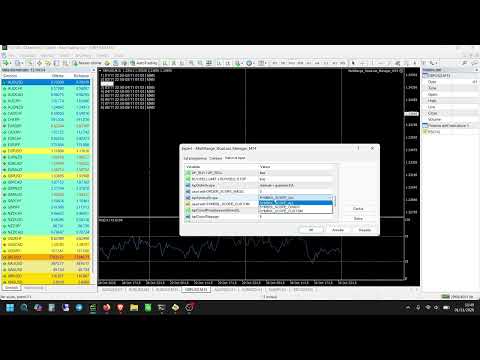
MultiRange Stop Loss Manager MT4 is a utility designed to temporarily remove Stop Loss levels during specific time windows and automatically restore them afterwards.
Its main purpose is to protect open and pending orders during market conditions in which the Bid/Ask spread can widen sharply for technical market reasons, rather than because the trading strategy itself has failed.
This can be especially useful:
-
around the daily trading rollover, generally around midnight in MetaTrader server time and, depending on the broker, during the first part of the new trading day;
-
during periods of very low liquidity;
-
during moments of strong volatility;
-
whenever the order book becomes temporarily thinner and the Bid/Ask spread becomes unusually wide.
During these situations, an order may hit its Stop Loss simply because the spread expands for a short period, even if the underlying market movement has not invalidated the trading strategy.
MultiRange Stop Loss Manager allows the trader to define specific periods during which the original Stop Loss is temporarily removed and safely stored.
At the end of the selected period, the utility automatically attempts to restore the original Stop Loss.
Why this utility can be useful
At daily rollover, liquidity can temporarily decrease and spreads can increase considerably.
For example, a Buy position is normally closed at the Bid price, while a Sell position is affected by the Ask price. A sudden spread expansion can therefore bring one side of the market to the Stop Loss even when the normal market price movement is relatively limited.
This means that a trade can sometimes be stopped out because of a temporary liquidity or spread event rather than because of the trading logic that originally opened the position.
MultiRange Stop Loss Manager is designed to give the trader greater control over these specific periods.
The utility does not modify the trading strategy and does not open new trades. It only manages the Stop Loss of selected existing orders.
-
Up to 5 independent Stop Loss suspension periods
-
Each period can be enabled or disabled separately
-
Time windows can cross midnight
-
Management of both market and pending orders
-
Management of all trades, manual trades only, or trades with a selected Magic Number
-
Management of all symbols, the current chart symbol, or one specific symbol
-
Original Stop Loss values are stored before removal
-
Automatic Stop Loss restoration at the end of the suspension period
-
Pending orders remain correctly managed if they become market positions during the suspension period
-
Optional market closure if the price has already crossed the stored Stop Loss
-
On-chart display of upcoming suspension periods
-
Detailed MetaTrader logging
-
English, Italian and Spanish interface messages
Removing a Stop Loss always increases risk because the position temporarily has no broker-side Stop Loss protection.
For this reason, the utility stores the original Stop Loss before removing it.
When the suspension period ends, the original Stop Loss is restored whenever market conditions allow it.
An additional safety option can also close the position at market if the price has already moved beyond the original stored Stop Loss while protection was suspended.
This prevents the utility from simply leaving a position without protection when the original Stop Loss can no longer be restored correctly.
The user remains responsible for selecting appropriate suspension periods and for understanding the risks associated with temporarily removing Stop Loss protection.
Language
Language
Selects the language used by the utility for messages and notifications.
Available languages:
-
English
-
Italian
-
Spanish
English is the default language.
Main Controls
Enable EA
Main ON/OFF switch.
-
true — Stop Loss management is active.
-
false — the utility remains attached to the chart but does not remove or restore Stop Loss levels.
Use Local PC Time
Selects the clock used for the suspension schedule.
-
true — uses the local time of the computer or VPS.
-
false — uses the MetaTrader broker server time.
For most users who want to protect positions around the broker's daily rollover, using broker server time can make the schedule easier to match with the broker's trading day.
Timer Seconds
Defines how often the utility checks:
-
the current time;
-
active suspension periods;
-
managed orders;
-
Stop Loss restoration conditions.
A lower value means more frequent checks.
The utility provides five independent time ranges.
Each range contains three settings:
-
Enable Range
-
Remove SL Time
-
Restore SL Time
Only the ranges you need have to be enabled.
Range 1
Enable Range 1
Activates or disables the first suspension period.
Remove SL Time 1
Defines when the Stop Loss suspension begins.
At this time, the utility stores the original Stop Loss and removes it from the selected orders.
Restore SL Time 1
Defines when the suspension ends.
At this time, the utility attempts to restore the original Stop Loss.
A range can cross midnight.
Example:
22:50 → 01:03
This means that Stop Loss protection is suspended from 22:50 until 01:03 of the following day.
This type of configuration can be useful around daily rollover if the broker experiences wider spreads during that period.
Range 2
Enable Range 2
Activates the second independent suspension period.
Remove SL Time 2
Starting time for Range 2.
Restore SL Time 2
Ending time for Range 2.
Range 3
Enable Range 3
Activates the third independent suspension period.
Remove SL Time 3
Starting time for Range 3.
Restore SL Time 3
Ending time for Range 3.
Range 4
Enable Range 4
Activates the fourth independent suspension period.
Remove SL Time 4
Starting time for Range 4.
Restore SL Time 4
Ending time for Range 4.
Range 5
Enable Range 5
Activates the fifth independent suspension period.
Remove SL Time 5
Starting time for Range 5.
Restore SL Time 5
Ending time for Range 5.
The five ranges are independent and can be used for different periods during the same trading day.
Include Market Orders
Controls whether open Buy and Sell positions are managed.
-
true — market positions are included.
-
false — market positions are ignored.
Include Pending Orders
Controls whether pending orders are managed.
Supported pending order types include:
-
Buy Limit
-
Sell Limit
-
Buy Stop
-
Sell Stop
If a pending order is activated while its Stop Loss is suspended, the utility continues to manage the resulting market position using the original stored Stop Loss.
Order Scope
Determines which trades the utility is allowed to manage.
Available modes:
All Orders
Manages all matching trades in the account.
This can include both manually opened positions and positions opened by Expert Advisors.
Manual Orders Only
Only trades with Magic Number 0 are managed.
Specific Magic Number
Only orders with the selected Magic Number are managed.
This is useful when you want MultiRange Stop Loss Manager to work only with positions generated by a specific Expert Advisor.
Magic Number
Used when the Specific Magic Number mode is selected.
Enter the Magic Number of the Expert Advisor whose trades should be managed.
Symbol Scope
Determines which symbols are managed.
Available options:
All Symbols
The utility manages matching orders on all symbols in the account.
Current Chart Symbol
Only orders belonging to the symbol of the chart where the utility is attached are managed.
Custom Symbol
Only one specifically selected symbol is managed.
Custom Symbol
Used when Custom Symbol mode is selected.
Enter the exact symbol name used by your broker.
Examples may include:
EURUSD
or broker-specific names such as:
EURUSD.a
EURUSDm
The exact name must match the symbol used by your broker.
Close If Price Beyond Stored Stop Loss
This is an important safety option.
If the market has already crossed the original stored Stop Loss before the suspension period ends, the original Stop Loss may no longer be valid for restoration.
When this option is enabled, the utility can close the position at market instead of leaving it without the intended protection.
-
true — close the position at market if the stored Stop Loss has already been crossed.
-
false — do not perform the automatic market closure.
Close Slippage
Defines the allowed slippage used when the utility needs to close a position at market.
The value is expressed in MetaTrader points.
Verbose Log
Enables detailed messages in the MetaTrader Experts and Journal tabs.
When enabled, the utility reports actions such as:
-
Stop Loss stored;
-
Stop Loss removed;
-
Stop Loss restored;
-
position closed because the stored Stop Loss was crossed;
-
suspension window changes;
-
errors returned by MetaTrader.
This option can be useful for monitoring and troubleshooting.
Show Next Suspensions
Displays the upcoming Stop Loss suspension periods directly on the chart.
Panel Max Upcoming
Defines the maximum number of future suspension periods shown when the panel is expanded.
Panel X
Controls the horizontal position of the panel.
Panel Y
Controls the vertical position of the panel.
Panel Font Size
Sets the text size used by the information panel.
Panel Color
Selects the color used for the panel text.
One of the main uses of MultiRange Stop Loss Manager is protection around the broker's daily rollover period.
Around midnight in MetaTrader server time, and sometimes during part of the following hour depending on the broker and liquidity providers, market liquidity may temporarily decrease.
The Bid/Ask spread can therefore become much wider than during normal trading conditions.
A Stop Loss located relatively close to the market can consequently be triggered by this temporary spread expansion.
A typical configuration could therefore suspend Stop Loss protection shortly before the expected rollover and restore it once normal liquidity and spreads have returned.
The correct times are broker-dependent and should always be verified by the user.
The additional time ranges can be used whenever the trader knows in advance that abnormal liquidity or spread conditions may occur.
Examples include:
-
daily rollover;
-
specific low-liquidity periods;
-
scheduled periods during which the trader expects unusually wide spreads;
-
temporary market conditions where Stop Loss protection needs to be managed differently.
MultiRange Stop Loss Manager does not guarantee protection against losses, spread widening, slippage or market gaps.
Temporarily removing a Stop Loss can result in losses greater than the original Stop Loss level.
The utility should therefore be used only by traders who understand the consequences of temporarily removing broker-side Stop Loss protection.
Always test the settings carefully on a demo account before using the utility on a live trading account.