Hexau Panda EA by forexpanda net for MT5
- Experts
- Version: 16.0
- Activations: 5

HEXAU PANDA EA by forexpanda.net - 6 gold strategies, one EA, built-in risk controls and a live dashboard --- Launch price is $100 for first copies, after that the original price of $599 applies!!! ---
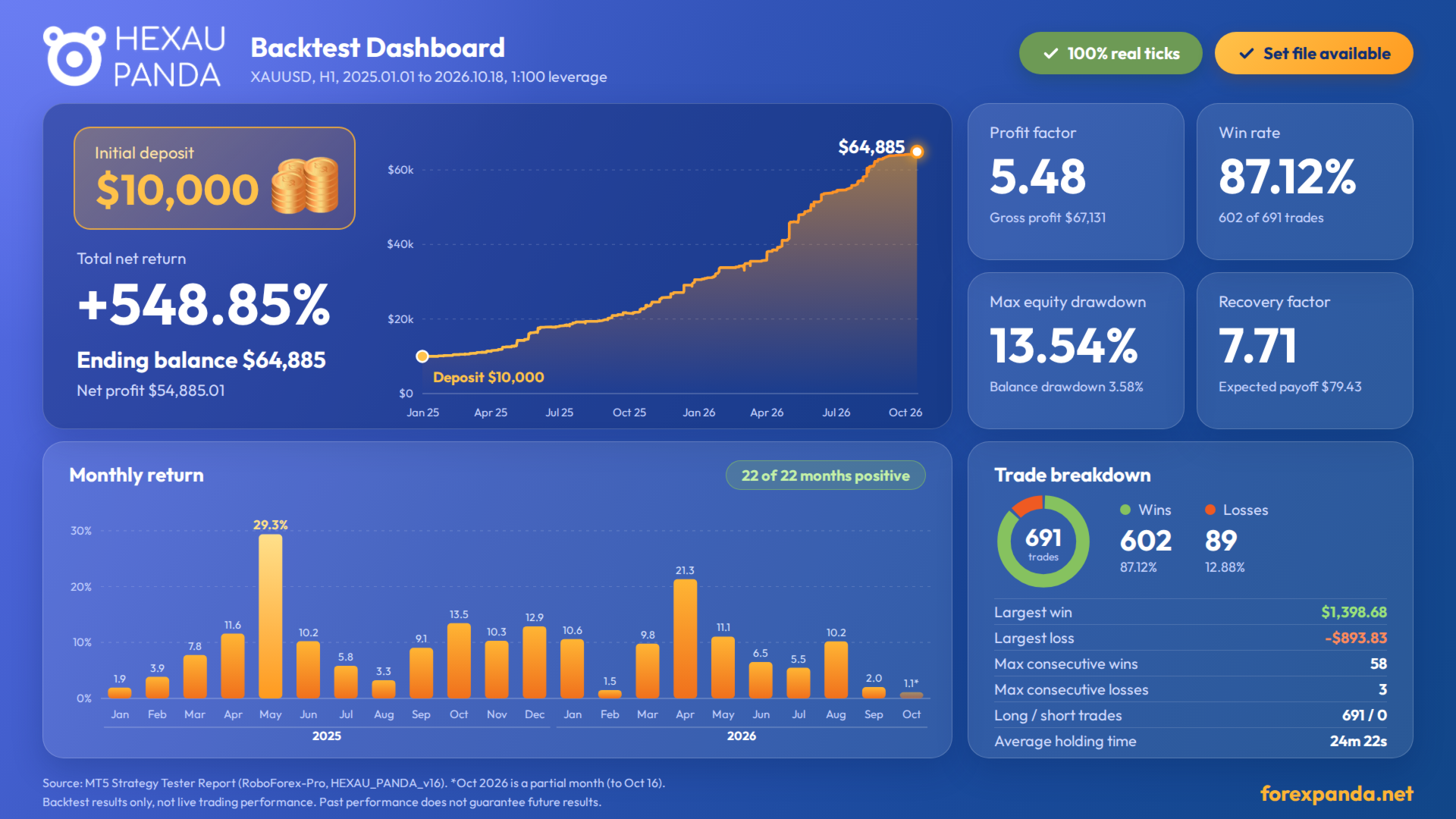
--- Why $599??? Coz the EA had 100% winning month last 22 month + 2%-29% profit per mth + 87% win rate + max. 14% DD + PF 5.4 - That's WHY!!! ---
..................................................................................
Useful downloads and link:
- Download the Manuel (full version 21 pages)
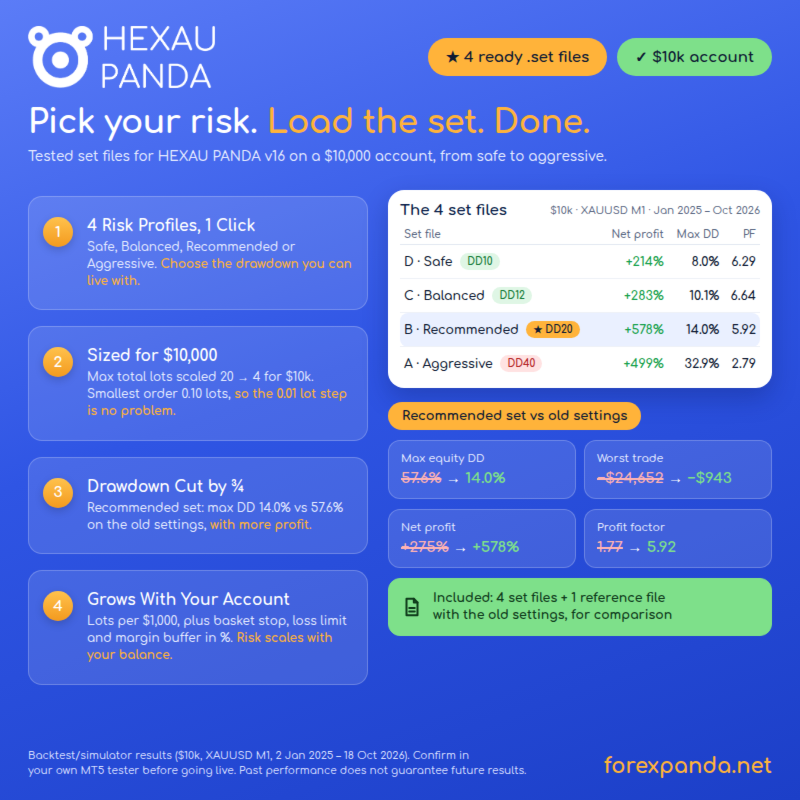
- Download all Presets (for 10k ECN account, Set A,B,C,D)
- Link for Backtest on showmytrades.com
- Download our FREE Performance Dashboard by forexpanda.net (for MT5)
...................................................................................
*Please do me a personal favor: Please don't run any other EA on the terminal you run the HEXAU PANDA. PLEASE!!!!
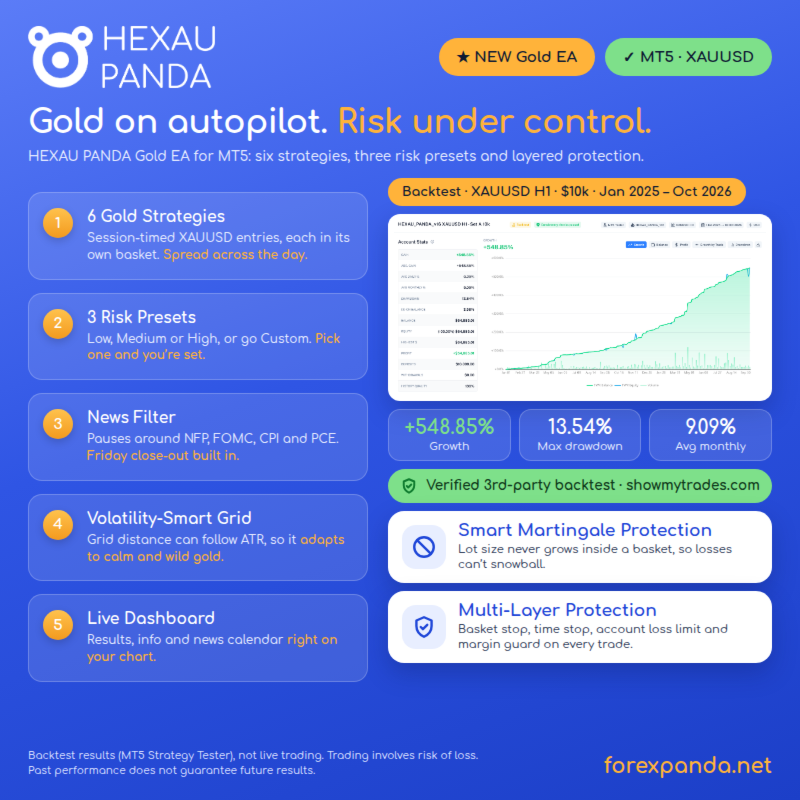
HEXAU PANDA trades gold (XAUUSD) with six independent time-window strategies. Attach it, pick a Low, Medium or High risk set, done.
- 6 strategies, 1 EA - six buy-only strategies, each with its own trading hours, magic number and basket. Use a ready-made set or build your own.
- Layered risk controls - basket stop, time stop, Friday close-out, margin buffer, spread filter, order and lot caps, and an optional account loss limit.
- News filter - pauses trading around high-impact US events, using the MT5 economic calendar. No DLL, no web requests.
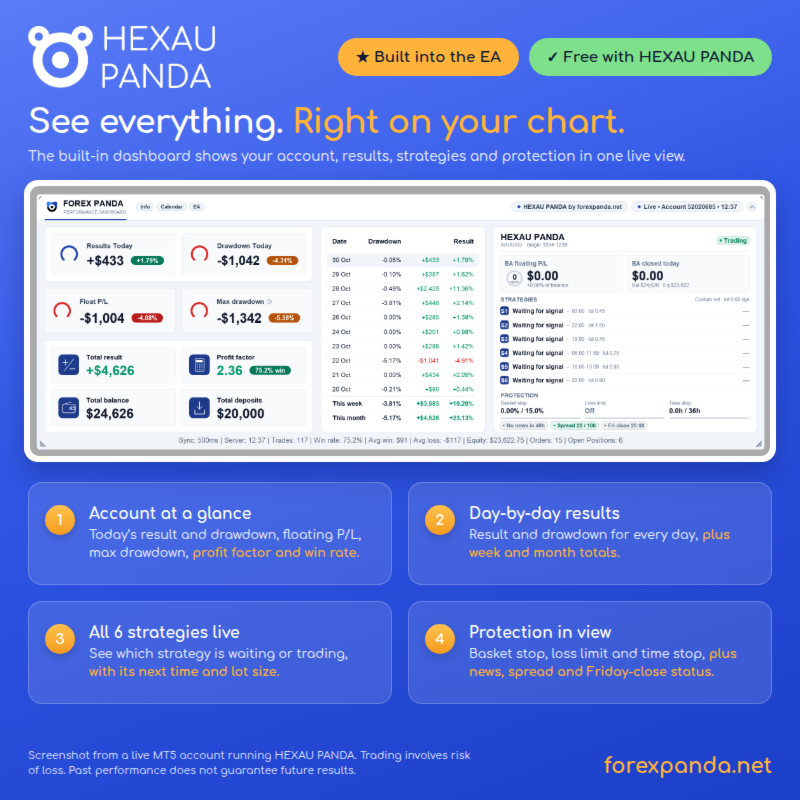
- Live dashboard on the chart - today's result, drawdown, float P/L, a daily calendar, and a status panel for every strategy.
- Simple setup - the lot follows your balance, plain-language inputs, and the EA ignores other EAs' trades (magic number and comment check).
Requires a hedging MT5 account. This is a grid system: orders are added while price moves against a basket. Trading involves high risk. Test on a demo account first.
------------------------------------------------------------
USER MANUAL - VERSION 16
------------------------------------------------------------
PART 1 - ABOUT
HEXAU PANDA is an Expert Advisor for MetaTrader 5, built for gold (XAUUSD). It runs six independent buy-only strategies. Each has its own trading hours and manages its own group of orders, called a basket.
- Hedging account required (on a netting account the EA stops and says so in the Experts log).
- Distances are in points, tuned for a 2-decimal gold quote (1 point = 0.01). Any chart timeframe.
- Six magic numbers: base ... base+5 (default 1234-1239).
- No DLL, no WebRequest. News come from the MT5 economic calendar. One small dashboard cache file in Common\Files (can be deleted).
How a trade works:
1. Window: a strategy looks for an entry only in its own hours (server time).
2. Signal: at a new bar of its timeframe, two DeMarker momentum readings on two timeframes must both point up. With no open order, it buys.
3. Grid: if price falls by the grid distance below the lowest order, one more order of the same lot is added (checked once a minute), up to the maximum.
4. Exit: the whole basket closes when price rises above the basket target (average price + a few points).
5. Protection layers may pause or close a basket earlier.
Be aware: this is a grid (averaging) system. Single orders have no stop loss; a long, strong move against open baskets can cause large losses. See PART 9.
PART 2 - REQUIREMENTS AND INSTALLATION
You need: a hedging MT5 account; a gold chart (XAUUSD; the symbol name differs per broker), any timeframe; Algo Trading on and "Allow Algo Trading" ticked; a stable connection (VPS recommended); low gold spreads (orders are skipped above the spread limit, default 100 points).
All hours are broker server time (Market Watch clock). Brokers use different server time zones: check that yours suits the strategy windows, or ask the vendor.
Install: drag HEXAU PANDA onto a gold chart then Common tab: tick Allow Algo Trading then Inputs tab: choose the Strategy set (input section 4) and the lot settings (section 1) then OK. A smiling face means it runs. In the Experts tab you should see "HEXAU PANDA MT5 v16 started", one "Strategy N: grid ... magic ..." line per active strategy, the first-order lots, and the news and dashboard lines.
One EA per symbol. If another EA uses the same magic numbers, change one of them; by default HEXAU PANDA ignores trades that lack its magic number AND comment.
PART 3 - QUICK START
Defaults (cautious): Low set (S5, S6); dynamic lot 0.01 per 1,000 of balance; max. 10 orders per basket; grid x2.0; basket stop 3.5 %; time stop 36 h; margin buffer 300 %; spread limit 100 points; news Top 5 gold events, 30 min before and after; Friday close-out 22:00; dashboard on.
Sets: Low = S5, S6 | Medium = S1, S4, S5, S6 | High = all six (more baskets at once, more risk) | Custom = your choice (input section 5).
Dynamic lot = lots per 1,000 x full thousands of balance (min. 1). With 0.01: balance 2,500 = 0.02 lot, 10,000 = 0.10 lot. A basket keeps the lot of its first order for all its grid orders, also after a restart.
Start on a demo account.
PART 4 - THE SIX STRATEGIES
All buy only, only inside their window (server time) and only with no open order.
S1: 03:00-03:59 | bar M15 | grid 150 pts (300 with x2.0) | target 50 pts | sets: Medium, High
S2: 22:00-22:59 | bar M15 | grid 150 pts (300 with x2.0) | target 50 pts | sets: High
S3: 19:00-19:59 | bar M15 | grid 150 pts (300 with x2.0) | target 50 pts | sets: High
S4: 06:00-11:59 | bar M5 | grid 150 pts (300 with x2.0) | target 150 pts | sets: Medium, High
S5: 10:00-13:59 | bar M12 | grid 500 pts (1000 with x2.0) | target 200 pts | sets: Low, Medium, High
S6: 22:00-22:59 | bar M10 | grid 300 pts (600 with x2.0) | target 200 pts | sets: Low, Medium, High
100 points = 1.00 on a 2-decimal gold quote. Grid used = base x grid multiplier x ATR factor (if on).
- Grid orders use the lot of order 1; next level = lowest open order minus grid distance.
- Basket target = average price + target points; when the bid rises above it, the whole basket closes.
- Exits are checked on every tick. A strategy that is switched off opens nothing new, but an open basket is still managed.
- After a restart the EA recognises its baskets (magic number + comment).
Equalizer (lot multiplier S1 / S2 / S3 / S4 / S5 / S6, rounded to your broker's lot step): Low 0.2 / 1.2 / 1.2 / 1.0 / 1.2 / 0.6 | Medium 0.4 / 2.0 / 2.0 / 1.6 / 2.0 / 1.0 | High 0.6 / 3.0 / 3.0 / 2.4 / 3.0 / 1.4.
PART 5 - PROTECTION SYSTEM
- Spread filter: no new entry or grid order above the spread limit. Exits are not blocked.
- Margin buffer: no new order if the margin level after it would be below 300 % (default).
- Order / lot caps: limits for all strategies together.
- Basket stop: a basket closes at 3.5 % floating loss of balance (default).
- Time stop: a basket closes after 36 trading hours (default; weekends not counted).
- Friday close-out: from 22:00 on Friday (default) all baskets close and no new trades open.
- News pause: no new entries around selected US events (grid orders paused too by default). Exits keep working.
- Day switches: a weekday set to "Don't trade" opens no new baskets; open ones are still managed.
- Account loss limit: floating loss of all EA trades reaches the limit = close all, then keep trading, remove the EA, or only alert.
- Own-trade check: trades without the EA's magic number AND comment are ignored.
- Retries: up to 3 quick retries on a requote; failed closes are retried every 5 seconds.
Each tick the EA checks, in order: environment (connection, Algo Trading), account loss limit, new entries, then every open basket (Friday close-out, basket stop, time stop, target, grid).
News: US high-importance events from the MT5 economic calendar, 2 days ahead. Choices: Off, NFP only, Top 5 gold events (nonfarm payrolls, interest rate decision, FOMC, CPI, PCE), all high-impact US events. The news filter and the dashboard are not active in the Strategy Tester, so backtests trade through news.
PART 6 - THE DASHBOARD
Three sections, shown or hidden with the header chips Info, Calendar and EA.
- Info (whole account): Results Today (default: closed trades only), Drawdown Today (largest gap between balance and equity today), Float P/L, Max drawdown, Total result, Profit factor with win rate, Total balance, Total deposits.
- Calendar: one row per day with Drawdown and Result (money and % of the day's start balance), plus This week and This month. Today's drawdown here is measured from the day's highest equity, so it can differ from the Drawdown Today card.
- EA panel (HEXAU PANDA trades only): status badge (Trading, News pause, High spread, Friday close, Day off, Max exposure, Low margin, Loss limit hit ...), EA floating P/L, EA closed today, one line per strategy S1-S6 (OFF, Waiting for signal, or the running basket with TP and next grid price), protection meters and chips (news, spread, Friday close).
- Window: drag the header to move, click it to collapse, drag any corner to resize, double-click a section to hide it. Narrow chart: Calendar goes first, then Info, then the EA panel.
- Alert: at the alert level (default 3 % daily drawdown) the badge turns amber and a sound plays once a day. It does not close any trade.
PART 7 - INPUT REFERENCE
In MT5 order. Defaults in [brackets]. Time = server time.
INPUT SECTION 1 - Lot size and grid
- Lot size mode: Fixed, or Dynamic (grows with balance) [Dynamic]: Fixed = always the fixed lot; Dynamic = the lot grows with your balance.
- Fixed lot size (when Lot mode = Fixed) [0.01]: starting lot in Fixed mode.
- Dynamic lot: lots per 1000 balance (0.01 = 0.02 at 2000) [0.01]: starting lot per full 1,000 of balance (min. 1 step).
- Equalizer: lot multiplier per strategy (preset or Custom) [Off]: Off / Low / Medium / High / Custom: multiplies the lot per strategy (see PART 4).
- Maximum number of orders in one basket (per strategy) [10]: no more grid orders after that (1-100).
- Grid distance: 1.0 = standard, 2.0 = twice as far apart [2.0]: stretches the grid of all strategies (up to 20).
- Minimum wait between two grid orders (minutes, 0 = none) [0]: pause after the newest order before the next grid order.
- Grid distance follows volatility (ATR): Off / On [Off]: On = wider grid in wild markets, tighter in quiet ones (H1 ATR 14 vs 100, factor 0.5-2.0).
- ATR strength when On (0 = none, 1 = full) [0.5]: how strongly volatility changes the grid (max. 5).
- Strategy 1 ... 6 lot multiplier (Equalizer = Custom) [0.4 / 2.0 / 2.0 / 1.6 / 2.0 / 1.0]: used only with Equalizer = Custom (above 0, max. 10).
INPUT SECTION 2 - Loss protection
- Basket stop: floating loss in % of balance (0 = off) [3.5]: closes a basket at this floating loss (0-100).
- Close a basket after this many trading hours (0 = off) [36]: closes a basket open this long (max. 8,760).
- Account loss protection: action at the loss limit [Off]: Off, or Percent / Money: close all and keep trading / close all and remove the EA / alert only.
- Account loss limit (% or money, as chosen above) [0.0]: limit for the action above: % of balance or an amount (0 = off).
- No new order if the margin level after it would be below (%, 0 = off) [300.0]: margin buffer.
- Max open orders of ALL strategies together (0 = off) [0]: cap for all strategies together (max. 1,000).
- Max open lots of ALL strategies together (0 = off) [0.0]: cap for all strategies together (max. 1,000).
INPUT SECTION 3 - Order settings
- Magic number (strategy N uses magic + N - 1) [1234]: base ID; strategy N uses base + N - 1.
- Text added to every trade as a comment [HEXAUPANDA]: max. 31 characters; do not change while trades are open.
- Own trades = magic AND comment match (protects against another EA with the same magic) [Yes]: Yes = only trades with the magic number AND the comment's first 6 characters count as this EA's.
- Add [StrategyN] to the trade comment [Yes]: adds [Strategy1] ... [Strategy6] to the comment.
- No new trades when the spread is above (points) [100]: points, exits are never blocked.
- Max price deviation for orders and closes (points) [30]: points, up to 3 quick retries on a requote.
INPUT SECTION 4 - Strategy set
- Strategy set: Low, Medium, High risk or Custom [Low]: Low (S5, S6), Medium (S1, S4, S5, S6), High (all six), Custom (choose in section 5).
INPUT SECTION 5 - Strategies 1 to 6 (own settings)
Entry hours: S1 03:00, S2 22:00, S3 19:00, S4 06:00-11:59, S5 10:00-13:59, S6 22:00.
- Use strategy N? (only when Strategy set = Custom) [Use this strategy]: switches the strategy on or off.
- Own grid distance (0 = use the general setting) [0.0]: replaces the general grid distance (0-20).
- Own maximum orders (0 = use the general setting) [0]: replaces the general maximum orders (0-100).
INPUT SECTION 6 - News protection
- News protection: which events pause trading [Top 5]: Off / NFP only / Top 5 gold events / All high-impact US events.
- Pause trading this many minutes before the news [30]: minutes before the event (0-1,440).
- Keep paused this many minutes after the news [30]: minutes after the event (0-1,440).
- During news: pause grid orders too, or keep adding them [Pause]: Pause = grid orders stop too; Keep = only new baskets are blocked.
- Event names for the "Top 5" choice (separate with ;) [nonfarm payrolls;non-farm payrolls;interest rate decision;fomc;cpi;pce]: words (separated by ;) that select the events for "Top 5".
INPUT SECTION 7 - Trading days and hours
- Friday close-out: close baskets, stop new trades [Yes]: closes all baskets and stops new trades from the hour below.
- Friday close-out starts at (server time) [22:00]: server hour on Friday.
- Monday / Tuesday / Wednesday / Thursday / Friday: trade or don't trade [Trade]: Don't trade = no new baskets that day; open baskets are still managed.
INPUT SECTION 8 - Dashboard (off in the Strategy Tester)
- Show the performance dashboard on the chart [Show]: master switch.
- Section 1: Basic Info (today, drawdown, float, totals) / Section 2: Calendar (daily table, this week / month) / Section 3: EA panel (status, strategies, protection, news) [Show]: show or hide each dashboard section.
- Dashboard name (blue pill, empty = hidden) / Dashboard theme / Dashboard style / Dashboard size factor (0.5 - 1.5) [Light / Professional / 0.9]: look of the dashboard (the name is the text in the blue header pill).
- Currency symbol [$]: currency sign.
- Decimals for money values (0 or 2) [0]: decimals for money values (0 or 2).
- Trading day starts at server hour (0-23) [0]: when a new trading day starts for all daily figures (0-23).
- "Results Today" is calculated as [Closed trades only]: Equity change today / Closed trades only / Closed today + all floating P/L.
- Rows in the daily table (5-15) / Gauge is full at +X % result today [10 / 1.0]: rows (5-15) and gauge goal.
- Alert level: amber badge + warning sound at (%) [3.0]: daily drawdown alert level: amber badge and a warning sound once a day.
- Play a sound when the level is reached (once a day) / Sound file for the alert (terminal Sounds folder) / Also show a pop-up alert window [Yes / alert.wav / No]: sound, sound file and pop-up for the alert.
PART 8 - TROUBLESHOOTING
No trades? Usually normal: a strategy enters only inside its window and when its signal is there. Check: Algo Trading and "Allow Algo Trading" on; the EA panel status badge (anything other than "Trading" is the reason); the Low set runs only S5 and S6; the window (server time), the day switches and the Friday close-out hour; the Experts log ("entry postponed - spread / margin / caps": retried while the window lasts).
- "needs a HEDGING account ... stopped": open a hedging account.
- "invalid setting - ...": an input is outside its range; the message names it.
- "indicator data not ready ... bar skipped": chart history was still loading, usually only at the first start.
- "Drawdown threshold reached": the account loss limit was hit; the EA acts as chosen in input section 2.
FAQ:
- Another symbol? The EA is built and tuned for gold only.
- Other EAs on the account? Yes, with different magic numbers.
- Changed the comment text and open trades are no longer managed? The comment is part of the own-trade check: restore the old text or close those trades by hand.
- Dashboard numbers differ from the History tab? Info and Calendar count the whole account; the day starts at the server hour set in input section 8.
PART 9 - RISK WARNING
Trading leveraged products such as gold CFDs carries a high level of risk and is not suitable for everyone. You can lose more than you expect, including the money in your account. Only trade with money you can afford to lose.
HEXAU PANDA is a grid (averaging) system: orders are added while price moves against a basket and single orders have no stop loss. A strong, long trend against open baskets can lead to large losses or the loss of the account, even with the protection layers on. They reduce risk; they cannot remove it. No backtest, demo result or screenshot promises future results.
- Start on a demo account with the default Low set.
- Choose a lot you can afford for a full basket (all allowed orders open), not for one order.
- Use a VPS. Do not change inputs while baskets are open unless you know the effect.
- Keep basket stop, time stop and Friday close-out on, and set the account loss limit to a value you can accept.
Terms: Basket = all open orders of one strategy. Grid order = an extra order added when price moves a set distance against the basket. Magic number = ID marking an EA's trades. Server time = your broker's clock (Market Watch), not local time.
...
Regards
Martin