Multi Candle N Pattern Filter Signals Arrow MT5
- Indicateurs
- Version: 2.10
- Mise à jour: 27 octobre 2026
- Activations: 5

MultiCandle Pattern Pro with Universal Filter Suite v2.0 is a professional technical analysis indicator engineered for MetaTrader 5 (MT5). The software automates the identification of sequential multi-candle price action formations across liquid financial markets, focusing specifically on 4-Candle (4C), 5-Candle (5C), and 6-Candle (6C) structures. Rather than depending on isolated single-candle setups that are vulnerable to erratic market noise, the system analyzes structured multi-bar sequences to identify verified directional continuations and momentum exhaustion pivots.
The program integrates two distinct algorithmic methods into a unified analytical environment:
1. Pola N (Trend-Pullback Continuum): A structural trend-continuation model that captures three-phase wave retracements. An initial impulse leg establishes directional order flow, followed by a controlled counter-trend contraction, and finalized by a confirmation candle signaling resumption.
2. Momentum and Breakout Reversal: A momentum exhaustion and breakout model designed to identify structural turning points. It captures extended directional runs that encounter institutional absorption, followed by an impulsive candle breaching prior structural pivot levels.
To provide robust quantitative verification, the indicator embeds an onboard 14-Filter Quantitative Suite (MultiFilterSuite architecture). Traders can selectively enable technical indicators covering momentum, trend direction, volatility thresholds, moving average baselines, Heiken Ashi states, dynamic support and resistance boundaries, and ZigZag-calculated Fibonacci retracement levels.
Execution follows a strict non-repainting protocol: calculations and visual plotting occur exclusively upon the close of a bar (Bar Index 1), leaving the active bar (Bar Index 0) neutral. Once an arrow appears on a closed candle, it remains fixed to that historical bar without shifting, redrawing, or recalculating. Multi-channel alert integration delivers pop-up alerts, audio notifications, mobile push notifications, and expert log comments.
Operating Principles & Technical Logic
MultiCandle Pattern Pro evaluates price action by analyzing sequential candlestick relationships across open, high, low, and close levels.
1. Non-Repainting Execution Architecture
- Calculation Timing: All pattern conditions and technical filters are evaluated strictly on historical closed candles. During each execution of OnCalculate, the live candle (Bar Index 0, rates_total - 1) is cleared across all six data buffers (Buy1Buffer, Sell1Buffer, Buy2Buffer, Sell2Buffer, Buy3Buffer, Sell3Buffer).
- Historical Fixity: Signals plotted on candle index 1 (the most recently closed bar) or earlier bars never move, redraw, disappear, or recalculate.
- Single-Alert Validation: Alerts are governed by an internal timestamp tracking variable (last_alert_bar_time). Notifications are dispatched exactly once per closed bar, preventing repetitive triggers on tick updates.
2. Pattern Recognition Framework
The indicator tracks three distinct structural scales:
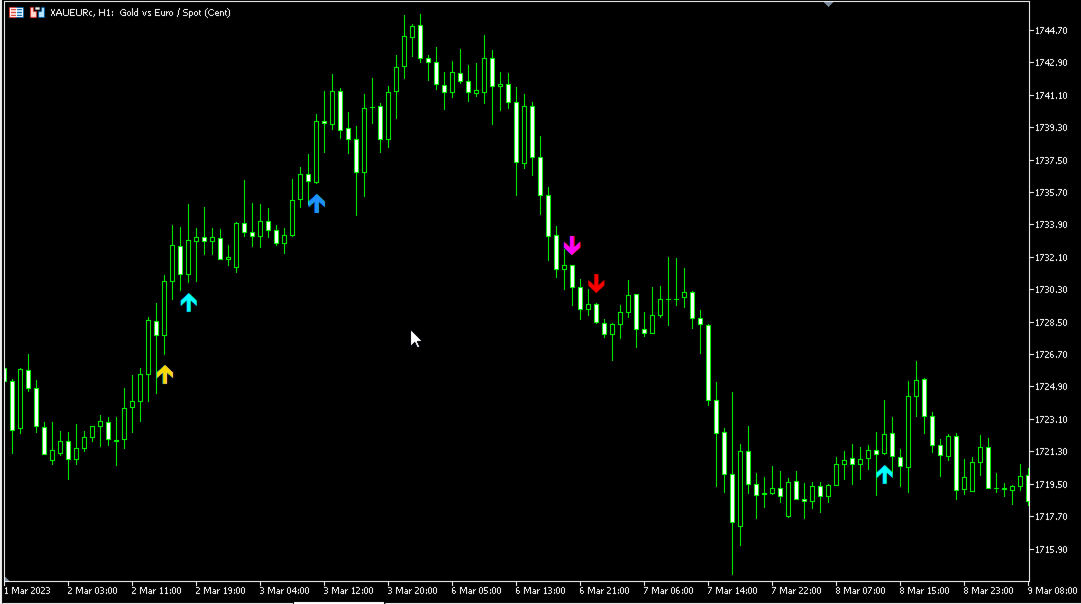
- Signal 1 (4-Candle Pattern): Identifies short-duration impulse-pullback structures or sharp 3-bar reversal sequences. Plotted via Plot 0 (Buy) and Plot 1 (Sell).
- Signal 2 (5-Candle Pattern): Identifies intermediate trend waves with secondary pullbacks or 4-bar counter-trend moves followed by reversal impulses. Plotted via Plot 2 (Buy) and Plot 3 (Sell).
- Signal 3 (6-Candle Pattern): Identifies extended continuation sequences or 5-bar consolidation blocks resolved by directional breakouts. Plotted via Plot 4 (Buy) and Plot 5 (Sell).
Operational Modes (InpEntryMethod):
- Mode 0: Pola N (Trend-Pullback Continuum)
The Pola N method models structural trend continuations forming 'N-shape' wave geometry in uptrends and inverted 'N-shape' geometry in downtrends.
* 4-Candle Bullish Pola N: Bar[i-3] Bullish (Close > Open) and Bar[i-2] Bullish (Close > Open) establish upward momentum. Bar[i-1] Bearish (Close < Open) acts as the pullback. Bar[i] Bullish (Close > Open) confirms trend continuation.
* 4-Candle Bearish Pola N: Bar[i-3] Bearish (Close < Open) and Bar[i-2] Bearish (Close < Open) establish downward momentum. Bar[i-1] Bullish (Close > Open) acts as the pullback. Bar[i] Bearish (Close < Open) confirms trend continuation.
* 5-Candle Bullish Pola N: Three consecutive Bullish bars (Bar[i-4], Bar[i-3], Bar[i-2]) establish upward momentum. Bar[i-1] Bearish (Close < Open) is the pullback. Bar[i] Bullish (Close > Open) confirms continuation.
* 5-Candle Bearish Pola N: Three consecutive Bearish bars (Bar[i-4], Bar[i-3], Bar[i-2]) establish downward momentum. Bar[i-1] Bullish (Close > Open) is the pullback. Bar[i] Bearish (Close < Open) confirms continuation.
* 6-Candle Bullish Pola N: Four consecutive Bullish bars (Bar[i-5], Bar[i-4], Bar[i-3], Bar[i-2]) establish upward momentum. Bar[i-1] Bearish (Close < Open) is the pullback. Bar[i] Bullish (Close > Open) confirms continuation.
* 6-Candle Bearish Pola N: Four consecutive Bearish bars (Bar[i-5], Bar[i-4], Bar[i-3], Bar[i-2]) establish downward momentum. Bar[i-1] Bullish (Close > Open) is the pullback. Bar[i] Bearish (Close < Open) confirms continuation.
Candlestick Body Validation Filters:
To ensure healthy market structure, the Pola N engine applies two mathematical body filters:
* BodyFilter 1 (UseBodyFilter1): The absolute body of the pullback candle must be smaller than the preceding trend candle: Abs(Close[i-1] - Open[i-1]) < Abs(Close[i-2] - Open[i-2]). This verifies that the retracement represents an orderly contraction.
* BodyFilter 2 (UseBodyFilter2): The absolute body of the confirmation candle must be larger than the pullback candle: Abs(Close[i] - Open[i]) > Abs(Close[i-1] - Open[i-1]). This confirms that dominant order flow has resumed.
- Mode 1: Momentum and Breakout Reversal
* 4-Candle Momentum Reversal:
Bullish: Three consecutive Bearish bars (Bar[i-3], Bar[i-2], Bar[i-1]). Bar[i] is Bullish (Close > Open) and closes above the open price of Bar[i-3] (Close[i] > Open[i-3]), confirming immediate absorption of the prior move.
Bearish: Three consecutive Bullish bars (Bar[i-3], Bar[i-2], Bar[i-1]). Bar[i] is Bearish (Close < Open) and closes below the open price of Bar[i-3] (Close[i] < Open[i-3]), confirming immediate absorption of the prior move.
* 5-Candle Momentum Reversal:
Bullish: Four consecutive Bearish bars (Bar[i-4] to Bar[i-1]). Bar[i] is Bullish (Close > Open) and closes above the open price of Bar[i-4] (Close[i] > Open[i-4]).
Bearish: Four consecutive Bullish bars (Bar[i-4] to Bar[i-1]). Bar[i] is Bearish (Close < Open) and closes below the open price of Bar[i-4] (Close[i] < Open[i-4]).
* 6-Candle Breakout Reversal:
Bullish: Evaluates the previous 5 bars (Bar[i-5] to Bar[i-1]). At least 4 must be Bearish (Close < Open). Bar[i] must be Bullish (Close > Open) and close strictly higher than the highest High of those 5 bars (Close[i] > Highest High[i-5..i-1]).
Bearish: Evaluates the previous 5 bars (Bar[i-5] to Bar[i-1]). At least 4 must be Bullish (Close > Open). Bar[i] must be Bearish (Close < Open) and close strictly lower than the lowest Low of those 5 bars (Close[i] < Lowest Low[i-5..i-1]).
- Mode 2: All Methods Combined (ENTRY_METHOD_ALL)
Evaluates Pola N and Momentum/Breakout patterns simultaneously. Signals trigger when either pattern condition is satisfied alongside active filters.
Universal 14-Filter Quantitative Suite
The MultiFilterSuite module provides an institutional confirmation framework. Each filter operates as an independent logical gate:
1. RSI Level Cross Filter:
Bullish: RSI crosses from below or equal to RSI_Oversold (default 30.0) on the previous candle to strictly above RSI_Oversold on the signal candle (RSI[shift] > 30.0 and RSI[shift+1] <= 30.0).
Bearish: RSI crosses from above or equal to RSI_Overbought (default 70.0) on the previous candle to strictly below RSI_Overbought on the signal candle (RSI[shift] < 70.0 and RSI[shift+1] >= 70.0).
2. ADX Trend Strength Filter:
Condition: The main line of the Average Directional Index must be greater than or equal to ADX_Min_Level (default 20.0). Weak consolidation setups are filtered out.
3. Single Moving Average Filter:
Bullish: Signal candle close must be above the MA line (Close > MA).
Bearish: Signal candle close must be below the MA line (Close < MA).
4. Ichimoku Senkou Span B Filter:
Bullish: Signal candle close must be strictly above Senkou Span B (Close > Senkou Span B).
Bearish: Signal candle close must be strictly below Senkou Span B (Close < Senkou Span B).
5. RSI 75 Macro Bias Filter:
Bullish: RSI with period 75 must be above its midline (RSI[75] > 50.0).
Bearish: RSI with period 75 must be below its midline (RSI[75] < 50.0).
6. Double Moving Average Ribbon Filter:
Bullish: Fast MA (MA_A) must be strictly above Slow MA (MA_B) (MA_A > MA_B).
Bearish: Fast MA (MA_A) must be strictly below Slow MA (MA_B) (MA_A < MA_B).
7. Awesome Oscillator (AO) Multi-Mode Filter:
Volume/Magnitude: AO >= AO_Buy_Min for Buy, AO <= AO_Sell_Max for Sell.
Color Momentum: AO bar value rising (AO[shift] > AO[shift+1]) for Buy, falling (AO[shift] < AO[shift+1]) for Sell.
Zero-Line Regime: AO rising and positive (> 0.0) for Buy, falling and negative (< 0.0) for Sell.
8. Parabolic SAR Trailing Bias Filter:
Bullish: Signal candle close must be above the current Parabolic SAR point (Close > SAR).
Bearish: Signal candle close must be below the current Parabolic SAR point (Close < SAR).
9. Heiken Ashi Trend State Filter:
Bullish: Current synthetic Heiken Ashi candle is Bullish (HA_Close > HA_Open).
Bearish: Current synthetic Heiken Ashi candle is Bearish (HA_Close < HA_Open).
10. CCI Trend Filter:
Bullish: Long-period CCI (default 50) must be positive (CCI > 0.0).
Bearish: Long-period CCI must be negative (CCI < 0.0).
11. CCI Overbought and Oversold Boundary Filter:
Bullish: Short-period CCI (default 14) must be at or below CCI_Overbought (CCI <= 100.0).
Bearish: Short-period CCI must be at or above CCI_Oversold (CCI >= -100.0).
12. RVI Trend and Signal Cross Filters:
RVI Trend: RVI main line must be positive (> 0.0) for Buy, negative (< 0.0) for Sell.
RVI Signal: RVI main line must be above RVI signal line for Buy, below for Sell.
13. MACD Histogram and Zero Filters:
MACD Histogram: MACD histogram value must be positive (> 0.0) for Buy, negative (< 0.0) for Sell.
MACD Zero: MACD main line must be positive (> 0.0) for Buy, negative (< 0.0) for Sell.
14. Dynamic Support / Resistance and Fibonacci Filters:
Support/Resistance: Checks lowest low (Support) and highest high (Resistance) across SR_Period bars. Buy requires candle Low to interact with Support zone (+/- SR_Zone_Points). Sell requires candle High to interact with Resistance zone.
Fibonacci Retracement: Detects structural swing points using a ZigZag algorithm. Calculates Fibonacci levels (default 38.2% and 61.8%). Buy and Sell signals require candle range [Low, High] to intersect the retracement zone.
Key Software Features
- Multi-Candle Structural Engine: Automates pattern detection across 4-Candle, 5-Candle, and 6-Candle structural formations.
- Dual Strategy Core: Supports Pola N (trend-pullback continuation) and Momentum & Breakout Reversal methods, with an optional combined mode.
- Candlestick Body Validation: Ratio filters verify pullback contractions and confirmation expansion before triggering signals.
- Modular 14-Filter Suite: Connects trend, momentum, volatility, support/resistance, and Fibonacci retracement confirmations.
- Non-Repainting Execution: Calculations occur strictly on closed bars. Arrows remain anchored to historical bars without shifting.
- Six Dedicated Data Buffers: Independent Buy and Sell buffers for 4C, 5C, and 6C signals, enabling straightforward EA integration via iCustom.
- Configurable Visuals: Independent arrow offset and custom color settings for each pattern type to optimize chart presentation.
- Multi-Channel Alert Suite: Real-time pop-up dialogues, custom audio cues, mobile push notifications, and terminal log comments.
- Efficient Processing: Memory-optimized architecture with series buffer management to prevent terminal performance slowdowns.
Operation & Setup Recommendations
- Supported Instruments: Applicable across liquid instruments, including Forex major pairs (EURUSD, GBPUSD, USDJPY, AUDUSD, USDCAD), crosses (EURGBP, GBPJPY, EURAUD), precious metals (XAUUSD, XAGUSD), equity indices (US30, US500, USTEC, DAX40), and liquid cryptocurrencies (BTCUSD, ETHUSD).
- Recommended Timeframes:
Scalping (M1, M5, M15): Use Mode 2 (All Methods) with moving average filters (Use_MA_Filter or Use_DoubleMA_Filter) to align with higher-order trend flow.
Day Trading (M30, H1): Use Pola N mode with body filters enabled alongside ADX (Use_ADX_Filter) to filter low-volatility consolidation.
Swing Trading (H4, D1): Use Pola N or Breakout Reversal with Support/Resistance and Fibonacci filters enabled for confluence at structural pivot zones.
- Broker and Execution Requirements:
Account Type: Fully compatible with both Hedging and Netting accounts on MetaTrader 5.
Spread Conditions: Low spread or ECN accounts are recommended when trading lower timeframes.
Hardware / VPS: Standard desktop PC or VPS environment. Optimized calculations maintain minimal resource consumption.
- Trade Management Guidelines:
Stop Loss: Position beyond the pattern swing extreme (below the low for Buy, above the high for Sell) or use an ATR-based offset (e.g. 1.5x ATR).
Take Profit: Target key market structure levels, prior swing highs/lows, or an asymmetric Risk-to-Reward ratio (1:1.5 or 1:2.0).
Position Trailing: Consider trailing stops behind moving average baselines or Parabolic SAR points once the trade achieves initial profit milestones.
Complete Input Parameters Documentation
Strategy & Method Selection
- InpEntryMethod (Default: ENTRY_METHOD_ALL) [Enumeration] -> Determines the active candlestick recognition engine: Mode 0 (ENTRY_METHOD_POLA_N) for Trend-Pullback structures, Mode 1 (ENTRY_METHOD_REVERSAL_BO) for Momentum/Breakout Reversal structures, or Mode 2 (ENTRY_METHOD_ALL) for both methods combined.
Signal Activation
- UseSignal1 (Default: true) [Boolean] -> Enables or disables signal detection and arrow plotting for 4-Candle patterns (Plot buffers 0 and 1).
- UseSignal2 (Default: true) [Boolean] -> Enables or disables signal detection and arrow plotting for 5-Candle patterns (Plot buffers 2 and 3).
- UseSignal3 (Default: true) [Boolean] -> Enables or disables signal detection and arrow plotting for 6-Candle patterns (Plot buffers 4 and 5).
Candle Body Validation (Pola N)
- UseBodyFilter1 (Default: true) [Boolean] -> When enabled, requires the absolute body size of the pullback candle (Bar[i-1]) to be strictly smaller than the preceding trend candle (Bar[i-2]).
- UseBodyFilter2 (Default: true) [Boolean] -> When enabled, requires the absolute body size of the confirmation candle (Bar[i]) to be strictly larger than the pullback candle (Bar[i-1]).
Arrow & Visual Settings
- ArrowOffset (Default: 100) [Integer, Points] -> Vertical distance in points between the candlestick high/low price and the plotted signal arrow.
- BuyColor1 (Default: clrAqua) [Color] -> Visual color assigned to Signal 1 BUY arrows (4-Candle).
- SellColor1 (Default: clrRed) [Color] -> Visual color assigned to Signal 1 SELL arrows (4-Candle).
- BuyColor2 (Default: clrDodgerBlue) [Color] -> Visual color assigned to Signal 2 BUY arrows (5-Candle).
- SellColor2 (Default: clrDarkOrange) [Color] -> Visual color assigned to Signal 2 SELL arrows (5-Candle).
- BuyColor3 (Default: clrGold) [Color] -> Visual color assigned to Signal 3 BUY arrows (6-Candle).
- SellColor3 (Default: clrMagenta) [Color] -> Visual color assigned to Signal 3 SELL arrows (6-Candle).
Notifications & Audio
- EnableAlert (Default: true) [Boolean] -> Enables MetaTrader 5 on-screen pop-up alert dialogues with asset, timeframe, and pattern details.
- EnableSound (Default: true) [Boolean] -> Plays an acoustic audio alert file when a verified signal closes.
- EnablePush (Default: false) [Boolean] -> Dispatches real-time push notifications to mobile devices via the user MetaQuotes ID.
- EnableComment (Default: true) [Boolean] -> Prints structured signal confirmation details to the terminal Experts log.
- SoundFile (Default: "alert.wav") [String] -> Audio file name located in the MetaTrader 5 Sounds directory to play on signal trigger.
Filter 1: RSI Cross Filter
- Use_RSI_Cross_Filter (Default: false) [Boolean] -> Activates the RSI oversold/overbought boundary cross filter.
- RSI_Length (Default: 14) [Integer, Bars] -> Calculation period for the Relative Strength Index.
- RSI_Price_Source (Default: PRICE_CLOSE) [Enumeration] -> Applied price constant used in RSI calculation.
- RSI_Oversold (Default: 30.0) [Double, Level] -> Lower oversold boundary threshold; BUY signals require RSI to cross above this level.
- RSI_Overbought (Default: 70.0) [Double, Level] -> Upper overbought boundary threshold; SELL signals require RSI to cross below this level.
Filter 2: ADX Trend Strength Filter
- Use_ADX_Filter (Default: false) [Boolean] -> Activates the Average Directional Index trend strength filter.
- ADX_Period (Default: 10) [Integer, Bars] -> Averaging period for ADX calculation.
- ADX_Min_Level (Default: 20.0) [Double, Level] -> Minimum required ADX baseline value to validate directional momentum.
Filter 3: Single Moving Average Filter
- Use_MA_Filter (Default: false) [Boolean] -> Activates the single moving average dynamic baseline filter.
- MA_Period (Default: 50) [Integer, Bars] -> Averaging period for the baseline moving average.
- MA_Method (Default: MODE_SMA) [Enumeration] -> Smoothing method (SMA, EMA, SMMA, LWMA).
- MA_Shift (Default: 0) [Integer, Bars] -> Forward or backward visual bar shift for the moving average.
Filter 4: Ichimoku Senkou Span B Filter
- Use_Ichimoku_Filter (Default: false) [Boolean] -> Activates the Ichimoku Kinko Hyo Senkou Span B baseline filter.
- Ichimoku_Tenkan (Default: 9) [Integer, Bars] -> Tenkan-sen calculation period.
- Ichimoku_Kijun (Default: 26) [Integer, Bars] -> Kijun-sen calculation period.
- Ichimoku_SenkouB (Default: 52) [Integer, Bars] -> Senkou Span B calculation period.
Filter 5: RSI 75 Macro Bias Filter
- Use_RSI75_Filter (Default: false) [Boolean] -> Activates higher-order macro RSI trend bias evaluation.
- RSI_Filter_Period (Default: 75) [Integer, Bars] -> Calculation period for the macro RSI indicator.
Filter 6: Double Moving Average Ribbon Filter
- Use_DoubleMA_Filter (Default: false) [Boolean] -> Activates dual moving average trend alignment evaluation.
- MA_A_Period (Default: 30) [Integer, Bars] -> Averaging period for Fast Moving Average A.
- MA_A_Method (Default: MODE_EMA) [Enumeration] -> Smoothing method for Moving Average A.
- MA_A_Applied (Default: PRICE_CLOSE) [Enumeration] -> Applied price constant for Moving Average A.
- MA_A_Shift (Default: 0) [Integer, Bars] -> Bar shift parameter for Moving Average A.
- MA_B_Period (Default: 140) [Integer, Bars] -> Averaging period for Slow Moving Average B.
- MA_B_Method (Default: MODE_EMA) [Enumeration] -> Smoothing method for Moving Average B.
- MA_B_Applied (Default: PRICE_CLOSE) [Enumeration] -> Applied price constant for Moving Average B.
- MA_B_Shift (Default: 0) [Integer, Bars] -> Bar shift parameter for Moving Average B.
Filter 7: Awesome Oscillator Filters
- Use_AO_Filter (Default: false) [Boolean] -> Master activation toggle for Awesome Oscillator filtering.
- Use_AO_Volume_Filter (Default: false) [Boolean] -> Activates absolute numerical threshold checks for AO momentum.
- AO_Buy_Min (Default: 4.0) [Double, Value] -> Minimum positive AO threshold required to validate BUY signals.
- AO_Sell_Max (Default: -4.0) [Double, Value] -> Maximum negative AO threshold required to validate SELL signals.
- Use_AO_Color_Filter (Default: false) [Boolean] -> Requires AO bar color to match signal direction (rising for BUY, falling for SELL).
- Use_AO_Zero_Filter (Default: false) [Boolean] -> Requires AO to be rising above 0.0 for BUY, or falling below 0.0 for SELL.
Filter 8: Parabolic SAR Filter
- Use_SAR_Filter (Default: false) [Boolean] -> Activates Parabolic Stop and Reverse directional trailing filter.
- SAR_Step (Default: 0.02) [Double, Increment] -> Acceleration factor step size.
- SAR_Maximum (Default: 0.2) [Double, Maximum] -> Maximum permissible acceleration factor.
Filter 9: Heiken Ashi Filter
- Use_HeikenAshi_Filter (Default: false) [Boolean] -> Activates synthetic Heiken Ashi candlestick state verification.
Filter 10: CCI Trend Filter
- Use_CCI_Filter (Default: false) [Boolean] -> Activates long-period Commodity Channel Index zero-line trend filter.
- CCI_Period (Default: 50) [Integer, Bars] -> Calculation period for CCI trend evaluation.
- CCI_Applied (Default: PRICE_CLOSE) [Enumeration] -> Applied price constant for CCI trend calculation.
Filter 11: CCI Overbought and Oversold Filter
- Use_CCI_OBOS_Filter (Default: false) [Boolean] -> Activates short-period CCI boundary exhaustion filter.
- CCI_OBOS_Period (Default: 14) [Integer, Bars] -> Calculation period for CCI exhaustion evaluation.
- CCI_OBOS_Applied (Default: PRICE_CLOSE) [Enumeration] -> Applied price constant for CCI OB/OS calculation.
- CCI_Overbought (Default: 100.0) [Double, Level] -> Upper threshold; BUY signals require CCI to remain at or below this value.
- CCI_Oversold (Default: -100.0) [Double, Level] -> Lower threshold; SELL signals require CCI to remain at or above this value.
Filter 12: RVI Trend and Signal Filters
- Use_RVI_Filter (Default: false) [Boolean] -> Activates Relative Vigor Index zero-line trend filter.
- RVI_Period (Default: 75) [Integer, Bars] -> Calculation period for RVI trend evaluation.
- Use_RVI_Signal_Filter (Default: false) [Boolean] -> Activates RVI main line versus signal line crossover filter.
- RVI_Signal_Period (Default: 20) [Integer, Bars] -> Calculation period for RVI signal line evaluation.
Filter 13: MACD Histogram and Zero Filters
- Use_MACD_Filter (Default: false) [Boolean] -> Activates MACD histogram momentum polarity filter.
- MACD_FastEMA (Default: 12) [Integer, Bars] -> Fast exponential moving average period.
- MACD_SlowEMA (Default: 26) [Integer, Bars] -> Slow exponential moving average period.
- MACD_SignalSMA (Default: 9) [Integer, Bars] -> Signal simple moving average period.
- MACD_Applied (Default: PRICE_CLOSE) [Enumeration] -> Applied price constant for MACD calculation.
- Use_MACD_Zero_Filter (Default: false) [Boolean] -> Activates MACD main line zero-axis directional filter.
Filter 14: Support / Resistance and Fibonacci Filters
- Use_SR_Filter (Default: false) [Boolean] -> Activates dynamic support and resistance zone boundary filter.
- SR_Period (Default: 50) [Integer, Bars] -> Historical lookback period for detecting highest high and lowest low levels.
- SR_Zone_Points (Default: 80) [Double, Points] -> Tolerance boundary buffer in points around support/resistance levels.
- Use_Fib_Filter (Default: false) [Boolean] -> Activates dynamic Fibonacci retracement golden pocket entry filter.
- Fib_Level_1 (Default: 0.382) [Double, Ratio] -> Lower Fibonacci retracement ratio boundary (38.2%).
- Fib_Level_2 (Default: 0.618) [Double, Ratio] -> Upper Fibonacci retracement ratio boundary (61.8%).
- ZigZag_Depth (Default: 12) [Integer, Bars] -> Depth parameter for the internal swing point detection algorithm.
- ZigZag_Deviation (Default: 5) [Integer, Points] -> Minimum point deviation required to register new structural pivots.
- ZigZag_Backstep (Default: 3) [Integer, Bars] -> Minimum bar separation between consecutive structural pivot points.
Risk Disclaimer
Risk Disclosure: Trading foreign exchange, contracts for difference (CFDs), indices, commodities, and other financial instruments carries a substantial level of risk and may not be suitable for all investors. High leverage can amplify potential losses as well as gains. Prior to engaging in trading, carefully consider your investment objectives, financial situation, and tolerance for risk. Past performance of any indicator, system, or strategy does not indicate or guarantee future results.
MultiCandle Pattern Pro with Universal Filter Suite v2.0 is an analytical and operational indicator tool designed to assist traders in technical analysis and pattern identification. The software does not provide financial advice, execution guarantees, or automated trade management. Always conduct thorough evaluation on a demo account to verify operational behavior before live application.