Ajustartplinea

AJUSTAR TP SEGÚN LÍNEA DE TENDENCIA — Modificación Dinámica de Take Profit en MT5

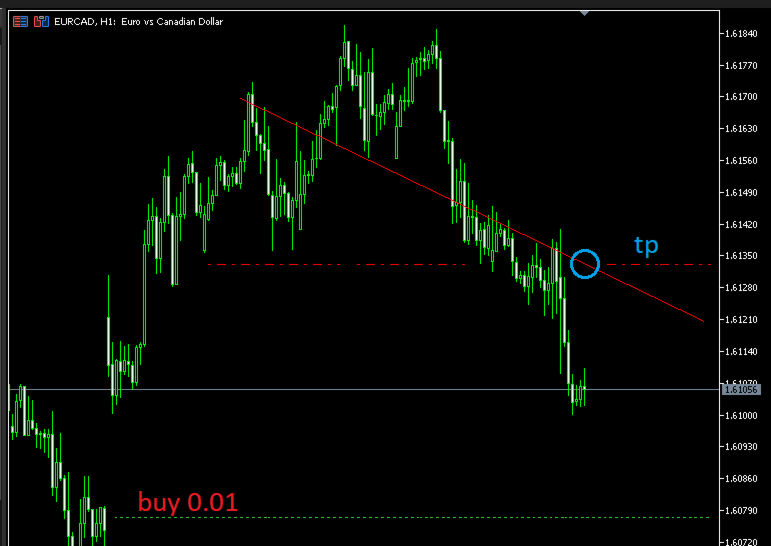
Este script para MetaTrader 5 permite proyectar el precio actual de cualquier línea de tendencia presente en el gráfico y asignarlo automáticamente como Take Profit (TP) a las posiciones abiertas que cumplan con los criterios de filtrado seleccionados.

Es una herramienta imprescindible para traders que proyectan sus objetivos de salida basándose en estructuras diagonales, canales de precio, directrices de tendencia o líneas de soporte/resistencia inclinadas en tiempo real.

¿Cómo funciona?

  1. Lectura y Proyección: El script localiza la línea de tendencia en el gráfico mediante su nombre exacto. A continuación, obtiene la proyección vertical de esa línea en el tiempo actual ( TimeCurrent() ).

  2. Normalización Automática: Ajusta el precio detectado utilizando la precisión exacta en decimales ( _Digits ) del símbolo actual.

  3. Validación de Seguridad: Verifica si la modificación es jurídicamente lógica para el tipo de posición (por ejemplo: para un BUY , el TP debe ser superior al precio actual; para un SELL , debe ser inferior).

  4. Modificación de TP: Aplica el nuevo valor de Take Profit respetando y manteniendo intacto el Stop Loss (SL) que ya tenía la orden.

Parámetros de Entrada (Inputs)

  • InpTrendlineName (Predeterminado: "MiLineaTP" ) Nombre exacto del objeto línea de tendencia dibujado en el gráfico.

  • InpModifyTP (Predeterminado: false ) Modo de seguridad:

    • false : Modo Prueba / Simulación. Solo calcula y muestra en el terminal el precio proyectado de la línea sin modificar ninguna orden.

    • true : Modo Ejecución Real. Aplica los cambios de TP en las posiciones filtradas.

  • InpTipoOperacion (Predeterminado: TODAS_LAS_ORDENES ) Filtra la dirección de las órdenes a modificar:

    • TODAS_LAS_ORDENES : Aplica tanto a Compras (BUY) como a Ventas (SELL).

    • SOLO_COMPRAS : Modifica exclusivamente órdenes de Compra.

    • SOLO_VENTAS : Modifica exclusivamente órdenes de Venta.

  • InpFiltroModo (Predeterminado: POR_MAGIC_NUMBER ) Define cómo se seleccionarás las posiciones a modificar:

    • POR_MAGIC_NUMBER : Modifica según el identificador de Expert Advisor o posiciones manuales.

    • POR_TICKETS : Modifica únicamente un grupo de tickets específicos.

  • InpMagicNumber (Predeterminado: 0 ) Número mágico a filtrar. Usa 0 para modificar posiciones abiertas manualmente.

  • InpTicketsList (Predeterminado: "123456,789101" ) Lista de números de ticket separados por comas (se activa solo si InpFiltroModo = POR_TICKETS ).

Ejemplo de Uso Práctico

Escenario: Salida Dinámica en Canal Bajista

  1. Tienes 3 operaciones de compra abiertas en EURUSD mediante un EA con Magic Number 888 .

  2. Dibujas una línea de tendencia en la parte superior del canal y le cambias el nombre en sus propiedades a MiLineaTP . (Asegúrate de que la línea alcance la vela actual o que tenga activada la propiedad "Rayo a la derecha").

  3. Arrastras el script al gráfico con los siguientes parámetros:

    • InpTrendlineName = MiLineaTP

    • InpModifyTP = true

    • InpFiltroModo = POR_MAGIC_NUMBER

    • InpMagicNumber = 888

  4. Resultado: El script calcula dónde corta la línea diagonal justo en la vela actual, valida el nivel y actualiza instantáneamente el Take Profit de las 3 órdenes al exacto valor proyectado.

Características Principales

  • Ajuste Dinámico por Diagonal: Permite establecer objetivos Take Profit que varían dinámicamente según la pendiente de una línea.

  • Modo de Prueba Seguro ( InpModifyTP = false ): Permite verificar en los logs de la plataforma qué precio se asignaría antes de ejecutar cualquier cambio real.

  • Filtrado Avanzado de Operaciones: Modifica según tipo de orden (Buy/Sell), Magic Number o por listado de tickets separados por coma.

  • Protección de Errores de Bróker: Valida la lógica de precios Ask/Bid antes de enviar la orden para evitar rechazos por parte del servidor.

  • Soporte Multi-Decimales: Compatible con pares Forex de 3 y 5 dígitos, Índices, Criptomonedas y Metales gracias a la normalización nativa ( _Digits ).

  • Preservación del Stop Loss: Modifica el TP sin reescribir ni arriesgar el Stop Loss establecido previamente.

  • No requiere indicadores externos ni librerías DLL.

Requisitos Técnicos para la Línea

Para que el script lea el precio correctamente, la línea de tendencia debe cumplir una de estas dos condiciones:

  1. Tener activada la opción Rayo a la derecha (Ray Right) en sus propiedades.

  2. Estar dibujada de forma que el punto final alcance o supere temporalmente a la vela actual ( TimeCurrent() ).

Importante

  • Este script no genera señales de entrada ni análisis técnico por sí mismo; únicamente gestiona la salida (TP) de operaciones abiertas.

  • El script ejecuta la modificación una sola vez al ser arrastrado al gráfico. No se queda ejecutando en bucle continuo como un Expert Advisor.

  • La modificación de órdenes está sujeta a las reglas del bróker (distancia mínima de Stop Level, mercado abierto, etc.).

  • Versión: 1.11

  • Plataforma: MetaTrader 5

  • Tipo: Script ( #property script_show_inputs )

  • Autor: SPC

#property copyright "Copyright 2026"
#property link      ""
#property version   "1.11"
#property script_show_inputs

// Descripción explicativa que aparece en el cuadro de diálogo al ejecutar el script
#property description "=========================================================="
#property description "SCRIPT: Ajustar TP Según Línea de Tendencia"
#property description "=========================================================="
#property description "Este script busca una línea de tendencia en el gráfico por su"
#property description "nombre y calcula su precio en el tiempo actual."
#property description ""
#property description "Luego asigna ese precio como Take Profit (TP) a las órdenes"
#property description "filtradas según la configuración (Tipo, Magic Number o Tickets)."
#property description "=========================================================="

#include <Trade\Trade.mqh>
#include <Trade\PositionInfo.mqh>

enum ENUM_TIPO_OPERACION
{
   TODAS_LAS_ORDENES = 0, // Compras y Ventas
   SOLO_COMPRAS      = 1, // Solo Compras (BUY)
   SOLO_VENTAS       = 2  // Solo Ventas (SELL)
};

enum ENUM_FILTRO_MODO
{
   POR_MAGIC_NUMBER = 0, // Filtro por Magic Number (0 = todas / manuales)
   POR_TICKETS      = 1  // Filtro por Tickets Específicos
};

//--- PARÁMETROS DE ENTRADA
input string               InpTrendlineName = "MiLineaTP";       // Nombre exacto del objeto Línea
input bool                 InpModifyTP      = false;           // ¿Aplicar cambios de TP? (false = Solo Probar)
input ENUM_TIPO_OPERACION  InpTipoOperacion = TODAS_LAS_ORDENES; // Tipo de Operaciones a Modificar
input ENUM_FILTRO_MODO     InpFiltroModo    = POR_MAGIC_NUMBER;   // Modo de Filtrado de Ordenes

//--- Opciones según el modo de filtrado seleccionado
input ulong                InpMagicNumber   = 0;               // Magic Number (Si aplica)
input string               InpTicketsList   = "123456,789101"; // Tickets separados por comas (Si aplica)

CTrade trade;
CPositionInfo pos;

//+------------------------------------------------------------------+
//| Script program start function                                    |
//+------------------------------------------------------------------+
void OnStart()
{
   if(InpTrendlineName == "")
   {
      Print("ERROR: Debes introducir el nombre exacto de la línea de tendencia.");
      return;
   }

   if(ObjectFind(0, InpTrendlineName) < 0)
   {
      Print("ERROR: No se encontró la línea en el gráfico: ", InpTrendlineName);
      return;
   }

   datetime now = TimeCurrent();
   double price_now = ObjectGetValueByTime(0, InpTrendlineName, now, 0);

   if(price_now <= 0)
   {
      Print("ERROR: No se pudo obtener el precio de la línea. Asegúrate de que llegue a la vela actual o tenga 'Rayo a la derecha' activo.");
      return;
   }

   // CORRECCIÓN: Tipo 'int' explícito para evitar warning de conversión desde 'long'
   int digits = (int)SymbolInfoInteger(_Symbol, SYMBOL_DIGITS);
   price_now = NormalizeDouble(price_now, digits);

   Print("--------------------------------------------------");
   Print("Línea seleccionada: ", InpTrendlineName, " | Precio proyectado: ", DoubleToString(price_now, digits));

   if(!InpModifyTP)
   {
      Print("MODO PRUEBA: No se han modificado los Take Profit (InpModifyTP = false).");
      return;
   }

   int total = PositionsTotal();
   int modificados = 0;

   for(int i = 0; i < total; i++)
   {
      if(!pos.SelectByIndex(i))
         continue;

      // Filtrar solo por el símbolo del gráfico actual
      if(pos.Symbol() != _Symbol)
         continue;

      // 1. Filtro por Dirección (Compras/Ventas)
      if(InpTipoOperacion == SOLO_COMPRAS && pos.PositionType() != POSITION_TYPE_BUY)
         continue;
      if(InpTipoOperacion == SOLO_VENTAS && pos.PositionType() != POSITION_TYPE_SELL)
         continue;

      // 2. Filtro por Magic Number o por Tickets
      ulong ticket = pos.Ticket();

      if(InpFiltroModo == POR_MAGIC_NUMBER)
      {
         if(InpMagicNumber != 0 && pos.Magic() != InpMagicNumber)
            continue;
      }
      else if(InpFiltroModo == POR_TICKETS)
      {
         if(!EsTicketPermitido(ticket, InpTicketsList))
            continue;
      }

      // Validar coherencia del TP con el tipo de orden
      if(pos.PositionType() == POSITION_TYPE_BUY && price_now <= pos.PriceCurrent())
      {
         PrintFormat("Ticket %I64u omitido: El TP (%.5f) debe ser mayor al precio actual para un BUY.", ticket, price_now);
         continue;
      }
      if(pos.PositionType() == POSITION_TYPE_SELL && price_now >= pos.PriceCurrent())
      {
         PrintFormat("Ticket %I64u omitido: El TP (%.5f) debe ser menor al precio actual para un SELL.", ticket, price_now);
         continue;
      }

      // Aplicar modificación de TP respetando el Stop Loss actual
      double sl = pos.StopLoss();
      if(trade.PositionModify(ticket, sl, price_now))
      {
         modificados++;
         PrintFormat("ÉXITO: Ticket %I64u -> Nuevo TP ajustado a %.5f", ticket, price_now);
      }
      else
      {
         PrintFormat("ERROR: No se pudo modificar el TP del ticket %I64u. Código error: %d", ticket, GetLastError());
      }
   }

   PrintFormat("RESUMEN: %d TP modificados de %d posiciones procesadas.", modificados, total);
   Print("--------------------------------------------------");
}

//+------------------------------------------------------------------+
//| Función auxiliar para buscar si un ticket está en la lista      |
//+------------------------------------------------------------------+
bool EsTicketPermitido(ulong ticket, string cadena_tickets)
{
   string array_tickets[];
   ushort u_sep = StringGetCharacter(",", 0);
   int count = StringSplit(cadena_tickets, u_sep, array_tickets);

   for(int k = 0; k < count; k++)
   {
      string ticket_str = array_tickets[k];
      StringTrimLeft(ticket_str);
      StringTrimRight(ticket_str);
      
      if((ulong)StringToInteger(ticket_str) == ticket)
         return true;
   }
   return false;
}

Produits recommandés
Gold Session Levels Pro MT5 is a manual MetaTrader 5 indicator designed to display relevant intraday reference levels for XAUUSD. The indicator automatically calculates and draws the Asian range, its midpoint, the daily open, the London and New York opens, the previous trading day's high and low, and targets derived from the size of the Asian range. FEATURES - Dynamic Asian range while the configured session is active. - Range freezing after the configured Asian session close. - Asian range
FREE
ApexAlgo EA
Leonit Ajvazi
Symbol XAUUSD, AUDUSD Timeframe H1 Timeframe Retail Support YES Minimum Deposit  1000 USD (or equivalent amount in another currency) Compatible with all brokers YES (supports every account currency) Works without preset YES ApexAlgo EA is a professionally developed Expert Advisor for MT5, specifically designed for trading XAUUSD on the 1-hour timeframe. The algorithm combines modern trend-following mechanisms with precise breakout and retest strategies to efficiently identify and execute high-
FREE
Free automatic Fibonacci is an indicator that automatically plots a Fibonacci retracement based on the number of bars you select on the BarsToScan setting in the indicator. The Fibonacci is automatically updated in real time as new highest and lowest values appears amongst the selected bars. You can select which level values to be displayed in the indicator settings. You can also select the color of the levels thus enabling the trader to be able to attach the indicator several times with differe
FREE
The utility for setting a common stop loss for multiple orders. Beta version. After the test,  common take profit function will be added, orders close function will be added , and other necessary features will be added. Please do not give bad ratings to this free beta version. If you like it, give it a good rating and write to the author about any errors you find and what you would like to see in the utility. I made this utility for myself and use it daily. I am sharing it with you. A commercial
FREE
One Trade Risk Selector with Order Type and Trail(MT5) One Order Risk Selector with Order Type and Trailing stop, as optional (MT5) is a powerful, smart and simple execution Expert Advisor (EA) designed to provide precise risk management for MetaTrader 5 traders. It allows for a single trade with selected risk,   order type  , configurable stop loss, optional take profit and optional trailing stop settings, making it ideal for disciplined traders who want to keep accurate risk per trade. Key F
FREE
LT Watermark MT5
Thiago Duarte
4.79 (24)
This indicator draw a watermark on the chart, with the timeframe and symbol name. You can change everything, including add a aditional watermark. Functions: Symbol watermark: Size -  text size. Font -  text font. Color -  text color. Background text -  watermark at foreground or background mode. Horizontal correction -  x correction in pixels. Vertical correction -  y correction in pixels. Separator period X symbol -  what will separate the period from symbol. Aditional watermark: Enable custom
FREE
Hedge Copier Pro — Master EA   is the control unit of a high-speed, LOCAL trade copier for MetaTrader 5. It monitors your prop firm account and instantly broadcasts every trade event to the paired Slave EA — with ZERO latency and NO internet dependency. Designed specifically for prop firm traders, it includes a unique   REVERSE HEDGE mode : the Slave (sold separately) opens the OPPOSITE direction of every Master trade, allowing you to hedge across two accounts simultaneously and protect your fu
FREE
Donchian Breakout And Rsi
Mattia Impicciatore
4.5 (2)
Description générale Cet indicateur est une version améliorée du Canal Donchian classique, enrichie de fonctionnalités pratiques pour le trading réel. En plus des trois lignes standard (supérieure, inférieure et ligne médiane), le système détecte les cassures et les affiche visuellement avec des flèches sur le graphique, en montrant uniquement la ligne opposée à la direction actuelle de la tendance pour une lecture plus claire. L’indicateur comprend : Signaux visuels : flèches colorées lors des
FREE
Alligator Joe
Alexandre Vincent Traber
Overview Alligator Joe est un Expert Advisor d'alignement de tendance construit autour de l'indicateur Alligator classique (Jaw, Teeth, Lips). Il attend un alignement récent des trois lignes — pas un alignement déjà en place depuis un moment — puis entre dans le sens de cette tendance. Les positions sont fermées progressivement en trois étapes à mesure que le prix retraverse chaque ligne, plutôt qu'avec une sortie unique et fixe. How it works L'EA vérifie la dernière bougie clôturée : Lips, Tee
FREE
XAU VWAP Mean Reversion H4 Expert Advisor for MetaTrader 5 — Gold / XAUUSD focus Version: 1.00 What it is XAU VWAP Mean Reversion H4 is an Expert Advisor for gold on the H4 chart. Intraday VWAP mean-reversion style participation on gold H4. Built for structured automated participation — not grid , not martingale . Evaluate on your broker and risk profile before any live use. This product is a technical system . Exact thresholds and entry equations remain internal product design and are not publ
FREE
Inverse Liquidity Grab Ultimate EA
Stephen Muriithi Muraguri
5 (1)
This EA finds Fair Value Liquidity (FVL) on the chart, tracks when they get mitigated , and then looks for an inversion signal (price “fails” through the zone). When that inversion happens, it places a trade in the opposite direction of the original Liquidity gap (an Inverse FVG approach). It also lets you control when it trades using market sessions , and it can auto-close positions at New York open (all positions or profitable-only). Key advantages Clear, rule-based entries (no guessing): trad
FREE
LT Donchian Channel
Thiago Duarte
4.86 (7)
Donchian Channel is an indicator created by Richard Donchian. It is formed by taking the highest high and the lowest low of the last specified period in candles. The area between high and low is the channel for the chosen period. Its configuration is simple. It is possible to have the average between the upper and lower lines, plus you have alerts when price hits one side. If you have any questions or find any bugs, please contact me. Enjoy!
FREE
Indicator Description 4 Hull MA Color + Envelopes is a powerful trend-following indicator for MetaTrader 5 that combines four Hull Moving Averages (HMA) with Moving Average Envelopes to clearly identify market direction, trend strength, and potential reversal or pullback zones. This indicator is designed to reduce noise, react quickly to price movement, and provide a clean visual structure for professional trading.   Key Features   4 Hull Moving Averages (20, 50, 100, 200) Automatic color change
FREE
Rainbow MT5
Jamal El Alama
4 (1)
Description : Rainbow MT5 is a technical indicator based on Moving Average with period 34 and very easy to use. When price crosses above MA and MA changes color to green, then this is a signal to buy. When price crosses below MA and MA changes color to red, then this is a signal to sell. The Expert advisor ( Rainbow EA MT5 ) based on Rainbow MT5 indicator is now available here . MT4 version is available here .
FREE
Trade Dock
Sovannara Voan
5 (3)
A bot utility designed to streamline trade management. It offers auto lot calculation based on money, account risk, or fixed lot size, with order setup featuring draggable take profit, stop loss, and entry price to fit your plan. It supports Buy/Sell market, Buy/Sell limit, and Buy/Sell stop orders, with or without stop loss and take profit. Additional features include single-click breakeven, deleting positions/orders, and more, making trade management efficient and easy.
FREE
Important Lines
Terence Gronowski
4.88 (24)
This indicator displays Pivot-Lines, preday high and low, preday close and the minimum and maximum of the previous hour. You just have to put this single indicator to the chart to have all these important lines, no need to setup many single indicators. Why certain lines are important Preday high and low : These are watched by traders who trade in a daily chart. Very often, if price climbs over or falls under a preday low/high there is an acceleration in buying/selling. It is a breakout out of a
FREE
TradePulseMonitor for MetaTrader 4 & 5 Overview: TradePulseMonitor is a comprehensive, real-time dashboard indicator designed for MetaTrader 4 and MetaTrader 5. It provides traders with an at-a-glance overview of their account's financial health, risk exposure, position metrics, and historical performance. By consolidating critical data into a single, customizable on-chart dashboard, it eliminates the need to constantly check the Terminal window, allowing for faster and more informed trading de
FREE
Trade Behavior Mirror lit uniquement l'historique des transactions déjà clôturées de votre propre compte et compte un seul phénomène précis : l'ouverture d'une nouvelle position peu après une perte réalisée, avec un lot plus important que votre volume habituel. L'outil ne prédit rien et ne conseille rien. Chaque chiffre du panneau correspond à quelque chose qui s'est déjà produit sur ce compte. Comment les chiffres sont construits : l'outil lit jusqu'à 31 jours de transactions clôturées, tous s
FREE
Babel Assistant
Iurii Bazhanov
4.33 (9)
Babel assistant 1     The MT5 netting “Babel_assistant_1” robot uses the ZigZag indicator to generate Fibonacci levels on M1, M5, M15, H1, H4, D1, W1  periods of the charts , calculates the strength of trends for buying and selling. It opens a position with "Lot for open a position" if the specified trend level 4.925 is exceeded. Then Babel places pending orders at the some Fibonacci levels and places specified Stop Loss , Take Profit. The screen displays current results of work on the position
FREE
Friend of the Trend: Your Trend Tracker Master the market with Friend of the Trend , the indicator that simplifies trend analysis and helps you identify the best moments to buy, sell, or wait. With an intuitive and visually striking design, Friend of the Trend analyzes price movements and delivers signals through a colorful histogram: Green Bars : Signal an uptrend, indicating buying opportunities. Red Bars : Alert to a downtrend, suggesting potential selling points. Orange Bars : Represent cons
FREE
Spike Catch Pro
Amani Fungo
4.14 (7)
Spike Catch Pro 22:03 release updates Advanced engine for searching trade entries in all Boom and Crash pairs (300,500 and 1000) Programmed strategies improvements Mx_Spikes (to combine Mxd,Mxc and Mxe), Tx_Spikes,   RegularSpikes,   Litho_System,   Dx_System,   Md_System,   MaCross,   Omx_Entry(OP),  Atx1_Spikes(OP),   Oxc_Retracement (AT),M_PullBack(AT) we have added an arrow on strategy identification, this will help also in the visual manual backtesting of the included strategies and see ho
FREE
Breakeven Bot
Gabriel Paul Ange Perrin
Optimize your trading management with Breakeven Bot, the essential tool for active traders managing multiple positions at once. No more wasting time manually adjusting your stops—one click is all it takes to secure your profits! Main Feature: ️ "BREAKEVEN" Button – Instantly set all profitable positions to breakeven and protect your gains quickly. ️ Customization Options: Set breakeven in pips or currency, depending on your preference. Choose whether breakeven should be at the entr
FREE
TradeVision Pro
Ian Nganga Comba
TradeVisonPro Forex Analyzer Pro Tableau de bord d’analyse et de suivi des comptes de trading MT5 TradeVisonPro Forex Analyzer Pro est une solution d’analyse du trading et de suivi des comptes conçue pour les utilisateurs de MetaTrader 5. Le produit organise les données de trading MT5 dans un tableau de bord web structuré, permettant aux traders de consulter les informations du compte, de surveiller les positions ouvertes, d’analyser l’historique des transactions, de suivre les stratégies, de te
FREE
CloseAllPosition
Konstantin Chernov
4 (2)
A script for closing positions If you need to quickly close several positions, this script will make all the routine for you! The script does not have any input parameters. Allow AutoTrading before running the script. Usage: Run the script on a chart. If you need to specify the maximal deviation and the number of attempts to close positions, use the script with input parameters https://www.mql5.com/en/market/product/625 You can download MetaTrader 4 version here: https://www.mql5.com/en/market/
FREE
Symbol Watermark
Flavio Javier Jarabeck
4.63 (16)
Another request from my brotherhood was putting the name of the Symbol being seen - a little bigger - on the Chart, just to get sure that they are seeing the correct one... Mistakes pay a high price on the market... It is a very effective, and almost resource-null-consuming indicator that displays the current Symbol Name and Timeframe in almost any position of your Chart, with any color, and any Font Size... And also you can change the divisor character that is presented between the Symbol Name
FREE
Are you tired of drawing trendlines every time you're analyzing charts? Or perhaps you would like more consistency in your technical analysis. Then this is for you. This indicator will draw trend lines automatically when dropped on a chart. How it works Works similar to standard deviation channel found on mt4 and mt5. It has 2 parameters: 1. Starting Bar 2. Number of bars for calculation The   starting bar   is the bar which drawing of the trend lines will begin, while the   number of bars for c
FREE
Macd Rsi Expert
Lakshya Pandey
5 (1)
MACD RSI Optimized EA is a free, fully automated trading robot designed to capture trends using a classic combination of indicators. By merging the trend-following capabilities of the MACD (Moving Average Convergence Divergence) with the momentum filtering of the RSI (Relative Strength Index), this EA aims to filter out market noise and enter trades with higher probability. This version has been specifically optimized for the month of October on the M15 (15-minute) timeframe and performs best on
FREE
Triple Indicator Pro
Ebrahim Mohamed Ahmed Maiyas
3.67 (3)
Triple Indicator Pro: ADX, BB & MA Powered Trading Expert Unlock precision trading with Triple Indicator Pro, an advanced Expert Advisor designed to maximize your market edge. Combining the power of the ADX (trend strength), Bollinger Bands (market volatility), and Moving Average (trend direction), this EA opens trades only when all three indicators align 1 - ADX (Average Directional Index) indicator – This indicator measures the strength of the trend, if the trend is weak, the expert avoids
FREE
Эксперт  MACD_LevelTrader MT5   создан для торговле валютной пары XAUUSD. Данная версия это наработки того, что можно извлечь  из  индикатора MACD и Moving Average.  Важно   перед тестированием изменить настройку с 1000 на 5000                       Offset in points UP from SMA200 for sell              5000                       Offset in points DOWN from SMA200 for buy        5000   Тайм фрейм  М5. Два варианта логики, П араметр  true=вход по уровню  MACD +   SMA200, false=вход по MACD  Тестиру
FREE
TradeDeck Lot Calculator
Joaquin Nicolas Metayer
LotCalc is a minimalist MT5 indicator designed for fast, precise position sizing. Set your risk amount in dollars, click the button, then click your entry and stop-loss levels directly on the chart — the lot size and point distance are calculated and displayed instantly. No clutter, no extra panels, just the one tool you actually need before placing a trade.
FREE
Les acheteurs de ce produit ont également acheté
Trade Assistant MT5
Evgeniy Kravchenko
4.41 (216)
It helps to calculate the risk per trade, the easy installation of a new order, order management with partial closing functions, trailing stop of 7 types and other useful functions. Additional materials and instructions Installation instructions - Application instructions - Trial version of the application for a demo account Line function -   shows on the chart the Opening line, Stop Loss, Take Profit. With this function it is easy to set a new order and see its additional characteristics bef
Bienvenue sur Trade Manager EA, l’outil ultime de gestion des risques conçu pour rendre le trading plus intuitif, précis et efficace. Ce n’est pas seulement un outil d’exécution d’ordres ; c’est une solution complète pour la planification des trades, la gestion des positions et le contrôle des risques. Que vous soyez débutant, trader expérimenté ou scalpeur ayant besoin d’une exécution rapide, Trade Manager EA s’adapte à vos besoins, offrant une flexibilité sur tous les marchés, des devises et i
================================================================================ POC BREAKOUT - V20.72. Full Professional Grade Toolkit ================================================================================ POC Breakout is a full MetaTrader 5 trading dashboard for discretionary traders who want breakout signals, Point of Control (POC) context, volume profiles, order flow, market structure, news, alerts, and advanced trade planning in one professional workspace. Attached directly to you
Local Trade Copier EA MT5
Juvenille Emperor Limited
4.94 (148)
Découvrez une expérience exceptionnellement rapide de copie de trades avec le   Local Trade Copier EA MT5 . Avec sa configuration facile en 1 minute, ce copieur de trades vous permet de copier des trades entre plusieurs terminaux MetaTrader sur le même ordinateur Windows ou Windows VPS avec des vitesses de copie ultra-rapides de moins de 0.5 seconde. Que vous soyez un trader débutant ou professionnel, le   Local Trade Copier EA MT5   offre une large gamme d'options pour le personnaliser en fonc
Version Bêta Le Telegram to MT5 Signal Trader est presque prêt pour la sortie officielle en version alpha. Certaines fonctionnalités sont encore en développement et vous pourriez rencontrer de petits bugs. Si vous rencontrez des problèmes, merci de les signaler, vos retours aident à améliorer le logiciel pour tout le monde. Telegram to MT5 Signal Trader est un outil puissant qui copie automatiquement les signaux de trading depuis des chaînes ou groupes Telegram vers votre compte MetaTrader 5 .
TradePanel MT5
Alfiya Fazylova
4.88 (167)
Trade Panel est un assistant commercial multifonction. L'application contient plus de 50 fonctions de trading pour le trading manuel et permet d'automatiser la plupart des tâches commerciales. Instructions d'utilisation + tutoriel vidéo : https://www.mql5.com/fr/blogs/post/762589 Version d'essai de l'application pour un compte démo : https://www.mql5.com/fr/blogs/post/762644 Comment installer l'application : https://www.mql5.com/fr/blogs/post/762645 Comment tester l'application en mode visuel :
Astro Trade MT5
Indra Maulana
5 (3)
25% discount on the release of the tool: only for the next 3 buyers Send a message to receive a demo version. AstroTrade Trading Assistant AstroTrade is a comprehensive multi-functional trading utility developed for the MetaTrader 5 platform. It integrates essential tools for trade execution, risk management, and technical monitoring into a single unified interface. The application is designed to assist traders in managing their daily operations through a visual and structured environment. Vi
Telegram to MT5 Multi-Channel Copier   copie automatiquement les signaux de trading de vos canaux Telegram directement vers MetaTrader 5. Pas de bots, pas d'extensions de navigateur, pas de copie manuelle. Un signal arrive sur Telegram et l'EA ouvre le trade dans votre terminal en quelques secondes. Le produit comprend deux composants : une application Windows qui écoute vos canaux Telegram, et cet Expert Advisor qui exécute les signaux dans votre terminal MT5. Une version MT4 est également disp
Telegram To MT5 Ultra
Mirel Daniel Gheonu
5 (4)
Telegram To MT5 — Copieur de signaux Transformez les appels de trading de vos canaux Telegram en véritables ordres MT5 — automatiquement, sur autant de comptes que vous le souhaitez, avec le risque et les règles entièrement sous votre contrôle. Telegram To MT5 relie les canaux VIP / de signaux que vous suivez déjà sur Telegram à votre terminal MetaTrader 5. Une application de bureau compagnon gratuite lit les messages (même des canaux qui bloquent les bots), et cet Expert Advisor les exécute sur
The product will copy all telegram signal to MT5 ( which you are member) , also it can work as remote copier.  Easy to set up, copy order instant, can work with almost signal formats, image signal,  s upport to translate other language to English Work with all type of channel or group, even channel have "Restrict Saving Content", work with  multi channel, multi MT5 Work as remote copier: with signal have ticket number, it will copy exactly via ticket number. Support to backtest signal. How to s
Anchor Trade Manager
Kalinskie Gilliam
5 (8)
Anchor: The EA Manager Your EAs manage their own trades. Anchor manages the account around them. Anchor gives you one place to control your EAs, manage risk and decide when trading is allowed. Any EA, any vendor, any broker or symbol. No source-code changes required. The Problem Most EAs only know what they are doing. They cannot see when another EA is already trading, when several EAs open and are stacking risk or when the account has reached your loss limit. Even using just one EA, it may not
Signal Trading View to MT5 Pro
Mirel Daniel Gheonu
4.5 (2)
Signal TradingView to MT5 Pro Automator Exécution professionnelle instantanée entre TradingView et MetaTrader 5 Automatisez votre stratégie de trading avec le pont de communication le plus robuste entre les alertes TradingView et l'exécution réelle sur MT5. Conçu pour les traders qui exigent vitesse, flexibilité et une gestion des risques impeccable, cet Expert Advisor transforme tout message d'alerte en un ordre au marché ou à cours limité précis. POINTS FORTS ET AVANTAGES Moteur d'analyse univ
Exp COPYLOT CLIENT for MT5
Vladislav Andruschenko
3.97 (35)
Copieur professionnel de trades pour MetaTrader 5 Un copieur de trades rapide, professionnel et fiable pour MetaTrader . COPYLOT permet de copier des trades Forex entre les terminaux MT4 et MT5 avec prise en charge des comptes Hedge et Netting . La version MT5 de COPYLOT prend en charge : - MT5 Hedge → MT5 Hedge - MT5 Hedge → MT5 Netting - MT5 Netting → MT5 Hedge - MT5 Netting → MT5 Netting - MT4 → MT5 Hedge - MT4 → MT5 Netting Version MT4 Description complète + DEMO + PDF Comment acheter Comme
Envoyez-moi un message après l’achat pour recevoir le kit complet du manuel + un essai de 3 jours de l’API OpenAI pour tester les fonctionnalités d’IA + un autre cadeau bonus Le prix actuel est un tarif promotionnel limité pour la mise à jour du relancement d’août — sécurisez votre édition maintenant avant l’augmentation du prix. Prochain prix : $340 C’est complètement différent de tous les panneaux de trading que vous avez pu essayer ou voir sur le marché. C’est l’un des panneaux de trading al
HINN MagicEntry Extra
ALGOFLOW OÜ
4.72 (18)
HINN MAGIC ENTRY – the ultimate tool for entry and position management! SIMPLE. FASTEST. INTUITIVE. MAX AUTOMATED. Place orders by selecting a level directly on the chart! full description   ::  demo-version  :: 60-sec-video-description Key features: - Market, limit, and pending orders - Automatic lot size calculation - Automatic spread and commission accounting - Unlimited partitial take-profits  - Breakeven and trailing stop-loss and take-profit  functions - Invalidation leves - Intuitive, a
Trade copier MT5
Alfiya Fazylova
4.58 (52)
Trade Copier est un utilitaire professionnel conçu pour copier et synchroniser les commandesentre les comptes de trading. Les commandes sont copiées du compte/terminal du fournisseur vers le compte/terminal du destinataire, qui sont installés sur le même ordinateur ou vps. PROMOTION - Si vous avez déjà acquis le "Trade copier MT5", vous pouvez obtenir le "Trade copier MT4" gratuitement (pour la copie MT4 > MT5 et MT4 < MT5). Pour obtenir des informations plus détaillées sur les conditions, veuil
Trade Dashboard MT5
Fatemeh Ameri
4.95 (132)
Trade Dashboard simplifies how you open, manage, and control your trades, with built-in lot size calculation. It allows you to execute trades, manage risk, and control positions directly on the chart, with tools such as partial close, breakeven, and trailing stop. Designed to reduce manual work and help you stay focused on your trading decisions. A demo version is available for testing. Detailed explanations of features are provided within the MQL5 platform. Installation instructions are include
Seconds Chart MT5
Boris Sedov
4.61 (18)
Seconds Chart - un outil unique pour créer des graphiques en secondes dans MetaTrader 5 . Grâce à Seconds Chart , vous pouvez créer un graphique avec une période définie en secondes, offrant une flexibilité et une précision idéales pour l'analyse, indisponibles sur les graphiques standards en minutes ou en heures. Par exemple, la période S15 indique un graphique avec des bougies d'une durée de 15 secondes. Vous pouvez utiliser n'importe quels indicateurs et experts advisors compatibles avec les
Power Candles Strategy Scanner - Outil de recherche de configurations multi-symboles à optimisation automatique Le Power Candles Strategy Scanner utilise le même moteur d'auto-optimisation que celui qui alimente l'indicateur Power Candles, pour chaque symbole de votre Market Watch, en parallèle. Un panneau vous indique quels symboles sont statistiquement négociables à l'instant, quelle stratégie est la plus performante pour chacun, la paire Stop Loss / Take Profit optimale, et vous alerte dès qu
Farmed Hedge Yield Farming | All Markets (Manual - Hybrid - Semi/Automated EA) VERIFIED TRADING RESULTS - Farmed Hedge Yield Axi Copy:  https://www.mql5.com/en/signals/2356376 - Farmed Hedge Yield Exn Copy:   https://www.mql5.com/en/signals/2356404 - Farmed Hedge Yield V Copy:  https://www.mql5.com/en/signals/2357156 * Before purchasing, please feel free to send me a message if you have any questions about the product or setup. ** After purchase,  Contact me via private message to receive t
Timeless Charts
Samuel Manoel De Souza
5 (8)
Timeless Charts est un utilitaire de trading tout-en-un destiné aux traders professionnels. Il combine des types de graphiques personnalisés tels que les graphiques en secondes et Renko avec une analyse avancée du flux d’ordre s utilisant Footprints , Clusters , Profils de Volume , études VWAP et outils d’analyse ancrés pour une compréhension plus approfondie du marché. Le trading et la gestion des positions sont effectués directement depuis le graphique via un panneau intégré de gestion des ord
Premium Trade Manager - Le panneau de trading avec un coach intégré Premium Trade Manager intègre un coach de trading directement dans votre graphique, avec un moteur d'exécution complet en dessous. Configurez le trade comme vous le faites toujours, puis laissez Max, votre coach de trading IA, analyser ce setup exact par rapport à votre compte en direct et vous donner un verdict clair avant de vous engager : le stop est-il discipliné, le risque est-il raisonnable, une publication à fort impact e
Trading View ToMT5
Mirel Daniel Gheonu
The Ultimate TradingView to MT5 Bridge Automation Arrêtez le trading manuel et les problèmes de latence. TradingView to MT5 Copier PRO est la passerelle (bridge) la plus rapide et la plus fiable pour exécuter vos alertes TradingView directement sur MetaTrader 5. Que vous utilisiez des indicateurs personnalisés, des scripts du Testeur de Stratégie ou des dessins manuels, cet Expert Advisor (EA) exécute vos trades instantanément grâce à la technologie WebSocket Haute Vitesse . Contrairement aux co
Quant AI Agents
Ho Tuan Thang
5 (1)
Quant AI Agents are independent trading Expert Advisors. Instead of trading using a fixed strategy like other conventional EAs, Quant AI Agents   is a   multi-agent AI trading framework   that turns natural-language strategy prompts into live.  WANT THE SAME RESULTS AS MY LIVE SIGNAL?   Use the exact same brokers I do:   IC MARKETS , IC TRADING   .  Unlike the centralized stock market, Forex has no single, unified price feed.  Every broker sources liquidity from different providers, creating un
Footprint Chart Pro — Professional OrderFlow EA for MetaTrader 5 Version 6.34 | Professional tool for real traders | Institutional-Grade Visualization DEMO USERS - PLEASE SELECT EVERY TICK / REAL TICK WHEN TESTING AND YOU HAVE DOWNLOADED HISTORICAL DATA. IF YOU SEE A WAITING SCREEN AND IT IS NOT DOWNLOADING, IT MEANS YOU HAVE LOW HISTORICAL DATA. TRY 1 MIN AND 5 MIN FIRST ON 1 DAY DATA. ONE DAY DATA SHOULD BE THE NEWEST AND MOST CURRENT DATE. PLEASE WAIT UNTIL THE MARKET HAS ROLLED OVER PERIOD.
Trade Copier Ultimate
Janitha Sandaruwan Amaradasa Wickramasingha Arachchilage
5 (5)
Trade Copier Ultimate - Telegram to MT5 Signal Copier Trade Copier Ultimate automatically copies Telegram trading signals into MetaTrader 5. The EA can read signal messages, detect the symbol, order type, entry price, Stop Loss, Take Profit levels and selected update commands, then execute or manage the trade in MT5 using your lot and risk settings. It is more than a basic Telegram to MT5 copier. TCU also supports Bot API and user-account Bridge workflows, Discord signal routing, local MT5 to MT
SAFETYLOCK for MetaTrader 5 — système premium de verrouillage protecteur et de gestion des risques SAFETYLOCK for MT5 est un utilitaire professionnel pour MetaTrader 5 qui crée automatiquement un ordre en attente protecteur opposé pour une position déjà ouverte. Lorsqu’un trader ou un autre Expert Advisor ouvre une position, SAFETYLOCK peut placer un Buy Stop ou un Sell Stop protecteur à la distance spécifiée. Si le marché évolue contre la position initiale, cet ordre est activé et forme une str
News Filter EA
Rashed Samir
5 (1)
News Filter EA: Advanced Algo Trading Assistant News Filter EA is an advanced algo trading assistant designed to enhance your trading experience. By using the News Filter EA , you can integrate a Forex economic news filter into your existing expert advisor, even if you do not have access to its source code. In addition to the news filter, you can also specify trading days and hours for your expert. The News Filter EA also includes risk management  and equity protection features. MT4 Version Ma
The News Filter MT5
Leolouiski Gan
4.78 (23)
Ce produit filtre tous les conseillers experts et les graphiques manuels pendant les heures de publication des actualités, de sorte que vous n'avez pas à vous soucier des pics de prix soudains qui pourraient détruire vos configurations de trading manuelles ou les transactions entrées par d'autres conseillers experts. Ce produit est également livré avec un système de gestion des ordres complet qui peut gérer vos positions ouvertes et vos ordres en attente avant la publication de toute actualité.
Trade Assistant 38 in 1
Makarii Gubaydullin
4.91 (23)
Outil multifonctionnel : Calculateur de Lot, Ordres Grid, Ratio R/R, Gestionnaire de Trades, Zones d'Offre et de Demande, Price Action et bien plus Version Démo   |   Manuel d'Utilisation L'Assistant de Trading   ne fonctionne pas dans le testeur de stratégies : vous pouvez télécharger la   Version Démo ICI  pour tester l' utilitaire . Contactez-moi   pour toute question  / idée d'amélioration / en cas de bug détecté Si vous avez besoin d'une version MT4, elle est disponible ici Simplifiez, acc
Plus de l'auteur
NivelesFibonacci
Sergio Piqueras Cuevas
NIVELES FIBONACCI 1.14 — Proyección de niveles Fibonacci personalizados Este script para MetaTrader 5 permite calcular y dibujar automáticamente niveles de Fibonacci personalizados a partir de dos precios conocidos y sus correspondientes niveles Fibonacci. La herramienta utiliza una relación matemática lineal entre los dos puntos introducidos para proyectar cualquier nivel Fibonacci que el usuario desee. ¿Cómo funciona? El usuario debe introducir: Precio del Punto A Nivel Fibonacci asignado al P
FREE
Nivelesfibonacci2
Sergio Piqueras Cuevas
NIVELESFIBONACCI2.12 — Órdenes Pendientes sobre Niveles Fibonacci Personalizados Este script para MetaTrader 5 permite colocar automáticamente órdenes pendientes de compra o venta utilizando como referencia los niveles Fibonacci horizontales previamente dibujados en el gráfico. El script está diseñado para funcionar conjuntamente con NIVELESFIBONACCI1.1 , aunque puede utilizar cualquier conjunto de líneas horizontales que siga la misma estructura de nombres mediante el prefijo configurado. La pr
FREE
TendenciaPrecioFecha
Sergio Piqueras Cuevas
AutoFindBestTrendLine — Detector Automático de Líneas de Tendencia Descripción general: AutoFindBestTrendLine es una utilidad para MetaTrader 5 que analiza el historial del gráfico y detecta automáticamente la mejor línea de tendencia posible, ya sea de máximos (resistencias), mínimos (soportes) o ambos. El script identifica los dos puntos más relevantes y dibuja una línea óptima basada en el número de toques reales sobre el precio. Ventajas principales: Detección automática de líneas de tendenc
FREE
Filtrer:
Aucun avis
Répondre à l'avis