Trade Execution And Management Ea

Management
The complete trade execution and position management toolkit for MetaTrader 5.
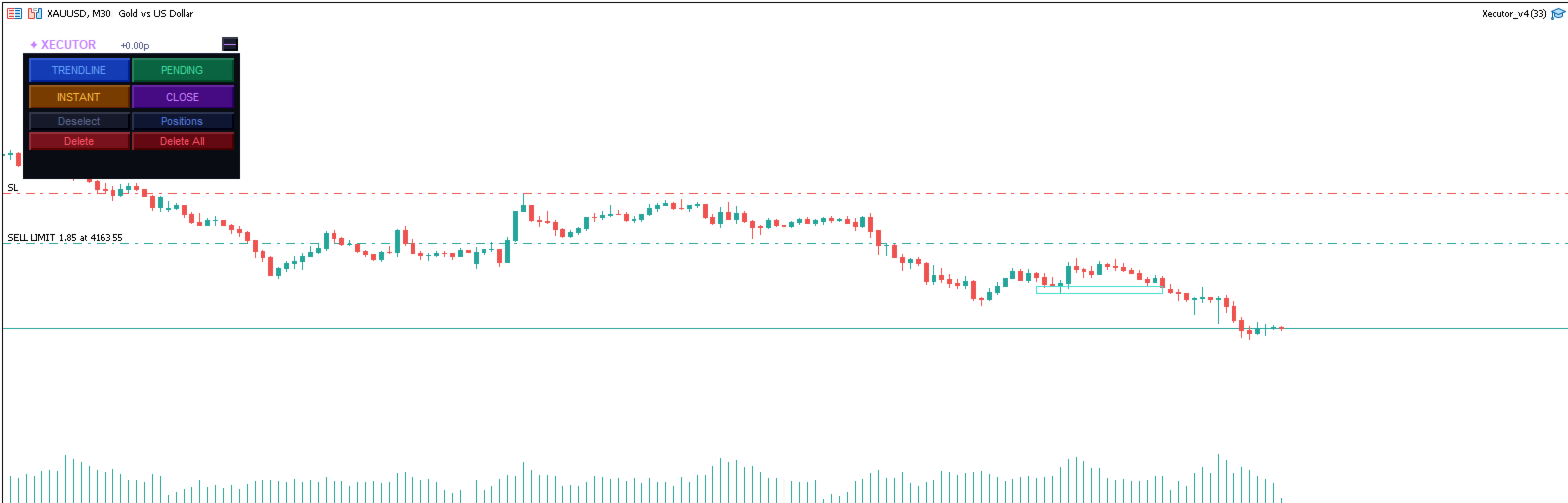
TEAM EA replaces your entire manual trading workflow with a single floating panel — from precision entry timing to live position management, all from one unified interface directly on your chart.
---
Overview
TEAM EA is a professional-grade Expert Advisor built for active traders who need speed, precision, and control. It provides four distinct execution modes, a live positions dashboard with automated management tools, and a minimizable interface that stays out of your way when you don't need it.
---
Execution Modes
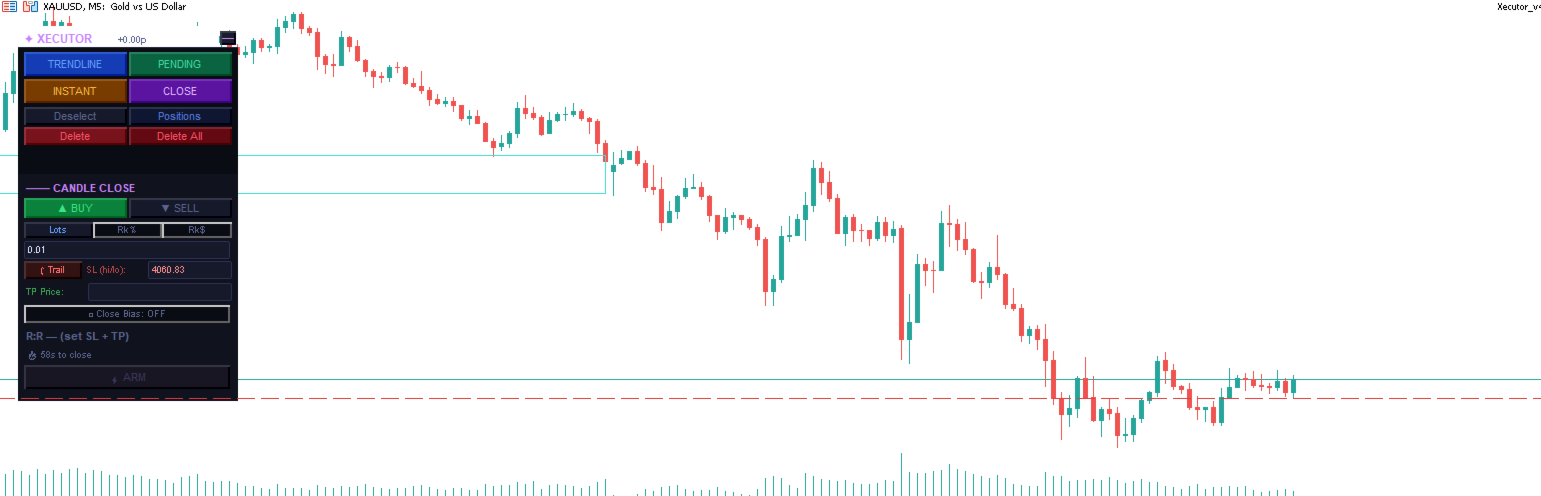
⚡ Candle Close (CC)
Fire orders at the exact moment a candle closes — the most important execution point for price action traders.
Set direction, SL and TP once, then ARM any combination of timeframes simultaneously
Each armed timeframe fires independently at its own candle close
Trailing SL tracks the candle's high/low in real time while unarmed
Close Bias filter — skips the trade if the candle closes against your direction
Per-timeframe pills show all armed slots at a glance — click any pill to disarm
R:R validation with minimum ratio enforcement before arming
▶ Instant
Execute market orders immediately with a single click.
Click BUY or SELL to auto-place the SL at the current candle's high or low
SL can be set by price level or by points distance
TP is optional — fire without a take profit for pure SL-protected entries
No minimum R:R restriction — full trader discretion
Draggable SL and TP lines directly on the chart
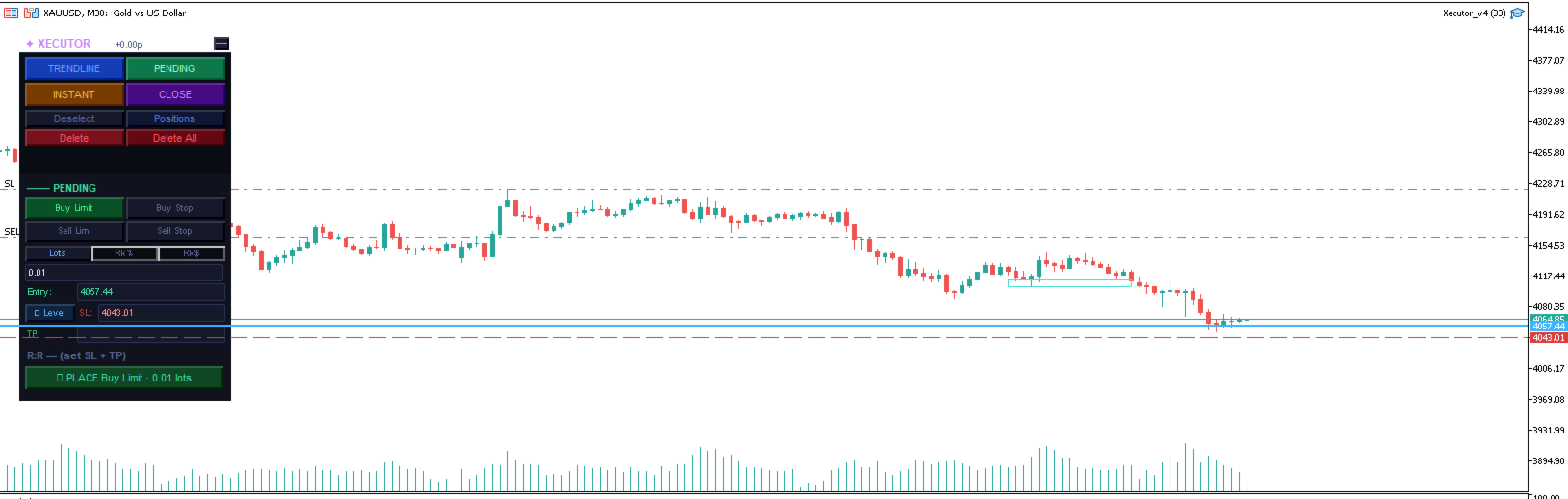
⏳ Pending
Place limit and stop orders at precise levels with full broker compatibility.
Buy Limit, Buy Stop, Sell Limit, Sell Stop
Auto-snaps entry to a sensible distance from current price based on ATR
SL configurable by price level or points
Place multiple pending orders simultaneously — each tracked as a live pill
Click any live pill to cancel that specific order
All three lines (entry, SL, TP) are draggable directly on the chart
GTC order type with broker fill mode auto-detection
📈 Trendline
Arm drawn trendlines as dynamic entry triggers — fire when price touches the line.
Draw any OBJ_TREND line on the chart, click it to select it, then ARM
Fires a market order when bid/ask comes within 1.5× spread of the line's projected price
SL by level or points — stored at arm time, resolved at fire time for accuracy
Multiple trendlines can be armed simultaneously with pill tracking
Armed lines glow gold; selected line glows cyan for clear visual feedback
Line is automatically removed from chart after firing
---
Position Management Panel
A dedicated floating panel showing all open positions and pending orders for the current symbol.
Position Rows (collapsible)
Each position shows direction, lot size, live P&L in dollars and pips — click to expand:
BE — Move SL to breakeven (only activates when position is in profit)
½ Close — Close exactly 50% of the position volume
✕ Close — Close the full position
Partial Take Profit (PTP)
Set a price target and close percentage on any open position:
Enter a price and a percentage (e.g. 4200.00 / 50%)
TEAM EA monitors every tick and fires `PositionClosePartial` when price hits the target
Fires once — shows ✓ after triggering, click to reset for another level
Pre-fill PTP — set a PTP on pending orders before they fill, so it's ready the moment the order executes
Trailing Stop
Activate a dynamic trailing stop on any position:
Enter distance in points (e.g. 150 pts)
Watermark tracks the price high/low in real time
SL only moves to improve — never widens, never moves into loss territory
Respects broker minimum stop levels
Footer
BE All — Move all open position SLs to breakeven in one click
Close All — Close every open position on this symbol
Total P&L display across all positions
---
Interface
Floating Panel
Transparent title bar showing `✦ TEAM EA` and live P&L
Drag anywhere on the chart by the title bar
All four execution modes accessible with one click
Dark theme with colour-coded modes for instant visual orientation
Minimized State
Collapses to a single customisable crossed-swords icon
Live P&L displayed above the icon when positions are open
Hides completely when no positions are active
Click the icon to instantly restore the full panel
Sword colour configurable in EA settings
Positions Panel
Opens alongside the main panel without overlapping
Collapses and expands per-position for clean display with many open trades
Shows both open positions and pending orders in one view
---
Settings
Parameter    Default    Description
MagicNumber    20250001    Unique identifier for EA-placed orders
MaxSlippage    3    Maximum slippage in points for market orders
MinRRRatio    1.0    Minimum R:R ratio required to ARM in CC and TL modes
CCEarlyMs    2000    Milliseconds before candle close to trigger CC execution
SwordColor    Gold    Colour of the minimized sword icon
---
Compatibility
Platform: MetaTrader 5
Broker: Compatible with any MT5 broker — auto-detects FOK, IOC, and RETURN fill modes
Account type: Works on Netting and Hedging accounts
Symbols: Any symbol available in Market Watch
Timeframes: All standard MT5 timeframes
---
How It Works
Attach TEAM EA to any chart
Select your execution mode — CC, Instant, Pending, or Trendline
Set your direction, SL, TP and position size
Execute, arm, or place — TEAM EA handles the rest
Monitor and manage all open trades from the Positions panel
---
TEAM EA does not use any automated strategies or signals. All trade decisions are made by the trader. This EA is a precision execution and management tool only.
Produits recommandés
Click Trading
Jawad Tauheed
5 (2)
One Click Trading – Auto TP SL Developer TraderLinkz Version 1.00 Category Utility What it does Adds missing TP and SL to your manual trades and pending orders Sets them once per ticket Lets you move TP and SL afterward Works on hedging and netting accounts Scans on every tick and reacts on trade events Why you want it You place faster entries You get consistent risk and exit targets You reduce fat finger errors You keep full manual control Quick start Attach the EA to any chart Keep TP and SL e
FREE
Breakeven Bot
Gabriel Paul Ange Perrin
Optimize your trading management with Breakeven Bot, the essential tool for active traders managing multiple positions at once. No more wasting time manually adjusting your stops—one click is all it takes to secure your profits! Main Feature: ️ "BREAKEVEN" Button – Instantly set all profitable positions to breakeven and protect your gains quickly. ️ Customization Options: Set breakeven in pips or currency, depending on your preference. Choose whether breakeven should be at the entr

FREE
Market Regime Observer est un outil professionnel d’analyse des régimes de marché. Il permet d’identifier : Tendance forte Marché en range Transition Volatilité chaotique Le système utilise : ADX EMA50 / EMA100 EMA200 ATR Analyse des bougies pour générer une analyse de marché en temps réel. Idéal pour : Traders de tendance Traders ICT / Smart Money Développeurs EA Systèmes quantitatifs ️ La version gratuite est limitée à un seul symbole. Pour : Multi-symboles Version illimitée Intégration AI /
FREE
Prop Edge Heartbeat
Nuno Madeira Amaro Pire Costa
EA to prevent inactivity violations on prop firms. This EA will scout for your most recent trade and if it is older than the number of days defined, will enter a micro lot position size 0.01 on the pair defined. It is recommended to use a tight spread pair like EURUSD. This EA will not act as long as you have at least one trade in the last X days (defined on config). This EA will not place other trades or modify existing position.
FREE
Smart SLTP ATR Trade Manager A trade management utility for MetaTrader 5 that automatically assigns Stop Loss and Take Profit levels to open positions, and trails Stop Loss as price moves in the trader's favor. Compatible with manual trades, Expert Advisors, and copy trading signals simultaneously. Overview The utility monitors all open positions on the chart and assigns SL/TP levels immediately upon trade entry, based on one of four configurable calculation modes. An optional step-based traili

FREE
Crespin V15
Crespin Davito
CRESPIN V16.1 MARKET - Système de Trading Automatisé Nouvelle Génération Découvrez le système de trading automatisé le plus abouti de la série CRESPIN. Version 16.1 - Une révolution dans la gestion automatisée pour comptes CENT. Des années de développement concentrées dans un seul outil professionnel. LIRE ABSOLUMENT TOUT LE DESCRIPTIF (Après achat ,M'écrire via la messagerie pour  recevoir la configuration  optimale  pour backtesting , demo , et réel ) POURQUOI V16.1 CHANGE TOUT pour XAUUSD Arc
FREE
Le Matrix Arrow Indicator Multi Timeframe Panel MT5 est un complément gratuit et un atout majeur pour votre Matrix Arrow Indicator MT5 . Il montre le signal Matrix Arrow Indicator MT5 actuel pour 5 périodes personnalisées par l'utilisateur et pour 16 symboles/instruments modifiables au total. L'utilisateur a la possibilité d'activer/désactiver l'un des 10 indicateurs standard dont se compose l' Indicateur de Flèche Matricielle MT5 . Tous les 10 attributs d'indicateurs standard sont également ré
FREE
V-Connect Tick Data Validator is a utility for MetaTrader 5. It checks each tick and rejects invalid data. Features - Checks bid and ask prices - Checks spread and time - Uses only MQL5 functions - Logs results in the Experts tab - Real-time filtering: - Negative or zero spreads - Stale timestamps (>60 seconds) - Reversed bid/ask - **<1ms overhead** — runs on low-spec VPS - **Journal audit trail** — "TICK PASSED" / "TICK REJECTED" How to Use Attach to a chart. In your EA: if (validate_tick(tick
FREE
Order Manager Pro : Le panneau ultime de gestion des transactions Prenez le contrôle total de votre trading manuel avec Order Manager Pro , l'utilitaire de gestion de trading tout-en-un conçu pour la vitesse, la précision et la flexibilité. Arrêtez de jongler avec plusieurs fenêtres et des calculs complexes. Ce panneau puissant place chaque fonction de trading essentielle directement sur votre graphique, vous permettant de réagir instantanément aux mouvements du marché et de gérer votre risque s
FREE
This MQL4 code is a   custom indicator   that draws multiple colored rectangles on a chart, spaced apart by a defined pip distance, and projected into the future. Here's a brief breakdown: Purpose: Draws several horizontal rectangles (zones) starting from a specified price. Rectangles are spaced apart vertically by a pip distance. Colors alternate between FirstColor and SecondColor . Rectangles can be drawn behind candles and optionally filled. Each rectangle extends into the future for a specif
FREE
TradeInfo MT5
Manuraj Dhanda
4.33 (15)
TradeInfo is a utility indicator which displays the most important information of the current account and position. Displayed information: Information about the current account (Balance, Equity, Free Margin). Current spread, current drawdown (DD), planned profit, expected losses, etc. Number of open position(s), volume (LOT), profit. Today’s and yesterday’s range. Remaining time to the next candle. Last day profit information. MagicNumber filter. Comment filter. Indicator parameters: ShowPro
FREE
Just Attach to the Chart to be able to Click Button to Close all Open Positions in your Trading Account. Change Horizontal And Vertical Pixel based positioning for Button placement on chart. Appreciate your feedback and reviews. Note: All open positions on your trading account will be closed when button pressed.  If you need help with any simple utility happy to help.  
FREE
Trade assistant pro v8
Ahmed Mohammed Bakr Bakr
FREE FREE FREE Trade Assistant MT5 – Professional Trading & Risk Management Panel Trade Assistant MT5 is an advanced trading panel designed to help traders execute orders faster, safer, and more professionally . It simplifies manual trading by combining smart order management , precise risk control , and one-click execution , making it ideal for both beginners and advanced traders. This tool does not trade automatically . Instead, it empowers you with full control while applying professional-gra
FREE
AutoLotEqualizer – Smart Position Balancing Tool AutoLotEqualizer is a precision trade management utility designed to keep your total BUY and SELL volumes balanced automatically. It detects differences between your open BUY and SELL positions and opens compensating trades — ensuring both sides stay equal in exposure. This helps grid, hedge, and basket systems maintain symmetry and control over total position risk — all while saving you time and manual effort. ️ Key Features Automatic Lot Ba
FREE
Automatic Trade Protection EA For MT5 Overview Trade Equity Guardian is a lightweight, always-on Expert Advisor that continuously monitors all open positions on your account and automatically closes any trade that breaches your predefined risk thresholds. It acts as a safety net — protecting your account from oversized positions, runaway losses, or locking in profits when targets are hit. Attach it to any chart and let it run in the background. It works alongside your other EAs and manual trades
FREE
Indicator Removal Script for MetaTrader 5 (Version 1.4) The Delete  All Indicators Script is a powerful and user-friendly tool designed for MetaTrader 5 (MT5) to instantly remove all indicators from the main chart, sub-windows, or both, with a single click. Developed by Louis MattFX , this script (Version 1.4) simplifies chart management, saving traders time and effort when resetting their workspace for fresh analysis or new trading strategies. Key Features Flexible Removal Options : Choose to c
FREE
MyFXRoom EA — Smart Position Size Calculator & Trade Execution Tool Overview MyFXRoom EA is a professional semi-automated trading tool designed to remove the guesswork and manual calculation from trade execution. Built for serious traders who manage their own entries and exits but want precision, speed, and consistency in every trade — without the complexity of a fully automated system. The EA does one thing exceptionally well: it calculates the correct position size for your exact risk toleran
FREE
AZ ATR indicator (with volume correlation bonus) Standard ATR indicator, you can enable ignoring abnormally large candles. It is possible to change the location of the displayed text in 4 corners of the chart. You can change the calculation period (days ago). Bonus - the indicator has a correlation with volumes. Can be enabled to display a possible priority at the current moment in the market. What do the values ​​mean: Positive correlation (0.3 - 1.0): 0.3-0.7 - moderate connection
FREE
SmartTrader Panel
Bhuwan Singh Kumha
The SmartTrader Panel  is a powerful and intuitive trading panel designed to streamline trade execution and risk management in MetaTrader. With its sleek and user-friendly interface, traders can quickly manage their positions, calculate risk metrics, and execute trades with precision. Key Features: One-Click Trading: Easily place Buy or Sell orders with a single click. Risk Management: Automatically calculates risk percentage, risk-reward ratio, and potential profit/loss. Customizable Trad
FREE
AQ RiskOptimizer MT5
HIT HYPERTECH INNOVATIONS LTD
4 (1)
Risk Optimizer is the absolute solution for applying risk management on your account. Bad risk management is the main reason that causes traders to lose money. Risk Optimizer calculates and suggests the correct lot size for each position according to your personal, customized risk profile. You can give directly your preferred risk as percentage (%) for each position or you can trust our algorithms to calculate and optimize according to your risk category selection. But it is not only that! Selec
FREE
Mini Panel Plus
PATRICK ANTONIO MORELO A.
4.33 (15)
Remodeling the BoletaMiniPanel, the Mini Panel Plus has the same functionalities, but is now in the form of a box that allows it to be minimized and placed anywhere on the chart. Simple Panel with Stop loss (Loss), Stop gain (Gain), Trailing stop (TS) and Breakeven (BE-P). The Lot is the number of contracts to be traded. Gain is the number, in points, at which the stop gain will be positioned. If you don't want to place a stop gain, just put 0 (zero) in its place and when you open the order it w
FREE
Very often there are situations when you need to quickly close all open positions or close only under a certain condition... The Positions Close script closes open positions according to the selected settings. You can choose to close All positions , only Buy, only Sell You can also choose by which symbols to close positions: by all symbols or only by the current one, on the chart of which the script was thrown There is a filter for closing profitable or unprofitable positions, as well as bo
FREE
Smart Gold 15M Fibonacci Retracement EA This EA is shared free of charge as a contribution to the trading community. I hope it serves as a useful tool for traders who value disciplined trading and risk management. Overview Smart Gold 15M Fibonacci Retracement EA is a fully automated Expert Advisor designed for trading XAUUSD (Gold), with recommended use on the M15 timeframe. The EA combines EMA 9 / EMA 21 trend detection with a Fibonacci Retracement entry system. Instead of entering immediately
FREE
This tool automatically calculates the lot size, the TP and SL (in pips) for you, and directly places trades. It has 5 clickable buttons: Risk percentage Variable, holds the value in percentage of the account balance you willing to risk. Example: if the value is 1% and your account balance is 1000USD, the EA will place the trade that will ensure that you only loss 10USD should the market goes against you. TP (in pips) variable, holds the value of your preferred Take Profit in pips. SL (in pips)
FREE
Morning Range Breakout (Free Version) Morning Range Breakout (Free Version) is a straightforward trading advisor that implements a breakout strategy based on the morning range. It identifies the high and low within a specified time interval (e.g., 08:00–10:00 UTC) and opens a trade on a breakout upward or downward. The free version includes core functionality without restrictions. All parameters and messages are in English, per MQL5 Market requirements. Key Features Detects morning range based
FREE
Neon Shadow EA MT5
Evgeniy Ilin
4.5 (2)
Neon Shadow — Solution de trading prête à l'emploi pour les marchés financiers Le produit est conçu pour une utilisation en mode « installer et oublier ». Le mode STATIC de base contient une stratégie intégrée qui commence à fonctionner immédiatement après l'installation sur un graphique sans paramètres supplémentaires. Convient pour tous les dépôts. Le trading est effectué dans le style Swing. Ce style de trading offre des trades rares et amples, mais beaucoup plus efficaces lors d'un trading
FREE
AZ session scalper A small but useful session indicator, designed primarily for scalping. Enable the session you plan to trade, watch the reaction of the M5/M15 candlesticks to the level of the previous trading session, and enter. We always look at the reaction of the current session to the previous one. For example, if you trade the Americas, enable the European session, and watch how one session takes away liquidity from another. Important: adjust the time to your broker's time zone in the i
FREE
Babel Assistant
Iurii Bazhanov
4.33 (9)
Babel assistant 1     The MT5 netting “Babel_assistant_1” robot uses the ZigZag indicator to generate Fibonacci levels on M1, M5, M15, H1, H4, D1, W1  periods of the charts , calculates the strength of trends for buying and selling. It opens a position with "Lot for open a position" if the specified trend level 4.925 is exceeded. Then Babel places pending orders at the some Fibonacci levels and places specified Stop Loss , Take Profit. The screen displays current results of work on the position
FREE
Breakout Londres
Victor Paul Hamilton
Osez-Vous Trader avec des Méthodes Éprouvées par le Temps au Lieu de Fantasies de Martingale ? .  La triste vérité est que les stratégies les plus rentables semblent souvent les plus ennuyeuses dans les backtests, mais les traders particuliers veulent de l'action et de l'excitation - c'est exactement pourquoi 95% d'entre eux perdent de l'argent.   Cet EA force en fait l'interaction et la compréhension de l'utilisateur - vous devez configurer correctement les horaires des sessions, comprendre le
FREE
The   Trading Sessions indicator   is a simple tool that helps to highlight a specific trading session. For example, it can be used to differentiate the European, American or Asian sessions. Main features The indicator shows a user-defined trading session. Alert notifications for the start and end of the session. Custom session time. Works on every timeframe (M1, M5, M15, M30, H1, H4, D1, W1, MN). Customizable parameters (Colors, alerts...). It can be used for creating EA. Available for MT4 an
FREE
Les acheteurs de ce produit ont également acheté
Trade Assistant MT5
Evgeniy Kravchenko
4.43 (213)
It helps to calculate the risk per trade, the easy installation of a new order, order management with partial closing functions, trailing stop of 7 types and other useful functions. Additional materials and instructions Installation instructions - Application instructions - Trial version of the application for a demo account Line function -   shows on the chart the Opening line, Stop Loss, Take Profit. With this function it is easy to set a new order and see its additional characteristics bef
Bienvenue sur Trade Manager EA, l’outil ultime de gestion des risques conçu pour rendre le trading plus intuitif, précis et efficace. Ce n’est pas seulement un outil d’exécution d’ordres ; c’est une solution complète pour la planification des trades, la gestion des positions et le contrôle des risques. Que vous soyez débutant, trader expérimenté ou scalpeur ayant besoin d’une exécution rapide, Trade Manager EA s’adapte à vos besoins, offrant une flexibilité sur tous les marchés, des devises et i
Local Trade Copier EA MT5
Juvenille Emperor Limited
4.96 (142)
Découvrez une expérience exceptionnellement rapide de copie de trades avec le   Local Trade Copier EA MT5 . Avec sa configuration facile en 1 minute, ce copieur de trades vous permet de copier des trades entre plusieurs terminaux MetaTrader sur le même ordinateur Windows ou Windows VPS avec des vitesses de copie ultra-rapides de moins de 0.5 seconde. Que vous soyez un trader débutant ou professionnel, le   Local Trade Copier EA MT5   offre une large gamme d'options pour le personnaliser en fonc
TradePanel MT5
Alfiya Fazylova
4.88 (160)
Trade Panel est un assistant commercial multifonction. L'application contient plus de 50 fonctions de trading pour le trading manuel et permet d'automatiser la plupart des tâches commerciales. Avant l'achat, vous pouvez tester la version de démonstration sur un compte de démonstration. Télécharger la version d'essai de l'application pour un compte de démonstration : https://www.mql5.com/fr/blogs/post/762644 . Instructions complètes ici . Commerce. Permet d'effectuer des opérations commerciales e
Version Bêta Le Telegram to MT5 Signal Trader est presque prêt pour la sortie officielle en version alpha. Certaines fonctionnalités sont encore en développement et vous pourriez rencontrer de petits bugs. Si vous rencontrez des problèmes, merci de les signaler, vos retours aident à améliorer le logiciel pour tout le monde. Telegram to MT5 Signal Trader est un outil puissant qui copie automatiquement les signaux de trading depuis des chaînes ou groupes Telegram vers votre compte MetaTrader 5 .
Farmed Hedge Yield Farming | All Markets (Manual - Hybrid - Semi/Automated EA) MULTI-ASSET SUPPORT Trade any asset available on your broker - Forex: Major, Minor, Exotic pairs - Crypto: BTC, ETH, XRP, SOL, BNB - Stocks: Apple, Tesla, Amazon, Google, etc. - Commodities: Gold, Silver, Oil, Gas - Indices: US30, NAS100, SPX500, DAX40 - Any CFD your broker offers VERIFIED TRADING RESULTS - Farmed Hedge Yield Axi Copy:  https://www.mql5.com/en/signals/2356376 - Farmed Hedge Yield Exn Copy:   https:/
Power Candles Strategy Scanner - Outil de recherche de configurations multi-symboles à optimisation automatique Le Power Candles Strategy Scanner utilise le même moteur d'auto-optimisation que celui qui alimente l'indicateur Power Candles, pour chaque symbole de votre Market Watch, en parallèle. Un panneau vous indique quels symboles sont statistiquement négociables à l'instant, quelle stratégie est la plus performante pour chacun, la paire Stop Loss / Take Profit optimale, et vous alerte dès qu
Exp COPYLOT CLIENT for MT5
Vladislav Andruschenko
3.94 (34)
Copieur professionnel de trades pour MetaTrader 5 Un copieur de trades rapide, professionnel et fiable pour MetaTrader . COPYLOT permet de copier des trades Forex entre les terminaux MT4 et MT5 avec prise en charge des comptes Hedge et Netting . La version MT5 de COPYLOT prend en charge : - MT5 Hedge → MT5 Hedge - MT5 Hedge → MT5 Netting - MT5 Netting → MT5 Hedge - MT5 Netting → MT5 Netting - MT4 → MT5 Hedge - MT4 → MT5 Netting Version MT4 Description complète + DEMO + PDF Comment acheter Comme
================================================================================ POC BREAKOUT - V20.72. Full Professional Grade Toolkit ================================================================================ POC Breakout is a full MetaTrader 5 trading dashboard for discretionary traders who want breakout signals, Point of Control (POC) context, volume profiles, order flow, market structure, news, alerts, and advanced trade planning in one professional workspace. Attached directly to you
Telegram to MT5 Multi-Channel Copier copie automatiquement les signaux de trading de vos canaux Telegram directement vers MetaTrader 5. Pas de bots, pas d'extensions de navigateur, pas de copie manuelle. Vous recevez un signal sur Telegram et l'EA ouvre l'opération sur votre terminal en quelques secondes. Le produit comprend deux composants : une application Windows qui écoute vos canaux Telegram, et cet Expert Advisor qui exécute les signaux sur votre terminal MT5. Une version MT4 est également
Trade Dashboard MT5
Fatemeh Ameri
4.95 (131)
Trade Dashboard simplifies how you open, manage, and control your trades, with built-in lot size calculation. It allows you to execute trades, manage risk, and control positions directly on the chart, with tools such as partial close, breakeven, and trailing stop. Designed to reduce manual work and help you stay focused on your trading decisions. A demo version is available for testing. Detailed explanations of features are provided within the MQL5 platform. Installation instructions are include
Quant AI Agents
Ho Tuan Thang
5 (1)
Quant AI Agents are independent trading Expert Advisors. Instead of trading using a fixed strategy like other conventional EAs, Quant AI Agents   is a   multi-agent AI trading framework   that turns natural-language strategy prompts into live.  WANT THE SAME RESULTS AS MY LIVE SIGNAL?   Use the exact same brokers I do:   IC MARKETS , IC TRADING   .  Unlike the centralized stock market, Forex has no single, unified price feed.  Every broker sources liquidity from different providers, creating un
YuClusters
Yury Kulikov
4.93 (43)
Attention: You can view the program operation in the free version  YuClusters DEMO .  YuClusters is a professional market analysis system. The trader has unique opportunities to analyze the flow of orders, trade volumes, price movements using various charts, profiles, indicators, and graphical objects. YuClusters operates on data based on Time&Sales or ticks information, depending on what is available in the quotes of a financial instrument. YuClusters allows you to build graphs by combining da
HINN Lazy Trader
ALGOFLOW OÜ
5 (1)
LIMITED SUMMER SALE -40% ! ONLY $470 insead of $790!  Maximum real discount! The core idea: using the user interface, you configure the parameters the chart must meet before entering a position (or positions), choose which entry models to use, and set the rules for when trading and planning should end. Lazy Trader  handles the rest: it  takes over all the routine chart watching and execution! full description  :: 3 key videos [1] ->  [2]   ->  [3] What can it do? - Understands Larry Williams
Anchor Trade Manager
Kalinskie Gilliam
5 (3)
Anchor: The EA Manager Run your full EA portfolio without conflicts, without stacked risk, and without watching every chart yourself. Anchor coordinates up to 64 Expert Advisors on a single account. Attach Anchor to any chart. Type your EA names and magic numbers in one line. Click OK. Anchor begins coordinating immediately. Built for portfolios. Built for discipline. Built for prop firms. The Problem Running multiple EAs on the same account creates risk. Two gold EAs can open opposite positions
Premium Trade Manager - Le panneau de trading avec un coach intégré Premium Trade Manager intègre un coach de trading directement dans votre graphique, avec un moteur d'exécution complet en dessous. Configurez le trade comme vous le faites toujours, puis laissez Max, votre coach de trading IA, analyser ce setup exact par rapport à votre compte en direct et vous donner un verdict clair avant de vous engager : le stop est-il discipliné, le risque est-il raisonnable, une publication à fort impact e
Trade copier MT5
Alfiya Fazylova
4.57 (46)
Trade Copier est un utilitaire professionnel conçu pour copier et synchroniser les commandesentre les comptes de trading. Les commandes sont copiées du compte/terminal du fournisseur vers le compte/terminal du destinataire, qui sont installés sur le même ordinateur ou vps. PROMOTION - Si vous avez déjà acquis le "Trade copier MT5", vous pouvez obtenir le "Trade copier MT4" gratuitement (pour la copie MT4 > MT5 et MT4 < MT5). Pour obtenir des informations plus détaillées sur les conditions, veuil
Timeless Charts
Samuel Manoel De Souza
5 (7)
Timeless Charts est un utilitaire de trading tout-en-un destiné aux traders professionnels. Il combine des types de graphiques personnalisés tels que les graphiques en secondes et Renko avec une analyse avancée du flux d’ordre s utilisant Footprints , Clusters , Profils de Volume , études VWAP et outils d’analyse ancrés pour une compréhension plus approfondie du marché. Le trading et la gestion des positions sont effectués directement depuis le graphique via un panneau intégré de gestion des ord
Seconds Chart MT5
Boris Sedov
4.61 (18)
Seconds Chart - un outil unique pour créer des graphiques en secondes dans MetaTrader 5 . Grâce à Seconds Chart , vous pouvez créer un graphique avec une période définie en secondes, offrant une flexibilité et une précision idéales pour l'analyse, indisponibles sur les graphiques standards en minutes ou en heures. Par exemple, la période S15 indique un graphique avec des bougies d'une durée de 15 secondes. Vous pouvez utiliser n'importe quels indicateurs et experts advisors compatibles avec les
HINN MagicEntry Extra
ALGOFLOW OÜ
4.73 (15)
LIMITED SUMMER SALE -40% !   ONLY $30 insead of $50!  Maximum real discount! HINN MAGIC ENTRY – the ultimate tool for entry and position management! Place orders by selecting a level directly on the chart! full description   ::  demo-version  :: 60-sec-video-description Key features: - Market, limit, and pending orders - Automatic lot size calculation - Automatic spread and commission accounting - Unlimited partitial take-profits  - Breakeven and trailing stop-loss and take-profit  functions -
Trading View ToMT5
Mirel Daniel Gheonu
The Ultimate TradingView to MT5 Bridge Automation Arrêtez le trading manuel et les problèmes de latence. TradingView to MT5 Copier PRO est la passerelle (bridge) la plus rapide et la plus fiable pour exécuter vos alertes TradingView directement sur MetaTrader 5. Que vous utilisiez des indicateurs personnalisés, des scripts du Testeur de Stratégie ou des dessins manuels, cet Expert Advisor (EA) exécute vos trades instantanément grâce à la technologie WebSocket Haute Vitesse . Contrairement aux co
Trade Manager DaneTrades
Levi Dane Benjamin
4.28 (29)
Trade Manager pour vous aider à entrer et sortir rapidement des transactions tout en calculant automatiquement votre risque. Y compris des fonctionnalités pour vous aider à éviter le sur-trading, le trading de vengeance et le trading émotionnel. Les transactions peuvent être gérées automatiquement et les mesures de performances du compte peuvent être visualisées dans un graphique. Ces fonctionnalités rendent ce panneau idéal pour tous les traders manuels et contribuent à améliorer la plateforme
The product will copy all telegram signal to MT5 ( which you are member) , also it can work as remote copier.  Easy to set up, copy order instant, can work with almost signal formats, image signal,  s upport to translate other language to English Work with all type of channel or group, even channel have "Restrict Saving Content", work with  multi channel, multi MT5 Work as remote copier: with signal have ticket number, it will copy exactly via ticket number. Support to backtest signal. How to s
AI Agent Supervisor is NOT an Expert Advisor. AI Agent Supervisor   is a   multi-agent AI risk & portfolio supervisor   that watches every EA on your account and intervenes in real time.  WANT AN AI PORTFOLIO MANAGER WATCHING YOUR FLEET 24/7?   Run your fleet on the same brokers I do:   IC MARKETS , IC TRADING   .  Unlike the centralized stock market, Forex has no single, unified price feed.  Every broker sources liquidity from different providers, creating unique data streams. The Supervisor r
Footprint Chart Pro — Professional OrderFlow EA for MetaTrader 5 Version 6.34 | Professional tool for real traders | Institutional-Grade Visualization DEMO USERS - PLEASE SELECT EVERY TICK / REAL TICK WHEN TESTING AND YOU HAVE DOWNLOADED HISTORICAL DATA. IF YOU SEE A WAITING SCREEN AND IT IS NOT DOWNLOADING, IT MEANS YOU HAVE LOW HISTORICAL DATA. TRY 1 MIN AND 5 MIN FIRST ON 1 DAY DATA. ONE DAY DATA SHOULD BE THE NEWEST AND MOST CURRENT DATE. PLEASE WAIT UNTIL THE MARKET HAS ROLLED OVER PERIOD.
Télécharger la démo fonctionnelle Copy Cat More (Chat Copieur) — Copieur de Trades (Trade Copier) MT5 est un copieur de trades local et un cadre complet de gestion du risque et d'exécution, conçu pour les défis du trading d'aujourd'hui. Des challenges de prop firm à la gestion de portefeuille personnel, il s'adapte à chaque situation grâce à une combinaison d'exécution robuste, de protection du capital, de configuration flexible et de gestion avancée des trades. Le copieur fonctionne dans les
Entry In The Zone with SMC Multi Timeframe is a real-time 2-in-1 market analysis tool that combines market structure analysis and a No Repaint BUY / SELL signal system into a single indicator, built on Smart Money Concepts (SMC) — a widely adopted framework used by professional traders to understand market structure. This indicator helps you see the market more clearly, make decisions based on structure rather than guesswork, and focus on high-probability zones where price is more likely to reac
Panneau de trading pour MetaTrader 5 — contrôle professionnel du trading en un clic depuis le graphique et le clavier Un panneau de trading avancé conçu pour les traders actifs, afin d’ouvrir, gérer et clôturer des positions bien plus rapidement qu’avec l’interface standard de MetaTrader. Cette solution s’adresse à ceux qui veulent contrôler positions, ordres en attente, profit global et exécution depuis un seul espace de travail professionnel. Il ne s’agit pas d’un simple utilitaire. C’est un
Trade Manager DashPlus
Henry Lyubomir Wallace
5 (12)
DashPlus est un outil de gestion de trading avancé conçu pour améliorer l'efficacité et la performance de vos transactions sur la plateforme MetaTrader 5. Il offre un ensemble complet de fonctionnalités, incluant le calcul des risques, la gestion des ordres, des systèmes de grilles avancés, des outils basés sur les graphiques et des analyses de performance. Fonctionnalités principales 1. Grille de récupération Implémente un système de grille flexible et de moyenne pour gérer les transactions dan
EA Auditor
Stephen J Martret
5 (3)
EA Auditor is an independent analysis tool for traders evaluating Expert Advisors and trading signals on MetaTrader 5. It audits backtest reports, reviews posted developer signals, and cross-verifies the two against each other to help traders assess strategies before committing capital. The MQL5 market offers a wide range of Expert Advisors from many developers, with varying approaches, quality, and transparency. EA Auditor provides a consistent, data-driven framework for reviewing them, answer
Plus de l'auteur
Bar Replay
Okeene Rajae Chambers
Bar Replay — Manual backtesting made simple. Bar Replay is a chart-based replay tool for MetaTrader 5 that hides future candles past a "frozen time" you control. Step forward bar by bar, jump to any historical date, or auto-play at a custom speed — and practice your strategy as if you were trading the chart live, without any lookahead bias. Whether you're refining a discretionary strategy, building screen time, or studying historical price action, Bar Replay turns any chart into a training grou
FREE
Rsi Divergence Mtf
Okeene Rajae Chambers
RSI Divergence — Multi-Timeframe Fractal Signals RSI Divergence is a professional-grade indicator that detects RSI divergence across all timeframes and confirms signals with fractal bar patterns — giving you high-probability trade entries with precision timing. What it does The indicator draws divergence trendlines directly on your RSI panel and main chart the moment a confirmed divergence pivot forms. It then scans for three fractal confirmation patterns after each divergence anchor, pinpointin
FREE
Mtf Price Action Tracker
Okeene Rajae Chambers
5 (1)
Here's the full product description text: MTF PA Tracker Monitor up to 10 symbol/timeframe combinations — all from a single chart window. MTF PA Tracker renders live, miniature price-action charts directly on your MT5 chart as an overlay panel. No extra windows, no tab switching. Everything you need to read the market across multiple timeframes is in one place, always visible. What It Does The indicator displays up to 10 fully independent mini-charts , each with its own symbol and timeframe. Yo
FREE
MacroEdge Pro
Okeene Rajae Chambers
Fundamental Bias Dashboard for MetaTrader 5 Overview MacroEdge Pro is a comprehensive fundamental analysis panel that surfaces macro data, institutional positioning, and session timing in a single clean dashboard — directly on your chart. Designed for discretionary traders who need economic context without switching between tabs, terminals, or external tools. Rather than displaying raw numbers, MacroEdge Pro interprets them: beats vs misses, consecutive streaks, COT trend direction, kill zone ti
FREE
Checklist Indicator
Okeene Rajae Chambers
This indicator displays a customizable checklist directly on your chart, helping you stay disciplined and organized during trading. You can define your own list of tasks, position it anywhere on the screen, and adjust the appearance to match your setup. It’s ideal for pre-trade routines, strategy rules, or reminders to follow your trading plan. The indicator automatically manages and cleans up its text labels, ensuring no leftover objects remain when it is removed or updated.
FREE
Filtrer:
Aucun avis
Répondre à l'avis