
Interactive Moving Average
- Indicateurs
-
Yasumuro Ayaka
 Welcome to ForexFanclub (FFC)! 🚀
We develop high-quality, practical, and lightweight trading tools designed to optimize your MetaTrader experience. Our goal is to provide traders with reliable utilities that enhance market analysis and streamline daily trading routines. - Version: 1.0
ForexFanclub(FFC) : For detailed instructions and our official website, please visit my profile!
InteractiveMA: Real-Time Moving Average Control
Stop wasting time opening settings dialogs just to tweak your Moving Average. InteractiveMA puts complete control of your trend analysis directly at your fingertips, allowing you to cycle through MA types and periods instantly on the chart.
Whether you are a scalper needing rapid adjustments or a long-term trader refining your entry, this tool makes your technical analysis fluid and efficient.
Key Features
-
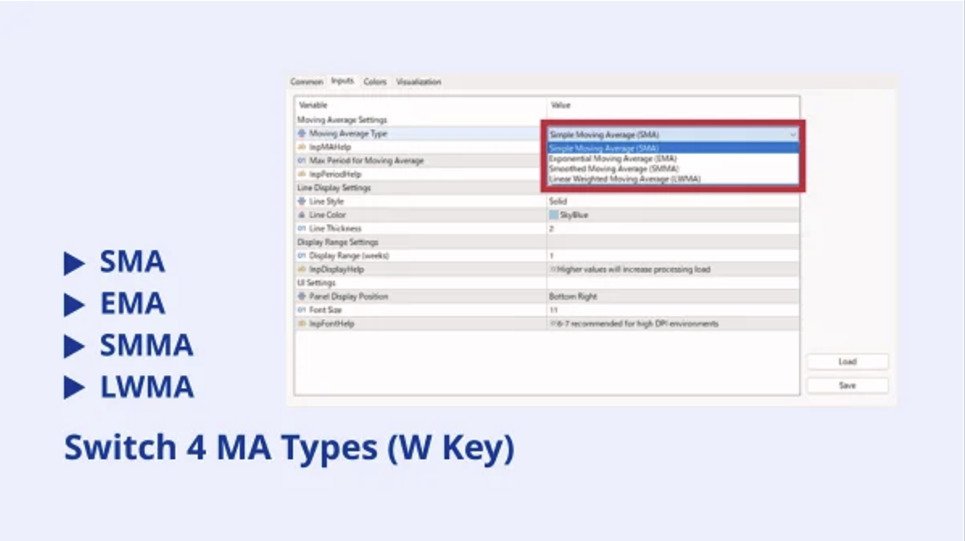
Keyboard-Controlled Switching: Use your keyboard to change settings on the fly. No more clicking through menus—keep your eyes on the price action.
-
Four MA Methods: Instantly toggle between SMA, EMA, SMMA, and LWMA with a single key press.
-
Precision Adjustment: Fine-tune your period length (up or down) incrementally, allowing you to find the "sweet spot" for any timeframe or asset instantly.
-
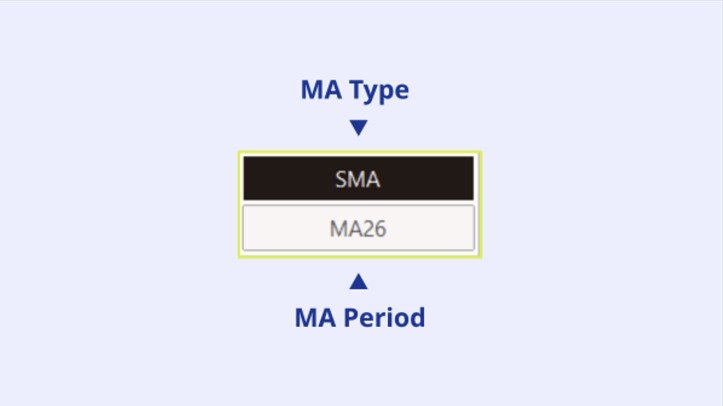
Clean, Integrated UI: A sleek, draggable control panel displays your current settings, keeping your workspace organized without cluttering your view.
-
High-Performance Code: Built for speed, ensuring zero lag even on lower-end hardware or complex chart setups.
Input Parameters
| Parameter | Description |
| Default Method | The initial calculation method (SMA, EMA, SMMA, or LWMA) when loaded. |
| Default Period | The initial period length for the moving average. |
| Line Color | Customize the color of the MA line to match your chart theme. |
| Line Width | Set the visual thickness of the moving average line. |
| Font Size | Adjust the size of the on-screen control panel text. |
| Hotkey_Switch | The key used to cycle through MA types (Default: 'W'). |
| Hotkey_Increase | The key used to increase the period (Default: 'D'). |
| Hotkey_Decrease | The key used to decrease the period (Default: 'A'). |
This tool is developed by ForexFanClub.


































bom indicador.