Propfirm Rules Manager

═══════════════════════════════════════════════════════
PROP FIRM RULES MANAGER — Complete Challenge Rule Enforcement for MT5
═══════════════════════════════════════════════════════
Monitors every prop firm rule in real-time. Daily loss, max drawdown, profit targets, consistency, EOD rules and more. 5 firm presets built in.

──────────────────────────────────────────────────

Try Before You Buy:

You can download and test the PROP FIRM RULES MANAGER free demo version on a demo account before purchasing.

For MetaTrader 5:
Download: 

PROP FIRM RULES MANAGER.ex5   

How to install the trial:

  1. Download the   PROP FIRM RULES MANAGER.ex5  file above.
  2. In MetaTrader: File → Open Data Folder → MQL5/Experts
  3. Paste the trial file into that folder, then restart MetaTrader.
  4. The trial is fully functional for 12 hours per demo account.

To reset the trial period (demo accounts only):
MetaTrader → Tools → Global Variables → Ctrl+A → Delete.
Important: Only do this on a non-critical demo account. Never delete global variables on a live or prop firm challenge account — other EAs may rely on them.

The trial version will refuse to run on a live or prop account. To use PROP FIRM RULES MANAGER on a real account, please purchase the full version above.

Contact  support:  MQL5  || For your Comprehensive Installation & User Guide 

────────────────────────────────────────────────────────


You already know how to trade.

That's not why prop firm accounts get blown. They get blown because a single session ran too long. Because you were watching the chart and not the drawdown. Because you knew the rule — you just couldn't watch both at the same time.

Prop Firm Rules Manager watches the rules so you don't have to.

It runs silently on any MT5 chart, tracks every rule your prop firm enforces, and closes everything the moment a limit is hit — whether you are at your screen or not. Not as a replacement for discipline. As a guarantee that one bad session doesn't undo weeks of work.

─────────────────────────────────────────────────────
WHAT IT COVERS
─────────────────────────────────────────────────────

Most risk managers cover daily loss and maximum drawdown. That is the floor. The full set of rules that actually trip traders up is longer — and every rule on this list has cost someone a challenge:

Daily Loss Limit
The account's daily loss compared to your day-open balance, in real time. Realized P&L plus all open floating — exactly how your firm calculates it.

Maximum Drawdown
Static or trailing, from your exact challenge starting balance. When the limit fires, all positions are closed simultaneously — not sequentially.

Profit Target Tracking
Tracks your total P&L against the target with a live progress bar. Know exactly how far you are before requesting your payout.

Daily Profit Target Lock
Lock trading automatically once you hit your daily profit goal. Some traders run past their best day trying to add more. This stops that.

Consistency Rule
Flags when a single day's profit is becoming too large a share of your total profits — the rule that catches traders at payout who didn't track it during the challenge.

Minimum Trading Days Counter
Counts your qualifying trading days automatically. Shows current vs required so you know before submission whether you meet the minimum.

Minimum Trade Holding Time
Enforces hold time rules that some firms apply. Trades closed too quickly are detected and flagged.

Intraday Trailing Drawdown
Tracks your equity high watermark within the session and fires when the trailing drawdown from that peak exceeds your limit.

EOD Static Drawdown
Checks your drawdown at end of day against a fixed baseline — some firms run this check at 5pm EST or midnight server time. Configurable to your firm's exact time.

EOD Trailing Drawdown
End-of-day check using the trailing high watermark method. Both EOD rules can run independently or together.

Max Risk Per Trade
Calculates SL-based risk for each new trade. Closes it immediately if the risk exceeds your configured percentage of balance. Protects against oversized entries.

─────────────────────────────────────────────────────
FIVE FIRM PRESETS — ONE CLICK TO CONFIGURE
─────────────────────────────────────────────────────

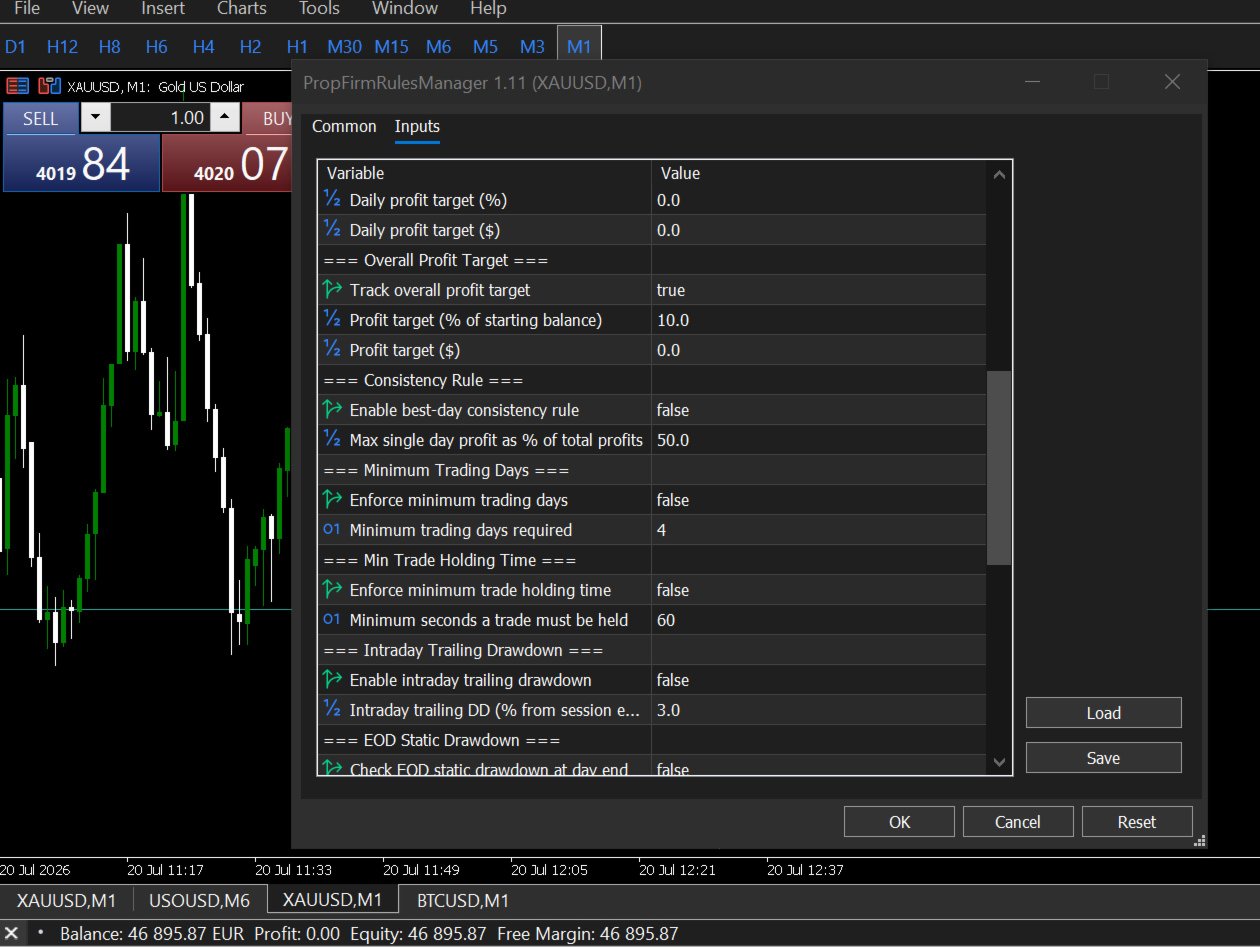
Select your firm from the settings panel. Every rule value loads instantly. No manual configuration required.

FTMO 2-Step Challenge
Daily loss: 5% | Max DD: 10% static | Target: 10% | Min days: 4

FTMO 1-Step Challenge
Daily loss: 3% | Max DD: 10% trailing | Target: 10% | Consistency: 50% | Min days: 4

FundedNext Stellar 2-Step
Daily loss: 5% | Max DD: 10% static | Target: 8% | Consistency: 40% | Min days: 5

GoatFunded 2-Step
Daily loss: 5% | Max DD: 10% static | Target: 8%

The5ers Hyper
Daily loss: 4% | Max DD: 5% static | Target: 10% | Consistency: 50%

Custom
Set every value manually for any firm not listed.

Preset values apply immediately when selected. No EA reattach needed.

─────────────────────────────────────────────────────
THE DASHBOARD
─────────────────────────────────────────────────────

Four live cards update on every tick:

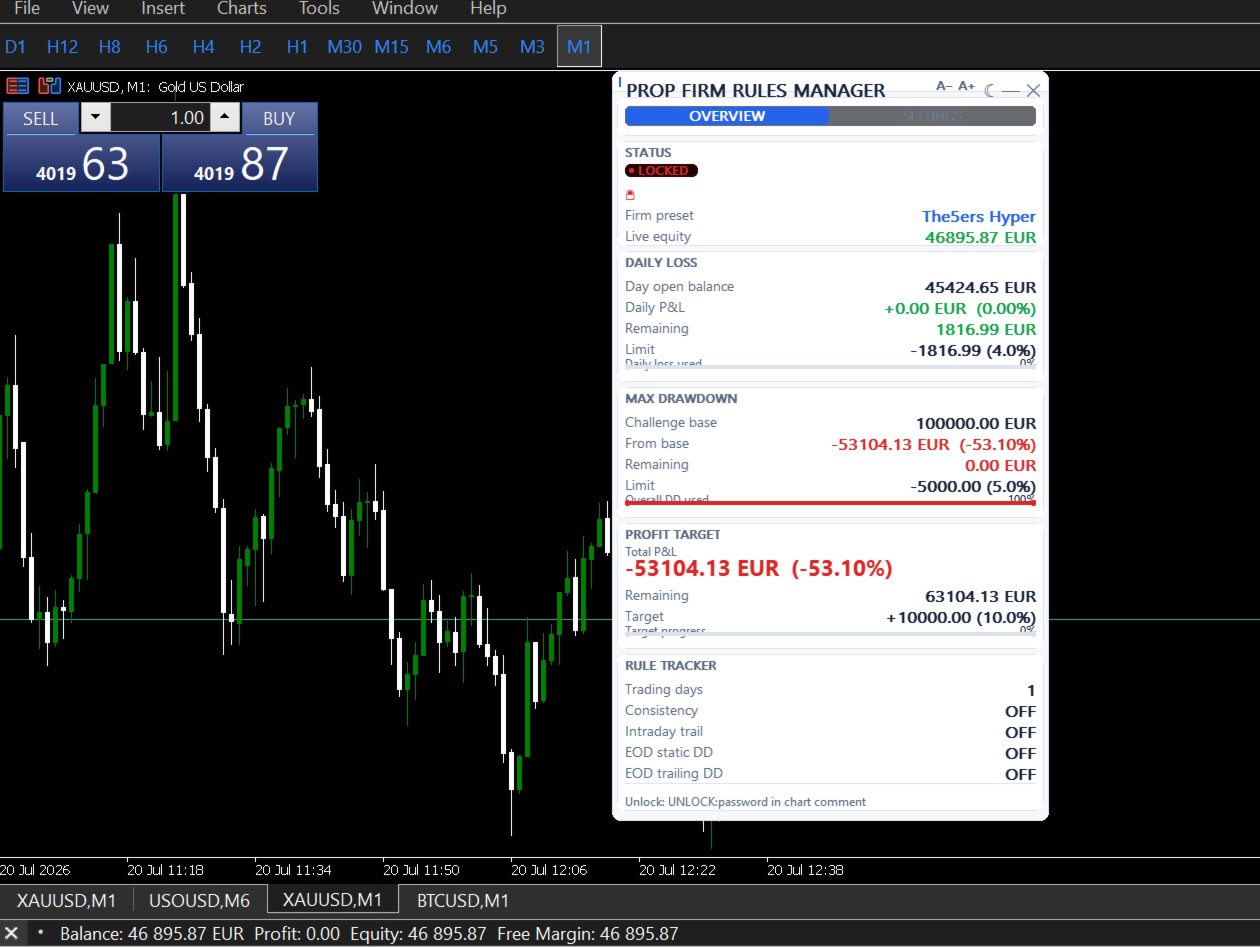
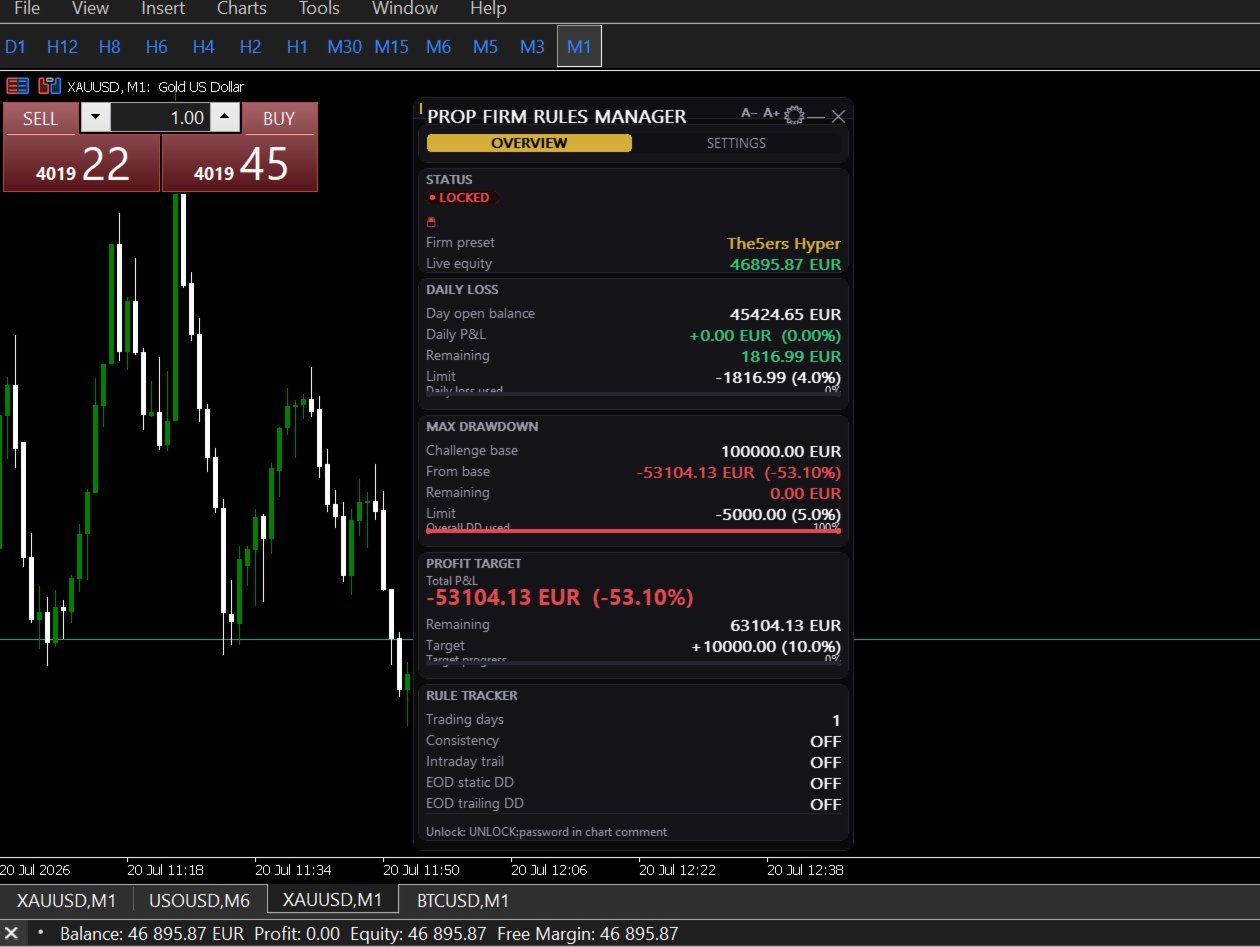
DAILY LOSS — day open balance, real-time P&L, remaining before limit, progress bar
MAX DRAWDOWN — challenge base, drawdown from base, remaining, progress bar
PROFIT TARGET — start balance, total P&L, remaining to target, progress bar
RULE TRACKER — trading days vs minimum, consistency status, live equity, intraday trail, EOD static, EOD trailing

Status bar: ACTIVE when all limits safe. LOCKED with reason when a limit fires.

Two themes. Black and gold for dark charts. White and navy for light charts. Toggle live from the dashboard.

─────────────────────────────────────────────────────
INTERACTIVE SETTINGS PANEL
─────────────────────────────────────────────────────

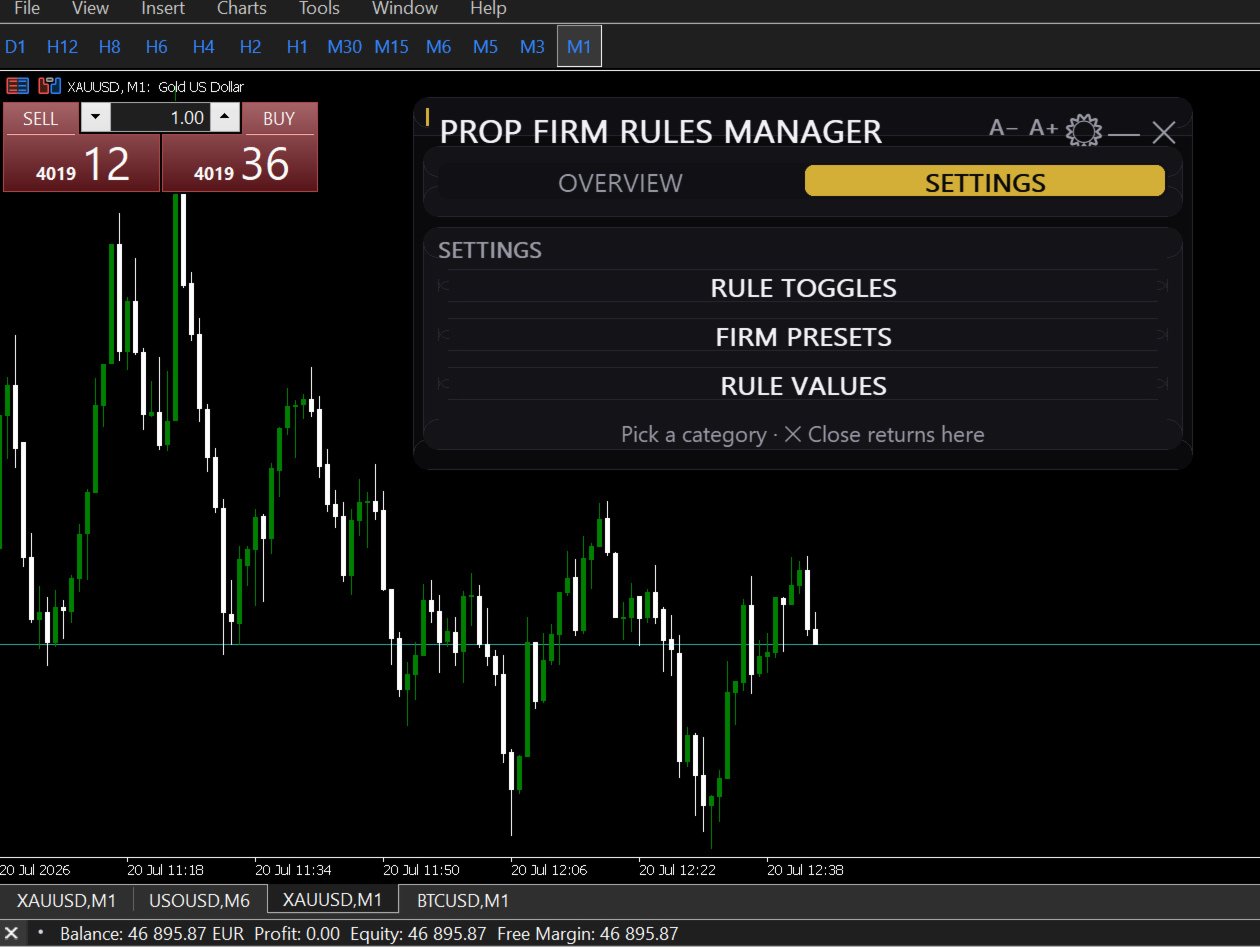
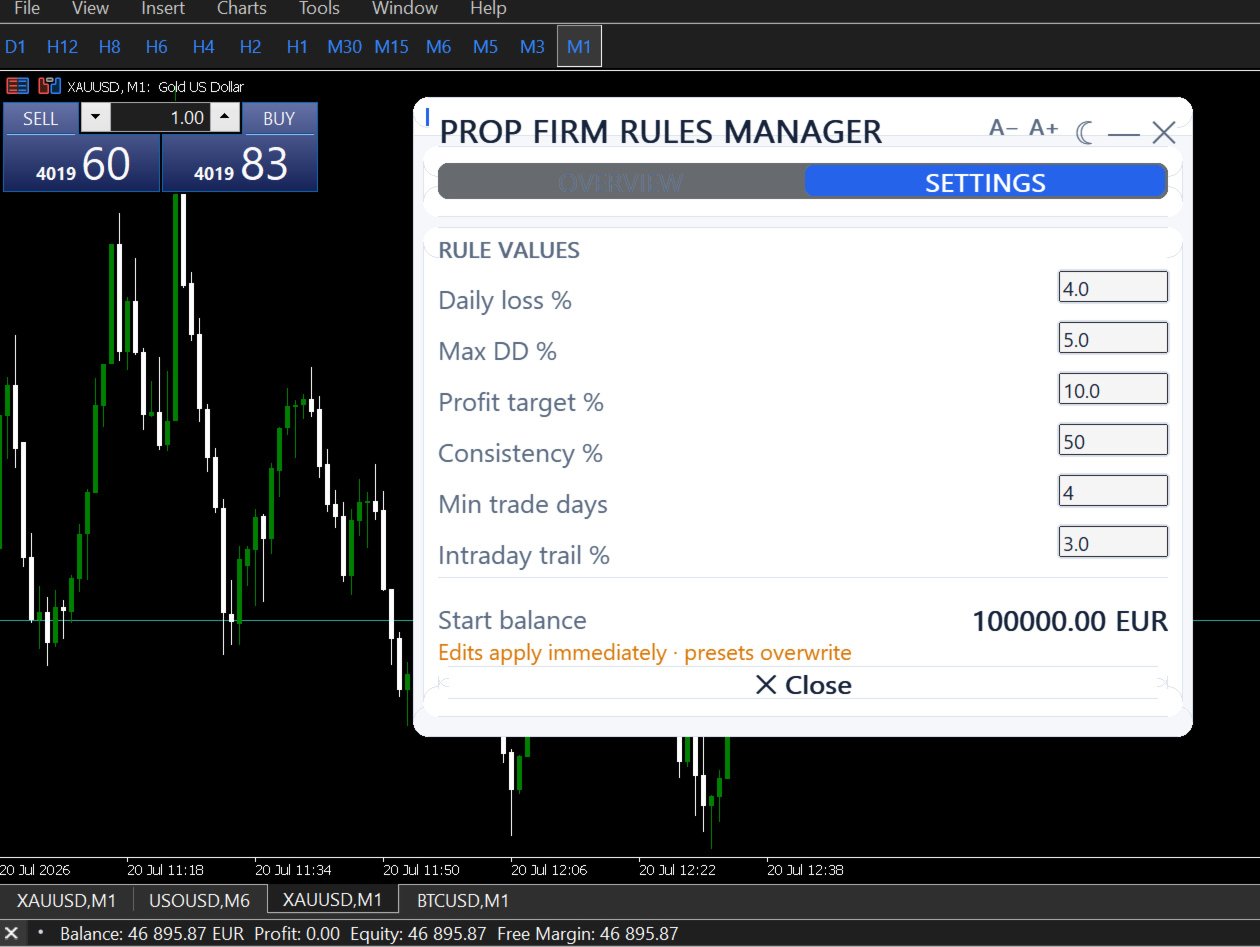
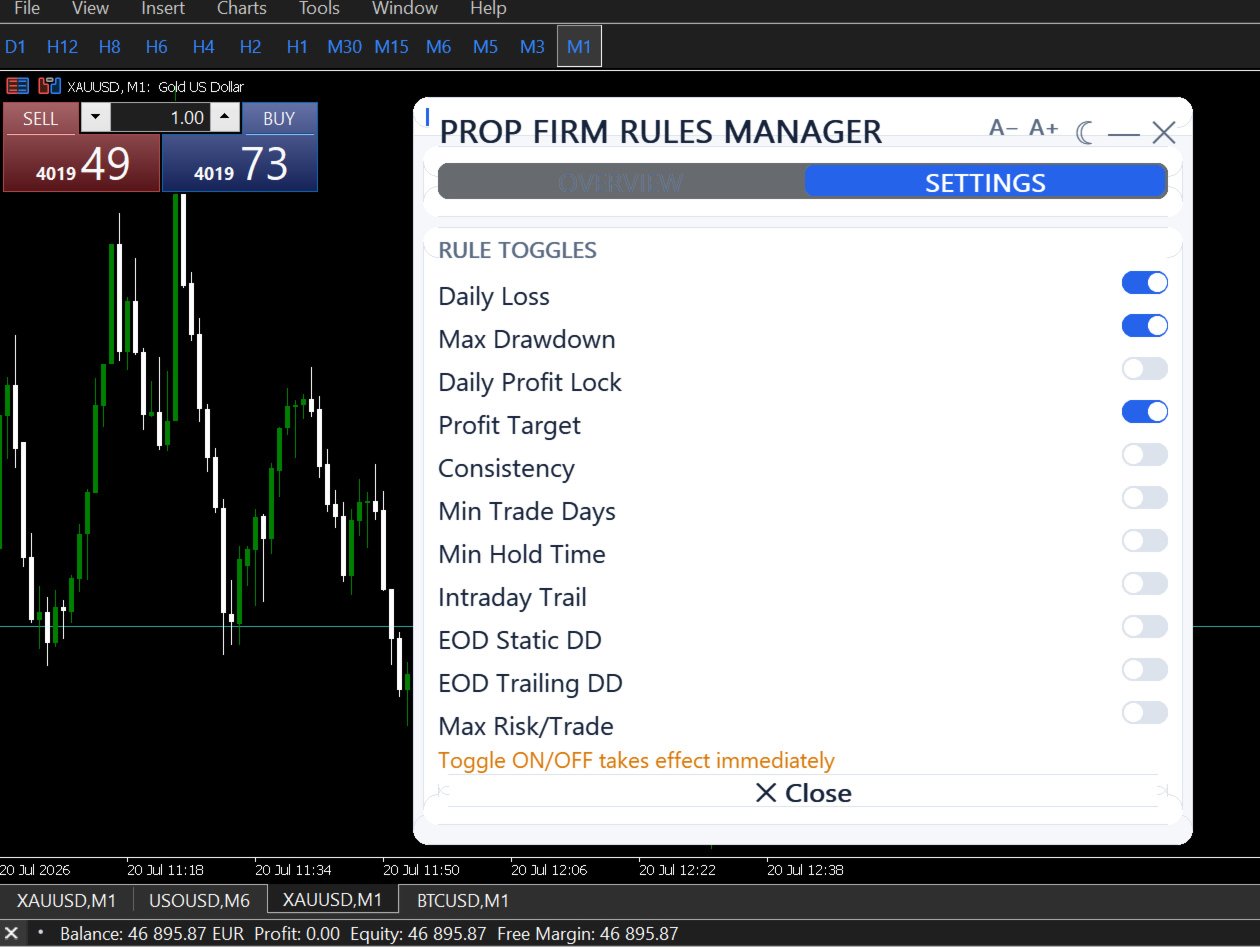
Click the settings button on the dashboard. Every rule can be turned on or off with a single click — no inputs dialog, no EA restart. Changes apply on the next tick.

The settings panel shows:
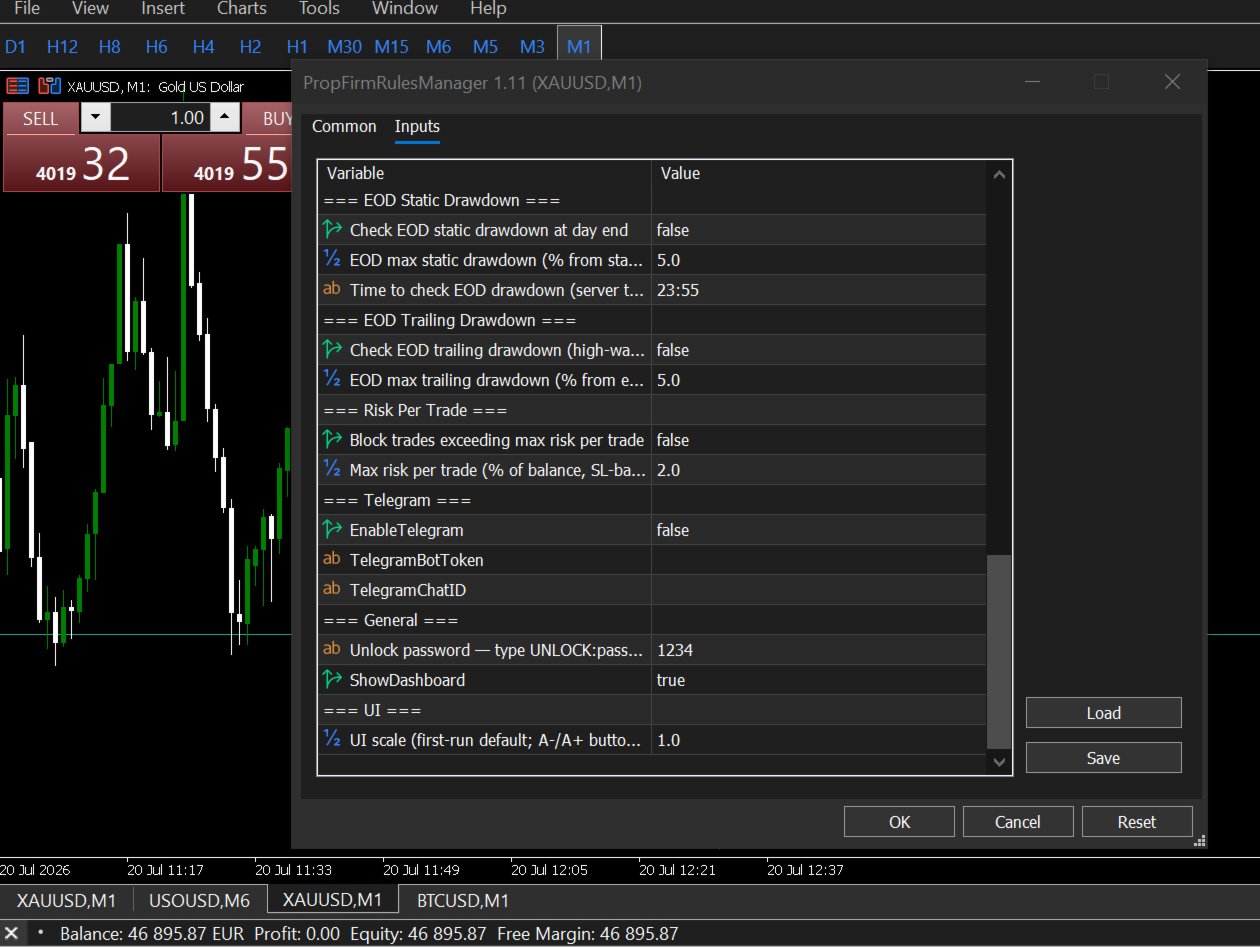
- Firm preset chips (click to switch preset)
- ON/OFF toggle for all 11 rules
- Effective values currently enforced
- Account lock status and unlock instructions
- Theme toggle

─────────────────────────────────────────────────────
ACCOUNT-WIDE PROTECTION
─────────────────────────────────────────────────────

Attach to any single chart. The EA monitors every position on the account regardless of which symbol, magic number, or EA opened it. One instance covers the entire account.

When a rule fires:
1. All positions are collected and closed in a single simultaneous pass
2. Account is locked — any new position opened within the next 10 seconds is detected and closed
3. Telegram notification sent with the rule that triggered, equity, P&L, and timestamp
4. Lock state written to GlobalVariables — survives terminal restarts

To resume trading after a lock, type UNLOCK:yourpassword in the chart comment field.

─────────────────────────────────────────────────────
TELEGRAM NOTIFICATIONS
─────────────────────────────────────────────────────

Receive an alert the moment any rule fires — including which rule triggered, your current equity, the day's P&L, and the exact time. Setup takes under 5 minutes. Full instructions in the user guide.

─────────────────────────────────────────────────────
WHO THIS IS FOR
─────────────────────────────────────────────────────

Traders on FTMO, FundedNext, GoatFunded, The5ers, or any prop firm challenge
Funded account holders who need to stay inside drawdown rules while running live trades
Manual traders who want rule enforcement without giving up control of their strategy
Traders running other EAs who want a risk layer on top

This is not a trading strategy. It does not find trades or manage entries. It exists to ensure that when everything goes wrong in a session, the damage is limited to what the rules allow — and not a dollar more.

─────────────────────────────────────────────────────
WHAT IS INCLUDED
─────────────────────────────────────────────────────

PropFirmRulesManager Ea -20 activations 
Full user guide — all settings, prop firm presets, examples, FAQ
Lifetime updates
Support via MQL5 messages

─────────────────────────────────────────────────────
KNOWN LIMITATION
─────────────────────────────────────────────────────

MT5 does not allow an EA to prevent a trade from being submitted. When the account is locked, positions opened in the following 10 seconds are detected and closed — typically within 1–3 seconds. This EA is designed for manual and semi-automated trading. For very high-frequency automated systems, the latency between a new position and its forced close may not be sufficient.

─────────────────────────────────────────────────────
NOTE ON CHALLENGE RULES
─────────────────────────────────────────────────────

Prop firm rules change. The preset values in this EA were accurate at time of publication. Always verify your firm's current rules before configuring limits. The responsibility for setting the correct values rests with the user.

═══════════════════════════════════════════════════════
Produits recommandés
FibRetrace Zones Zones de retracement de Fibonacci du dernier mouvement FibRetrace Zones est le compagnon visuel gratuit de l'Expert Advisor FibRetrace. Il trace les niveaux de retracement de Fibonacci et met en évidence la zone de repli du dernier mouvement, pour que vous voyiez où se situent les entrées avant de trader. La zone est colorée selon la direction : vert pour les configurations haussières, rouge pour les baissières. Fonctionne sur tout symbole et toute unité de temps. FONCTIONNALITÉ
FREE
Free automatic Fibonacci is an indicator that automatically plots a Fibonacci retracement based on the number of bars you select on the BarsToScan setting in the indicator. The Fibonacci is automatically updated in real time as new highest and lowest values appears amongst the selected bars. You can select which level values to be displayed in the indicator settings. You can also select the color of the levels thus enabling the trader to be able to attach the indicator several times with differe
FREE
FiT Panel Pro
Thonglak Janyakorn
Overview FiT Panel Pro is a professional-grade trade management panel designed for MetaTrader 5 traders who demand speed, precision, and full control over their trades. Built with a modern dark-theme UI, it combines one-click execution with advanced risk management, visual SL/TP drag lines, automatic Fibonacci-based levels, and comprehensive order management — all in a single, compact panel. Whether you are a scalper, day trader, or swing trader, FiT Panel Pro gives you the edge you need to exec
FREE
Predator tail
Aleksandr Davydov
Thank you for your interest in The Tail. I have been trading since 2018. Or rather, it’s not me who trades, but the army of my robots, which I constantly develop. Tail is one such candidate. This robot works on moving averages, filters trades by RSI. The robot provides the functionality of volume and position control. Combine different approaches. I recommend using it in a group of 3-5 of the same robots on different instruments for the best result. I recommend keeping a high value of the
FREE
CosmiCLab SMC FIBO CosmiCLab SMC FIBO is a professional trading indicator designed for traders who use Smart Money Concepts (SMC), market structure analysis and Fibonacci retracement levels. The indicator automatically detects market swings and builds Fibonacci levels based on the latest impulse movement. It also identifies market structure changes such as BOS (Break of Structure) and CHOCH (Change of Character), helping traders understand the current market direction. CosmiCLab SMC FIBO also pr
Morning Range Breakout (Free Version) Morning Range Breakout (Free Version) is a straightforward trading advisor that implements a breakout strategy based on the morning range. It identifies the high and low within a specified time interval (e.g., 08:00–10:00 UTC) and opens a trade on a breakout upward or downward. The free version includes core functionality without restrictions. All parameters and messages are in English, per MQL5 Market requirements. Key Features Detects morning range based
FREE
Fibo Trader FREE MT5
Grzegorz Korycki
3 (3)
Fibo Trader is an expert advisor that allows you to create automated presets for oscillation patterns in reference to Fibonacci retracements values using fully automated and dynamically created grid. The process is achieved by first optimizing the EA, then running it on automated mode. EA allows you to switch between automatic and manual mode. When in manual mode the user will use a graphical panel that allows to manage the current trading conditions, or to take control in any moment to trade ma
FREE
Order Book, known also as Market Book, market depth, Level 2, - is a dynamically updated table with current volumes of orders to buy and to sell specific financial instument at price levels near Bid and Ask. MetaTrader 5 provides the means for receiving market book from your broker, but in real time only, without access to its history. The indicator OrderBook Cumulative Indicator accumulates market book data online and visualizes them on the chart. In addition, the indicator can show the market
Babel Assistant
Iurii Bazhanov
4.33 (9)
Babel assistant 1 Le robot de compensation (netting) MT5 "Babel_assistant_1" utilise l'indicateur ZigZag pour générer des niveaux de Fibonacci sur les unités de temps M1, M5, M15, H1, H4, D1 et W1, et calcule la force des tendances d'achat et de vente. Il ouvre une position en utilisant le paramètre "Lot for open a position" si le niveau de tendance spécifié de 4,925 est dépassé. Ensuite, Babel place des ordres en attente à certains niveaux de Fibonacci et définit les lignes de Stop Loss et de T
FREE
AI Weekly Open Bias Trader
Fadi Hassan Khaled Ghanem
Utilise le prix d'ouverture hebdomadaire comme ligne de biais et trade les rejets de cette ligne dans le sens du biais hebdomadaire. Fonctionnement L'EA évalue ses règles une fois par barre clôturée de l'unité de temps du signal (H1 par défaut), de sorte que les signaux ne se redessinent pas et que la logique est identique dans le testeur et sur un graphique réel. Lorsque la configuration apparaît et qu'aucune position de cet EA n'est ouverte sur le symbole, il ouvre un ordre au marché avec un s
FREE
Apex Point
Marco Engstermann
Apex Point is a trend-following indicator for MetaTrader 5, transforming complex market data into signals for traders. It displays blue dots for uptrends, red dots for downtrends, and yellow crosses at potential reversals, helping users identify momentum shifts quickly. Key features include a confirmation system requiring multiple bars (default: 3) to validate changes, reducing false signals; dynamic ATR-based offsets for adaptive trailing, with instant ratcheting in the trend direction and smo
FREE
Account Monitor Pro — Your Ultimate Trade Statistics Hub Account Monitor Pro is a professional information dashboard designed for traders who combine Expert Advisors (EAs) and manual trading. The indicator separates statistics in real-time based on your Magic Number, allowing you to clearly see who is driving the profit: the algorithm or yourself. Key Features: Split Monitoring: Instant separation of "Robot" positions (by Magic Number) and "Manual" trades. Multi-language Support: 11 languages in
FREE
Basket Take-Profit Utility Lite   is a free on-chart trade management tool for MetaTrader 5 that lets you close groups of trades the moment their   combined profit target   is reached — something MetaTrader cannot do natively. All settings are controlled directly from the interactive panel on your chart. No need to detach and re-attach the EA to change your target. Features: Group trades   by: All open positions · Specific symbol · Magic number Three target types   selectable from the panel: - F
FREE
Gap Catcher
Mikita Kurnevich
5 (5)
Read more about my products Gap Cather - is a fully automated trading algorithm based on the GAP (price gap) trading strategy. This phenomenon does not occur often, but on some currency pairs, such as AUDNZD, it happens more often than others. The strategy is based on the GAP pullback pattern. Recommendations:  AUDNZD  TF M1  leverage 1:100 or higher  minimum deposit 10 USD Parameters:  MinDistancePoints - minimum height of GAP  PercentProfit - percentage of profit relative to GAP level
FREE
DynamicTrader 1
Markus Christer Ekengren
Smart Trade Manager EA – Simple, Visual, and Risk-Based Trading Take control of your trades with ease! This free Expert Advisor is designed for traders who want a fast, intuitive, and risk-based way to manage entries directly from the chart. Risk-Based Position Sizing – Just set your preferred % risk in the EA settings, and lot size is calculated automatically. One-Click Trading – Place trades instantly with two simple buttons: BUY or SELL . Interactive SL & TP Lines – Drag and drop stop-
FREE
Easy GOLD MT5
Franck Martin
3.87 (45)
Easy Gold is the latest addition to the BotGPT family. It is surprising and very powerful. It is ideal for beginners due to its simplicity.  There is absolutely nothing to do, it's 100% automated, simply indicate the percentage of risk you want to take per trade and the EA is ready. Whatever your capital, the EA takes care of everything. Optimized on (XAUUSD).  Unleash all the power with the professional version (AGI Gold) and its connection to the neural network, available in my store. My othe
FREE
Risk Manager – Account Protection Tool Risk Manager is an Expert Advisor for MetaTrader 5 designed to protect your trading account by applying automatic risk management rules. This tool does not open trades . It continuously monitors your account and enforces predefined limits to help prevent excessive losses and maintain disciplined trading. Risk Manager works in the background and can manage positions opened by manual trading or other Expert Advisors. It is particularly useful for: • Manual tr
FREE
Reversal Composite Candles
MetaQuotes Ltd.
3.69 (16)
The idea of the system is to indentify the reversal patterns using the calculation of the composite candle. The reversal patterns is similar to the "Hammer" and "Hanging Man" patterns in Japanese candlestick analysis. But it uses the composite candle instead the single candle and doesn't need the small body of the composite candle to confirm the reversal. Input parameters: Range - maximal number of bars, used in the calculation of the composite candle. Minimum - minimal size of the composite can
FREE
PZ Penta O MT5
PZ TRADING SLU
3.8 (5)
The Penta-O is a 6-point retracement harmonacci pattern which usually precedes big market movements. Penta-O patterns can expand and repaint quite a bit. To make things easier this indicator implements a twist: it waits for a donchian breakout in the right direction before signaling the trade. The end result is an otherwise repainting indicator with a very reliable trading signal. The donchian breakout period is entered as an input. [ Installation Guide | Update Guide | Troubleshooting | FAQ | A
FREE
Strategy: This is a Guard for your account in case the Margin Call of the Account is called. The most brokers have Margin Call at Margin Level of 100%. If account Margin Level is below TriggerMarginLevelPercent (100%), the EA checks all open account positions. For every non-hedge position it opens one reverse position with the same symbol and same volume. After that it will remove itself from the Chart IMPORTANT: CHECK this manually on the Account before using this EA. Only some Broker offer t
FREE
Dr Gauss EURUSD
Roberto Alvarez
Expert Advisor for EURUSD – MQL5 Expert Advisor simple and robust , designed for use by both beginner and experienced traders , with a primary focus on stability , risk management , and operational consistency . The system does not use martingale , grid , or any progressive risk-increasing techniques. Each trade is independent and executed under strict control rules, with particular attention to equity curve protection . The trading logic is based on classical principles of probability and risk
Brent Trend Bot
Maksim Kononenko
4.5 (16)
The Brent Trend Bot special feature is simple basic tools and logic of operation. There are no many strategies and dozens of settings, like other EAs, it works according to one algorithm. The operating principle is a trend-following strategy with an attempt to get the maximum profitability adjusted for risk. Therefore, it can be recommended for beginners. Its strong point is the principle of closing transactions. Its goal is not to chase profits, but to minimize the number of unprofitable trans
FREE
The indicator detects and displays М. Gartley's Butterfly pattern. The pattern is plotted by the extreme values of the ZigZag indicator (included in the resources, no need to install). After detecting the pattern, the indicator notifies of that by the pop-up window, a mobile notification and an email. The pattern and wave parameters are displayed on the screenshots. The default parameters are used for demonstration purposes only in order to increase the amount of detected patterns. Parameters z
The jcoworld OTE EA is an automated trading bot for MetaTrader 5 built on Smart Money Concepts (SMC) . It accurately identifies market impulse moves and automatically enters trades within the Optimal Trade Entry (OTE) zone (61.8% – 79.0% Fibonacci) as soon as a confirmation candle closes. Optimized for: XAUEUR, XAUUSD, and Major Forex Pairs Features: Automatic risk management, dynamic lot sizing & automated Stop Loss/Take Profit. Try for free: This demo version is 100% free! Pricing Plans for Fu
FREE
Golden Square X
Huynh Tan Linh N
4.18 (11)
This is my latest Free version for Gold. With optimized parameters and user-friendly features, this version is likely very easy to use and highly effective. You can customize TP and SL parameters as you wish, but the default settings should work well for you without the need for further adjustments.  This version is designed for the M5. This version does not require a large capital investment; only $100-$200 is sufficient for Golden Square X to run and generate profits for you. Based on backtest
FREE
Painel de Trading Pro
Dedial Pereira Da Silva
TradePanel Pro - Manual Trading Panel with Grid, Trailing, and Targets  "Complete manual trading panel for MT5: grid, trailing stop, smart breakeven, daily targets and risk management in one click." TradePanel Pro is a professional manual trading panel for MetaTrader 5, built for traders who want speed, organization and automatic position protection — without juggling multiple tools or complex setups. Everything you need lives in a single panel: one-click buy/sell, point-based stops and targe
Voici NAS100 Auto SL and TP Maker pour MT5 : Ne manquez plus jamais le réglage du StopLoss et du TakeProfit avec notre NAS100 Auto SL and TP Maker, un assistant indispensable pour les traders qui naviguent sur le marché du Nasdaq 100 sur MetaTrader 5. Cet outil est conçu pour ceux qui recherchent une solution transparente pour automatiser la gestion des niveaux de StopLoss et TakeProfit. Caractéristiques principales : Automatisation sans effort : Surveille automatiquement les transactions sur
FREE
Here's how to use the BTC_PriceAlert.mq5 indicator in MetaTrader 5: What it does It's a custom indicator (not an EA) for BTCJPY that draws horizontal alert lines on your chart and fires a notification when price touches your specified upper or lower target. It checks the high/low of each bar (wick touches count, not just closes). Install the indicator Copy BTC_PriceAlert.mq5 into your MT5 data folder under MQL5/Indicators (File > Open Data Folder in MetaEditor or MT5). Compile it in MetaEditor
FREE
Heiken_Ashi_Bars - Visualiseur de Tendance Avancé pour MT5 Aperçu Heiken_Ashi_Bars est un indicateur personnalisé puissant et visuellement intuitif conçu pour filtrer le bruit du marché et mettre en évidence la véritable tendance sous-jacente. Les graphiques en chandeliers traditionnels peuvent souvent être erratiques. En calculant la moyenne des données de prix, cet indicateur lisse l'action des prix, ce qui permet de repérer beaucoup plus facilement les continuations de tendance, les inversion
Les acheteurs de ce produit ont également acheté
Trade Assistant MT5
Evgeniy Kravchenko
4.43 (216)
It helps to calculate the risk per trade, the easy installation of a new order, order management with partial closing functions, trailing stop of 7 types and other useful functions. Additional materials and instructions Installation instructions - Application instructions Line function -   shows on the chart the Opening line, Stop Loss, Take Profit. With this function it is easy to set a new order and see its additional characteristics before opening.   Risk management  - The risk calculation
Bienvenue sur Trade Manager EA, l’outil ultime de gestion des risques conçu pour rendre le trading plus intuitif, précis et efficace. Ce n’est pas seulement un outil d’exécution d’ordres ; c’est une solution complète pour la planification des trades, la gestion des positions et le contrôle des risques. Que vous soyez débutant, trader expérimenté ou scalpeur ayant besoin d’une exécution rapide, Trade Manager EA s’adapte à vos besoins, offrant une flexibilité sur tous les marchés, des devises et i
Local Trade Copier EA MT5
Juvenille Emperor Limited
4.94 (149)
Local Trade Copier EA MT5 est un copieur de trades rapide et flexible permettant de copier et de gérer des trades entre plusieurs comptes MetaTrader 5 sur le même ordinateur Windows ou Windows VPS. Il combine la synchronisation locale des trades avec des contrôles côté Receiver pour la taille des lots, la gestion du risque, le filtrage des trades, le mappage des symboles, la gestion des trades et la protection du compte. Configurez vos terminaux Transmitter et Receiver en environ 1 minute et co
Telegram to MT5 Multi-Channel Copier   copie automatiquement les signaux de trading de vos canaux Telegram et Discord directement vers MetaTrader 5. Pas de bots, pas d'extensions de navigateur, pas de copie manuelle. Un signal arrive sur Telegram ou Discord et l'EA ouvre le trade dans votre terminal en quelques secondes. Et avant de copier un canal, le backtester intégré vous montre ce que ce canal aurait fait sur votre compte. Le produit comprend deux composants : une application Windows qui éc
News Trade EA MT5
Konstantin Kulikov
4.55 (11)
Je voudrais vous présenter un robot efficace que j'utilise depuis plusieurs années. Il peut être utilisé en mode semi-automatique, comme en mode totalement automatique. >>> Chat <<< Le programme comporte des paramètres souples pour le commerce sur les nouvelles du calendrier économique. Il est impossible de le vérifier dans le testeur des stratégies. Ce qu’il faut, c’est le travail réel. Il faut ajouter à la liste des URL autorisées, dans les paramètres du terminal, un site d'actualités. Cliqu
TradePanel MT5
Alfiya Fazylova
4.88 (170)
Trade Panel est un assistant commercial multifonction. L'application contient plus de 50 fonctions de trading pour le trading manuel et permet d'automatiser la plupart des tâches commerciales. Instructions d'utilisation : https://www.mql5.com/fr/blogs/post/762589 Version d'essai de l'application pour un compte démo : https://www.mql5.com/fr/blogs/post/762644 Comment installer l'application : https://www.mql5.com/fr/blogs/post/762645 Comment tester l'application en mode visuel : https://www.mql5.
Copiez les signaux Telegram avec vos propres règles de trading Telegram to MT5 Signal Trader copie automatiquement les signaux de trading au format texte provenant de canaux et de groupes Telegram publics et privés vers MetaTrader 5. Gérez plusieurs fournisseurs et comptes MT5 depuis une seule application de bureau, avec des paramètres de risque et de trading propres à chaque fournisseur . Aucun bot Telegram ni configuration d'API n'est nécessaire pour copier les signaux. Connectez-vous simpleme
Farmed Hedge Yield Farming | All Markets (Manual - Hybrid - Semi/Automated EA) VERIFIED TRADING RESULTS - Farmed Hedge Yield Axi Copy:  https://www.mql5.com/en/signals/2356376 - Farmed Hedge Yield Exn Copy:   https://www.mql5.com/en/signals/2356404 - Farmed Hedge Yield V Copy:  https://www.mql5.com/en/signals/2357156 IMPORTANT NOTICE: FarmedHedge is a MANUAL-FOCUSED TRADING UTILITY ,not a fully automated EA. Results shown on this Signal include manual trades and overall strategic management.
================================================================================ POC BREAKOUT - V20.72. Full Professional Grade Toolkit ================================================================================ POC Breakout is a full MetaTrader 5 trading dashboard for discretionary traders who want breakout signals, Point of Control (POC) context, volume profiles, order flow, market structure, news, alerts, and advanced trade planning in one professional workspace. Attached directly to you
Strategy Ledger Pro
Abdullah Uygar Tuna
5 (13)
Désormais disponible en français. Strategy Ledger Pro est un panneau d'analyse de compte en lecture seule pour MetaTrader 5. Il sépare les résultats du compte par Expert Advisor, stratégie, symbole et numéro magic, pour que vous voyiez ce que chacun apporte réellement. Le panneau est disponible en 11 langues : English, Français, Deutsch, Español, Italiano, Português, Русский, Türkçe, 中文, 日本語 et 한국어. Avant de télécharger la démo. Le Market exécute la démo de tout produit payant uniquement dans l
Dealer Panel
Mian Rameez Ali
Dealer's Panel No signal decides anything here — a hand does. One click, and the panel calculates what's underneath: lot size from risk, target from a 30-step balance ladder that remembers exactly how far an account has climbed. Toggle between market and pending without touching an input field. Set a stop, and the take-profit can write itself — a fixed share of the balance, translated into price with no arithmetic left for the trader to get wrong. One trade live at a time; it won't let a seco
Exp COPYLOT CLIENT for MT5
Vladislav Andruschenko
3.97 (35)
Copieur professionnel de trades pour MetaTrader 5 Un copieur de trades rapide, professionnel et fiable pour MetaTrader . COPYLOT permet de copier des trades Forex entre les terminaux MT4 et MT5 avec prise en charge des comptes Hedge et Netting . La version MT5 de COPYLOT prend en charge : - MT5 Hedge → MT5 Hedge - MT5 Hedge → MT5 Netting - MT5 Netting → MT5 Hedge - MT5 Netting → MT5 Netting - MT4 → MT5 Hedge - MT4 → MT5 Netting Version MT4 Description complète + DEMO + PDF Comment acheter Comme
Prochaine mise à jour — Version 2.52 bientôt disponible ! [NOUVEAU] Préparez-vous à découvrir 4 nouvelles fonctionnalités majeures conçues pour améliorer votre analyse du marché et votre flux de travail de trading Nous faisons passer l’analyse du marché au niveau supérieur avec 4 nouvelles fonctionnalités conçues pour répondre à vos besoins en trading. Découvrez : 1. TRADE OVERVIEW DASHBOARD 2. CONFLUENCE AT ZONE 3. STRONG & WEAK HIGH/LOW 4. OTE 1. TRADE OVERVIEW DASHBOARD Un tableau de bord qu
Telegram To MT5 Ultra
Mirel Daniel Gheonu
5 (5)
Telegram To MT5 — Copieur de signaux Transformez les appels de trading de vos canaux Telegram en véritables ordres MT5 — automatiquement, sur autant de comptes que vous le souhaitez, avec le risque et les règles entièrement sous votre contrôle. Telegram To MT5 relie les canaux VIP / de signaux que vous suivez déjà sur Telegram à votre terminal MetaTrader 5. Une application de bureau compagnon gratuite lit les messages (même des canaux qui bloquent les bots), et cet Expert Advisor les exécute sur
The product will copy all telegram signal to MT5 ( which you are member) , also it can work as remote copier.  Easy to set up, copy order instant, can work with almost signal formats, image signal,  s upport to translate other language to English Work with all type of channel or group, even channel have "Restrict Saving Content", work with  multi channel, multi MT5 Work as remote copier: with signal have ticket number, it will copy exactly via ticket number. Support to backtest signal. How to s
Trade copier MT5
Alfiya Fazylova
4.61 (57)
Trade Copier est un utilitaire professionnel conçu pour copier et synchroniser les commandesentre les comptes de trading. Les commandes sont copiées du compte/terminal du fournisseur vers le compte/terminal du destinataire, qui sont installés sur le même ordinateur ou vps. Avant d'acheter, vous pouvez tester la version démo sur un compte démo. Version démo ici . Instructions complètes ici . Principales fonctionnalités et avantages: Prend en charge la copie des commandes MT5> MT5, MT4> MT5, MT5>
RETAILBERG FOOTPRINT CHART PRO — Order-Flow Workspace for MetaTrader 5 Version 7.00  |  Professional System  |  31 tools  |  One chart A full 150-page illustrated User Manual is included. Please read the full manual to understand this feature packed footprint chart elements and ui. https://www.mql5.com/en/blogs/post/777982 DEMO / STRATEGY TESTER — PLEASE READ FIRST
Grid Manual MT5
Alfiya Fazylova
4.73 (22)
Grid Manual est un panneau de trading permettant de travailler avec une grille d'ordres. L'utilitaire est universel, possède des paramètres flexibles et une interface intuitive. Il fonctionne avec une grille d'ordres non seulement dans le sens des pertes, mais aussi dans le sens de l'augmentation des profits. Le commerçant n'a pas besoin de créer et de maintenir une grille d'ordres, l'utilitaire le fera. Il suffit d'ouvrir une ordre et "Grid Manual" créera automatiquement une grille de ordres po
MT5 to Telegram Signal Provider est un utilitaire facile à utiliser et entièrement personnalisable qui permet l'envoi de signaux spécifiés vers un chat, un canal ou un groupe Telegram, transformant ainsi votre compte en fournisseur de signaux. Contrairement à la plupart des produits concurrents, il n'utilise pas d'importations DLL. [ Démonstration ] [ Manuel ] [ Version MT4 ] [ Version Discord ] [ Canal Telegram ]  New: [ Telegram To MT5 ] Configuration Un guide utilisateur étape par étape est
The Patch
Mian Rameez Ali
The Patch It never opens a trade. It walks behind the ones that did. Every open position, every pending order — checked twice a second for the one thing that's easy to forget: a stop, a target. Found bare, it doesn't ask. It writes the missing number in, measured in points from wherever the position began, and moves on to the next. No strategy, no opinion on direction. Just the quiet assumption that nothing should ever sit on the market unprotected — not because someone decided it shouldn't,
Signal Trading View to MT5 Pro
Mirel Daniel Gheonu
4.5 (2)
Signal TradingView to MT5 Pro Automator Exécution professionnelle instantanée entre TradingView et MetaTrader 5 Automatisez votre stratégie de trading avec le pont de communication le plus robuste entre les alertes TradingView et l'exécution réelle sur MT5. Conçu pour les traders qui exigent vitesse, flexibilité et une gestion des risques impeccable, cet Expert Advisor transforme tout message d'alerte en un ordre au marché ou à cours limité précis. POINTS FORTS ET AVANTAGES Moteur d'analyse univ
Power Candles Strategy Scanner - Outil de recherche de configurations multi-symboles à optimisation automatique Le Power Candles Strategy Scanner utilise le même moteur d'auto-optimisation que celui qui alimente l'indicateur Power Candles, pour chaque symbole de votre Market Watch, en parallèle. Un panneau vous indique quels symboles sont statistiquement négociables à l'instant, quelle stratégie est la plus performante pour chacun, la paire Stop Loss / Take Profit optimale, et vous alerte dès qu
Anchor Trade Manager
Kalinskie Gilliam
5 (9)
Your EAs cannot see each other, but Anchor can. Anchor gives you one place to coordinate your EAs, manage risk, and decide when trading is allowed. It works alongside the trading bots you already use without any changes to them. The Problem One EA opens a trade. Then another starts trading. The next thing you know, you wake up to multiple grids built across your account. Each EA may be doing exactly what it was designed to do, but together they can place far more risk on your account than you in
VirtualTradePad PRO SE MT5 — centre de contrôle de trading professionnel pour MetaTrader 5 VirtualTradePad PRO SE est un panneau de trading premium basé sur le graphique et un espace de gestion des trades pour MetaTrader 5 . Il est conçu pour les traders qui souhaitent une exécution plus rapide, un contrôle plus clair des positions, une gestion structurée des trades, une planification visuelle des niveaux et un flux de travail professionnel directement depuis le graphique. Ce n’est pas seulement
Prop Guardian Risk Manager MT5 – Drawdown, Risk & Hedge Protection for Prop Firm and Managed Accounts Prop Guardian Risk Manager is a professional risk-control utility for MetaTrader 5, designed for prop firm traders, money managers and anyone who wants strict account-level risk protection. It does not generate trading signals, strategy entries or trading decisions. Instead, it runs in the background, monitors your account risk and can automatically block new exposure, close managed positions or
The News Filter MT5
Leolouiski Gan
4.79 (24)
Ce produit filtre tous les conseillers experts et les graphiques manuels pendant les heures de publication des actualités, de sorte que vous n'avez pas à vous soucier des pics de prix soudains qui pourraient détruire vos configurations de trading manuelles ou les transactions entrées par d'autres conseillers experts. Ce produit est également livré avec un système de gestion des ordres complet qui peut gérer vos positions ouvertes et vos ordres en attente avant la publication de toute actualité.
Floor Watch
Syed Tauqeer Hussain Shah
Floor Watch One number, watched every thirty seconds: how far equity has fallen since the day began — or since its highest point, if it's told to trail the peak instead of the open. Cross the line and it doesn't argue. Every open position closes, every pending order vanishes, and anything that slips through afterward gets shut the moment it appears. Not asked. Removed. The floor holds until the clock turns 5 AM Pakistan time — then, and only then, does the day start over. One rule. No except
Panneau de trading pour MetaTrader 5 — contrôle professionnel du trading en un clic depuis le graphique et le clavier Un panneau de trading avancé conçu pour les traders actifs, afin d’ouvrir, gérer et clôturer des positions bien plus rapidement qu’avec l’interface standard de MetaTrader. Cette solution s’adresse à ceux qui veulent contrôler positions, ordres en attente, profit global et exécution depuis un seul espace de travail professionnel. Il ne s’agit pas d’un simple utilitaire. C’est un
EA Auditor
Stephen J Martret
5 (6)
EA Auditor is an independent analysis tool for traders evaluating Expert Advisors and trading signals on MetaTrader 5. It audits backtest reports, reviews posted developer signals, and cross-verifies the two against each other to help traders assess strategies before committing capital. The MQL5 market offers a wide range of Expert Advisors from many developers, with varying approaches, quality, and transparency. EA Auditor provides a consistent, data-driven framework for reviewing them, answer
RS Trade Copier - le copieur de trades local ultra-rapide avec une véritable interface graphique. Arrêtez de saisir les numéros de compte manuellement. Fini les listes interminables de 200+ paramètres dans l'onglet Inputs. Un outil fiable et flexible pour copier les opérations de trading entre plusieurs terminaux MT5 et MT4. Il convient aux traders expérimentés, aux services de signaux ainsi qu'aux investisseurs privés. Il permet la synchronisation du trading d'un ou plusieurs Providers vers un
Plus de l'auteur
SMC OrderBlock Entry Engine The SMC OrderBlock Entry Engine is a Smart Money Concepts indicator for MetaTrader 5 that identifies valid institutional order blocks, confirms them with a Break of Structure, and fires a non-repainting entry signal only after a strict four-step confirmation sequence. Every signal on the chart has passed all four validation rules before appearing. An order block is the last opposing candle before a strong impulsive move that breaks market structure. These zones repre
FREE
SMC Multi EMA TrendLines SMC Multi EMA TrendLines is a MetaTrader 5 indicator that draws up to ten independent moving average lines on the current chart timeframe, displays a live alignment dashboard, and fires alerts when significant EMA events occur. Version 1.11 introduces a complete alert system including EMA crossovers, price crossing an EMA, price approaching an EMA before a cross happens, and full stack alignment detection. Alerts are delivered via MT5 popup, MT5 push notification to you
FREE
Smc Session Killzone and Breakout The Smc Session Killzone and Breakout indicator automates the institutional session trading model for MetaTrader 5. It draws the Asian, London, and New York session ranges as labelled boxes on the chart, detects when price sweeps beyond the Asian session high or low, and fires a non-repainting entry signal after a Market Structure Shift is confirmed. All signals are based on closed bars and do not repaint. The underlying model follows the sequence that institut
FREE
Smc Trend Heatmap The Smc Trend Heatmap is a free multi-timeframe bias dashboard for MetaTrader 5. It scans five timeframes simultaneously - M5, M15, M30, H1, and H4 - and shows the current trend direction on each using a three-condition EMA logic. The dashboard updates continuously in a corner panel and provides an overall bias summary across all active timeframes. The indicator does not draw lines or arrows on the price chart. It operates entirely as a panel and can be placed on any chart rega
FREE
PROP FIRM READY AUTOPILOT TRADE COPIER — by E.A VICTOR MT5→MT5  |  MT5→MT4  ||  MT4→MT4  |  MT4→MT5 Two files. Four directions. Unlimited accounts.  Try Before You Buy You can download and test the AutoPilot Trade Copier free demo version on a demo account before purchasing. For MetaTrader 5 Download:  AutoPilot MT5 TRADE COPIER (TRIAL).ex5 For MetaTrader 4: Download:  AutoPilot MT4 TRADE COPIER (TRIAL).ex4 How to install the trial: Download the   AutoPilot MT4 TRADE COPIER (TRIAL) .ex4 or  Au
PROP FIRM READY  AUTOPILOT TRADE COPIER — by E.A VICTOR MT5→MT5  |  MT5→MT4  ||  MT4→MT4  |  MT4→MT5 Two files. Four directions. Unlimited accounts. Try Before You Buy: You can download and test the AutoPilot Trade Copier free demo version on a demo account before purchasing. For MetaTrader 5: Download: AutoPilot MT5 TRADE COPIER (TRIAL).ex5 For MetaTrader 4: Download: AutoPilot MT4 TRADE COPIER (TRIAL).ex4 How to install the trial: Download the   AutoPilot MT4 TRADE COPIER (TRIAL) .ex4 or Au
Try Before You Buy: You can download and test the DisciplineGuard Pro  free demo version on a demo account before purchasing. For MetaTrader 5: Download:   /   DisciplineGuard Pro   /   How to install the trial: Download the  /   DisciplineGuard Pro   /      file above. In MetaTrader:   File → Open Data Folder →   MQL5/Experts Paste the trial file into that folder, then   restart MetaTrader. The trial is fully functional for 4 hours per demo account. To reset the trial period   (demo accounts o
Try Before You Buy: You can download and test the Multi Tp Ladder  free demo version  on a demo account before purchasing. For MetaTrader 5: Download:   MultiTP ladder     How to install the trial: Download the       MultiTP ladder     file above. In MetaTrader:   File → Open Data Folder →   MQL5/Experts Paste the trial file into that folder, then   restart MetaTrader . The trial is fully functional for 12  hours per demo account . To reset the trial period   (demo accounts only): MetaTrader →
PNL MANAGER PRO —    Automatic Exit Manager with Smart Risk Control Set your entry, walk away. PNL Manager Pro sets your stop loss and take-profits automatically, locks in profit in stages, moves you to breakeven, and trails the rest — all while keeping your risk inside the limit you set. Try Before You Buy: You can download and test the Pnl MANAGER  free demo version  on a demo acc
Filtrer:
Aucun avis
Répondre à l'avis