Atropos Manager

Atropos Manager 

Professional Trade Management Utility for MetaTrader 5. (User Guide & Manual)

Atropos Manager is built for traders who open multiple positions and need a faster, cleaner way to manage them after entry.

It does not predict the market and it does not generate entry signals.
Its purpose is simple: help you manage open trades with structure, speed, and control directly from the chart.

Whether you trade manually, use pending orders, enter from mobile, follow signals, or use another EA for entries, Atropos Manager can take over the management side once a position is active.

Why Atropos Manager?

Many traders know how to enter a trade, but the real challenge starts after entry:

  • Which trades should be protected?
  • Which trades should be grouped?
  • Which position should trail?
  • Which trade needs TP or SL?
  • Which trades should be partially closed?
  • When should a basket exit in profit?
  • How fast can you react during volatile movement?

Atropos Manager gives you a practical control panel to manage these decisions without adjusting every trade manually.

On-Chart Control Panel

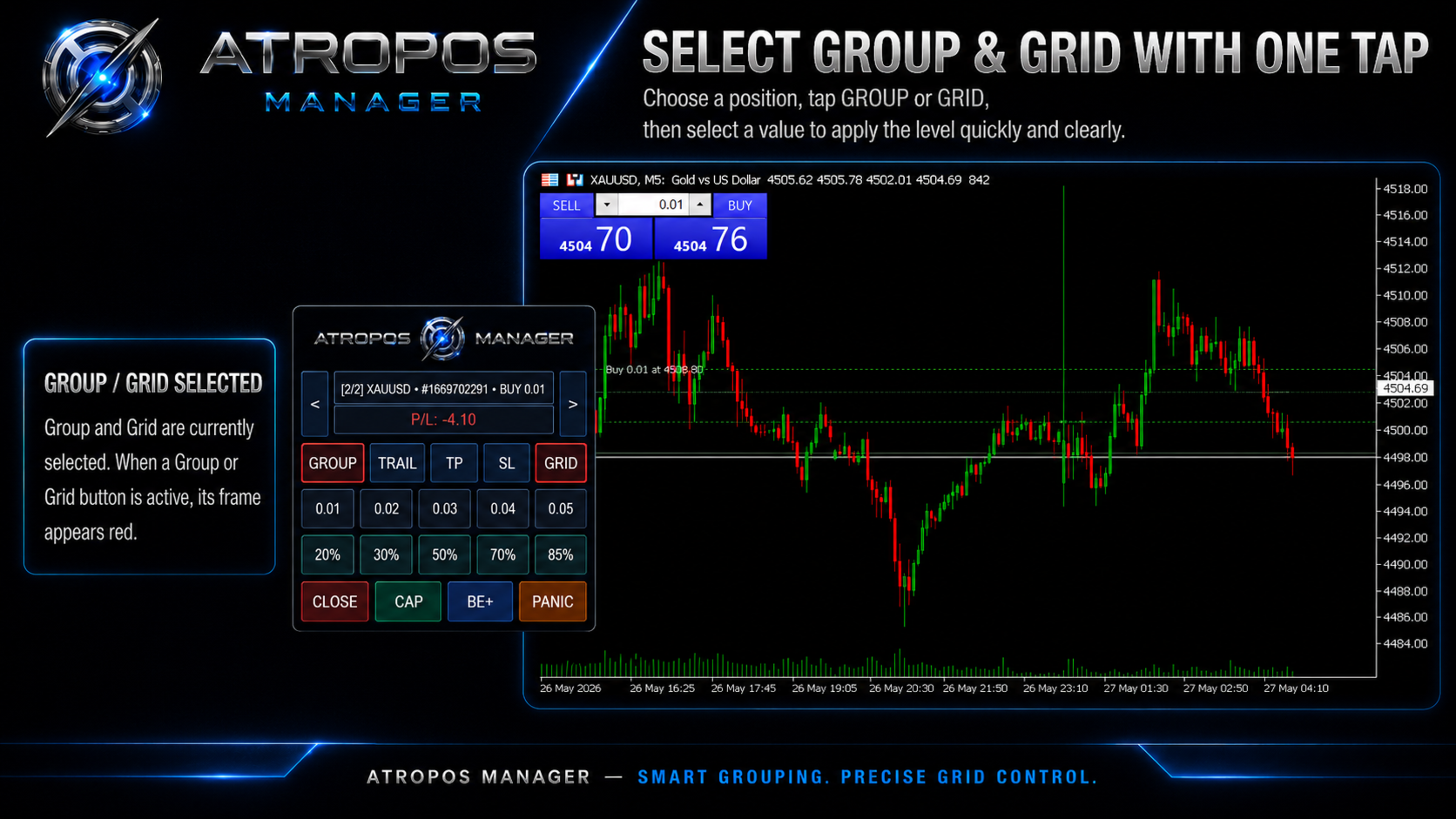
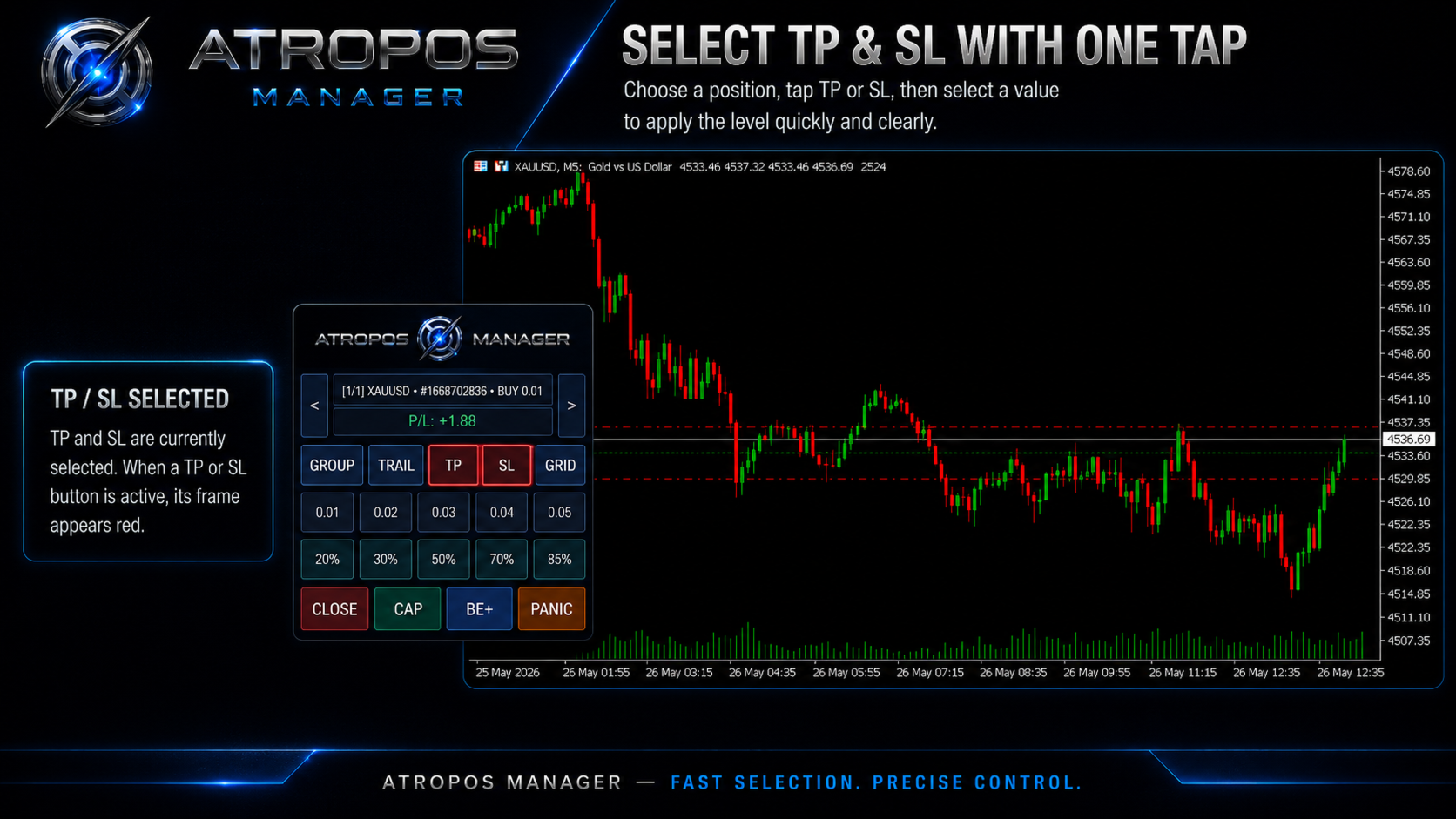
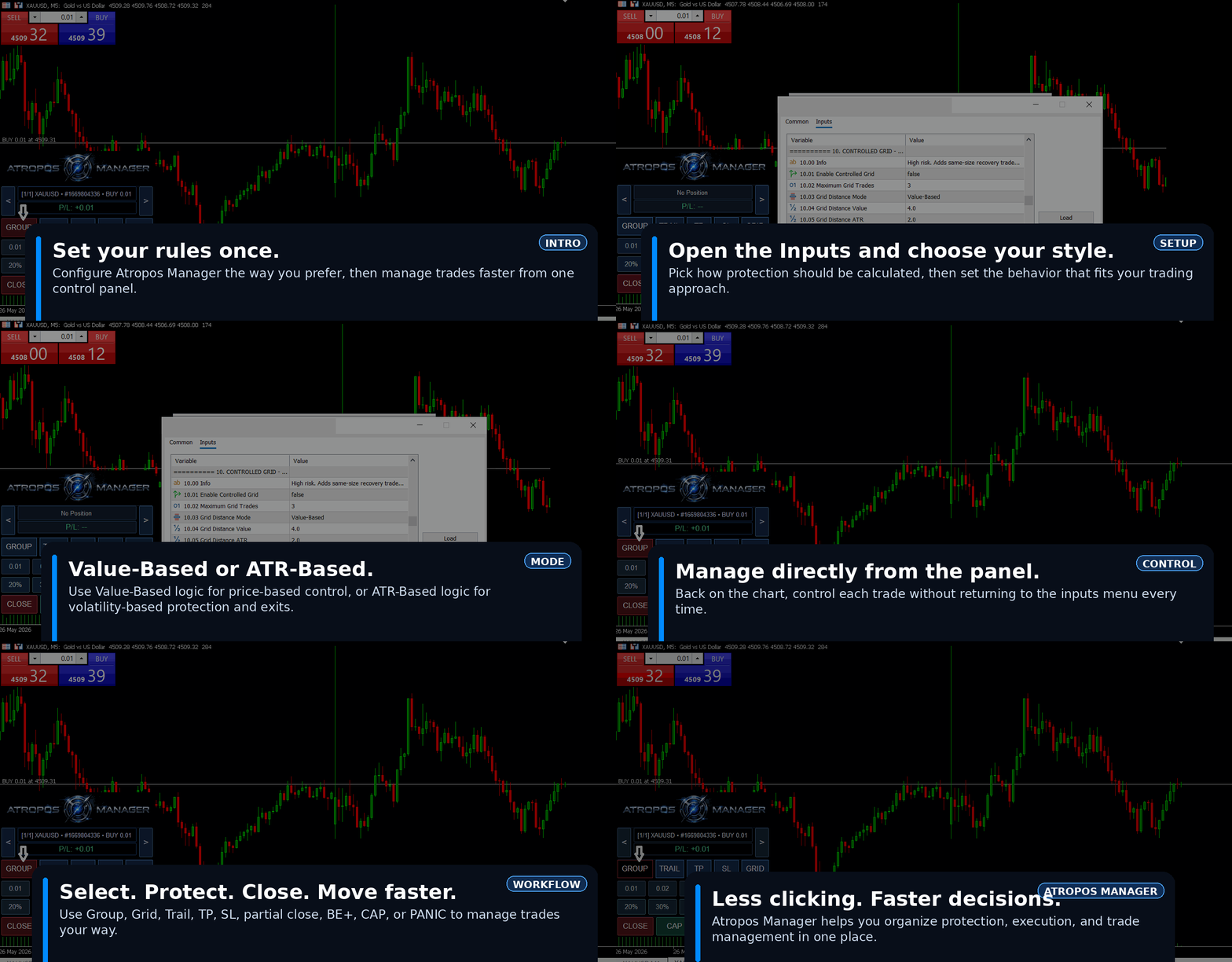
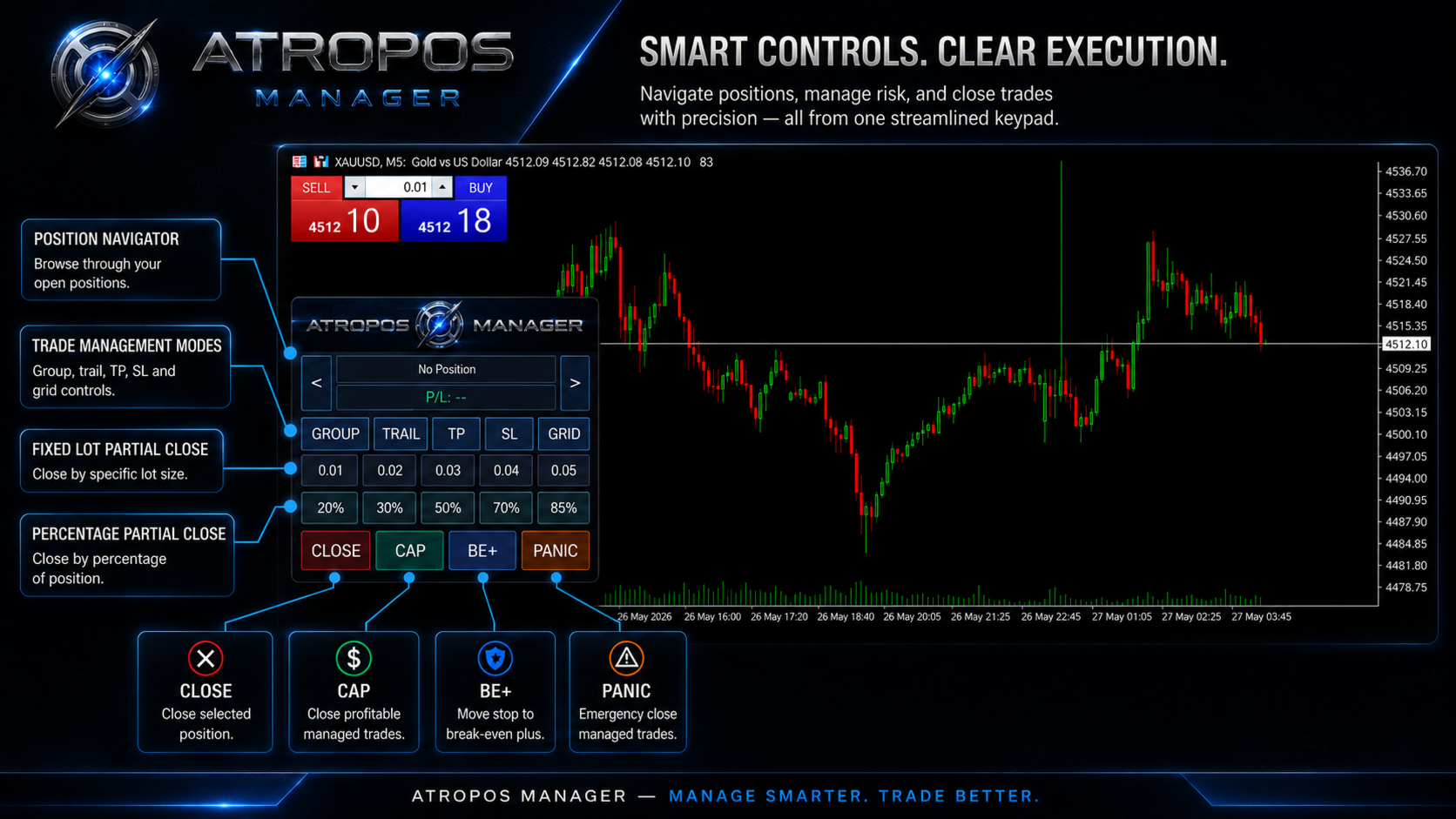
The built-in keypad lets you manage selected positions directly from the chart.

You can browse through open positions and enable or disable management features per trade:

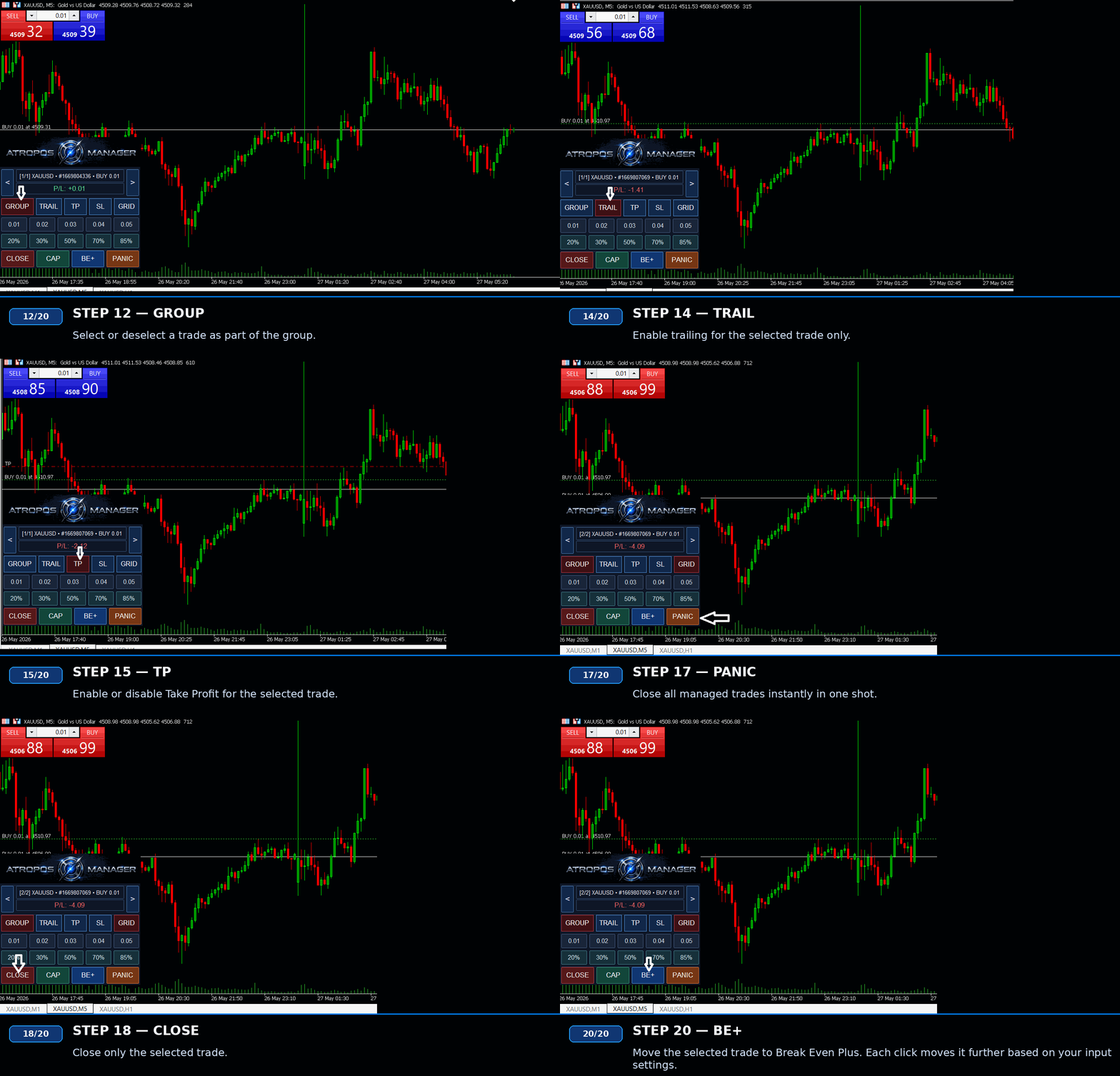
  • GROUP — include or exclude the selected trade from group management
  • GRID — allow controlled grid expansion for the selected trade
  • TRAIL — enable trailing management for the selected trade
  • TP — apply or remove take-profit management
  • SL — apply or remove stop-loss management

When a button is active, it is visually highlighted, so you can quickly see how each trade is being managed.

This is especially useful for traders who manage several positions at the same time and need clear control without opening the inputs menu repeatedly.

Value-Based or ATR-Based Protection

Atropos Manager supports two protection styles:

Value-Based Mode

Value-Based mode uses a price-normalized value system designed to adapt across different symbols and market prices.

This helps keep trade management more logical when market prices change over time or when trading different instruments such as gold, forex, indices, oil, or crypto.

ATR-Based Mode

ATR-Based mode uses market volatility to calculate distances.

This is useful when you want stop loss, take profit, trailing, and protection distances to adapt to current market movement.

You can choose the method that better fits your trading style.

TP, SL, and Multi-Stage Management

Atropos Manager can manage:

  • Stop Loss
  • TP1
  • TP2
  • TP3
  • Break-even plus
  • Step protection
  • Partial exits
  • Post-TP trailing

This allows you to secure part of the position, protect the remaining volume, and reduce the amount of manual work after the trade starts moving.

Group Profit Management

Group management is designed for traders who open more than one position on the same symbol or strategy idea.

Instead of managing each trade separately, you can select trades into a group and let Atropos Manager monitor the combined floating result.

Group tools can help you:

  • Exit selected trades when total P/L reaches a target
  • Trail group profit after a threshold
  • Close a basket when the total result is acceptable
  • Manage mixed positions where some trades are in profit and others are still negative

This is useful when the goal is not to make every single trade win, but to manage the total basket intelligently.

Controlled Grid

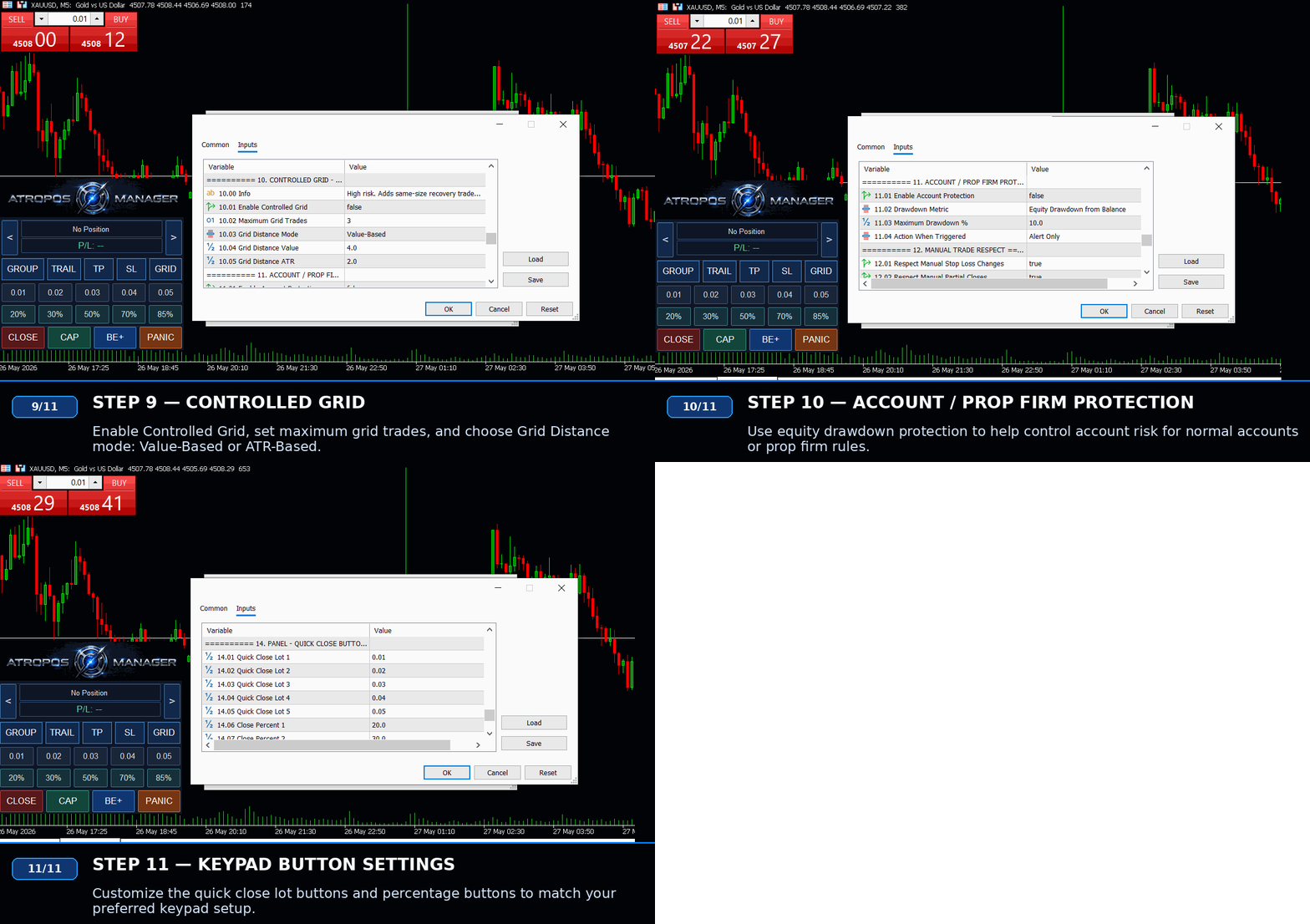
The controlled grid feature is designed to support structured recovery or position expansion.

You can define:

  • Maximum grid trades
  • Grid distance mode
  • Value-Based grid distance
  • ATR-Based grid distance

Grid trades are managed as part of the group workflow, so the system can focus on the combined basket result instead of isolated trades.

Fast Trade Actions

The panel includes practical quick-action buttons:

  • Close — close the selected position
  • CAP — close profitable managed trades
  • BE+ — move stop loss to break-even plus
  • Panic — emergency close managed trades
  • Fixed lot partial close buttons
  • Percentage partial close buttons

The quick-close buttons can be customized from the inputs, allowing you to match the panel to your own lot sizing and trade-management style.

Account and Prop Firm Protection

Atropos Manager includes optional equity drawdown protection.

This can help traders monitor account risk and apply emergency actions when drawdown reaches a selected level.

It can be useful for:

  • Personal risk control
  • Prop firm rule management
  • Accounts with strict drawdown limits
  • Traders who want an extra safety layer

This feature is not a replacement for proper risk management, but it can help enforce discipline when account conditions become dangerous.

Works With Different Trading Styles

Atropos Manager can be useful for:

  • Manual traders
  • Scalpers
  • Gold traders
  • Forex traders
  • Indices traders
  • Oil traders
  • Crypto traders
  • Traders using pending orders
  • Traders managing many positions
  • Traders using another EA or indicator for entries
  • Traders running MT5 on VPS

The manager focuses on what happens after the trade is opened.

Important Notes

Atropos Manager is a trade management utility.

It does not guarantee profit.
It does not predict market direction.
It does not replace your trading strategy.
It manages positions according to your selected settings.

Always test on a demo account first and make sure the settings match your broker, symbol, account type, lot size, and trading style.

Summary

Atropos Manager is designed for traders who want more control after entry.

It combines automatic protection, Value-Based and ATR-Based management, group profit control, controlled grid logic, partial closes, break-even tools, account protection, and a fast on-chart keypad into one practical MT5 trade management utility.

Set your rules once. Manage each trade faster. Stay in control directly from the chart.

Produits recommandés
Talents ATR Scalper Utility (MT5) The Talents ATR Scalper Utility is a professional-grade trade execution and management tool built for MetaTrader 5. Inspired by the Biblical Parable of the Talents , this utility is designed to help traders multiply their potential with precision risk control, one-click simplicity, and advanced automation. Whether you’re scalping forex, gold, or indices, this tool delivers speed, consistency, and confidence. Key Features One-Click Trade Preview Click below price
BulkOp Trade Manager
Ahmed Jumaa Saif Ali Almheiri
BulkOp Trade Manager Trade faster. Manage smarter. Close with confidence. BulkOp Trade Manager is a powerful MT5 utility EA built for traders who need speed, control, and clean execution directly from the chart. It is designed for active manual traders, scalpers, gold traders, and anyone who wants to manage multiple positions with less delay and fewer clicks. Why BulkOp? Ultra-fast Buy and Sell execution One-click Bulk Close Profit One-click Bulk Close Loss Keyboard trading control Bulk order e

Manually enter the price for Buy position or Sell position. This EA will automatically open 3 orders and also 3 Pending (In deposited position) = Total 6 orders per one click Please see Screenshot or Videos for more explanation. - Easy to manage your different order. - Fast in modification for SL and TP. - Can modified the SL and TP depends on individual techniques.
Lock your floating profit in one click - no more fumbling with lot sizes while the market moves against you. Hedge Manager Pro is a manual hedge panel for MetaTrader 5. When a trade is in profit and you want to protect it, or a position turns against you and you need to cap the risk fast, a single button opens a correctly sized hedge for you. No grid, no martingale, no black box. You stay in control - the panel just does the math and the order routing instantly. Three ways to hedge - pick the on
Pattern Recognition EA
Claudiu-georgian Zavera
Pattern Recognition EA - From Learn to Earn. The market repeats itself. This EA finds every past repeat of the current candle sequence - and lets history vote the direction. ONE SHAPE. EVERY REPEAT IN HISTORY VOTES. The last N candles on your signal timeframe form a shape. The EA scans the history you choose - a fixed number of bars or everything your broker provides - for the SAME shape, and checks what happened next, every single time. Only when enough repeats exist AND a clear majority of t
Trade Panel Pro — Terminal professionnel de gestion des risques et d'exécution d'ordres pour MetaTrader 5 Trade Panel Pro est un utilitaire avancé de trading et de gestion des risques « tout-en-un » pour MetaTrader 5, conçu pour les day traders actifs et les professionnels. Il allie un calcul précis des risques à une exécution ultra-rapide des ordres, vous aidant à protéger votre capital et à gérer facilement vos trades avec plusieurs objectifs. Avantages principaux et fonctionnalités clés
Easy Trade Executor est un outil de calcul rapide de la taille de position, d’exécution des ordres et de gestion des trades pour MT5. Placez les niveaux Open Price, Stop Loss et Take Profit directement sur le graphique, obtenez automatiquement la taille de position appropriée et ouvrez des trades avec un risque maîtrisé en seulement quelques clics. Pourquoi choisir Easy Trade Executor ? Easy Trade Executor a été conçu pour les traders qui veulent aller au-delà du simple calcul du risque et gére
Bober Real MT5
Arnold Bobrinskii
4.88 (16)
Bober Real MT5 is a fully automatic Forex trading Expert Advisor. This robot was made in 2014 year and did a lot of profitbale trades during this period. So far over 7000% growth on my personal account. There was many updates but 2019 update is the best one. The robot can run on any instrument, but the results are better with EURGBP, GBPUSD, on the M5 timeframe. Robot doesn't show good results in tester or live account if you run incorrect sets. Set files for Live accounts availible only for cu
VirtualStopsMT5
Viktor Shpakovskiy
A utility for managing open positions using virtual (invisible to the broker) stops. Virtual stop loss and virtual take profit can be freely moved around the chart. If the price touches the virtual stop line (TP, SL, TS), the EA will close all orders of the same direction on the current chart. Closing orders by virtual take profit is possible only if there is a profit. With the help of the built-in trading simulator, you can, in the strategy tester, see how the adviser works. Parameters Block

The Ultimate All-In-One Trade Manager & Prop Firm Guardian for MT5. Nexus Pro Trade Manager is the most advanced, all-in-one trading assistant designed for both manual traders and Prop Firm challengers. Featuring a stunning, lag-free UI (Dark/Light mode), it completely transforms your MT5 into a professional trading terminal. Whether you are trading a personal account or trying to pass evaluations for FTMO, FundedNext, or other prop firms, Nexus Pro protects your capital, automates your risk cal
Mango Scalper
Mahmoud M A Alkhatib
Mango Scalper  is a fully automated scalping robot that uses a very Good and Smart breakout strategy, advanced money management and probabilistic analysis. Most effective in the price consolidation stages that occupy the bulk of the market time. Proven itself on real accounts with an excellent risk-to-reward ratio. Does not need forced optimization, which is the main factor of its reliability and guarantee of stable profit in the future. S uitable for both beginners and experienced traders.  
This EA is there to take your trade closing stress away. Quickly close as many trades as you have opened at the click of a button, INCLUDING PENDING ORDERS. This works on the MT5 platform whether it be currencies, Indices, stocks or Deriv synthetic indices. I have saved it under utilities as it is a utility, however, to install this, you have to save the file in you "EA" folder. That is; Go to "File", then "Open Data Folder", "MQL5" and then "Experts". Paste this file there. Restart MT5 and you'
Galaxy Elegance
Gezani Paulus Nkuna
G.X.L (GALAXY ELEGANCE) Product Overview G.X.L is an automated trading robot for MetaTrader 5 that operates based on price action analysis. The system processes real-time market data to identify trading opportunities. It provides information and recommendations aligned with user-defined trading preferences. Core Functionality The robot analyzes price movements without relying on traditional lagging indicators. It focuses on current market structure, including swing points and fractals, to determ
CrossPoint5
Denis Trubachev
CrossPoint5   is an indicator that helps novice traders. In addition to the standard "Crosshair" function (Ctrl + F),   CrossPoint5   will show you how to set the StopLoss and TakeProfit levels correctly, taking into account the minimum allowable level, calculate the number of points between two points and convert this into the currency of the account, taking into account the expected lot of the transaction. Sometimes, when opening a deal, a novice trader completely forgets about the spread.
Trade Manager G2 MT5
Ida Bagus Putu Mahardika
TRADE MANAGER G2 – PRODUCT DESCRIPTION By Ida Bagus Putu Mahardika Trade Manager G2 – All-in-One Trading Panel for Professional Execution & Risk Management Trade Manager G2 is a next-generation trading panel designed to give you full control over order execution, position management, and profit optimization in real time on MetaTrader 5. With a modern card-based user interface and individual TP actions per level, this panel elevates your trading experience to the next level. KEY ADVANTAGES OF
Crash5 EA ,I s a automatic robot that has the level of professional decision when to take a trade without any emotion. The bot will help in your scalping decision making with its own TP (take profit) and SL (stop loss) with the trail stop when in profit. This is a trend based spike catching ,looking on whats happening in real time charts no repainting of any signals. The robot helps in making decisions on the candle stick pattern opened and closed lat price with the help of RSI ,MACD and the EMA
La plupart des outils de gestion du risque regardent le compte dans son ensemble : quand le compte atteint sa limite, tout s'arrête, y compris les EA qui n'avaient rien fait de mal. EA Circuit Breaker travaille un EA à la fois. Quand un seul EA franchit la ligne que vous avez tracée pour lui, seul cet EA est traité et le reste du compte continue de tourner. L'outil n'ouvre pas de positions de lui-même, ne donne pas de conseils et n'envoie pas de signaux. CONÇU POUR LES COMPTES DE COUVERTURE
EA SB8 Panel Trade
Juan Manuel Bernal Martin
SB-8 – Manual Trading Panel with Fixed Risk & TradingView-Style Visualization for MT5 SB-8 is an advanced manual trading panel for MetaTrader 5 , designed to execute trades visually, quickly and without calculations . It is especially built for traders coming from TradingView , who often find MT5 confusing when it comes to risk management and trade visualization. With SB-8, you don’t calculate lot size, percentages or risk . You simply move the Stop Loss line , and the panel handles everything a
Margin Call Shield – Defend Your Margin on Your Terms Margin Call Shield is a tool for MetaTrader 5 traders who want to decide for themselves which open positions are closed during margin call situations before the platform does so automatically based on its internal rules. By default, the broker or platform decides which positions to close, often using undisclosed algorithms. Margin Call Shield lets you set this order according to your own strategy. Why Was Margin Call Shield Created? In a mar
ManualEdge ∴ Manual Trading & Basket Risk Panel Trade by hand. Let the system watch your back. ManualEdge is a one-click chart panel built for discretionary traders who want the speed of manual execution combined with the discipline of automated risk management. Instead of choosing between a dumb button panel and a black-box EA, ManualEdge gives you both: you decide when to enter, the panel handles the boring ∴ and dangerous ∴ parts of managing the trade afterward. Protect yourself from bad habb
Equity Firewall est un utilitaire pour MT5 conçu pour le contrôle automatique des drawdowns et la gestion des risques au niveau du compte. Il protège le capital, en particulier lorsque plusieurs conseillers experts (EA) tradent sur le même compte avec le risque d’augmentations soudaines de positions ou de drawdowns. Installer la version d'essai pour les comptes démo Equity Firewall permet de définir un drawdown global maximal, une limite de perte quotidienne et un objectif de profit, avec le cho
Auto SLTP Maker MT5  is an assistant for all those who forget to set StopLoss and/or TakeProfit in deal parameters, or trade on a very fast market and fail to place them in time. This tool automatically tracks trades without StopLoss and/or TakeProfit and checks what level should be set in accordance with the settings. The tool works both with market and pending orders. The type of orders to work with can be set in the parameters. It can track either trades for the instrument it runs on, or all
Manual Trading Assistant Pro 【L'outil de "Survie" Ultime pour les Traders Manuels】 Avez-vous déjà paniqué avec les calculs de lots ou les réglages TP/SL lors de mouvements rapides du marché ? Cet utilitaire est conçu pour les traders qui veulent se concentrer à 100% sur "L'Entrée (Attaque)" et laisser la "Sortie (Défense)" à la machine. 【Nouveau dans V3.82 : Fonction de Diagnostic】 Diagnostic de Paramètres Intégré (Pips Check) Ne vous inquiétez plus des mauvais réglages. Le bouton [Pips Check]
MT5 To Telegram Copier
Levi Dane Benjamin
3 (2)
Envoyez des signaux entièrement personnalisables de MT5 à Telegram et devenez un fournisseur de signaux ! Ce produit est présenté dans une interface graphique conviviale et visuellement attrayante. Personnalisez vos paramètres et commencez à utiliser le produit en quelques minutes seulement ! Guide de l'utilisateur + Démo  | Version MT4  | Version Discord Si vous souhaitez essayer une démo, veuillez consulter le Guide de l'utilisateur. L'émetteur de MT5 vers Telegram NE fonctionne PAS dans le t
L'utilitaire Close Buttons est un utilitaire MQL5 compact et flexible pour la gestion manuelle des positions et des ordres en attente, directement depuis le graphique. Ce panneau vous permet de clôturer des groupes d'ordres et des positions sur le symbole actuel ou un groupe de symboles sélectionnés en un seul clic. Il fonctionne avec tous les ordres, ainsi qu'avec une liste spécifiée de numéros magiques ou des ordres manuels. Le panneau peut être réduit ou déplacé sur l'écran. Les thèmes clair
Scalping bot for the gold/dollar pair (XAU/USD) — a powerful and versatile solution for traders, designed to deliver maximum efficiency in a dynamic market. This bot is specifically engineered for scalping: it analyzes price changes and places trades even before significant market movements begin. This allows it to secure advantageous positions early and capitalize on even the smallest market fluctuations. Key Features: Flexibility: Adapts to any market conditions and suits your trading strategy
Tool Auto Modify SLTP – Protect Your Trades, Optimize Your Strategy In trading, risk is always present. Just one forgotten SL/TP can turn a promising trade into a loss. Even experienced traders occasionally make mistakes. That’s why Tool Auto Modify SLTP was created – to keep you protected and let you focus on your strategy. Key Features: Manage Orders for All Symbols: Monitor and adjust SL/TP for all your trading pairs. Three Flexible Risk Modes: Point-Based: Set fixed SL/TP distances. Account
TradePilotmt5
Hossein Khalil Alishir
TradePilot Expert Advisor (EA) for MetaTrader 5 TradePilot is a professional and user-friendly Expert Advisor (EA) for MetaTrader 5 (MT5) . It simplifies automated trading , risk management , and trade execution with a smart trading panel . Perfect for beginners and experienced traders looking for a reliable trade manager EA with automated lot size calculation and smart position management. Key Advantages User-Friendly Trading Panel: Customizable panel with buttons and hotkeys for fast ex
A simple script that closes all current orders. Terminate once close all positions, so no worries about constantly closing your order. How to use : Drag the script from the navigator to the chart, and it will be activated. Do remember to enable algo trading to use this script. There are different version of the script that can choose whether to close all buy/sell posiitons, if you need this, do contact me in MQL5.
Stealth Mode TP/SL Manager with AI Protection This AI-powered tool   manages Stop Loss and Take Profit dynamically   using either price-based or profit-and-loss (PnL) calculations while   hiding these levels from the market . Also the this tool is very important to PROP FIRMS accounts , so you can set your stoploss to not hitting the daily stop loss ! Key Features: Supports BUY, SELL, or both position types. Flexible symbol selection:   Manage the current chart, all symbols, or specific symbols
Les acheteurs de ce produit ont également acheté
================================================================================ POC BREAKOUT - V20.72. Full Professional Grade Toolkit ================================================================================ POC Breakout is a full MetaTrader 5 trading dashboard for discretionary traders who want breakout signals, Point of Control (POC) context, volume profiles, order flow, market structure, news, alerts, and advanced trade planning in one professional workspace. Attached directly to you
Farmed Hedge Yield Farming | All Markets (Manual - Hybrid - Semi/Automated EA) MULTI-ASSET SUPPORT Trade any asset available on your broker - Forex: Major, Minor, Exotic pairs - Crypto: BTC, ETH, XRP, SOL, BNB - Stocks: Apple, Tesla, Amazon, Google, etc. - Commodities: Gold, Silver, Oil, Gas - Indices: US30, NAS100, SPX500, DAX40 - Any CFD your broker offers VERIFIED TRADING RESULTS - Farmed Hedge Yield Axi Copy:  https://www.mql5.com/en/signals/2356376 - Farmed Hedge Yield Exn Copy:   https:/
Footprint Chart Pro — Professional OrderFlow EA for MetaTrader 5 Version 6.34 | Professional tool for real traders | Institutional-Grade Visualization DEMO USERS - PLEASE SELECT EVERY TICK / REAL TICK WHEN TESTING AND YOU HAVE DOWNLOADED HISTORICAL DATA. IF YOU SEE A WAITING SCREEN AND IT IS NOT DOWNLOADING, IT MEANS YOU HAVE LOW HISTORICAL DATA. TRY 1 MIN AND 5 MIN FIRST ON 1 DAY DATA. ONE DAY DATA SHOULD BE THE NEWEST AND MOST CURRENT DATE. PLEASE WAIT UNTIL THE MARKET HAS ROLLED OVER PERIOD.
VirtualTradePad PRO SE MT5 — centre de contrôle de trading professionnel pour MetaTrader 5 VirtualTradePad PRO SE est un panneau de trading premium basé sur le graphique et un espace de gestion des trades pour MetaTrader 5 . Il est conçu pour les traders qui souhaitent une exécution plus rapide, un contrôle plus clair des positions, une gestion structurée des trades, une planification visuelle des niveaux et un flux de travail professionnel directement depuis le graphique. Ce n’est pas seulement
Premium Trade Manager - Le panneau de trading avec un coach intégré Premium Trade Manager intègre un coach de trading directement dans votre graphique, avec un moteur d'exécution complet en dessous. Configurez le trade comme vous le faites toujours, puis laissez Max, votre coach de trading IA, analyser ce setup exact par rapport à votre compte en direct et vous donner un verdict clair avant de vous engager : le stop est-il discipliné, le risque est-il raisonnable, une publication à fort impact e
Power Candles Strategy Scanner - Outil de recherche de configurations multi-symboles à optimisation automatique Le Power Candles Strategy Scanner utilise le même moteur d'auto-optimisation que celui qui alimente l'indicateur Power Candles, pour chaque symbole de votre Market Watch, en parallèle. Un panneau vous indique quels symboles sont statistiquement négociables à l'instant, quelle stratégie est la plus performante pour chacun, la paire Stop Loss / Take Profit optimale, et vous alerte dès qu
YuClusters
Yury Kulikov
4.93 (43)
Attention: You can view the program operation in the free version  YuClusters DEMO .  YuClusters is a professional market analysis system. The trader has unique opportunities to analyze the flow of orders, trade volumes, price movements using various charts, profiles, indicators, and graphical objects. YuClusters operates on data based on Time&Sales or ticks information, depending on what is available in the quotes of a financial instrument. YuClusters allows you to build graphs by combining da
Welcome to ENTRY IN THE ZONE WITH SMC MULTI TIMEFRAME Entry In The Zone and SMC Multi Timeframe is a real-time market analysis tool based on Smart Money Concepts (SMC), designed to analyze market structure, price direction, and key trading zones. It supports both Single-Timeframe Analysis and Multi-Timeframe Analysis, providing a clearer view of the overall market structure across multiple timeframes, with real-time BUY / SELL signals that do not repaint. It is designed to help filter trading op
Quant AI Agents
Ho Tuan Thang
5 (1)
Quant AI Agents are independent trading Expert Advisors. Instead of trading using a fixed strategy like other conventional EAs, Quant AI Agents   is a   multi-agent AI trading framework   that turns natural-language strategy prompts into live.  WANT THE SAME RESULTS AS MY LIVE SIGNAL?   Use the exact same brokers I do:   IC MARKETS , IC TRADING   .  Unlike the centralized stock market, Forex has no single, unified price feed.  Every broker sources liquidity from different providers, creating un
The product will copy all telegram signal to MT5 ( which you are member) , also it can work as remote copier.  Easy to set up, copy order instant, can work with almost signal formats, image signal,  s upport to translate other language to English Work with all type of channel or group, even channel have "Restrict Saving Content", work with  multi channel, multi MT5 Work as remote copier: with signal have ticket number, it will copy exactly via ticket number. Support to backtest signal. How to s
Features   With MT5 to Interactive Brokers(IB) Trader, you can: 1. Load chart data from IB to MT5, and Analyze with all standard or customer Indicators. 2. Place Orders to IB Account Directly in MT5. 3. Make your Own EAs upon IB Securities by only making minus changes of the trading function. Usage 1) Installation Copy the "Mt5ToIBTraderEn.ex4" and sample files to [MT5 Data Folder]->MQL5->Experts.  2)  MT5 Settings Add the IP Address to the MT5 Allowed URLs in 'Tools->Options->Expert Adviso
EasyInsight AIO MT5
Alain Verleyen
4.92 (12)
EASY Insight AIO – La solution tout-en-un pour un trading intelligent et sans effort Présentation Imaginez pouvoir analyser l’ensemble du marché — Forex, Or, Crypto, Indices et même Actions — en quelques secondes, sans aucune analyse manuelle de graphiques, sans installation complexe ni configuration d’indicateurs. EASY Insight AIO est votre outil d’exportation ultime, prêt à l’emploi, pour un trading alimenté par l’IA. Il fournit une vue d’ensemble du marché dans un fichier CSV propre — prêt
FUTURES ORDERFLOW FOOTPRINT CHART Professional OrderFlow EA for MetaTrader 5 Version 1.01| Professional tool for real traders | Institutional-Grade Visualization STRATEGY TESTER USERS - PLEASE SELECT EVERY REAL TICK WHEN TESTING AND YOU HAVE DOWNLOADED HISTORICAL DATA. IF YOU SEE A WAITING SCREEN AND IT IS NOT DOWNLOADING, IT MEANS YOU HAVE LOW HISTORICAL DATA. TRY 1 MIN AND 5 MIN FIRST ON 1 DAY DATA. ONE DAY DATA SHOULD BE THE NEWEST AND MOST CURRENT DATE. PLEASE WAIT UNTIL THE MARKET HAS ROL
Grid Manual MT5
Alfiya Fazylova
4.73 (22)
Grid Manual est un panneau de trading permettant de travailler avec une grille d'ordres. L'utilitaire est universel, possède des paramètres flexibles et une interface intuitive. Il fonctionne avec une grille d'ordres non seulement dans le sens des pertes, mais aussi dans le sens de l'augmentation des profits. Le commerçant n'a pas besoin de créer et de maintenir une grille d'ordres, l'utilitaire le fera. Il suffit d'ouvrir une ordre et "Grid Manual" créera automatiquement une grille de ordres po
AI Agent Supervisor is NOT an Expert Advisor. AI Agent Supervisor   is a   multi-agent AI risk & portfolio supervisor   that watches every EA on your account and intervenes in real time.  WANT AN AI PORTFOLIO MANAGER WATCHING YOUR FLEET 24/7?   Run your fleet on the same brokers I do:   IC MARKETS , IC TRADING   .  Unlike the centralized stock market, Forex has no single, unified price feed.  Every broker sources liquidity from different providers, creating unique data streams. The Supervisor r
Unlimited Trade Copier Pro MT5 is a tool to copy trade remotely to multiple MT4, MT5 and cTrader accounts at different computers/locations over internet. This is an ideal solution for you if you are a signal provider and want to copy your trades to other receivers globally on your own rules. One provider can copy trades to multiple receivers and one receiver can get trade from multiple providers as well. The provider can even set the subscription expiry for each receiver, so that receiver will n
Adam FTMO MT5
Vyacheslav Izvarin
5 (2)
ADAM EA Special Version for FTMO Please use ShowInfo= false for backtesting ! Our 1st EA created using ChatGPT technology Trade only GOOD and checked PROP FIRMS  Default parameters for Challenge $100,000 Tested on EURUSD and GBPUSD only  Use 15MIN Time Frame Close all deals and Auto-trading  before Weekend at 12:00 GMT+3  Friday For Prop Firms MUST use special Protector  https://www.mql5.com/en/market/product/94362 --------------------------------------------------------------------------------
ManHedger MT5
Peter Mueller
4.83 (6)
THIS EA IS A SEMI-AUTO EA, IT NEEDS USER INPUT. Manual & Test Version Please TEST this product before BUYING  and watch my video about it. The price of the ManHedger will increase to 250$ after 20 copies sold. Contact me for user support or bug reports or if you want the MT4 version! MT4 Version  I do not guarantee any profits or financial success using this EA. With this Expert Advisor, you can: Implement your own Zone Recovery strategy to capitalize on trending markets. Create Grid trading s
Mt5 To InterativeBrokers Copier allows you to copy deals from MT5 account to Interactive Brokers. With this, you can run your EA strategy on a MT5 Demo/Real Account, then copy all the deals to Interactive Brokers account real time. Features: 1. Copy or Invert-Copy deals Realtime from MT5 to IB Account. 2. Synchronizing positions of both accounts periodicaly, in case any missing copying. 3. You can choose only Buy position or Sell position. Symbols Setup: General Format:  {MT Symbol} -> {IB S
Trade Copier Pro MT5
Vu Trung Kien
3.67 (3)
Trade Copier Pro MT5 is a tool to copy trade remotely to multiple MT4, MT5 and cTradfer accounts at different computers/locations over internet. This is an ideal solution for you if you are a signal provider and want to copy your trades to other receivers globally on your own rules. One provider can copy trades to multiple receivers and one receiver can get trade from multiple providers as well. The provider can even set the subscription expiry for each receiver, so that receiver will not be abl
HINN Lazy Trader
ALGOFLOW OÜ
5 (1)
LIMITED SUMMER SALE -40% ! ONLY $470 insead of $790!  Maximum real discount! ONLY UNTIL 08/22 The core idea: using the user interface, you configure the parameters the chart must meet before entering a position (or positions), choose which entry models to use, and set the rules for when trading and planning should end. Lazy Trader  handles the rest: it  takes over all the routine chart watching and execution! full description  :: 3 key videos [1] ->  [2]   ->  [3] What can it do? - Understand
Telegram To MT5 Receiver
Levi Dane Benjamin
4.53 (15)
Copiez les signaux de n'importe quel canal dont vous êtes membre (y compris les canaux privés et restreints) directement sur votre MT5.  Cet outil a été conçu en pensant à l'utilisateur et offre de nombreuses fonctionnalités nécessaires pour gérer et surveiller les trades. Ce produit est présenté dans une interface graphique conviviale et attrayante. Personnalisez vos paramètres et commencez à utiliser le produit en quelques minutes ! Guide de l'utilisateur + Démo  | Version MT4 | Version Disc
Active Lines
Yury Kulikov
5 (2)
Attention: Demo version for review and testing can be downloaded here . It does not allow trading and can only be run on one chart. Active Lines - a powerful professional tool for operations with lines on charts. Active Lines provides a wide range of actions for events when the price crosses lines. For example: notify, open/modify/close a position, place/remove pending orders. With Active Lines you can assign several tasks to one line, for each of which you can set individual trigger conditions

Telegram to mt5 pro
Janet Abu Khalil
4 (4)
Telegram to MT5 Pro — Advanced Telegram Signal Copier with Auto-Fix, Multi-TP, Risk Control and Full Trade Management Telegram to MT5 Pro — Copieur de signaux Telegram professionnel Telegram to MT5 Pro est un copieur de trading haute performance qui exécute automatiquement les signaux de Telegram directement dans votre compte MetaTrader 5, avec un contrôle total du risque, de l’exécution et de la gestion des trades. Le système se compose de deux composants : • L’Expert Advisor (EA) exécuté dans
Custom Alerts AIO : Surveillez tous les marchés à la fois — sans aucune configuration Présentation Custom Alerts AIO est une solution de surveillance du marché prête à l’emploi, sans configuration nécessaire. Tous les indicateurs requis — FX Power, FX Volume, FX Dynamic, FX Levels, IX Power — sont directement intégrés. Aucun graphique n’est affiché, ce qui rend cet outil idéal pour la génération d’alertes en temps réel. Il prend en charge toutes les classes d’actifs proposées par votre courtie
Prop Firm Os
Gayathiri Gopalakrishnan
5 (1)
PROP FIRM OS Structured Trading Assistant for MetaTrader 5 PROP FIRM OS is a structured trading assistant designed for MetaTrader 5 users who prefer rule-based market analysis and organized trading workflows. The Expert Advisor combines market analysis tools, scanner functions, dashboard monitoring, alerts, risk-control settings, and trade management features inside one system. PROP FIRM OS is designed to help traders follow selected rules, filters, and monitoring conditions during trading activ
Ultimate Extractor
Clifton Creath
5 (8)
Ultimate Extractor - Professional Trading Analytics for MT5 *****this is the local HTML version of Ultimate Extractor. !!!!!it is not compatible with Cloud!!!! For the online version please reach out to me directly****** Ultimate EA manager also now available when you use cloud pro and above for free!! Ultimate Extractor transforms your MetaTrader 5 trading history into actionable insights with comprehensive analytics, interactive charts, and real-time performance tracking. What It Does Automa
Indicator Automation XT - Elite Universal Signal Engine Transform any indicator into a high-performance automated trading system instantly. Stop chasing signals and start executing with precision. Indicator Automation XT is the ultimate evolution of signal-to-trade technology for MetaTrader 5. Designed for traders who demand speed, reliability, and institutional-grade risk management, the XT version bridges the gap between your favorite technical indicators and the live market. Whether it is a
MT5 Trading Deck
Manuel Michiels
5 (2)
One button. One trade. MT5 Trading Deck is a hotkey trading panel for MetaTrader 5 that turns the platform into a keyboard-driven execution cockpit. Stop loss, take profit and lot size are pre-calculated for every key; the moment you press, a market order is live on the broker. A complete technical user manual is attached in the product Comments section. It documents every input parameter, the full hotkey map, the recommended Stream Deck XL layout, and the advanced workflows for Pre-Limit orders
Bots Builder Pro MT5
Andrey Barinov
4.17 (6)
This is exactly what the name says. Visual strategy builder . One of a kind. Turn your trading strategies and ideas into Expert Advisors without writing single line of code. Generate mql source code files with a few clicks and get your fully functional Expert Advisors, which are ready for live execution, strategy tester and cloud optimization. There are very few options for those who have no programming skills and can not create their trading solutions in the MQL language. Now, with Bots Builde
Plus de l'auteur
Atropos X Multi-Engine Signal & Market State Indicator for MetaTrader 5 Atropos X is a professional MT5 indicator built for traders who want more than basic buy and sell arrows. It combines two signal engines, multiple confirmation filters, Linear Regression visual context, and a live market state panel into one clean trading workspace. (user guide and manual) Instead of loading your chart with many separate indicators, Atropos X brings signal, trend, momentum, volatility, and market-condition t
Filtrer:
Aucun avis
Répondre à l'avis