 MetaTrader 5
 Experts
 Indicateurs
 Scripts
 Bibliothèque
 Stockage
Voir comment télécharger gratuitement des robots de trading
Retrouvez-nous sur Facebook !
Rejoignez notre page de fans
Vous avez aimé le script ? Essayez-le dans le terminal MetaTrader 5

Close By Filter - close positions by side, symbol, magic number and profit - script pour MetaTrader 5
Daniel Reynolds

MQL4 and MQL5 developer building Expert Advisors, indicators, trade panels and utilities for MetaTrader 4 and 5.
What I build:
- Vues:
- 124
- Publié:
-
 Vous manquez des opportunités de trading :
- Applications de trading gratuites
- Plus de 8 000 signaux à copier
- Actualités économiques pour explorer les marchés financiers
Inscription Se connecterVous acceptez la politique du site Web et les conditions d'utilisation
Si vous n'avez pas de compte, veuillez vous inscrire -
 Besoin d'un robot ou d'un indicateur basé sur ce code ? Commandez-le sur Freelance
Aller sur Freelance


Close By Filter closes only the positions you choose, instead of everything at once. Pick the side, the symbol, the magic number and whether the position is in profit or in loss. The script lists what matches, shows the floating result and asks before it changes anything.
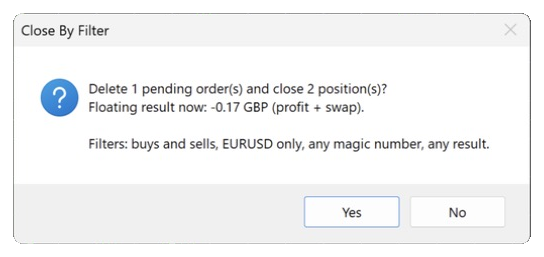
The confirmation box: what will be closed and the floating result
What it does
- Filters by side (buys, sells or both), symbol (this chart or all symbols), magic number (any, manual trades only, or one magic number) and result (any, only in profit, only in loss).
- Can also delete the matching pending orders (limit, stop and stop-limit orders on the chosen side). Pending orders are deleted first, so none can fill while the positions are being closed.
- Shows a confirmation box with the number of positions and orders and the current floating result (profit + swap).
- Checks the filters again just before each close, because prices move while the box is open.
- Finds each position by its position ID, so a ticket change during the run does not cause a wrong report.
- Never sends a close twice for the same position: on a netting account a second close would open a new position the other way.
- Retries on requotes, price changes, time-outs and connection errors, and stops at once on errors that a retry cannot fix (for example, market closed).
- Sets the order filling mode from the symbol's own settings.
- Reports what was closed, skipped, already gone or failed in the Experts tab. Failures, and pending orders that filled before they could be deleted, also raise an alert.
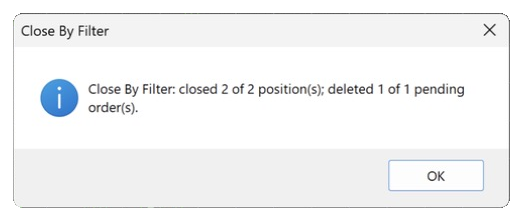
The result after the run
Inputs
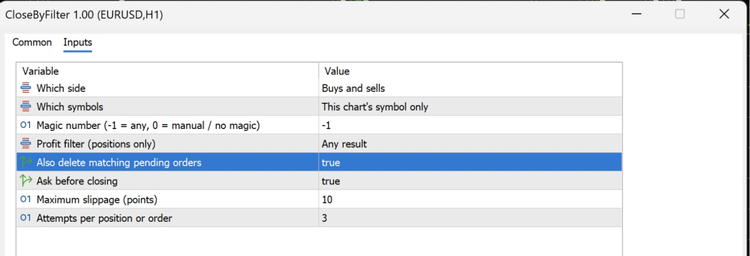
The script's inputs
- Which side: buys and sells, buys only, or sells only.
- Which symbols: this chart's symbol only (default) or all symbols.
- Magic number: -1 = any, 0 = no magic number (usually manual trades), any other number = only that magic number.
- Profit filter: any result, only positions in profit, or only positions in loss (profit + swap).
- Also delete matching pending orders: false by default.
- Ask before closing: true by default. Set it to false only if you are sure of your filters.
- Maximum slippage (points).
- Attempts per position or order.
Notes: tick "Allow Algo Trading" on the script's Common tab, and switch Algo Trading on in the terminal. Test it on a demo account first.
Trade History Exporter - closed trades to CSV with R multiple, MAE and MFE
Saves your closed trades to a CSV file for your spreadsheet: one row per trade with points, costs, net result, R multiple, MAE and MFE.
 Inside-Bar Outcome Tracker: Breakout Direction, Failure Rate and Time to Resolve
Finds every inside-bar pattern in the history of your chart and follows it to the end: which side of the mother bar broke first, whether the breakout held or failed within a few bars, and how many inside bars came before it. The histogram marks each breakout, boxes show the patterns on the chart, and a panel gives the statistics for your own symbol and timeframe, split by the number of inside bars and by the size of the mother bar, plus one line that can be pasted into a comment to compare symbols.
Gold MACD Divergence Map
MACD regular and hidden divergences on closed bars with an honest first-touch statistics panel. Not a trading signal.
 Trailing Stop That Starts at the Take-Profit Level
Starts a trailing stop when the price reaches the take-profit zone of a position you already have open. The take profit is removed, extended or kept. It never opens trades.