 MetaTrader 5
 Experts
 Indicateurs
 Scripts
 Bibliothèque
 Stockage
Voir comment télécharger gratuitement des robots de trading
Retrouvez-nous sur Telegram !
Rejoignez notre page de fans
Vous avez aimé le script ? Essayez-le dans le terminal MetaTrader 5

Execution and Slippage Forensics audits MetaTrader 5 account history - script pour MetaTrader 5
Margarita Florencia Del Aguila

Welcome to AIPID. I am 54 years old, married, and have two children. I am an engineer, and for nearly 20 years, trading has been my hell and is my passion.
WHY HAS IT BEEN MY HELL?
- Vues:
- 166
- Note:
- Publié:
- Mise à jour:
-
 Vous manquez des opportunités de trading :
- Applications de trading gratuites
- Plus de 8 000 signaux à copier
- Actualités économiques pour explorer les marchés financiers
Inscription Se connecterVous acceptez la politique du site Web et les conditions d'utilisation
Si vous n'avez pas de compte, veuillez vous inscrire -
 Besoin d'un robot ou d'un indicateur basé sur ce code ? Commandez-le sur Freelance
Aller sur Freelance
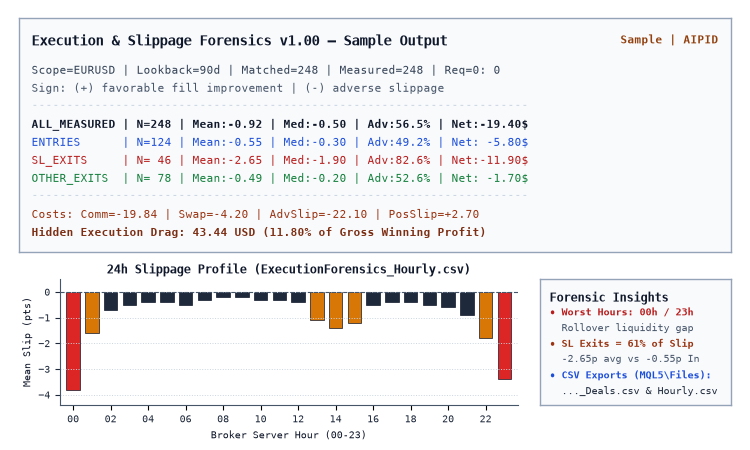
Core Idea
Execution & Slippage Forensics is a standalone diagnostic script for MetaTrader 5 (no external #include dependencies) that audits your real account trading history by pairing every executed trade deal back to its parent historical order via HistoryOrderSelect(). By comparing ORDER_PRICE_OPEN (requested price) against DEAL_PRICE (actual fill price), it quantifies execution quality in both points and account currency without fabricating numbers when market orders omit requested prices (Req=0.0).
How to Interpret the Output
1. Sign Convention:
- Positive (+) values in points or currency represent favorable price improvement (filled better than requested).
- Negative (-) values represent adverse slippage (filled worse than requested).
2. Four Execution Buckets:
- ALL_MEASURED: Aggregate portfolio fill statistics.
- ENTRIES (IN / INOUT): Entry execution quality under normal liquidity.
- SL_EXITS (DEAL_REASON_SL): Stop-Loss execution slippage, isolating stop-hunting or liquidity gaps.
- OTHER_EXITS: Take-Profit, manual, and automated closes.
Each category reports Count, Mean (pts), Median (pts, resistant to outliers), Adverse %, Positive %, and Net Slippage ($).
3. 24-Hour Server Profile & Hidden Execution Drag:
- Identifies exact Broker Server hours (00:00 - 23:00) where rollover or low liquidity widens adverse slippage.
- Computes Hidden Execution Drag = Commissions + Fees + Swaps + Adverse Slippage expressed as a percentage of Gross Winning Profit.
4. Exports:
- Prints the full report and worst adverse deals in the Experts tab, displays a concise summary on the chart, and exports ExecutionForensics_Deals.csv and ExecutionForensics_Hourly.csv to MQL5\Files\.
External Input Parameters
- InpLookbackDays (default 90): Number of past days to audit. Set 0 to audit the entire loaded account history.
- InpSymbolFilter (default ""): Empty string audits all symbols; "CURRENT" audits only the active chart symbol; or specify an exact symbol name.
- InpMagicFilter (default -1): -1 includes all EAs and manual trades; set a positive MagicNumber to isolate a single Expert Advisor.
- InpExportCSV (default true): Enables CSV export of deal-level records and the 24-hour execution table into MQL5\Files\.
- InpShowChartComment (default true): Displays a compact summary overlay on the active chart.
- InpTopWorstDeals (default 5): Number of worst adverse-slippage fills to list in the Experts log (0 disables).
Recommended Usage
Attach the script to any chart after ensuring the desired date range is loaded in your MT5 Account History tab. Works on all Forex, Metals, Indices, and CFD symbols in both Hedging and Netting accounts.
 Giano ATR Regime
Classifies volatility on closed bars using ATR(14), with three color-coded regimes and optional alerts.
 TrailGuard - break-even and trailing stop manager for open trades
Moves the stop loss to break-even and then trails it on trades that are already open. It never opens or closes a trade.
Tick-Based Spread Distribution Profiler reads historical Bid/Ask ticks via CopyTicksRange
Tick-Based Spread Distribution Profiler reads historical Bid/Ask ticks via CopyTicksRange() and plots 24h spread percentiles (P50, P90, P99) in a separate subwindow.
Range Compression Zones Breakout
Range Compression Zones Breakout draws range compression zones and marks breakouts that pass a higher-timeframe high/low filter and a volume filter. Inspired by the range compression idea in Domenico D'Errico's Accumulation/Distribution study (TASC, August 2018). Independent implementation, not a literal port of the published study.