 MetaTrader 5
 Experts
 Indicateurs
 Scripts
 Bibliothèque
 Stockage
Voir comment télécharger gratuitement des robots de trading
Retrouvez-nous sur Facebook !
Rejoignez notre page de fans
Rejoignez notre page de fans
Vous avez aimé le script ? Essayez-le dans le terminal MetaTrader 5

XAUUSD Hourly Volatility Clock: typical range by hour vs today - indicateur pour MetaTrader 5

- Vues:
- 133
- Publié:
-
 Vous manquez des opportunités de trading :
- Applications de trading gratuites
- Plus de 8 000 signaux à copier
- Actualités économiques pour explorer les marchés financiers
Inscription Se connecterVous acceptez la politique du site Web et les conditions d'utilisation
Si vous n'avez pas de compte, veuillez vous inscrire -
 Besoin d'un robot ou d'un indicateur basé sur ce code ? Commandez-le sur Freelance
Aller sur Freelance

XAUUSD Hourly Volatility Clock is a MetaTrader 5 chart indicator. It measures, for each hour of the broker’s server clock, the typical high–low range of completed H1 bars, and compares that profile with the hour that is forming now. The idea is simple: gold does not move the same amount at 03:00 as it does around a liquid session open. The indicator does not place, modify or close orders, and it is not a trade signal.
It is not a session-box tool and it does not mark liquidity sweeps. It is a volatility profile of the twenty-four server hours, drawn as a compact dark-theme clock.
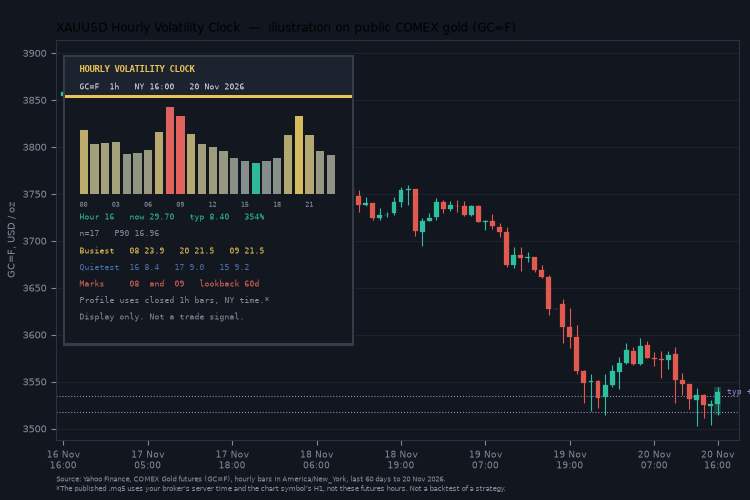
XAUUSD Hourly Volatility Clock: median H1 range for each server hour versus the current hour.
Features
- A 24-hour strip in the panel: each column is the median H1 range of that server hour over the lookback. Quiet hours are cool, busy hours are gold, the current hour is teal.
- The current hour is reported as “now versus typical”, in price and as a percentage of the median. The mean and the 90th percentile can be shown as well.
- A short ranking of the busiest and quietest hours in the current lookback.
- An optional box on the chart for the developing hour’s high and low, and a dotted typical band at hour-open ± the median range of that hour.
- Two optional highlight hours (defaults 10 and 16 in server time). Set them to the session opens you actually care about on your broker; the indicator does not assume a timezone.
- An optional expansion alert when a closed H1 bar’s range exceeds a multiple of that hour’s median (1.5× by default).
- Auto-scale panel, configurable colours, fonts and widths. Objects use the prefix HVC_ and are removed when the indicator is removed.
- No look-ahead in the profile: only closed H1 bars are counted. The current hour is displayed as developing and is not written back into the medians.
Works on any symbol and any chart timeframe. The profile is always built from that symbol’s H1 history. Defaults and the title are chosen for gold.
How the profile is built
- The indicator reads completed H1 bars of the chart symbol, going back N days (60 by default).
- For each bar it takes the server hour of the bar’s open and the high–low range.
- For each hour 00–23 it stores the median range, and optionally the mean and the 90th percentile, once at least 8 samples are present.
- The hour that is still open is excluded from the medians. When that hour closes, the profile is rebuilt.
The clock follows broker server time, not London or New York time. If your broker changes server time with daylight saving, the same wall-clock hour may land in a different column after the change. That is a property of the server clock, not a repaint of past bars.
A typical band around the hour open is a budget, not a target and not a stop.
Inputs
Profile
| Input | Default | Meaning |
|---|---|---|
| Lookback days | 60 | Completed days of H1 history used for the medians. |
| Minimum samples | 8 | An hour with fewer closed bars is shown as empty. |
| Show mean / P90 | mean off, P90 on | Extra statistics for the current hour. |
Chart marks and alerts
| Input | Default | Meaning |
|---|---|---|
| Current-hour box | on | Rectangle of the developing hour’s high and low. |
| Typical band | on | Dotted lines at hour open ± that hour’s median. |
| Highlight hours A / B | 10 and 16 | Server hours to paint in the accent colour; −1 turns one off. |
| Expansion alert | off | Fires only on a closed H1 bar. |
| Expansion multiple | 1.50 | Closed-hour range versus that hour’s median. |
Display and colours
Corner, offsets, auto-scale, font, line and panel colours are all inputs.
How to use it
- Attach the indicator to XAUUSD (or to any other symbol). It is comfortable on M15 and H1; the profile still comes from H1.
- Look at the clock before you plan an entry: if the typical range of this server hour is already used, the “average” hour has less room left. That is a budget, not a barrier.
- Set highlight hours to the session opens of your broker, after you have checked the server clock.
- Leave alerts off until you have watched a few sessions.
- Do not treat a busy hour as a buy or a sell signal.
Requirements
- Platform: MetaTrader 5.
- Enough H1 history on the symbol (a few weeks at least; 60 days is the default lookback).
- No DLL calls, no WebRequest, no internet connection.
- The indicator does not trade.
About the author
More free tools by the same author: https://www.mql5.com/en/users/krechet233
Gold Level Map (XAUUSD): Round Numbers, Prior Day/Week Extremes and ADR
A clean on-chart map of psychological 00/50 figures, prior day and week extremes, and the average daily range, with honest bounce/break statistics. Display only — it does not trade.
 MT5 New-Bar and Connection Event Logger
A lightweight MetaTrader 5 Expert Advisor that records new-bar events and terminal connection-state changes to a local CSV file. Designed for developers and traders who need reliable event logging, diagnostics and monitoring without executing trades.
 Closed Trades to CSV - one row per closing deal (partial closes, reversals)
Exports closed trades to a CSV file, one row per closing deal: partial closes, close-by and netting reversals are split, each row with the position's open time, volume-weighted open price and its share of the entry commission.
 Risk Lot Calculator - lot size from risk percent and stop distance
Small include file that gives you the lot size from risk in percent (or fixed money) and the stop loss distance. Rounds always down, checks min/max lot and free margin.